VERILOG & VIVADO
QUICKSTART
STEWART DULANEY
OBJECTIVE
• Get familiar with Verilog and Xilinx Vivado (IDE) and the typical
workflow of using a Computer-Aided Design (CAD) Tool in the
design of digital systems by implementing a simple
combinational circuit
SETUP
• Xilinx provides a free version of the Vivado software called
Webpack for Windows and Linux operating systems:
https://www.xilinx.com/support/download.html
THE FUNCTION OF THE CIRCUIT – FULL
ADDER
• Truth Table
THE FUNCTION OF THE CIRCUIT – FULL
ADDER
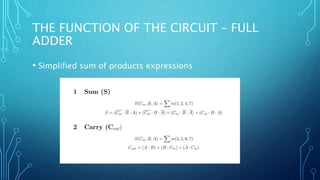
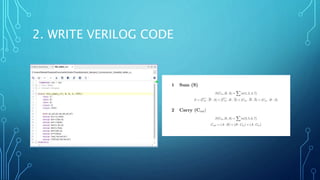
• Simplified sum of products expressions
THE FUNCTION OF THE CIRCUIT – FULL
ADDER
• Logic schematic diagram
OVERVIEW
1. Create a new project in Vivado
2. Write Verilog code
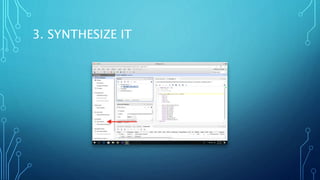
3. Synthesize it
4. Write testbench file (in Verilog)
5. Run simulation
6. Verify the results in the waveform (Timing Diagram)
1. CREATE A NEW PROJECT IN VIVADO
• Splash screen  Create
Project  Next  Next 
Next  Next  Next  Next
 Finish (use default
selections)
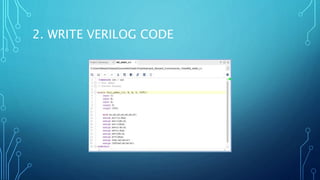
2. WRITE VERILOG CODE
• Add Sources  Add or create
design sources  Create File
 “full_adder_v”  OK 
Finish
2. WRITE VERILOG CODE
3. SYNTHESIZE IT
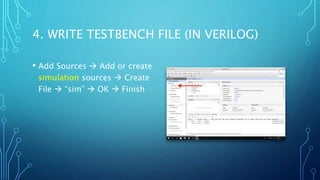
4. WRITE TESTBENCH FILE (IN VERILOG)
• Add Sources  Add or create
simulation sources  Create
File  “sim”  OK  Finish
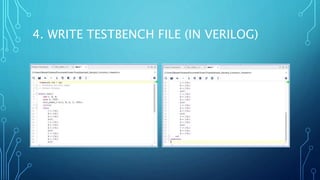
4. WRITE TESTBENCH FILE (IN VERILOG)
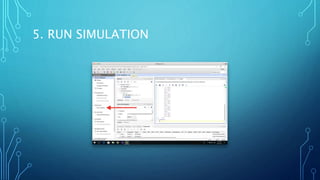
5. RUN SIMULATION
6. VERIFY THE RESULTS IN THE WAVEFORM
(TIMING DIAGRAM)
6. VERIFY THE RESULTS IN THE WAVEFORM
(TIMING DIAGRAM)
THE END
• Download slides and code: http://bit.ly/verilogquickstart

Verilog & Vivado Quickstart

Editor's Notes

  • #11 Line 5 – module declaration, fundamental building block of a Verilog design Lines 6-8 – input declaration Lines 9-10 – output declaration Line 12 – declare variables of type wire (the default net type in Verilog) for each minterm needed
  • #12  Lines 13-19 – assign values to each minterm variable using the Boolean operators “&” and “~” Lines 20-21 – assign values to each output using the Boolean operator “|”
  • #15 Line 5 – declare a module with no input or output ports Line 6 – declare the registers (variables) that will be connected to the inputs of the DUT Line 7 – declare the wires that will be connected to the outputs of the DUT Line 8 – declare an instance of full_adder_v with name U1 (arbitrary) and specified inputs/outputs Lines 9-42 – the testbench applies combinations of inputs to the DUT using a process, which is a block of statements that are executed sequentially Line 9 – the process runs once at the beginning of the simulation because of the keyword initial Lines 11-13 – each variable is assigned a 1 bit binary value Line 14 – wait 100 units of simulation time between assignments (delays specified with the “#” operator)