www.glcnetworks.com
VLAN on Mikrotik
GLC webinar, 8 september 2016
Achmad Mardiansyah
achmad@glcnetworks.com
GLC Networks, Indonesia
www.glcnetworks.com
Agenda
● Introduction
● VLAN
● VLAN on mikrotik
● Demo
● Q & A
www.glcnetworks.com
What is GLC?
● Garda Lintas Cakrawala (www.glcnetworks.com)
● An Indonesian company
● Located in Bandung
● Areas: Training, IT Consulting
● Mikrotik Certified Training Partner
● Mikrotik Certified Consultant
● Mikrotik distributor
3
www.glcnetworks.com
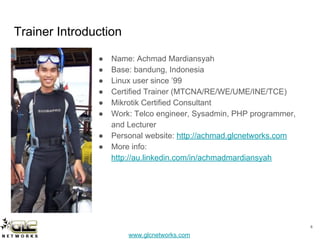
Trainer Introduction
● Name: Achmad Mardiansyah
● Base: bandung, Indonesia
● Linux user since ’99
● Certified Trainer (MTCNA/RE/WE/UME/INE/TCE)
● Mikrotik Certified Consultant
● Work: Telco engineer, Sysadmin, PHP programmer,
and Lecturer
● Personal website: http://achmad.glcnetworks.com
● More info:
http://au.linkedin.com/in/achmadmardiansyah
4
www.glcnetworks.com
Please introduce yourself
● Your name
● Your company/university?
● Your networking experience?
● Your mikrotik experience?
● Your expectation from this course?
5
www.glcnetworks.com
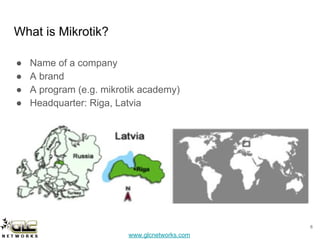
What is Mikrotik?
● Name of a company
● A brand
● A program (e.g. mikrotik academy)
● Headquarter: Riga, Latvia
6
www.glcnetworks.com
What are mikrotik products?
● Router OS
○ The OS. Specialized for networking
○ Website: www.mikrotik.com/download
● RouterBoard
○ The hardware
○ RouterOS installed
○ Website: www.routerboard.com
7
www.glcnetworks.com
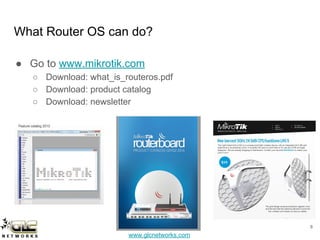
What Router OS can do?
● Go to www.mikrotik.com
○ Download: what_is_routeros.pdf
○ Download: product catalog
○ Download: newsletter
8
www.glcnetworks.com
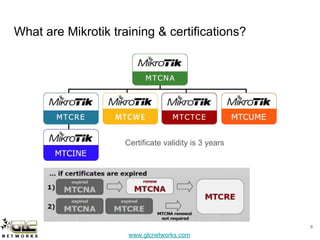
What are Mikrotik training & certifications?
9
Certificate validity is 3 years
www.glcnetworks.com
VLAN (Virtual LAN)
www.glcnetworks.com
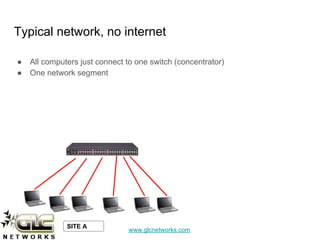
Typical network, no internet
● All computers just connect to one switch (concentrator)
● One network segment
SITE A
www.glcnetworks.com
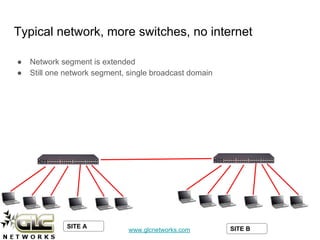
Typical network, more switches, no internet
● Network segment is extended
● Still one network segment, single broadcast domain
SITE A SITE B
www.glcnetworks.com
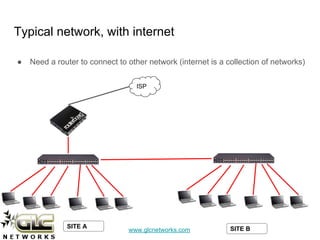
Typical network, with internet
● Need a router to connect to other network (internet is a collection of networks)
ISP
SITE A SITE B
www.glcnetworks.com
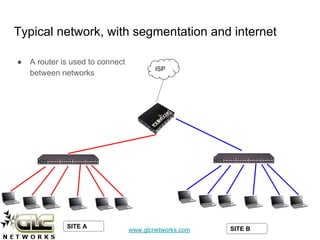
Typical network, with segmentation and internet
● A router is used to connect
between networks
ISP
SITE A SITE B
www.glcnetworks.com
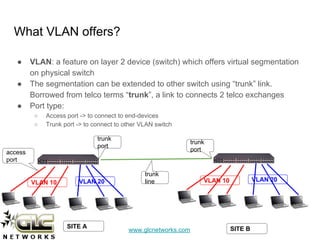
What VLAN offers?
● VLAN: a feature on layer 2 device (switch) which offers virtual segmentation
on physical switch
● The segmentation can be extended to other switch using “trunk” link.
Borrowed from telco terms “trunk”, a link to connects 2 telco exchanges
● Port type:
○ Access port -> to connect to end-devices
○ Trunk port -> to connect to other VLAN switch
access
port
trunk
port
trunk
port
VLAN 10 VLAN 20 VLAN 10 VLAN 20
SITE A SITE B
trunk
line
www.glcnetworks.com
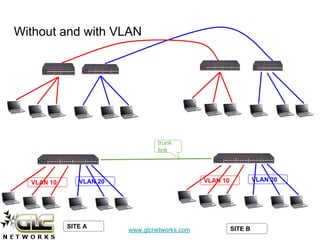
Without and with VLAN
trunk
link
VLAN 10 VLAN 20 VLAN 10 VLAN 20
SITE A SITE B
www.glcnetworks.com
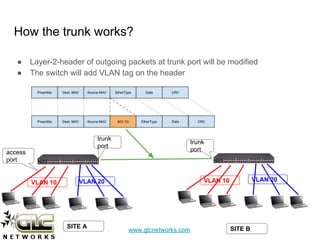
How the trunk works?
● Layer-2-header of outgoing packets at trunk port will be modified
● The switch will add VLAN tag on the header
access
port
trunk
port
trunk
port
SITE A SITE B
VLAN 10 VLAN 20 VLAN 10 VLAN 20
www.glcnetworks.com
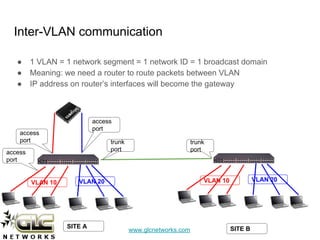
Inter-VLAN communication
● 1 VLAN = 1 network segment = 1 network ID = 1 broadcast domain
● Meaning: we need a router to route packets between VLAN
● IP address on router’s interfaces will become the gateway
access
port
trunk
port
trunk
port
SITE A SITE B
VLAN 10 VLAN 20 VLAN 10 VLAN 20
access
port
access
port
www.glcnetworks.com
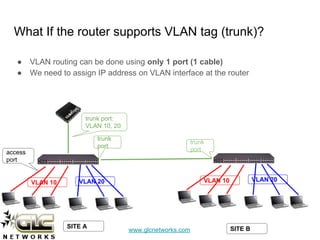
What If the router supports VLAN tag (trunk)?
● VLAN routing can be done using only 1 port (1 cable)
● We need to assign IP address on VLAN interface at the router
access
port
trunk
port
trunk
port
SITE A SITE B
trunk port:
VLAN 10, 20
VLAN 10 VLAN 20 VLAN 10 VLAN 20
www.glcnetworks.com
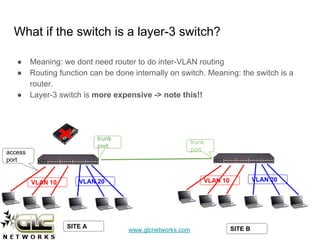
What if the switch is a layer-3 switch?
● Meaning: we dont need router to do inter-VLAN routing
● Routing function can be done internally on switch. Meaning: the switch is a
router.
● Layer-3 switch is more expensive -> note this!!
access
port
trunk
port
trunk
port
SITE A SITE B
VLAN 10 VLAN 20 VLAN 10 VLAN 20
www.glcnetworks.com
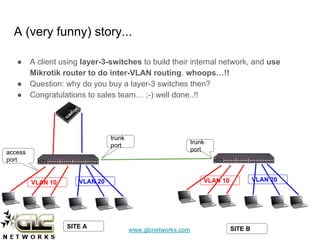
A (very funny) story...
● A client using layer-3-switches to build their internal network, and use
Mikrotik router to do inter-VLAN routing. whoops…!!
● Question: why do you buy a layer-3 switches then?
● Congratulations to sales team… ;-) well done..!!
access
port
trunk
port
trunk
port
SITE A SITE B
VLAN 10 VLAN 20 VLAN 10 VLAN 20
www.glcnetworks.com
VLAN on Mikrotik
www.glcnetworks.com
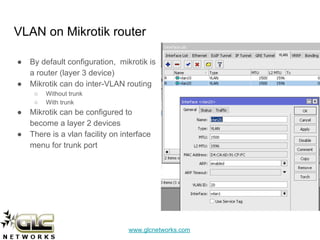
VLAN on Mikrotik router
● By default configuration, mikrotik is
a router (layer 3 device)
● Mikrotik can do inter-VLAN routing
○ Without trunk
○ With trunk
● Mikrotik can be configured to
become a layer 2 devices
● There is a vlan facility on interface
menu for trunk port
www.glcnetworks.com
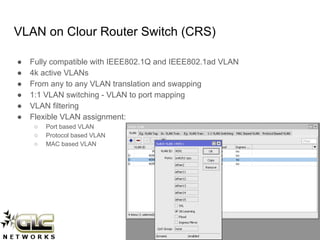
VLAN on Clour Router Switch (CRS)
● Fully compatible with IEEE802.1Q and IEEE802.1ad VLAN
● 4k active VLANs
● From any to any VLAN translation and swapping
● 1:1 VLAN switching - VLAN to port mapping
● VLAN filtering
● Flexible VLAN assignment:
○ Port based VLAN
○ Protocol based VLAN
○ MAC based VLAN
www.glcnetworks.com
Demo
www.glcnetworks.com
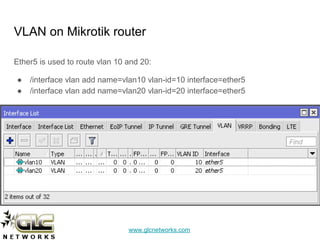
VLAN on Mikrotik router
Ether5 is used to route vlan 10 and 20:
● /interface vlan add name=vlan10 vlan-id=10 interface=ether5
● /interface vlan add name=vlan20 vlan-id=20 interface=ether5
www.glcnetworks.com
VLAN on CRS (port based vlan)
Configuration
Ether1: access port vlan10 -> slave port
Ether2: access port vlan20 -> slave port
Ether3: trunk port that allows vlan 10 and 20 -> master port
#setup VLAN group
/interface ethernet set ether1 master-port=ether3
/interface ethernet set ether2 master-port=ether3
#setup access port
/interface ethernet switch ingress-vlan-translation add ports=ether1 new-customer-vid=10 sa-learning=yes
/interface ethernet switch ingress-vlan-translation add ports=ether2 new-customer-vid=20 sa-learning=yes
#setup trunk port
/interface ethernet switch egress-vlan-tag add tagged-ports=ether3 vlan-id=10
/interface ethernet switch egress-vlan-tag add tagged-ports=ether3 vlan-id=20
#setup VLAN membership
/interface ethernet switch vlan add ports=ether3,ether1 vlan-id=10 learn=yes
/interface ethernet switch vlan add ports=ether3,ether2 vlan-id=20 learn=yes
www.glcnetworks.com
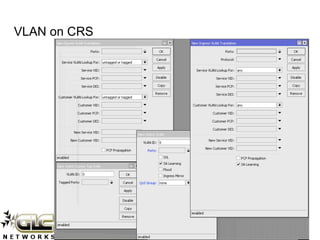
VLAN on CRS
www.glcnetworks.com
QA
www.glcnetworks.com
End of slides
● Thank you for your attention
● Please submit your feedback: http://bit.ly/glcfeedback
● Like our facebook page: “GLC networks”
● Stay tune with our schedule

VLAN on mikrotik

  • 1.
    www.glcnetworks.com VLAN on Mikrotik GLCwebinar, 8 september 2016 Achmad Mardiansyah achmad@glcnetworks.com GLC Networks, Indonesia
  • 2.
  • 3.
    www.glcnetworks.com What is GLC? ●Garda Lintas Cakrawala (www.glcnetworks.com) ● An Indonesian company ● Located in Bandung ● Areas: Training, IT Consulting ● Mikrotik Certified Training Partner ● Mikrotik Certified Consultant ● Mikrotik distributor 3
  • 4.
    www.glcnetworks.com Trainer Introduction ● Name:Achmad Mardiansyah ● Base: bandung, Indonesia ● Linux user since ’99 ● Certified Trainer (MTCNA/RE/WE/UME/INE/TCE) ● Mikrotik Certified Consultant ● Work: Telco engineer, Sysadmin, PHP programmer, and Lecturer ● Personal website: http://achmad.glcnetworks.com ● More info: http://au.linkedin.com/in/achmadmardiansyah 4
  • 5.
    www.glcnetworks.com Please introduce yourself ●Your name ● Your company/university? ● Your networking experience? ● Your mikrotik experience? ● Your expectation from this course? 5
  • 6.
    www.glcnetworks.com What is Mikrotik? ●Name of a company ● A brand ● A program (e.g. mikrotik academy) ● Headquarter: Riga, Latvia 6
  • 7.
    www.glcnetworks.com What are mikrotikproducts? ● Router OS ○ The OS. Specialized for networking ○ Website: www.mikrotik.com/download ● RouterBoard ○ The hardware ○ RouterOS installed ○ Website: www.routerboard.com 7
  • 8.
    www.glcnetworks.com What Router OScan do? ● Go to www.mikrotik.com ○ Download: what_is_routeros.pdf ○ Download: product catalog ○ Download: newsletter 8
  • 9.
    www.glcnetworks.com What are Mikrotiktraining & certifications? 9 Certificate validity is 3 years
  • 10.
  • 11.
    www.glcnetworks.com Typical network, nointernet ● All computers just connect to one switch (concentrator) ● One network segment SITE A
  • 12.
    www.glcnetworks.com Typical network, moreswitches, no internet ● Network segment is extended ● Still one network segment, single broadcast domain SITE A SITE B
  • 13.
    www.glcnetworks.com Typical network, withinternet ● Need a router to connect to other network (internet is a collection of networks) ISP SITE A SITE B
  • 14.
    www.glcnetworks.com Typical network, withsegmentation and internet ● A router is used to connect between networks ISP SITE A SITE B
  • 15.
    www.glcnetworks.com What VLAN offers? ●VLAN: a feature on layer 2 device (switch) which offers virtual segmentation on physical switch ● The segmentation can be extended to other switch using “trunk” link. Borrowed from telco terms “trunk”, a link to connects 2 telco exchanges ● Port type: ○ Access port -> to connect to end-devices ○ Trunk port -> to connect to other VLAN switch access port trunk port trunk port VLAN 10 VLAN 20 VLAN 10 VLAN 20 SITE A SITE B trunk line
  • 16.
    www.glcnetworks.com Without and withVLAN trunk link VLAN 10 VLAN 20 VLAN 10 VLAN 20 SITE A SITE B
  • 17.
    www.glcnetworks.com How the trunkworks? ● Layer-2-header of outgoing packets at trunk port will be modified ● The switch will add VLAN tag on the header access port trunk port trunk port SITE A SITE B VLAN 10 VLAN 20 VLAN 10 VLAN 20
  • 18.
    www.glcnetworks.com Inter-VLAN communication ● 1VLAN = 1 network segment = 1 network ID = 1 broadcast domain ● Meaning: we need a router to route packets between VLAN ● IP address on router’s interfaces will become the gateway access port trunk port trunk port SITE A SITE B VLAN 10 VLAN 20 VLAN 10 VLAN 20 access port access port
  • 19.
    www.glcnetworks.com What If therouter supports VLAN tag (trunk)? ● VLAN routing can be done using only 1 port (1 cable) ● We need to assign IP address on VLAN interface at the router access port trunk port trunk port SITE A SITE B trunk port: VLAN 10, 20 VLAN 10 VLAN 20 VLAN 10 VLAN 20
  • 20.
    www.glcnetworks.com What if theswitch is a layer-3 switch? ● Meaning: we dont need router to do inter-VLAN routing ● Routing function can be done internally on switch. Meaning: the switch is a router. ● Layer-3 switch is more expensive -> note this!! access port trunk port trunk port SITE A SITE B VLAN 10 VLAN 20 VLAN 10 VLAN 20
  • 21.
    www.glcnetworks.com A (very funny)story... ● A client using layer-3-switches to build their internal network, and use Mikrotik router to do inter-VLAN routing. whoops…!! ● Question: why do you buy a layer-3 switches then? ● Congratulations to sales team… ;-) well done..!! access port trunk port trunk port SITE A SITE B VLAN 10 VLAN 20 VLAN 10 VLAN 20
  • 22.
  • 23.
    www.glcnetworks.com VLAN on Mikrotikrouter ● By default configuration, mikrotik is a router (layer 3 device) ● Mikrotik can do inter-VLAN routing ○ Without trunk ○ With trunk ● Mikrotik can be configured to become a layer 2 devices ● There is a vlan facility on interface menu for trunk port
  • 24.
    www.glcnetworks.com VLAN on ClourRouter Switch (CRS) ● Fully compatible with IEEE802.1Q and IEEE802.1ad VLAN ● 4k active VLANs ● From any to any VLAN translation and swapping ● 1:1 VLAN switching - VLAN to port mapping ● VLAN filtering ● Flexible VLAN assignment: ○ Port based VLAN ○ Protocol based VLAN ○ MAC based VLAN
  • 25.
  • 26.
    www.glcnetworks.com VLAN on Mikrotikrouter Ether5 is used to route vlan 10 and 20: ● /interface vlan add name=vlan10 vlan-id=10 interface=ether5 ● /interface vlan add name=vlan20 vlan-id=20 interface=ether5
  • 27.
    www.glcnetworks.com VLAN on CRS(port based vlan) Configuration Ether1: access port vlan10 -> slave port Ether2: access port vlan20 -> slave port Ether3: trunk port that allows vlan 10 and 20 -> master port #setup VLAN group /interface ethernet set ether1 master-port=ether3 /interface ethernet set ether2 master-port=ether3 #setup access port /interface ethernet switch ingress-vlan-translation add ports=ether1 new-customer-vid=10 sa-learning=yes /interface ethernet switch ingress-vlan-translation add ports=ether2 new-customer-vid=20 sa-learning=yes #setup trunk port /interface ethernet switch egress-vlan-tag add tagged-ports=ether3 vlan-id=10 /interface ethernet switch egress-vlan-tag add tagged-ports=ether3 vlan-id=20 #setup VLAN membership /interface ethernet switch vlan add ports=ether3,ether1 vlan-id=10 learn=yes /interface ethernet switch vlan add ports=ether3,ether2 vlan-id=20 learn=yes
  • 28.
  • 29.
  • 30.
    www.glcnetworks.com End of slides ●Thank you for your attention ● Please submit your feedback: http://bit.ly/glcfeedback ● Like our facebook page: “GLC networks” ● Stay tune with our schedule