www.glcnetworks.com
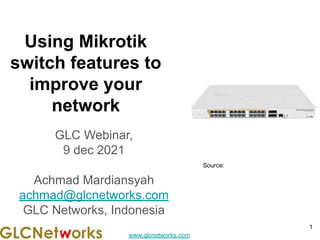
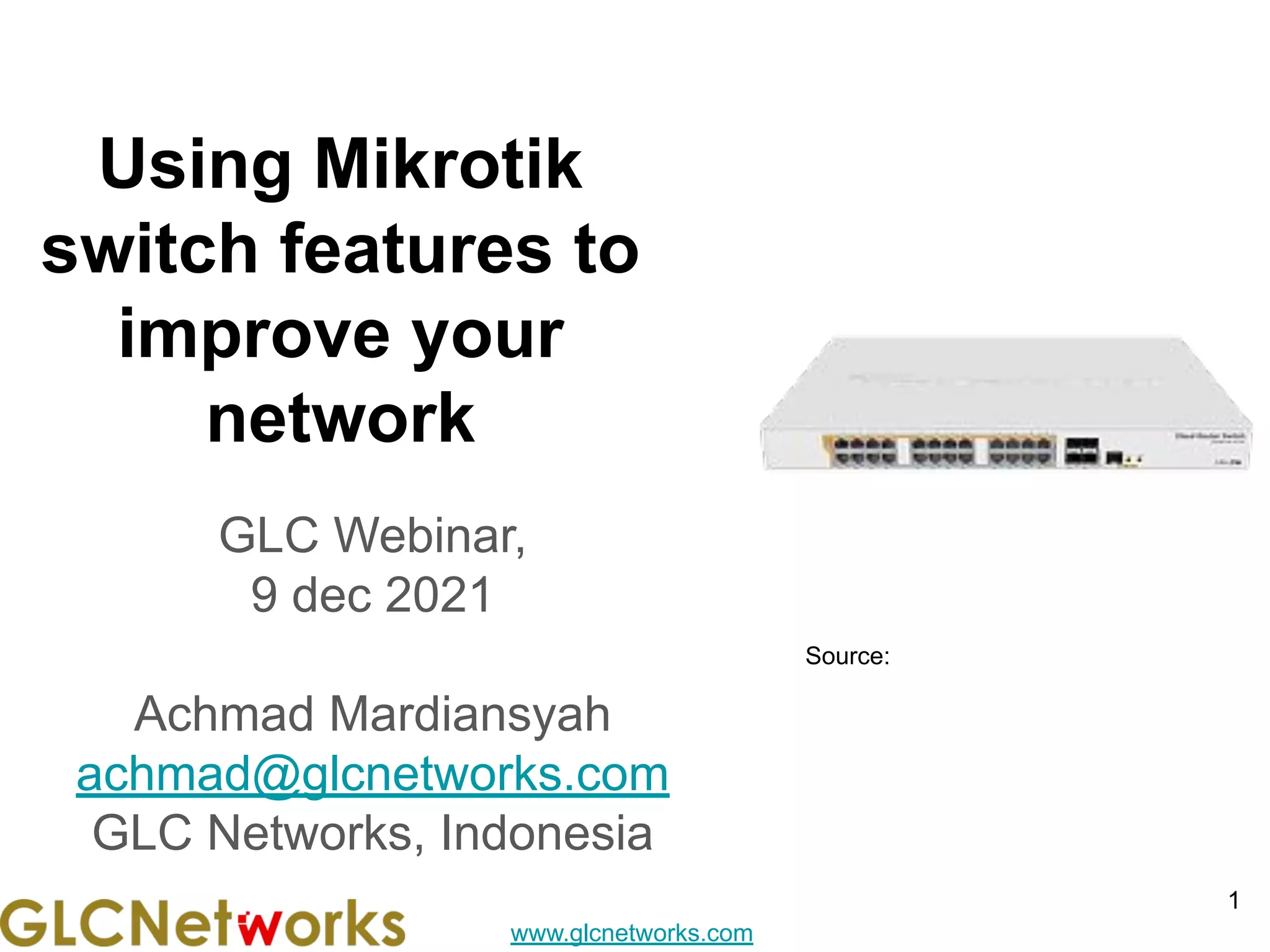
Using Mikrotik
switch features to
improve your
network
GLC Webinar,
9 dec 2021
Achmad Mardiansyah
achmad@glcnetworks.com
GLC Networks, Indonesia
1
Source:
www.glcnetworks.com
Agenda
● Introduction
● Review prerequisite knowledge
● Mikrotik switch
● Switch features
● Live practice
● Q & A
2
www.glcnetworks.com
introduction
3
www.glcnetworks.com
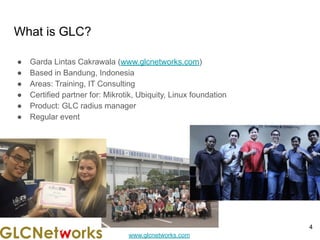
What is GLC?
● Garda Lintas Cakrawala (www.glcnetworks.com)
● Based in Bandung, Indonesia
● Areas: Training, IT Consulting
● Certified partner for: Mikrotik, Ubiquity, Linux foundation
● Product: GLC radius manager
● Regular event
4
www.glcnetworks.com
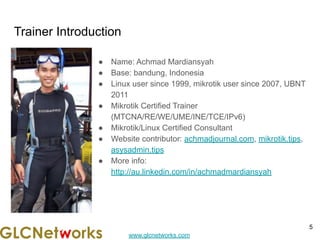
Trainer Introduction
● Name: Achmad Mardiansyah
● Base: bandung, Indonesia
● Linux user since 1999, mikrotik user since 2007, UBNT
2011
● Mikrotik Certified Trainer
(MTCNA/RE/WE/UME/INE/TCE/IPv6)
● Mikrotik/Linux Certified Consultant
● Website contributor: achmadjournal.com, mikrotik.tips,
asysadmin.tips
● More info:
http://au.linkedin.com/in/achmadmardiansyah
5
www.glcnetworks.com
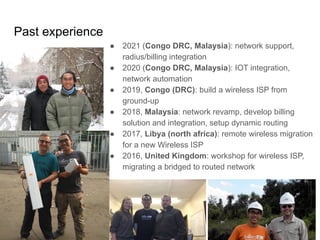
Past experience
6
● 2021 (Congo DRC, Malaysia): network support,
radius/billing integration
● 2020 (Congo DRC, Malaysia): IOT integration,
network automation
● 2019, Congo (DRC): build a wireless ISP from
ground-up
● 2018, Malaysia: network revamp, develop billing
solution and integration, setup dynamic routing
● 2017, Libya (north africa): remote wireless migration
for a new Wireless ISP
● 2016, United Kingdom: workshop for wireless ISP,
migrating a bridged to routed network
www.glcnetworks.com
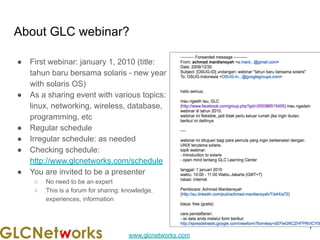
About GLC webinar?
● First webinar: january 1, 2010 (title:
tahun baru bersama solaris - new year
with solaris OS)
● As a sharing event with various topics:
linux, networking, wireless, database,
programming, etc
● Regular schedule
● Irregular schedule: as needed
● Checking schedule:
http://www.glcnetworks.com/schedule
● You are invited to be a presenter
○ No need to be an expert
○ This is a forum for sharing: knowledge,
experiences, information
7
www.glcnetworks.com
Please introduce yourself
● Your name
● Your company/university?
● Your networking experience?
● Your mikrotik experience?
● Your expectation from this course?
8
www.glcnetworks.com
Prerequisite
● This presentation some prerequisite knowledge
● We assume you already understand:
○ Python programming
○ Machine learning
9
www.glcnetworks.com
Review prerequisite knowledge
10
www.glcnetworks.com
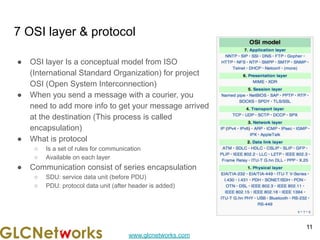
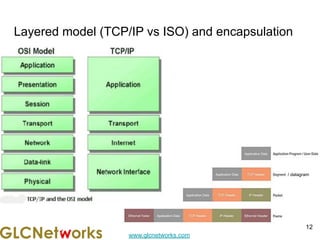
7 OSI layer & protocol
11
● OSI layer Is a conceptual model from ISO
(International Standard Organization) for project
OSI (Open System Interconnection)
● When you send a message with a courier, you
need to add more info to get your message arrived
at the destination (This process is called
encapsulation)
● What is protocol
○ Is a set of rules for communication
○ Available on each layer
● Communication consist of series encapsulation
○ SDU: service data unit (before PDU)
○ PDU: protocol data unit (after header is added)
www.glcnetworks.com
Layered model (TCP/IP vs ISO) and encapsulation
12
/ datagram
www.glcnetworks.com
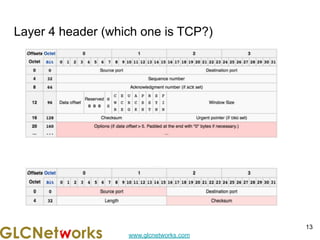
Layer 4 header (which one is TCP?)
13
www.glcnetworks.com
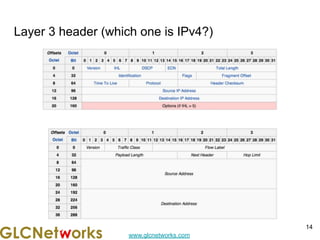
Layer 3 header (which one is IPv4?)
14
www.glcnetworks.com
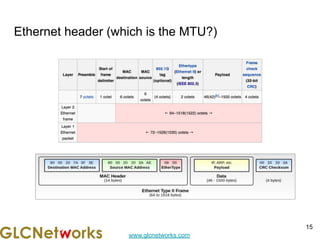
Ethernet header (which is the MTU?)
15
www.glcnetworks.com
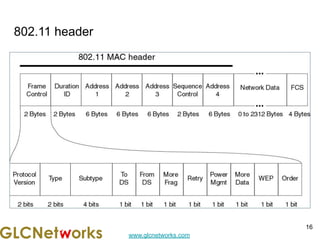
802.11 header
16
www.glcnetworks.com
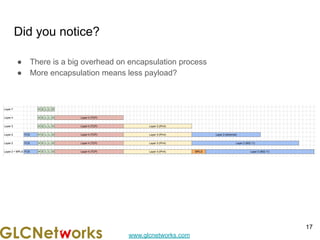
Did you notice?
● There is a big overhead on encapsulation process
● More encapsulation means less payload?
17
www.glcnetworks.com
Connecting Network devices
18
www.glcnetworks.com
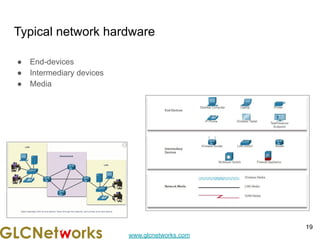
Typical network hardware
● End-devices
● Intermediary devices
● Media
19
www.glcnetworks.com
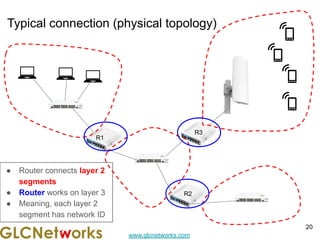
Typical connection (physical topology)
20
R2
R1
R3
● Router connects layer 2
segments
● Router works on layer 3
● Meaning, each layer 2
segment has network ID
www.glcnetworks.com
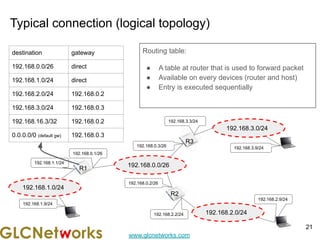
Typical connection (logical topology)
Routing table:
● A table at router that is used to forward packet
● Available on every devices (router and host)
● Entry is executed sequentially
21
192.168.0.0/26
R1
192.168.0.1/26
192.168.0.3/26
192.168.0.2/26
R3
R2
192.168.1.0/24
192.168.2.0/24
192.168.3.0/24
192.168.3.3/24
192.168.3.9/24
192.168.2.9/24
192.168.2.2/24
192.168.1.1/24
192.168.1.9/24
destination gateway
192.168.0.0/26 direct
192.168.1.0/24 direct
192.168.2.0/24 192.168.0.2
192.168.3.0/24 192.168.0.3
192.168.16.3/32 192.168.0.2
0.0.0.0/0 (default gw) 192.168.0.3
www.glcnetworks.com
Layer 2 technology: Ethernet
22
www.glcnetworks.com
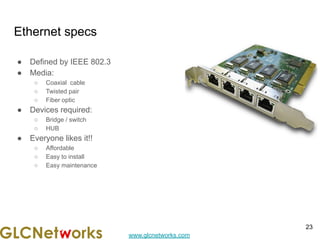
Ethernet specs
● Defined by IEEE 802.3
● Media:
○ Coaxial cable
○ Twisted pair
○ Fiber optic
● Devices required:
○ Bridge / switch
○ HUB
● Everyone likes it!!
○ Affordable
○ Easy to install
○ Easy maintenance
23
www.glcnetworks.com
How ethernet works (CSMA/CD)
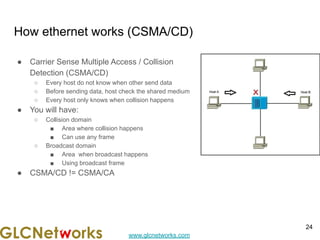
● Carrier Sense Multiple Access / Collision
Detection (CSMA/CD)
○ Every host do not know when other send data
○ Before sending data, host check the shared medium
○ Every host only knows when collision happens
● You will have:
○ Collision domain
■ Area where collision happens
■ Can use any frame
○ Broadcast domain
■ Area when broadcast happens
■ Using broadcast frame
● CSMA/CD != CSMA/CA
24
www.glcnetworks.com
How ethernet works (ARP)
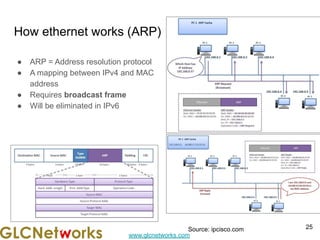
● ARP = Address resolution protocol
● A mapping between IPv4 and MAC
address
● Requires broadcast frame
● Will be eliminated in IPv6
25
Source: ipcisco.com
www.glcnetworks.com
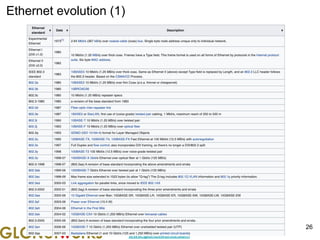
Ethernet evolution (1)
26
www.glcnetworks.com
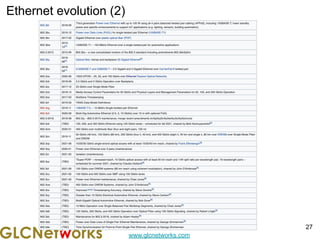
Ethernet evolution (2)
27
www.glcnetworks.com
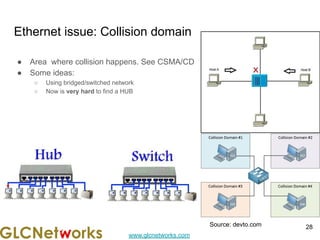
Ethernet issue: Collision domain
● Area where collision happens. See CSMA/CD
● Some ideas:
○ Using bridged/switched network
○ Now is very hard to find a HUB
28
Source: devto.com
www.glcnetworks.com
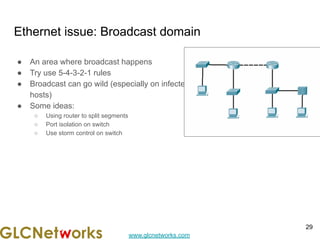
Ethernet issue: Broadcast domain
● An area where broadcast happens
● Try use 5-4-3-2-1 rules
● Broadcast can go wild (especially on infected
hosts)
● Some ideas:
○ Using router to split segments
○ Port isolation on switch
○ Use storm control on switch
29
www.glcnetworks.com
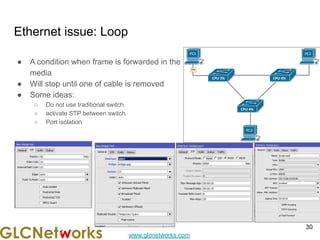
Ethernet issue: Loop
● A condition when frame is forwarded in the
media
● Will stop until one of cable is removed
● Some ideas:
○ Do not use traditional switch
○ activate STP between switch
○ Port isolation
30
www.glcnetworks.com
Layer 2 technology: VLAN
31
www.glcnetworks.com
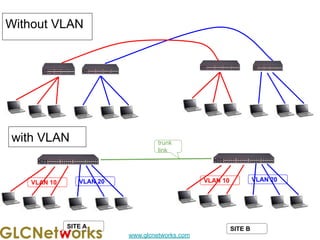
Without VLAN
trunk
link
VLAN 10 VLAN 20 VLAN 10 VLAN 20
SITE A SITE B
with VLAN
www.glcnetworks.com
VLAN terms
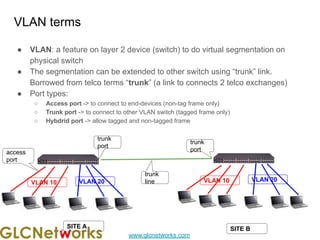
● VLAN: a feature on layer 2 device (switch) to do virtual segmentation on
physical switch
● The segmentation can be extended to other switch using “trunk” link.
Borrowed from telco terms “trunk” (a link to connects 2 telco exchanges)
● Port types:
○ Access port -> to connect to end-devices (non-tag frame only)
○ Trunk port -> to connect to other VLAN switch (tagged frame only)
○ Hybdrid port -> allow tagged and non-tagged frame
access
port
trunk
port
trunk
port
VLAN 10 VLAN 20 VLAN 10 VLAN 20
SITE A SITE B
trunk
line
www.glcnetworks.com
What happened on trunk ports
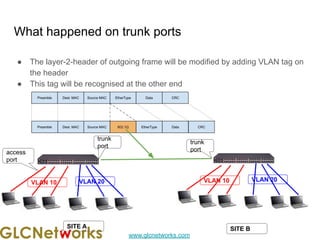
● The layer-2-header of outgoing frame will be modified by adding VLAN tag on
the header
● This tag will be recognised at the other end
access
port
trunk
port
trunk
port
SITE A SITE B
VLAN 10 VLAN 20 VLAN 10 VLAN 20
www.glcnetworks.com
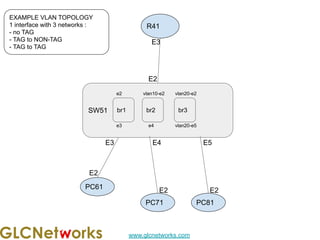
R41
EXAMPLE VLAN TOPOLOGY
1 interface with 3 networks :
- no TAG
- TAG to NON-TAG
- TAG to TAG
PC61
E3
E2
E2
SW51
E2
PC71
E3 E4
br1
e2
e3
br2
vlan10-e2
e4
E2
PC81
E5
br3
vlan20-e2
vlan20-e5
www.glcnetworks.com
Mikrotik switches
36
www.glcnetworks.com
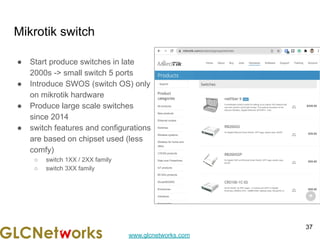
Mikrotik switch
● Start produce switches in late
2000s -> small switch 5 ports
● Introduce SWOS (switch OS) only
on mikrotik hardware
● Produce large scale switches
since 2014
● switch features and configurations
are based on chipset used (less
comfy)
○ switch 1XX / 2XX family
○ switch 3XX family
37
www.glcnetworks.com
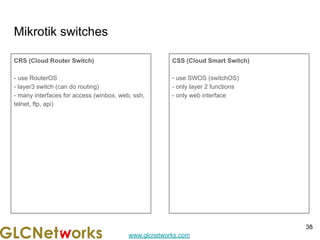
Mikrotik switches
CRS (Cloud Router Switch)
- use RouterOS
- layer3 switch (can do routing)
- many interfaces for access (winbox, web, ssh,
telnet, ftp, api)
CSS (Cloud Smart Switch)
- use SWOS (switchOS)
- only layer 2 functions
- only web interface
38
www.glcnetworks.com
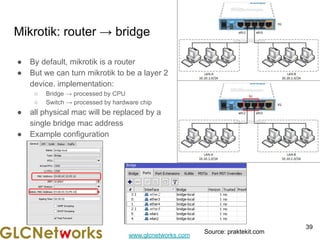
Mikrotik: router → bridge
● By default, mikrotik is a router
● But we can turn mikrotik to be a layer 2
device. implementation:
○ Bridge → processed by CPU
○ Switch → processed by hardware chip
● all physical mac will be replaced by a
single bridge mac address
● Example configuration
39
Source: praktekit.com
www.glcnetworks.com
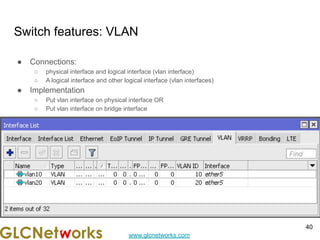
Switch features: VLAN
● Connections:
○ physical interface and logical interface (vlan interface)
○ A logical interface and other logical interface (vlan interfaces)
● Implementation
○ Put vlan interface on physical interface OR
○ Put vlan interface on bridge interface
40
www.glcnetworks.com
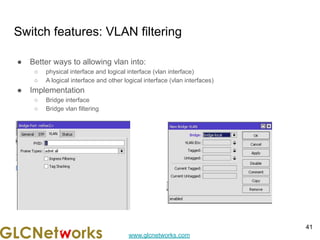
Switch features: VLAN filtering
● Better ways to allowing vlan into:
○ physical interface and logical interface (vlan interface)
○ A logical interface and other logical interface (vlan interfaces)
● Implementation
○ Bridge interface
○ Bridge vlan filtering
41
www.glcnetworks.com
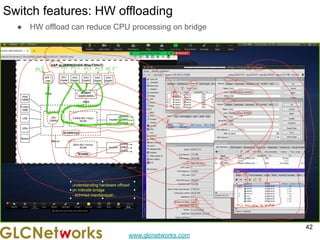
Switch features: HW offloading
● HW offload can reduce CPU processing on bridge
42
www.glcnetworks.com
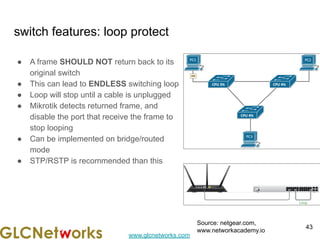
switch features: loop protect
● A frame SHOULD NOT return back to its
original switch
● This can lead to ENDLESS switching loop
● Loop will stop until a cable is unplugged
● Mikrotik detects returned frame, and
disable the port that receive the frame to
stop looping
● Can be implemented on bridge/routed
mode
● STP/RSTP is recommended than this
43
Source: netgear.com,
www.networkacademy.io
www.glcnetworks.com
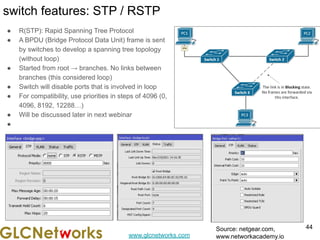
switch features: STP / RSTP
● R(STP): Rapid Spanning Tree Protocol
● A BPDU (Bridge Protocol Data Unit) frame is sent
by switches to develop a spanning tree topology
(without loop)
● Started from root → branches. No links between
branches (this considered loop)
● Switch will disable ports that is involved in loop
● For compatibility, use priorities in steps of 4096 (0,
4096, 8192, 12288…)
● Will be discussed later in next webinar
●
44
Source: netgear.com,
www.networkacademy.io
www.glcnetworks.com
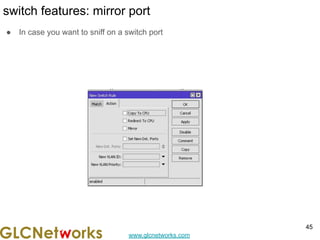
switch features: mirror port
● In case you want to sniff on a switch port
45
www.glcnetworks.com
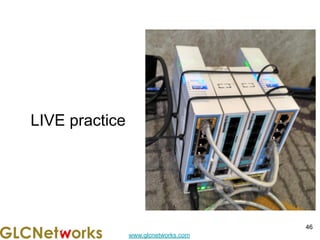
LIVE practice
46
www.glcnetworks.com
preparation
● SSH client
● SSH parameters
○ SSH address
○ SSH port
○ SSH username
○ SSH password
47
www.glcnetworks.com
Q & A
48
www.glcnetworks.com
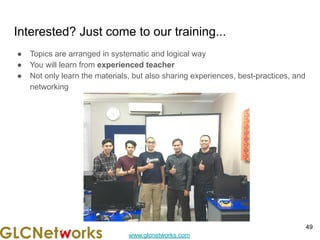
Interested? Just come to our training...
● Topics are arranged in systematic and logical way
● You will learn from experienced teacher
● Not only learn the materials, but also sharing experiences, best-practices, and
networking
49
www.glcnetworks.com
End of slides
● Thank you for your attention
● Please submit your feedback: http://bit.ly/glcfeedback
● Find our further event on our website : https://www.glcnetworks.com/en/
● Like our facebook page: https://www.facebook.com/glcnetworks
● Slide: https://www.slideshare.net/glcnetworks/
● Discord (bahasa indonesia): (https://discord.gg/6MZ3KUHHBX)
● Recording (youtube): https://www.youtube.com/c/GLCNetworks
● Stay tune with our schedule
● Any questions?
50

Using Mikrotik Switch Features to Improve Your Network

  • 1.
    www.glcnetworks.com Using Mikrotik switch featuresto improve your network GLC Webinar, 9 dec 2021 Achmad Mardiansyah achmad@glcnetworks.com GLC Networks, Indonesia 1 Source:
  • 2.
    www.glcnetworks.com Agenda ● Introduction ● Reviewprerequisite knowledge ● Mikrotik switch ● Switch features ● Live practice ● Q & A 2
  • 3.
  • 4.
    www.glcnetworks.com What is GLC? ●Garda Lintas Cakrawala (www.glcnetworks.com) ● Based in Bandung, Indonesia ● Areas: Training, IT Consulting ● Certified partner for: Mikrotik, Ubiquity, Linux foundation ● Product: GLC radius manager ● Regular event 4
  • 5.
    www.glcnetworks.com Trainer Introduction ● Name:Achmad Mardiansyah ● Base: bandung, Indonesia ● Linux user since 1999, mikrotik user since 2007, UBNT 2011 ● Mikrotik Certified Trainer (MTCNA/RE/WE/UME/INE/TCE/IPv6) ● Mikrotik/Linux Certified Consultant ● Website contributor: achmadjournal.com, mikrotik.tips, asysadmin.tips ● More info: http://au.linkedin.com/in/achmadmardiansyah 5
  • 6.
    www.glcnetworks.com Past experience 6 ● 2021(Congo DRC, Malaysia): network support, radius/billing integration ● 2020 (Congo DRC, Malaysia): IOT integration, network automation ● 2019, Congo (DRC): build a wireless ISP from ground-up ● 2018, Malaysia: network revamp, develop billing solution and integration, setup dynamic routing ● 2017, Libya (north africa): remote wireless migration for a new Wireless ISP ● 2016, United Kingdom: workshop for wireless ISP, migrating a bridged to routed network
  • 7.
    www.glcnetworks.com About GLC webinar? ●First webinar: january 1, 2010 (title: tahun baru bersama solaris - new year with solaris OS) ● As a sharing event with various topics: linux, networking, wireless, database, programming, etc ● Regular schedule ● Irregular schedule: as needed ● Checking schedule: http://www.glcnetworks.com/schedule ● You are invited to be a presenter ○ No need to be an expert ○ This is a forum for sharing: knowledge, experiences, information 7
  • 8.
    www.glcnetworks.com Please introduce yourself ●Your name ● Your company/university? ● Your networking experience? ● Your mikrotik experience? ● Your expectation from this course? 8
  • 9.
    www.glcnetworks.com Prerequisite ● This presentationsome prerequisite knowledge ● We assume you already understand: ○ Python programming ○ Machine learning 9
  • 10.
  • 11.
    www.glcnetworks.com 7 OSI layer& protocol 11 ● OSI layer Is a conceptual model from ISO (International Standard Organization) for project OSI (Open System Interconnection) ● When you send a message with a courier, you need to add more info to get your message arrived at the destination (This process is called encapsulation) ● What is protocol ○ Is a set of rules for communication ○ Available on each layer ● Communication consist of series encapsulation ○ SDU: service data unit (before PDU) ○ PDU: protocol data unit (after header is added)
  • 12.
    www.glcnetworks.com Layered model (TCP/IPvs ISO) and encapsulation 12 / datagram
  • 13.
    www.glcnetworks.com Layer 4 header(which one is TCP?) 13
  • 14.
    www.glcnetworks.com Layer 3 header(which one is IPv4?) 14
  • 15.
  • 16.
  • 17.
    www.glcnetworks.com Did you notice? ●There is a big overhead on encapsulation process ● More encapsulation means less payload? 17
  • 18.
  • 19.
    www.glcnetworks.com Typical network hardware ●End-devices ● Intermediary devices ● Media 19
  • 20.
    www.glcnetworks.com Typical connection (physicaltopology) 20 R2 R1 R3 ● Router connects layer 2 segments ● Router works on layer 3 ● Meaning, each layer 2 segment has network ID
  • 21.
    www.glcnetworks.com Typical connection (logicaltopology) Routing table: ● A table at router that is used to forward packet ● Available on every devices (router and host) ● Entry is executed sequentially 21 192.168.0.0/26 R1 192.168.0.1/26 192.168.0.3/26 192.168.0.2/26 R3 R2 192.168.1.0/24 192.168.2.0/24 192.168.3.0/24 192.168.3.3/24 192.168.3.9/24 192.168.2.9/24 192.168.2.2/24 192.168.1.1/24 192.168.1.9/24 destination gateway 192.168.0.0/26 direct 192.168.1.0/24 direct 192.168.2.0/24 192.168.0.2 192.168.3.0/24 192.168.0.3 192.168.16.3/32 192.168.0.2 0.0.0.0/0 (default gw) 192.168.0.3
  • 22.
  • 23.
    www.glcnetworks.com Ethernet specs ● Definedby IEEE 802.3 ● Media: ○ Coaxial cable ○ Twisted pair ○ Fiber optic ● Devices required: ○ Bridge / switch ○ HUB ● Everyone likes it!! ○ Affordable ○ Easy to install ○ Easy maintenance 23
  • 24.
    www.glcnetworks.com How ethernet works(CSMA/CD) ● Carrier Sense Multiple Access / Collision Detection (CSMA/CD) ○ Every host do not know when other send data ○ Before sending data, host check the shared medium ○ Every host only knows when collision happens ● You will have: ○ Collision domain ■ Area where collision happens ■ Can use any frame ○ Broadcast domain ■ Area when broadcast happens ■ Using broadcast frame ● CSMA/CD != CSMA/CA 24
  • 25.
    www.glcnetworks.com How ethernet works(ARP) ● ARP = Address resolution protocol ● A mapping between IPv4 and MAC address ● Requires broadcast frame ● Will be eliminated in IPv6 25 Source: ipcisco.com
  • 26.
  • 27.
  • 28.
    www.glcnetworks.com Ethernet issue: Collisiondomain ● Area where collision happens. See CSMA/CD ● Some ideas: ○ Using bridged/switched network ○ Now is very hard to find a HUB 28 Source: devto.com
  • 29.
    www.glcnetworks.com Ethernet issue: Broadcastdomain ● An area where broadcast happens ● Try use 5-4-3-2-1 rules ● Broadcast can go wild (especially on infected hosts) ● Some ideas: ○ Using router to split segments ○ Port isolation on switch ○ Use storm control on switch 29
  • 30.
    www.glcnetworks.com Ethernet issue: Loop ●A condition when frame is forwarded in the media ● Will stop until one of cable is removed ● Some ideas: ○ Do not use traditional switch ○ activate STP between switch ○ Port isolation 30
  • 31.
  • 32.
    www.glcnetworks.com Without VLAN trunk link VLAN 10VLAN 20 VLAN 10 VLAN 20 SITE A SITE B with VLAN
  • 33.
    www.glcnetworks.com VLAN terms ● VLAN:a feature on layer 2 device (switch) to do virtual segmentation on physical switch ● The segmentation can be extended to other switch using “trunk” link. Borrowed from telco terms “trunk” (a link to connects 2 telco exchanges) ● Port types: ○ Access port -> to connect to end-devices (non-tag frame only) ○ Trunk port -> to connect to other VLAN switch (tagged frame only) ○ Hybdrid port -> allow tagged and non-tagged frame access port trunk port trunk port VLAN 10 VLAN 20 VLAN 10 VLAN 20 SITE A SITE B trunk line
  • 34.
    www.glcnetworks.com What happened ontrunk ports ● The layer-2-header of outgoing frame will be modified by adding VLAN tag on the header ● This tag will be recognised at the other end access port trunk port trunk port SITE A SITE B VLAN 10 VLAN 20 VLAN 10 VLAN 20
  • 35.
    www.glcnetworks.com R41 EXAMPLE VLAN TOPOLOGY 1interface with 3 networks : - no TAG - TAG to NON-TAG - TAG to TAG PC61 E3 E2 E2 SW51 E2 PC71 E3 E4 br1 e2 e3 br2 vlan10-e2 e4 E2 PC81 E5 br3 vlan20-e2 vlan20-e5
  • 36.
  • 37.
    www.glcnetworks.com Mikrotik switch ● Startproduce switches in late 2000s -> small switch 5 ports ● Introduce SWOS (switch OS) only on mikrotik hardware ● Produce large scale switches since 2014 ● switch features and configurations are based on chipset used (less comfy) ○ switch 1XX / 2XX family ○ switch 3XX family 37
  • 38.
    www.glcnetworks.com Mikrotik switches CRS (CloudRouter Switch) - use RouterOS - layer3 switch (can do routing) - many interfaces for access (winbox, web, ssh, telnet, ftp, api) CSS (Cloud Smart Switch) - use SWOS (switchOS) - only layer 2 functions - only web interface 38
  • 39.
    www.glcnetworks.com Mikrotik: router →bridge ● By default, mikrotik is a router ● But we can turn mikrotik to be a layer 2 device. implementation: ○ Bridge → processed by CPU ○ Switch → processed by hardware chip ● all physical mac will be replaced by a single bridge mac address ● Example configuration 39 Source: praktekit.com
  • 40.
    www.glcnetworks.com Switch features: VLAN ●Connections: ○ physical interface and logical interface (vlan interface) ○ A logical interface and other logical interface (vlan interfaces) ● Implementation ○ Put vlan interface on physical interface OR ○ Put vlan interface on bridge interface 40
  • 41.
    www.glcnetworks.com Switch features: VLANfiltering ● Better ways to allowing vlan into: ○ physical interface and logical interface (vlan interface) ○ A logical interface and other logical interface (vlan interfaces) ● Implementation ○ Bridge interface ○ Bridge vlan filtering 41
  • 42.
    www.glcnetworks.com Switch features: HWoffloading ● HW offload can reduce CPU processing on bridge 42
  • 43.
    www.glcnetworks.com switch features: loopprotect ● A frame SHOULD NOT return back to its original switch ● This can lead to ENDLESS switching loop ● Loop will stop until a cable is unplugged ● Mikrotik detects returned frame, and disable the port that receive the frame to stop looping ● Can be implemented on bridge/routed mode ● STP/RSTP is recommended than this 43 Source: netgear.com, www.networkacademy.io
  • 44.
    www.glcnetworks.com switch features: STP/ RSTP ● R(STP): Rapid Spanning Tree Protocol ● A BPDU (Bridge Protocol Data Unit) frame is sent by switches to develop a spanning tree topology (without loop) ● Started from root → branches. No links between branches (this considered loop) ● Switch will disable ports that is involved in loop ● For compatibility, use priorities in steps of 4096 (0, 4096, 8192, 12288…) ● Will be discussed later in next webinar ● 44 Source: netgear.com, www.networkacademy.io
  • 45.
    www.glcnetworks.com switch features: mirrorport ● In case you want to sniff on a switch port 45
  • 46.
  • 47.
    www.glcnetworks.com preparation ● SSH client ●SSH parameters ○ SSH address ○ SSH port ○ SSH username ○ SSH password 47
  • 48.
  • 49.
    www.glcnetworks.com Interested? Just cometo our training... ● Topics are arranged in systematic and logical way ● You will learn from experienced teacher ● Not only learn the materials, but also sharing experiences, best-practices, and networking 49
  • 50.
    www.glcnetworks.com End of slides ●Thank you for your attention ● Please submit your feedback: http://bit.ly/glcfeedback ● Find our further event on our website : https://www.glcnetworks.com/en/ ● Like our facebook page: https://www.facebook.com/glcnetworks ● Slide: https://www.slideshare.net/glcnetworks/ ● Discord (bahasa indonesia): (https://discord.gg/6MZ3KUHHBX) ● Recording (youtube): https://www.youtube.com/c/GLCNetworks ● Stay tune with our schedule ● Any questions? 50