www.glcnetworks.com
FIREWALL NAT
GLC webinar, 04 may 2017
Achmad Mardiansyah
achmad@glcnetworks.com
GLC Networks, Indonesia
1
www.glcnetworks.com
Agenda
● Introduction
● Network Address Translation (NAT)
● Mikrotik firewall NAT
● Demo
● Q & A
2
www.glcnetworks.com
What is GLC?
● Garda Lintas Cakrawala (www.glcnetworks.com)
● An Indonesian company
● Located in Bandung
● Areas: Training, IT Consulting
● Mikrotik Certified Training Partner
● Mikrotik Certified Consultant
● Mikrotik distributor
3
www.glcnetworks.com
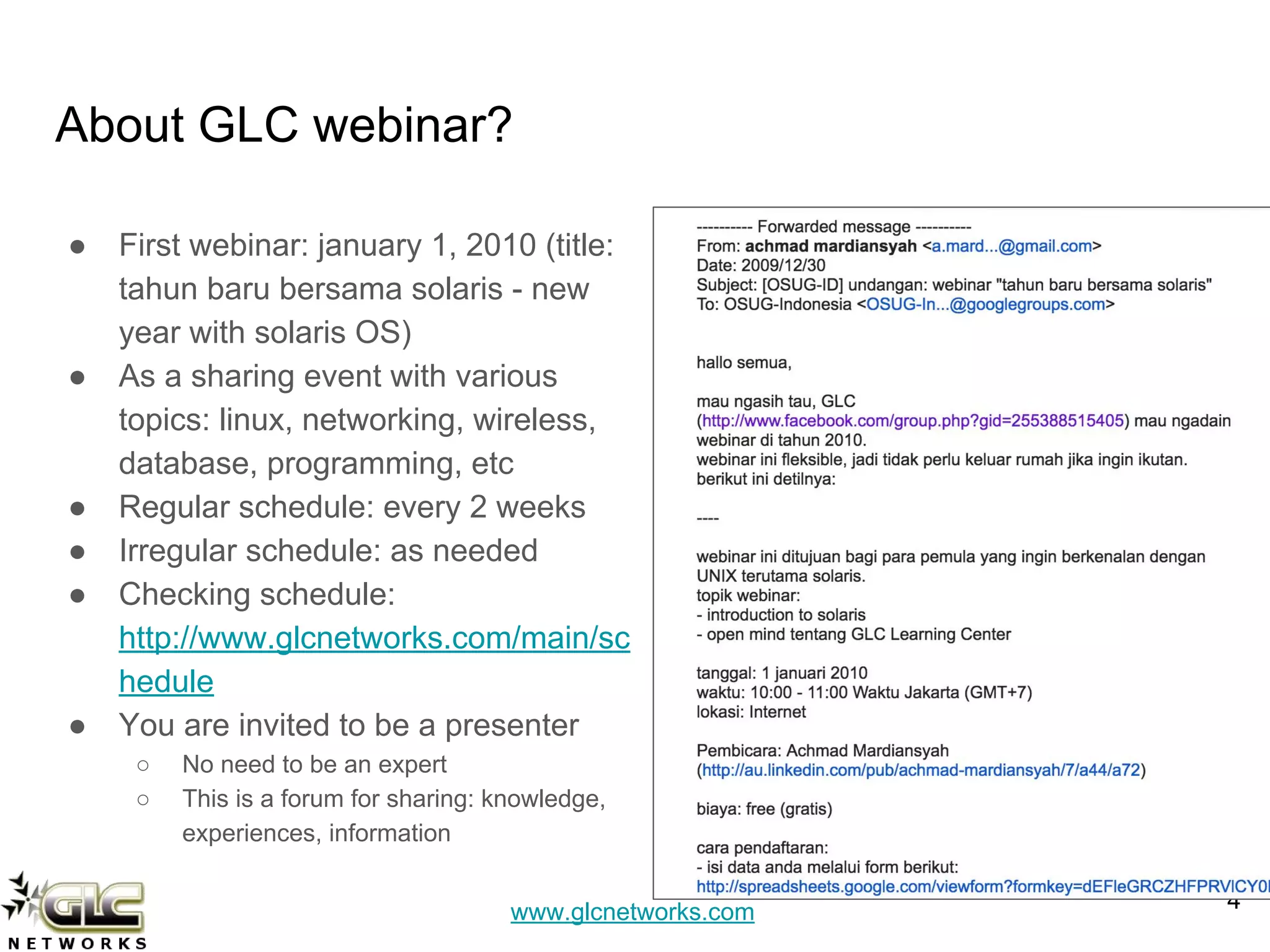
About GLC webinar?
● First webinar: january 1, 2010 (title:
tahun baru bersama solaris - new
year with solaris OS)
● As a sharing event with various
topics: linux, networking, wireless,
database, programming, etc
● Regular schedule: every 2 weeks
● Irregular schedule: as needed
● Checking schedule:
http://www.glcnetworks.com/main/sc
hedule
● You are invited to be a presenter
○ No need to be an expert
○ This is a forum for sharing: knowledge,
experiences, information
4
www.glcnetworks.com
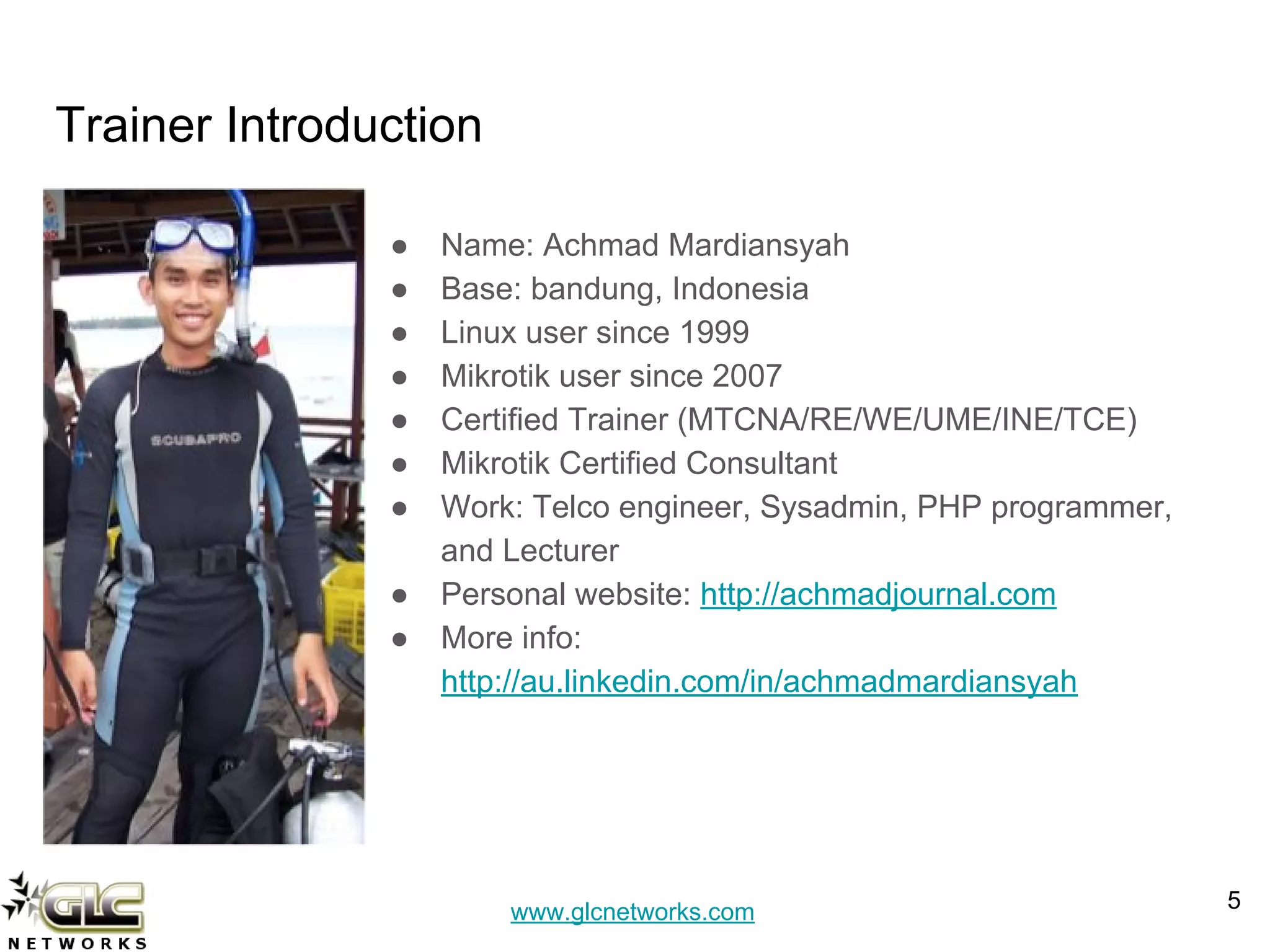
Trainer Introduction
● Name: Achmad Mardiansyah
● Base: bandung, Indonesia
● Linux user since 1999
● Mikrotik user since 2007
● Certified Trainer (MTCNA/RE/WE/UME/INE/TCE)
● Mikrotik Certified Consultant
● Work: Telco engineer, Sysadmin, PHP programmer,
and Lecturer
● Personal website: http://achmadjournal.com
● More info:
http://au.linkedin.com/in/achmadmardiansyah
5
www.glcnetworks.com
Please introduce yourself
● Your name
● Your company/university?
● Your networking experience?
● Your mikrotik experience?
● Your expectation from this course?
6
www.glcnetworks.com
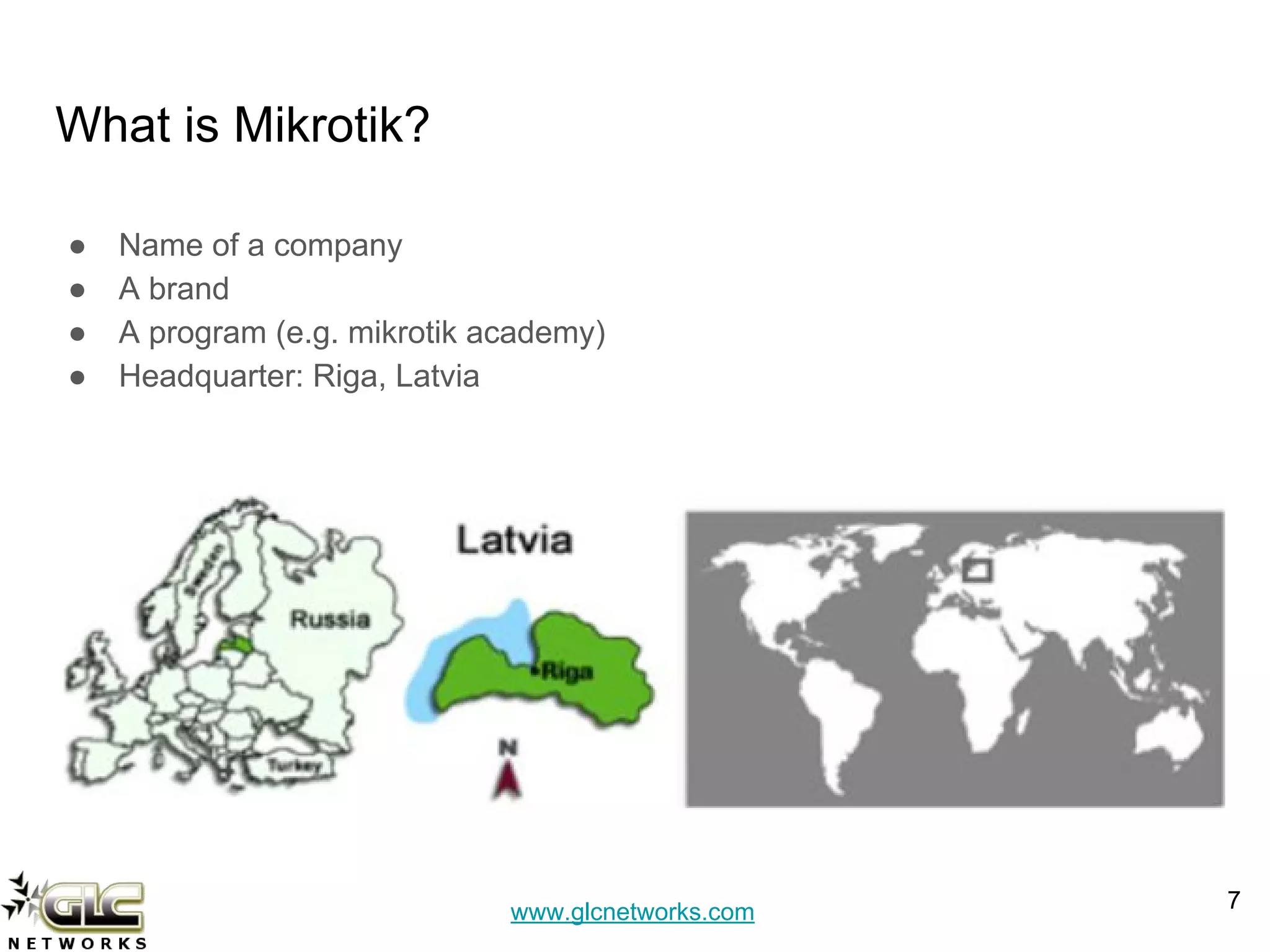
What is Mikrotik?
● Name of a company
● A brand
● A program (e.g. mikrotik academy)
● Headquarter: Riga, Latvia
7
www.glcnetworks.com
What are mikrotik products?
● Router OS
○ The OS. Specialized for networking
○ Website: www.mikrotik.com/download
● RouterBoard
○ The hardware
○ RouterOS installed
○ Website: www.routerboard.com
8
www.glcnetworks.com
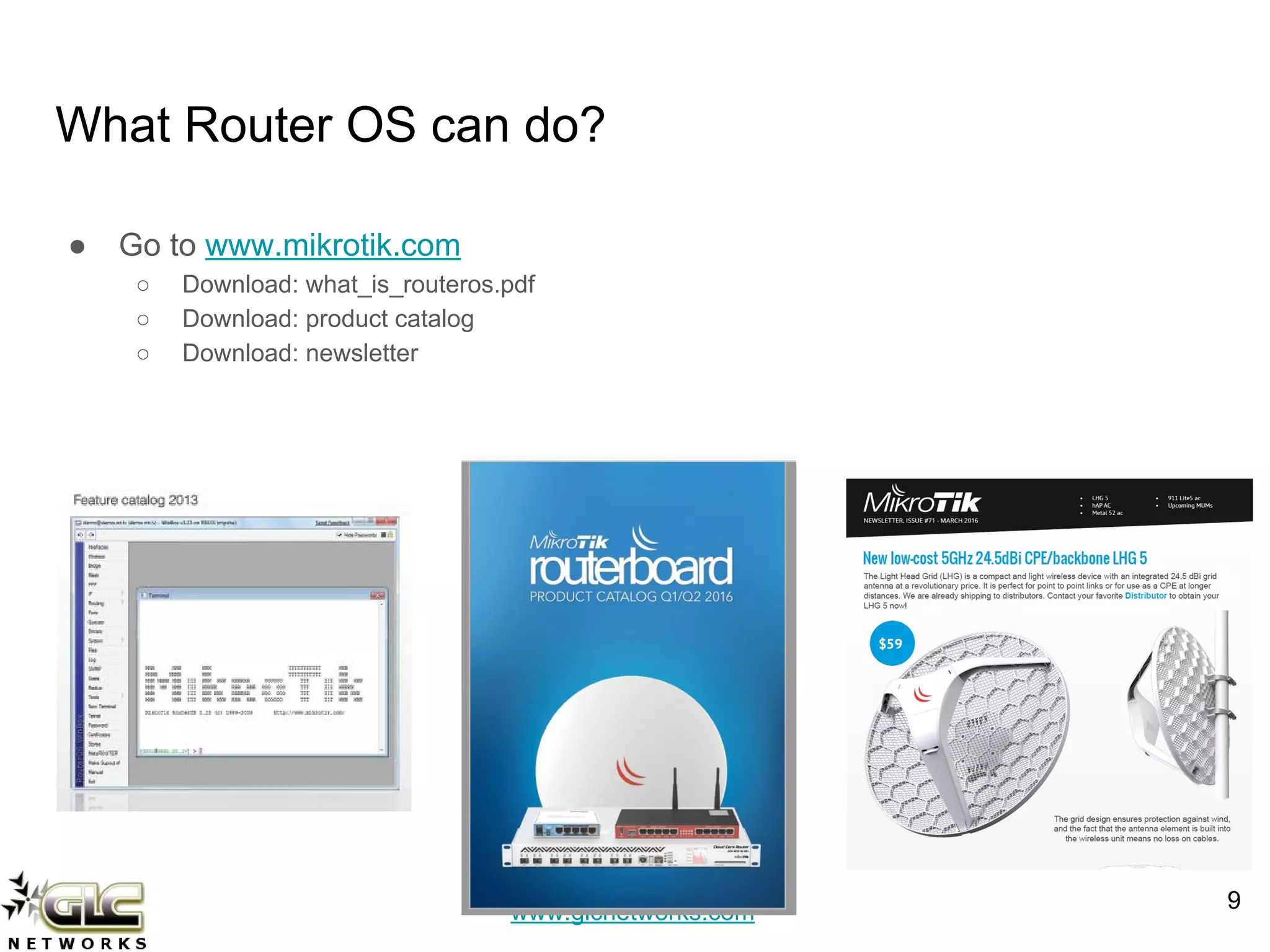
What Router OS can do?
● Go to www.mikrotik.com
○ Download: what_is_routeros.pdf
○ Download: product catalog
○ Download: newsletter
9
www.glcnetworks.com
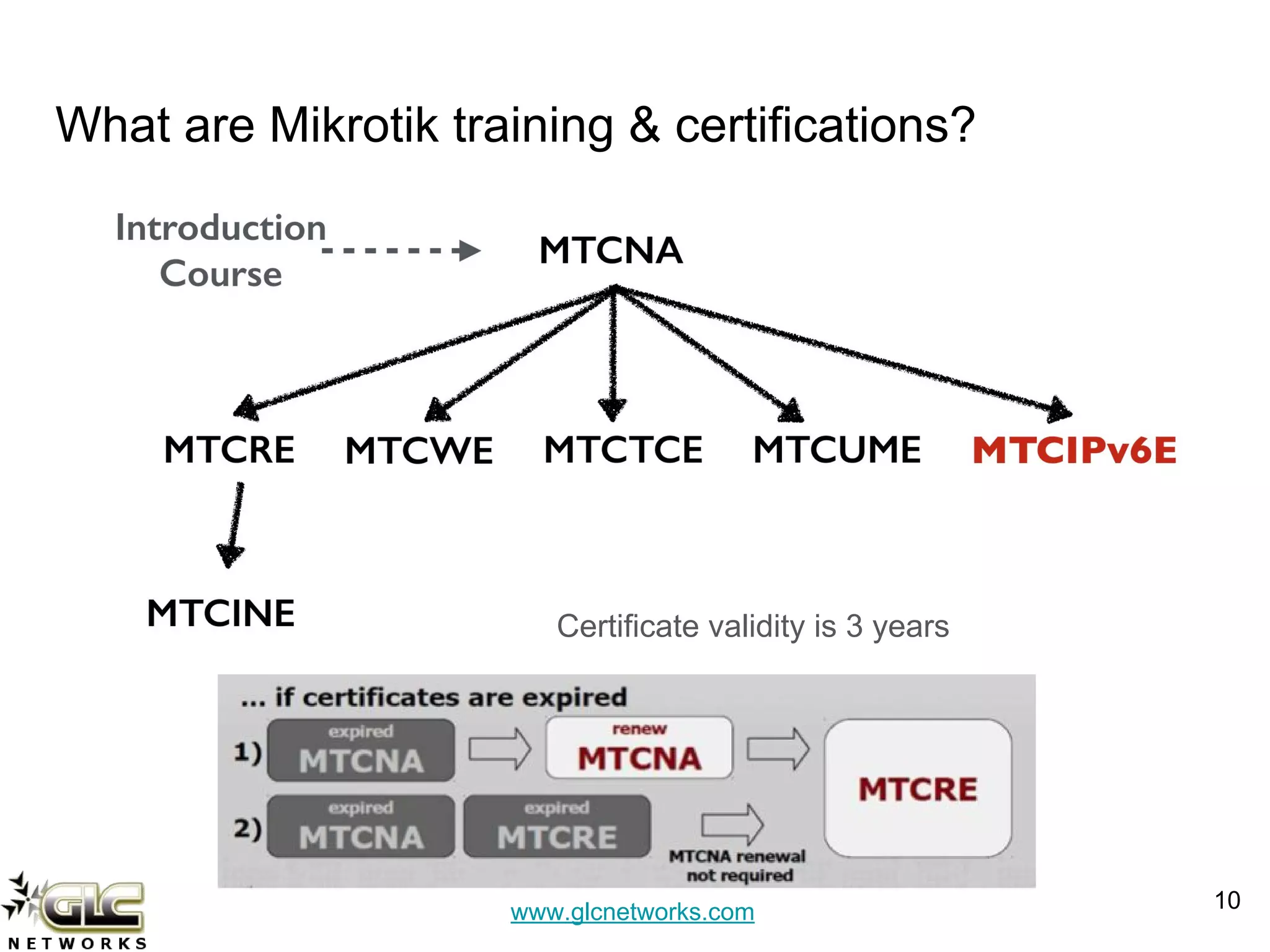
What are Mikrotik training & certifications?
10
Certificate validity is 3 years
www.glcnetworks.com
Network Address Translation (NAT)
11
www.glcnetworks.com
At early stage of internet… (1990s)
● Most of computer’s communication is using layer 3 protocol (Internet Protocol
- IP)
● The use of CIDR (classless interdomain routing) -> no class A, B C
● There was a body that registers blocks of IP address
● Internet was booming -> IP address was running out !!!
● NAT was born
12
www.glcnetworks.com
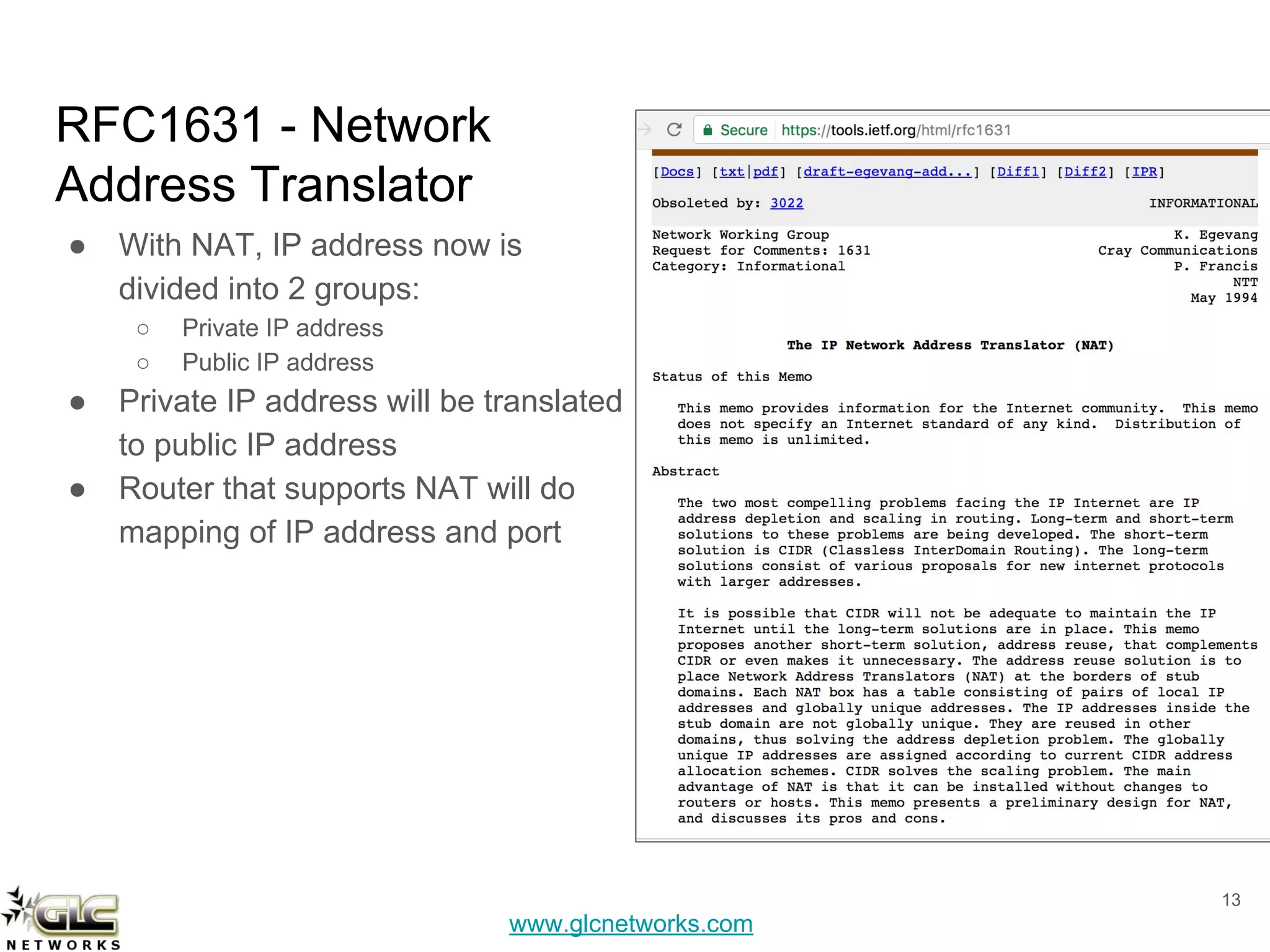
RFC1631 - Network
Address Translator
● With NAT, IP address now is
divided into 2 groups:
○ Private IP address
○ Public IP address
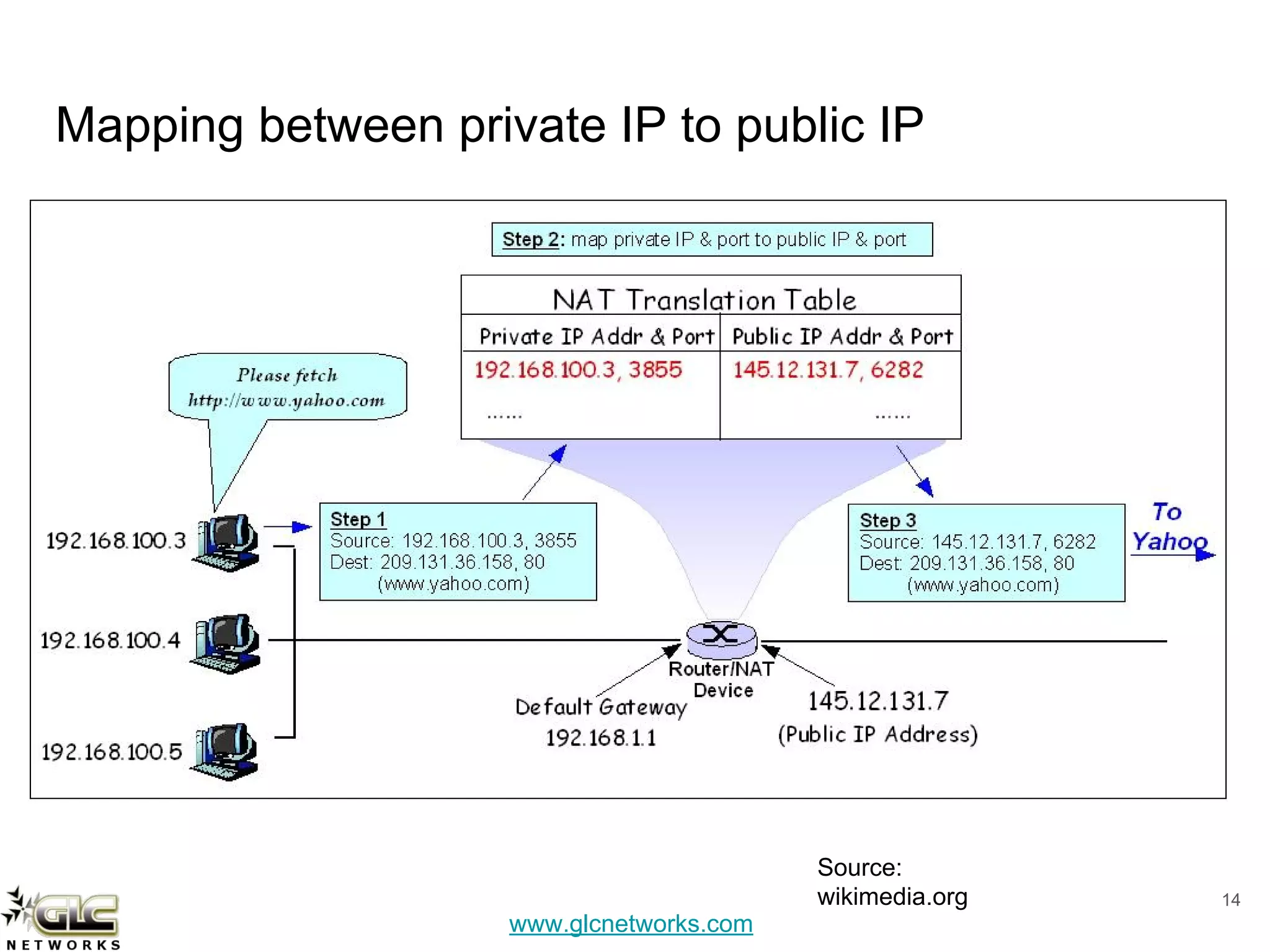
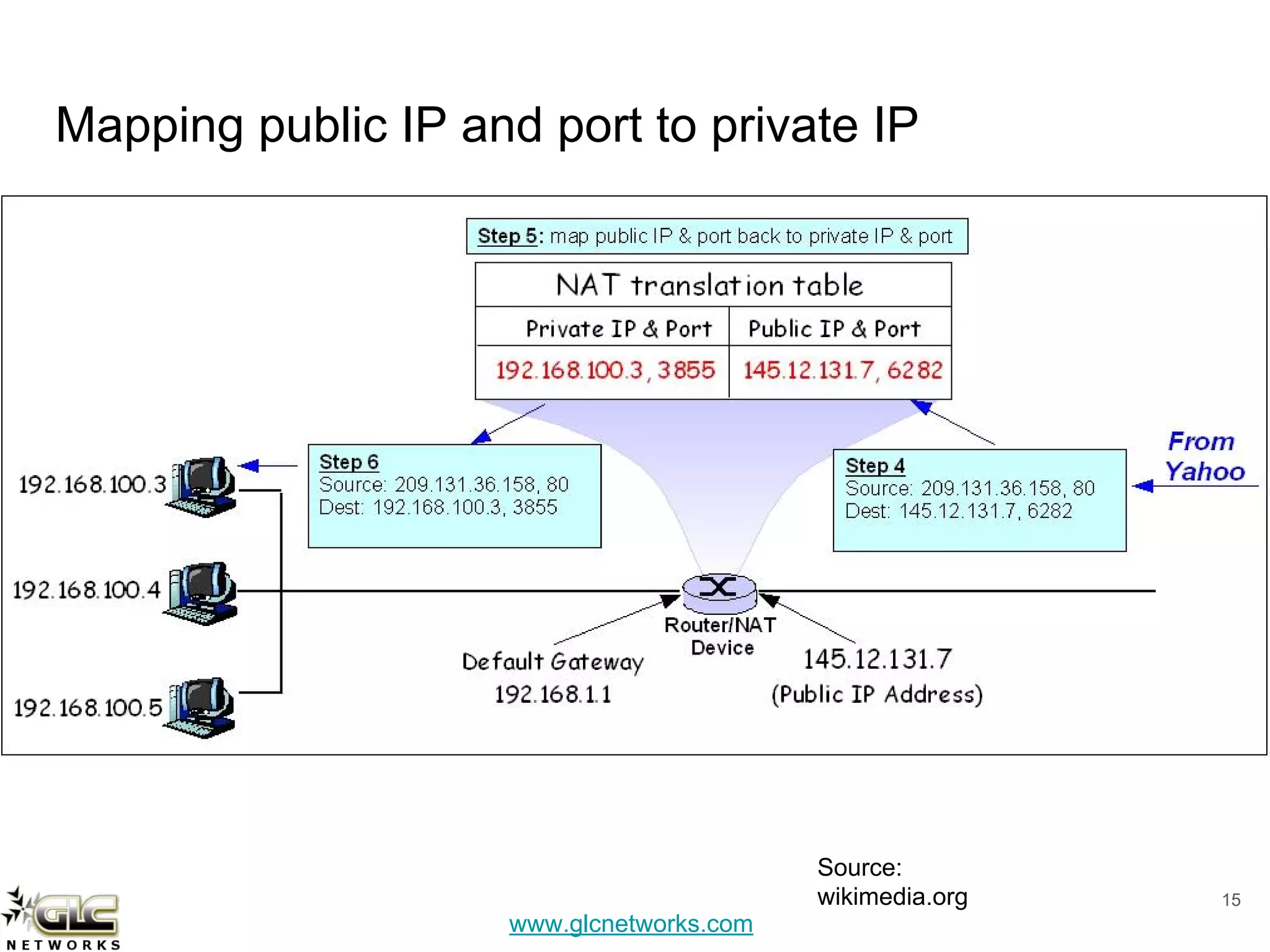
● Private IP address will be translated
to public IP address
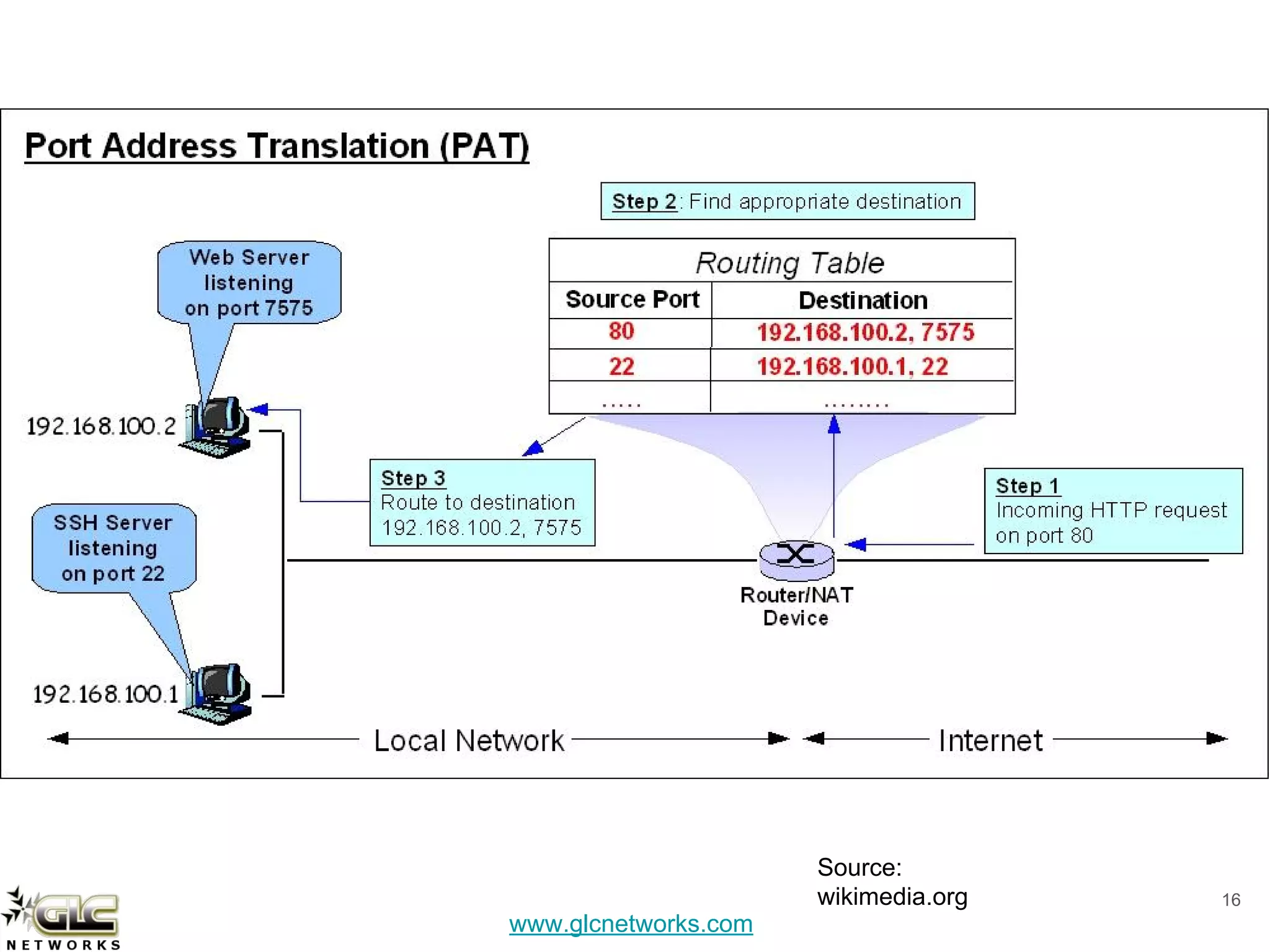
● Router that supports NAT will do
mapping of IP address and port
13
www.glcnetworks.com
Mapping between private IP to public IP
14
Source:
wikimedia.org
www.glcnetworks.com
Mapping public IP and port to private IP
15
Source:
wikimedia.org
www.glcnetworks.com
16
Source:
wikimedia.org
www.glcnetworks.com
However, NAT is not good….
● Its not scalable. even with the box that is so called “carrier grade NAT”
● Some applications do not work under NATed environment: Online game
(xbox, steam), voip, security, etc
● Dont use NAT on your local network -> use routing protocol instead
● NAT is not designed to be permanent solution
Ultimate Solution:
USE IPv6 !!!
17
www.glcnetworks.com
Mikrotik Firewall NAT
18
www.glcnetworks.com
19
www.glcnetworks.com
Chain for NAT
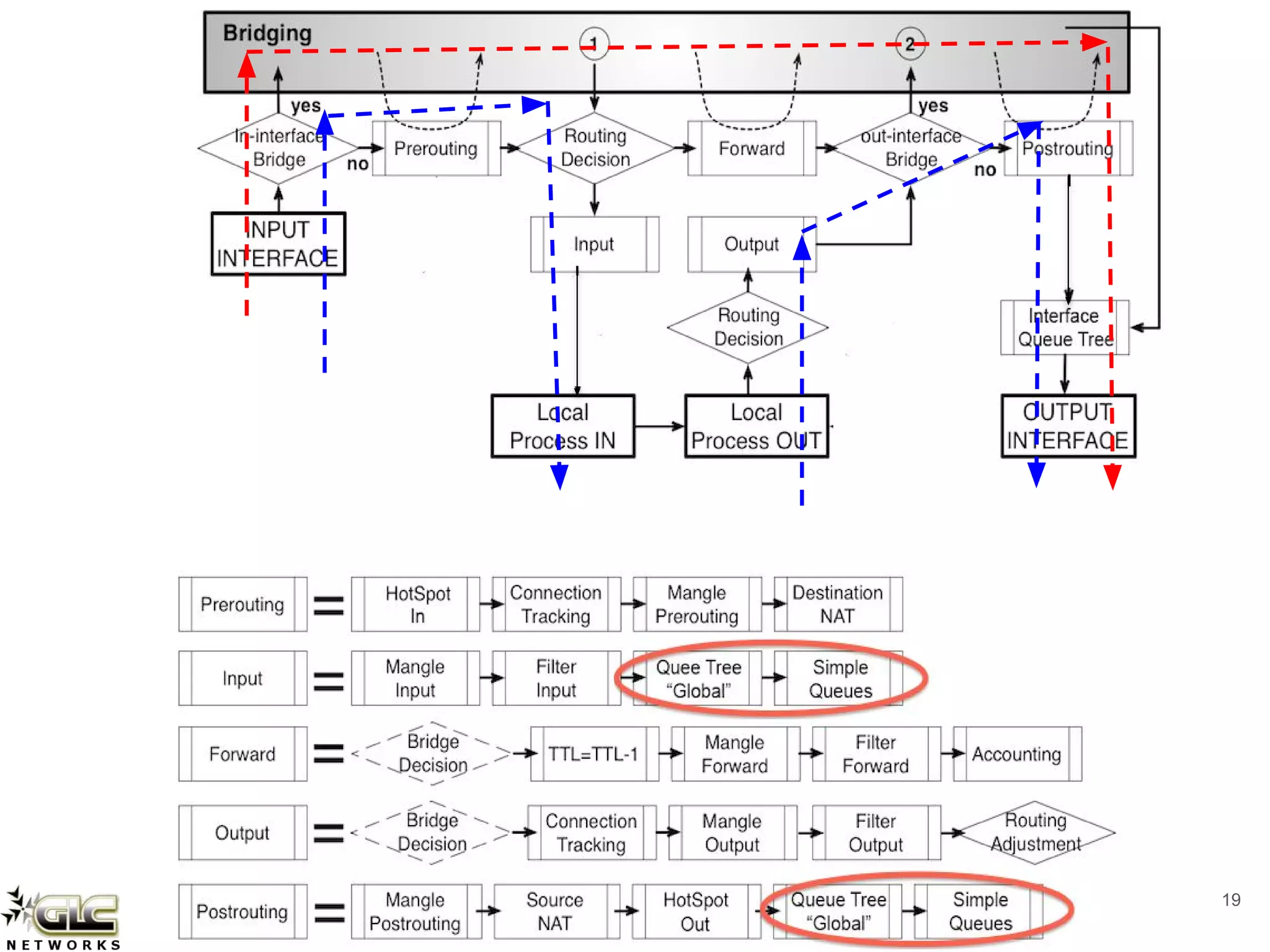
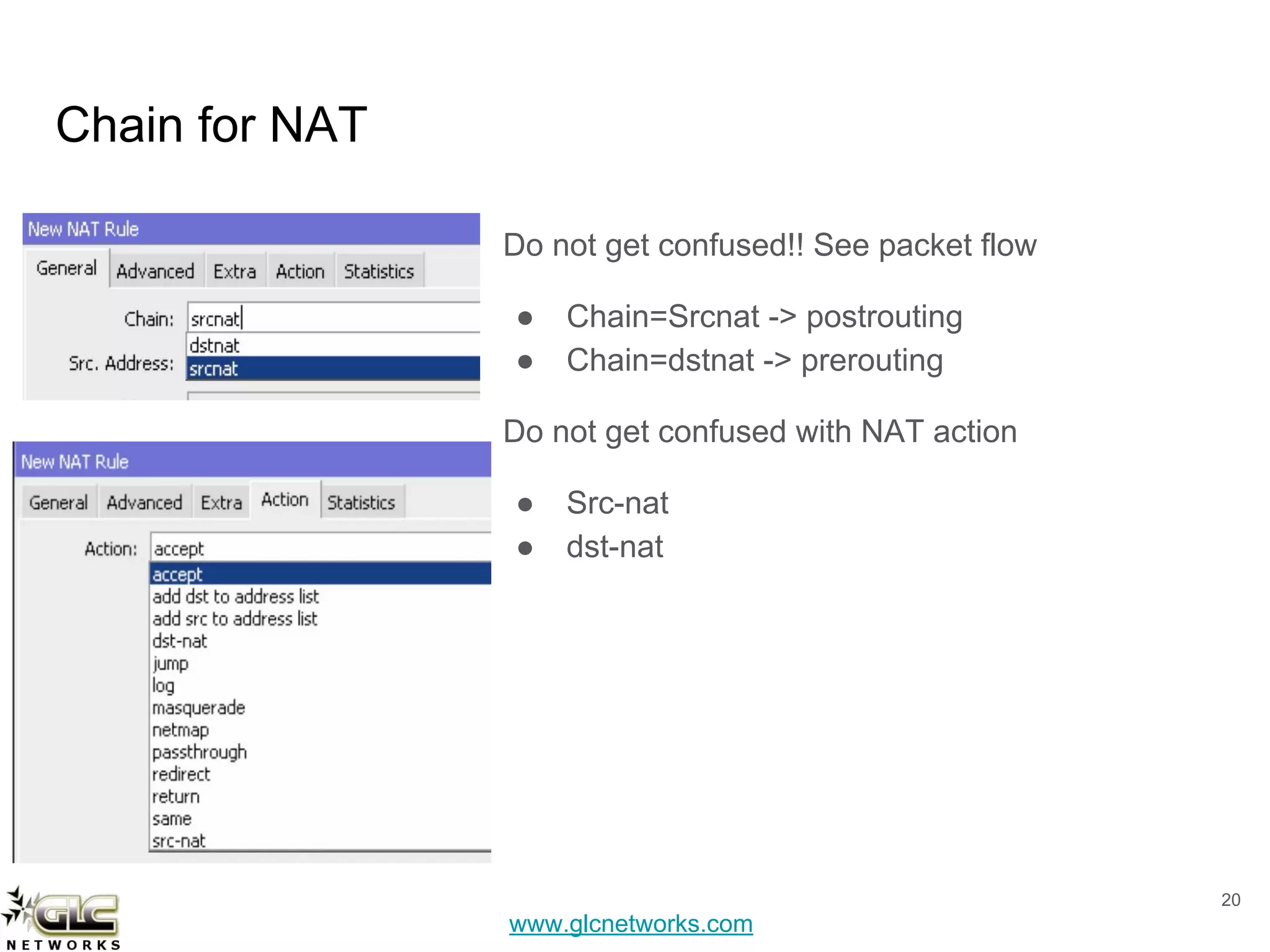
Do not get confused!! See packet flow
● Chain=Srcnat -> postrouting
● Chain=dstnat -> prerouting
Do not get confused with NAT action
● Src-nat
● dst-nat
20
www.glcnetworks.com
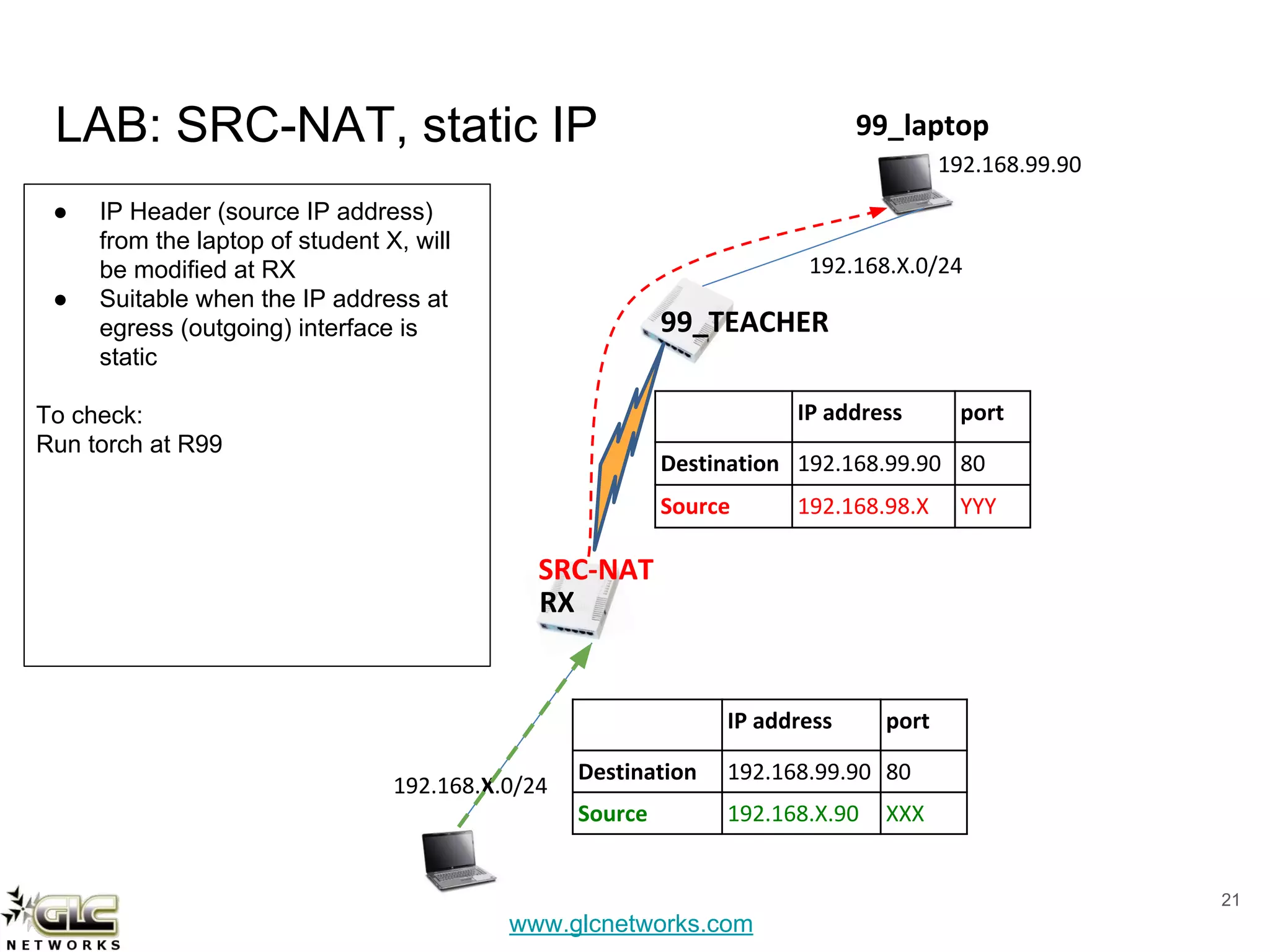
LAB: SRC-NAT, static IP
21
192.168.X.0/24
192.168.99.90
99_TEACHER
192.168.X.0/24
99_laptop
IP address port
Destination 192.168.99.90 80
Source 192.168.X.90 XXX
IP address port
Destination 192.168.99.90 80
Source 192.168.98.X YYY
RX
SRC-NAT
● IP Header (source IP address)
from the laptop of student X, will
be modified at RX
● Suitable when the IP address at
egress (outgoing) interface is
static
To check:
Run torch at R99
www.glcnetworks.com
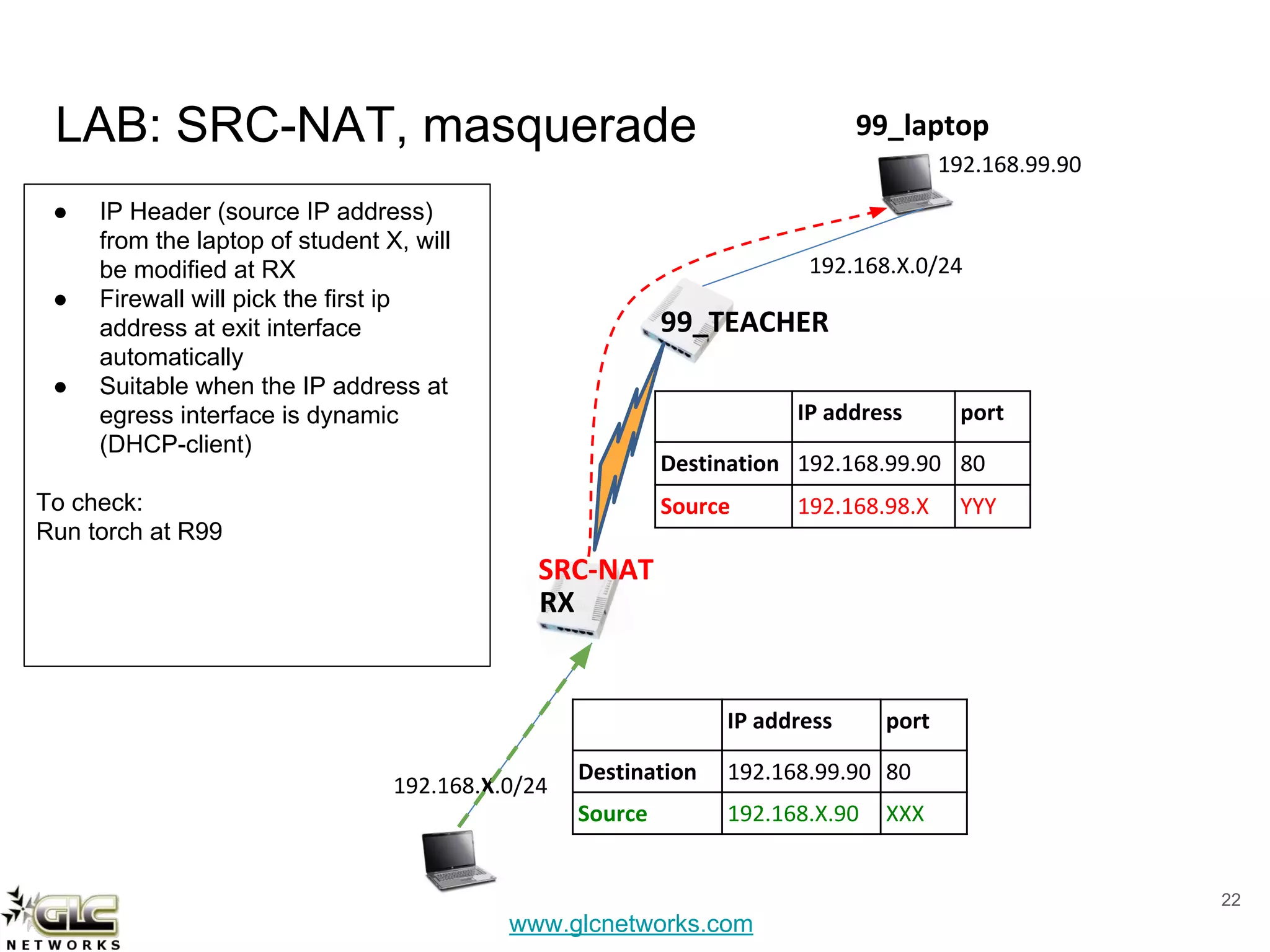
LAB: SRC-NAT, masquerade
22
192.168.X.0/24
192.168.99.90
99_TEACHER
192.168.X.0/24
99_laptop
IP address port
Destination 192.168.99.90 80
Source 192.168.X.90 XXX
IP address port
Destination 192.168.99.90 80
Source 192.168.98.X YYY
RX
SRC-NAT
● IP Header (source IP address)
from the laptop of student X, will
be modified at RX
● Firewall will pick the first ip
address at exit interface
automatically
● Suitable when the IP address at
egress interface is dynamic
(DHCP-client)
To check:
Run torch at R99
www.glcnetworks.com
Example masquerade
23
www.glcnetworks.com
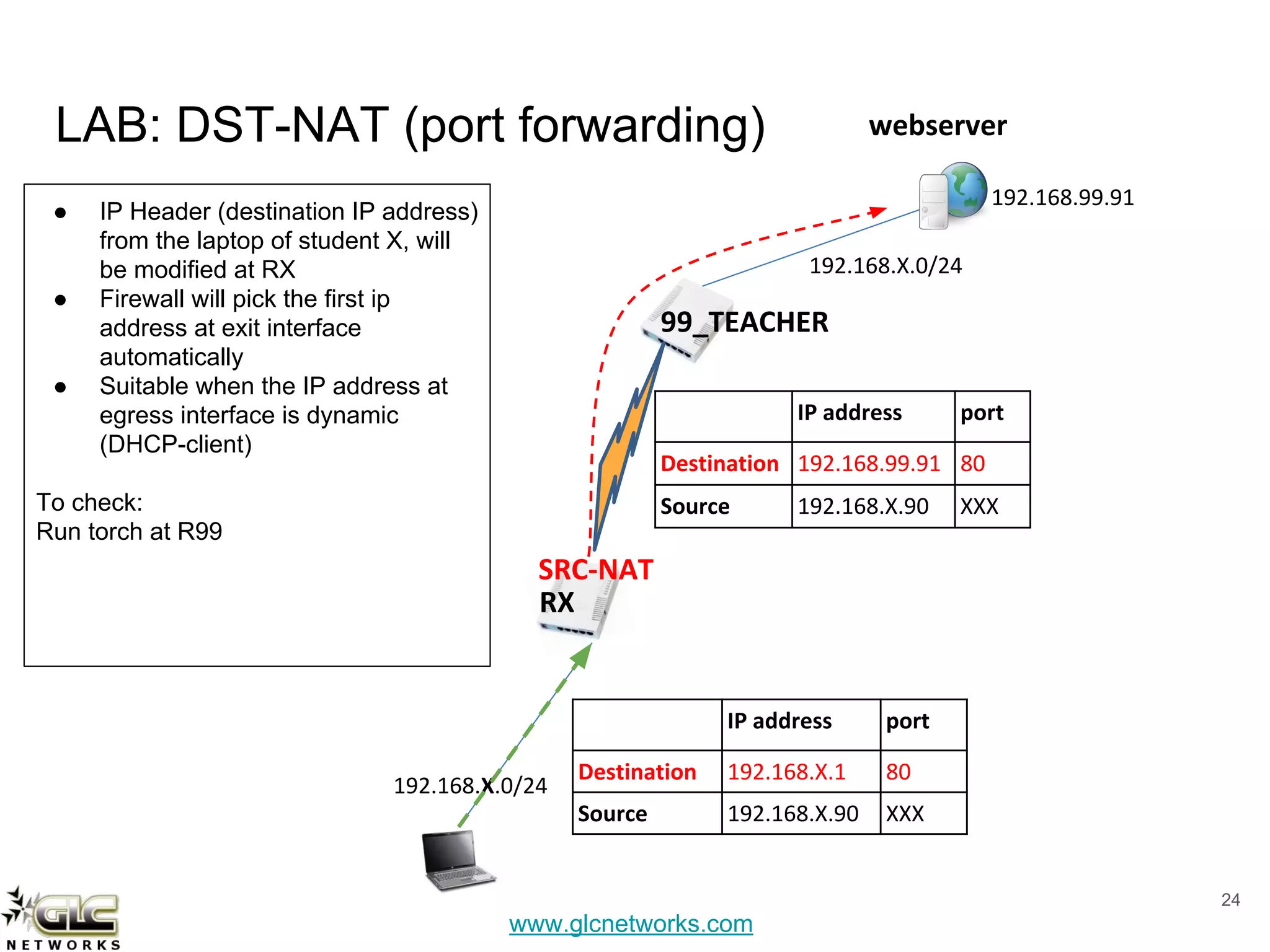
LAB: DST-NAT (port forwarding)
24
192.168.X.0/24
192.168.99.91
99_TEACHER
192.168.X.0/24
webserver
IP address port
Destination 192.168.X.1 80
Source 192.168.X.90 XXX
IP address port
Destination 192.168.99.91 80
Source 192.168.X.90 XXX
RX
SRC-NAT
● IP Header (destination IP address)
from the laptop of student X, will
be modified at RX
● Firewall will pick the first ip
address at exit interface
automatically
● Suitable when the IP address at
egress interface is dynamic
(DHCP-client)
To check:
Run torch at R99
www.glcnetworks.com
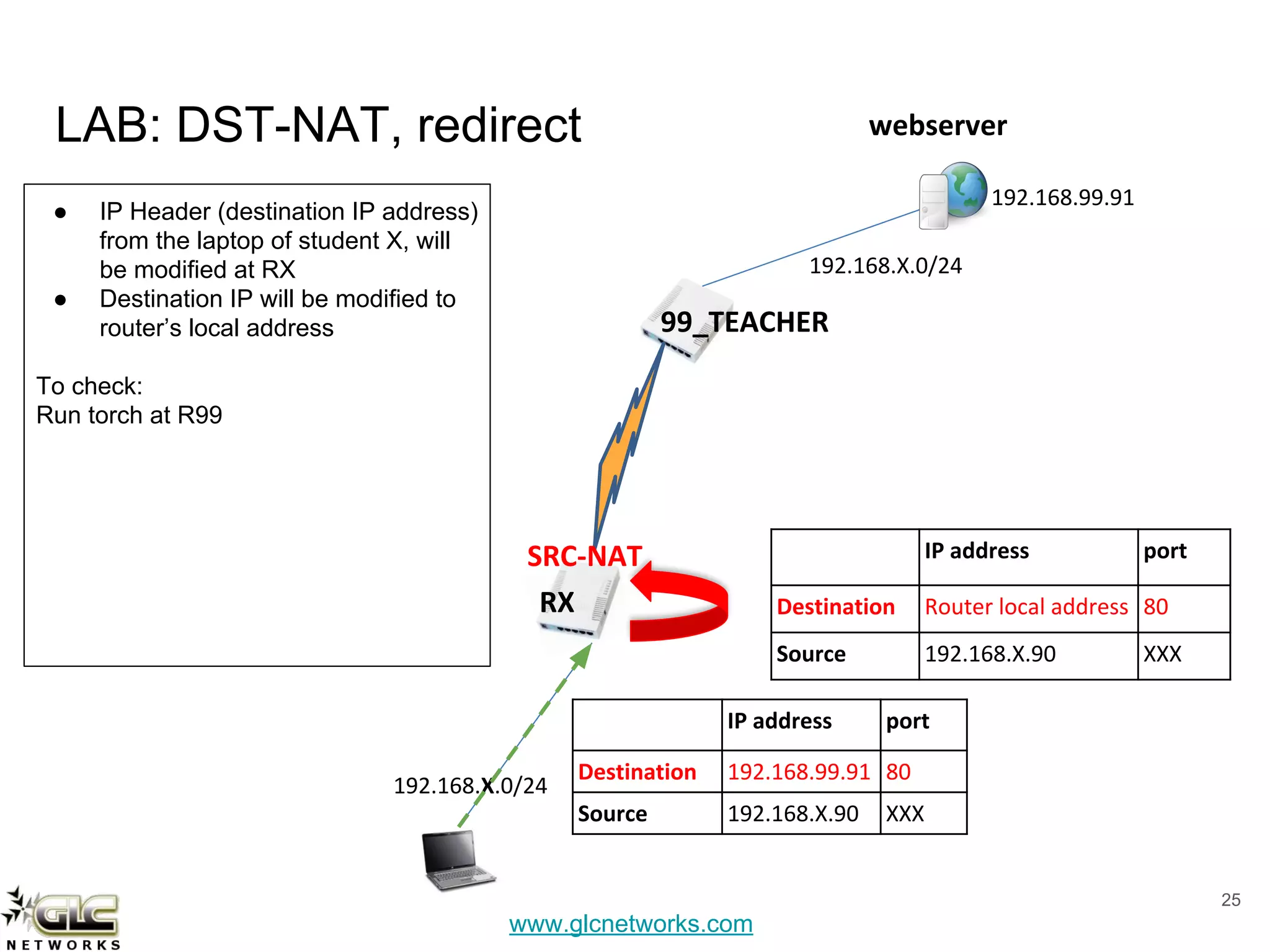
LAB: DST-NAT, redirect
25
192.168.X.0/24
192.168.99.91
99_TEACHER
192.168.X.0/24
webserver
IP address port
Destination 192.168.99.91 80
Source 192.168.X.90 XXX
IP address port
Destination Router local address 80
Source 192.168.X.90 XXX
RX
SRC-NAT
● IP Header (destination IP address)
from the laptop of student X, will
be modified at RX
● Destination IP will be modified to
router’s local address
To check:
Run torch at R99
www.glcnetworks.com
QA
26
www.glcnetworks.com
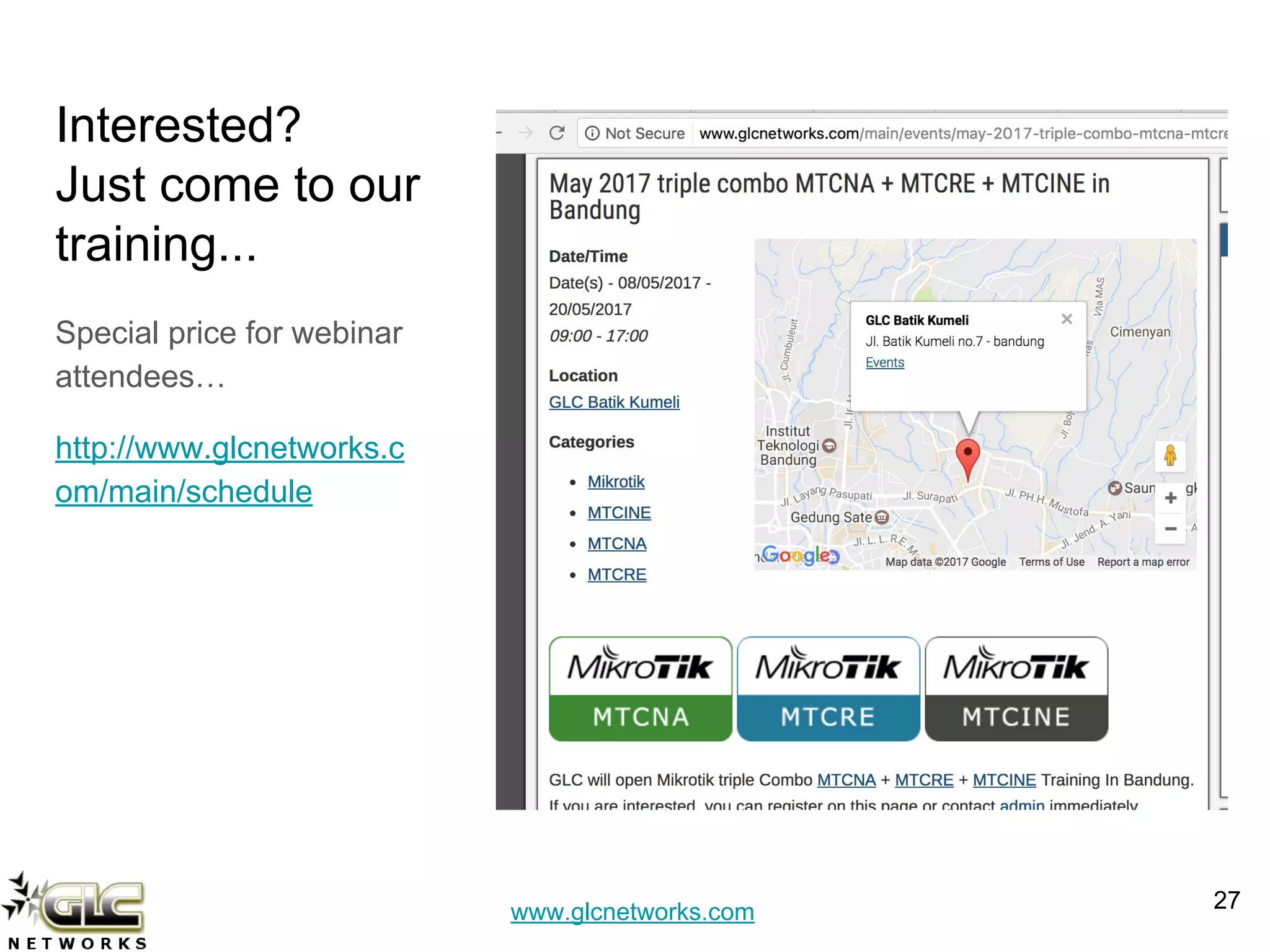
Interested?
Just come to our
training...
Special price for webinar
attendees…
http://www.glcnetworks.c
om/main/schedule
27
www.glcnetworks.com
End of slides
● Thank you for your attention
● Please submit your feedback: http://bit.ly/glcfeedback
● Like our facebook page: “GLC networks”
● Slide: http://www.slideshare.net/r41nbuw
● Recording: https://www.youtube.com/channel/UCI611_IIkQC0rsLWIFIx_yg
● Stay tune with our schedule
28

Mikrotik firewall NAT

  • 1.
    www.glcnetworks.com FIREWALL NAT GLC webinar,04 may 2017 Achmad Mardiansyah achmad@glcnetworks.com GLC Networks, Indonesia 1
  • 2.
    www.glcnetworks.com Agenda ● Introduction ● NetworkAddress Translation (NAT) ● Mikrotik firewall NAT ● Demo ● Q & A 2
  • 3.
    www.glcnetworks.com What is GLC? ●Garda Lintas Cakrawala (www.glcnetworks.com) ● An Indonesian company ● Located in Bandung ● Areas: Training, IT Consulting ● Mikrotik Certified Training Partner ● Mikrotik Certified Consultant ● Mikrotik distributor 3
  • 4.
    www.glcnetworks.com About GLC webinar? ●First webinar: january 1, 2010 (title: tahun baru bersama solaris - new year with solaris OS) ● As a sharing event with various topics: linux, networking, wireless, database, programming, etc ● Regular schedule: every 2 weeks ● Irregular schedule: as needed ● Checking schedule: http://www.glcnetworks.com/main/sc hedule ● You are invited to be a presenter ○ No need to be an expert ○ This is a forum for sharing: knowledge, experiences, information 4
  • 5.
    www.glcnetworks.com Trainer Introduction ● Name:Achmad Mardiansyah ● Base: bandung, Indonesia ● Linux user since 1999 ● Mikrotik user since 2007 ● Certified Trainer (MTCNA/RE/WE/UME/INE/TCE) ● Mikrotik Certified Consultant ● Work: Telco engineer, Sysadmin, PHP programmer, and Lecturer ● Personal website: http://achmadjournal.com ● More info: http://au.linkedin.com/in/achmadmardiansyah 5
  • 6.
    www.glcnetworks.com Please introduce yourself ●Your name ● Your company/university? ● Your networking experience? ● Your mikrotik experience? ● Your expectation from this course? 6
  • 7.
    www.glcnetworks.com What is Mikrotik? ●Name of a company ● A brand ● A program (e.g. mikrotik academy) ● Headquarter: Riga, Latvia 7
  • 8.
    www.glcnetworks.com What are mikrotikproducts? ● Router OS ○ The OS. Specialized for networking ○ Website: www.mikrotik.com/download ● RouterBoard ○ The hardware ○ RouterOS installed ○ Website: www.routerboard.com 8
  • 9.
    www.glcnetworks.com What Router OScan do? ● Go to www.mikrotik.com ○ Download: what_is_routeros.pdf ○ Download: product catalog ○ Download: newsletter 9
  • 10.
    www.glcnetworks.com What are Mikrotiktraining & certifications? 10 Certificate validity is 3 years
  • 11.
  • 12.
    www.glcnetworks.com At early stageof internet… (1990s) ● Most of computer’s communication is using layer 3 protocol (Internet Protocol - IP) ● The use of CIDR (classless interdomain routing) -> no class A, B C ● There was a body that registers blocks of IP address ● Internet was booming -> IP address was running out !!! ● NAT was born 12
  • 13.
    www.glcnetworks.com RFC1631 - Network AddressTranslator ● With NAT, IP address now is divided into 2 groups: ○ Private IP address ○ Public IP address ● Private IP address will be translated to public IP address ● Router that supports NAT will do mapping of IP address and port 13
  • 14.
    www.glcnetworks.com Mapping between privateIP to public IP 14 Source: wikimedia.org
  • 15.
    www.glcnetworks.com Mapping public IPand port to private IP 15 Source: wikimedia.org
  • 16.
  • 17.
    www.glcnetworks.com However, NAT isnot good…. ● Its not scalable. even with the box that is so called “carrier grade NAT” ● Some applications do not work under NATed environment: Online game (xbox, steam), voip, security, etc ● Dont use NAT on your local network -> use routing protocol instead ● NAT is not designed to be permanent solution Ultimate Solution: USE IPv6 !!! 17
  • 18.
  • 19.
  • 20.
    www.glcnetworks.com Chain for NAT Donot get confused!! See packet flow ● Chain=Srcnat -> postrouting ● Chain=dstnat -> prerouting Do not get confused with NAT action ● Src-nat ● dst-nat 20
  • 21.
    www.glcnetworks.com LAB: SRC-NAT, staticIP 21 192.168.X.0/24 192.168.99.90 99_TEACHER 192.168.X.0/24 99_laptop IP address port Destination 192.168.99.90 80 Source 192.168.X.90 XXX IP address port Destination 192.168.99.90 80 Source 192.168.98.X YYY RX SRC-NAT ● IP Header (source IP address) from the laptop of student X, will be modified at RX ● Suitable when the IP address at egress (outgoing) interface is static To check: Run torch at R99
  • 22.
    www.glcnetworks.com LAB: SRC-NAT, masquerade 22 192.168.X.0/24 192.168.99.90 99_TEACHER 192.168.X.0/24 99_laptop IPaddress port Destination 192.168.99.90 80 Source 192.168.X.90 XXX IP address port Destination 192.168.99.90 80 Source 192.168.98.X YYY RX SRC-NAT ● IP Header (source IP address) from the laptop of student X, will be modified at RX ● Firewall will pick the first ip address at exit interface automatically ● Suitable when the IP address at egress interface is dynamic (DHCP-client) To check: Run torch at R99
  • 23.
  • 24.
    www.glcnetworks.com LAB: DST-NAT (portforwarding) 24 192.168.X.0/24 192.168.99.91 99_TEACHER 192.168.X.0/24 webserver IP address port Destination 192.168.X.1 80 Source 192.168.X.90 XXX IP address port Destination 192.168.99.91 80 Source 192.168.X.90 XXX RX SRC-NAT ● IP Header (destination IP address) from the laptop of student X, will be modified at RX ● Firewall will pick the first ip address at exit interface automatically ● Suitable when the IP address at egress interface is dynamic (DHCP-client) To check: Run torch at R99
  • 25.
    www.glcnetworks.com LAB: DST-NAT, redirect 25 192.168.X.0/24 192.168.99.91 99_TEACHER 192.168.X.0/24 webserver IPaddress port Destination 192.168.99.91 80 Source 192.168.X.90 XXX IP address port Destination Router local address 80 Source 192.168.X.90 XXX RX SRC-NAT ● IP Header (destination IP address) from the laptop of student X, will be modified at RX ● Destination IP will be modified to router’s local address To check: Run torch at R99
  • 26.
  • 27.
    www.glcnetworks.com Interested? Just come toour training... Special price for webinar attendees… http://www.glcnetworks.c om/main/schedule 27
  • 28.
    www.glcnetworks.com End of slides ●Thank you for your attention ● Please submit your feedback: http://bit.ly/glcfeedback ● Like our facebook page: “GLC networks” ● Slide: http://www.slideshare.net/r41nbuw ● Recording: https://www.youtube.com/channel/UCI611_IIkQC0rsLWIFIx_yg ● Stay tune with our schedule 28