1
Bluetooth®
is a registered trademark of Bluetooth SIG, Inc.
Threats to mobile devices are more prevalent and increasing in scope and complexity. Users of mobile devices desire to take full advantage of the features
available on those devices, but many of the features provide convenience and capability but sacrifice security. This best practices guide outlines steps the
users can take to better protect personal devices and information.
Cellular service signal Wi-Fi
Near-field communication (NFC)
Airplane mode Location
Bluetooth® Recent applications soft key
Agree, but we should consider the
foreign policy implications...…
John Doe
Hey, John! Check out the
foreign policy implications...
https://foreignp0licy.net/
whitepapers/tradistan-
energy-forecast.pdf
9:31
YES
INSTALL NEW APP?
X NO
Disable location services when
not needed. DO NOT bring the
device with you to sensitive
locations.
Power the device off and on weekly.
DO NOT have sensitive conversations
on personal devices, even if you think
the content is generic.
DO NOT open unknown email
attachments and links. Even
legitimate senders can pass on
malicious content accidently
or as a result of being
compromised or impersonated
by a malicious actor.
Unexpected pop-ups like this are
usually malicious. If one appears,
forcibly close all applications
(i.e., iPhone®2
: double tap the
Home button* or Android®3
:
click “recent apps” soft key).
Only use original charging cords or
charging accessories purchased
from a trusted manufacturer. DO NOT
use public USB charging stations.
Never connect personal devices to
government computers, whether via
physical connection, Wi-Fi,
or Bluetooth®
.
31
!
Update the device software
and applications as soon as
possible.
Consider using Biometrics
(e.g., fingerprint, face)
authentication for
convenience to protect data
of minimal sensitivity.
Use strong lock-screen
pins/passwords: a 6-digit
PIN is sufficient if the
device wipes itself after
10 incorrect password
attempts. Set the device
to lock automatically
after 5 minutes.
Install a minimal number of
applications and only ones
from official application
stores. Be cautious of the
personal data entered
into applications. Close
applications when not using.
DO NOT jailbreak or root the device.
National Security Agency | Mobile Device Best Practices
2
iPhone®
and iPhone®
applications are a registered trademark of Apple, Inc.
3
Android®
is a registered trademark of Google LLC.
*For iPhone X®2
or later, see: support.apple.com/en-us/HT201330 The information contained in this document was developed in the course of NSA’s Cybersecurity mission, including its
responsibilities to assist Executive departments and agencies with operations security programs.
U/OO/155488-20 | PP-20-0622| Oct 2020 rev 1.1
Disable Bluetooth®
when
you are not using it. Airplane
mode does not always
disable Bluetooth®
.
DO NOT connect to public
Wi-Fi networks. Disable
Wi-Fi when unneeded. Delete
unused Wi-Fi networks.
Maintain physical control of
the device. Avoid connecting to
unknown removable media.
Consider using a protective
case that drowns the
microphone to block room
audio (hot-miking attack).
Cover the camera when
not using.
CASE
DO NOT have sensitive
conversations in the
vicinity of mobile devices
not configured to handle
secure voice.
PASSWORDS
SOFTWARE UPDATES
BIOMETRICS
TEXT MESSAGES
!
APPLICATIONS
!
WI-FI
!
CONTROL
!
TRUSTED ACCESSORIES
!
POP-UPS
!
LOCATION
POWER
MODIFY
ATTACHMENTS/LINKS
BLUETOOTH®1
CONVERSATIONS
Do
Avoid
! Do Not
Disable
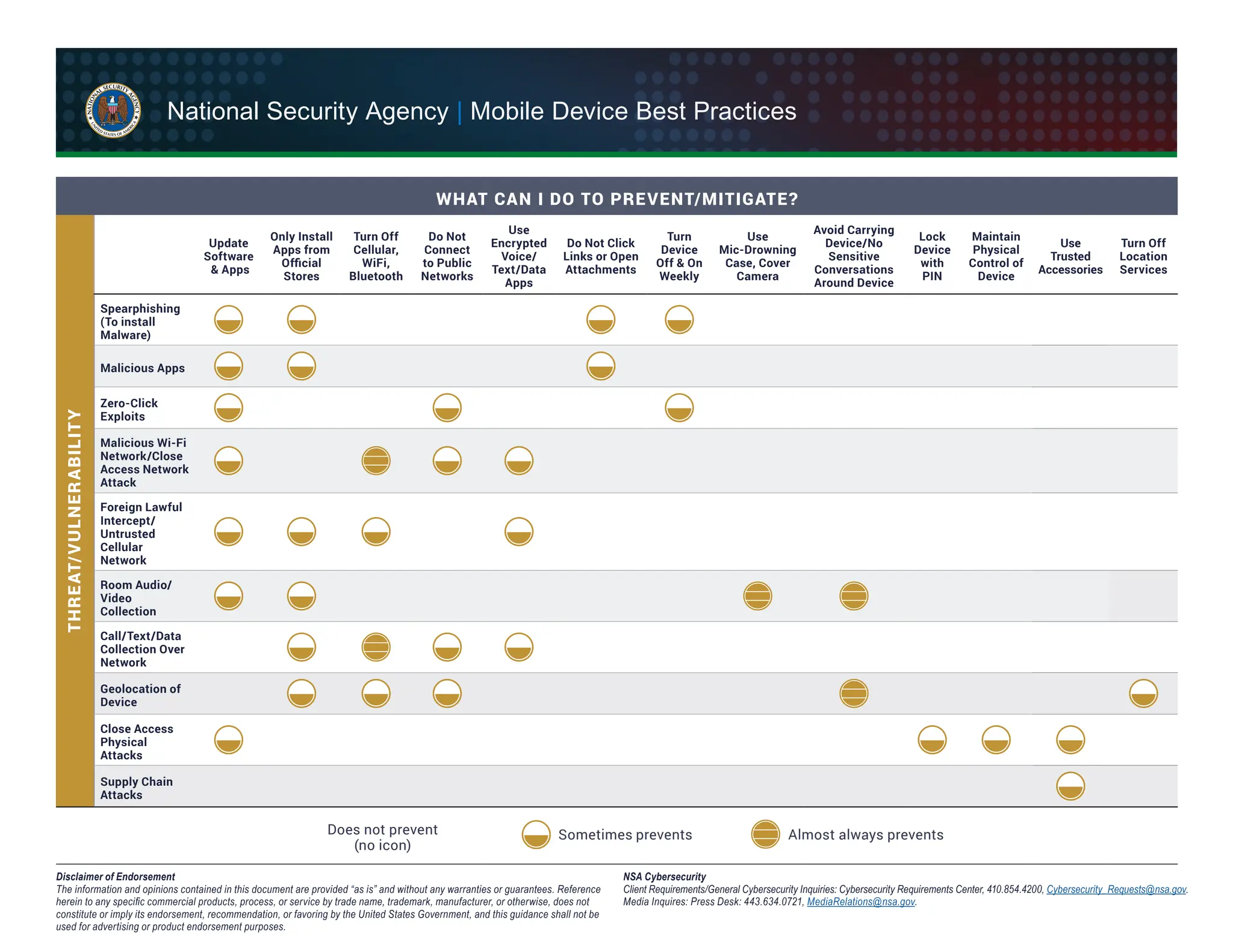
WHAT CAN I DO TO PREVENT/MITIGATE?
Update
Software
& Apps
Only Install
Apps from
Official
Stores
Turn Off
Cellular,
WiFi,
Bluetooth
Do Not
Connect
to Public
Networks
Use
Encrypted
Voice/
Text/Data
Apps
Do Not Click
Links or Open
Attachments
Turn
Device
Off & On
Weekly
Use
Mic-Drowning
Case, Cover
Camera
Avoid Carrying
Device/No
Sensitive
Conversations
Around Device
Lock
Device
with
PIN
Maintain
Physical
Control of
Device
Use
Trusted
Accessories
Turn Off
Location
Services
Spearphishing
(To install
Malware)
Malicious Apps
Zero-Click
Exploits
Malicious Wi-Fi
Network/Close
Access Network
Attack
Foreign Lawful
Intercept/
Untrusted
Cellular
Network
Room Audio/
Video
Collection
Call/Text/Data
Collection Over
Network
Geolocation of
Device
Close Access
Physical
Attacks
Supply Chain
Attacks
Almost always prevents
Sometimes prevents
Does not prevent
(no icon)
THRE
AT/
VULNER
ABILIT
Y
National Security Agency | Mobile Device Best Practices
Disclaimer of Endorsement
The information and opinions contained in this document are provided “as is” and without any warranties or guarantees. Reference
herein to any specific commercial products, process, or service by trade name, trademark, manufacturer, or otherwise, does not
constitute or imply its endorsement, recommendation, or favoring by the United States Government, and this guidance shall not be
used for advertising or product endorsement purposes.
NSA Cybersecurity
Client Requirements/General Cybersecurity Inquiries: Cybersecurity Requirements Center, 410.854.4200, Cybersecurity_Requests@nsa.gov.
Media Inquires: Press Desk: 443.634.0721, MediaRelations@nsa.gov.

National Security Agency - NSA mobile device best practices

  • 1.
    1 Bluetooth® is a registeredtrademark of Bluetooth SIG, Inc. Threats to mobile devices are more prevalent and increasing in scope and complexity. Users of mobile devices desire to take full advantage of the features available on those devices, but many of the features provide convenience and capability but sacrifice security. This best practices guide outlines steps the users can take to better protect personal devices and information. Cellular service signal Wi-Fi Near-field communication (NFC) Airplane mode Location Bluetooth® Recent applications soft key Agree, but we should consider the foreign policy implications...… John Doe Hey, John! Check out the foreign policy implications... https://foreignp0licy.net/ whitepapers/tradistan- energy-forecast.pdf 9:31 YES INSTALL NEW APP? X NO Disable location services when not needed. DO NOT bring the device with you to sensitive locations. Power the device off and on weekly. DO NOT have sensitive conversations on personal devices, even if you think the content is generic. DO NOT open unknown email attachments and links. Even legitimate senders can pass on malicious content accidently or as a result of being compromised or impersonated by a malicious actor. Unexpected pop-ups like this are usually malicious. If one appears, forcibly close all applications (i.e., iPhone®2 : double tap the Home button* or Android®3 : click “recent apps” soft key). Only use original charging cords or charging accessories purchased from a trusted manufacturer. DO NOT use public USB charging stations. Never connect personal devices to government computers, whether via physical connection, Wi-Fi, or Bluetooth® . 31 ! Update the device software and applications as soon as possible. Consider using Biometrics (e.g., fingerprint, face) authentication for convenience to protect data of minimal sensitivity. Use strong lock-screen pins/passwords: a 6-digit PIN is sufficient if the device wipes itself after 10 incorrect password attempts. Set the device to lock automatically after 5 minutes. Install a minimal number of applications and only ones from official application stores. Be cautious of the personal data entered into applications. Close applications when not using. DO NOT jailbreak or root the device. National Security Agency | Mobile Device Best Practices 2 iPhone® and iPhone® applications are a registered trademark of Apple, Inc. 3 Android® is a registered trademark of Google LLC. *For iPhone X®2 or later, see: support.apple.com/en-us/HT201330 The information contained in this document was developed in the course of NSA’s Cybersecurity mission, including its responsibilities to assist Executive departments and agencies with operations security programs. U/OO/155488-20 | PP-20-0622| Oct 2020 rev 1.1 Disable Bluetooth® when you are not using it. Airplane mode does not always disable Bluetooth® . DO NOT connect to public Wi-Fi networks. Disable Wi-Fi when unneeded. Delete unused Wi-Fi networks. Maintain physical control of the device. Avoid connecting to unknown removable media. Consider using a protective case that drowns the microphone to block room audio (hot-miking attack). Cover the camera when not using. CASE DO NOT have sensitive conversations in the vicinity of mobile devices not configured to handle secure voice. PASSWORDS SOFTWARE UPDATES BIOMETRICS TEXT MESSAGES ! APPLICATIONS ! WI-FI ! CONTROL ! TRUSTED ACCESSORIES ! POP-UPS ! LOCATION POWER MODIFY ATTACHMENTS/LINKS BLUETOOTH®1 CONVERSATIONS Do Avoid ! Do Not Disable
  • 2.
    WHAT CAN IDO TO PREVENT/MITIGATE? Update Software & Apps Only Install Apps from Official Stores Turn Off Cellular, WiFi, Bluetooth Do Not Connect to Public Networks Use Encrypted Voice/ Text/Data Apps Do Not Click Links or Open Attachments Turn Device Off & On Weekly Use Mic-Drowning Case, Cover Camera Avoid Carrying Device/No Sensitive Conversations Around Device Lock Device with PIN Maintain Physical Control of Device Use Trusted Accessories Turn Off Location Services Spearphishing (To install Malware) Malicious Apps Zero-Click Exploits Malicious Wi-Fi Network/Close Access Network Attack Foreign Lawful Intercept/ Untrusted Cellular Network Room Audio/ Video Collection Call/Text/Data Collection Over Network Geolocation of Device Close Access Physical Attacks Supply Chain Attacks Almost always prevents Sometimes prevents Does not prevent (no icon) THRE AT/ VULNER ABILIT Y National Security Agency | Mobile Device Best Practices Disclaimer of Endorsement The information and opinions contained in this document are provided “as is” and without any warranties or guarantees. Reference herein to any specific commercial products, process, or service by trade name, trademark, manufacturer, or otherwise, does not constitute or imply its endorsement, recommendation, or favoring by the United States Government, and this guidance shall not be used for advertising or product endorsement purposes. NSA Cybersecurity Client Requirements/General Cybersecurity Inquiries: Cybersecurity Requirements Center, 410.854.4200, Cybersecurity_Requests@nsa.gov. Media Inquires: Press Desk: 443.634.0721, MediaRelations@nsa.gov.