www.glcnetworks.com
ISP load balancing with
GLC webinar, 16 november 2017
Achmad Mardiansyah
achmad@glcnetworks.com
GLC Networks, Indonesia
1
ECMP
www.glcnetworks.com
Agenda
● Introduction
● Prerequisite
● Load balancing
● ECMP method
● Demo
● Q & A
2
www.glcnetworks.com
What is GLC?
● Garda Lintas Cakrawala (www.glcnetworks.com)
● An Indonesian company
● Located in Bandung
● Areas: Training, IT Consulting
● Mikrotik Certified Training Partner/Consultant/Distributor
● Ubiquiti Certified Trainer/Consultant
● RedHat Certified Trainer
3
www.glcnetworks.com
About GLC webinar?
● First webinar: january 1, 2010 (title:
tahun baru bersama solaris - new
year with solaris OS)
● As a sharing event with various
topics: linux, networking, wireless,
database, programming, etc
● Regular schedule: every 2 weeks
● Irregular schedule: as needed
● Checking schedule:
http://www.glcnetworks.com/main/sc
hedule
● You are invited to be a presenter
○ No need to be an expert
○ This is a forum for sharing: knowledge,
experiences, information
4
www.glcnetworks.com
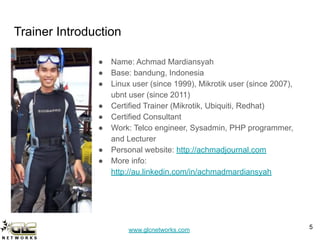
Trainer Introduction
● Name: Achmad Mardiansyah
● Base: bandung, Indonesia
● Linux user (since 1999), Mikrotik user (since 2007),
ubnt user (since 2011)
● Certified Trainer (Mikrotik, Ubiquiti, Redhat)
● Certified Consultant
● Work: Telco engineer, Sysadmin, PHP programmer,
and Lecturer
● Personal website: http://achmadjournal.com
● More info:
http://au.linkedin.com/in/achmadmardiansyah
5
www.glcnetworks.com
Please introduce yourself
● Your name
● Your company/university?
● Your networking experience?
● Your mikrotik experience?
● Your expectation from this course?
6
www.glcnetworks.com
Prerequisite
7
www.glcnetworks.com
wait, load balancing is easy...
● Lots of tutorials in internet!!!
● Tons of pages, tutorials, videos
Questions to reader:
● Do you really understand what its
written?
● Did the writer understand what
they wrote?
● Is it really works as expected in
your environment?
8
www.glcnetworks.com
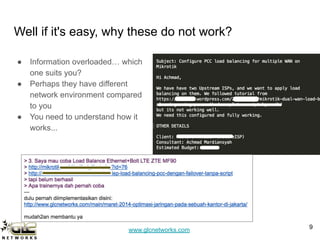
Well if it's easy, why these do not work?
● Information overloaded… which
one suits you?
● Perhaps they have different
network environment compared
to you
● You need to understand how it
works...
9
www.glcnetworks.com
You should understand
● Firewall mangle. See GLC webinar: Mikrotik
firewall mangle
● The differences between:
○ Packet vs Connection
○ Mark: packet / connection / routing
● How routing works: see GLC webinar:
Routing with mikrotik
● How NAT works: see GLC webinar: Mikrotik
firewall NAT
10
www.glcnetworks.com
Load balancing
11
www.glcnetworks.com
What is (traffic) load balancing?
● Is a process to forward traffic on several
links
● Applied on router
● Load balancing != failover
● Can be done on per-packet or
per-connection basis
● This doesnt increase your data rate.
4mbps ISP1 + 4mbps ISP2 -> your
download rate = 8mbps (WRONG!)
Benefits:
● Increase utilisation of upstream links
12
ISP1 ISP2
LAN
ether1 ether2
webserver
ISP3
ether4
R1
www.glcnetworks.com
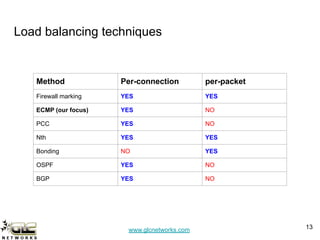
Load balancing techniques
13
Method Per-connection per-packet
Firewall marking YES YES
ECMP (our focus) YES NO
PCC YES NO
Nth YES YES
Bonding NO YES
OSPF YES NO
BGP YES NO
www.glcnetworks.com
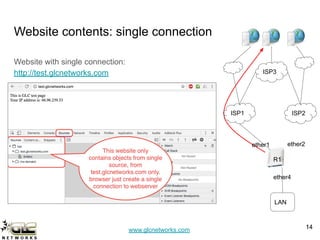
Website contents: single connection
Website with single connection:
http://test.glcnetworks.com
14
14
ISP1 ISP2
LAN
ether1 ether2
ISP3
ether4
R1
www.glcnetworks.com
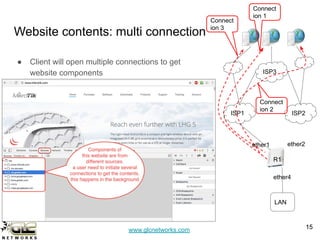
Website contents: multi connection
15
15
ISP1 ISP2
LAN
ether1 ether2
ISP3
● Client will open multiple connections to get
website components
Connect
ion 1
Connect
ion 2
Connect
ion 3
ether4
R1
www.glcnetworks.com
ECMP technique
16
www.glcnetworks.com
How ECMP works?
ECMP = Equal Cost Multi-Path ECMP. steps:
● ECMP will identify connections from clients
(per-src-dst-address combination)
● ECMP will forward the connection based on
weight/cost of the gateway
● ECMP does persistent per-connection load
balancing
● Its recommended to use “check-gateway” option
● As soon as one of the gateway is not responding,
check-gateway will remove it from gateway list,
and you will have a "failover" effect.
17
ISP1
LAN
ether1
ISP3
conn 1
conn 2
conn 3
ISP2
ether2
ether4
www.glcnetworks.com
ECMP Example
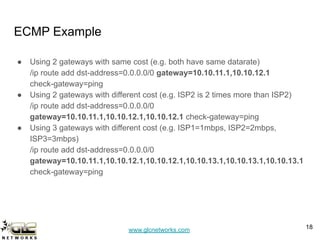
● Using 2 gateways with same cost (e.g. both have same datarate)
/ip route add dst-address=0.0.0.0/0 gateway=10.10.11.1,10.10.12.1
check-gateway=ping
● Using 2 gateways with different cost (e.g. ISP2 is 2 times more than ISP2)
/ip route add dst-address=0.0.0.0/0
gateway=10.10.11.1,10.10.12.1,10.10.12.1 check-gateway=ping
● Using 3 gateways with different cost (e.g. ISP1=1mbps, ISP2=2mbps,
ISP3=3mbps)
/ip route add dst-address=0.0.0.0/0
gateway=10.10.11.1,10.10.12.1,10.10.12.1,10.10.13.1,10.10.13.1,10.10.13.1
check-gateway=ping
18
www.glcnetworks.com
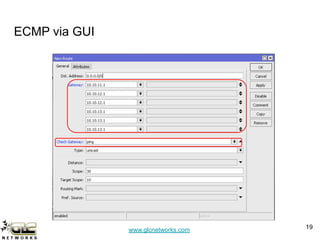
ECMP via GUI
19
www.glcnetworks.com
Some issues
● Beware of NAT connection
○ webserver will see inbound connection from 2 ip public addresses
○ webpage will not displayed correctly (as it is considered illegal session)
○ banking / https / game websites will not allow you to access their website, because they will
see you are coming from 2 more IP addresses. often you need to do authentication again
● Beware of DNS rules
○ Some DNS server will give different result based on source IP address -> could make website
inaccessible
● Routing table flushing
○ Routing table is flushed every 10 minutes, to avoid possible DOS attack
○ Your persistent route will be created again -> this could lead to a new IP address (if you use
NAT)
20
www.glcnetworks.com
Recommendations
● Avoid NAT if possible -> dont use private address -> use public IP address
end-to-end -> use BGP -> better performance
● Use IPv6 -> IPv6 is designed to have a large address space
21
www.glcnetworks.com
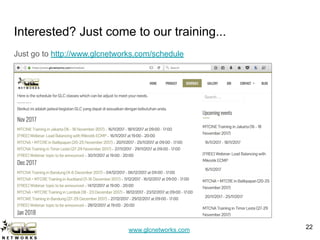
Interested? Just come to our training...
Just go to http://www.glcnetworks.com/schedule
22
www.glcnetworks.com
End of slides
● Thank you for your attention
● Please submit your feedback: http://bit.ly/glcfeedback
● Like our facebook page: “GLC networks”
● Slide: http://www.slideshare.net/r41nbuw
● Recording: https://www.youtube.com/channel/UCI611_IIkQC0rsLWIFIx_yg
● Stay tune with our schedule
23

ISP Load Balancing with Mikrotik ECMP

  • 1.
    www.glcnetworks.com ISP load balancingwith GLC webinar, 16 november 2017 Achmad Mardiansyah achmad@glcnetworks.com GLC Networks, Indonesia 1 ECMP
  • 2.
    www.glcnetworks.com Agenda ● Introduction ● Prerequisite ●Load balancing ● ECMP method ● Demo ● Q & A 2
  • 3.
    www.glcnetworks.com What is GLC? ●Garda Lintas Cakrawala (www.glcnetworks.com) ● An Indonesian company ● Located in Bandung ● Areas: Training, IT Consulting ● Mikrotik Certified Training Partner/Consultant/Distributor ● Ubiquiti Certified Trainer/Consultant ● RedHat Certified Trainer 3
  • 4.
    www.glcnetworks.com About GLC webinar? ●First webinar: january 1, 2010 (title: tahun baru bersama solaris - new year with solaris OS) ● As a sharing event with various topics: linux, networking, wireless, database, programming, etc ● Regular schedule: every 2 weeks ● Irregular schedule: as needed ● Checking schedule: http://www.glcnetworks.com/main/sc hedule ● You are invited to be a presenter ○ No need to be an expert ○ This is a forum for sharing: knowledge, experiences, information 4
  • 5.
    www.glcnetworks.com Trainer Introduction ● Name:Achmad Mardiansyah ● Base: bandung, Indonesia ● Linux user (since 1999), Mikrotik user (since 2007), ubnt user (since 2011) ● Certified Trainer (Mikrotik, Ubiquiti, Redhat) ● Certified Consultant ● Work: Telco engineer, Sysadmin, PHP programmer, and Lecturer ● Personal website: http://achmadjournal.com ● More info: http://au.linkedin.com/in/achmadmardiansyah 5
  • 6.
    www.glcnetworks.com Please introduce yourself ●Your name ● Your company/university? ● Your networking experience? ● Your mikrotik experience? ● Your expectation from this course? 6
  • 7.
  • 8.
    www.glcnetworks.com wait, load balancingis easy... ● Lots of tutorials in internet!!! ● Tons of pages, tutorials, videos Questions to reader: ● Do you really understand what its written? ● Did the writer understand what they wrote? ● Is it really works as expected in your environment? 8
  • 9.
    www.glcnetworks.com Well if it'seasy, why these do not work? ● Information overloaded… which one suits you? ● Perhaps they have different network environment compared to you ● You need to understand how it works... 9
  • 10.
    www.glcnetworks.com You should understand ●Firewall mangle. See GLC webinar: Mikrotik firewall mangle ● The differences between: ○ Packet vs Connection ○ Mark: packet / connection / routing ● How routing works: see GLC webinar: Routing with mikrotik ● How NAT works: see GLC webinar: Mikrotik firewall NAT 10
  • 11.
  • 12.
    www.glcnetworks.com What is (traffic)load balancing? ● Is a process to forward traffic on several links ● Applied on router ● Load balancing != failover ● Can be done on per-packet or per-connection basis ● This doesnt increase your data rate. 4mbps ISP1 + 4mbps ISP2 -> your download rate = 8mbps (WRONG!) Benefits: ● Increase utilisation of upstream links 12 ISP1 ISP2 LAN ether1 ether2 webserver ISP3 ether4 R1
  • 13.
    www.glcnetworks.com Load balancing techniques 13 MethodPer-connection per-packet Firewall marking YES YES ECMP (our focus) YES NO PCC YES NO Nth YES YES Bonding NO YES OSPF YES NO BGP YES NO
  • 14.
    www.glcnetworks.com Website contents: singleconnection Website with single connection: http://test.glcnetworks.com 14 14 ISP1 ISP2 LAN ether1 ether2 ISP3 ether4 R1
  • 15.
    www.glcnetworks.com Website contents: multiconnection 15 15 ISP1 ISP2 LAN ether1 ether2 ISP3 ● Client will open multiple connections to get website components Connect ion 1 Connect ion 2 Connect ion 3 ether4 R1
  • 16.
  • 17.
    www.glcnetworks.com How ECMP works? ECMP= Equal Cost Multi-Path ECMP. steps: ● ECMP will identify connections from clients (per-src-dst-address combination) ● ECMP will forward the connection based on weight/cost of the gateway ● ECMP does persistent per-connection load balancing ● Its recommended to use “check-gateway” option ● As soon as one of the gateway is not responding, check-gateway will remove it from gateway list, and you will have a "failover" effect. 17 ISP1 LAN ether1 ISP3 conn 1 conn 2 conn 3 ISP2 ether2 ether4
  • 18.
    www.glcnetworks.com ECMP Example ● Using2 gateways with same cost (e.g. both have same datarate) /ip route add dst-address=0.0.0.0/0 gateway=10.10.11.1,10.10.12.1 check-gateway=ping ● Using 2 gateways with different cost (e.g. ISP2 is 2 times more than ISP2) /ip route add dst-address=0.0.0.0/0 gateway=10.10.11.1,10.10.12.1,10.10.12.1 check-gateway=ping ● Using 3 gateways with different cost (e.g. ISP1=1mbps, ISP2=2mbps, ISP3=3mbps) /ip route add dst-address=0.0.0.0/0 gateway=10.10.11.1,10.10.12.1,10.10.12.1,10.10.13.1,10.10.13.1,10.10.13.1 check-gateway=ping 18
  • 19.
  • 20.
    www.glcnetworks.com Some issues ● Bewareof NAT connection ○ webserver will see inbound connection from 2 ip public addresses ○ webpage will not displayed correctly (as it is considered illegal session) ○ banking / https / game websites will not allow you to access their website, because they will see you are coming from 2 more IP addresses. often you need to do authentication again ● Beware of DNS rules ○ Some DNS server will give different result based on source IP address -> could make website inaccessible ● Routing table flushing ○ Routing table is flushed every 10 minutes, to avoid possible DOS attack ○ Your persistent route will be created again -> this could lead to a new IP address (if you use NAT) 20
  • 21.
    www.glcnetworks.com Recommendations ● Avoid NATif possible -> dont use private address -> use public IP address end-to-end -> use BGP -> better performance ● Use IPv6 -> IPv6 is designed to have a large address space 21
  • 22.
    www.glcnetworks.com Interested? Just cometo our training... Just go to http://www.glcnetworks.com/schedule 22
  • 23.
    www.glcnetworks.com End of slides ●Thank you for your attention ● Please submit your feedback: http://bit.ly/glcfeedback ● Like our facebook page: “GLC networks” ● Slide: http://www.slideshare.net/r41nbuw ● Recording: https://www.youtube.com/channel/UCI611_IIkQC0rsLWIFIx_yg ● Stay tune with our schedule 23