www.glcnetworks.com
API
(Application Programming Interface)
GLC webinar, 29 December 2016
Achmad Mardiansyah
achmad@glcnetworks.com
GLC Networks, Indonesia
www.glcnetworks.com
Agenda
● Introduction
● API intro
● Mikrotik API
● Demo
● Q & A
2
www.glcnetworks.com
What is GLC?
● Garda Lintas Cakrawala (www.glcnetworks.com)
● An Indonesian company
● Located in Bandung
● Areas: Training, IT Consulting
● Mikrotik Certified Training Partner
● Mikrotik Certified Consultant
● Mikrotik distributor
3
www.glcnetworks.com
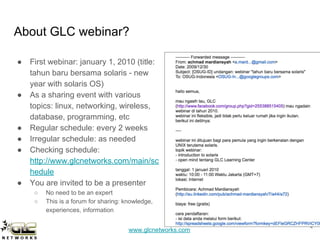
About GLC webinar?
● First webinar: january 1, 2010 (title:
tahun baru bersama solaris - new
year with solaris OS)
● As a sharing event with various
topics: linux, networking, wireless,
database, programming, etc
● Regular schedule: every 2 weeks
● Irregular schedule: as needed
● Checking schedule:
http://www.glcnetworks.com/main/sc
hedule
● You are invited to be a presenter
○ No need to be an expert
○ This is a forum for sharing: knowledge,
experiences, information
4
www.glcnetworks.com
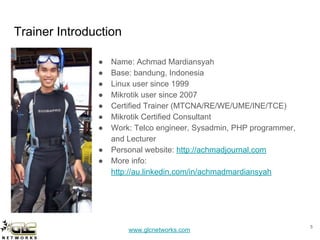
Trainer Introduction
● Name: Achmad Mardiansyah
● Base: bandung, Indonesia
● Linux user since 1999
● Mikrotik user since 2007
● Certified Trainer (MTCNA/RE/WE/UME/INE/TCE)
● Mikrotik Certified Consultant
● Work: Telco engineer, Sysadmin, PHP programmer,
and Lecturer
● Personal website: http://achmadjournal.com
● More info:
http://au.linkedin.com/in/achmadmardiansyah
5
www.glcnetworks.com
Please introduce yourself
● Your name
● Your company/university?
● Your networking experience?
● Your mikrotik experience?
● Your expectation from this course?
6
www.glcnetworks.com
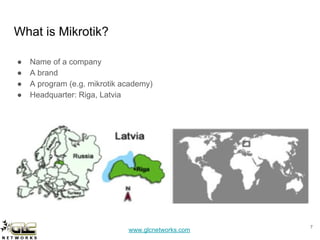
What is Mikrotik?
● Name of a company
● A brand
● A program (e.g. mikrotik academy)
● Headquarter: Riga, Latvia
7
www.glcnetworks.com
What are mikrotik products?
● Router OS
○ The OS. Specialized for networking
○ Website: www.mikrotik.com/download
● RouterBoard
○ The hardware
○ RouterOS installed
○ Website: www.routerboard.com
8
www.glcnetworks.com
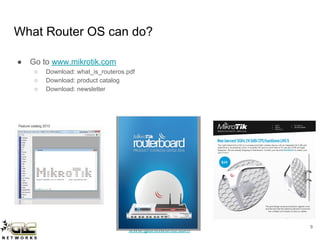
What Router OS can do?
● Go to www.mikrotik.com
○ Download: what_is_routeros.pdf
○ Download: product catalog
○ Download: newsletter
9
www.glcnetworks.com
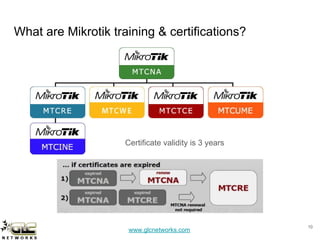
What are Mikrotik training & certifications?
10
Certificate validity is 3 years
www.glcnetworks.com
API intro
11
www.glcnetworks.com
What is API?
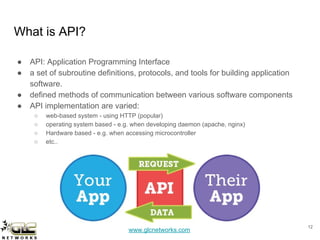
● API: Application Programming Interface
● a set of subroutine definitions, protocols, and tools for building application
software.
● defined methods of communication between various software components
● API implementation are varied:
○ web-based system - using HTTP (popular)
○ operating system based - e.g. when developing daemon (apache, nginx)
○ Hardware based - e.g. when accessing microcontroller
○ etc..
12
www.glcnetworks.com
Why use API?
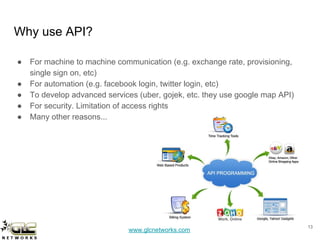
● For machine to machine communication (e.g. exchange rate, provisioning,
single sign on, etc)
● For automation (e.g. facebook login, twitter login, etc)
● To develop advanced services (uber, gojek, etc. they use google map API)
● For security. Limitation of access rights
● Many other reasons...
13
www.glcnetworks.com
Mikrotik API
14
www.glcnetworks.com
Mikrotik API
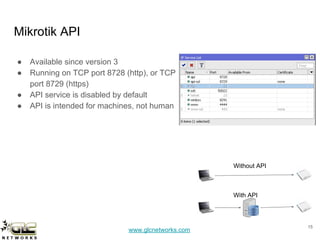
● Available since version 3
● Running on TCP port 8728 (http), or TCP
port 8729 (https)
● API service is disabled by default
● API is intended for machines, not human
15
Without API
With API
www.glcnetworks.com
Why use Mikrotik API?
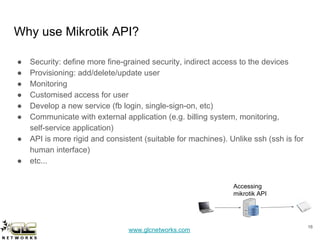
● Security: define more fine-grained security, indirect access to the devices
● Provisioning: add/delete/update user
● Monitoring
● Customised access for user
● Develop a new service (fb login, single-sign-on, etc)
● Communicate with external application (e.g. billing system, monitoring,
self-service application)
● API is more rigid and consistent (suitable for machines). Unlike ssh (ssh is for
human interface)
● etc...
1616
Accessing
mikrotik API
www.glcnetworks.com
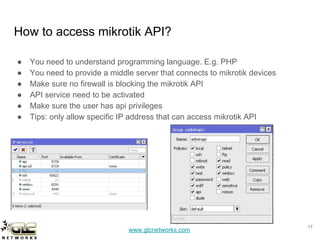
How to access mikrotik API?
● You need to understand programming language. E.g. PHP
● You need to provide a middle server that connects to mikrotik devices
● Make sure no firewall is blocking the mikrotik API
● API service need to be activated
● Make sure the user has api privileges
● Tips: only allow specific IP address that can access mikrotik API
17
www.glcnetworks.com
DEMO
18
www.glcnetworks.com
Using Mikrotik API
In this example we will use:
● PHP programming language
● Mikrotik PHP class by BenMenking
(https://github.com/BenMenking/routeros-api)
● A webserver that can access mikrotik devices
191919
Accessing
mikrotik API
www.glcnetworks.com
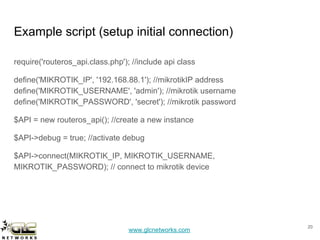
Example script (setup initial connection)
require('routeros_api.class.php'); //include api class
define('MIKROTIK_IP', '192.168.88.1'); //mikrotikIP address
define('MIKROTIK_USERNAME', 'admin'); //mikrotik username
define('MIKROTIK_PASSWORD', 'secret'); //mikrotik password
$API = new routeros_api(); //create a new instance
$API->debug = true; //activate debug
$API->connect(MIKROTIK_IP, MIKROTIK_USERNAME,
MIKROTIK_PASSWORD); // connect to mikrotik device
20
www.glcnetworks.com
add hotspot user using API (prepare user)
$user = array(1 => array('name' => 'user1', 'password' => 'pass1'),
2 => array('name' => 'user2', 'password' => 'pass2'),
3 => array('name' => 'user3', 'password' => 'pass3'),
4 => array('name' => 'user4', 'password' => 'pass4'),
5 => array('name' => 'user5', 'password' => 'pass5'),
);
foreach($user as $tmp) {
$username="=name=";
$username.=$tmp['name'];
$pass="=password=";
$pass.=$tmp['password'];
$server="=server=";
$server.=SERVER;$profile="=profile=";
$profile.=PROFILE;
21
www.glcnetworks.com
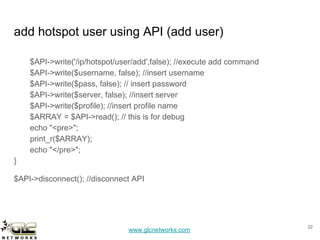
add hotspot user using API (add user)
$API->write('/ip/hotspot/user/add',false); //execute add command
$API->write($username, false); //insert username
$API->write($pass, false); // insert password
$API->write($server, false); //insert server
$API->write($profile); //insert profile name
$ARRAY = $API->read(); // this is for debug
echo "<pre>";
print_r($ARRAY);
echo "</pre>";
}
$API->disconnect(); //disconnect API
22
www.glcnetworks.com
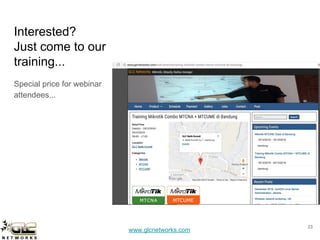
Interested?
Just come to our
training...
Special price for webinar
attendees...
23
www.glcnetworks.com
End of slides
● Thank you for your attention
● Please submit your feedback: http://bit.ly/glcfeedback
● Like our facebook page: “GLC networks”
● Stay tune with our schedule
24

Mikrotik API

  • 1.
    www.glcnetworks.com API (Application Programming Interface) GLCwebinar, 29 December 2016 Achmad Mardiansyah achmad@glcnetworks.com GLC Networks, Indonesia
  • 2.
    www.glcnetworks.com Agenda ● Introduction ● APIintro ● Mikrotik API ● Demo ● Q & A 2
  • 3.
    www.glcnetworks.com What is GLC? ●Garda Lintas Cakrawala (www.glcnetworks.com) ● An Indonesian company ● Located in Bandung ● Areas: Training, IT Consulting ● Mikrotik Certified Training Partner ● Mikrotik Certified Consultant ● Mikrotik distributor 3
  • 4.
    www.glcnetworks.com About GLC webinar? ●First webinar: january 1, 2010 (title: tahun baru bersama solaris - new year with solaris OS) ● As a sharing event with various topics: linux, networking, wireless, database, programming, etc ● Regular schedule: every 2 weeks ● Irregular schedule: as needed ● Checking schedule: http://www.glcnetworks.com/main/sc hedule ● You are invited to be a presenter ○ No need to be an expert ○ This is a forum for sharing: knowledge, experiences, information 4
  • 5.
    www.glcnetworks.com Trainer Introduction ● Name:Achmad Mardiansyah ● Base: bandung, Indonesia ● Linux user since 1999 ● Mikrotik user since 2007 ● Certified Trainer (MTCNA/RE/WE/UME/INE/TCE) ● Mikrotik Certified Consultant ● Work: Telco engineer, Sysadmin, PHP programmer, and Lecturer ● Personal website: http://achmadjournal.com ● More info: http://au.linkedin.com/in/achmadmardiansyah 5
  • 6.
    www.glcnetworks.com Please introduce yourself ●Your name ● Your company/university? ● Your networking experience? ● Your mikrotik experience? ● Your expectation from this course? 6
  • 7.
    www.glcnetworks.com What is Mikrotik? ●Name of a company ● A brand ● A program (e.g. mikrotik academy) ● Headquarter: Riga, Latvia 7
  • 8.
    www.glcnetworks.com What are mikrotikproducts? ● Router OS ○ The OS. Specialized for networking ○ Website: www.mikrotik.com/download ● RouterBoard ○ The hardware ○ RouterOS installed ○ Website: www.routerboard.com 8
  • 9.
    www.glcnetworks.com What Router OScan do? ● Go to www.mikrotik.com ○ Download: what_is_routeros.pdf ○ Download: product catalog ○ Download: newsletter 9
  • 10.
    www.glcnetworks.com What are Mikrotiktraining & certifications? 10 Certificate validity is 3 years
  • 11.
  • 12.
    www.glcnetworks.com What is API? ●API: Application Programming Interface ● a set of subroutine definitions, protocols, and tools for building application software. ● defined methods of communication between various software components ● API implementation are varied: ○ web-based system - using HTTP (popular) ○ operating system based - e.g. when developing daemon (apache, nginx) ○ Hardware based - e.g. when accessing microcontroller ○ etc.. 12
  • 13.
    www.glcnetworks.com Why use API? ●For machine to machine communication (e.g. exchange rate, provisioning, single sign on, etc) ● For automation (e.g. facebook login, twitter login, etc) ● To develop advanced services (uber, gojek, etc. they use google map API) ● For security. Limitation of access rights ● Many other reasons... 13
  • 14.
  • 15.
    www.glcnetworks.com Mikrotik API ● Availablesince version 3 ● Running on TCP port 8728 (http), or TCP port 8729 (https) ● API service is disabled by default ● API is intended for machines, not human 15 Without API With API
  • 16.
    www.glcnetworks.com Why use MikrotikAPI? ● Security: define more fine-grained security, indirect access to the devices ● Provisioning: add/delete/update user ● Monitoring ● Customised access for user ● Develop a new service (fb login, single-sign-on, etc) ● Communicate with external application (e.g. billing system, monitoring, self-service application) ● API is more rigid and consistent (suitable for machines). Unlike ssh (ssh is for human interface) ● etc... 1616 Accessing mikrotik API
  • 17.
    www.glcnetworks.com How to accessmikrotik API? ● You need to understand programming language. E.g. PHP ● You need to provide a middle server that connects to mikrotik devices ● Make sure no firewall is blocking the mikrotik API ● API service need to be activated ● Make sure the user has api privileges ● Tips: only allow specific IP address that can access mikrotik API 17
  • 18.
  • 19.
    www.glcnetworks.com Using Mikrotik API Inthis example we will use: ● PHP programming language ● Mikrotik PHP class by BenMenking (https://github.com/BenMenking/routeros-api) ● A webserver that can access mikrotik devices 191919 Accessing mikrotik API
  • 20.
    www.glcnetworks.com Example script (setupinitial connection) require('routeros_api.class.php'); //include api class define('MIKROTIK_IP', '192.168.88.1'); //mikrotikIP address define('MIKROTIK_USERNAME', 'admin'); //mikrotik username define('MIKROTIK_PASSWORD', 'secret'); //mikrotik password $API = new routeros_api(); //create a new instance $API->debug = true; //activate debug $API->connect(MIKROTIK_IP, MIKROTIK_USERNAME, MIKROTIK_PASSWORD); // connect to mikrotik device 20
  • 21.
    www.glcnetworks.com add hotspot userusing API (prepare user) $user = array(1 => array('name' => 'user1', 'password' => 'pass1'), 2 => array('name' => 'user2', 'password' => 'pass2'), 3 => array('name' => 'user3', 'password' => 'pass3'), 4 => array('name' => 'user4', 'password' => 'pass4'), 5 => array('name' => 'user5', 'password' => 'pass5'), ); foreach($user as $tmp) { $username="=name="; $username.=$tmp['name']; $pass="=password="; $pass.=$tmp['password']; $server="=server="; $server.=SERVER;$profile="=profile="; $profile.=PROFILE; 21
  • 22.
    www.glcnetworks.com add hotspot userusing API (add user) $API->write('/ip/hotspot/user/add',false); //execute add command $API->write($username, false); //insert username $API->write($pass, false); // insert password $API->write($server, false); //insert server $API->write($profile); //insert profile name $ARRAY = $API->read(); // this is for debug echo "<pre>"; print_r($ARRAY); echo "</pre>"; } $API->disconnect(); //disconnect API 22
  • 23.
    www.glcnetworks.com Interested? Just come toour training... Special price for webinar attendees... 23
  • 24.
    www.glcnetworks.com End of slides ●Thank you for your attention ● Please submit your feedback: http://bit.ly/glcfeedback ● Like our facebook page: “GLC networks” ● Stay tune with our schedule 24