USE IMPROVE EVANGELIZE
Solaris 10
Container
Achmad Mardiansyah
Sun Certified Network Administrator
Freelance Engineer
2
USE IMPROVE EVANGELIZE
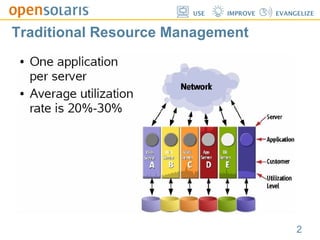
Traditional Resource Management
3
USE IMPROVE EVANGELIZE
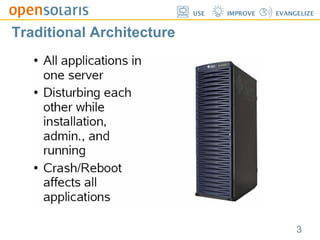
Traditional Architecture
4
USE IMPROVE EVANGELIZE
Putting it all together...
5
USE IMPROVE EVANGELIZE
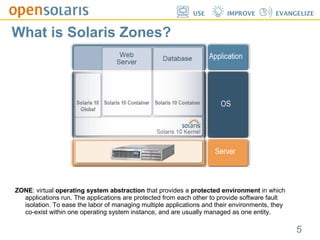
What is Solaris Zones?
ZONE: virtual operating system abstraction that provides a protected environment in which
applications run. The applications are protected from each other to provide software fault
isolation. To ease the labor of managing multiple applications and their environments, they
co-exist within one operating system instance, and are usually managed as one entity.
6
USE IMPROVE EVANGELIZE
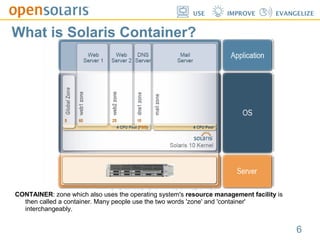
What is Solaris Container?
CONTAINER: zone which also uses the operating system's resource management facility is
then called a container. Many people use the two words 'zone' and 'container'
interchangeably.
7
USE IMPROVE EVANGELIZE
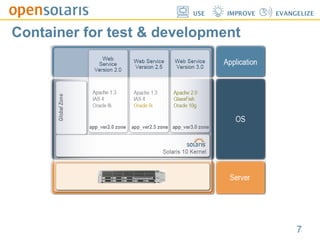
Container for test & development
8
USE IMPROVE EVANGELIZE
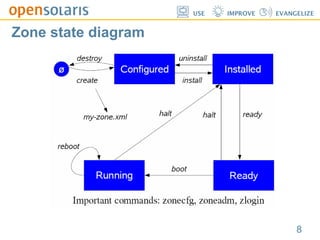
Zone state diagram
9
USE IMPROVE EVANGELIZE
Container demo...
10
USE IMPROVE EVANGELIZE
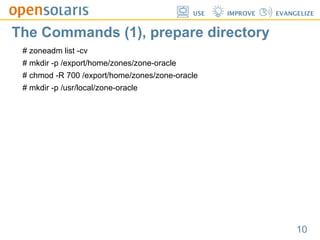
The Commands (1), prepare directory
# zoneadm list -cv
# mkdir -p /export/home/zones/zone-oracle
# chmod -R 700 /export/home/zones/zone-oracle
# mkdir -p /usr/local/zone-oracle
11
USE IMPROVE EVANGELIZE
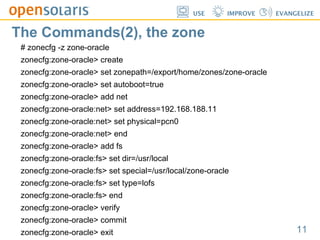
The Commands(2), the zone
# zonecfg -z zone-oracle
zonecfg:zone-oracle> create
zonecfg:zone-oracle> set zonepath=/export/home/zones/zone-oracle
zonecfg:zone-oracle> set autoboot=true
zonecfg:zone-oracle> add net
zonecfg:zone-oracle:net> set address=192.168.188.11
zonecfg:zone-oracle:net> set physical=pcn0
zonecfg:zone-oracle:net> end
zonecfg:zone-oracle> add fs
zonecfg:zone-oracle:fs> set dir=/usr/local
zonecfg:zone-oracle:fs> set special=/usr/local/zone-oracle
zonecfg:zone-oracle:fs> set type=lofs
zonecfg:zone-oracle:fs> end
zonecfg:zone-oracle> verify
zonecfg:zone-oracle> commit
zonecfg:zone-oracle> exit
12
USE IMPROVE EVANGELIZE
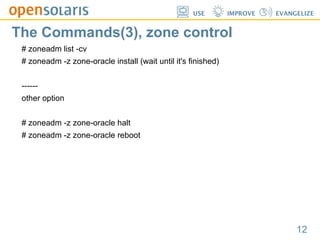
The Commands(3), zone control
# zoneadm list -cv
# zoneadm -z zone-oracle install (wait until it's finished)
------
other option
# zoneadm -z zone-oracle halt
# zoneadm -z zone-oracle reboot
13
USE IMPROVE EVANGELIZE
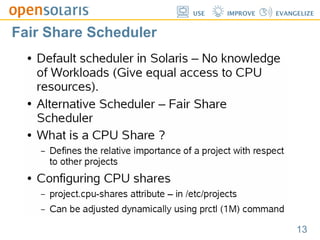
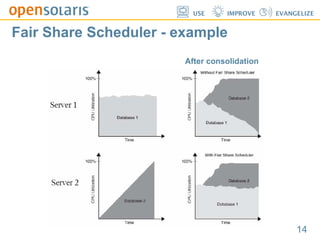
Fair Share Scheduler
14
USE IMPROVE EVANGELIZE
Fair Share Scheduler - example
After consolidation
15
USE IMPROVE EVANGELIZE
Demo continue...
16
USE IMPROVE EVANGELIZE
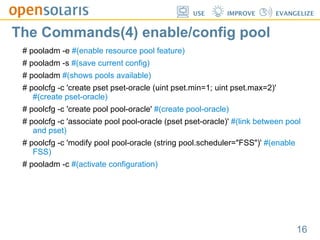
The Commands(4) enable/config pool
# pooladm -e #(enable resource pool feature)
# pooladm -s #(save current config)
# pooladm #(shows pools available)
# poolcfg -c 'create pset pset-oracle (uint pset.min=1; uint pset.max=2)'
#(create pset-oracle)
# poolcfg -c 'create pool pool-oracle' #(create pool-oracle)
# poolcfg -c 'associate pool pool-oracle (pset pset-oracle)' #(link between pool
and pset)
# poolcfg -c 'modify pool pool-oracle (string pool.scheduler="FSS")' #(enable
FSS)
# pooladm -c #(activate configuration)
17
USE IMPROVE EVANGELIZE
The Commands(5) assign FSS to zone
# zonecfg -z zone-oracle
zonecfg:zone-oracle> set pool=pool-oracle
zonecfg:zone-oracle> add rctl
zonecfg:zone-oracle:rctl> set name=zone.oracle-cpushares
zonecfg:zone-oracle:rctl> add value (priv=privileged,limit=2,action=none)
zonecfg:zone-oracle:rctl> end
zonecfg:zone-oracle> verify
zonecfg:zone-oracle> commit
zonecfg:zone-oracle> exit
18
USE IMPROVE EVANGELIZE
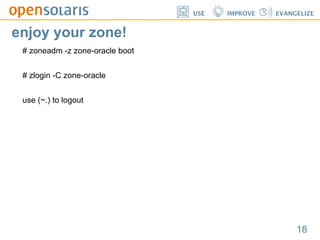
enjoy your zone!
# zoneadm -z zone-oracle boot
# zlogin -C zone-oracle
use (~.) to logout
USE IMPROVE EVANGELIZE
Thank you!
Achmad Mardiansyah
Sun Certified Network Administrator
Freelance Engineer
Questions...?

Solaris 10 Container

  • 1.
    USE IMPROVE EVANGELIZE Solaris10 Container Achmad Mardiansyah Sun Certified Network Administrator Freelance Engineer
  • 2.
  • 3.
  • 4.
  • 5.
    5 USE IMPROVE EVANGELIZE Whatis Solaris Zones? ZONE: virtual operating system abstraction that provides a protected environment in which applications run. The applications are protected from each other to provide software fault isolation. To ease the labor of managing multiple applications and their environments, they co-exist within one operating system instance, and are usually managed as one entity.
  • 6.
    6 USE IMPROVE EVANGELIZE Whatis Solaris Container? CONTAINER: zone which also uses the operating system's resource management facility is then called a container. Many people use the two words 'zone' and 'container' interchangeably.
  • 7.
    7 USE IMPROVE EVANGELIZE Containerfor test & development
  • 8.
  • 9.
  • 10.
    10 USE IMPROVE EVANGELIZE TheCommands (1), prepare directory # zoneadm list -cv # mkdir -p /export/home/zones/zone-oracle # chmod -R 700 /export/home/zones/zone-oracle # mkdir -p /usr/local/zone-oracle
  • 11.
    11 USE IMPROVE EVANGELIZE TheCommands(2), the zone # zonecfg -z zone-oracle zonecfg:zone-oracle> create zonecfg:zone-oracle> set zonepath=/export/home/zones/zone-oracle zonecfg:zone-oracle> set autoboot=true zonecfg:zone-oracle> add net zonecfg:zone-oracle:net> set address=192.168.188.11 zonecfg:zone-oracle:net> set physical=pcn0 zonecfg:zone-oracle:net> end zonecfg:zone-oracle> add fs zonecfg:zone-oracle:fs> set dir=/usr/local zonecfg:zone-oracle:fs> set special=/usr/local/zone-oracle zonecfg:zone-oracle:fs> set type=lofs zonecfg:zone-oracle:fs> end zonecfg:zone-oracle> verify zonecfg:zone-oracle> commit zonecfg:zone-oracle> exit
  • 12.
    12 USE IMPROVE EVANGELIZE TheCommands(3), zone control # zoneadm list -cv # zoneadm -z zone-oracle install (wait until it's finished) ------ other option # zoneadm -z zone-oracle halt # zoneadm -z zone-oracle reboot
  • 13.
  • 14.
    14 USE IMPROVE EVANGELIZE FairShare Scheduler - example After consolidation
  • 15.
  • 16.
    16 USE IMPROVE EVANGELIZE TheCommands(4) enable/config pool # pooladm -e #(enable resource pool feature) # pooladm -s #(save current config) # pooladm #(shows pools available) # poolcfg -c 'create pset pset-oracle (uint pset.min=1; uint pset.max=2)' #(create pset-oracle) # poolcfg -c 'create pool pool-oracle' #(create pool-oracle) # poolcfg -c 'associate pool pool-oracle (pset pset-oracle)' #(link between pool and pset) # poolcfg -c 'modify pool pool-oracle (string pool.scheduler="FSS")' #(enable FSS) # pooladm -c #(activate configuration)
  • 17.
    17 USE IMPROVE EVANGELIZE TheCommands(5) assign FSS to zone # zonecfg -z zone-oracle zonecfg:zone-oracle> set pool=pool-oracle zonecfg:zone-oracle> add rctl zonecfg:zone-oracle:rctl> set name=zone.oracle-cpushares zonecfg:zone-oracle:rctl> add value (priv=privileged,limit=2,action=none) zonecfg:zone-oracle:rctl> end zonecfg:zone-oracle> verify zonecfg:zone-oracle> commit zonecfg:zone-oracle> exit
  • 18.
    18 USE IMPROVE EVANGELIZE enjoyyour zone! # zoneadm -z zone-oracle boot # zlogin -C zone-oracle use (~.) to logout
  • 19.
    USE IMPROVE EVANGELIZE Thankyou! Achmad Mardiansyah Sun Certified Network Administrator Freelance Engineer Questions...?