www.glcnetworks.com
Tuning OSPF:
Aggregate
GLC WEBINAR,
17 Nov 2022, 19:30 GMT+7
Achmad Mardiansyah
achmad@glcnetworks.com
GLC Networks, Indonesia
www.glcnetworks.com
Agenda
â—Ź Introduction
â—Ź Review prerequisite knowledge
â—Ź OSPF
â—Ź OSPF area
â—Ź Live practice
â—Ź Q & A
2
www.glcnetworks.com
Introduction
3
www.glcnetworks.com
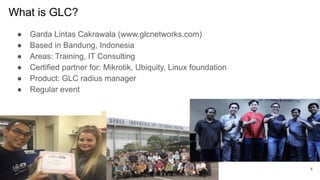
What is GLC?
â—Ź Garda Lintas Cakrawala (www.glcnetworks.com)
â—Ź Based in Bandung, Indonesia
â—Ź Areas: Training, IT Consulting
â—Ź Certified partner for: Mikrotik, Ubiquity, Linux foundation
â—Ź Product: GLC radius manager
â—Ź Regular event
4
www.glcnetworks.com
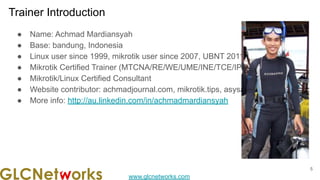
Trainer Introduction
â—Ź Name: Achmad Mardiansyah
â—Ź Base: bandung, Indonesia
â—Ź Linux user since 1999, mikrotik user since 2007, UBNT 2011
â—Ź Mikrotik Certified Trainer (MTCNA/RE/WE/UME/INE/TCE/IPv6)
â—Ź Mikrotik/Linux Certified Consultant
â—Ź Website contributor: achmadjournal.com, mikrotik.tips, asysadmin.tips
â—Ź More info: http://au.linkedin.com/in/achmadmardiansyah
5
www.glcnetworks.com
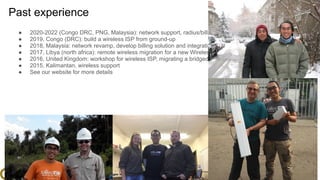
Past experience
â—Ź 2020-2022 (Congo DRC, PNG, Malaysia): network support, radius/billing integration
â—Ź 2019, Congo (DRC): build a wireless ISP from ground-up
â—Ź 2018, Malaysia: network revamp, develop billing solution and integration, setup dynamic routing
â—Ź 2017, Libya (north africa): remote wireless migration for a new Wireless ISP
â—Ź 2016, United Kingdom: workshop for wireless ISP, migrating a bridged to routed network
â—Ź 2015, Kalimantan, wireless support
â—Ź See our website for more details
6
www.glcnetworks.com
Please introduce yourself
â—Ź Your name
â—Ź Your company/university?
â—Ź Your networking experience?
â—Ź Your mikrotik experience?
â—Ź Your expectation from this course?
7
www.glcnetworks.com
Prerequisite
This presentation some prerequisite knowledge
â—Ź We assume you already know:
â—‹ TCP/IP
â—‹ Mikrotik
â—‹ Routing protocol
â—‹ Routed protocol
8
www.glcnetworks.com
Review prerequisite knowledge
9
www.glcnetworks.com
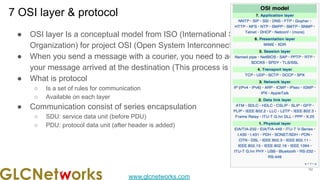
7 OSI layer & protocol
â—Ź OSI layer Is a conceptual model from ISO (International Standard
Organization) for project OSI (Open System Interconnection)
â—Ź When you send a message with a courier, you need to add more info to get
your message arrived at the destination (This process is called encapsulation)
â—Ź What is protocol
â—‹ Is a set of rules for communication
â—‹ Available on each layer
â—Ź Communication consist of series encapsulation
â—‹ SDU: service data unit (before PDU)
â—‹ PDU: protocol data unit (after header is added)
10
www.glcnetworks.com
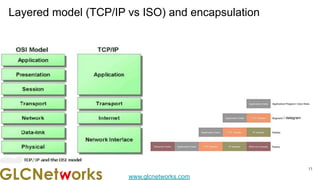
Layered model (TCP/IP vs ISO) and encapsulation
11
/ datagram
www.glcnetworks.com
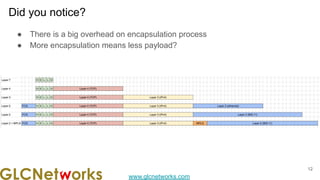
Did you notice?
â—Ź There is a big overhead on encapsulation process
â—Ź More encapsulation means less payload?
12
www.glcnetworks.com
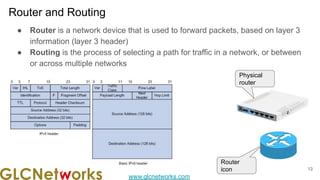
Router and Routing
13
â—Ź Router is a network device that is used to forward packets, based on layer 3
information (layer 3 header)
â—Ź Routing is the process of selecting a path for traffic in a network, or between
or across multiple networks
Physical
router
Router
icon
www.glcnetworks.com
Typical connection (physical)
14
R2
R1
R3
â—Ź Router connects layer 2 segments
â—Ź Router works on layer 3, connecting L2
segments
â—Ź Meaning, each layer 2 segment has network
ID
www.glcnetworks.com
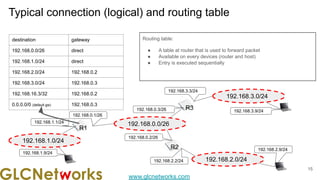
Typical connection (logical) and routing table
15
Routing table:
â—Ź A table at router that is used to forward packet
â—Ź Available on every devices (router and host)
â—Ź Entry is executed sequentially
192.168.0.0/26
R1
192.168.0.1/26
192.168.0.3/26
192.168.0.2/26
R3
R2
192.168.1.0/24
192.168.2.0/24
192.168.3.0/24
192.168.3.3/24
192.168.3.9/24
192.168.2.9/24
192.168.2.2/24
192.168.1.1/24
192.168.1.9/24
destination gateway
192.168.0.0/26 direct
192.168.1.0/24 direct
192.168.2.0/24 192.168.0.2
192.168.3.0/24 192.168.0.3
192.168.16.3/32 192.168.0.2
0.0.0.0/0 (default gw) 192.168.0.3
www.glcnetworks.com
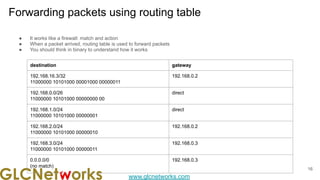
Forwarding packets using routing table
16
â—Ź It works like a firewall: match and action
â—Ź When a packet arrived, routing table is used to forward packets
â—Ź You should think in binary to understand how it works
destination gateway
192.168.16.3/32
11000000 10101000 00001000 00000011
192.168.0.2
192.168.0.0/26
11000000 10101000 00000000 00
direct
192.168.1.0/24
11000000 10101000 00000001
direct
192.168.2.0/24
11000000 10101000 00000010
192.168.0.2
192.168.3.0/24
11000000 10101000 00000011
192.168.0.3
0.0.0.0/0
(no match)
192.168.0.3
www.glcnetworks.com
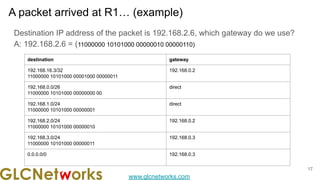
A packet arrived at R1… (example)
17
Destination IP address of the packet is 192.168.2.6, which gateway do we use?
A: 192.168.2.6 = (11000000 10101000 00000010 00000110)
destination gateway
192.168.16.3/32
11000000 10101000 00001000 00000011
192.168.0.2
192.168.0.0/26
11000000 10101000 00000000 00
direct
192.168.1.0/24
11000000 10101000 00000001
direct
192.168.2.0/24
11000000 10101000 00000010
192.168.0.2
192.168.3.0/24
11000000 10101000 00000011
192.168.0.3
0.0.0.0/0 192.168.0.3
www.glcnetworks.com
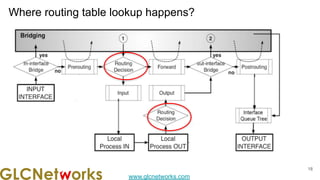
Where routing table lookup happens?
18
www.glcnetworks.com
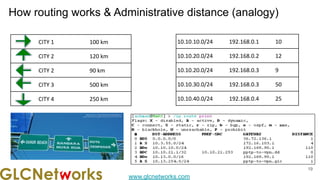
How routing works & Administrative distance (analogy)
19
19
CITY 1 100 km
CITY 2 120 km
CITY 2 90 km
CITY 3 500 km
CITY 4 250 km
10.10.10.0/24 192.168.0.1 10
10.10.20.0/24 192.168.0.2 12
10.10.20.0/24 192.168.0.3 9
10.10.30.0/24 192.168.0.3 50
10.10.40.0/24 192.168.0.4 25
www.glcnetworks.com
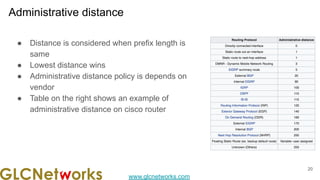
Administrative distance
20
â—Ź Distance is considered when prefix length is
same
â—Ź Lowest distance wins
â—Ź Administrative distance policy is depends on
vendor
â—Ź Table on the right shows an example of
administrative distance on cisco router
www.glcnetworks.com
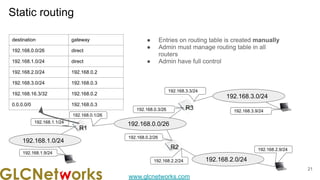
Static routing
21
â—Ź Entries on routing table is created manually
â—Ź Admin must manage routing table in all
routers
â—Ź Admin have full control
192.168.0.0/26
R1
192.168.0.1/26
192.168.0.3/26
192.168.0.2/26
R3
R2
192.168.1.0/24
192.168.2.0/24
192.168.3.0/24
192.168.3.3/24
192.168.3.9/24
192.168.2.9/24
192.168.2.2/24
192.168.1.1/24
192.168.1.9/24
destination gateway
192.168.0.0/26 direct
192.168.1.0/24 direct
192.168.2.0/24 192.168.0.2
192.168.3.0/24 192.168.0.3
192.168.16.3/32 192.168.0.2
0.0.0.0/0 192.168.0.3
www.glcnetworks.com
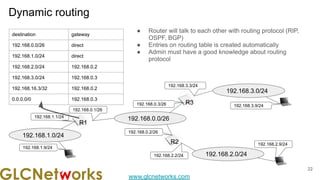
Dynamic routing
22
â—Ź Router will talk to each other with routing protocol (RIP,
OSPF, BGP)
â—Ź Entries on routing table is created automatically
â—Ź Admin must have a good knowledge about routing
protocol
192.168.0.0/26
R1
192.168.0.1/26
192.168.0.3/26
192.168.0.2/26
R3
R2
192.168.1.0/24
192.168.2.0/24
192.168.3.0/24
192.168.3.3/24
192.168.3.9/24
192.168.2.9/24
192.168.2.2/24
192.168.1.1/24
192.168.1.9/24
destination gateway
192.168.0.0/26 direct
192.168.1.0/24 direct
192.168.2.0/24 192.168.0.2
192.168.3.0/24 192.168.0.3
192.168.16.3/32 192.168.0.2
0.0.0.0/0 192.168.0.3
www.glcnetworks.com
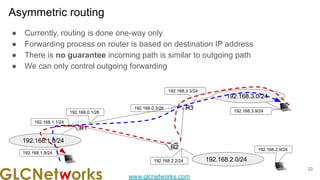
Asymmetric routing
23
â—Ź Currently, routing is done one-way only
â—Ź Forwarding process on router is based on destination IP address
â—Ź There is no guarantee incoming path is similar to outgoing path
â—Ź We can only control outgoing forwarding
R1
192.168.0.1/26
192.168.0.3/26 R3
R2
192.168.1.0/24
192.168.2.0/24
192.168.3.0/24
192.168.3.3/24
192.168.3.9/24
192.168.2.9/24
192.168.2.2/24
192.168.1.1/24
192.168.1.9/24
www.glcnetworks.com
OSPF
Open Shortest Path Protocol
24
www.glcnetworks.com
What is OSPF?
â—Ź Dynamic routing protocol, link-state, with Dijkstra Algorithm
â—Ź Hierarchical routing (using area)
â—Ź IGP (interior gateway protocol), all router must have same AS number
â—Ź use protocol number 89
â—Ź Used by millions organizations
â—Ź Support load balancing
Need to consider:
â—Ź Requires more CPU processing
â—Ź More complex (compared to RIP), lots of options
25
www.glcnetworks.com
HOW OSPF works?
OSPF steps
â—Ź Find neighbor router. using hello packet
â—Ź Use multicast address for communication:
â—‹ 224.0.0.5, for all routers
â—‹ 224.0.0.6, for DR and BDR router
â—Ź Each router send LSP (Link State Packet) via LSA (Link State Advertisement)
â—Ź LSAs are flooded to all routers
â—Ź Each router generates link-state database based on received LSA
â—Ź Flooding algorithm ensure each router has identical link-state database
â—Ź if there is a change on network, redistribute LSP
note:
â—Ź area-id, authentication, hello interval, dead interval must be similar among routers
26
www.glcnetworks.com
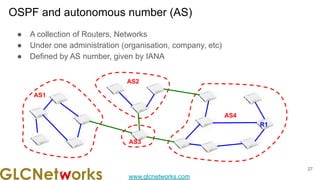
â—Ź A collection of Routers, Networks
â—Ź Under one administration (organisation, company, etc)
â—Ź Defined by AS number, given by IANA
OSPF and autonomous number (AS)
AS1
AS4
AS3
AS2
R1
27
www.glcnetworks.com
OSPF AREA
28
www.glcnetworks.com
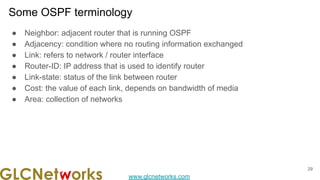
Some OSPF terminology
29
â—Ź Neighbor: adjacent router that is running OSPF
â—Ź Adjacency: condition where no routing information exchanged
â—Ź Link: refers to network / router interface
â—Ź Router-ID: IP address that is used to identify router
â—Ź Link-state: status of the link between router
â—Ź Cost: the value of each link, depends on bandwidth of media
â—Ź Area: collection of networks
www.glcnetworks.com
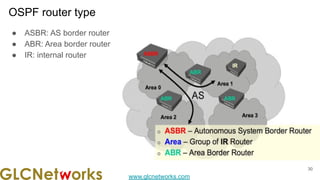
OSPF router type
30
â—Ź ASBR: AS border router
â—Ź ABR: Area border router
â—Ź IR: internal router
www.glcnetworks.com
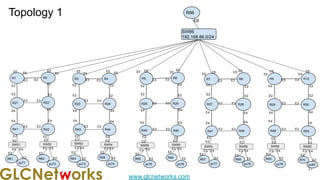
Topology 1
31
E4
R1 R2
R21 R22
R41 R42
E2
E4
E4 E4
E4
E2
E2
E2
E3
E3
E6
R3 R4
R23 R24
R43 R44
E2
E4
E4 E4
E4
E2
E2
E2
E3
E3
E6
R5 R6
R25 R26
R45 R46
E2
E4
E4 E4
E4
E2
E2
E2
E3
E3
E6
R7 R8
R27 R28
R47 R48
E2
E4
E4 E4
E2
E2
E2
E3
E3
E6
R9 R10
R29 R30
R49 R50
E2
E4
E4
E4
E4
E2
E2
E2
E3
E3
E6
SW86
192.168.86.0/24
E5 E5 E5
E5 E5
R86
E6
R61 R62 R63 R64 R65 R66
R67 R68 R69 R70
E3 E3
E3 E3
E2
E2
E2
E2
E3 E3
E3 E3
E2
E2
E2
E2
E3 E3
E3 E3
E2
E2
E2
E2
E3 E3
E3 E3
E2
E2 E2
E2
E3 E3
E3 E3
E2
E2 E2
E2
E6
E5
E6 E5
SW51
E2
E2
SW52 SW53 SW54 SW55 SW55 SW59
SW58
SW55
SW60
E2
pc79 pc80
E2
E3 E4
E2
E3
E2
E4
pc78
E2
E2
E3 E4
pc71 pc72
E2
E2
E3 E4 E3 E4
pc73 pc74 pc75
E2
pc76
E2
pc77
E2
E2
E3 E4
E2
E2
E3 E4
E2
E2
E3 E4
E2
E3 E4
E2
E3 E4
E6
E5
E6
E5 E6 E5
www.glcnetworks.com
OSPF Aggregate
32
www.glcnetworks.com
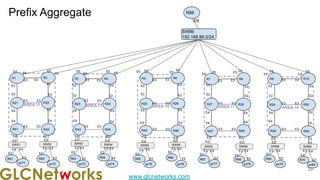
Prefix Aggregate
33
AREA 19
AREA 17
AREA 15
E4
AREA 13
AREA 11
R1 R2
R21 R22
R41 R42
E2
E4
E4 E4
E4
E2
E2
E2
E3
E3
E6
R3 R4
R23 R24
R43 R44
E2
E4
E4 E4
E4
E2
E2
E2
E3
E3
E6
R5 R6
R25 R26
R45 R46
E2
E4
E4 E4
E4
E2
E2
E2
E3
E3
E6
R7 R8
R27 R28
R47 R48
E2
E4
E4 E4
E2
E2
E2
E3
E3
E6
R9 R10
R29 R30
R49 R50
E2
E4
E4
E4
E4
E2
E2
E2
E3
E3
E6
SW86
192.168.86.0/24
E5 E5 E5
E5 E5
R86
E6
R61 R62 R63 R64 R65 R66
R67 R68 R69 R70
E3 E3
E3 E3
E2
E2
E2
E2
E3 E3
E3 E3
E2
E2
E2
E2
E3 E3
E3 E3
E2
E2
E2
E2
E3 E3
E3 E3
E2
E2 E2
E2
E3 E3
E3 E3
E2
E2 E2
E2
E6
E5
E6 E5
SW51
E2
E2
SW52 SW53 SW54 SW55 SW55 SW59
SW58
SW55
SW60
E2
pc79 pc80
E2
E3 E4
E2
E3
E2
E4
pc78
E2
E2
E3 E4
pc71 pc72
E2
E2
E3 E4 E3 E4
pc73 pc74 pc75
E2
pc76
E2
pc77
E2
E2
E3 E4
E2
E2
E3 E4
E2
E2
E3 E4
E2
E3 E4
E2
E3 E4
E6
E5
E6
E5 E6 E5
www.glcnetworks.com
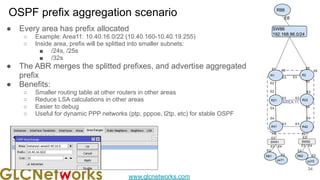
OSPF prefix aggregation scenario
â—Ź Every area has prefix allocated
â—‹ Example: Area11: 10.40.16.0/22 (10.40.160-10.40.19.255)
â—‹ Inside area, prefix will be splitted into smaller subnets:
â–  /24s, /25s
â–  /32s
â—Ź The ABR merges the splitted prefixes, and advertise aggregated
prefix
â—Ź Benefits:
â—‹ Smaller routing table at other routers in other areas
â—‹ Reduce LSA calculations in other areas
â—‹ Easier to debug
â—‹ Useful for dynamic PPP networks (ptp, pppoe, l2tp, etc) for stable OSPF
34
AREA 11
R1 R2
R21 R22
R41 R42
E2
E4
E4 E4
E4
E2
E2
E2
E3
E3
E6
E5
R61 R62
E3 E3
E3 E3
E2
E2
E2
E2
SW51
E2
E2
SW52
pc71 pc72
E2
E2
E3 E4 E3 E4
E6
E5
SW86
192.168.86.0/24
R86
E6
www.glcnetworks.com
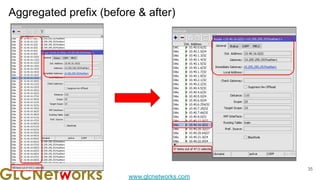
Aggregated prefix (before & after)
35
www.glcnetworks.com
QnA
Any questions?
36
www.glcnetworks.com
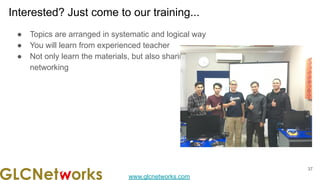
Interested? Just come to our training...
â—Ź Topics are arranged in systematic and logical way
â—Ź You will learn from experienced teacher
â—Ź Not only learn the materials, but also sharing experiences, best-practices, and
networking
37
www.glcnetworks.com
End of slides
â—Ź Thank you for your attention
â—Ź Please submit your feedback: http://bit.ly/glcfeedback
â—Ź Find our further event on our website : https://www.glcnetworks.com
â—Ź Like our facebook page: https://www.facebook.com/glcnetworks
â—Ź Slide: https://www.slideshare.net/glcnetworks/
â—Ź Discord (bahasa indonesia): (https://discord.gg/6MZ3KUHHBX )
â—Ź Recording (youtube): https://www.youtube.com/c/GLCNetworks
â—Ź Stay tune with our schedule
38

Tuning OSPF: Prefix Aggregate

  • 1.
    www.glcnetworks.com Tuning OSPF: Aggregate GLC WEBINAR, 17Nov 2022, 19:30 GMT+7 Achmad Mardiansyah achmad@glcnetworks.com GLC Networks, Indonesia
  • 2.
    www.glcnetworks.com Agenda â—Ź Introduction â—Ź Reviewprerequisite knowledge â—Ź OSPF â—Ź OSPF area â—Ź Live practice â—Ź Q & A 2
  • 3.
  • 4.
    www.glcnetworks.com What is GLC? â—ŹGarda Lintas Cakrawala (www.glcnetworks.com) â—Ź Based in Bandung, Indonesia â—Ź Areas: Training, IT Consulting â—Ź Certified partner for: Mikrotik, Ubiquity, Linux foundation â—Ź Product: GLC radius manager â—Ź Regular event 4
  • 5.
    www.glcnetworks.com Trainer Introduction â—Ź Name:Achmad Mardiansyah â—Ź Base: bandung, Indonesia â—Ź Linux user since 1999, mikrotik user since 2007, UBNT 2011 â—Ź Mikrotik Certified Trainer (MTCNA/RE/WE/UME/INE/TCE/IPv6) â—Ź Mikrotik/Linux Certified Consultant â—Ź Website contributor: achmadjournal.com, mikrotik.tips, asysadmin.tips â—Ź More info: http://au.linkedin.com/in/achmadmardiansyah 5
  • 6.
    www.glcnetworks.com Past experience â—Ź 2020-2022(Congo DRC, PNG, Malaysia): network support, radius/billing integration â—Ź 2019, Congo (DRC): build a wireless ISP from ground-up â—Ź 2018, Malaysia: network revamp, develop billing solution and integration, setup dynamic routing â—Ź 2017, Libya (north africa): remote wireless migration for a new Wireless ISP â—Ź 2016, United Kingdom: workshop for wireless ISP, migrating a bridged to routed network â—Ź 2015, Kalimantan, wireless support â—Ź See our website for more details 6
  • 7.
    www.glcnetworks.com Please introduce yourself â—ŹYour name â—Ź Your company/university? â—Ź Your networking experience? â—Ź Your mikrotik experience? â—Ź Your expectation from this course? 7
  • 8.
    www.glcnetworks.com Prerequisite This presentation someprerequisite knowledge â—Ź We assume you already know: â—‹ TCP/IP â—‹ Mikrotik â—‹ Routing protocol â—‹ Routed protocol 8
  • 9.
  • 10.
    www.glcnetworks.com 7 OSI layer& protocol â—Ź OSI layer Is a conceptual model from ISO (International Standard Organization) for project OSI (Open System Interconnection) â—Ź When you send a message with a courier, you need to add more info to get your message arrived at the destination (This process is called encapsulation) â—Ź What is protocol â—‹ Is a set of rules for communication â—‹ Available on each layer â—Ź Communication consist of series encapsulation â—‹ SDU: service data unit (before PDU) â—‹ PDU: protocol data unit (after header is added) 10
  • 11.
    www.glcnetworks.com Layered model (TCP/IPvs ISO) and encapsulation 11 / datagram
  • 12.
    www.glcnetworks.com Did you notice? â—ŹThere is a big overhead on encapsulation process â—Ź More encapsulation means less payload? 12
  • 13.
    www.glcnetworks.com Router and Routing 13 â—ŹRouter is a network device that is used to forward packets, based on layer 3 information (layer 3 header) â—Ź Routing is the process of selecting a path for traffic in a network, or between or across multiple networks Physical router Router icon
  • 14.
    www.glcnetworks.com Typical connection (physical) 14 R2 R1 R3 â—ŹRouter connects layer 2 segments â—Ź Router works on layer 3, connecting L2 segments â—Ź Meaning, each layer 2 segment has network ID
  • 15.
    www.glcnetworks.com Typical connection (logical)and routing table 15 Routing table: â—Ź A table at router that is used to forward packet â—Ź Available on every devices (router and host) â—Ź Entry is executed sequentially 192.168.0.0/26 R1 192.168.0.1/26 192.168.0.3/26 192.168.0.2/26 R3 R2 192.168.1.0/24 192.168.2.0/24 192.168.3.0/24 192.168.3.3/24 192.168.3.9/24 192.168.2.9/24 192.168.2.2/24 192.168.1.1/24 192.168.1.9/24 destination gateway 192.168.0.0/26 direct 192.168.1.0/24 direct 192.168.2.0/24 192.168.0.2 192.168.3.0/24 192.168.0.3 192.168.16.3/32 192.168.0.2 0.0.0.0/0 (default gw) 192.168.0.3
  • 16.
    www.glcnetworks.com Forwarding packets usingrouting table 16 â—Ź It works like a firewall: match and action â—Ź When a packet arrived, routing table is used to forward packets â—Ź You should think in binary to understand how it works destination gateway 192.168.16.3/32 11000000 10101000 00001000 00000011 192.168.0.2 192.168.0.0/26 11000000 10101000 00000000 00 direct 192.168.1.0/24 11000000 10101000 00000001 direct 192.168.2.0/24 11000000 10101000 00000010 192.168.0.2 192.168.3.0/24 11000000 10101000 00000011 192.168.0.3 0.0.0.0/0 (no match) 192.168.0.3
  • 17.
    www.glcnetworks.com A packet arrivedat R1… (example) 17 Destination IP address of the packet is 192.168.2.6, which gateway do we use? A: 192.168.2.6 = (11000000 10101000 00000010 00000110) destination gateway 192.168.16.3/32 11000000 10101000 00001000 00000011 192.168.0.2 192.168.0.0/26 11000000 10101000 00000000 00 direct 192.168.1.0/24 11000000 10101000 00000001 direct 192.168.2.0/24 11000000 10101000 00000010 192.168.0.2 192.168.3.0/24 11000000 10101000 00000011 192.168.0.3 0.0.0.0/0 192.168.0.3
  • 18.
  • 19.
    www.glcnetworks.com How routing works& Administrative distance (analogy) 19 19 CITY 1 100 km CITY 2 120 km CITY 2 90 km CITY 3 500 km CITY 4 250 km 10.10.10.0/24 192.168.0.1 10 10.10.20.0/24 192.168.0.2 12 10.10.20.0/24 192.168.0.3 9 10.10.30.0/24 192.168.0.3 50 10.10.40.0/24 192.168.0.4 25
  • 20.
    www.glcnetworks.com Administrative distance 20 â—Ź Distanceis considered when prefix length is same â—Ź Lowest distance wins â—Ź Administrative distance policy is depends on vendor â—Ź Table on the right shows an example of administrative distance on cisco router
  • 21.
    www.glcnetworks.com Static routing 21 â—Ź Entrieson routing table is created manually â—Ź Admin must manage routing table in all routers â—Ź Admin have full control 192.168.0.0/26 R1 192.168.0.1/26 192.168.0.3/26 192.168.0.2/26 R3 R2 192.168.1.0/24 192.168.2.0/24 192.168.3.0/24 192.168.3.3/24 192.168.3.9/24 192.168.2.9/24 192.168.2.2/24 192.168.1.1/24 192.168.1.9/24 destination gateway 192.168.0.0/26 direct 192.168.1.0/24 direct 192.168.2.0/24 192.168.0.2 192.168.3.0/24 192.168.0.3 192.168.16.3/32 192.168.0.2 0.0.0.0/0 192.168.0.3
  • 22.
    www.glcnetworks.com Dynamic routing 22 â—Ź Routerwill talk to each other with routing protocol (RIP, OSPF, BGP) â—Ź Entries on routing table is created automatically â—Ź Admin must have a good knowledge about routing protocol 192.168.0.0/26 R1 192.168.0.1/26 192.168.0.3/26 192.168.0.2/26 R3 R2 192.168.1.0/24 192.168.2.0/24 192.168.3.0/24 192.168.3.3/24 192.168.3.9/24 192.168.2.9/24 192.168.2.2/24 192.168.1.1/24 192.168.1.9/24 destination gateway 192.168.0.0/26 direct 192.168.1.0/24 direct 192.168.2.0/24 192.168.0.2 192.168.3.0/24 192.168.0.3 192.168.16.3/32 192.168.0.2 0.0.0.0/0 192.168.0.3
  • 23.
    www.glcnetworks.com Asymmetric routing 23 â—Ź Currently,routing is done one-way only â—Ź Forwarding process on router is based on destination IP address â—Ź There is no guarantee incoming path is similar to outgoing path â—Ź We can only control outgoing forwarding R1 192.168.0.1/26 192.168.0.3/26 R3 R2 192.168.1.0/24 192.168.2.0/24 192.168.3.0/24 192.168.3.3/24 192.168.3.9/24 192.168.2.9/24 192.168.2.2/24 192.168.1.1/24 192.168.1.9/24
  • 24.
  • 25.
    www.glcnetworks.com What is OSPF? â—ŹDynamic routing protocol, link-state, with Dijkstra Algorithm â—Ź Hierarchical routing (using area) â—Ź IGP (interior gateway protocol), all router must have same AS number â—Ź use protocol number 89 â—Ź Used by millions organizations â—Ź Support load balancing Need to consider: â—Ź Requires more CPU processing â—Ź More complex (compared to RIP), lots of options 25
  • 26.
    www.glcnetworks.com HOW OSPF works? OSPFsteps â—Ź Find neighbor router. using hello packet â—Ź Use multicast address for communication: â—‹ 224.0.0.5, for all routers â—‹ 224.0.0.6, for DR and BDR router â—Ź Each router send LSP (Link State Packet) via LSA (Link State Advertisement) â—Ź LSAs are flooded to all routers â—Ź Each router generates link-state database based on received LSA â—Ź Flooding algorithm ensure each router has identical link-state database â—Ź if there is a change on network, redistribute LSP note: â—Ź area-id, authentication, hello interval, dead interval must be similar among routers 26
  • 27.
    www.glcnetworks.com â—Ź A collectionof Routers, Networks â—Ź Under one administration (organisation, company, etc) â—Ź Defined by AS number, given by IANA OSPF and autonomous number (AS) AS1 AS4 AS3 AS2 R1 27
  • 28.
  • 29.
    www.glcnetworks.com Some OSPF terminology 29 â—ŹNeighbor: adjacent router that is running OSPF â—Ź Adjacency: condition where no routing information exchanged â—Ź Link: refers to network / router interface â—Ź Router-ID: IP address that is used to identify router â—Ź Link-state: status of the link between router â—Ź Cost: the value of each link, depends on bandwidth of media â—Ź Area: collection of networks
  • 30.
    www.glcnetworks.com OSPF router type 30 â—ŹASBR: AS border router â—Ź ABR: Area border router â—Ź IR: internal router
  • 31.
    www.glcnetworks.com Topology 1 31 E4 R1 R2 R21R22 R41 R42 E2 E4 E4 E4 E4 E2 E2 E2 E3 E3 E6 R3 R4 R23 R24 R43 R44 E2 E4 E4 E4 E4 E2 E2 E2 E3 E3 E6 R5 R6 R25 R26 R45 R46 E2 E4 E4 E4 E4 E2 E2 E2 E3 E3 E6 R7 R8 R27 R28 R47 R48 E2 E4 E4 E4 E2 E2 E2 E3 E3 E6 R9 R10 R29 R30 R49 R50 E2 E4 E4 E4 E4 E2 E2 E2 E3 E3 E6 SW86 192.168.86.0/24 E5 E5 E5 E5 E5 R86 E6 R61 R62 R63 R64 R65 R66 R67 R68 R69 R70 E3 E3 E3 E3 E2 E2 E2 E2 E3 E3 E3 E3 E2 E2 E2 E2 E3 E3 E3 E3 E2 E2 E2 E2 E3 E3 E3 E3 E2 E2 E2 E2 E3 E3 E3 E3 E2 E2 E2 E2 E6 E5 E6 E5 SW51 E2 E2 SW52 SW53 SW54 SW55 SW55 SW59 SW58 SW55 SW60 E2 pc79 pc80 E2 E3 E4 E2 E3 E2 E4 pc78 E2 E2 E3 E4 pc71 pc72 E2 E2 E3 E4 E3 E4 pc73 pc74 pc75 E2 pc76 E2 pc77 E2 E2 E3 E4 E2 E2 E3 E4 E2 E2 E3 E4 E2 E3 E4 E2 E3 E4 E6 E5 E6 E5 E6 E5
  • 32.
  • 33.
    www.glcnetworks.com Prefix Aggregate 33 AREA 19 AREA17 AREA 15 E4 AREA 13 AREA 11 R1 R2 R21 R22 R41 R42 E2 E4 E4 E4 E4 E2 E2 E2 E3 E3 E6 R3 R4 R23 R24 R43 R44 E2 E4 E4 E4 E4 E2 E2 E2 E3 E3 E6 R5 R6 R25 R26 R45 R46 E2 E4 E4 E4 E4 E2 E2 E2 E3 E3 E6 R7 R8 R27 R28 R47 R48 E2 E4 E4 E4 E2 E2 E2 E3 E3 E6 R9 R10 R29 R30 R49 R50 E2 E4 E4 E4 E4 E2 E2 E2 E3 E3 E6 SW86 192.168.86.0/24 E5 E5 E5 E5 E5 R86 E6 R61 R62 R63 R64 R65 R66 R67 R68 R69 R70 E3 E3 E3 E3 E2 E2 E2 E2 E3 E3 E3 E3 E2 E2 E2 E2 E3 E3 E3 E3 E2 E2 E2 E2 E3 E3 E3 E3 E2 E2 E2 E2 E3 E3 E3 E3 E2 E2 E2 E2 E6 E5 E6 E5 SW51 E2 E2 SW52 SW53 SW54 SW55 SW55 SW59 SW58 SW55 SW60 E2 pc79 pc80 E2 E3 E4 E2 E3 E2 E4 pc78 E2 E2 E3 E4 pc71 pc72 E2 E2 E3 E4 E3 E4 pc73 pc74 pc75 E2 pc76 E2 pc77 E2 E2 E3 E4 E2 E2 E3 E4 E2 E2 E3 E4 E2 E3 E4 E2 E3 E4 E6 E5 E6 E5 E6 E5
  • 34.
    www.glcnetworks.com OSPF prefix aggregationscenario â—Ź Every area has prefix allocated â—‹ Example: Area11: 10.40.16.0/22 (10.40.160-10.40.19.255) â—‹ Inside area, prefix will be splitted into smaller subnets: â–  /24s, /25s â–  /32s â—Ź The ABR merges the splitted prefixes, and advertise aggregated prefix â—Ź Benefits: â—‹ Smaller routing table at other routers in other areas â—‹ Reduce LSA calculations in other areas â—‹ Easier to debug â—‹ Useful for dynamic PPP networks (ptp, pppoe, l2tp, etc) for stable OSPF 34 AREA 11 R1 R2 R21 R22 R41 R42 E2 E4 E4 E4 E4 E2 E2 E2 E3 E3 E6 E5 R61 R62 E3 E3 E3 E3 E2 E2 E2 E2 SW51 E2 E2 SW52 pc71 pc72 E2 E2 E3 E4 E3 E4 E6 E5 SW86 192.168.86.0/24 R86 E6
  • 35.
  • 36.
  • 37.
    www.glcnetworks.com Interested? Just cometo our training... â—Ź Topics are arranged in systematic and logical way â—Ź You will learn from experienced teacher â—Ź Not only learn the materials, but also sharing experiences, best-practices, and networking 37
  • 38.
    www.glcnetworks.com End of slides â—ŹThank you for your attention â—Ź Please submit your feedback: http://bit.ly/glcfeedback â—Ź Find our further event on our website : https://www.glcnetworks.com â—Ź Like our facebook page: https://www.facebook.com/glcnetworks â—Ź Slide: https://www.slideshare.net/glcnetworks/ â—Ź Discord (bahasa indonesia): (https://discord.gg/6MZ3KUHHBX ) â—Ź Recording (youtube): https://www.youtube.com/c/GLCNetworks â—Ź Stay tune with our schedule 38