The Overhead Projector 
EPE 222 Educational Technology 1
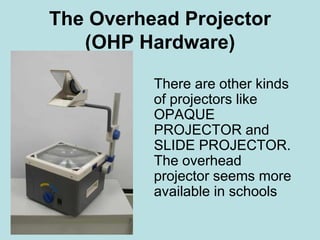
The Overhead Projector 
(OHP Hardware) 
There are other kinds 
of projectors like 
OPAQUE 
PROJECTOR and 
SLIDE PROJECTOR. 
The overhead 
projector seems more 
available in schools
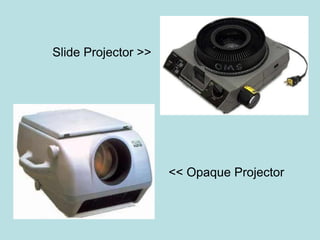
<< Opaque Projector 
Slide Projector >>
Parts of an OHP 
1. Lamp & reflector 
2. Blower 
3. Base mirror 
4. Projection stage 
5. Upper section
Three (3) Types of OHP Software 
1. Continuous Roll 
2. Slide Transparency 
3. Computer Disk
The recommended sizes for different forms 
of printing and writing are as follows: 
• lower-case printing: just over 1/8 inch (3mm) 
(excluding ascenders and descenders) 
• upper-case printing: just over 1/4 inch (6mm) 
• handwriting: as for lower-case printing.
Useful Tips in Utilizing an OHP 
Projector 
1. Do not try to put too much information on 
a single transparency. 
2. Use a clear, systematic layout . 
3. Make sure that all the material will be 
seen when the transparency is projected.
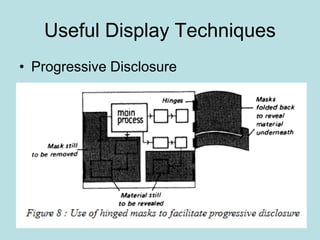
Useful Display Techniques 
• Progressive Disclosure
Useful Display Techniques 
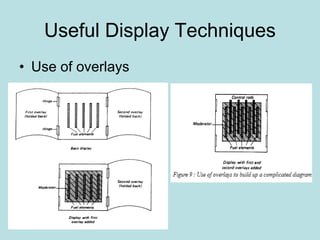
• Use of overlays
How to design OHP 
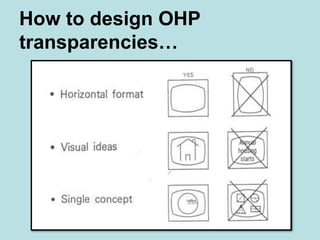
transparencies…
How to design OHP 
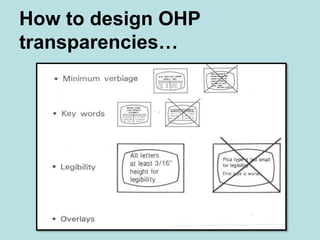
transparencies…
Useful Display Techniques 
• Use of animation 
Although the overhead projector is 
classed as a 'still-visual display' system, it 
is in fact possible to add an element of 
animation to certain types of OHP display. 
Sample OHP Animation
How to Utilize OHP? 
VIDEO 1 
VIDEO 2 
VIDEO 3 
VIDEO 4 
VIDEO 5
Activity 2 Midterm (Group) 
Each group need to prepare a brief/short 
lecture by using the OHP (10 mins). 
They will be evaluated based on the 
techniques they will showcase. 
A group need to have a minimum of two (2) 
transparencies and only one (1) presenter per 
group. 
Presentation: Next Meeting

EPE 222 OHP

  • 1.
    The Overhead Projector EPE 222 Educational Technology 1
  • 2.
    The Overhead Projector (OHP Hardware) There are other kinds of projectors like OPAQUE PROJECTOR and SLIDE PROJECTOR. The overhead projector seems more available in schools
  • 3.
    << Opaque Projector Slide Projector >>
  • 4.
    Parts of anOHP 1. Lamp & reflector 2. Blower 3. Base mirror 4. Projection stage 5. Upper section
  • 5.
    Three (3) Typesof OHP Software 1. Continuous Roll 2. Slide Transparency 3. Computer Disk
  • 6.
    The recommended sizesfor different forms of printing and writing are as follows: • lower-case printing: just over 1/8 inch (3mm) (excluding ascenders and descenders) • upper-case printing: just over 1/4 inch (6mm) • handwriting: as for lower-case printing.
  • 7.
    Useful Tips inUtilizing an OHP Projector 1. Do not try to put too much information on a single transparency. 2. Use a clear, systematic layout . 3. Make sure that all the material will be seen when the transparency is projected.
  • 8.
    Useful Display Techniques • Progressive Disclosure
  • 9.
    Useful Display Techniques • Use of overlays
  • 10.
    How to designOHP transparencies…
  • 11.
    How to designOHP transparencies…
  • 12.
    Useful Display Techniques • Use of animation Although the overhead projector is classed as a 'still-visual display' system, it is in fact possible to add an element of animation to certain types of OHP display. Sample OHP Animation
  • 13.
    How to UtilizeOHP? VIDEO 1 VIDEO 2 VIDEO 3 VIDEO 4 VIDEO 5
  • 14.
    Activity 2 Midterm(Group) Each group need to prepare a brief/short lecture by using the OHP (10 mins). They will be evaluated based on the techniques they will showcase. A group need to have a minimum of two (2) transparencies and only one (1) presenter per group. Presentation: Next Meeting