
DOCUMENT RESUME
ED 289 497 IR 012 964
AUTHOR Ellington, Henry
TITLE A Guide to the Use of the Overhead Projector.
Teaching and Learning in Higher Education, 14.
INSTITUTION Scottish Central Institutions Committee for
Educational Development.
SPONS AGENCY Robert Gordon's Inst. of Technology, Aberdeen
(Scotland).
PUB DATE 87
NOTE 16p.; For a related guide, see IR 012 960.
PUB TYPE Guides Non-Classroom Use (055) -- Information
Analyses (070)
EDRS PRICE MF01/PC01 Plus Postage.
DESCRIPTORS Foreign Countries; Higher Education; *Instructional
Design; *Material Development; *Overhead Projectors;
*Production Techniques; Teacher Developed Materials;
*Teaching Methods; *Transparencies
ABSTRACT
A sequel to the booklet "A Review of the Different
Types of Instructional Materials Available to Teachers and
Lecturers," this booklet begins by discussing the main educational
uses of the overhead projector and its various strengths and
weaknesses. Basic guidelines for using the overhead projector
effectively are then offered, which include ways to avoid some common
problems. Finally, detailed guidelines for designing and producing
overhead projector software are provided which cover the following
topics: (1) the two basic forms of overhead projector software--the
continuous roll and the single transparency--and their respective
uses; (2) basic principles for designing overhead projector
transparencies; (3) producing the transparencies by hand, with a
typewriter, from opaque originals, or using a computer-based system;
and (4) display techniques such as use of progressive disclosure,
overlays, and animation. An annotated list of two items recommended
for further reading is included. (MES)
***********************************************************************
Reproductions supplied by EDRS are the best that can be made
from the original document
************************************************ :*********************
This booklet was first published internally In Robert Gordon's Institute of Technol-
ogy, Aberdeen as part of the Institute's staff development programme.
The booklet was written by Dr Henry Ellington of AGIT' s Educational Technology
Unit, who adapted it from material originally published In "Producing Teaching
Materials", by Henry Ellington (Kogan Page, London; 1985)
CICED gratefully acknowledges the co-operation f RGIT, Kogan Page and the
author In the publication of the present edition of the booklet.
CICED 1987
3
A Guide To The Use Of The Overhead Projector
Introduction
In "A review of the different types of instructional materials available
to teachers and lecturers", we saw how the overhead projector
(OHP) is probably the most useful and versatile visual aid that is
available to the modern teacher. Indeed, it has now replaced the
traditional chalkboard as the main teaching aid provided in many
classrooms and lecture theatres. It is therefore important that all
teachers and lecturers should know how to make effective use of the
OHP, so that they can exploit its potential to the full. This booklet has
been written to help new, inexperienced lecturers to acquire this
basic knowledge and expertise, although it is hoped that experienced
staff will also be aNe to pick up some useful hints from it.
Tha booklet begins by discus.;ing the main educational uses of the
OHP, and highlighting its various strenoths and weaknesses. It then
offers some basic guidelines on how to use the OHP effectively,
showing (for example) how to avoid common faults such as
keystoning. Finally, it provides detailed guidance on how to design
and produce OHP software.
How the OHP can be used
in different instructional situations
It is now generally acknowledged that the overhead projector is
probably the most useful visual aid available to anyone who wishes to
carry out expository teaching of virtually any type. It is also extremely
useful in many group learning situations, both for presenting
information to a group (e.g. in a seminar or the briefing for an
exercise of the game/simulation/case study type) and in enabling
members of a group to display material that they themselves have
produced (e.g. in a group project or case study).
Some strengths of the OHP
The OHP has a number of definite advantages over other methods of
presenting visual information. A lecturer can, for e ample, use it in
exactly the same way as a chalkboard or markerboard (for writing out
notes, ma king through calculations and proofs, drawing graphic
material, and so on) but with the great advantage of always facing
the class, and thus being able to maintain eye contact with the
learners. Such eye contact, which is, of course, impossible when a
lecturer is writing on a chalkboard or markerboard, can play an
extremely useful role in expository teaching, serving both as an
4
outward non-verbal communication channel for the teacher and as a
means of obtaining feedback from a class on how a lesson is going.
Another important advantage over the chalkboard or markerboard is
that the OHP can also be used to show pre-prepared material, thus
enabling teachers and lecturers to build up banks of notes,
diagrams, tables etc. that can be used over and over again. When
well planned and designed, such sets of overhea,.1 transparencies
can often also provide all the cues and 'aides memoire' that are
needed during a lesson, so that no conventional teaching notes are
required. As we will see later, such material can be prepared using a
variety of production methods (free-hand writing or drawing, transfer
lettering, thermal or electrostatic copying, and so on) and can
incorporate a wide range of presentation techniques (progressive
disclosure, use of overlays, use of animation, etc.). Overhead
transparencies are also relatively compact compared with some
other types of visual aids (e.g. charts), and are therefore easy to
store in suitable boxes, large envelopes, folders or files.
Compared with other projected aids, the OHP also has the great
advantage that it does not require tho room to be blacked out, thus
allowing students to take notes; indeed it can be used in all but the
very brightest !Ight (e.g. direct sunlight). The OHP is also clean,
quiet, and 'user 4,riendly', requiring no technical skill or knowledge on
the pen of the operator apart from the ability to change the
occasional lamp.
Some weaknesses o' the OHP
Disadvantages of the OHP include the fact that it requires a power
supply, and needs a suitable flat (preferably white) surface on which
to project its image. Also, unless this surface is inclined forward at
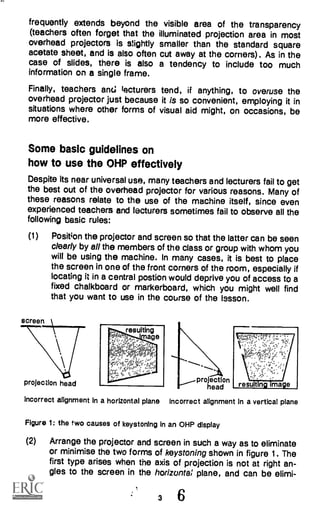
the correct angle, the image will probably suffer from 'keystoning'
(see figure 1). Unlike chalkboards, OHP's do also require a certain
amount of routine maintenance. They are also liable to break down
occasionally (generally at extremely inconvenient times), so it is
always advisable to have a spare bulb close at hand (some modern
machines do in fact have a built-in spare bulb that can be brought
into use at the turn of a knob). A further disadvantage is that some
lecturers find the glare from the OHP troublesome, although this can
generally be overcome by attaching a suitably-positioned shade to
the machine.
Apart from these possible 'hardware' difficulties, the main problems
associated with the overhead projector stem from the fact that many
users do not give sufficient thought to the production of their display
material. In many cases, writing is too small or too untidy to be read
easily (both in some cases), quite apart from the fact that it
2 5
frequently extends beyond the visible area of the transparency
(teachers often forget that the illuminated projection area in most
overhead projectors is slightly smaller than the standard square
acetate sheet, and is also often cut away at the corners). As in the
case of slides, there is also a tendency to include too much
information on a single frame.
Finally, teachers anc; lecturers tend, if anything, to overuse the
overhead projector just because it is so convenient, employing it in
situations where other forms of visual aid might, on occasions, be
more effective.
Some basic guidelines on
how to use the OHP effectively
Despite its near universal use, many teachers and lecturers fail to get
the best out of the overhead projector for various reasons. Many of
these reasons relate to the use of the machine itself, since even
experienced teachers and lecturers sometimes fail to observe all the
following basic rules:
(1) Position the projector and screen so that the latter can be seen
clearly by all the members of the class or group with whom you
will be using the machine. In many cases, it is best to place
the screen in one of the front corners of the room, especially if
locating it in a central postion would deprive you of access to a
fixed chalkboard or markerboard, which you might well find
that you want to use in the course of the Issson.
projection head projection
head resu t ng mage
Incorrect alignment in a horizontal plane Incorrect alignment in a vertical plane
Figure 1: the two causes of keystoning in an OHP display
(2) Arrange the projector and screen in such a way as to eliminate
or minimise the two forms of keystoning shown in figure 1. The
first type arises when the axis of projection is not at right an-
gles to the screen in the horizontal plane, and can be elimi-
3 6
nated by placing the projector opposite the centre of the
screen. The second (and most common) type arises in cases
where the axis of the projection is not at right angles to the
screen in the vertical plane, usually because the projection
head is too low. It can usually be eliminated or made accept-
able by tilting the screen forward, it this is possible. In the case
of a fixed vertical screen, however, the only way to solve the
problem may well be to raise the level of the overhead projec-
tor itself, provided that this can be done without blocking the
learners' view of the screen, of course!
(3) Adjust the distance from the projector to the screen so that the
image fills the full area of the latter who', properly in focus;
failure to use the entire area of the screen can make it difficult
for people at the back of the room to make out details.
(4) Make sure that the platen (the glass plate on which the display
material is placed) and head lens surfaces are clear and free
from dust; dirty or dusty surfaces can reduce image bright-
ness and detract from the clarity and quality of the display.
How to design and produce OHP software
Even if they succeed in getting everything right from a 'hardware'
point of view, many overhead projector users do not give sufficient
thought to the design of the software that they use or take sufficient
care in its preparation to make sure that it achieves the desired
objectives. Let us therefore take a systematic look at how the design
and production of OHP software should be tackled.
The two basic forms of OHP software
First of all, let us take a brief look at the two basic forms that OHP
software can take - the continuous roll and the single transparency -
and examine their respective uses.
The continuous roll
Most overhead projectors are fitted with a system whereby a long roll
of acetate film can be wound across the platen from one spool to
another. This enables a virtually endless supply of blank film to be
used in the course of a tesson, either for writing out a continuous set
of notes or for providing a succession of blank surfaces for the
display of specific items of material.
Continuous rolls of this type are best suited to the requirements of
those who prefer to create their supportive display material during
the actual course of a lesson rather than produce it beforehand.
4 7
They constitute, for example the standard display method that is now
used by many mathematics lecturers. In the bad old days, these
used to have to write all their material on a chalkboard, which not
only entailed their having to rub old material out at regular intervals in
order to make room for new material, but also covered their hands
and clothes with chalk dust. Now, however, thanks to the advent of
the overhead projector with its virtually endless roll of acetate film,
they can work their way through an entire lecture without having to
rub anything out, and, furthermore, can do so sitting down and
without any messy dustl.
The single transparency
The other basic form that OHP software can take is the single
transparency, whether mounted or unmounted. Until comparatively
recently, most OHP acetate sheets were rather thin, and were usually
mounted in large cardboard or plastic frames in order to make thorn
easier to handle and prevent them from curling up during use. Now,
however, sheets are somewhat thicker and less prone to curling up
during projection, so that there is no longer the same need to mount
them in this way, although some users still prefer to do so. Others
simply use them as they are - unmounted - since this makes them
easier to store and carry round, the boxes in which blank sheets are
supplied bAing ideally suited for both purposes. Although single OHP
transparencies can as, 'in be used for the creation of display material
during the actual coui se of a Ir sson, their principal use is in the
production of pre-prepared materials. It is with the design and
production of 3uch single OHP transparencies that the remainder of
this booklet will be concerned.
Designing OHP transparencies - basic principles
Although OHP transparencies can be produced in an extremely wide
range of forms, there are two basic principles that should underlie
the design of all such materials.
First, do not try to put too much information on a single transparency.
This is one of the most common mistakes that are made when
preparing both photographic slides and overhead projector
materials. Ideally you should restrict the content of each
transparency to the presentation of a single concept or limited
subject area, using a series of such simple transparencies to cover a
complicated topic rather than trying to include everything in a single
frame. Remember ".hat including too much detail will not only make
the material difficult for the viewers (especially those at the back cf
the room) to sae, but will probably also cause conceptual confusion.
5 8
Second, use a clear, systematic layout. As with all still visual display
materials, the way in which the information is presented is often just
as important as the intrinsic content in determining whether the
material is effective from an instructional point of view. Thus the
material should be laid out clearly and systematically, with any key
words or items highlighted in some way (e.g. by making use of
contrasting colours).
Producing the transparencies
Overhead projector transparencies can be produced by a variety of
methods, but, whichever method is used, there is one basic rule that
over-rides all others:
Make sure that all the material will be seen
when the transparency Is projected.
Because most of the blank acetate sheets that are supplied for use
with the overhead projectch are larger than the effective size of the
platen, there is a danger of 'running off the edges' - either vertically
or horizontally - unless due care is taken. Also, most overhead
projectors 'cut the corners' off the image, so any material in the
extreme corners of the transparency may well also fail to be seen.
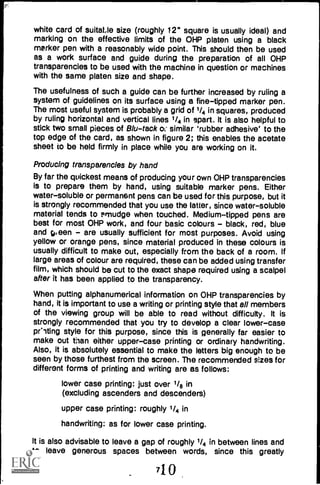
grid of
'/4 In.
squares
for use
as guide
lines
thick
-- white
card
Figure 2: A home-made work surface for the prepara,:on of
OHP transparencies
effective limit
of platern
Fortunately, there is an extr amely simple and foolproof way of
avoiding all such problems. This involves cutting out a square of thick
6
white card of suitaile size (roughly 12" square is usually ideal) and
marking on the effective limits of the OHP platen using a black
marker pen with a reasonably wide point. This should then be used
as a work surface and guide during the preparation of all OHP
transparencies to be used with the machine in question or machines
with the same platen size and shape.
The usefulness of such a guide can be further increased by ruling a
system of guidelines on its surface using a fine-tipped marker pen.
The most useful system is probably a grid of 1/4 in squares, produced
by ruling horizontal and vertical lines 1/4 in apart. It is also helpful to
stick two small pieces of B/u -tack oc similar 'rubber adhesive' to the
top edge of the card, as shown in figure 2; this enables the acetate
sheet to be held firmly in place while you are working on it.
Producing transparencies by hand
By far the quickest means of producing your own OHP transparencies
is to prepare them by hand, using suitable marker pens. Either
water-soluble or permanent pens can be used for this purpose, but it
is strongly recommended that you use the latter, since water-soluble
material tends to smudge when touched. Medium-tipped pens are
best for most OHP work, and four basic colours - black, red, blue
and gi een - are usually sufficient for most purposes. Avoid using
yellow or orange pens, since material produced in these colours is
usually difficult to make out, especially from the back of a room. If
large areas of colour are required, these can be added using transfer
film, which should be cut to the exact shape required using a scalpel
after it has been applied to the transparency.
When putting alphanumerical information on OHP transparencies by
hand, it is important to use a writing or printing style that all members
of the viewing group will be able to read without difficulty. It is
strongly recommended that you try to develop a clear lower-case
or-ding style for this purpose, since this is generally far easier to
make out than either upper-case printing or ordinary handwriting.
Also, it is absolutely essential to make the letters big enough to be
seen by those furthest from the screen. The recommended sizes for
different forms of printing and writing are as follows:
lower case printing: just over 1/8 in
(excluding ascenders and descenders)
upper case printing: roughly 1/4 in
handwriting: as for lower case printing.
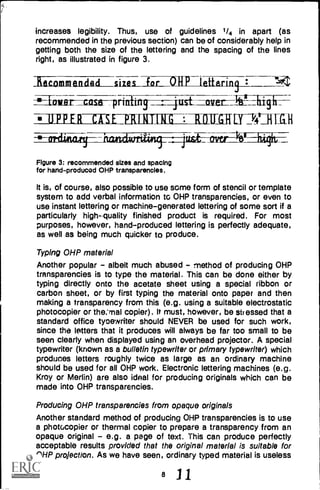
It is also advisable to leave a gap of roughly 1/4 in between lines and
to leave generous spaces between words, since this greatly
710
increases legibility. Thus, use of guidelines 1/4 in apart (as
recommended in the previous section) can be of considerably help in
getting both the size of the lettering and the spacing of the lines
right, as illustrated in figure 3.
Recommended sizes fof--1111 tetLarin szt/
-_---Aowar-Istt---prialins-----4tist_aiter_ Iii-I high
I=ERDMEPRIALMILLAUMITNiiliall
Figure 3: recommended sizes and spacing
for hand- produced OHP transparencies.
It is, of course, also possible to use some form of stencil or template
system to add verbal information tc OHP transparencies, or even to
use instant lettering or machine-generated lettering of some sort if a
particularly highquality finished product is required. For most
purposes, however, hand-produced lettering is perfectly adequate,
as well as being much quicker to produce.
Typing OHP material
Another popular - albeit much abused - method of producing OHP
transparencies is to type the material. This can be done either by
typing directly onto the acetate sheet using a special ribbon or
carbon sheet, or by first typing the material onto paper and then
making a transparency from this (e.g. using a suitable electrostatic
photocopier or the:rnal copier). It must, however, be stressed that a
standard office tycewriter should NEVER be used for such work,
since the letters that it produces will always be far too small to be
seen clearly when displayed using an overhead projector. A special
typewriter (known as a bulletin typewriter or primary typewriter) which
produces letters roughly twice as large as an ordinary machine
should be used for all OHP work. Electronic lettering machines (e.g.
Kroy or Merlin) are also ideal for producing originals which can be
made into OHP transparencies.
Producing OHP transparencies from opaque originals
Another standard method of producing OHP transparencies is to use
a photocopier or thermal copier to prepare a transparency from an
opaque original - e.g. a page of text. This can produce perfectly
acceptable results provided that the original material is suitable for
OHP projection. As we have seen, ordinary typed material is useless
8 11
for this purpose, and the same is true of most printed materiels,
since these are normally intended for individual study at close
quarters rath r than long-range viewing by a group. Thus, producing
an OHP transparecy from (say) a diagram in a book or journal is
nearly always worse than useless, since the resulting material will
almost invariably be far too small and/or highly detailed to be seen
clearly when projected, especially by the people at the back of the
room.
If you are in any doubt about the legibility of the material you have
produced, go to the back of the room in which you are to use it and
check for yourself; you should be able to make out all the information
without difficulty if your material is to be of any use.
Producing computer-generated OHP materials
In the same way as it is possible to use a word processor or similar
computer-based system to create and produce opaque originals for
duplication or printing (see booklet on "How to produce printed and
duplicated materials", it is now possible to use the computer to
design and produce OHP transparencies. Although it will probably be
a long time before machines of this type start to appear in schools,
they will probably become standard fixtures in most tertiary education
and specialised training establishments in the not-too-distant future,
and will undoubtedly prove to be of enormous help to staff in
preparing OHP materials. Most systems of this type can be used to
create both alphanumeric and graphic materials and print them out in
OHP transparency form - in full colour, and with whatever size of
lettering is wanted.
Some useful display techniques
Let us now look at some of the standard techniques that can be used
to increase the effectiveness of OHP displays.
Progressive disclosure
This is one of the basic techniques that can be used in overhead
projector displays, and one of the most useful from an instructional
point of view. It involves covering up all or part of the material on a
given transparency, and progressively revealing the material as the
presentation proceeds. This has the double advantage of
concentrating the mind of the learner on whatever item or section is
being discussed at the time and maintaining interest by keeping him
or her in suspense over what is going to be revealed next (always a
good psychological ploy).
Progressive disclosure can be achieved in a number of ways, the
easiest of which is simply to cover the material to be hidden with a
9 12
sheet of paper, card or other opaque material and then to move it
out of the way as and when required. This can be quite effective
when used with a simple list of headings of key points, which can be
revealed and discussed one by one. There is, however, a tendency
for the mask to fall off the projector before the material at the bottom
of the transparency is reached, something that can be prevented by
weighing it down with a suitable !aavy object (e.g. a bunch of keys
or a ruler).
+EH]
masks folded
back to reveal
material
underneath
hinges --
mask still
to be-4
removed
material still to be revealed
mask still
to be
removed
Figure 4: usa of a system of hinged masks to allow progressive disclosure of
the various sections of a block diagram
A more sophisticated and more versatile way of achieving
progressive disclosure is to cover the various items or sentions with
individual masks of the required shape and attach these to one or
more of the edges of the transparency by means of suitable hinges
(e.g. pieces of Sellotape). The masks can then be pulled back one
by one in order to reveal the different items or sections. This
technique is particularly useful with graph displays such as block
and flow diagrams, since it enables the various sections of such a
diagram to be revealed one by one, thus showing how the complete
system is built up. The use of such hinged masks is illustrated in
figure 4.
Use of overlays
Another standard technique that can bo used to bu:11 up the
information content of an overhead projector display is . I use of
overlays. This differs from progressive disclosure in that the whole of
the area of the tranbdarency is revealed from the start, with
additional information being added to the original display by
superimposing further transparencies on tie original. Again, this can
to -13
be used to guide learners through the development of a complicated
display stage by stage, thus avoiding the confusion and/or distraction
that might well arise if the entire display were shown right from the
start.
There are two basic ways in which material can be overlaid on an
OHP display. The first is simply to lay separate transparencies,
carrying the new information, on top of the first. This may give rise to
problems of registration, however, particularly if the display is a
complicated one or if exact positioning of the new information is
crucial. The second method is to make use of hinged overlays
attached to some or all of the edges of the original transparency,
overlays that can then be flipped into position as and when required.
Use of this system clearly enables the registration problems
mentioned above to be avoided, the secret of achieving perfect
registration being to add the information to each successive overlay
after it has been attached to the original transparency and moved
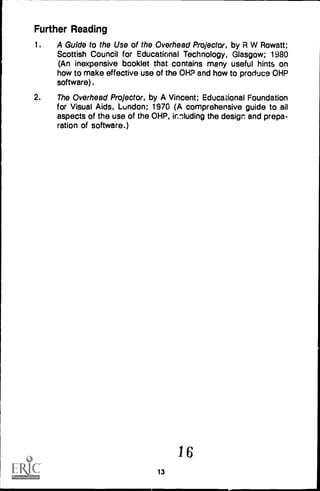
into its display position. The way in which a progressively more
detailed display can be built up by adding a series of hinged overlays
is illustrated in figure 5. Clearly, appropriate use of colours can add
greatly to the effective-ess of such a display.
Use of animation
Although the overhead projector is classed as a 'still visual display'
system, it is in fact possible to add an element of animation trN
certain types of OHP display. This can be used to show such things
as the flow of fluids along pipes, and the direction of flow in flow
diagrams. Two basic methods can be used to produce such
apparent movement. The first is to incorporate special polarizing
materials in the display, and to introduce a polarizing spinner into the
optical system of the projector, between the platen and the
projection head. The second is to make use of Moirei9 fringes to
create an illusion of movement in parts of the display. The materials
and ancillary equipment needed to produce both types of animation
can be obtained from specialist educational suppliers.
14
11
hinge-,
First overlay
(folded back)
r---------
11111,",/fue; elements
basic display
second overlay
(folded back)
fuel elements
moderator
display with first
overlay added
display with first and
second overlays added
second overlay
(folded back)
Figure 5: Use of a series of overlays to build up a progressively more detailed
schematic diagram of the core of a nuclear reactor
15
12
Further Reading
1. A Guide to the Use of the Overhead Projector, by R W Rowatt;
Scottish Council for Educational Technology, Glasgow; 1980
(An inexpensive booklet that contains many useful hints on
how to make effective use of the OHP and how to produce OHP
software).
2. The Overhead Projector, by A Vincent; Educational Foundation
for Visual Aids, London; 1970 (A comprehensive guide to ail
aspects of the use of the OHP, innluding the design and prepa-
ration of software.)
16
13

overhead projector guide

  • 1.
    DOCUMENT RESUME ED 289497 IR 012 964 AUTHOR Ellington, Henry TITLE A Guide to the Use of the Overhead Projector. Teaching and Learning in Higher Education, 14. INSTITUTION Scottish Central Institutions Committee for Educational Development. SPONS AGENCY Robert Gordon's Inst. of Technology, Aberdeen (Scotland). PUB DATE 87 NOTE 16p.; For a related guide, see IR 012 960. PUB TYPE Guides Non-Classroom Use (055) -- Information Analyses (070) EDRS PRICE MF01/PC01 Plus Postage. DESCRIPTORS Foreign Countries; Higher Education; *Instructional Design; *Material Development; *Overhead Projectors; *Production Techniques; Teacher Developed Materials; *Teaching Methods; *Transparencies ABSTRACT A sequel to the booklet "A Review of the Different Types of Instructional Materials Available to Teachers and Lecturers," this booklet begins by discussing the main educational uses of the overhead projector and its various strengths and weaknesses. Basic guidelines for using the overhead projector effectively are then offered, which include ways to avoid some common problems. Finally, detailed guidelines for designing and producing overhead projector software are provided which cover the following topics: (1) the two basic forms of overhead projector software--the continuous roll and the single transparency--and their respective uses; (2) basic principles for designing overhead projector transparencies; (3) producing the transparencies by hand, with a typewriter, from opaque originals, or using a computer-based system; and (4) display techniques such as use of progressive disclosure, overlays, and animation. An annotated list of two items recommended for further reading is included. (MES) *********************************************************************** Reproductions supplied by EDRS are the best that can be made from the original document ************************************************ :*********************
  • 2.
    This booklet wasfirst published internally In Robert Gordon's Institute of Technol- ogy, Aberdeen as part of the Institute's staff development programme. The booklet was written by Dr Henry Ellington of AGIT' s Educational Technology Unit, who adapted it from material originally published In "Producing Teaching Materials", by Henry Ellington (Kogan Page, London; 1985) CICED gratefully acknowledges the co-operation f RGIT, Kogan Page and the author In the publication of the present edition of the booklet. CICED 1987 3
  • 3.
    A Guide ToThe Use Of The Overhead Projector Introduction In "A review of the different types of instructional materials available to teachers and lecturers", we saw how the overhead projector (OHP) is probably the most useful and versatile visual aid that is available to the modern teacher. Indeed, it has now replaced the traditional chalkboard as the main teaching aid provided in many classrooms and lecture theatres. It is therefore important that all teachers and lecturers should know how to make effective use of the OHP, so that they can exploit its potential to the full. This booklet has been written to help new, inexperienced lecturers to acquire this basic knowledge and expertise, although it is hoped that experienced staff will also be aNe to pick up some useful hints from it. Tha booklet begins by discus.;ing the main educational uses of the OHP, and highlighting its various strenoths and weaknesses. It then offers some basic guidelines on how to use the OHP effectively, showing (for example) how to avoid common faults such as keystoning. Finally, it provides detailed guidance on how to design and produce OHP software. How the OHP can be used in different instructional situations It is now generally acknowledged that the overhead projector is probably the most useful visual aid available to anyone who wishes to carry out expository teaching of virtually any type. It is also extremely useful in many group learning situations, both for presenting information to a group (e.g. in a seminar or the briefing for an exercise of the game/simulation/case study type) and in enabling members of a group to display material that they themselves have produced (e.g. in a group project or case study). Some strengths of the OHP The OHP has a number of definite advantages over other methods of presenting visual information. A lecturer can, for e ample, use it in exactly the same way as a chalkboard or markerboard (for writing out notes, ma king through calculations and proofs, drawing graphic material, and so on) but with the great advantage of always facing the class, and thus being able to maintain eye contact with the learners. Such eye contact, which is, of course, impossible when a lecturer is writing on a chalkboard or markerboard, can play an extremely useful role in expository teaching, serving both as an 4
  • 4.
    outward non-verbal communicationchannel for the teacher and as a means of obtaining feedback from a class on how a lesson is going. Another important advantage over the chalkboard or markerboard is that the OHP can also be used to show pre-prepared material, thus enabling teachers and lecturers to build up banks of notes, diagrams, tables etc. that can be used over and over again. When well planned and designed, such sets of overhea,.1 transparencies can often also provide all the cues and 'aides memoire' that are needed during a lesson, so that no conventional teaching notes are required. As we will see later, such material can be prepared using a variety of production methods (free-hand writing or drawing, transfer lettering, thermal or electrostatic copying, and so on) and can incorporate a wide range of presentation techniques (progressive disclosure, use of overlays, use of animation, etc.). Overhead transparencies are also relatively compact compared with some other types of visual aids (e.g. charts), and are therefore easy to store in suitable boxes, large envelopes, folders or files. Compared with other projected aids, the OHP also has the great advantage that it does not require tho room to be blacked out, thus allowing students to take notes; indeed it can be used in all but the very brightest !Ight (e.g. direct sunlight). The OHP is also clean, quiet, and 'user 4,riendly', requiring no technical skill or knowledge on the pen of the operator apart from the ability to change the occasional lamp. Some weaknesses o' the OHP Disadvantages of the OHP include the fact that it requires a power supply, and needs a suitable flat (preferably white) surface on which to project its image. Also, unless this surface is inclined forward at the correct angle, the image will probably suffer from 'keystoning' (see figure 1). Unlike chalkboards, OHP's do also require a certain amount of routine maintenance. They are also liable to break down occasionally (generally at extremely inconvenient times), so it is always advisable to have a spare bulb close at hand (some modern machines do in fact have a built-in spare bulb that can be brought into use at the turn of a knob). A further disadvantage is that some lecturers find the glare from the OHP troublesome, although this can generally be overcome by attaching a suitably-positioned shade to the machine. Apart from these possible 'hardware' difficulties, the main problems associated with the overhead projector stem from the fact that many users do not give sufficient thought to the production of their display material. In many cases, writing is too small or too untidy to be read easily (both in some cases), quite apart from the fact that it 2 5
  • 5.
    frequently extends beyondthe visible area of the transparency (teachers often forget that the illuminated projection area in most overhead projectors is slightly smaller than the standard square acetate sheet, and is also often cut away at the corners). As in the case of slides, there is also a tendency to include too much information on a single frame. Finally, teachers anc; lecturers tend, if anything, to overuse the overhead projector just because it is so convenient, employing it in situations where other forms of visual aid might, on occasions, be more effective. Some basic guidelines on how to use the OHP effectively Despite its near universal use, many teachers and lecturers fail to get the best out of the overhead projector for various reasons. Many of these reasons relate to the use of the machine itself, since even experienced teachers and lecturers sometimes fail to observe all the following basic rules: (1) Position the projector and screen so that the latter can be seen clearly by all the members of the class or group with whom you will be using the machine. In many cases, it is best to place the screen in one of the front corners of the room, especially if locating it in a central postion would deprive you of access to a fixed chalkboard or markerboard, which you might well find that you want to use in the course of the Issson. projection head projection head resu t ng mage Incorrect alignment in a horizontal plane Incorrect alignment in a vertical plane Figure 1: the two causes of keystoning in an OHP display (2) Arrange the projector and screen in such a way as to eliminate or minimise the two forms of keystoning shown in figure 1. The first type arises when the axis of projection is not at right an- gles to the screen in the horizontal plane, and can be elimi- 3 6
  • 6.
    nated by placingthe projector opposite the centre of the screen. The second (and most common) type arises in cases where the axis of the projection is not at right angles to the screen in the vertical plane, usually because the projection head is too low. It can usually be eliminated or made accept- able by tilting the screen forward, it this is possible. In the case of a fixed vertical screen, however, the only way to solve the problem may well be to raise the level of the overhead projec- tor itself, provided that this can be done without blocking the learners' view of the screen, of course! (3) Adjust the distance from the projector to the screen so that the image fills the full area of the latter who', properly in focus; failure to use the entire area of the screen can make it difficult for people at the back of the room to make out details. (4) Make sure that the platen (the glass plate on which the display material is placed) and head lens surfaces are clear and free from dust; dirty or dusty surfaces can reduce image bright- ness and detract from the clarity and quality of the display. How to design and produce OHP software Even if they succeed in getting everything right from a 'hardware' point of view, many overhead projector users do not give sufficient thought to the design of the software that they use or take sufficient care in its preparation to make sure that it achieves the desired objectives. Let us therefore take a systematic look at how the design and production of OHP software should be tackled. The two basic forms of OHP software First of all, let us take a brief look at the two basic forms that OHP software can take - the continuous roll and the single transparency - and examine their respective uses. The continuous roll Most overhead projectors are fitted with a system whereby a long roll of acetate film can be wound across the platen from one spool to another. This enables a virtually endless supply of blank film to be used in the course of a tesson, either for writing out a continuous set of notes or for providing a succession of blank surfaces for the display of specific items of material. Continuous rolls of this type are best suited to the requirements of those who prefer to create their supportive display material during the actual course of a lesson rather than produce it beforehand. 4 7
  • 7.
    They constitute, forexample the standard display method that is now used by many mathematics lecturers. In the bad old days, these used to have to write all their material on a chalkboard, which not only entailed their having to rub old material out at regular intervals in order to make room for new material, but also covered their hands and clothes with chalk dust. Now, however, thanks to the advent of the overhead projector with its virtually endless roll of acetate film, they can work their way through an entire lecture without having to rub anything out, and, furthermore, can do so sitting down and without any messy dustl. The single transparency The other basic form that OHP software can take is the single transparency, whether mounted or unmounted. Until comparatively recently, most OHP acetate sheets were rather thin, and were usually mounted in large cardboard or plastic frames in order to make thorn easier to handle and prevent them from curling up during use. Now, however, sheets are somewhat thicker and less prone to curling up during projection, so that there is no longer the same need to mount them in this way, although some users still prefer to do so. Others simply use them as they are - unmounted - since this makes them easier to store and carry round, the boxes in which blank sheets are supplied bAing ideally suited for both purposes. Although single OHP transparencies can as, 'in be used for the creation of display material during the actual coui se of a Ir sson, their principal use is in the production of pre-prepared materials. It is with the design and production of 3uch single OHP transparencies that the remainder of this booklet will be concerned. Designing OHP transparencies - basic principles Although OHP transparencies can be produced in an extremely wide range of forms, there are two basic principles that should underlie the design of all such materials. First, do not try to put too much information on a single transparency. This is one of the most common mistakes that are made when preparing both photographic slides and overhead projector materials. Ideally you should restrict the content of each transparency to the presentation of a single concept or limited subject area, using a series of such simple transparencies to cover a complicated topic rather than trying to include everything in a single frame. Remember ".hat including too much detail will not only make the material difficult for the viewers (especially those at the back cf the room) to sae, but will probably also cause conceptual confusion. 5 8
  • 8.
    Second, use aclear, systematic layout. As with all still visual display materials, the way in which the information is presented is often just as important as the intrinsic content in determining whether the material is effective from an instructional point of view. Thus the material should be laid out clearly and systematically, with any key words or items highlighted in some way (e.g. by making use of contrasting colours). Producing the transparencies Overhead projector transparencies can be produced by a variety of methods, but, whichever method is used, there is one basic rule that over-rides all others: Make sure that all the material will be seen when the transparency Is projected. Because most of the blank acetate sheets that are supplied for use with the overhead projectch are larger than the effective size of the platen, there is a danger of 'running off the edges' - either vertically or horizontally - unless due care is taken. Also, most overhead projectors 'cut the corners' off the image, so any material in the extreme corners of the transparency may well also fail to be seen. grid of '/4 In. squares for use as guide lines thick -- white card Figure 2: A home-made work surface for the prepara,:on of OHP transparencies effective limit of platern Fortunately, there is an extr amely simple and foolproof way of avoiding all such problems. This involves cutting out a square of thick 6
  • 9.
    white card ofsuitaile size (roughly 12" square is usually ideal) and marking on the effective limits of the OHP platen using a black marker pen with a reasonably wide point. This should then be used as a work surface and guide during the preparation of all OHP transparencies to be used with the machine in question or machines with the same platen size and shape. The usefulness of such a guide can be further increased by ruling a system of guidelines on its surface using a fine-tipped marker pen. The most useful system is probably a grid of 1/4 in squares, produced by ruling horizontal and vertical lines 1/4 in apart. It is also helpful to stick two small pieces of B/u -tack oc similar 'rubber adhesive' to the top edge of the card, as shown in figure 2; this enables the acetate sheet to be held firmly in place while you are working on it. Producing transparencies by hand By far the quickest means of producing your own OHP transparencies is to prepare them by hand, using suitable marker pens. Either water-soluble or permanent pens can be used for this purpose, but it is strongly recommended that you use the latter, since water-soluble material tends to smudge when touched. Medium-tipped pens are best for most OHP work, and four basic colours - black, red, blue and gi een - are usually sufficient for most purposes. Avoid using yellow or orange pens, since material produced in these colours is usually difficult to make out, especially from the back of a room. If large areas of colour are required, these can be added using transfer film, which should be cut to the exact shape required using a scalpel after it has been applied to the transparency. When putting alphanumerical information on OHP transparencies by hand, it is important to use a writing or printing style that all members of the viewing group will be able to read without difficulty. It is strongly recommended that you try to develop a clear lower-case or-ding style for this purpose, since this is generally far easier to make out than either upper-case printing or ordinary handwriting. Also, it is absolutely essential to make the letters big enough to be seen by those furthest from the screen. The recommended sizes for different forms of printing and writing are as follows: lower case printing: just over 1/8 in (excluding ascenders and descenders) upper case printing: roughly 1/4 in handwriting: as for lower case printing. It is also advisable to leave a gap of roughly 1/4 in between lines and to leave generous spaces between words, since this greatly 710
  • 10.
    increases legibility. Thus,use of guidelines 1/4 in apart (as recommended in the previous section) can be of considerably help in getting both the size of the lettering and the spacing of the lines right, as illustrated in figure 3. Recommended sizes fof--1111 tetLarin szt/ -_---Aowar-Istt---prialins-----4tist_aiter_ Iii-I high I=ERDMEPRIALMILLAUMITNiiliall Figure 3: recommended sizes and spacing for hand- produced OHP transparencies. It is, of course, also possible to use some form of stencil or template system to add verbal information tc OHP transparencies, or even to use instant lettering or machine-generated lettering of some sort if a particularly highquality finished product is required. For most purposes, however, hand-produced lettering is perfectly adequate, as well as being much quicker to produce. Typing OHP material Another popular - albeit much abused - method of producing OHP transparencies is to type the material. This can be done either by typing directly onto the acetate sheet using a special ribbon or carbon sheet, or by first typing the material onto paper and then making a transparency from this (e.g. using a suitable electrostatic photocopier or the:rnal copier). It must, however, be stressed that a standard office tycewriter should NEVER be used for such work, since the letters that it produces will always be far too small to be seen clearly when displayed using an overhead projector. A special typewriter (known as a bulletin typewriter or primary typewriter) which produces letters roughly twice as large as an ordinary machine should be used for all OHP work. Electronic lettering machines (e.g. Kroy or Merlin) are also ideal for producing originals which can be made into OHP transparencies. Producing OHP transparencies from opaque originals Another standard method of producing OHP transparencies is to use a photocopier or thermal copier to prepare a transparency from an opaque original - e.g. a page of text. This can produce perfectly acceptable results provided that the original material is suitable for OHP projection. As we have seen, ordinary typed material is useless 8 11
  • 11.
    for this purpose,and the same is true of most printed materiels, since these are normally intended for individual study at close quarters rath r than long-range viewing by a group. Thus, producing an OHP transparecy from (say) a diagram in a book or journal is nearly always worse than useless, since the resulting material will almost invariably be far too small and/or highly detailed to be seen clearly when projected, especially by the people at the back of the room. If you are in any doubt about the legibility of the material you have produced, go to the back of the room in which you are to use it and check for yourself; you should be able to make out all the information without difficulty if your material is to be of any use. Producing computer-generated OHP materials In the same way as it is possible to use a word processor or similar computer-based system to create and produce opaque originals for duplication or printing (see booklet on "How to produce printed and duplicated materials", it is now possible to use the computer to design and produce OHP transparencies. Although it will probably be a long time before machines of this type start to appear in schools, they will probably become standard fixtures in most tertiary education and specialised training establishments in the not-too-distant future, and will undoubtedly prove to be of enormous help to staff in preparing OHP materials. Most systems of this type can be used to create both alphanumeric and graphic materials and print them out in OHP transparency form - in full colour, and with whatever size of lettering is wanted. Some useful display techniques Let us now look at some of the standard techniques that can be used to increase the effectiveness of OHP displays. Progressive disclosure This is one of the basic techniques that can be used in overhead projector displays, and one of the most useful from an instructional point of view. It involves covering up all or part of the material on a given transparency, and progressively revealing the material as the presentation proceeds. This has the double advantage of concentrating the mind of the learner on whatever item or section is being discussed at the time and maintaining interest by keeping him or her in suspense over what is going to be revealed next (always a good psychological ploy). Progressive disclosure can be achieved in a number of ways, the easiest of which is simply to cover the material to be hidden with a 9 12
  • 12.
    sheet of paper,card or other opaque material and then to move it out of the way as and when required. This can be quite effective when used with a simple list of headings of key points, which can be revealed and discussed one by one. There is, however, a tendency for the mask to fall off the projector before the material at the bottom of the transparency is reached, something that can be prevented by weighing it down with a suitable !aavy object (e.g. a bunch of keys or a ruler). +EH] masks folded back to reveal material underneath hinges -- mask still to be-4 removed material still to be revealed mask still to be removed Figure 4: usa of a system of hinged masks to allow progressive disclosure of the various sections of a block diagram A more sophisticated and more versatile way of achieving progressive disclosure is to cover the various items or sentions with individual masks of the required shape and attach these to one or more of the edges of the transparency by means of suitable hinges (e.g. pieces of Sellotape). The masks can then be pulled back one by one in order to reveal the different items or sections. This technique is particularly useful with graph displays such as block and flow diagrams, since it enables the various sections of such a diagram to be revealed one by one, thus showing how the complete system is built up. The use of such hinged masks is illustrated in figure 4. Use of overlays Another standard technique that can bo used to bu:11 up the information content of an overhead projector display is . I use of overlays. This differs from progressive disclosure in that the whole of the area of the tranbdarency is revealed from the start, with additional information being added to the original display by superimposing further transparencies on tie original. Again, this can to -13
  • 13.
    be used toguide learners through the development of a complicated display stage by stage, thus avoiding the confusion and/or distraction that might well arise if the entire display were shown right from the start. There are two basic ways in which material can be overlaid on an OHP display. The first is simply to lay separate transparencies, carrying the new information, on top of the first. This may give rise to problems of registration, however, particularly if the display is a complicated one or if exact positioning of the new information is crucial. The second method is to make use of hinged overlays attached to some or all of the edges of the original transparency, overlays that can then be flipped into position as and when required. Use of this system clearly enables the registration problems mentioned above to be avoided, the secret of achieving perfect registration being to add the information to each successive overlay after it has been attached to the original transparency and moved into its display position. The way in which a progressively more detailed display can be built up by adding a series of hinged overlays is illustrated in figure 5. Clearly, appropriate use of colours can add greatly to the effective-ess of such a display. Use of animation Although the overhead projector is classed as a 'still visual display' system, it is in fact possible to add an element of animation trN certain types of OHP display. This can be used to show such things as the flow of fluids along pipes, and the direction of flow in flow diagrams. Two basic methods can be used to produce such apparent movement. The first is to incorporate special polarizing materials in the display, and to introduce a polarizing spinner into the optical system of the projector, between the platen and the projection head. The second is to make use of Moirei9 fringes to create an illusion of movement in parts of the display. The materials and ancillary equipment needed to produce both types of animation can be obtained from specialist educational suppliers. 14 11
  • 14.
    hinge-, First overlay (folded back) r--------- 11111,",/fue;elements basic display second overlay (folded back) fuel elements moderator display with first overlay added display with first and second overlays added second overlay (folded back) Figure 5: Use of a series of overlays to build up a progressively more detailed schematic diagram of the core of a nuclear reactor 15 12
  • 15.
    Further Reading 1. AGuide to the Use of the Overhead Projector, by R W Rowatt; Scottish Council for Educational Technology, Glasgow; 1980 (An inexpensive booklet that contains many useful hints on how to make effective use of the OHP and how to produce OHP software). 2. The Overhead Projector, by A Vincent; Educational Foundation for Visual Aids, London; 1970 (A comprehensive guide to ail aspects of the use of the OHP, innluding the design and prepa- ration of software.) 16 13