NURSING EDUCATION
PRESENTATION
ON
PROJECTED AIDS
TEERTHANKER MAHAVEER
COLLEGE OF NURSING
Presented by-
Ms. Cindrella Burge
M.Sc. Nursing I year
Medical Surgical Nursing Dept
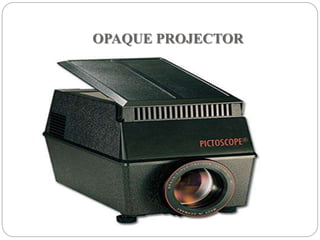
OPAQUE PROJECTOR
OPAQUE PROJECTOR
 The opaque projector, epidioscope, epidiascope or
episcope; PAXISCOPE
 This is a device that has the capacity to display opaque
materials on a screen by shinning a bright lamp onto
the object.
 A system of mirrors, prisms and/or imaging lenses is
used to focus an image of the material onto a viewing
screen.
Conti…
 Opaque projectors are typically used to project images of
book pages, drawings, leaves, etc.
 They have been produced to allow images to be transferred to
surfaces.
 Projectors require brighter bulbs
 Larger lenses
 Care to be taken to prevent material damage by the heat
generated by the light source.
 Not very common
Small Episcope for home use
Precautions that should be taken for opaque
projector
 Handled carefully
 Protected from breakage
 Away from moisture
 Kept clean
 Preferably kept in a cool room
 Switched off when not in use.
Advantages-
 Graphic aids are projected with magnification
 Tracing enlarged images
 No need of clipping picture from book resources
 Flat specimen like coins, cloth pieces, leaves etc.
can also be projected
 Seen conveniently by a large number of students.
Disadvantages-
 Demands total darkness
 Bulky machine
 Electricity required
 Difficult maintenance
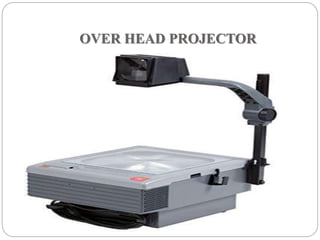
OVER HEAD PROJECTOR
Over head projector-
 An OHP is an important electronic teaching aid.
 It is a box with a large “stage” on the top surface. A lamp
from inside the box is condensed by a special type of lens
and passes through the transparency that is placed on the
“stage”. A transparency may be composed of photographic
film or any transparent material capable of being imprinted
with an image by means of chemical, heat process or direct
drawing method.
 This machine projects an image from a transparency.
steps
1. Position the projector at least 2-3 meters from the screen.
2. Check if the lenses and glass plate are clean.
3. Place the transparency on the stage as you would normally
view it.
4. Do necessary adjustments with the head assembly and
focusing knob in order to ensure that the projection can be
read by your learners who are seated at the farthest part of
the room.
5. Make sure that your learners can see what you are
projecting.
6. Look at either your class or your transparency and NOT at
the screen. An exception is when you are using a laser
pointer.
7. Place the transparency on the glass plate before turning on
the projector. Turn it off before removing the transparency.
8. Use dim lights.
9. When using an OHP pointer, point it to the
transparency itself and not on the screen. You may also
rest the pointer on the text.
10. Turn off the OHP when you are not using it during
discussions.
11. Make sure that the lamp has cooled before moving
the projector.
Preparing a transparency-
 Preparing by writing on cellophane sheets with the
help of an OHP pen
 Colored pens
 Print horizontally on the transparency.
 Use a large text size.
 Use standard fonts.
 Do not overload your transparency.
 Use the rule of 6
Rule of 6 for preparing transparencies-
 6 lines per transparency
 6 words per line
 6 mm smallest letter size
 6 cm (3+3 on each side) margin
Screens for projections
 Effective utilization of projection material necessitates
careful selection of the screen. Types of screen are –
- Aluminiums coated
- glass board
- Flat white screen
- Screens should be mounted properly and at a proper
angle
Advantages of OHP-
 The teacher can maintain eye contact and observe the
reactions of students.
 Small objects can be shown on the machine simply by
placing them on projection slide.
 The graphics and writings can be shown very clearly and
colorfully.
 It does not need as darkened room as compared to other
projectors.
SOME DO’S AND DON’T’S WHILE
USING THE OHP-
DO’S
 Focus and position image before presentation
 Stand to the side of the screen
 Turn off projector when not in use
 Letters the larger the better
 Use colour to attract attention
 Use pen or ruler to point
 Use upper and lower case letters.
DON’T’S
 Walk or stand in front of the screen.
 Leave the projector ON when you’re talking about
something
 Have images type-written or too small
 Use black and white visuals only
 Use finger to point
 Use only capital letter
THANK YOU

Projected aids

  • 1.
    NURSING EDUCATION PRESENTATION ON PROJECTED AIDS TEERTHANKERMAHAVEER COLLEGE OF NURSING Presented by- Ms. Cindrella Burge M.Sc. Nursing I year Medical Surgical Nursing Dept
  • 2.
  • 3.
    OPAQUE PROJECTOR  Theopaque projector, epidioscope, epidiascope or episcope; PAXISCOPE  This is a device that has the capacity to display opaque materials on a screen by shinning a bright lamp onto the object.  A system of mirrors, prisms and/or imaging lenses is used to focus an image of the material onto a viewing screen.
  • 4.
    Conti…  Opaque projectorsare typically used to project images of book pages, drawings, leaves, etc.  They have been produced to allow images to be transferred to surfaces.  Projectors require brighter bulbs  Larger lenses  Care to be taken to prevent material damage by the heat generated by the light source.  Not very common
  • 6.
  • 7.
    Precautions that shouldbe taken for opaque projector  Handled carefully  Protected from breakage  Away from moisture  Kept clean  Preferably kept in a cool room  Switched off when not in use.
  • 8.
    Advantages-  Graphic aidsare projected with magnification  Tracing enlarged images  No need of clipping picture from book resources  Flat specimen like coins, cloth pieces, leaves etc. can also be projected  Seen conveniently by a large number of students.
  • 9.
    Disadvantages-  Demands totaldarkness  Bulky machine  Electricity required  Difficult maintenance
  • 10.
  • 11.
    Over head projector- An OHP is an important electronic teaching aid.  It is a box with a large “stage” on the top surface. A lamp from inside the box is condensed by a special type of lens and passes through the transparency that is placed on the “stage”. A transparency may be composed of photographic film or any transparent material capable of being imprinted with an image by means of chemical, heat process or direct drawing method.  This machine projects an image from a transparency.
  • 13.
    steps 1. Position theprojector at least 2-3 meters from the screen. 2. Check if the lenses and glass plate are clean. 3. Place the transparency on the stage as you would normally view it. 4. Do necessary adjustments with the head assembly and focusing knob in order to ensure that the projection can be read by your learners who are seated at the farthest part of the room.
  • 14.
    5. Make surethat your learners can see what you are projecting. 6. Look at either your class or your transparency and NOT at the screen. An exception is when you are using a laser pointer. 7. Place the transparency on the glass plate before turning on the projector. Turn it off before removing the transparency. 8. Use dim lights.
  • 15.
    9. When usingan OHP pointer, point it to the transparency itself and not on the screen. You may also rest the pointer on the text. 10. Turn off the OHP when you are not using it during discussions. 11. Make sure that the lamp has cooled before moving the projector.
  • 17.
    Preparing a transparency- Preparing by writing on cellophane sheets with the help of an OHP pen  Colored pens  Print horizontally on the transparency.  Use a large text size.  Use standard fonts.  Do not overload your transparency.  Use the rule of 6
  • 18.
    Rule of 6for preparing transparencies-  6 lines per transparency  6 words per line  6 mm smallest letter size  6 cm (3+3 on each side) margin
  • 19.
    Screens for projections Effective utilization of projection material necessitates careful selection of the screen. Types of screen are – - Aluminiums coated - glass board - Flat white screen - Screens should be mounted properly and at a proper angle
  • 20.
    Advantages of OHP- The teacher can maintain eye contact and observe the reactions of students.  Small objects can be shown on the machine simply by placing them on projection slide.  The graphics and writings can be shown very clearly and colorfully.  It does not need as darkened room as compared to other projectors.
  • 22.
    SOME DO’S ANDDON’T’S WHILE USING THE OHP-
  • 23.
    DO’S  Focus andposition image before presentation  Stand to the side of the screen  Turn off projector when not in use  Letters the larger the better  Use colour to attract attention  Use pen or ruler to point  Use upper and lower case letters.
  • 24.
    DON’T’S  Walk orstand in front of the screen.  Leave the projector ON when you’re talking about something  Have images type-written or too small  Use black and white visuals only  Use finger to point  Use only capital letter
  • 25.