CLASS -8 -
EDUCATIONAL AIDS
PROJECTED AIDS- OHP
D.KAVITHA
ASSOCIATE PROFESSOR IN NURSING
DEPARTMENT Obs& Gyn
MPG&RIHS,PUDUCHERRY
KAVITHA DURAIRAJ, ASSOCIATE PROFESSOR 1
1
PROJECTED AIDS
2KAVITHA DURAIRAJ, ASSOCIATE PROFESSOR
INTRODUCTION
 Rapid contribution of science and technology
in the development of newer projecting
audiovisual aids has revolutionized the field of
audio visual aids.
3
KAVITHA DURAIRAJ, ASSOCIATE PROFESSOR
DEFINITION OF PROJECTED
VISUAL AIDS
 Projected visual aids are pictures shown upon
a screen by the use of a certain type of
machine.
4
KAVITHA DURAIRAJ, ASSOCIATE PROFESSOR
ADVANTAGES OF PROJECTED
AV AIDS
 Provides greater enjoyment in learning
 Stimulates more rapid learning
 Increases retention: larger percentages and
longer retention
 Compels attention
 Enlarges or reduces actual size of objects
 Brings distant past and the present into the
classroom
5
KAVITHA DURAIRAJ, ASSOCIATE PROFESSOR
 SLIDES
 OHP
 FLIMS
 TV/VCR/VCD/LCD
 CAMERA MICROSCOPE
6
KAVITHA DURAIRAJ, ASSOCIATE PROFESSOR
OVER HEAD PROJECTOR-
INTRODUCTION
 Overhead Projector was created by Jules
Duboscq, in 1870s.
 Used during the Second World War
 Used as a teaching tool since 1950s.
 Become popular easy to used
 Provides an interactive environment for
educators.
7
KAVITHA DURAIRAJ, ASSOCIATE PROFESSOR
OVER HEAD PROJECTOR
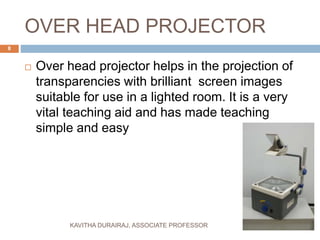
 Over head projector helps in the projection of
transparencies with brilliant screen images
suitable for use in a lighted room. It is a very
vital teaching aid and has made teaching
simple and easy
8
KAVITHA DURAIRAJ, ASSOCIATE PROFESSOR
DEFINITION
 Overhead Projector: machine designed to
project an image, text, and drawings onto a
small screen or whiteboard
 Transparencies: pages transparent and
flexible used to place information and images
9
KAVITHA DURAIRAJ, ASSOCIATE PROFESSOR
PARTS OF OHP
10
KAVITHA DURAIRAJ, ASSOCIATE PROFESSOR
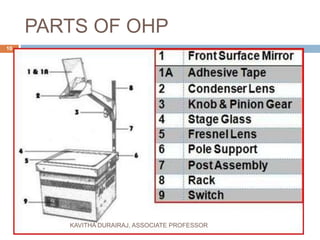
Parts of over head projector
1. Metal box with a 1000w bulb for an indirect
projection / 600w Halogen Lamp for a direct
projection and a concave reflector
2.Transparent writing place 25x 25cm
3. Fresnel lens is used to form a converging
beam of light . Which illuminates the stage
area uniformly and converges to the projected
lens
11
KAVITHA DURAIRAJ, ASSOCIATE PROFESSOR
4. The projection lens is used to form
converging beam of light . Which illuminates
the stage area uniformly and converges to the
projected lens
5. A surface aluminized mirror / very thin flat
mirror serves to rotate the path / light by 90˚
6. Small exhaust / cooling fan in the projector to
blow out the excess heat produced by the bulb
12
KAVITHA DURAIRAJ, ASSOCIATE PROFESSOR
7. Fresnel lens protected by a glass plate.
8. Knob – the projection distance can be
adjusted in accordance with the desired
picture size
13
KAVITHA DURAIRAJ, ASSOCIATE PROFESSOR
Accessory structures
 Screens may be aluminum coated .
 Glass bead / flat white screen
 Stabilizer to prevent voltage fluctuation
 Pointer
14
KAVITHA DURAIRAJ, ASSOCIATE PROFESSOR
How the OHP can be used in
different Instructional Situation
 Expository teaching of virtually any type
 Group learning situations
 Enabling members of a group to display
material that they themselves have produced
15
KAVITHA DURAIRAJ, ASSOCIATE PROFESSOR
CONT….
 To present activity plan or objectives
 To show tables

 To systematize the information to be conveyed
 To list brain-storming idea
16
KAVITHA DURAIRAJ, ASSOCIATE PROFESSOR
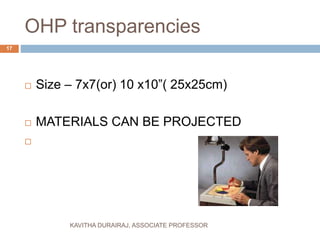
OHP transparencies
 Size – 7x7(or) 10 x10”( 25x25cm)
 MATERIALS CAN BE PROJECTED

17
KAVITHA DURAIRAJ, ASSOCIATE PROFESSOR
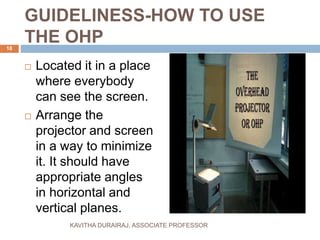
GUIDELINESS-HOW TO USE
THE OHP
 Located it in a place
where everybody
can see the screen.
 Arrange the
projector and screen
in a way to minimize
it. It should have
appropriate angles
in horizontal and
vertical planes.
18
KAVITHA DURAIRAJ, ASSOCIATE PROFESSOR
CONT…
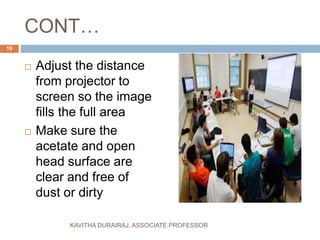
 Adjust the distance
from projector to
screen so the image
fills the full area
 Make sure the
acetate and open
head surface are
clear and free of
dust or dirty
19
KAVITHA DURAIRAJ, ASSOCIATE PROFESSOR
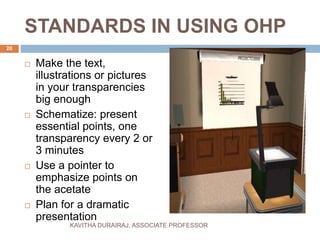
STANDARDS IN USING OHP
 Make the text,
illustrations or pictures
in your transparencies
big enough
 Schematize: present
essential points, one
transparency every 2 or
3 minutes
 Use a pointer to
emphasize points on
the acetate
 Plan for a dramatic
presentation
20
KAVITHA DURAIRAJ, ASSOCIATE PROFESSOR
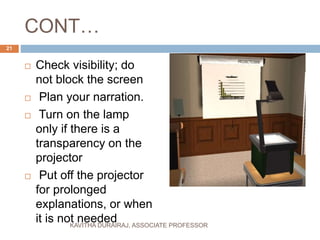
CONT…
 Check visibility; do
not block the screen
 Plan your narration.
 Turn on the lamp
only if there is a
transparency on the
projector
 Put off the projector
for prolonged
explanations, or when
it is not needed
21
KAVITHA DURAIRAJ, ASSOCIATE PROFESSOR
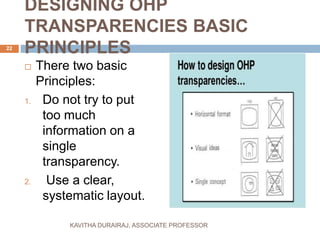
DESIGNING OHP
TRANSPARENCIES BASIC
PRINCIPLES
 There two basic
Principles:
1. Do not try to put
too much
information on a
single
transparency.
2. Use a clear,
systematic layout.
22
KAVITHA DURAIRAJ, ASSOCIATE PROFESSOR
PRODUCING COMPUTER
GENERATED OHP MATERIALS
 Use computer to design and produce
OHT
 Create both alphanumeric and
graphic materials and print them out
in OHP transparency form - in full
color, and with whatever size of
lettering is wanted
23
KAVITHA DURAIRAJ, ASSOCIATE PROFESSOR
DISPLAY TECHNIQUES
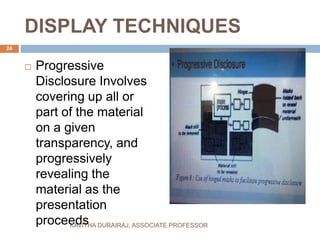
 Progressive
Disclosure Involves
covering up all or
part of the material
on a given
transparency, and
progressively
revealing the
material as the
presentation
proceeds
24
KAVITHA DURAIRAJ, ASSOCIATE PROFESSOR
Display techniques
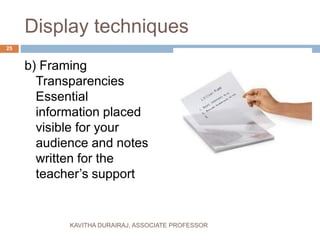
b) Framing
Transparencies
Essential
information placed
visible for your
audience and notes
written for the
teacher’s support
25
KAVITHA DURAIRAJ, ASSOCIATE PROFESSOR
Display Techniques
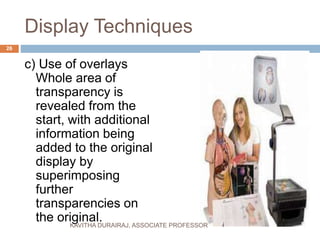
c) Use of overlays
Whole area of
transparency is
revealed from the
start, with additional
information being
added to the original
display by
superimposing
further
transparencies on
the original.
26
KAVITHA DURAIRAJ, ASSOCIATE PROFESSOR
DISPLAY TECHNIQUES
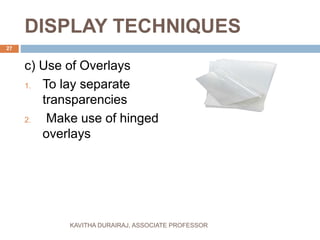
c) Use of Overlays
1. To lay separate
transparencies
2. Make use of hinged
overlays
27
KAVITHA DURAIRAJ, ASSOCIATE PROFESSOR
Tips to use OHP Effectively
 1.Just write key points on
transparencies
 2.Keep transparencies simple -
6X6Rule
 3.Use 18 point type- no more than two
type styles
 4.Mix upper and lower-case letters for
easy readability
 5.Do not use exclamation marks, they
look like number one.
28
KAVITHA DURAIRAJ, ASSOCIATE PROFESSOR
Cont…
 7. Do not turn off all room lights
 8. Turn projector lamp off during
discussions
 9. Never stand anything between the
projection and screen
 10.Give people time to read
 11.Talk to your listeners not the screen
 12. Before moving wait for period time to
cool Down - bulb may explode.
29
KAVITHA DURAIRAJ, ASSOCIATE PROFESSOR
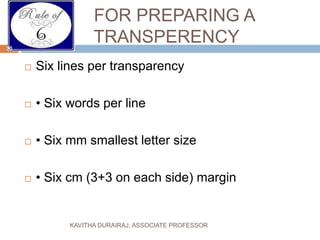
FOR PREPARING A
TRANSPERENCY
 Six lines per transparency
 • Six words per line
 • Six mm smallest letter size
 • Six cm (3+3 on each side) margin
30
KAVITHA DURAIRAJ, ASSOCIATE PROFESSOR
MATERIALS
 a)Transparencies
 b)Markers
 c)Ruler
 d)Cleaning supplies
 e)Bulbs
 f) A pointer
31
KAVITHA DURAIRAJ, ASSOCIATE PROFESSOR
METHOD OF USING OHP
 Place the OHP on a stable table with the
objective lens
 facing the screen behind the teacher.
 Put the cord plug into power wall socket.
 Switch on the blower first and then the bulb.
 Place transparency on the glass top.
32
KAVITHA DURAIRAJ, ASSOCIATE PROFESSOR
 Move the objective lens and mirror assembly
up and down to get the image in focus on the
screen.
 Explain about the material on the
transparency from behind OHP with a strong
pointer.
 The handle of the teacher should not come on
the slide.
 Make your points short and simple
 Remove what is not needed.
33
KAVITHA DURAIRAJ, ASSOCIATE PROFESSOR
SOME DO’S AND
DON’T’S WHILE USING
THE OHP
34 KAVITHA DURAIRAJ, ASSOCIATE PROFESSOR
DO’S
 Focus and position image before presentation
 Stand to the side of the screen
 Turn off projector when not in use
 Letters the larger the better
 Use colour to attract attention
 Put captions on top.
 Have images in to two-thirds of visual position
image at the top of the screen
 Use pen or ruler to point
 Use upper and lower case letters
35
KAVITHA DURAIRAJ, ASSOCIATE PROFESSOR
DON’T’S
 Walk or stand in front of the screen.
 Leave the projector on when you’ve talking
about
Something
 Write closely on the whole of the transparency
sheet
 Have images type-written or too small
 Use black and white visuals only
 Use finger to point
 Use only capital letter
36
KAVITHA DURAIRAJ, ASSOCIATE PROFESSOR
CHECK LIST FOR EFFECTIVE
USE OF OHP
1. BEFORE THE LESSON
 Position the screen
 Obtain correct image by moving machine
backward/ forward in relation to the screen
 Focus image sharply
 Place masking sheet to hand
 Place the transparencies in correct order
 Check table and head for dust
 Ensure that spare lamp is available
37
KAVITHA DURAIRAJ, ASSOCIATE PROFESSOR
DURING LESSON
 1.switch off when
Placing transparency on table
Removing transparency
Point has been explained
 2. use pointer to indicate
 3. use mask to reveal the points in a step by
step
38
KAVITHA DURAIRAJ, ASSOCIATE PROFESSOR
AFTER LESSON
 Donot move the OHP while lamp is HOT.
 Never disconnect from main supply while the
fan is operating
39
KAVITHA DURAIRAJ, ASSOCIATE PROFESSOR
ADVANTAGES OF USING OHP
 It is portable
 Get transparency materials in low cost
 Located in front of the room
 Used in a room with normal lighting
 It is simple to operate
40
KAVITHA DURAIRAJ, ASSOCIATE PROFESSOR
ADVANTAGES OF USING
OHP
 Used as a chalkboard or market board
 Modify transparencies during the presentation
 You can write without turning your back
 Maintain eye contact
 Audiences can follow handout or take notes
41
KAVITHA DURAIRAJ, ASSOCIATE PROFESSOR
DISADVANTAGES OF USING
OHP
 It requires a power supply
 Needs suitable surface about four square feet
 Need spare bulb in case unexpected events
 Many users do not give sufficient thought to
the production of their display material
42
KAVITHA DURAIRAJ, ASSOCIATE PROFESSOR
CONT…
 Tendency to include too much information in a
single frame
 Teachers or lectures overuse the OHP
 Difficult to transport because of its weigh
 Cost of materials required to operate them
 Used with small audiences.
43
KAVITHA DURAIRAJ, ASSOCIATE PROFESSOR
CONLUSION
 OHP is a useful tool to project information for a
small audience.
 It provides some advantages using it as well
as some disadvantages.
 There are some usage principles teachers
should follow to make its use effective.
44
KAVITHA DURAIRAJ, ASSOCIATE PROFESSOR
45

Class 8 avaids d.kavitha

  • 1.
    CLASS -8 - EDUCATIONALAIDS PROJECTED AIDS- OHP D.KAVITHA ASSOCIATE PROFESSOR IN NURSING DEPARTMENT Obs& Gyn MPG&RIHS,PUDUCHERRY KAVITHA DURAIRAJ, ASSOCIATE PROFESSOR 1 1
  • 2.
  • 3.
    INTRODUCTION  Rapid contributionof science and technology in the development of newer projecting audiovisual aids has revolutionized the field of audio visual aids. 3 KAVITHA DURAIRAJ, ASSOCIATE PROFESSOR
  • 4.
    DEFINITION OF PROJECTED VISUALAIDS  Projected visual aids are pictures shown upon a screen by the use of a certain type of machine. 4 KAVITHA DURAIRAJ, ASSOCIATE PROFESSOR
  • 5.
    ADVANTAGES OF PROJECTED AVAIDS  Provides greater enjoyment in learning  Stimulates more rapid learning  Increases retention: larger percentages and longer retention  Compels attention  Enlarges or reduces actual size of objects  Brings distant past and the present into the classroom 5 KAVITHA DURAIRAJ, ASSOCIATE PROFESSOR
  • 6.
     SLIDES  OHP FLIMS  TV/VCR/VCD/LCD  CAMERA MICROSCOPE 6 KAVITHA DURAIRAJ, ASSOCIATE PROFESSOR
  • 7.
    OVER HEAD PROJECTOR- INTRODUCTION Overhead Projector was created by Jules Duboscq, in 1870s.  Used during the Second World War  Used as a teaching tool since 1950s.  Become popular easy to used  Provides an interactive environment for educators. 7 KAVITHA DURAIRAJ, ASSOCIATE PROFESSOR
  • 8.
    OVER HEAD PROJECTOR Over head projector helps in the projection of transparencies with brilliant screen images suitable for use in a lighted room. It is a very vital teaching aid and has made teaching simple and easy 8 KAVITHA DURAIRAJ, ASSOCIATE PROFESSOR
  • 9.
    DEFINITION  Overhead Projector:machine designed to project an image, text, and drawings onto a small screen or whiteboard  Transparencies: pages transparent and flexible used to place information and images 9 KAVITHA DURAIRAJ, ASSOCIATE PROFESSOR
  • 10.
    PARTS OF OHP 10 KAVITHADURAIRAJ, ASSOCIATE PROFESSOR
  • 11.
    Parts of overhead projector 1. Metal box with a 1000w bulb for an indirect projection / 600w Halogen Lamp for a direct projection and a concave reflector 2.Transparent writing place 25x 25cm 3. Fresnel lens is used to form a converging beam of light . Which illuminates the stage area uniformly and converges to the projected lens 11 KAVITHA DURAIRAJ, ASSOCIATE PROFESSOR
  • 12.
    4. The projectionlens is used to form converging beam of light . Which illuminates the stage area uniformly and converges to the projected lens 5. A surface aluminized mirror / very thin flat mirror serves to rotate the path / light by 90˚ 6. Small exhaust / cooling fan in the projector to blow out the excess heat produced by the bulb 12 KAVITHA DURAIRAJ, ASSOCIATE PROFESSOR
  • 13.
    7. Fresnel lensprotected by a glass plate. 8. Knob – the projection distance can be adjusted in accordance with the desired picture size 13 KAVITHA DURAIRAJ, ASSOCIATE PROFESSOR
  • 14.
    Accessory structures  Screensmay be aluminum coated .  Glass bead / flat white screen  Stabilizer to prevent voltage fluctuation  Pointer 14 KAVITHA DURAIRAJ, ASSOCIATE PROFESSOR
  • 15.
    How the OHPcan be used in different Instructional Situation  Expository teaching of virtually any type  Group learning situations  Enabling members of a group to display material that they themselves have produced 15 KAVITHA DURAIRAJ, ASSOCIATE PROFESSOR
  • 16.
    CONT….  To presentactivity plan or objectives  To show tables   To systematize the information to be conveyed  To list brain-storming idea 16 KAVITHA DURAIRAJ, ASSOCIATE PROFESSOR
  • 17.
    OHP transparencies  Size– 7x7(or) 10 x10”( 25x25cm)  MATERIALS CAN BE PROJECTED  17 KAVITHA DURAIRAJ, ASSOCIATE PROFESSOR
  • 18.
    GUIDELINESS-HOW TO USE THEOHP  Located it in a place where everybody can see the screen.  Arrange the projector and screen in a way to minimize it. It should have appropriate angles in horizontal and vertical planes. 18 KAVITHA DURAIRAJ, ASSOCIATE PROFESSOR
  • 19.
    CONT…  Adjust thedistance from projector to screen so the image fills the full area  Make sure the acetate and open head surface are clear and free of dust or dirty 19 KAVITHA DURAIRAJ, ASSOCIATE PROFESSOR
  • 20.
    STANDARDS IN USINGOHP  Make the text, illustrations or pictures in your transparencies big enough  Schematize: present essential points, one transparency every 2 or 3 minutes  Use a pointer to emphasize points on the acetate  Plan for a dramatic presentation 20 KAVITHA DURAIRAJ, ASSOCIATE PROFESSOR
  • 21.
    CONT…  Check visibility;do not block the screen  Plan your narration.  Turn on the lamp only if there is a transparency on the projector  Put off the projector for prolonged explanations, or when it is not needed 21 KAVITHA DURAIRAJ, ASSOCIATE PROFESSOR
  • 22.
    DESIGNING OHP TRANSPARENCIES BASIC PRINCIPLES There two basic Principles: 1. Do not try to put too much information on a single transparency. 2. Use a clear, systematic layout. 22 KAVITHA DURAIRAJ, ASSOCIATE PROFESSOR
  • 23.
    PRODUCING COMPUTER GENERATED OHPMATERIALS  Use computer to design and produce OHT  Create both alphanumeric and graphic materials and print them out in OHP transparency form - in full color, and with whatever size of lettering is wanted 23 KAVITHA DURAIRAJ, ASSOCIATE PROFESSOR
  • 24.
    DISPLAY TECHNIQUES  Progressive DisclosureInvolves covering up all or part of the material on a given transparency, and progressively revealing the material as the presentation proceeds 24 KAVITHA DURAIRAJ, ASSOCIATE PROFESSOR
  • 25.
    Display techniques b) Framing Transparencies Essential informationplaced visible for your audience and notes written for the teacher’s support 25 KAVITHA DURAIRAJ, ASSOCIATE PROFESSOR
  • 26.
    Display Techniques c) Useof overlays Whole area of transparency is revealed from the start, with additional information being added to the original display by superimposing further transparencies on the original. 26 KAVITHA DURAIRAJ, ASSOCIATE PROFESSOR
  • 27.
    DISPLAY TECHNIQUES c) Useof Overlays 1. To lay separate transparencies 2. Make use of hinged overlays 27 KAVITHA DURAIRAJ, ASSOCIATE PROFESSOR
  • 28.
    Tips to useOHP Effectively  1.Just write key points on transparencies  2.Keep transparencies simple - 6X6Rule  3.Use 18 point type- no more than two type styles  4.Mix upper and lower-case letters for easy readability  5.Do not use exclamation marks, they look like number one. 28 KAVITHA DURAIRAJ, ASSOCIATE PROFESSOR
  • 29.
    Cont…  7. Donot turn off all room lights  8. Turn projector lamp off during discussions  9. Never stand anything between the projection and screen  10.Give people time to read  11.Talk to your listeners not the screen  12. Before moving wait for period time to cool Down - bulb may explode. 29 KAVITHA DURAIRAJ, ASSOCIATE PROFESSOR
  • 30.
    FOR PREPARING A TRANSPERENCY Six lines per transparency  • Six words per line  • Six mm smallest letter size  • Six cm (3+3 on each side) margin 30 KAVITHA DURAIRAJ, ASSOCIATE PROFESSOR
  • 31.
    MATERIALS  a)Transparencies  b)Markers c)Ruler  d)Cleaning supplies  e)Bulbs  f) A pointer 31 KAVITHA DURAIRAJ, ASSOCIATE PROFESSOR
  • 32.
    METHOD OF USINGOHP  Place the OHP on a stable table with the objective lens  facing the screen behind the teacher.  Put the cord plug into power wall socket.  Switch on the blower first and then the bulb.  Place transparency on the glass top. 32 KAVITHA DURAIRAJ, ASSOCIATE PROFESSOR
  • 33.
     Move theobjective lens and mirror assembly up and down to get the image in focus on the screen.  Explain about the material on the transparency from behind OHP with a strong pointer.  The handle of the teacher should not come on the slide.  Make your points short and simple  Remove what is not needed. 33 KAVITHA DURAIRAJ, ASSOCIATE PROFESSOR
  • 34.
    SOME DO’S AND DON’T’SWHILE USING THE OHP 34 KAVITHA DURAIRAJ, ASSOCIATE PROFESSOR
  • 35.
    DO’S  Focus andposition image before presentation  Stand to the side of the screen  Turn off projector when not in use  Letters the larger the better  Use colour to attract attention  Put captions on top.  Have images in to two-thirds of visual position image at the top of the screen  Use pen or ruler to point  Use upper and lower case letters 35 KAVITHA DURAIRAJ, ASSOCIATE PROFESSOR
  • 36.
    DON’T’S  Walk orstand in front of the screen.  Leave the projector on when you’ve talking about Something  Write closely on the whole of the transparency sheet  Have images type-written or too small  Use black and white visuals only  Use finger to point  Use only capital letter 36 KAVITHA DURAIRAJ, ASSOCIATE PROFESSOR
  • 37.
    CHECK LIST FOREFFECTIVE USE OF OHP 1. BEFORE THE LESSON  Position the screen  Obtain correct image by moving machine backward/ forward in relation to the screen  Focus image sharply  Place masking sheet to hand  Place the transparencies in correct order  Check table and head for dust  Ensure that spare lamp is available 37 KAVITHA DURAIRAJ, ASSOCIATE PROFESSOR
  • 38.
    DURING LESSON  1.switchoff when Placing transparency on table Removing transparency Point has been explained  2. use pointer to indicate  3. use mask to reveal the points in a step by step 38 KAVITHA DURAIRAJ, ASSOCIATE PROFESSOR
  • 39.
    AFTER LESSON  Donotmove the OHP while lamp is HOT.  Never disconnect from main supply while the fan is operating 39 KAVITHA DURAIRAJ, ASSOCIATE PROFESSOR
  • 40.
    ADVANTAGES OF USINGOHP  It is portable  Get transparency materials in low cost  Located in front of the room  Used in a room with normal lighting  It is simple to operate 40 KAVITHA DURAIRAJ, ASSOCIATE PROFESSOR
  • 41.
    ADVANTAGES OF USING OHP Used as a chalkboard or market board  Modify transparencies during the presentation  You can write without turning your back  Maintain eye contact  Audiences can follow handout or take notes 41 KAVITHA DURAIRAJ, ASSOCIATE PROFESSOR
  • 42.
    DISADVANTAGES OF USING OHP It requires a power supply  Needs suitable surface about four square feet  Need spare bulb in case unexpected events  Many users do not give sufficient thought to the production of their display material 42 KAVITHA DURAIRAJ, ASSOCIATE PROFESSOR
  • 43.
    CONT…  Tendency toinclude too much information in a single frame  Teachers or lectures overuse the OHP  Difficult to transport because of its weigh  Cost of materials required to operate them  Used with small audiences. 43 KAVITHA DURAIRAJ, ASSOCIATE PROFESSOR
  • 44.
    CONLUSION  OHP isa useful tool to project information for a small audience.  It provides some advantages using it as well as some disadvantages.  There are some usage principles teachers should follow to make its use effective. 44 KAVITHA DURAIRAJ, ASSOCIATE PROFESSOR
  • 45.