Hands-On Ethical Hacking
and Network Defense
Chapter 5
Port Scanning
Last revised
10-4-17
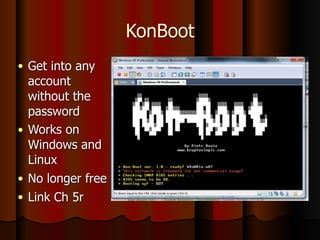
KonBoot
● Get into any
account
without the
password
● Works on
Windows and
Linux
● No longer free
● Link Ch 5r
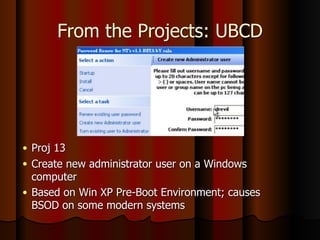
From the Projects: UBCD
● Proj 13
● Create new administrator user on a Windows
computer
● Based on Win XP Pre-Boot Environment; causes
BSOD on some modern systems
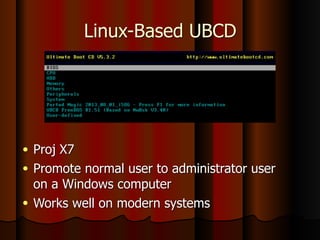
Linux-Based UBCD
● Proj X7
● Promote normal user to administrator user
on a Windows computer
● Works well on modern systems
Objectives
● Describe port scanning
● Describe different types of port scans
● Describe various port-scanning tools
● Explain what ping sweeps are used for
● Explain how shell scripting is used to
automate security tasks
4
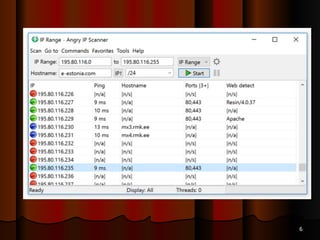
Introduction to Port Scanning
● Port Scanning
● Finds out which services are offered by a host
● Identifies vulnerabilities
● Open services can be used on attacks
● Identify a vulnerable port
● Launch an exploit
● Scan all ports when testing
● Not just well-known ports
5
6
6
6
6
11
Introduction to Port Scanning
(continued)
● Port scanning programs report
● Open ports
● Closed ports
● Filtered ports
● Best-guess assessment of which OS is running
7
Is Port Scanning Legal?
● The legal status of port scanning is unclear
● If you have permission, it's legal
● If you cause damage of $5,000 or more, it
may be illegal
● For more, see links Ch 5a and Ch 5b
8
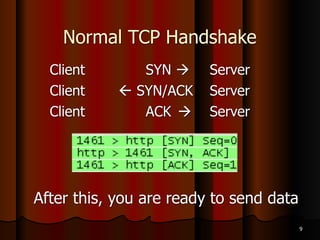
Normal TCP Handshake
Client SYN ! Server
Client " SYN/ACK Server
Client ACK ! Server
After this, you are ready to send data
9
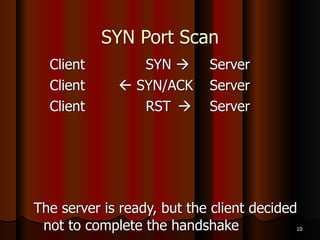
SYN Port Scan
Client SYN ! Server
Client " SYN/ACK Server
Client RST ! Server
The server is ready, but the client decided
not to complete the handshake 10
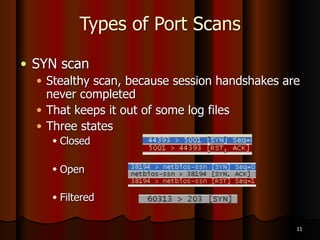
Types of Port Scans
● SYN scan
● Stealthy scan, because session handshakes are
never completed
● That keeps it out of some log files
● Three states
● Closed
● Open
● Filtered
11
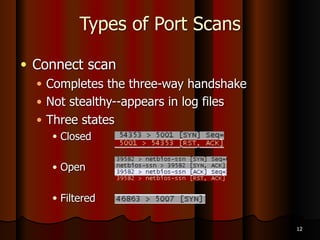
Types of Port Scans
● Connect scan
● Completes the three-way handshake
● Not stealthy--appears in log files
● Three states
● Closed
● Open
● Filtered
12
Types of Port Scans
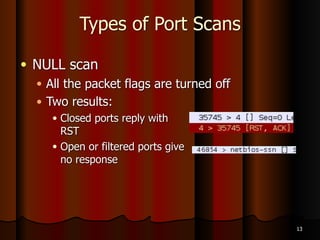
● NULL scan
● All the packet flags are turned off
● Two results:
● Closed ports reply with 

RST
● Open or filtered ports give 

no response
13
Types of Port Scans
● XMAS scan
● FIN, PSH and URG flags are set
● Works like a NULL scan – a closed port
responds with an RST packet
● FIN scan
● Only FIN flag is set
● Closed port responds with an RST packet
14
Windows Machines
● NULL, XMAS and FIN scans don't work on
Windows machines
● Win 2000 Pro and Win Server 2003 shows all
ports closed
● Win XP Pro all ports open/filtered
● See the NMAP tutorial (link Ch 5c)
15
Types of Port Scans
● Ping scan
● Simplest method sends ICMP ECHO REQUEST
to the destination(s)
● TCP Ping sends SYN or ACK to any port
(default is port 80 for Nmap)
● Any response shows the target is up
16
Types of Port Scans (continued)
● ACK scan
● Used to get information about a firewall
● Stateful firewalls track connection and block
unsolicited ACK packets
● Stateless firewalls just block incoming SYN packets,
so you get a RST response
● UDP scan
● Closed port responds with ICMP “Port Unreachable”
message
● Rarely used--but much improved in latest Nmap
version (2010)
17
Using Port-Scanning Tools
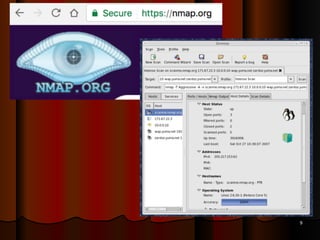
● Nmap
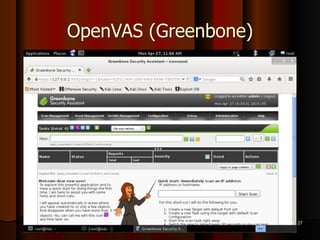
● Nessus and OpenVAS (the GPL-licensed
fork of Nessus)
● A complete vulnerabilty scanner, more
than a port scanner
23
Nmap
● Originally written for Phrack magazine
● One of the most popular tools
● GUI versions
● Xnmap and Ubuntu's NmapFE
● Open source tool
● Standard tool for security professionals
24
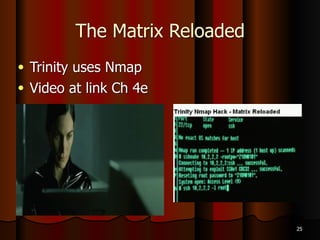
The Matrix Reloaded
● Trinity uses Nmap
● Video at link Ch 4e
25
26
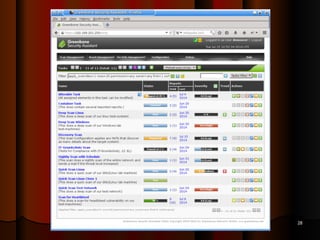
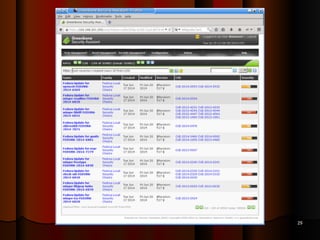
Nessus
● First released in 1998
● No longer free, free version is called
OpenVAS(GreenBone)
● Uses a client/server technology
● Can conduct tests from different locations
● Can use different OSs for client and
network
29
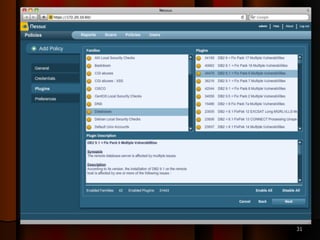
Nessus (continued)
● Finds services running on ports
● Finds vulnerabilities associated with
identified services
32
31
30
OpenVAS (Greenbone)
31
32
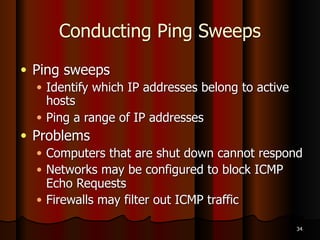
Conducting Ping Sweeps
● Ping sweeps
● Identify which IP addresses belong to active
hosts
● Ping a range of IP addresses
● Problems
● Computers that are shut down cannot respond
● Networks may be configured to block ICMP
Echo Requests
● Firewalls may filter out ICMP traffic
34
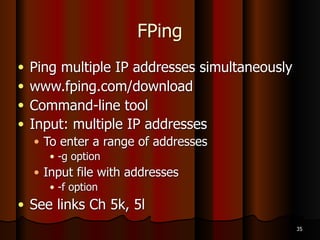
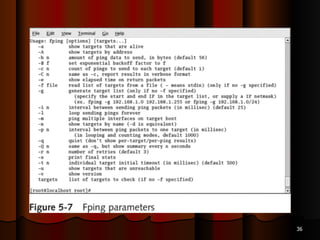
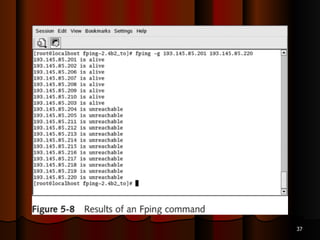
FPing
● Ping multiple IP addresses simultaneously
● www.fping.com/download
● Command-line tool
● Input: multiple IP addresses
● To enter a range of addresses
● -g option
● Input file with addresses
● -f option
● See links Ch 5k, 5l
35
36
37
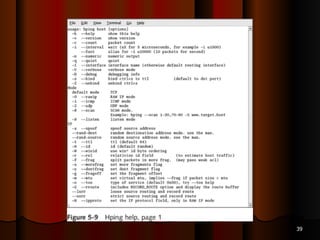
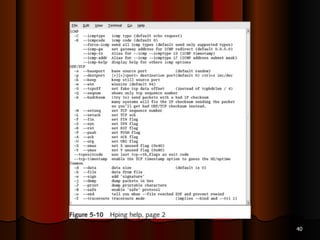
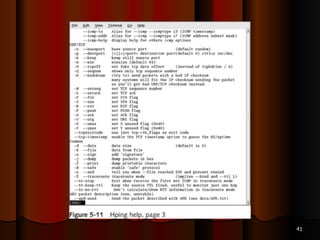
Hping
● Used to bypass filtering devices
● Allows users to fragment and manipulate IP
packets
● www.hping.org/download
● Powerful tool
● All security testers must be familiar with tool
● Supports many parameters (command
options)
● See links Ch 5m, Ch 5n
38
39
40
41
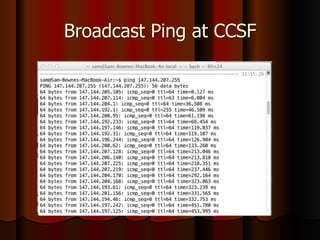
Broadcast Addresses
● If you PING a broadcast address, that can
create a lot of traffic
● Normally the broadcast address ends in
255
● But if your LAN is subnetted with a subnet
mask like 255.255.255.192
● There are other broadcast addresses ending in
63, 127, and 191
42
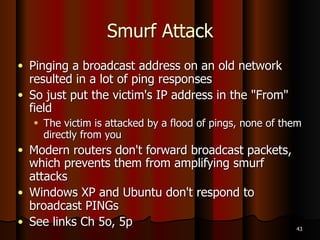
Smurf Attack
● Pinging a broadcast address on an old network
resulted in a lot of ping responses
● So just put the victim's IP address in the "From"
field
● The victim is attacked by a flood of pings, none of them
directly from you
● Modern routers don't forward broadcast packets,
which prevents them from amplifying smurf
attacks
● Windows XP and Ubuntu don't respond to
broadcast PINGs
● See links Ch 5o, 5p 43
Broadcast Ping at CCSF
Crafting IP Packets
● Packet components
● Source IP address
● Destination IP address
● Flags
● Crafting packets helps you obtain more
information about a service
● Tools
● Fping
● Hping
45
Understanding Shell Scripting
● Modify tools to better suit your needs
● Script
● Computer program that automates tasks
● Time-saving solution
46
Scripting Basics
● Similar to DOS batch programming
● Script or batch file
● Text file
● Contains multiple commands
● Repetitive commands are good candidate for
scripting
● Practice is the key
47
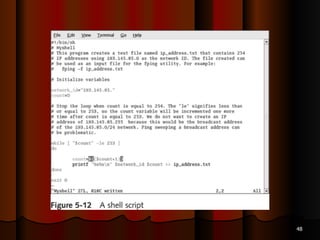
48
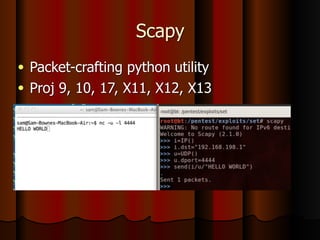
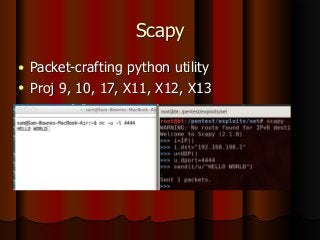
Scapy
● Packet-crafting python utility
● Proj 9, 10, 17, X11, X12, X13
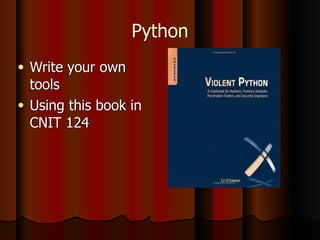
Python
● Write your own
tools
● Using this book in
CNIT 124
50

Ch 5: Port Scanning

  • 1.
    Hands-On Ethical Hacking andNetwork Defense Chapter 5 Port Scanning Last revised 10-4-17
  • 2.
    KonBoot ● Get intoany account without the password ● Works on Windows and Linux ● No longer free ● Link Ch 5r
  • 3.
    From the Projects:UBCD ● Proj 13 ● Create new administrator user on a Windows computer ● Based on Win XP Pre-Boot Environment; causes BSOD on some modern systems
  • 4.
    Linux-Based UBCD ● ProjX7 ● Promote normal user to administrator user on a Windows computer ● Works well on modern systems
  • 5.
    Objectives ● Describe portscanning ● Describe different types of port scans ● Describe various port-scanning tools ● Explain what ping sweeps are used for ● Explain how shell scripting is used to automate security tasks 4
  • 6.
    Introduction to PortScanning ● Port Scanning ● Finds out which services are offered by a host ● Identifies vulnerabilities ● Open services can be used on attacks ● Identify a vulnerable port ● Launch an exploit ● Scan all ports when testing ● Not just well-known ports 5
  • 7.
  • 8.
  • 9.
  • 10.
  • 11.
  • 12.
    Introduction to PortScanning (continued) ● Port scanning programs report ● Open ports ● Closed ports ● Filtered ports ● Best-guess assessment of which OS is running 7
  • 13.
    Is Port ScanningLegal? ● The legal status of port scanning is unclear ● If you have permission, it's legal ● If you cause damage of $5,000 or more, it may be illegal ● For more, see links Ch 5a and Ch 5b 8
  • 14.
    Normal TCP Handshake ClientSYN ! Server Client " SYN/ACK Server Client ACK ! Server After this, you are ready to send data 9
  • 15.
    SYN Port Scan ClientSYN ! Server Client " SYN/ACK Server Client RST ! Server The server is ready, but the client decided not to complete the handshake 10
  • 16.
    Types of PortScans ● SYN scan ● Stealthy scan, because session handshakes are never completed ● That keeps it out of some log files ● Three states ● Closed ● Open ● Filtered 11
  • 17.
    Types of PortScans ● Connect scan ● Completes the three-way handshake ● Not stealthy--appears in log files ● Three states ● Closed ● Open ● Filtered 12
  • 18.
    Types of PortScans ● NULL scan ● All the packet flags are turned off ● Two results: ● Closed ports reply with 
 RST ● Open or filtered ports give 
 no response 13
  • 19.
    Types of PortScans ● XMAS scan ● FIN, PSH and URG flags are set ● Works like a NULL scan – a closed port responds with an RST packet ● FIN scan ● Only FIN flag is set ● Closed port responds with an RST packet 14
  • 20.
    Windows Machines ● NULL,XMAS and FIN scans don't work on Windows machines ● Win 2000 Pro and Win Server 2003 shows all ports closed ● Win XP Pro all ports open/filtered ● See the NMAP tutorial (link Ch 5c) 15
  • 21.
    Types of PortScans ● Ping scan ● Simplest method sends ICMP ECHO REQUEST to the destination(s) ● TCP Ping sends SYN or ACK to any port (default is port 80 for Nmap) ● Any response shows the target is up 16
  • 22.
    Types of PortScans (continued) ● ACK scan ● Used to get information about a firewall ● Stateful firewalls track connection and block unsolicited ACK packets ● Stateless firewalls just block incoming SYN packets, so you get a RST response ● UDP scan ● Closed port responds with ICMP “Port Unreachable” message ● Rarely used--but much improved in latest Nmap version (2010) 17
  • 23.
    Using Port-Scanning Tools ●Nmap ● Nessus and OpenVAS (the GPL-licensed fork of Nessus) ● A complete vulnerabilty scanner, more than a port scanner 23
  • 24.
    Nmap ● Originally writtenfor Phrack magazine ● One of the most popular tools ● GUI versions ● Xnmap and Ubuntu's NmapFE ● Open source tool ● Standard tool for security professionals 24
  • 25.
    The Matrix Reloaded ●Trinity uses Nmap ● Video at link Ch 4e 25
  • 26.
  • 27.
    Nessus ● First releasedin 1998 ● No longer free, free version is called OpenVAS(GreenBone) ● Uses a client/server technology ● Can conduct tests from different locations ● Can use different OSs for client and network 29
  • 28.
    Nessus (continued) ● Findsservices running on ports ● Finds vulnerabilities associated with identified services 32
  • 29.
  • 30.
  • 31.
  • 32.
  • 33.
    Conducting Ping Sweeps ●Ping sweeps ● Identify which IP addresses belong to active hosts ● Ping a range of IP addresses ● Problems ● Computers that are shut down cannot respond ● Networks may be configured to block ICMP Echo Requests ● Firewalls may filter out ICMP traffic 34
  • 34.
    FPing ● Ping multipleIP addresses simultaneously ● www.fping.com/download ● Command-line tool ● Input: multiple IP addresses ● To enter a range of addresses ● -g option ● Input file with addresses ● -f option ● See links Ch 5k, 5l 35
  • 35.
  • 36.
  • 37.
    Hping ● Used tobypass filtering devices ● Allows users to fragment and manipulate IP packets ● www.hping.org/download ● Powerful tool ● All security testers must be familiar with tool ● Supports many parameters (command options) ● See links Ch 5m, Ch 5n 38
  • 38.
  • 39.
  • 40.
  • 41.
    Broadcast Addresses ● Ifyou PING a broadcast address, that can create a lot of traffic ● Normally the broadcast address ends in 255 ● But if your LAN is subnetted with a subnet mask like 255.255.255.192 ● There are other broadcast addresses ending in 63, 127, and 191 42
  • 42.
    Smurf Attack ● Pinginga broadcast address on an old network resulted in a lot of ping responses ● So just put the victim's IP address in the "From" field ● The victim is attacked by a flood of pings, none of them directly from you ● Modern routers don't forward broadcast packets, which prevents them from amplifying smurf attacks ● Windows XP and Ubuntu don't respond to broadcast PINGs ● See links Ch 5o, 5p 43
  • 43.
  • 44.
    Crafting IP Packets ●Packet components ● Source IP address ● Destination IP address ● Flags ● Crafting packets helps you obtain more information about a service ● Tools ● Fping ● Hping 45
  • 45.
    Understanding Shell Scripting ●Modify tools to better suit your needs ● Script ● Computer program that automates tasks ● Time-saving solution 46
  • 46.
    Scripting Basics ● Similarto DOS batch programming ● Script or batch file ● Text file ● Contains multiple commands ● Repetitive commands are good candidate for scripting ● Practice is the key 47
  • 47.
  • 48.
    Scapy ● Packet-crafting pythonutility ● Proj 9, 10, 17, X11, X12, X13
  • 49.
    Python ● Write yourown tools ● Using this book in CNIT 124
  • 50.