Network Security 101 – A Refresher Course
How to keep your network safe NOW or be sorry later!


                  By Allan Pratt, MBA
                Cyber-Tech Security Pro
                    itczar@att.net
There are two extremes in Network safety:
Absolute Security and Absolute open

Absolute security is: unplugged from the network
and power, locked in a safe, and thrown to the
bottom of the ocean1
4 Simple Rules
 Always keep your virus and Windows software updates “on”

 Always keep your firewall “on”

 Back up, Back up, Back up

 Always keep your passwords and key phrases safe
Better Safe Than Sorry
 Do not use common words or phrases for passwords

 Do not keep your passwords written on a post-it taped to
 your computer monitor

 Back-up, back-up, back-up
Strange But True
 You cannot secure a laptop until you secure the laptop
 Make sure everyone follows the security plan, even the boss
 Smart people can be stupid too, even HR
 Who launched that virus?
Human Nature

Also Called Social Engineering

Everyone Wants To Help

Passwords are meant to be a SECRET!
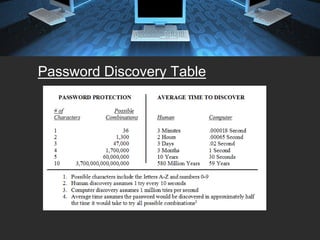
Password Discovery Table
Keep Your Email Safe
Make sure to scan all email messages!

      Do not open email from unknown sources or that you are
      not expecting
      Once they are in, only unplugging and reinstalling OS
      will work
      New Type of Attack, Spear-Phising4
Spear-Phishing
•   Net Reconnaissance
     – Studying public Data
     – The email address is made to look like it is from a logical
       sender
•   Harvesting The Data
     – Steals info and sends data to a Command and Control
       Server4
Keeping your data safe
•   Identify and Authenticate
•   Use a Surge Protector
•   Safeguard against Unauthorized Access
•   Server-side protection
•   Password protect3
Cyber Cafés can be harmful to your data’s health

•   Open networks make for easy theft
•   Turn off all file share protocols
•   Make sure your software firewall and virus protection is active
Wireless Networks
•   Turn off the SSID broadcast
•   Password protect your router
•   Do not leave MAC addresses open to others
•   Leave your hardware firewall on
•   Use matching vendors
•   Never use WEP protocols only the newer WPA2 and above
Unprotected? Do you feel lucky?
•   One Security Expert maintains that 50% of unprotected
    computers are compromised by an intruder within 12 minutes

•   Two devastating worms, Slammer and Nimda wreaked world-
    wide havoc in 10 and 30 minutes, respectively3
Things to watch out for…
 System Crashes
 Attempts to write to the system
 Data Modification
 Unexplained Poor System Performance6
Best Practices

1. Do not pay more for your security than your
   data is worth!

2. Password protect all of your important data!
Final reminders:
•   Back-up, Back-up, Back-up
•   Never open a strange file or attachment
•   Always allow automatic updates
•   You can never be too careful
•   It’s not IF you lose your data, but a matter of
    WHEN you lose your data
Works Cited
 1.   Curtin Matt, Introduction to Network Security, March 1997, page 8.
 2.   Curtin Matt, Snake Oil Warning Signs: Encryption Software to Avoid
      ©1996 -1998, page 5.
 3.   Vermaat, Discovering Computers, Fundamentals, Third Edition, Chapter
      10, pages 364, 368, 369, 374.
 4.   BusinessWeek, “Anatomy of a Spear-Phish,” April 21, 2008, page 38.
 5.   [Fraser 1997] Ed Fraser, RFC 2196, “Site Security Handbook”,
      September 1997.
 6.   Checking Microsoft Windows® Systems for Signs of Compromise,
      Simon Baker, UCL Computer Security Team; Patrick Green, OXCERT
      Thomas Meyer, Garaidh Cochrane Version: 1.3.4, 10/28/2005.
 7.   DEPARTMENT OF DEFENSE, STANDARD DEPARTMENT OF
      DEFENSE TRUSTED COMPUTER SYSTEM EVALUATION
      CRITERIA, DECEMBER l985 (DOD Orange book),
 8.   http://en.wikipedia.org/wiki/Network_security#column-one.

Network Security Presentation

  • 1.
    Network Security 101– A Refresher Course How to keep your network safe NOW or be sorry later! By Allan Pratt, MBA Cyber-Tech Security Pro itczar@att.net
  • 2.
    There are twoextremes in Network safety: Absolute Security and Absolute open Absolute security is: unplugged from the network and power, locked in a safe, and thrown to the bottom of the ocean1
  • 3.
    4 Simple Rules Always keep your virus and Windows software updates “on” Always keep your firewall “on” Back up, Back up, Back up Always keep your passwords and key phrases safe
  • 4.
    Better Safe ThanSorry Do not use common words or phrases for passwords Do not keep your passwords written on a post-it taped to your computer monitor Back-up, back-up, back-up
  • 5.
    Strange But True You cannot secure a laptop until you secure the laptop Make sure everyone follows the security plan, even the boss Smart people can be stupid too, even HR Who launched that virus?
  • 6.
    Human Nature Also CalledSocial Engineering Everyone Wants To Help Passwords are meant to be a SECRET!
  • 7.
  • 8.
    Keep Your EmailSafe Make sure to scan all email messages! Do not open email from unknown sources or that you are not expecting Once they are in, only unplugging and reinstalling OS will work New Type of Attack, Spear-Phising4
  • 9.
    Spear-Phishing • Net Reconnaissance – Studying public Data – The email address is made to look like it is from a logical sender • Harvesting The Data – Steals info and sends data to a Command and Control Server4
  • 10.
    Keeping your datasafe • Identify and Authenticate • Use a Surge Protector • Safeguard against Unauthorized Access • Server-side protection • Password protect3
  • 11.
    Cyber Cafés canbe harmful to your data’s health • Open networks make for easy theft • Turn off all file share protocols • Make sure your software firewall and virus protection is active
  • 12.
    Wireless Networks • Turn off the SSID broadcast • Password protect your router • Do not leave MAC addresses open to others • Leave your hardware firewall on • Use matching vendors • Never use WEP protocols only the newer WPA2 and above
  • 13.
    Unprotected? Do youfeel lucky? • One Security Expert maintains that 50% of unprotected computers are compromised by an intruder within 12 minutes • Two devastating worms, Slammer and Nimda wreaked world- wide havoc in 10 and 30 minutes, respectively3
  • 14.
    Things to watchout for… System Crashes Attempts to write to the system Data Modification Unexplained Poor System Performance6
  • 15.
    Best Practices 1. Donot pay more for your security than your data is worth! 2. Password protect all of your important data!
  • 16.
    Final reminders: • Back-up, Back-up, Back-up • Never open a strange file or attachment • Always allow automatic updates • You can never be too careful • It’s not IF you lose your data, but a matter of WHEN you lose your data
  • 17.
    Works Cited 1. Curtin Matt, Introduction to Network Security, March 1997, page 8. 2. Curtin Matt, Snake Oil Warning Signs: Encryption Software to Avoid ©1996 -1998, page 5. 3. Vermaat, Discovering Computers, Fundamentals, Third Edition, Chapter 10, pages 364, 368, 369, 374. 4. BusinessWeek, “Anatomy of a Spear-Phish,” April 21, 2008, page 38. 5. [Fraser 1997] Ed Fraser, RFC 2196, “Site Security Handbook”, September 1997. 6. Checking Microsoft Windows® Systems for Signs of Compromise, Simon Baker, UCL Computer Security Team; Patrick Green, OXCERT Thomas Meyer, Garaidh Cochrane Version: 1.3.4, 10/28/2005. 7. DEPARTMENT OF DEFENSE, STANDARD DEPARTMENT OF DEFENSE TRUSTED COMPUTER SYSTEM EVALUATION CRITERIA, DECEMBER l985 (DOD Orange book), 8. http://en.wikipedia.org/wiki/Network_security#column-one.