Recommended
PPT
CYBER FORENSICS-scanning and enumuration.ppt
PPT
PPTX
Scanning and Enumeration in Cyber Security.pptx
PDF
CEH Module 3 Scanning CEH V13, concepts and types
PPTX
Null Delhi chapter - Feb 2019
PPTX
PPT
RAMYA PPT FINAL.ppt biomedical engineering equipments
PPTX
PPT
Port Scanning in computer networks with .ppt
PDF
PPT
PPTX
Cyber security-Active Scanning Networks-Nmap
PPT
PPT
Hacking Fundamentals - Jen Johnson , Miria Grunick
PPT
PDF
Network Scanning refers to the set of procedures adopted for identifying a ne...
PDF
PPT
Network Scanning Phases and Supporting Tools
PPTX
06- 1 Active Information Gathering part 1.pptx
PDF
PPTX
Hunting Botnets with Zmap
PPTX
lecture5Ch03-bufferOverFlow-attack.ppt.pptx
PPTX
lecture5.pptxJHKGJFHDGTFGYIUOIUIPIOIPUOHIYGUYFGIH
PPTX
Nmap project presentation : Unlocking Network Secrets: Mastering Port Scannin...
PPTX
Detecting Reconnaissance Through Packet Forensics by Shashank Nigam
PPTX
PPTX
PDF
Cyber SecurityCyber SecurityCyber Security
PPTX
Query Parsing: The SEO Gatekeeper That Decides Rankings
PPTX
Reading and Writing Skills - Critical Reading ppt.pptx
More Related Content
PPT
CYBER FORENSICS-scanning and enumuration.ppt
PPT
PPTX
Scanning and Enumeration in Cyber Security.pptx
PDF
CEH Module 3 Scanning CEH V13, concepts and types
PPTX
Null Delhi chapter - Feb 2019
PPTX
PPT
RAMYA PPT FINAL.ppt biomedical engineering equipments
PPTX
Similar to 4-2.Scanning and Enumeration Presentation Slides (1).pptx
PPT
Port Scanning in computer networks with .ppt
PDF
PPT
PPTX
Cyber security-Active Scanning Networks-Nmap
PPT
PPT
Hacking Fundamentals - Jen Johnson , Miria Grunick
PPT
PDF
Network Scanning refers to the set of procedures adopted for identifying a ne...
PDF
PPT
Network Scanning Phases and Supporting Tools
PPTX
06- 1 Active Information Gathering part 1.pptx
PDF
PPTX
Hunting Botnets with Zmap
PPTX
lecture5Ch03-bufferOverFlow-attack.ppt.pptx
PPTX
lecture5.pptxJHKGJFHDGTFGYIUOIUIPIOIPUOHIYGUYFGIH
PPTX
Nmap project presentation : Unlocking Network Secrets: Mastering Port Scannin...
PPTX
Detecting Reconnaissance Through Packet Forensics by Shashank Nigam
PPTX
PPTX
PDF
Cyber SecurityCyber SecurityCyber Security
Recently uploaded
PPTX
Query Parsing: The SEO Gatekeeper That Decides Rankings
PPTX
Reading and Writing Skills - Critical Reading ppt.pptx
PPT
data collection tool ppt.ppttttdataadfttg
PPTX
I need all your support to get the data for the sections like photo gallery o...
PDF
Khan Traders Fish Meal – MSDS Material Safety Data Sheet
PDF
Data Science vs Machine Learning vs AI | Industry Skills Explained
PDF
SF User Group - Account-Contact Relationship Feb 2026
PDF
US Digital Fan Engagement Index 2026: Benchmarking Online Demand for Sports T...
PDF
LECTURE - Overcoming the AI Failure Rate - AIG, DQM.pdf
PPTX
Social Media Audit of Starbucks Coffee Company.pptx
PDF
Machine_Psychology_2050_Strategic_Scenarios.pdf
PDF
PathRAG rag pipeline PathRAG rag pipeline .pdf
PPTX
Organizational Structure and Design Topic 4
PDF
Step by Step Guide to Buying a Old or Aged Verified Paxful Accounts in US.pdf
PDF
Trustworthy AI : Governance of AI through Ethics
PPTX
GENPHYSICS-2.pptx this about general physics. Grade 11 lesson
PPTX
250106204341-c238c4fadonebeforelastyear.pptx
PDF
Analysis of Union Budget 2026-27: Major Announcements and their Impact
PPTX
Lecture 14- Introduction to Hypothesis Testing.pptx
PPTX
inbound4709748695955476507 Deformable bodies.pptx
4-2.Scanning and Enumeration Presentation Slides (1).pptx 1. Cyber Security Advanced Ethical Hacking
Scanning and Enumeration
© 2024 Virginia Cyber Range. Created by R. Eric Kiser. This course content is provided under an Attribution-NonCommercial-
ShareAlike 4.0 International Creative Commons License (https://creativecommons.org)
All logos used are the property of their respective trademark owners. Their use in these educational materials is not authorized by, sponsored by, or associated
with the trademark owners. No endorsement of the trademark owners by the creator of or educational institution is given or should be inferred.
Scanning and Enumeration
2. © 2024 Cyber Range. Created by R. Eric Kiser. (CC BY-NC-SA 4.0)
Lesson Objectives
• Review Scanning and Enumeration
• Define Scanning
• Understand Banner Grabbing
• Perform Banner Grabbing
• Describe tools to used to discover active listening ports
3. © 2024 Cyber Range. Created by R. Eric Kiser. (CC BY-NC-SA 4.0)
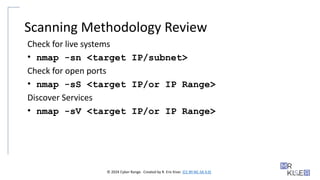
Scanning Methodology Review
Check for live systems
• nmap -sn <target IP/subnet>
Check for open ports
• nmap -sS <target IP/or IP Range>
Discover Services
• nmap -sV <target IP/or IP Range>
4. © 2024 Cyber Range. Created by R. Eric Kiser. (CC BY-NC-SA 4.0)
Scanning Methodology Review
Discover Operating Systems
• nmap -A -sC -o <target IP/subnet>
Identify Vulnerabilities
• msf > search <services on open ports>
Map the network
• Use tools like Solarwinds NTM, Zenmap, etc.
Create Proxies
• Use tools like proxyswitcher, Proxy Workbench, CyberGhost,
ProxyChains, Tor, etc.
5. © 2024 Cyber Range. Created by R. Eric Kiser. (CC BY-NC-SA 4.0)
Define Scanning
Scanning: When an attacker or penetration tester actively attempts to
connect to a system and uses the response to gain information about a
network.
6. © 2024 Cyber Range. Created by R. Eric Kiser. (CC BY-NC-SA 4.0)
TCP/IP Networking
Why it matters in scanning?
• Layer 3 (network layer)
• Where routing happens. Data is moved between systems.
• The physical address is verified in the packet header and the segment is
passed to layer 4 (transport layer).
• Once at layer 4, the things an ethical hacker is most interested in
occur… TCP flags and port numbering.
7. © 2024 Cyber Range. Created by R. Eric Kiser. (CC BY-NC-SA 4.0)
TCP Flags
• SYN - Establishes communication; first step in the 3-way handshake
• Ack - Acknowledgment flag; assures the initial packet was received
• Fin - Finished flag; the sender has exhausted its data and the
connection is closed
• URG - Urgent flag; set when there is an urgent packet.
• This packet will be processed before all other packets and the receiver will
be notified. Cancelling a message in transit is and example.
• PSH - Push flag; these packets are processed first without buffering
8. © 2024 Cyber Range. Created by R. Eric Kiser. (CC BY-NC-SA 4.0)
TCP Flags and Hackers
• Hackers with tools like Nmap and Hping3 can manipulate the flags to
obtain important data about systems.
9. © 2024 Cyber Range. Created by R. Eric Kiser. (CC BY-NC-SA 4.0)
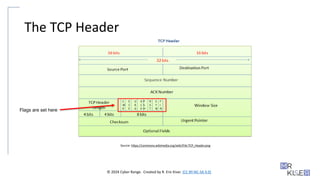
The TCP Header
Source: https://commons.wikimedia.org/wiki/File:TCP_Header.png
Flags are set here
10. © 2024 Cyber Range. Created by R. Eric Kiser. (CC BY-NC-SA 4.0)
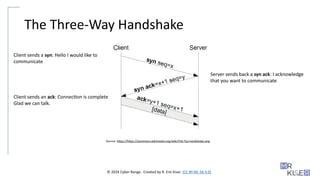
The Three-Way Handshake
Source: https://https://commons.wikimedia.org/wiki/File:Tcp-handshake.png
Client sends a syn: Hello I would like to
communicate
Server sends back a syn ack: I acknowledge
that you want to communicate
Client sends an ack: Connection is complete
Glad we can talk.
11. © 2024 Cyber Range. Created by R. Eric Kiser. (CC BY-NC-SA 4.0)
Port Numbering
• Port numbers provide a way for layer 7 (the application layer) to
process the datagram. This way, datagrams meant to send an email
(SMTP), do not get sent to SSH or DNS.
12. © 2024 Cyber Range. Created by R. Eric Kiser. (CC BY-NC-SA 4.0)
Port Scan Types
Full Connect - Polite scan, TCP connect, or full open scan. Completes a
3-way handshake.
Stealth - SYN Scan, half open scan. Only SYN packets are sent to ports.
The three-way handshake is not completed. Can bypass firewalls and
monitoring systems because it hides as normal traffic.
Inverse TCP flag - Uses FIN, URG, PSH flag, or no flag at all. If the port
is open, there is no response. If the port is closed, a RDT/ACK is
returned.
ACK flag - Looks at the TTL of the RST packet. If the packet is 64 or less,
the port is open.
13. © 2024 Cyber Range. Created by R. Eric Kiser. (CC BY-NC-SA 4.0)
Port Scan Types
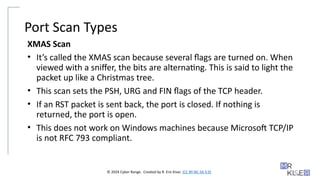
XMAS Scan
• It’s called the XMAS scan because several flags are turned on. When
viewed with a sniffer, the bits are alternating. This is said to light the
packet up like a Christmas tree.
• This scan sets the PSH, URG and FIN flags of the TCP header.
• If an RST packet is sent back, the port is closed. If nothing is
returned, the port is open.
• This does not work on Windows machines because Microsoft TCP/IP
is not RFC 793 compliant.
14. © 2024 Cyber Range. Created by R. Eric Kiser. (CC BY-NC-SA 4.0)
Port Scan Types
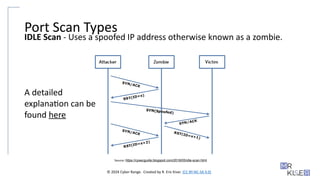
IDLE Scan - Uses a spoofed IP address otherwise known as a zombie.
Source: https://cysecguide.blogspot.com/2018/05/idle-scan.html
A detailed
explanation can be
found here
15. © 2024 Cyber Range. Created by R. Eric Kiser. (CC BY-NC-SA 4.0)
ICMP Message Types
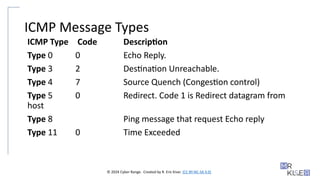
ICMP Type Code Description
Type 0 0 Echo Reply.
Type 3 2 Destination Unreachable.
Type 4 7 Source Quench (Congestion control)
Type 5 0 Redirect. Code 1 is Redirect datagram from
host
Type 8 Ping message that request Echo reply
Type 11 0 Time Exceeded
16. © 2024 Cyber Range. Created by R. Eric Kiser. (CC BY-NC-SA 4.0)
Tools for the Job
• There are many tools for scanning and enumeration.
• This PPT will list a few of the most popular ones as of this writing.
• Many tools are developed and released frequently; however, legacy
tools like Nmap, Netcat, and Metasploit have stood the test of time.
17. © 2024 Cyber Range. Created by R. Eric Kiser. (CC BY-NC-SA 4.0)
Anonymizers
• Applications that use a proxy to hide your identity. Will bypass
internet censorship, firewalls, and IDS.
• Use tools like Guardster, Ultrasurf, and Psiphon
• Tails.boum.org - This is a USB bootable OS that hides your identity
and prevents traces on the physical device used to boot the OS.
18. © 2024 Cyber Range. Created by R. Eric Kiser. (CC BY-NC-SA 4.0)
More Scanning Anonymizers
• TunnelBear
• Jondo
• Proxify
• ProxyChains (more on this later)
19. © 2024 Cyber Range. Created by R. Eric Kiser. (CC BY-NC-SA 4.0)
Scanning and Enumeration tools
Ping tools:
• Ping
• Angry IP Scanner
• Nmap
• Colasoft Ping
• SolarWinds
• Friendly Pinger
20. © 2024 Cyber Range. Created by R. Eric Kiser. (CC BY-NC-SA 4.0)
Scanning and Enumeration tools
Scanning Tools:
• Hping
• MegaPing
• Netcat
• Nmap
• CurrPorts
• SuperScan
21. © 2024 Cyber Range. Created by R. Eric Kiser. (CC BY-NC-SA 4.0)
Scanning and Enumeration tools
Banner Grabbing tools
• Netcraft
• Nmap
• Telnet
• Netcat
• Xprobe
• ID Serve
• cURL
• Wget
22. © 2024 Cyber Range. Created by R. Eric Kiser. (CC BY-NC-SA 4.0)
Scanning and Enumeration tools
Vulnerability Scanning tools:
• Nessus
• Nikto
• OpenVas
• Retina
• SAINT
23. © 2024 Cyber Range. Created by R. Eric Kiser. (CC BY-NC-SA 4.0)
Scanning and Enumeration tools
Network Mapping:
• Net Mapper
• Zenmap
• Network Topology Mapper
• Intermapper
• Network Notepad
• Paessler
24. © 2024 Cyber Range. Created by R. Eric Kiser. (CC BY-NC-SA 4.0)
Scanning and Enumeration tools
Proxies, Anonymizers, and Tunnels:
• Anonymizer
• Epic Privacy Browser
• Tor
• Orbot (mobile)
• HTTP Tunnel
• Proxifier
• Psiphon
• CyberGhost VPN
25. © 2024 Cyber Range. Created by R. Eric Kiser. (CC BY-NC-SA 4.0)
Scanning and Enumeration tools
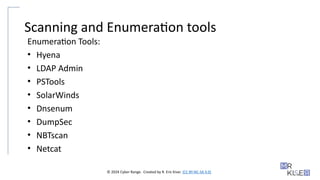
Enumeration Tools:
• Hyena
• LDAP Admin
• PSTools
• SolarWinds
• Dnsenum
• DumpSec
• NBTscan
• Netcat
26. © 2024 Cyber Range. Created by R. Eric Kiser. (CC BY-NC-SA 4.0)
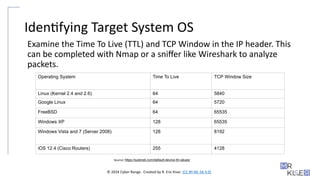
Identifying Target System OS
Examine the Time To Live (TTL) and TCP Window in the IP header. This
can be completed with Nmap or a sniffer like Wireshark to analyze
packets.
Source: https://subinsb.com/default-device-ttl-values/
Operating System Time To Live TCP Window Size
Linux (Kernel 2.4 and 2.6) 64 5840
Google Linux 64 5720
FreeBSD 64 65535
Windows XP 128 65535
Windows Vista and 7 (Server 2008) 128 8192
iOS 12.4 (Cisco Routers) 255 4128
27. © 2024 Cyber Range. Created by R. Eric Kiser. (CC BY-NC-SA 4.0)
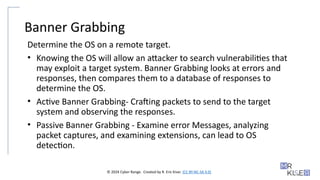
Banner Grabbing
Determine the OS on a remote target.
• Knowing the OS will allow an attacker to search vulnerabilities that
may exploit a target system. Banner Grabbing looks at errors and
responses, then compares them to a database of responses to
determine the OS.
• Active Banner Grabbing- Crafting packets to send to the target
system and observing the responses.
• Passive Banner Grabbing - Examine error Messages, analyzing
packet captures, and examining extensions, can lead to OS
detection.
28. © 2024 Cyber Range. Created by R. Eric Kiser. (CC BY-NC-SA 4.0)
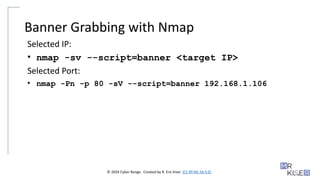
Banner Grabbing with Nmap
Selected IP:
• nmap -sv --script=banner <target IP>
Selected Port:
• nmap -Pn -p 80 -sV --script=banner 192.168.1.106
29. © 2024 Cyber Range. Created by R. Eric Kiser. (CC BY-NC-SA 4.0)
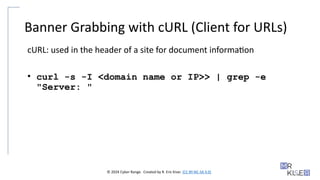
Banner Grabbing with cURL (Client for URLs)
cURL: used in the header of a site for document information
• curl -s -I <domain name or IP>> | grep -e
"Server: "
30. © 2024 Cyber Range. Created by R. Eric Kiser. (CC BY-NC-SA 4.0)
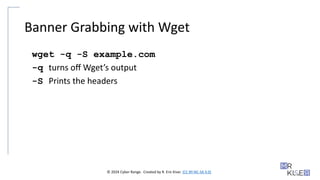
Banner Grabbing with Wget
wget -q -S example.com
-q turns off Wget’s output
-S Prints the headers
31. © 2024 Cyber Range. Created by R. Eric Kiser. (CC BY-NC-SA 4.0)
Banner Grabbing with Netcat
nc <target> <port>
32. © 2024 Cyber Range. Created by R. Eric Kiser. (CC BY-NC-SA 4.0)
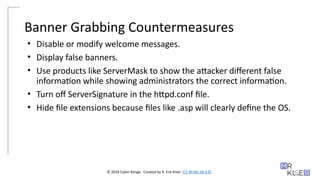
Banner Grabbing Countermeasures
• Disable or modify welcome messages.
• Display false banners.
• Use products like ServerMask to show the attacker different false
information while showing administrators the correct information.
• Turn off ServerSignature in the httpd.conf file.
• Hide file extensions because files like .asp will clearly define the OS.
33. © 2024 Cyber Range. Created by R. Eric Kiser. (CC BY-NC-SA 4.0)
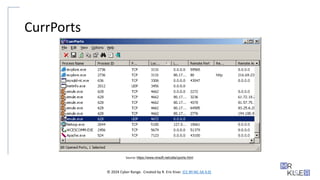
CurrPorts
• CurrPorts will scan for opened TCP/IP and UDP ports on a local
computer.
• This tool is often used as a way to monitor if an attacker has used or
opened a listening port and established a connection with the
machine.
34. © 2024 Cyber Range. Created by R. Eric Kiser. (CC BY-NC-SA 4.0)
CurrPorts
Source: https://www.nirsoft.net/utils/cports.html
35. © 2024 Cyber Range. Created by R. Eric Kiser. (CC BY-NC-SA 4.0)
Netstat
• Short for network statistics.
• Command-line tool that will scan for incoming and outgoing network
connections.
• If an attacker successfully gains a shell on a Windows machine, or has
physical access, Netstat is an easy way to begin looking at the network.
• Like CurrPorts, this tool is also useful to the administrator to check if
attackers have opened or connected to listening ports.
• However this tool will also allow an attacker to see all listening ports.
• This will provide an attacker with a further understanding of the network and
what services they may be able to exploit.
36. © 2024 Cyber Range. Created by R. Eric Kiser. (CC BY-NC-SA 4.0)
Netstat Switches
- a list all active connections and the listening ports
- e Ethernet Stats
- n numerical list of connections and ports
- O shows connections with PID on the processes tab
- p lists connections by protocol
- s list stats by protocol
- a Lists contents of the IP routing table
37. © 2024 Cyber Range. Created by R. Eric Kiser. (CC BY-NC-SA 4.0)
Scanning IPv6
• Scanning an entire subnet is a difficult task as the search space is
extremely large. It is not computationally feasible.
• Attackers will harvest IPv6 addresses by sniffing traffic, checking
logs, checking email headers, etc.
• Nmap does support IPv6 scanning, but many scanning tools do not.
The syntax is the same except you would add -6 after nmap.
• Firewall rules are usually setup for IPv4. As a result, scanning the
IPv6 could bypass the firewall as the rules are not setup for IPv6.
38. © 2024 Cyber Range. Created by R. Eric Kiser. (CC BY-NC-SA 4.0)
Complete the Exercise and handout
Check BlackBoard for exercise sheets.
39. © 2024 Cyber Range. Created by R. Eric Kiser. (CC BY-NC-SA 4.0)
Weekly Reading
• Read the following parts of Chapter 4 of the book Nmap Network
Scanning by Gordon “Fyodor” found below. Fyodor is the creator of
Nmap.
Source: nmap.org
Introduction to Port Scanning
What Exactly is a Port?
What Are the Most Popular Ports?
What is Port Scanning?
Why Scan Ports?
A Quick Port Scanning Tutorial
Command-line Flags
Selecting Scan Techniques
Selecting Ports to Scan
Timing-related Options
Output Format and Verbosity Options
Firewall and IDS Evasion Options
Specifying Targets
Miscellaneous Options
40. © 2024 Cyber Range. Created by R. Eric Kiser. (CC BY-NC-SA 4.0)
Reading
• Read Metasploit Fundamentals and the Port Scanning module under
Information Gathering found here.
Editor's Notes #4 The examples are only to show a few tools and switches they use. #12 Reminder:
Time to live (TTL) limits the lifespan of data transported on the network. Students may need to review TCP flags and header.
#15 Port scans rely on the ICMP Message types to identify information. For Example, if an ACK scan (nmap –sA ) returns a type 3 error the port is filtered. These scan types are often found on the CEH exam. #18 These tools are for reference as they may show up on the CEH. If time permits they can be studied further by looking for them online. In general, students need to know what they are used for. #19 These tools are for reference as they may show up on the CEH. If time permits they can be studied further by looking for them online. In general, students need to know what they are used for.
#20 These tools are for reference as they may show up on the CEH. If time permits they can be studied further by looking for them online. In general, students need to know what they are used for.
#21 These tools are for reference as they may show up on the CEH. If time permits they can be studied further by looking for them online. In general, students need to know what they are used for.
#22 These tools are for reference as they may show up on the CEH. If time permits they can be studied further by looking for them online. In general, students need to know what they are used for.
#23 These tools are for reference as they may show up on the CEH. If time permits they can be studied further by looking for them online. In general, students need to know what they are used for.
#24 These tools are for reference as they may show up on the CEH. If time permits they can be studied further by looking for them online. In general, students need to know what they are used for.
#25 These tools are for reference as they may show up on the CEH. If time permits they can be studied further by looking for them online. In general, students need to know what they are used for.
#26 Here is a site to help breakdown what happens when a program like Nmap is used for OS fingerprinting.
http://www.netresec.com/?page=Blog&month=2011-11&post=Passive-OS-Fingerprinting
Here is a site with default TTL and Window Sizes in connection with the running OS
https://subinsb.com/default-device-ttl-values/ #39 This is a weekly assignment. Students should complete the reading by the end of the week.
#40 This is a weekly assignment. Students should complete the reading by the end of the week.