Network Scanning
MD Saquib Nasir Khan
Topic Covered
• Lab Setup
• Overview
• Different Types of Scan
• Passive Scan
• Wireshark Basic
• Active Scan
• Hping3
• Nmap – Advance
Lab Requirement
• Kali Linux - Updated & Upgraded to Latest version
• Metasploitable 2.0
• Windows VM
• Both should be connected in a same NAT network.
Metasploitable 2.0
• Look at Open TCP port
• Netstat –tnlp
• Looking at services running
• Ps aux
Kali Linux
• Ping Metasploitable 2.0 from Kali Linux and confirm system is
reachable and communicating
Type of SCAN
• Passive Scan – Smelling
• Listening to The network Traffic
• Tcpdump
• Wireshark
• ARP Tables
• Active Scan – Tasting
• Nmap
• Hping
• Scapy
• Ping
• Tracert
Passive Scan
Wireshark - Basic
• Identify Interface
• Identify network and traffic
Wireshark - Basic
• Filtering Tariffing based on Conversation
Wireshark - Basic
• Select Other Protocols
ARP - The Address Resolution Protocol
• Arp – a
• 224.0.0.22 - Multicast for IGMP requests
• 224.0.0.252 - Link Local Multicast Name Resolution (LLMNR)
Active Scan
HPING
• Command Line
• TCP/IP Packet Analyser
• Inspired by ‘Ping’, but support TCP, UDP, ICMP and RAW IP Packets
• HPING uses
• Firewall testing
• Port Scanning
• Remote OS Fingerprinting
• Advanced Traceroute
• MTU discovery
• DOS
• Create IP spoofed Packets and send them to the target system .
Scanning IP with Hping3
DDOS hping3 --flood -S -V --rand-source 192.168.79.x
NMAP / ZenMAP
• Host Detection
• Port Scanning
• Service and Version Detection
• Operating System Detection
• Firewall Detecction
• Vulnerability Assessment
• Brute force attacks
• Exploitation
Types of SCAN
• Ping Scan
• Port Scan
• Service and version Detection
• OS dtetction
• Script Scan
• Timing
• IPS/IDS Evation
Nmap- Ping Scan
• It also Called - No port scan
• Live host detection and Network or monitor server
availability
• It often called a ping suite - is more reliable than ping
broadcast address
• Command
• Nmap –sn
• Default behaviors (Privileged user)
• ICMP echo request
• SYN – TCP port 443
• ACK – TCP Port 80
• ICMP timestamp request
• Defult for Unprivileged user
• SYN - TCP 80,443 ports
• ARP scan in local network
• Unless –send ip was specified
Port Scan
• SYN Scan
• TCP Scan
• UDP Scan
• SYN Vs TCP Scan
• Othres
Port Scan - SYN Scan
• Half Open Scan
• Open, Close, Filter
Port Scan – SYN Scan
Port Scan – SYN Scan (Open Port)
• Open port scan & 3 Way hand shake
Port Scan – SYN Scan (Close Port)
Port Scan – SYN Scan
Port Scan - Metasploitable
Port Scan – Top 100 Ports
Port Scan – All Ports
Port Scan – For multiple Hosts
TCP Scan / TCP Connect Scan
• When we need TCP Scan
TCP Scan – Open Port
TCP Scan – Close Port
SYN vs TCP Scan
UDP Scan
UDP SCAN
Version Detection
Version Detection
• Nano /etc/ssh/sshd_config
OS Detection
• Done Using TCP / IP Fingerprint Detection.
• Nmap – os –db database (2600 OS)
OS Detection – Guess Scan
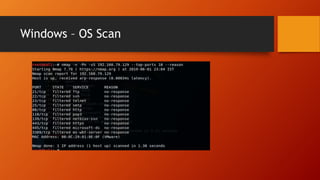
Windows – OS Scan
Windows – OS Scan
Why No OS detected?
IIS Installation to Open one port
Open Port 80
Now – We can detect OS details for Windows
Input – Output Management
Input – Management
192.168.79.0/24 192.168.79.100 – 150
192.168.79.0/24 10.0.0.0/16
192.168.79.0-100, 203,224,235-240
Filter the Output
Nmap Scan – IP List
Output - Management
• Taking output as XML file (-oX)
• Read the file using less commend or cat commend
• Ls test*
• Less test.xml
• Taking output as grep-able output (-oG)
• Normal Nmap output (-oN)
• All Format (-oA)
Nmap – Scripting Engine
• Lua programming language,
• User/share/nmap/scripts
• Network Discovery
• Version Detection
• Vulnerability Detection
• Vulnerability Exploitation
• Backdoor Detection
NSE – Categories
• Default (-sC)
• Auth (Authentication bypass)
• Brute (Brute force attack )
• Dos (Denial of Service)
• Exploit (To exploit a known vulnerability)
• Safe (Safe to run)
• Intrusive (Script not in safe category)
• Malware (To look for malware in destination hosts)
• Version (Version detection script)
• Vuln (Vulnerability scanning script)
Basic Script options
• Nmap –script-updated
• Locate *.nse
• Less script.db
• Ls –l | grep ssh
• Nmap –script-help ssh-brute
Trick and Treat
Script Scanning
• *-brute.nse
• *-info.nse
• Dsn-recursion
• Dns-zone-transfer
• http-slowloris-check
• Ms-sql-info
• Ms-sql-dump-hashes
• Nbstat
• Smb-enum-users
• Smb-enum-shares
Bypassing IPS IDS Devices
• Timing
• Extend the duration between the packets
• Disable Parallel scanning
• Fragmentation
• -f, nmap will divide the packets into 8 or less then 8 bytes packest after ip header.
• Source Port
• --source-port (using well known port like 80 as source port)
• Randomized Scanning Order (--randomize-host)
• IP spoofing (-S)
• Firewall and IPS/IDS Detction
• TTL
• badsum
Timing
• -T0 (Paranoid – 5 min)
• T1 (Sneaky – 15 Sec)
• T2 (Polite – 0.4 Sec)
• T3 (Normal – Default and Parallel Scan)
• T4 (aggressive)
• T5 (insane)
• T0 and T1 for IDS bypass
• --max-retries 2
• --host-timeout 30m
Timing
• Closing Parallel Scanning
• -T0|1|2
• --scan-delay 1
• --max-parallelism 1
• --max-hostgroup 1
Other Scan Type
• Null Scan (-sN)
• No flag is set
• FIN Scan (-sF)
• Only Fin flag is set
• XMAS Scan (-sX)
• FIN, PSH and URG flags are set
RFC
• Rule 1 - if the destination port state is closed, an incoming
segment not containing a RST causes a RST to be sent in response.
• Rule 2 – packets sent to OPEN ports without the SYN, RST, or ACK
bits set are dropped.
• Destination Return RST – Port is closed
• No response – Open of filtered
• ICMP unreachable - Filtered
ACK Scan -sA
• Open and close port retune RST package
• ICMP unreachable - Filtered
Idle Scan -sl
• Truly Blind TCP port Scan
• No packets from you
• Zombie host to gather information
Open Port
Close Port
Filtered Port
Idle Scan – Identify Zombie system
• Script – ipidseq.nse
Idle Scan with help of Zombie
Thank You

Network scanning

  • 1.
  • 2.
    Topic Covered • LabSetup • Overview • Different Types of Scan • Passive Scan • Wireshark Basic • Active Scan • Hping3 • Nmap – Advance
  • 3.
    Lab Requirement • KaliLinux - Updated & Upgraded to Latest version • Metasploitable 2.0 • Windows VM • Both should be connected in a same NAT network.
  • 4.
    Metasploitable 2.0 • Lookat Open TCP port • Netstat –tnlp • Looking at services running • Ps aux
  • 5.
    Kali Linux • PingMetasploitable 2.0 from Kali Linux and confirm system is reachable and communicating
  • 6.
    Type of SCAN •Passive Scan – Smelling • Listening to The network Traffic • Tcpdump • Wireshark • ARP Tables • Active Scan – Tasting • Nmap • Hping • Scapy • Ping • Tracert
  • 7.
  • 8.
    Wireshark - Basic •Identify Interface • Identify network and traffic
  • 9.
    Wireshark - Basic •Filtering Tariffing based on Conversation
  • 10.
    Wireshark - Basic •Select Other Protocols
  • 11.
    ARP - TheAddress Resolution Protocol • Arp – a • 224.0.0.22 - Multicast for IGMP requests • 224.0.0.252 - Link Local Multicast Name Resolution (LLMNR)
  • 12.
  • 13.
    HPING • Command Line •TCP/IP Packet Analyser • Inspired by ‘Ping’, but support TCP, UDP, ICMP and RAW IP Packets • HPING uses • Firewall testing • Port Scanning • Remote OS Fingerprinting • Advanced Traceroute • MTU discovery • DOS • Create IP spoofed Packets and send them to the target system .
  • 14.
  • 15.
    DDOS hping3 --flood-S -V --rand-source 192.168.79.x
  • 16.
    NMAP / ZenMAP •Host Detection • Port Scanning • Service and Version Detection • Operating System Detection • Firewall Detecction • Vulnerability Assessment • Brute force attacks • Exploitation
  • 17.
    Types of SCAN •Ping Scan • Port Scan • Service and version Detection • OS dtetction • Script Scan • Timing • IPS/IDS Evation
  • 18.
    Nmap- Ping Scan •It also Called - No port scan • Live host detection and Network or monitor server availability • It often called a ping suite - is more reliable than ping broadcast address • Command • Nmap –sn • Default behaviors (Privileged user) • ICMP echo request • SYN – TCP port 443 • ACK – TCP Port 80 • ICMP timestamp request • Defult for Unprivileged user • SYN - TCP 80,443 ports • ARP scan in local network • Unless –send ip was specified
  • 19.
    Port Scan • SYNScan • TCP Scan • UDP Scan • SYN Vs TCP Scan • Othres
  • 20.
    Port Scan -SYN Scan • Half Open Scan • Open, Close, Filter
  • 21.
    Port Scan –SYN Scan
  • 22.
    Port Scan –SYN Scan (Open Port) • Open port scan & 3 Way hand shake
  • 23.
    Port Scan –SYN Scan (Close Port)
  • 24.
    Port Scan –SYN Scan
  • 25.
    Port Scan -Metasploitable
  • 26.
    Port Scan –Top 100 Ports
  • 27.
    Port Scan –All Ports
  • 28.
    Port Scan –For multiple Hosts
  • 29.
    TCP Scan /TCP Connect Scan • When we need TCP Scan
  • 30.
    TCP Scan –Open Port
  • 31.
    TCP Scan –Close Port
  • 32.
  • 33.
  • 34.
  • 35.
  • 36.
    Version Detection • Nano/etc/ssh/sshd_config
  • 37.
    OS Detection • DoneUsing TCP / IP Fingerprint Detection. • Nmap – os –db database (2600 OS)
  • 38.
    OS Detection –Guess Scan
  • 39.
  • 40.
  • 41.
    Why No OSdetected?
  • 42.
    IIS Installation toOpen one port
  • 43.
  • 44.
    Now – Wecan detect OS details for Windows
  • 45.
    Input – OutputManagement
  • 46.
    Input – Management 192.168.79.0/24192.168.79.100 – 150 192.168.79.0/24 10.0.0.0/16 192.168.79.0-100, 203,224,235-240
  • 47.
  • 48.
  • 49.
    Output - Management •Taking output as XML file (-oX) • Read the file using less commend or cat commend • Ls test* • Less test.xml • Taking output as grep-able output (-oG) • Normal Nmap output (-oN) • All Format (-oA)
  • 50.
    Nmap – ScriptingEngine • Lua programming language, • User/share/nmap/scripts • Network Discovery • Version Detection • Vulnerability Detection • Vulnerability Exploitation • Backdoor Detection
  • 51.
    NSE – Categories •Default (-sC) • Auth (Authentication bypass) • Brute (Brute force attack ) • Dos (Denial of Service) • Exploit (To exploit a known vulnerability) • Safe (Safe to run) • Intrusive (Script not in safe category) • Malware (To look for malware in destination hosts) • Version (Version detection script) • Vuln (Vulnerability scanning script)
  • 52.
    Basic Script options •Nmap –script-updated • Locate *.nse • Less script.db • Ls –l | grep ssh • Nmap –script-help ssh-brute
  • 54.
  • 55.
    Script Scanning • *-brute.nse •*-info.nse • Dsn-recursion • Dns-zone-transfer • http-slowloris-check • Ms-sql-info • Ms-sql-dump-hashes • Nbstat • Smb-enum-users • Smb-enum-shares
  • 56.
    Bypassing IPS IDSDevices • Timing • Extend the duration between the packets • Disable Parallel scanning • Fragmentation • -f, nmap will divide the packets into 8 or less then 8 bytes packest after ip header. • Source Port • --source-port (using well known port like 80 as source port) • Randomized Scanning Order (--randomize-host) • IP spoofing (-S) • Firewall and IPS/IDS Detction • TTL • badsum
  • 57.
    Timing • -T0 (Paranoid– 5 min) • T1 (Sneaky – 15 Sec) • T2 (Polite – 0.4 Sec) • T3 (Normal – Default and Parallel Scan) • T4 (aggressive) • T5 (insane) • T0 and T1 for IDS bypass • --max-retries 2 • --host-timeout 30m
  • 58.
    Timing • Closing ParallelScanning • -T0|1|2 • --scan-delay 1 • --max-parallelism 1 • --max-hostgroup 1
  • 59.
    Other Scan Type •Null Scan (-sN) • No flag is set • FIN Scan (-sF) • Only Fin flag is set • XMAS Scan (-sX) • FIN, PSH and URG flags are set
  • 60.
    RFC • Rule 1- if the destination port state is closed, an incoming segment not containing a RST causes a RST to be sent in response. • Rule 2 – packets sent to OPEN ports without the SYN, RST, or ACK bits set are dropped. • Destination Return RST – Port is closed • No response – Open of filtered • ICMP unreachable - Filtered
  • 61.
    ACK Scan -sA •Open and close port retune RST package • ICMP unreachable - Filtered
  • 62.
    Idle Scan -sl •Truly Blind TCP port Scan • No packets from you • Zombie host to gather information
  • 63.
  • 64.
  • 65.
  • 66.
    Idle Scan –Identify Zombie system • Script – ipidseq.nse
  • 67.
    Idle Scan withhelp of Zombie
  • 68.