CNIT 121:
Computer
Forensics
10 Enterprise Services
Network Infrastructure
Services:
DHCP & DNS
DHCP
• Dynamic Host Configuration Protocol
• Assigns IP addresses to devices (with subnet
mask and gateway address)
• Can also configure DNS server address
• Uses UDP port 67 and 68
DHCP Lease
• An IP address may change every time the
device reboots
• So DHCP logs are essential to identify devices
from IP addresses
DHCP Searches
• Search a date for an IP address
• To find which system had that address when
an alert happened
• Search all dates for a MAC address
• Gets all the IP addresses that system had over
time
Microsoft's DHCP Logs
• DHCP Server Role is part of Windows Server
• By default, located at %windir%
System32Dhcp
• A plain comma-delimited text file
• ID, Date, Time, Description, IP Address, Host
Name, MAC Address
• Links Ch 10a, 10b
Issues with Microsoft DHCP
• Note: "Time" is local time, not UTC
• Logs only retained for one week
by default
ISC DHCP
• Most common on Unix/Linux systems
• Free and open-source
• Logs go to syslog local7
• Links Ch 10c
ISC DHCP Log Example
[root@proxy log]# tail -f dhcpd.log
Jan 15 13:49:59 proxy dhcpd: DHCPACK on 192.168.0.23 to
00:80:ad:01:7e:12 (programming) via eth1
Jan 15 13:54:45 proxy dhcpd: DHCPINFORM from
192.168.0.13 via eth1: not authoritative for subnet
192.168.0.0
• Link Ch 10d
ISC DHCP Log Examples
• Link Ch 10e
DNS
• Domain Name System
• Resolves domain names like ccsf.edu to IP
addresses like 147.144.1.212
• DNS logs show every domain visited, the IP
visiting it, and the time
• Malicious servers change IP addresses
frequently
ISC BIND
• Berkeley Internet Name Domain
• Logging is off by default; turn it on in
named.conf.local
• Link Ch 10f
Microsoft DNS
• Logging is off by
default
• Restarting DNS server
erases old log
Network-Level DNS Logging
• Any packet capture utility can do it, such as
tcpdump
• DNSCAP is specialized for DNS capturing
• Can log queries, and/or save a PCAP file
• Link Ch 10g
Enterprise Management
Applications:
LANDesk &
Symantec Altiris
LANDesk's Software
Management Suite
• Software License Monitoring (SLM)
• Tracks execution history of every application
• Date and time the application ran
• File attributes of the executable
• User account that ran it
• Link Ch 10h
Attackers
• Attackers often copy hacking tools like
password hash dumpers to a system, run it, and
then delete it
• LANDesk will record this in the SLM monitor
logs (in the Registry)
• Even if the binary has been deleted
Registry Keys
[HKEY_LOCAL_MACHINESOFTWARELANDesk
ManagementSuite

WinClientSoftwareMonitoringMonitorLog]
• Each application has a separate key, like 

C:/Program Files/Microsoft Office/OFFICE11/
EXCEL.EXE
• Subkeys contain:
• Current Duration, Current User, First Started, Last
Duration, Last Started, Total Duration, Total Runs
Parsing the Registry Keys
• SLM Browser
• Doesn't work on exported registry hives
• RegRipper does
• Links Ch 10l, 10m, 10n, 10o
What to Look For
• Low "Total Runs"
• Attackers often run a tool once and then
delete it
• Suspicious paths of execution
• Many tools run from the same directory
• Anything running from the Recycle Bin
What to Look For
• Timeline Analysis
• Look for rarely used utilities running within a
short time period
• Such as net.exe, net1.exe, cmd.exe, at.exe
• May indicate lateral movement
What to Look For
• Suspicious usernames in Current User
• User accounts with a low number of
application runs
• Accounts that shouldn't normally access this
system
• Accounts with elevated privileges, such as
domain administrators
What to Look For
• Executables that have been deleted
• This is normal for installers
• Other executables are more suspicious
Symantec's Altiris Client
Management Suite
• Optional component for application metering
• Records execution history of applications run
on a system
• Link Ch 10p, 10q
Altiris Application Metering
Logs
• Saved as a plain text file, including this
information:
• Manufacturer, version, user
• Discovered (date of first execution)
• And date of last execution
• Run Count and Total Run Time
What to Look For
• Executables without version information
• Malware authors often strip this data to hide from
signature-based antivirus
• Identify suspicious executables by file size
• Malware is usually small; < 1 MB
• Attacker may use the same backdoor on multiple
systems, changing only the name, so the size is
the same
Antivirus Software:
Symantec Endpoint Protection
McAfee VirusScan
Trend Micro OfficeScan
General Features
• Antivirus doesn't usually detect all programs
• Only the ones recognized as malicious
• Common administrative tools won't be detected
• Also some malicious tools lack a signature, and
won't be detected
• Antivirus logs are useful, but give an incomplete
picture of attacker activities
Antivirus Quarantine
• AV encodes malicious files & moves them to a
Quarantine folder
• Files can no longer execute
• Preserves files for incident responders
• Make sure antivirus is set to quarantine files,
not delete them
About Archives
• Attackers often use password-protected archive
files
• Antivirus can't open them to scan them
• Often AV will log errors about them
• This is a clue about attacker activity
Symantec Endpoint
Protection
• Stores extensive log files, in plaintext
• Also generates events in the Event Log
Strange Timestamps
• This is Nov. 19, 2002,
8:01:34 Am UTC
Quarantine Files
• File extension of .vbn
• Two VBN files for each file quarantined
• First: metadata about quarantined file
• Second: Encoded copy of original file
Symantec's Encoding
• Older versions: XOR with 0x5A
• Newer versions: XOR with 0xA5 and insert
additional 5-byte sequences throughout the
encoded file
• Symantec's QExtract.exe can extract files from
quarantine
• But only on the system that quarantined the
file
To Extract Quarantined Files
• Obtain the correct version of QExtract
• Boot up a forensic image of the affected
system
• OR use pyextract.py (link Ch 10r)
• But it sometimes fails to reconstruct the file
correctly
McAfee VirusScan
• Link Ch 10s
McAfee Logs
• Stored
locally on
the host
Most Useful
• OnAccessScanLog.txt and
OnDemandScanLog.txt
• Shows files that were quarantined or deleted
• With name of the detected threat
• Also creates events in Event Log
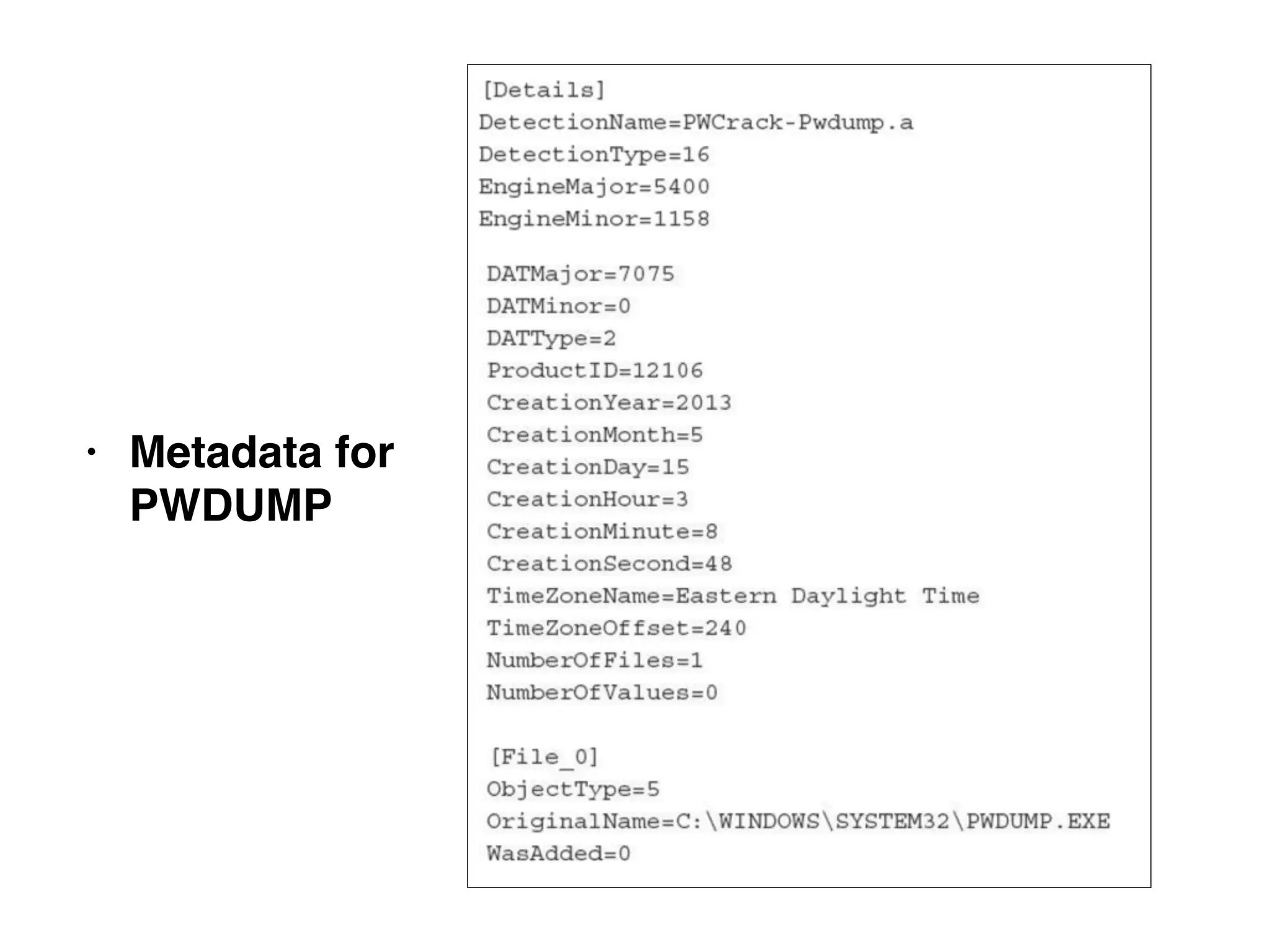
McAfee Quarantined Files
• .bup extension, a file with two parts
• "Details" contains metadata
• File-o: The actual quarantined file
• XORed with 0x6A and compressed into OLE
format
• To extract, use 7-Zip
• Metadata for
PWDUMP
Trend Micro OfficeScan
• Stores logs locally on the host
• Plaintext, with date, signature name, what action
the AV took, and path to file
Trend Quarantine Files
• Can be decoded with VSEncode.exe
• Create a configuration_file with the full path to
the quarantined files
Web Servers:
Apache &
IIS
Background
• Browsers send HTTP (Hypertext Transfer
Protocol) requests
• GET
• To retrieve a page, image, etc.
• POST
• To send data, like username and password
Ports
• HTTP uses TCP port 80 (by default)
• HTTPS uses TCP port 443 (by default)
Virtual Hosts
• Many websites running on the same server
• If one is compromised, they may all be affected
Log Files on Web Servers
• Stored in plain text
• Summary of each request
• IP of client
• URL requested
• HTTP method
• Result (status code)
Searches
Load Balancing
• Sends requests to a pool of servers
• Web server logs will have the IP of the load
balancer, not the client
• You need to correlate load balancer logs with Web
server logs
• OR: configure the load balancer to "pass through"
some details about the client
• X-Forwarder-For header field
• Configure Web server to log that header
Web Content
• Attackers often alter files on a Web server
• Or upload files, such as webshells and
hacking tools
• They may be plaintext or obfuscated
Example of Obfuscated PHP
• Link Ch 10t
Apache
• Free, open-source
• Usually running on Linux
• Configuration files
• httpd.conf, apache.conf, apache2.conf
• Some directives in .htaccess files
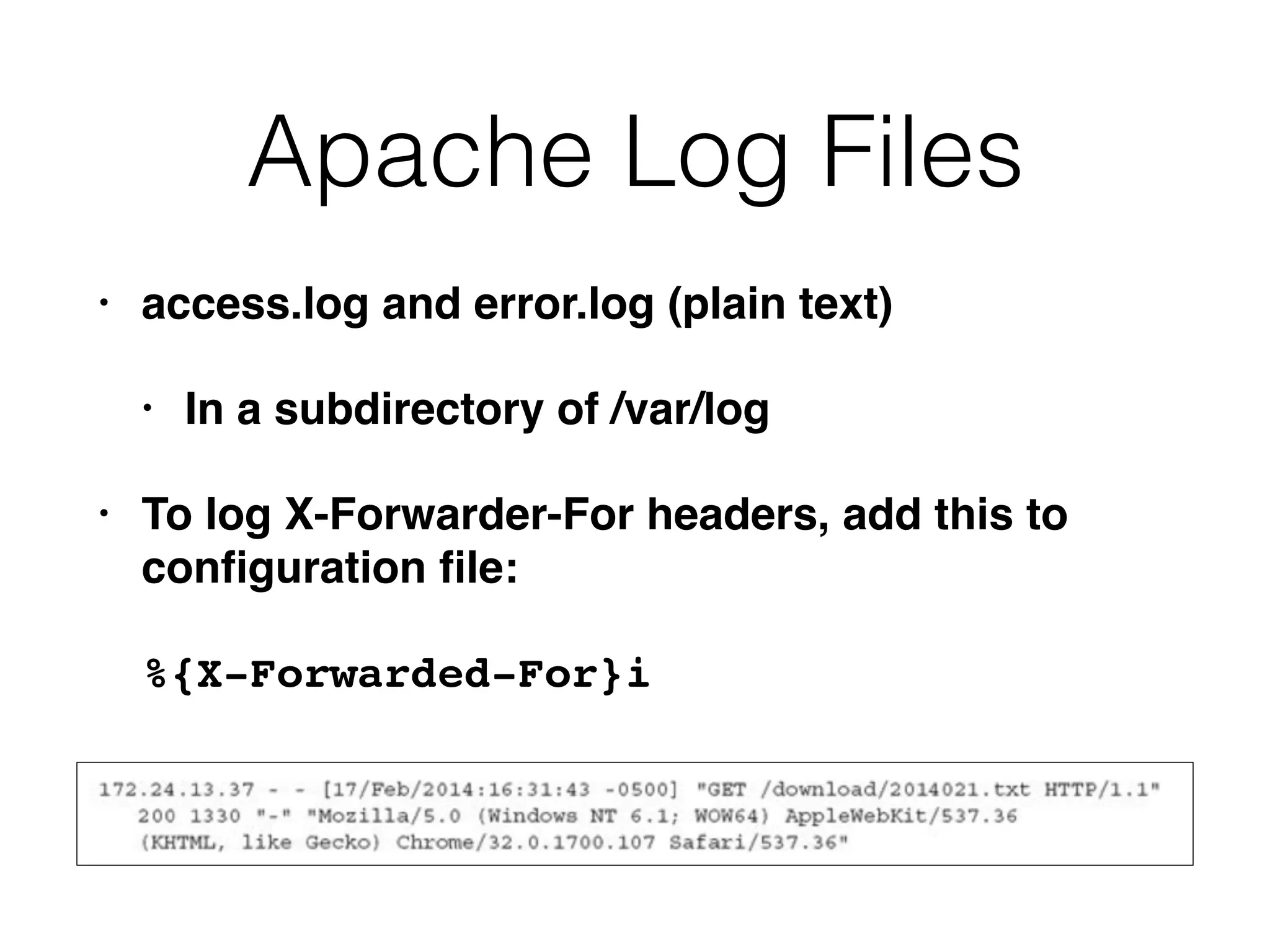
Apache Log Files
• access.log and error.log (plain text)
• In a subdirectory of /var/log
• To log X-Forwarder-For headers, add this to
configuration file:
%{X-Forwarded-For}i
Content Locations
• /var/www or /var/www/html by default
• Often changed
• Search for ServerRoot and DocumentRoot
directives in configuration files
Microsoft's IIS
• Internet Information Services
• Included in Server versions of Windows
• Configured through Control Panel
• Most relevant settings are stored in an XML file
named applicationHost.config
IIS Config File
• ID number appears at end of log directory name
• %SystemDrive%inetpublogsLogFiles
W3SVC1
IIS Log Files
• Filenames contain date in YYMMDD format
• u_ex140220.log --logs from Feb. 20, 2014
• Advanced Logging places logs in a different
directory
• Logs are plaintext but are encoded with UTF-8
and may include unicode characters
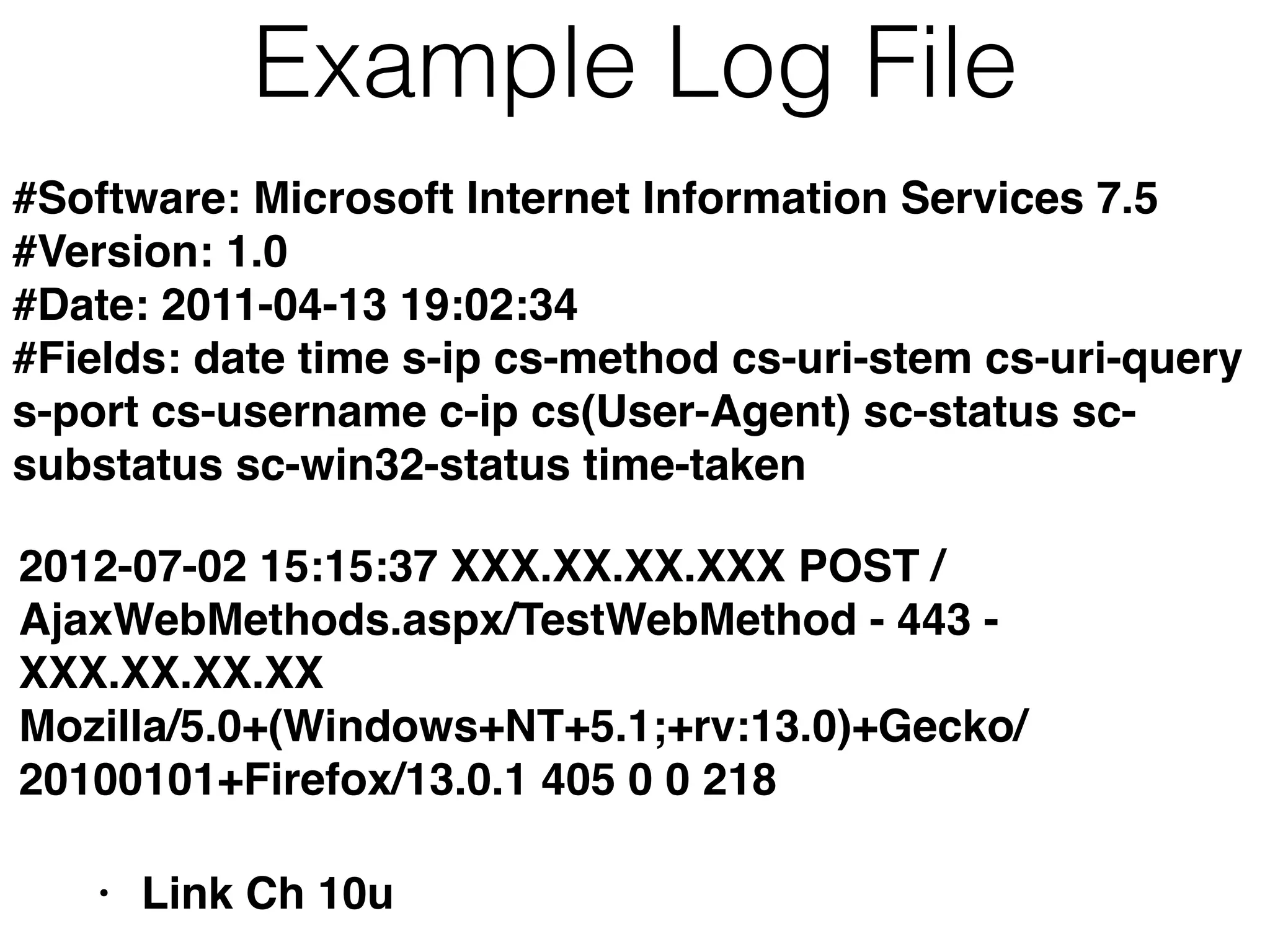
Example Log File
• Link Ch 10u
#Software: Microsoft Internet Information Services 7.5
#Version: 1.0
#Date: 2011-04-13 19:02:34
#Fields: date time s-ip cs-method cs-uri-stem cs-uri-query
s-port cs-username c-ip cs(User-Agent) sc-status sc-
substatus sc-win32-status time-taken
2012-07-02 15:15:37 XXX.XX.XX.XXX POST /
AjaxWebMethods.aspx/TestWebMethod - 443 -
XXX.XX.XX.XX
Mozilla/5.0+(Windows+NT+5.1;+rv:13.0)+Gecko/
20100101+Firefox/13.0.1 405 0 0 218
Database Servers:
Microsoft SQL
MySQL
Oracle
DB Evidence
• Client connection logs
• Attacker's IP address
• Error logs
• Malformed queries; brute force attacks
• Query logs
• Often not enabled, but would show what the
attacker was trying to access
DB Storage
• Data stored in many files
• Sometimes "raw" storage
• Proprietary methods to manage one or more
storage devices at the physical level
• Work with database administrator to deal with
customized databases
• Don't work on a live DB
• You might modify data or even cause a crash
Microsoft SQL
• Free version: SQL Server Express
• Configured with Microsoft SQL Server
Management Studio (SSMS)
• MSSQL does not log client connections by
default
• Only failed connections
ERRORLOG
• This example logs first an unsuccessful, then a
successful, connection attempt
• Both go into ERRORLOG
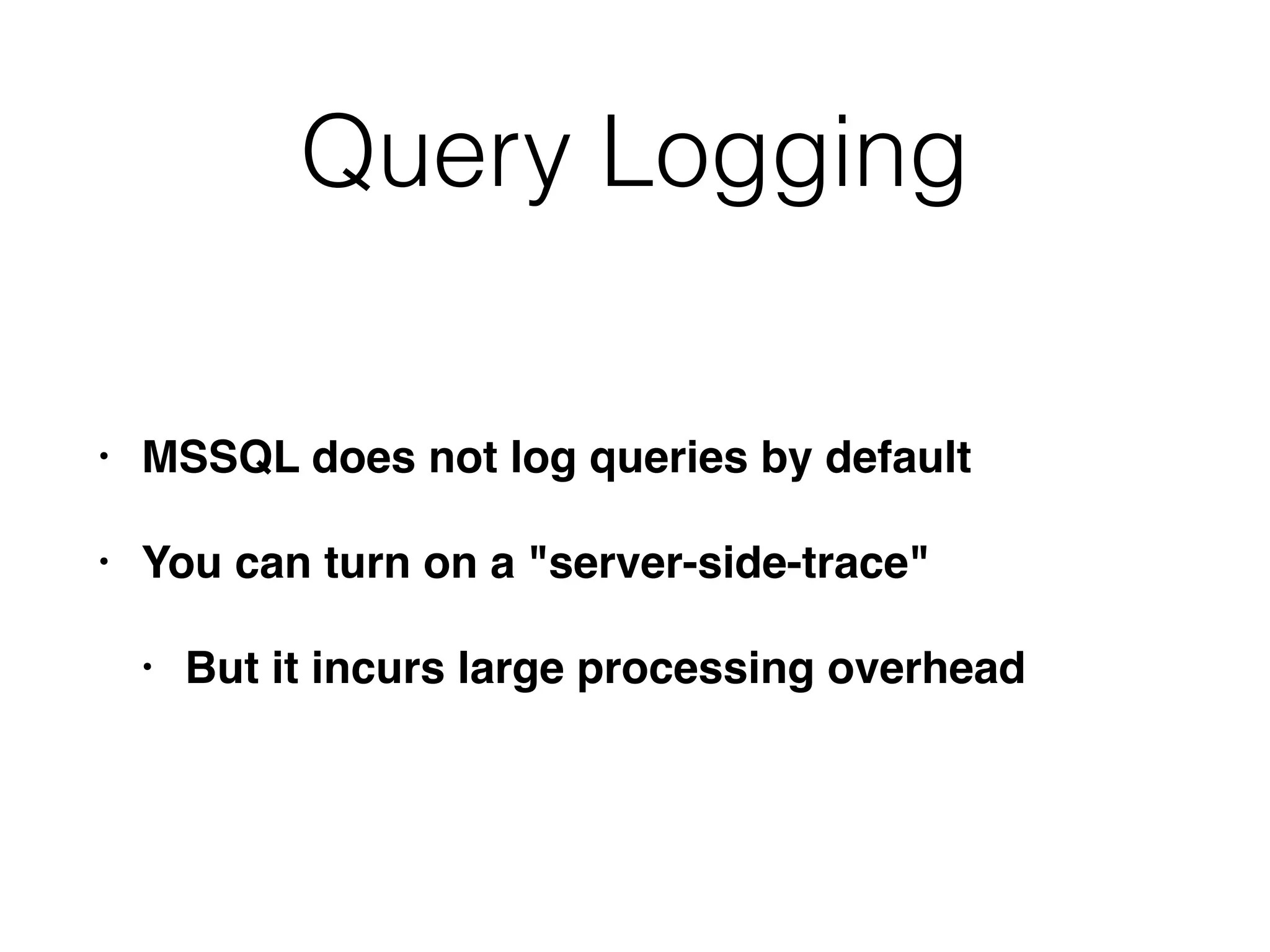
Query Logging
• MSSQL does not log queries by default
• You can turn on a "server-side-trace"
• But it incurs large processing overhead
Preserving DB Evidence
• Forensic image of the drives containing the DB
• Good, but requires taking down the DB server
• Copying DB files: .mdf & .ldf
• Locked; must take down DB to copy them
• Use SMSS to backup or export data
• Alters some evidence, like other live images
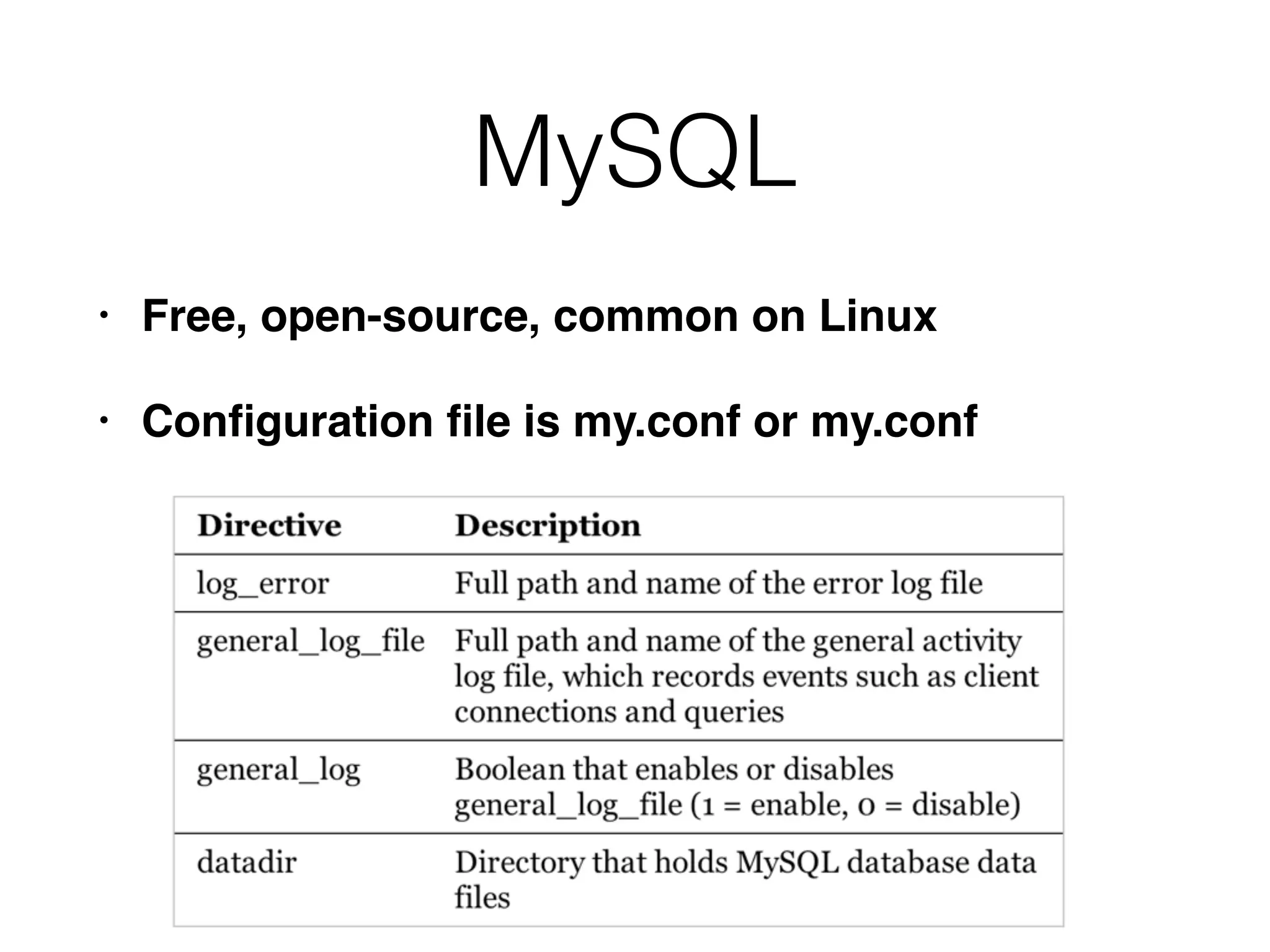
MySQL
• Free, open-source, common on Linux
• Configuration file is my.conf or my.conf
MySQL Logs
• Commonly in /var/log/mysql
• Only error log enabled by default
• General log is more useful for us, but causes
high logging overhead
Example
• General log
• User "root" connected from 192.168.200.2
• Executed this query
• select * from cc_data limit 1
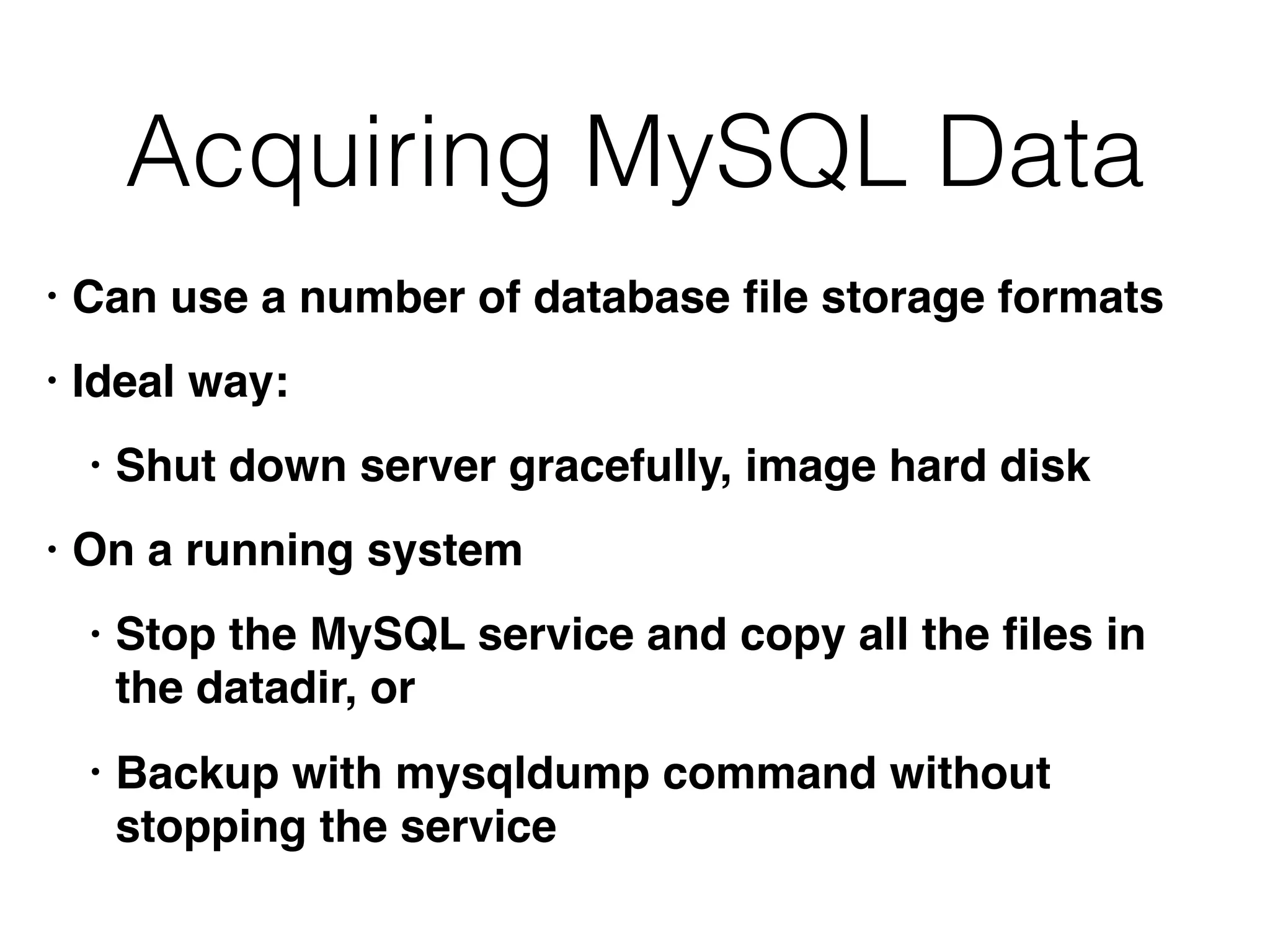
Acquiring MySQL Data
• Can use a number of database file storage formats
• Ideal way:
• Shut down server gracefully, image hard disk
• On a running system
• Stop the MySQL service and copy all the files in
the datadir, or
• Backup with mysqldump command without
stopping the service
Oracle
• Runs on Windows or Linux
• Expensive
• listener.log
• Details about each client connection
• log.xml
• Alerts
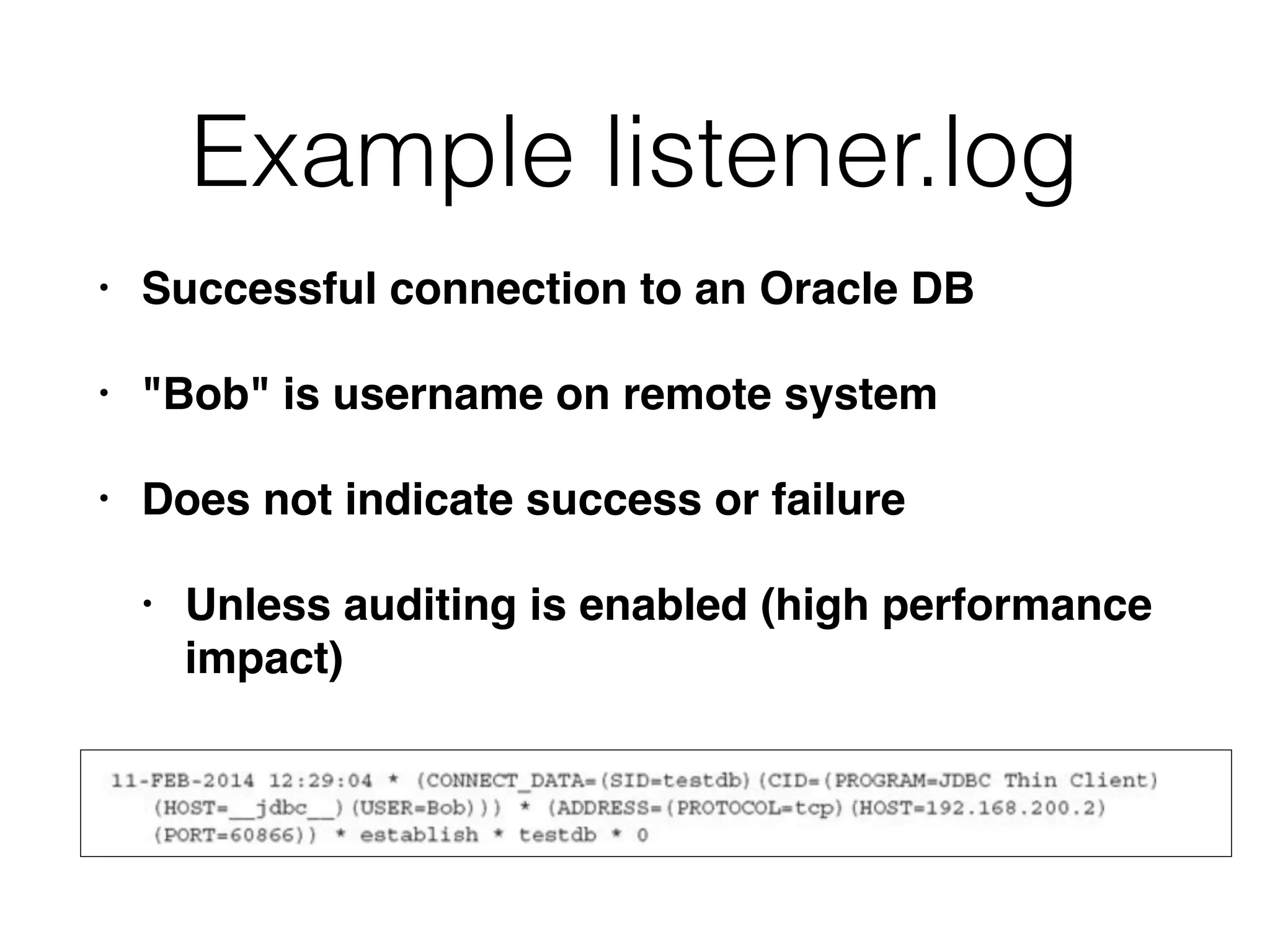
Example listener.log
• Successful connection to an Oracle DB
• "Bob" is username on remote system
• Does not indicate success or failure
• Unless auditing is enabled (high performance
impact)

CNIT 121: 10 Enterprise Services

  • 1.
  • 2.
  • 3.
    DHCP • Dynamic HostConfiguration Protocol • Assigns IP addresses to devices (with subnet mask and gateway address) • Can also configure DNS server address • Uses UDP port 67 and 68
  • 4.
    DHCP Lease • AnIP address may change every time the device reboots • So DHCP logs are essential to identify devices from IP addresses
  • 5.
    DHCP Searches • Searcha date for an IP address • To find which system had that address when an alert happened • Search all dates for a MAC address • Gets all the IP addresses that system had over time
  • 6.
    Microsoft's DHCP Logs •DHCP Server Role is part of Windows Server • By default, located at %windir% System32Dhcp • A plain comma-delimited text file • ID, Date, Time, Description, IP Address, Host Name, MAC Address • Links Ch 10a, 10b
  • 7.
    Issues with MicrosoftDHCP • Note: "Time" is local time, not UTC • Logs only retained for one week by default
  • 8.
    ISC DHCP • Mostcommon on Unix/Linux systems • Free and open-source • Logs go to syslog local7 • Links Ch 10c
  • 9.
    ISC DHCP LogExample [root@proxy log]# tail -f dhcpd.log Jan 15 13:49:59 proxy dhcpd: DHCPACK on 192.168.0.23 to 00:80:ad:01:7e:12 (programming) via eth1 Jan 15 13:54:45 proxy dhcpd: DHCPINFORM from 192.168.0.13 via eth1: not authoritative for subnet 192.168.0.0 • Link Ch 10d
  • 10.
    ISC DHCP LogExamples • Link Ch 10e
  • 11.
    DNS • Domain NameSystem • Resolves domain names like ccsf.edu to IP addresses like 147.144.1.212 • DNS logs show every domain visited, the IP visiting it, and the time • Malicious servers change IP addresses frequently
  • 12.
    ISC BIND • BerkeleyInternet Name Domain • Logging is off by default; turn it on in named.conf.local • Link Ch 10f
  • 13.
    Microsoft DNS • Loggingis off by default • Restarting DNS server erases old log
  • 14.
    Network-Level DNS Logging •Any packet capture utility can do it, such as tcpdump • DNSCAP is specialized for DNS capturing • Can log queries, and/or save a PCAP file • Link Ch 10g
  • 15.
  • 16.
    LANDesk's Software Management Suite •Software License Monitoring (SLM) • Tracks execution history of every application • Date and time the application ran • File attributes of the executable • User account that ran it • Link Ch 10h
  • 17.
    Attackers • Attackers oftencopy hacking tools like password hash dumpers to a system, run it, and then delete it • LANDesk will record this in the SLM monitor logs (in the Registry) • Even if the binary has been deleted
  • 18.
    Registry Keys [HKEY_LOCAL_MACHINESOFTWARELANDesk ManagementSuite
 WinClientSoftwareMonitoringMonitorLog] • Eachapplication has a separate key, like 
 C:/Program Files/Microsoft Office/OFFICE11/ EXCEL.EXE • Subkeys contain: • Current Duration, Current User, First Started, Last Duration, Last Started, Total Duration, Total Runs
  • 19.
    Parsing the RegistryKeys • SLM Browser • Doesn't work on exported registry hives • RegRipper does • Links Ch 10l, 10m, 10n, 10o
  • 20.
    What to LookFor • Low "Total Runs" • Attackers often run a tool once and then delete it • Suspicious paths of execution • Many tools run from the same directory • Anything running from the Recycle Bin
  • 21.
    What to LookFor • Timeline Analysis • Look for rarely used utilities running within a short time period • Such as net.exe, net1.exe, cmd.exe, at.exe • May indicate lateral movement
  • 22.
    What to LookFor • Suspicious usernames in Current User • User accounts with a low number of application runs • Accounts that shouldn't normally access this system • Accounts with elevated privileges, such as domain administrators
  • 23.
    What to LookFor • Executables that have been deleted • This is normal for installers • Other executables are more suspicious
  • 24.
    Symantec's Altiris Client ManagementSuite • Optional component for application metering • Records execution history of applications run on a system • Link Ch 10p, 10q
  • 25.
    Altiris Application Metering Logs •Saved as a plain text file, including this information: • Manufacturer, version, user • Discovered (date of first execution) • And date of last execution • Run Count and Total Run Time
  • 26.
    What to LookFor • Executables without version information • Malware authors often strip this data to hide from signature-based antivirus • Identify suspicious executables by file size • Malware is usually small; < 1 MB • Attacker may use the same backdoor on multiple systems, changing only the name, so the size is the same
  • 27.
    Antivirus Software: Symantec EndpointProtection McAfee VirusScan Trend Micro OfficeScan
  • 28.
    General Features • Antivirusdoesn't usually detect all programs • Only the ones recognized as malicious • Common administrative tools won't be detected • Also some malicious tools lack a signature, and won't be detected • Antivirus logs are useful, but give an incomplete picture of attacker activities
  • 29.
    Antivirus Quarantine • AVencodes malicious files & moves them to a Quarantine folder • Files can no longer execute • Preserves files for incident responders • Make sure antivirus is set to quarantine files, not delete them
  • 30.
    About Archives • Attackersoften use password-protected archive files • Antivirus can't open them to scan them • Often AV will log errors about them • This is a clue about attacker activity
  • 31.
    Symantec Endpoint Protection • Storesextensive log files, in plaintext • Also generates events in the Event Log
  • 32.
    Strange Timestamps • Thisis Nov. 19, 2002, 8:01:34 Am UTC
  • 33.
    Quarantine Files • Fileextension of .vbn • Two VBN files for each file quarantined • First: metadata about quarantined file • Second: Encoded copy of original file
  • 34.
    Symantec's Encoding • Olderversions: XOR with 0x5A • Newer versions: XOR with 0xA5 and insert additional 5-byte sequences throughout the encoded file • Symantec's QExtract.exe can extract files from quarantine • But only on the system that quarantined the file
  • 35.
    To Extract QuarantinedFiles • Obtain the correct version of QExtract • Boot up a forensic image of the affected system • OR use pyextract.py (link Ch 10r) • But it sometimes fails to reconstruct the file correctly
  • 36.
  • 37.
  • 38.
    Most Useful • OnAccessScanLog.txtand OnDemandScanLog.txt • Shows files that were quarantined or deleted • With name of the detected threat • Also creates events in Event Log
  • 39.
    McAfee Quarantined Files •.bup extension, a file with two parts • "Details" contains metadata • File-o: The actual quarantined file • XORed with 0x6A and compressed into OLE format • To extract, use 7-Zip
  • 40.
  • 41.
    Trend Micro OfficeScan •Stores logs locally on the host • Plaintext, with date, signature name, what action the AV took, and path to file
  • 42.
    Trend Quarantine Files •Can be decoded with VSEncode.exe • Create a configuration_file with the full path to the quarantined files
  • 43.
  • 44.
    Background • Browsers sendHTTP (Hypertext Transfer Protocol) requests • GET • To retrieve a page, image, etc. • POST • To send data, like username and password
  • 45.
    Ports • HTTP usesTCP port 80 (by default) • HTTPS uses TCP port 443 (by default)
  • 46.
    Virtual Hosts • Manywebsites running on the same server • If one is compromised, they may all be affected
  • 47.
    Log Files onWeb Servers • Stored in plain text • Summary of each request • IP of client • URL requested • HTTP method • Result (status code)
  • 48.
  • 49.
    Load Balancing • Sendsrequests to a pool of servers • Web server logs will have the IP of the load balancer, not the client • You need to correlate load balancer logs with Web server logs • OR: configure the load balancer to "pass through" some details about the client • X-Forwarder-For header field • Configure Web server to log that header
  • 50.
    Web Content • Attackersoften alter files on a Web server • Or upload files, such as webshells and hacking tools • They may be plaintext or obfuscated
  • 51.
    Example of ObfuscatedPHP • Link Ch 10t
  • 52.
    Apache • Free, open-source •Usually running on Linux • Configuration files • httpd.conf, apache.conf, apache2.conf • Some directives in .htaccess files
  • 53.
    Apache Log Files •access.log and error.log (plain text) • In a subdirectory of /var/log • To log X-Forwarder-For headers, add this to configuration file: %{X-Forwarded-For}i
  • 54.
    Content Locations • /var/wwwor /var/www/html by default • Often changed • Search for ServerRoot and DocumentRoot directives in configuration files
  • 55.
    Microsoft's IIS • InternetInformation Services • Included in Server versions of Windows • Configured through Control Panel • Most relevant settings are stored in an XML file named applicationHost.config
  • 56.
    IIS Config File •ID number appears at end of log directory name • %SystemDrive%inetpublogsLogFiles W3SVC1
  • 57.
    IIS Log Files •Filenames contain date in YYMMDD format • u_ex140220.log --logs from Feb. 20, 2014 • Advanced Logging places logs in a different directory • Logs are plaintext but are encoded with UTF-8 and may include unicode characters
  • 58.
    Example Log File •Link Ch 10u #Software: Microsoft Internet Information Services 7.5 #Version: 1.0 #Date: 2011-04-13 19:02:34 #Fields: date time s-ip cs-method cs-uri-stem cs-uri-query s-port cs-username c-ip cs(User-Agent) sc-status sc- substatus sc-win32-status time-taken 2012-07-02 15:15:37 XXX.XX.XX.XXX POST / AjaxWebMethods.aspx/TestWebMethod - 443 - XXX.XX.XX.XX Mozilla/5.0+(Windows+NT+5.1;+rv:13.0)+Gecko/ 20100101+Firefox/13.0.1 405 0 0 218
  • 59.
  • 60.
    DB Evidence • Clientconnection logs • Attacker's IP address • Error logs • Malformed queries; brute force attacks • Query logs • Often not enabled, but would show what the attacker was trying to access
  • 61.
    DB Storage • Datastored in many files • Sometimes "raw" storage • Proprietary methods to manage one or more storage devices at the physical level • Work with database administrator to deal with customized databases • Don't work on a live DB • You might modify data or even cause a crash
  • 62.
    Microsoft SQL • Freeversion: SQL Server Express • Configured with Microsoft SQL Server Management Studio (SSMS) • MSSQL does not log client connections by default • Only failed connections
  • 63.
    ERRORLOG • This examplelogs first an unsuccessful, then a successful, connection attempt • Both go into ERRORLOG
  • 64.
    Query Logging • MSSQLdoes not log queries by default • You can turn on a "server-side-trace" • But it incurs large processing overhead
  • 65.
    Preserving DB Evidence •Forensic image of the drives containing the DB • Good, but requires taking down the DB server • Copying DB files: .mdf & .ldf • Locked; must take down DB to copy them • Use SMSS to backup or export data • Alters some evidence, like other live images
  • 66.
    MySQL • Free, open-source,common on Linux • Configuration file is my.conf or my.conf
  • 67.
    MySQL Logs • Commonlyin /var/log/mysql • Only error log enabled by default • General log is more useful for us, but causes high logging overhead
  • 68.
    Example • General log •User "root" connected from 192.168.200.2 • Executed this query • select * from cc_data limit 1
  • 69.
    Acquiring MySQL Data •Can use a number of database file storage formats • Ideal way: • Shut down server gracefully, image hard disk • On a running system • Stop the MySQL service and copy all the files in the datadir, or • Backup with mysqldump command without stopping the service
  • 70.
    Oracle • Runs onWindows or Linux • Expensive • listener.log • Details about each client connection • log.xml • Alerts
  • 71.
    Example listener.log • Successfulconnection to an Oracle DB • "Bob" is username on remote system • Does not indicate success or failure • Unless auditing is enabled (high performance impact)