Hands-On Ethical
Hacking and
Network Defense

3
nd
edition
Chapter 7
Programming for Security Professionals
Last modified 1-11-17
2
Objectives
■ Explain basic programming concepts
■ Write a simple C program
■ Explain how Web pages are created with
HTML
■ Describe and create basic Perl programs
■ Explain basic object-oriented programming
concepts
3
Introduction to Computer
Programming
■ Computer programmers must understand
the rules of programming languages
■ Programmers deal with syntax errors
■ One minor mistake and the program will
not run
■ Or worse, it will produce unpredictable results
■ Being a good programmer takes time and
patience
4
Computer Programming
Fundamentals
■ Fundamental concepts
■ Branching, Looping, and Testing (BLT)
■ Documentation
■ Function
■ Mini program within a main program that
carries out a task
5
Branching, Looping, and Testing
(BLT)
■ Branching
■ Takes you from one area of the program to
another area
■ Looping
■ Act of performing a task over and over
■ Testing
■ Verifies some condition and returns true or
false
6
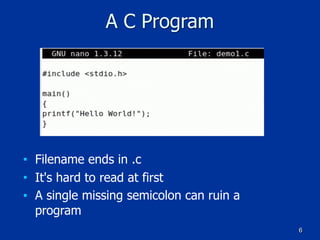
A C Program
■ Filename ends in .c
■ It's hard to read at first
■ A single missing semicolon can ruin a
program
7
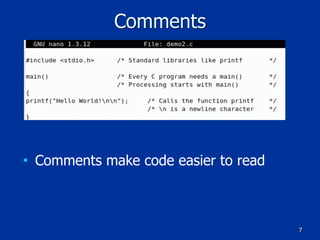
Comments
■ Comments make code easier to read
8
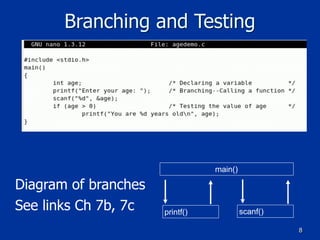
Branching and Testing
main()
scanf()printf()
Diagram of branches
See links Ch 7b, 7c
9
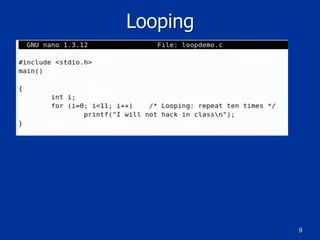
Looping
10
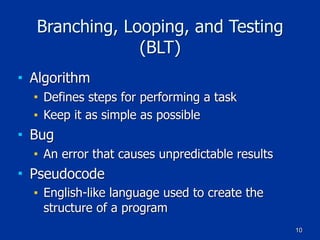
Branching, Looping, and Testing
(BLT)
■ Algorithm
■ Defines steps for performing a task
■ Keep it as simple as possible
■ Bug
■ An error that causes unpredictable results
■ Pseudocode
■ English-like language used to create the
structure of a program
11
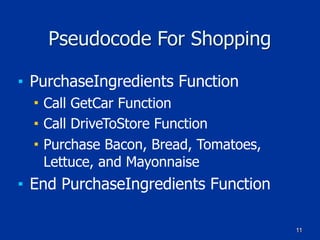
Pseudocode For Shopping
■ PurchaseIngredients Function
■ Call GetCar Function
■ Call DriveToStore Function
■ Purchase Bacon, Bread, Tomatoes,
Lettuce, and Mayonnaise
■ End PurchaseIngredients Function
12
Documentation
■ Documenting your work is essential
■ Add comments to your programs
■ Comments should explain what you are doing
■ Many programmers find it time consuming
and tedious
■ Helps others understand your work
13
Bugs
■ Industry standard
■ 20 to 30 bugs for every 1000 lines of code

(link Ch 7f)
■ Textbook claims a much smaller number without a source
■ Windows 2000 contains almost 50 million lines
■ And fewer than 60,000 bugs (about 1 per 1000 lines)
■ See link Ch 7e for comments in the leaked Win 2000
source code
■ Linux has 0.17 bugs per 1000 lines of code
■ (Link Ch 7f)
14
Learning the C Language
■ Developed by Dennis Ritchie at Bell
Laboratories in 1972
■ Powerful and concise language
■ UNIX was first written in assembly
language and later rewritten in C
■ C++ is an enhancement of the C language
■ C is powerful but dangerous
■ Bugs can crash computers, and it's easy to
leave security holes in the code
15
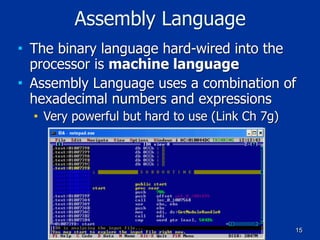
Assembly Language
■ The binary language hard-wired into the
processor is machine language
■ Assembly Language uses a combination of
hexadecimal numbers and expressions
■ Very powerful but hard to use (Link Ch 7g)
16
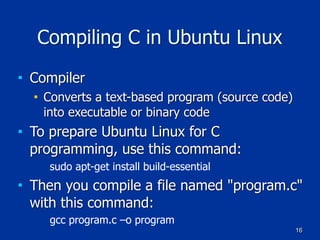
Compiling C in Ubuntu Linux
■ Compiler
■ Converts a text-based program (source code)
into executable or binary code
■ To prepare Ubuntu Linux for C
programming, use this command:
sudo apt-get install build-essential
■ Then you compile a file named "program.c"
with this command:
gcc program.c –o program
17
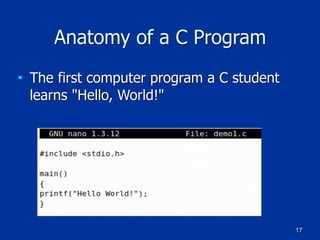
Anatomy of a C Program
■ The first computer program a C student
learns "Hello, World!"
18
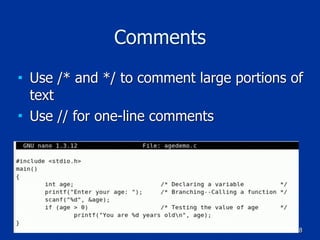
Comments
■ Use /* and */ to comment large portions of
text
■ Use // for one-line comments
19
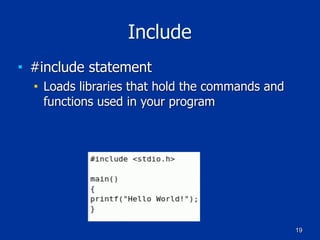
Include
■ #include statement
■ Loads libraries that hold the commands and
functions used in your program
20
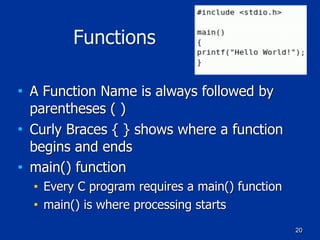
Functions
■ A Function Name is always followed by
parentheses ( )
■ Curly Braces { } shows where a function
begins and ends
■ main() function
■ Every C program requires a main() function
■ main() is where processing starts
21
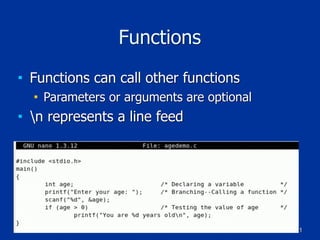
Functions
■ Functions can call other functions
■ Parameters or arguments are optional
■ n represents a line feed
22
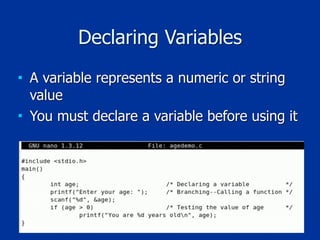
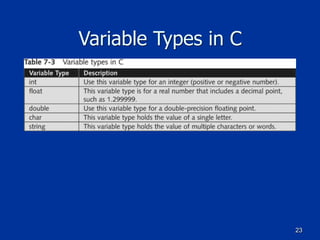
Declaring Variables
■ A variable represents a numeric or string
value
■ You must declare a variable before using it
23
Variable Types in C
24
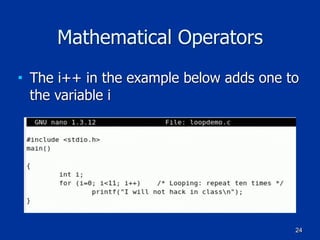
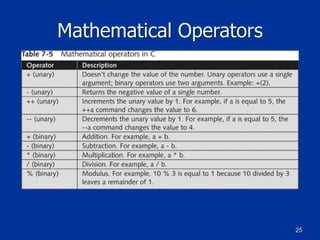
Mathematical Operators
■ The i++ in the example below adds one to
the variable i
25
Mathematical Operators
26
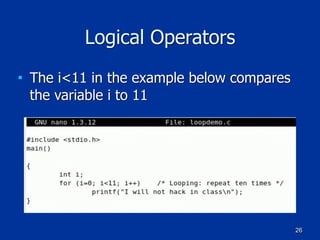
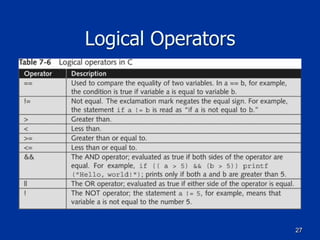
Logical Operators
■ The i<11 in the example below compares
the variable i to 11
27
Logical Operators
28
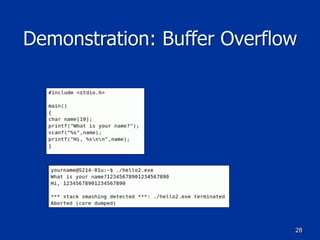
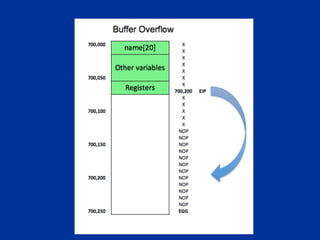
Demonstration: Buffer Overflow
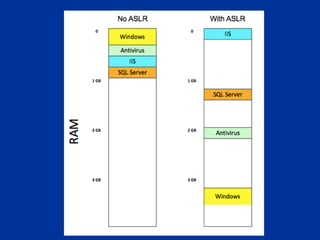
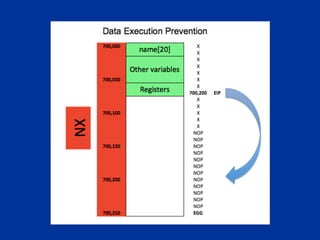
Buffer Overflow Defenses
30
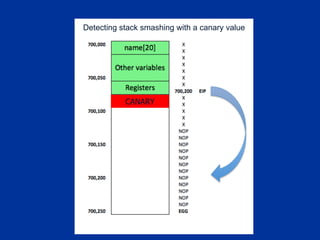
CANARY
Detecting stack smashing with a canary value
40
Understanding HTML Basics
■ HTML is a language used to create Web
pages
■ HTML files are text files
■ Security professionals often need to
examine Web pages
■ Be able to recognize when something looks
suspicious
41
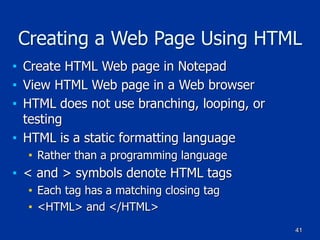
Creating a Web Page Using HTML
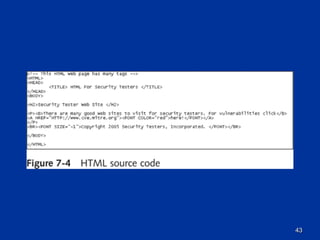
■ Create HTML Web page in Notepad
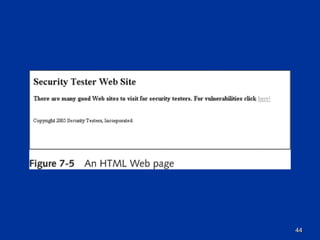
■ View HTML Web page in a Web browser
■ HTML does not use branching, looping, or
testing
■ HTML is a static formatting language
■ Rather than a programming language
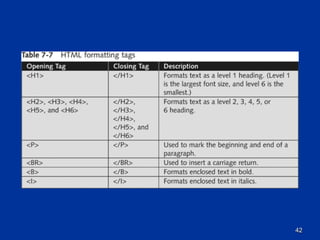
■ < and > symbols denote HTML tags
■ Each tag has a matching closing tag
■ <HTML> and </HTML>
42
43
44
45
Understanding Practical Extraction
and Report Language (Perl)
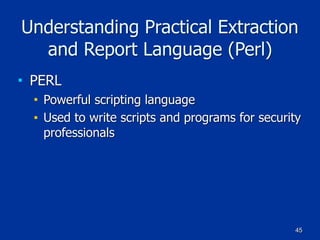
■ PERL
■ Powerful scripting language
■ Used to write scripts and programs for security
professionals
46
Background on Perl
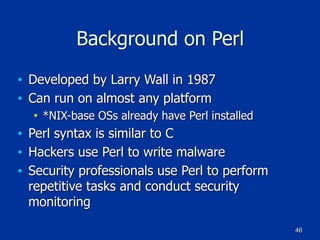
■ Developed by Larry Wall in 1987
■ Can run on almost any platform
■ *NIX-base OSs already have Perl installed
■ Perl syntax is similar to C
■ Hackers use Perl to write malware
■ Security professionals use Perl to perform
repetitive tasks and conduct security
monitoring
47
48
Understanding the Basics of Perl
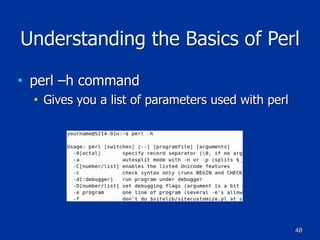
■ perl –h command
■ Gives you a list of parameters used with perl
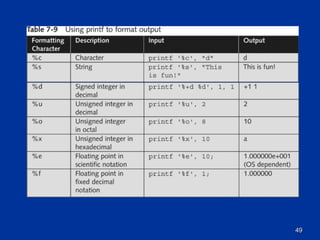
49
50
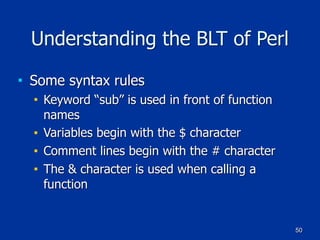
Understanding the BLT of Perl
■ Some syntax rules
■ Keyword “sub” is used in front of function
names
■ Variables begin with the $ character
■ Comment lines begin with the # character
■ The & character is used when calling a
function
51
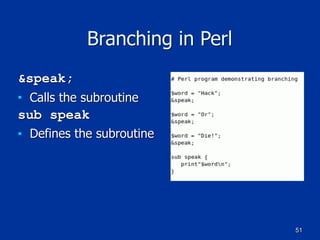
Branching in Perl
&speak;
■ Calls the subroutine
sub speak
■ Defines the subroutine
52
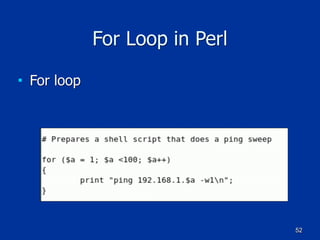
For Loop in Perl
■ For loop
53
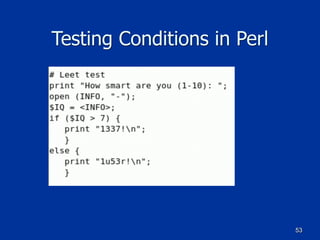
Testing Conditions in Perl
54
Understanding Object-Oriented
Programming Concepts
■ New programming paradigm
■ There are several languages that support
object-oriented programming
■ C++
■ C#
■ Java
■ Perl 6.0
■ Object Cobol
55
Components of Object-Oriented
Programming
■ Classes
■ Structures that hold pieces of data and
functions
■ The :: symbol
■ Used to separate the name of a class from a
member function
■ Example:
■ Employee::GetEmp()
56
Example of a Class in C++
class Employee
{
public:
char firstname[25];
char lastname[25];
char PlaceOfBirth[30];
[code continues]
};
void GetEmp()
{
// Perform tasks to get employee info
[program code goes here]
}
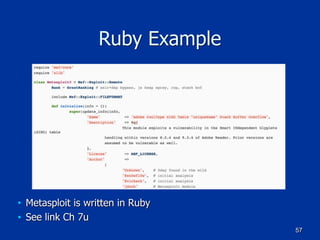
Ruby Example
■ Metasploit is written in Ruby
■ See link Ch 7u
57
56
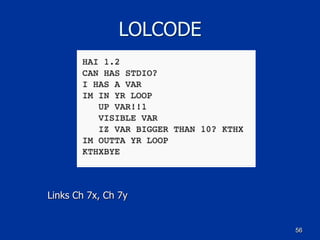
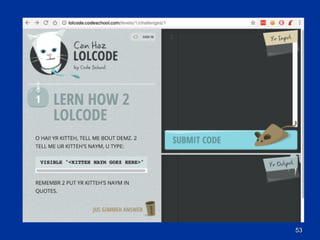
LOLCODE
Links Ch 7x, Ch 7y
53
56
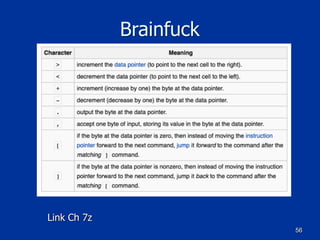
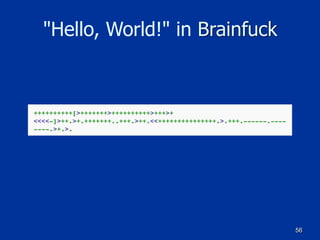
Brainfuck
Link Ch 7z
56
"Hello, World!" in Brainfuck

Ch 7: Programming for Security Professionals

  • 1.
    Hands-On Ethical Hacking and NetworkDefense
 3 nd edition Chapter 7 Programming for Security Professionals Last modified 1-11-17
  • 2.
    2 Objectives ■ Explain basicprogramming concepts ■ Write a simple C program ■ Explain how Web pages are created with HTML ■ Describe and create basic Perl programs ■ Explain basic object-oriented programming concepts
  • 3.
    3 Introduction to Computer Programming ■Computer programmers must understand the rules of programming languages ■ Programmers deal with syntax errors ■ One minor mistake and the program will not run ■ Or worse, it will produce unpredictable results ■ Being a good programmer takes time and patience
  • 4.
    4 Computer Programming Fundamentals ■ Fundamentalconcepts ■ Branching, Looping, and Testing (BLT) ■ Documentation ■ Function ■ Mini program within a main program that carries out a task
  • 5.
    5 Branching, Looping, andTesting (BLT) ■ Branching ■ Takes you from one area of the program to another area ■ Looping ■ Act of performing a task over and over ■ Testing ■ Verifies some condition and returns true or false
  • 6.
    6 A C Program ■Filename ends in .c ■ It's hard to read at first ■ A single missing semicolon can ruin a program
  • 7.
    7 Comments ■ Comments makecode easier to read
  • 8.
  • 9.
  • 10.
    10 Branching, Looping, andTesting (BLT) ■ Algorithm ■ Defines steps for performing a task ■ Keep it as simple as possible ■ Bug ■ An error that causes unpredictable results ■ Pseudocode ■ English-like language used to create the structure of a program
  • 11.
    11 Pseudocode For Shopping ■PurchaseIngredients Function ■ Call GetCar Function ■ Call DriveToStore Function ■ Purchase Bacon, Bread, Tomatoes, Lettuce, and Mayonnaise ■ End PurchaseIngredients Function
  • 12.
    12 Documentation ■ Documenting yourwork is essential ■ Add comments to your programs ■ Comments should explain what you are doing ■ Many programmers find it time consuming and tedious ■ Helps others understand your work
  • 13.
    13 Bugs ■ Industry standard ■20 to 30 bugs for every 1000 lines of code
 (link Ch 7f) ■ Textbook claims a much smaller number without a source ■ Windows 2000 contains almost 50 million lines ■ And fewer than 60,000 bugs (about 1 per 1000 lines) ■ See link Ch 7e for comments in the leaked Win 2000 source code ■ Linux has 0.17 bugs per 1000 lines of code ■ (Link Ch 7f)
  • 14.
    14 Learning the CLanguage ■ Developed by Dennis Ritchie at Bell Laboratories in 1972 ■ Powerful and concise language ■ UNIX was first written in assembly language and later rewritten in C ■ C++ is an enhancement of the C language ■ C is powerful but dangerous ■ Bugs can crash computers, and it's easy to leave security holes in the code
  • 15.
    15 Assembly Language ■ Thebinary language hard-wired into the processor is machine language ■ Assembly Language uses a combination of hexadecimal numbers and expressions ■ Very powerful but hard to use (Link Ch 7g)
  • 16.
    16 Compiling C inUbuntu Linux ■ Compiler ■ Converts a text-based program (source code) into executable or binary code ■ To prepare Ubuntu Linux for C programming, use this command: sudo apt-get install build-essential ■ Then you compile a file named "program.c" with this command: gcc program.c –o program
  • 17.
    17 Anatomy of aC Program ■ The first computer program a C student learns "Hello, World!"
  • 18.
    18 Comments ■ Use /*and */ to comment large portions of text ■ Use // for one-line comments
  • 19.
    19 Include ■ #include statement ■Loads libraries that hold the commands and functions used in your program
  • 20.
    20 Functions ■ A FunctionName is always followed by parentheses ( ) ■ Curly Braces { } shows where a function begins and ends ■ main() function ■ Every C program requires a main() function ■ main() is where processing starts
  • 21.
    21 Functions ■ Functions cancall other functions ■ Parameters or arguments are optional ■ n represents a line feed
  • 22.
    22 Declaring Variables ■ Avariable represents a numeric or string value ■ You must declare a variable before using it
  • 23.
  • 24.
    24 Mathematical Operators ■ Thei++ in the example below adds one to the variable i
  • 25.
  • 26.
    26 Logical Operators ■ Thei<11 in the example below compares the variable i to 11
  • 27.
  • 28.
  • 30.
  • 33.
  • 34.
    40 Understanding HTML Basics ■HTML is a language used to create Web pages ■ HTML files are text files ■ Security professionals often need to examine Web pages ■ Be able to recognize when something looks suspicious
  • 35.
    41 Creating a WebPage Using HTML ■ Create HTML Web page in Notepad ■ View HTML Web page in a Web browser ■ HTML does not use branching, looping, or testing ■ HTML is a static formatting language ■ Rather than a programming language ■ < and > symbols denote HTML tags ■ Each tag has a matching closing tag ■ <HTML> and </HTML>
  • 36.
  • 37.
  • 38.
  • 39.
    45 Understanding Practical Extraction andReport Language (Perl) ■ PERL ■ Powerful scripting language ■ Used to write scripts and programs for security professionals
  • 40.
    46 Background on Perl ■Developed by Larry Wall in 1987 ■ Can run on almost any platform ■ *NIX-base OSs already have Perl installed ■ Perl syntax is similar to C ■ Hackers use Perl to write malware ■ Security professionals use Perl to perform repetitive tasks and conduct security monitoring
  • 41.
  • 42.
    48 Understanding the Basicsof Perl ■ perl –h command ■ Gives you a list of parameters used with perl
  • 43.
  • 44.
    50 Understanding the BLTof Perl ■ Some syntax rules ■ Keyword “sub” is used in front of function names ■ Variables begin with the $ character ■ Comment lines begin with the # character ■ The & character is used when calling a function
  • 45.
    51 Branching in Perl &speak; ■Calls the subroutine sub speak ■ Defines the subroutine
  • 46.
    52 For Loop inPerl ■ For loop
  • 47.
  • 48.
    54 Understanding Object-Oriented Programming Concepts ■New programming paradigm ■ There are several languages that support object-oriented programming ■ C++ ■ C# ■ Java ■ Perl 6.0 ■ Object Cobol
  • 49.
    55 Components of Object-Oriented Programming ■Classes ■ Structures that hold pieces of data and functions ■ The :: symbol ■ Used to separate the name of a class from a member function ■ Example: ■ Employee::GetEmp()
  • 50.
    56 Example of aClass in C++ class Employee { public: char firstname[25]; char lastname[25]; char PlaceOfBirth[30]; [code continues] }; void GetEmp() { // Perform tasks to get employee info [program code goes here] }
  • 51.
    Ruby Example ■ Metasploitis written in Ruby ■ See link Ch 7u 57
  • 52.
  • 53.
  • 54.
  • 55.