Port Scanning Prabhaker Mateti
Port scanning Attackers wish to discover services they can break into. Security audit: Why are certain ports open? sending a packet to each port, one at a time. Based on the type of response, an attacker knows if the port is used. The used ports can be probed further for weakness.
Port Numbers An abstraction of the OS + Net Stds 16-bit unsigned integer Well Known Ports (0 .. 1023) Registered Ports (1024 .. 49151) Dynamic and/or Private Ports (49152 .. 65535).  http:// www.iana.org /assignments/ port-numbers
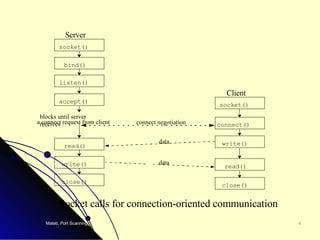
Socket calls for connection-oriented communication socket() bind() listen() read() close() socket() connect() read() write() close() blocks until server receives a connect request from client data data Server Client accept() write() connect negotiation
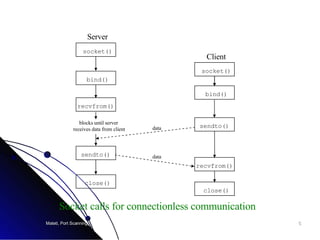
socket() bind() sendto() close() socket() bind() recvfrom() sendto() close() blocks until server receives data from client data data Server Client recvfrom() Socket calls for connectionless communication
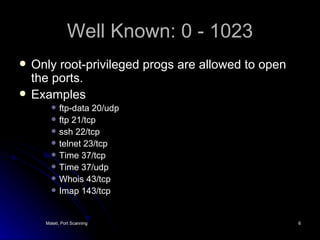
Well Known: 0 - 1023 Only root-privileged progs are allowed to open the ports. Examples ftp-data 20/udp ftp 21/tcp ssh 22/tcp telnet 23/tcp Time 37/tcp Time 37/udp Whois 43/tcp Imap 143/tcp
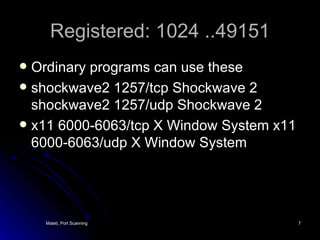
Registered: 1024 ..49151 Ordinary programs can use these shockwave2 1257/tcp Shockwave 2 shockwave2 1257/udp Shockwave 2  x11 6000-6063/tcp X Window System x11 6000-6063/udp X Window System
Dynamic/Private: 49152 .. 65535 Ordinary programs can use these
TCP connect(0) scanning Try connect()-ing to every port If the port is listening, connect() will be succeed. Otherwise, the port isn’t reachable. No need for any special privileges. Any user can use it. Speed - slow. Attacker can be logged/ identified.
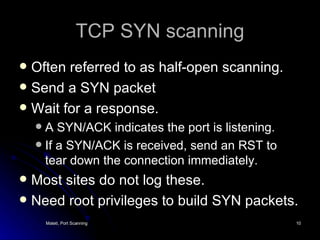
TCP SYN scanning Often referred to as half-open scanning. Send a SYN packet Wait for a response. A SYN/ACK indicates the port is listening. If a SYN/ACK is received, send an RST to tear down the connection immediately.  Most sites do not log these. Need root privileges to build SYN packets.
TCP FIN Scanning Send a FIN packet (without a preceding SYN etc.) FIN packets may pass through firewalls Closed ports reply with RST. Open ports ignore the FIN packet. Some hosts violate RFC. Reply with RST’s regardless of the port state Thus, are not vulnerable to this scan.
TCP reverse identd scanning identd  protocol (rfc1413):  disclose the username of the owner of any process  connected via TCP, even if that process didn’t initiate the connection. Example: connect to the http port (80), and then use identd to find out whether the server is running as root. Must have full TCP connection to the port.
Fragmentation scanning Not a new scanning method in and of itself. A modification of other techniques. Split the probe packet into IP fragments. By splitting up the TCP header over several packets, it is harder for packet filters to detect a probe.
FTP Bounce Scan Take advantage of a vulnerability of FTP protocol. Requires support for proxy ftp connections. For example, evil.com can establish a control communication connection to FTP server-PI (protocol interpreter) of target.com. Then it is able to request the server-PI to initiate an active server-DTP (data transfer process) to send a file anywhere on the Internet.
Bounce Scan A port scanner can exploit this to scan TCP ports form a proxy ftp server. Connect to an FTP server behind a firewall, and then scan ports that are more likely to be blocked. If the ftp server allows reading from and writing to a directory (such as /incoming), you can send arbitrary data to ports that you do find open.
FTP Bounce Use the PORT command (of FTP) to declare that our passive user-DTP is listening on the target box at a certain port number. LIST the current directory, and the results is sent over the server-DTP channel. If our target host is listening on the port, the transfer will be successful. Otherwise, connection will be refused. Then issue another PORT command to try the next port on the target.
FTP Bounce Advantages Harder to trace Potential to bypass firewalls. Disadvantages Slow Many FTP servers have (finally) disabled the proxy feature.
UDP Scans UDP is simpler, but the scanning is more difficult Open ports do not have to send an  ACK. Closed ports are not  required  to send an error packet. Most hosts send an ICMP_PORT_UNREACH error when you send a packet to a closed UDP port. Can find out if a port is NOT open.
UDP Scans Neither UDP packets, nor the ICMP errors are guaranteed to arrive. Slow: the ICMP error message rate is limited. Need to be root for access to raw ICMP socket. Non-root users  cannot read port unreachable errors directly.
UDP Scans But users can learn it indirectly. For example, a second write() call to a closed port will usually fail. recvfrom() on non-blocking UDP sockets usually return EAGAIN (try again), if the ICMP error hasn’t been received. It will return ECONNREFUSED (connection refuse), if ICMP error has been received.
Stealth Scan Simple port scanning can be easily logged by the services listening at the ports. E.g. they see an incoming connection with no data, thus they log an error. Stealth scan refers to scanning techniques that can avoid being logged. These techniques include fragmented packets, SYN scanning, FIN scanning etc.
Stealth Scan Scan slowly A port scanner typically scans a host too rapidly Some detectors recognize these “signatures”. So, scanning very slowly (e.g., over several days) is a stealth technique. Firing packets with fake IPs Flood with spoofed  scans and embed one scan from the real source (network) address.
Signatures of a port scan Several packets to different destination ports from the same source within a “short period” of time.  SYN to a non-listening port
Detection of Port Scanning Open a socket SOCK_RAW mode. protocol type IPPROTO_IP recvfrom() to capture the packets Discovering stealth scans requires kernel level work. A detector can inform us that we have been port-scanned, but the source address may have been spoofed.
Scanner Leaks If the packets we received have an IP TTL of 255, we can conclude that it was sent from or local network, regardless of what the source address field says. if TTL is 250, we can only tell that the attacker was no more than 5 hops away.
References Ron Gula, How to Handle and Identify Network Probes, April 1999,  www.securitywizards.com  [ Local Copy ] Required Reading.  Hobbit ,  The FTP Bounce Attack,   http:// www.insecure.org/nmap /  hobbit.ftpbounce.txt  The original paper on the subject. Reference.  Fyodor, Remote OS detection via TCP/IP Stack Finger Printing. Written: October 18, 1998 Last Modified: April 10, 1999.  http://www.insecure.org/nmap/nmap-fingerprinting-article.html    Required Reading.  Solar Designer, Designing and Attacking Port Scan Detection Tools, Phrack Magazine, Volume 8, Issue 53, July 8, 1998, article 13 of 15,   www.phrack.com  .  Recommended Reading.  ZoneAlarm (download free for personal use from  http:// www.zonelabs.com / ) that can detect port scans.  Try this on your own home network of Windows PCs.

Port Scanning

  • 1.
  • 2.
    Port scanning Attackerswish to discover services they can break into. Security audit: Why are certain ports open? sending a packet to each port, one at a time. Based on the type of response, an attacker knows if the port is used. The used ports can be probed further for weakness.
  • 3.
    Port Numbers Anabstraction of the OS + Net Stds 16-bit unsigned integer Well Known Ports (0 .. 1023) Registered Ports (1024 .. 49151) Dynamic and/or Private Ports (49152 .. 65535). http:// www.iana.org /assignments/ port-numbers
  • 4.
    Socket calls forconnection-oriented communication socket() bind() listen() read() close() socket() connect() read() write() close() blocks until server receives a connect request from client data data Server Client accept() write() connect negotiation
  • 5.
    socket() bind() sendto()close() socket() bind() recvfrom() sendto() close() blocks until server receives data from client data data Server Client recvfrom() Socket calls for connectionless communication
  • 6.
    Well Known: 0- 1023 Only root-privileged progs are allowed to open the ports. Examples ftp-data 20/udp ftp 21/tcp ssh 22/tcp telnet 23/tcp Time 37/tcp Time 37/udp Whois 43/tcp Imap 143/tcp
  • 7.
    Registered: 1024 ..49151Ordinary programs can use these shockwave2 1257/tcp Shockwave 2 shockwave2 1257/udp Shockwave 2 x11 6000-6063/tcp X Window System x11 6000-6063/udp X Window System
  • 8.
    Dynamic/Private: 49152 ..65535 Ordinary programs can use these
  • 9.
    TCP connect(0) scanningTry connect()-ing to every port If the port is listening, connect() will be succeed. Otherwise, the port isn’t reachable. No need for any special privileges. Any user can use it. Speed - slow. Attacker can be logged/ identified.
  • 10.
    TCP SYN scanningOften referred to as half-open scanning. Send a SYN packet Wait for a response. A SYN/ACK indicates the port is listening. If a SYN/ACK is received, send an RST to tear down the connection immediately. Most sites do not log these. Need root privileges to build SYN packets.
  • 11.
    TCP FIN ScanningSend a FIN packet (without a preceding SYN etc.) FIN packets may pass through firewalls Closed ports reply with RST. Open ports ignore the FIN packet. Some hosts violate RFC. Reply with RST’s regardless of the port state Thus, are not vulnerable to this scan.
  • 12.
    TCP reverse identdscanning identd protocol (rfc1413): disclose the username of the owner of any process connected via TCP, even if that process didn’t initiate the connection. Example: connect to the http port (80), and then use identd to find out whether the server is running as root. Must have full TCP connection to the port.
  • 13.
    Fragmentation scanning Nota new scanning method in and of itself. A modification of other techniques. Split the probe packet into IP fragments. By splitting up the TCP header over several packets, it is harder for packet filters to detect a probe.
  • 14.
    FTP Bounce ScanTake advantage of a vulnerability of FTP protocol. Requires support for proxy ftp connections. For example, evil.com can establish a control communication connection to FTP server-PI (protocol interpreter) of target.com. Then it is able to request the server-PI to initiate an active server-DTP (data transfer process) to send a file anywhere on the Internet.
  • 15.
    Bounce Scan Aport scanner can exploit this to scan TCP ports form a proxy ftp server. Connect to an FTP server behind a firewall, and then scan ports that are more likely to be blocked. If the ftp server allows reading from and writing to a directory (such as /incoming), you can send arbitrary data to ports that you do find open.
  • 16.
    FTP Bounce Usethe PORT command (of FTP) to declare that our passive user-DTP is listening on the target box at a certain port number. LIST the current directory, and the results is sent over the server-DTP channel. If our target host is listening on the port, the transfer will be successful. Otherwise, connection will be refused. Then issue another PORT command to try the next port on the target.
  • 17.
    FTP Bounce AdvantagesHarder to trace Potential to bypass firewalls. Disadvantages Slow Many FTP servers have (finally) disabled the proxy feature.
  • 18.
    UDP Scans UDPis simpler, but the scanning is more difficult Open ports do not have to send an ACK. Closed ports are not required to send an error packet. Most hosts send an ICMP_PORT_UNREACH error when you send a packet to a closed UDP port. Can find out if a port is NOT open.
  • 19.
    UDP Scans NeitherUDP packets, nor the ICMP errors are guaranteed to arrive. Slow: the ICMP error message rate is limited. Need to be root for access to raw ICMP socket. Non-root users cannot read port unreachable errors directly.
  • 20.
    UDP Scans Butusers can learn it indirectly. For example, a second write() call to a closed port will usually fail. recvfrom() on non-blocking UDP sockets usually return EAGAIN (try again), if the ICMP error hasn’t been received. It will return ECONNREFUSED (connection refuse), if ICMP error has been received.
  • 21.
    Stealth Scan Simpleport scanning can be easily logged by the services listening at the ports. E.g. they see an incoming connection with no data, thus they log an error. Stealth scan refers to scanning techniques that can avoid being logged. These techniques include fragmented packets, SYN scanning, FIN scanning etc.
  • 22.
    Stealth Scan Scanslowly A port scanner typically scans a host too rapidly Some detectors recognize these “signatures”. So, scanning very slowly (e.g., over several days) is a stealth technique. Firing packets with fake IPs Flood with spoofed scans and embed one scan from the real source (network) address.
  • 23.
    Signatures of aport scan Several packets to different destination ports from the same source within a “short period” of time. SYN to a non-listening port
  • 24.
    Detection of PortScanning Open a socket SOCK_RAW mode. protocol type IPPROTO_IP recvfrom() to capture the packets Discovering stealth scans requires kernel level work. A detector can inform us that we have been port-scanned, but the source address may have been spoofed.
  • 25.
    Scanner Leaks Ifthe packets we received have an IP TTL of 255, we can conclude that it was sent from or local network, regardless of what the source address field says. if TTL is 250, we can only tell that the attacker was no more than 5 hops away.
  • 26.
    References Ron Gula,How to Handle and Identify Network Probes, April 1999, www.securitywizards.com [ Local Copy ] Required Reading. Hobbit , The FTP Bounce Attack,  http:// www.insecure.org/nmap / hobbit.ftpbounce.txt The original paper on the subject. Reference. Fyodor, Remote OS detection via TCP/IP Stack Finger Printing. Written: October 18, 1998 Last Modified: April 10, 1999. http://www.insecure.org/nmap/nmap-fingerprinting-article.html    Required Reading. Solar Designer, Designing and Attacking Port Scan Detection Tools, Phrack Magazine, Volume 8, Issue 53, July 8, 1998, article 13 of 15,  www.phrack.com .  Recommended Reading. ZoneAlarm (download free for personal use from http:// www.zonelabs.com / ) that can detect port scans.  Try this on your own home network of Windows PCs.