
Wireless Networking
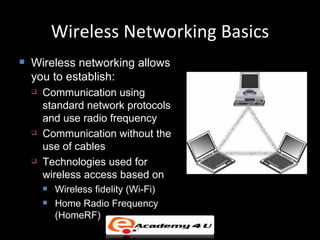
Wireless Networking Basics
   Wireless networking allows
    you to establish:
       Communication using
        standard network protocols
        and use radio frequency
       Communication without the
        use of cables
       Technologies used for
        wireless access based on
           Wireless fidelity (Wi-Fi)
           Home Radio Frequency
            (HomeRF)
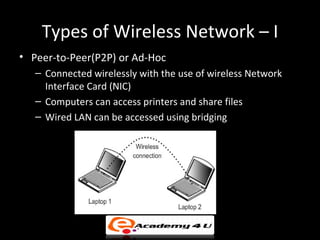
Types of Wireless Network – I
• Peer-to-Peer(P2P) or Ad-Hoc
   – Connected wirelessly with the use of wireless Network
     Interface Card (NIC)
   – Computers can access printers and share files
   – Wired LAN can be accessed using bridging
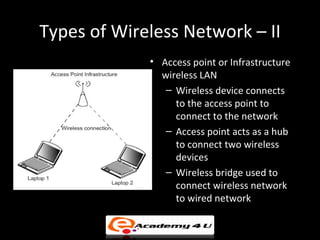
Types of Wireless Network – II
             • Access point or Infrastructure
               wireless LAN
                – Wireless device connects
                  to the access point to
                  connect to the network
                – Access point acts as a hub
                  to connect two wireless
                  devices
                – Wireless bridge used to
                  connect wireless network
                  to wired network
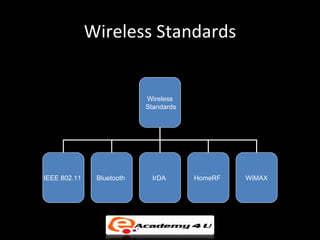
Wireless Standards
•   Variety of standards accepted worldwide and offer different levels of
    security


                                   Wireless
                                   Standards


       IEEE 802.11    Bluetooth      IrDA        HomeRF        WiMAX
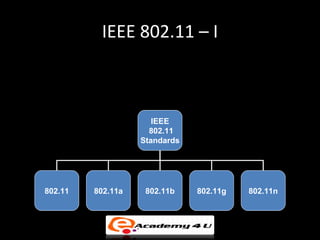
IEEE 802.11 – I
• Developed by Institute of Electrical and Electronic
  Engineers (IEEE) for defining different aspects of Radio
  Frequency Wireless networking

                             IEEE
                            802.11
                          Standards


     802.11     802.11a    802.11b    802.11g    802.11n
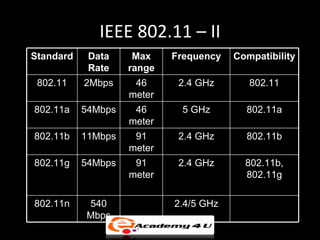
IEEE 802.11 – II
Standard    Data     Max    Frequency   Compatibility
            Rate    range
 802.11    2Mbps     46      2.4 GHz       802.11
                    meter
802.11a    54Mbps    46      5 GHz        802.11a
                    meter
802.11b    11Mbps    91      2.4 GHz      802.11b
                    meter
802.11g    54Mbps    91      2.4 GHz      802.11b,
                    meter                 802.11g

802.11n    540              2.4/5 GHz
           Mbps
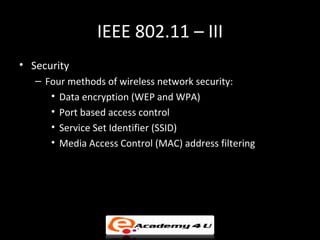
IEEE 802.11 – III
• Security
   – Four methods of wireless network security:
      • Data encryption (WEP and WPA)
      • Port based access control
      • Service Set Identifier (SSID)
      • Media Access Control (MAC) address filtering
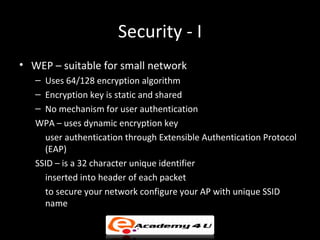
Security - I
• WEP – suitable for small network
   – Uses 64/128 encryption algorithm
   – Encryption key is static and shared
   – No mechanism for user authentication
   WPA – uses dynamic encryption key
     user authentication through Extensible Authentication Protocol
     (EAP)
   SSID – is a 32 character unique identifier
     inserted into header of each packet
     to secure your network configure your AP with unique SSID
     name
Security - II
• MAC address filtering – preferred for smaller
  network
  – MAC address listed in the list can access other
    devices in the network
  – If any NIC is failed then you have to reconfigure
    the AP
  Port Based Access control (802.1x) – uses EAP
    hardware used such as supplicant, authenticator,
    and authenticating server must be 802.1x enabled
    to use the network
Components Requirements
• The important components required for setting up a
  wireless network are:
   –   Medium
   –   Access point and Extension point
   –   Wireless bridges and Power line bridges
   –   Antennas
   –   Wireless adapters
   –   Wireless Station and Server
   –   Software
Medium
• Wireless medium is an unguided form of networking medium
• Wireless transmission involves use of technologies such as
  Bluetooth, Infrared, Lasers, Radio signals and Microwave
  technologies
• Lasers, infrared and Bluetooth are used mainly in LAN
  environment whereas microwave and other radio frequencies
  are used to connect vast geographical locations
• Mobile computing allows users to do their work at any
  location
Access Point and Extension Point
• Access Point
   – Device that bridges a wireless connection and a wired
     connection
   – Two types of access points: Hardware access points and
     Software access points
   – Generally acts as a hub and operates at layer 1
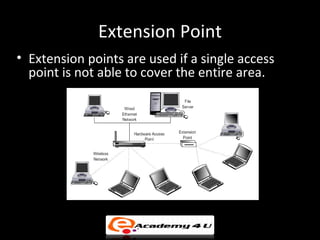
• Extension Point
   – Used if single access point is not able to cover entire
     area
   – Acts as wireless relay extending the range of wireless
     network
Hardware Access Points
• Hardware access point is a physical device that is used to
  establish a connection between a wired network and a
  wireless network
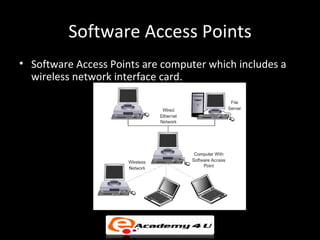
Software Access Points
• Software Access Points are computer which includes a
  wireless network interface card.
Extension Point
• Extension points are used if a single access
  point is not able to cover the entire area.
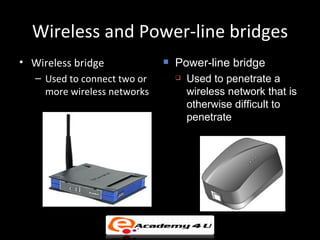
Wireless and Power-line bridges
• Wireless bridge                Power-line bridge
   – Used to connect two or          Used to penetrate a
     more wireless networks           wireless network that is
                                      otherwise difficult to
                                      penetrate
Antennas and Adapters
• Antennas are used to increase the range of wireless network
• Antennas should be compatible with the router, AP or the
  adapter i.e. installed in the network
• Types of antennas used:
   – Omnidirectional antennas - Used indoors and small in size
   – Directional antennas - High gain and used for long range
     outdoor use
• Wireless adapters help to connect computer or PDA to a
  network
• Wireless adapters are available as PC cards, PCI and mini PCI,
  USB, and CompactFlash.
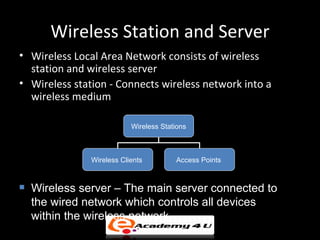
Wireless Station and Server
• Wireless Local Area Network consists of wireless
  station and wireless server
• Wireless station - Connects wireless network into a
  wireless medium

                           Wireless Stations


               Wireless Clients         Access Points


   Wireless server – The main server connected to
    the wired network which controls all devices
    within the wireless network
Software
• Wireless network adapter requires two types of software
  so as to function properly:
   – Driver
   – Configuration Utility
• Windows XP has built-in tools for configuring network
  adapter settings
• It is better to use the drivers and configuration utilities
  provided by the vendor along with the wireless adapter
Application
• Common applications of wireless technologies:
   –   Wireless Local Area Network (WLAN)
   –   Wireless Wide Area Network (WWAN)
   –   Wireless Personal Area Network (WPAN)
   –   Wireless Metropolitan Area Network (WMAN)
   –   Mobile Computing
Problem Solving
• Wire and Wireless Adapter
   – Software Troubleshooting - Wireless adapter configuration
     utility and wireless AP’s firmware version
• Driver Compatibility
• Low signal strength – Can be solved with:
   –   Interference
   –   Installing repeater
   –   Changing Antenna
   –   Installing Window XP Service Pack 2
Problem Solving
• Network settings – Common network setting problems
  are:
   –   SSID setting
   –   DHCP Addresses
   –   Encryption Keys
   –   MAC Address Filters

Wireless networking

  • 1.
  • 2.
    Wireless Networking Basics  Wireless networking allows you to establish:  Communication using standard network protocols and use radio frequency  Communication without the use of cables  Technologies used for wireless access based on  Wireless fidelity (Wi-Fi)  Home Radio Frequency (HomeRF)
  • 3.
    Types of WirelessNetwork – I • Peer-to-Peer(P2P) or Ad-Hoc – Connected wirelessly with the use of wireless Network Interface Card (NIC) – Computers can access printers and share files – Wired LAN can be accessed using bridging
  • 4.
    Types of WirelessNetwork – II • Access point or Infrastructure wireless LAN – Wireless device connects to the access point to connect to the network – Access point acts as a hub to connect two wireless devices – Wireless bridge used to connect wireless network to wired network
  • 5.
    Wireless Standards • Variety of standards accepted worldwide and offer different levels of security Wireless Standards IEEE 802.11 Bluetooth IrDA HomeRF WiMAX
  • 6.
    IEEE 802.11 –I • Developed by Institute of Electrical and Electronic Engineers (IEEE) for defining different aspects of Radio Frequency Wireless networking IEEE 802.11 Standards 802.11 802.11a 802.11b 802.11g 802.11n
  • 7.
    IEEE 802.11 –II Standard Data Max Frequency Compatibility Rate range 802.11 2Mbps 46 2.4 GHz 802.11 meter 802.11a 54Mbps 46 5 GHz 802.11a meter 802.11b 11Mbps 91 2.4 GHz 802.11b meter 802.11g 54Mbps 91 2.4 GHz 802.11b, meter 802.11g 802.11n 540 2.4/5 GHz Mbps
  • 8.
    IEEE 802.11 –III • Security – Four methods of wireless network security: • Data encryption (WEP and WPA) • Port based access control • Service Set Identifier (SSID) • Media Access Control (MAC) address filtering
  • 9.
    Security - I •WEP – suitable for small network – Uses 64/128 encryption algorithm – Encryption key is static and shared – No mechanism for user authentication WPA – uses dynamic encryption key user authentication through Extensible Authentication Protocol (EAP) SSID – is a 32 character unique identifier inserted into header of each packet to secure your network configure your AP with unique SSID name
  • 10.
    Security - II •MAC address filtering – preferred for smaller network – MAC address listed in the list can access other devices in the network – If any NIC is failed then you have to reconfigure the AP Port Based Access control (802.1x) – uses EAP hardware used such as supplicant, authenticator, and authenticating server must be 802.1x enabled to use the network
  • 11.
    Components Requirements • Theimportant components required for setting up a wireless network are: – Medium – Access point and Extension point – Wireless bridges and Power line bridges – Antennas – Wireless adapters – Wireless Station and Server – Software
  • 12.
    Medium • Wireless mediumis an unguided form of networking medium • Wireless transmission involves use of technologies such as Bluetooth, Infrared, Lasers, Radio signals and Microwave technologies • Lasers, infrared and Bluetooth are used mainly in LAN environment whereas microwave and other radio frequencies are used to connect vast geographical locations • Mobile computing allows users to do their work at any location
  • 13.
    Access Point andExtension Point • Access Point – Device that bridges a wireless connection and a wired connection – Two types of access points: Hardware access points and Software access points – Generally acts as a hub and operates at layer 1 • Extension Point – Used if single access point is not able to cover entire area – Acts as wireless relay extending the range of wireless network
  • 14.
    Hardware Access Points •Hardware access point is a physical device that is used to establish a connection between a wired network and a wireless network
  • 15.
    Software Access Points •Software Access Points are computer which includes a wireless network interface card.
  • 16.
    Extension Point • Extensionpoints are used if a single access point is not able to cover the entire area.
  • 17.
    Wireless and Power-linebridges • Wireless bridge  Power-line bridge – Used to connect two or  Used to penetrate a more wireless networks wireless network that is otherwise difficult to penetrate
  • 18.
    Antennas and Adapters •Antennas are used to increase the range of wireless network • Antennas should be compatible with the router, AP or the adapter i.e. installed in the network • Types of antennas used: – Omnidirectional antennas - Used indoors and small in size – Directional antennas - High gain and used for long range outdoor use • Wireless adapters help to connect computer or PDA to a network • Wireless adapters are available as PC cards, PCI and mini PCI, USB, and CompactFlash.
  • 19.
    Wireless Station andServer • Wireless Local Area Network consists of wireless station and wireless server • Wireless station - Connects wireless network into a wireless medium Wireless Stations Wireless Clients Access Points  Wireless server – The main server connected to the wired network which controls all devices within the wireless network
  • 20.
    Software • Wireless networkadapter requires two types of software so as to function properly: – Driver – Configuration Utility • Windows XP has built-in tools for configuring network adapter settings • It is better to use the drivers and configuration utilities provided by the vendor along with the wireless adapter
  • 21.
    Application • Common applicationsof wireless technologies: – Wireless Local Area Network (WLAN) – Wireless Wide Area Network (WWAN) – Wireless Personal Area Network (WPAN) – Wireless Metropolitan Area Network (WMAN) – Mobile Computing
  • 22.
    Problem Solving • Wireand Wireless Adapter – Software Troubleshooting - Wireless adapter configuration utility and wireless AP’s firmware version • Driver Compatibility • Low signal strength – Can be solved with: – Interference – Installing repeater – Changing Antenna – Installing Window XP Service Pack 2
  • 23.
    Problem Solving • Networksettings – Common network setting problems are: – SSID setting – DHCP Addresses – Encryption Keys – MAC Address Filters