




PRESENTATION ON WI-
    FI TECHNOLOGY


By
MD MONIRUZZAMAN
   DEPT:-ECE 3RD YEAR
 WBUT ROLL NO: 09148003059
                             1
-:ACKNOWLEDGEMENT
        :-
    My respected
       teacher:
  Prof. Tarun Kumar
         Das

                      2
   # Introduction
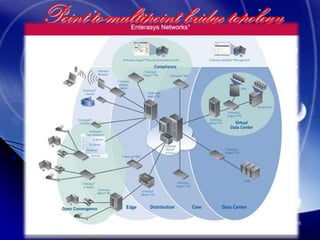
   # Wi-Fi Technologies
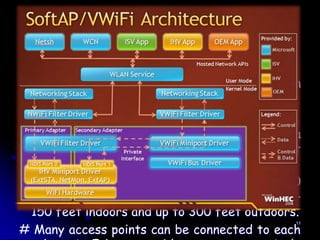
   # Wi-Fi Architecture
   # Wi-Fi Network Elements
   # How a Wi-Fi Network Works
   # Wi-Fi Network Topologies
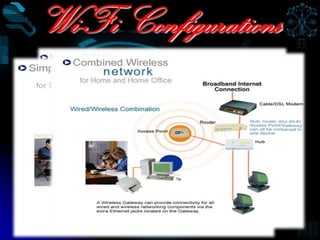
   # Wi-Fi Configurations
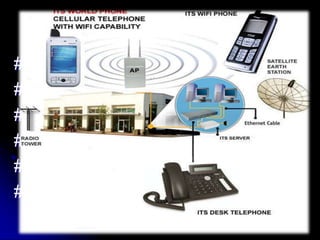
   # Applications of Wi-Fi
   # Wi-Fi Security
   # Conclusions
   # Reference
   # Bibliography
                                  3
Introduction
#   Wireless Technology is an
 alternative         to           Wired
 Technology, which is commonly
 used, for connecting devices in
 wireless mode.
# Wi-Fi (Wireless Fidelity) is a generic
 term that refers to the IEEE 802.11
 communications       standard       for
 Wireless Local Area Networks         4
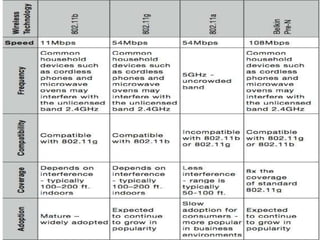
The Wi-Fi Technology
Wi-Fi Networks use Radio
Technologies to transmit &
receive data at high speed:

# IEEE 802.11b(1999)
# IEEE 802.11a(2001)
# IEEE 802.11g(2003)          5
802.11 Physical Layer
# There are three sub layers in
 physical layer:      1. Direct
 Sequence      Spread     Spectrum
 (DSSS)
  2.Frequency Hoping Spread
 Spectrum (FHSS)
  3.Diffused Infrared (DFIR) - Wide
 angle                           6
DSSS
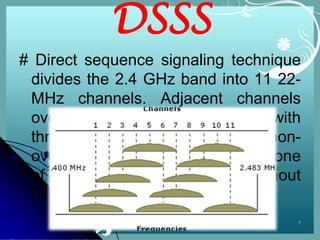
# Direct sequence signaling technique
 divides the 2.4 GHz band into 11 22-
 MHz channels. Adjacent channels
 overlap one another partially, with
 three of the 11 being completely non-
 overlapping. Data is sent across one
 of these 22 MHz channels without
 hopping to other channels.
                                     7
IEEE 802.11 Data Link
Layer
The data link layer consists of two
sub-layers :
  * Logical Link Control (LLC)
    *       Media Access Control
 (MAC).
  802.11 uses the same 802.2 LLC
 and 48-bit addressing as other 802
 LANs, allowing for very simple
                                  8

 bridging from wireless to IEEE
802.11 Media Access Control
# Carrier Sense Medium Access with collision avoidance
  protocol (CSMA/CA)
   ** Listen before talking
   ** Avoid collision by explicit Acknowledgement (ACK)
   ** Problem: additional overhead of ACK packets, so slow
     performance
# Request to Send/Clear to Send (RTS/CTS)
 protocol
  • Solution for “hidden node” problem
  • Problem:     Adds additional overhead by
    temporarily reserving the medium, so used for
    large size packets only retransmission would be
    expensive
# Power Management
                                                       9
Elements of a WI-FI Network
# Access Point (AP) -            The AP is a
 wireless LAN transceiver or “base station” that
 can connect one or many wireless devices
 simultaneously to the Internet.


# Wi-Fi cards -      They accept the wireless
 signal and relay information.They can be
 internal and external.(e.g PCMCIA Card for
 Laptop and PCI Card for Desktop PC)

                                               10


# Safeguards -         Firewalls and anti-virus
How a Wi-Fi Network Works
# Basic concept is same as Walkie talkies.
# A Wi-Fi hotspot is created by installing an
 access point to an internet connection.
# An access point acts as a base station.
# When Wi-Fi enabled device encounters a
 hotspot the device can then connect to that
 network wirelessly.
# A single access point can support up to 30
 users and can function within a range of 100 –
 150 feet indoors and up to 300 feet outdoors.
# Many access points can be connected to each
                                              11
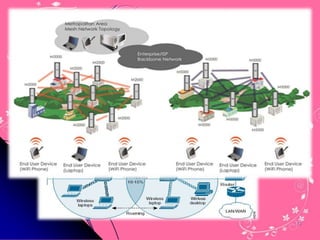
Wi-Fi Network Topologies
# AP-based topology (Infrastructure
 Mode)

# Peer-to-peer    topology   (Ad-hoc
 Mode)

# Point-to-multipoint bridge topology
                                    12
AP-based topology
# The client communicate through Access
 Point.
# BSA-RF coverage provided by an AP.
# ESA-It consists of 2 or more BSA.
# ESA cell includes 10-15% overlap to
 allow roaming.


                                      13
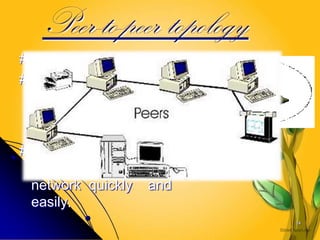
Peer-to-peer topology
# AP is not required.
# Client devices within a
  cell can communicate
  directly with each
  other.
# It is useful for setting
  up of a wireless
  network quickly and
  easily.
                             14
Point-to-multipoint bridge topology
This is used to connect a LAN in one building to
a LANs in other buildings even if the buildings
are miles apart . These conditions receive a
clear line of sight between buildings. The line-of-
sight range varies based on the type of wireless
bridge and antenna used as well as the
environmental conditions.


                                                  15
Wi-Fi Configurations


                       16
Wi-Fi Applications
# Home
# Small Businesses or SOHO
# Large Corporations & Campuses
# Health Care
# Wireless ISP (WISP)
#Travellers
                                  17
Wi-Fi Security Techniques
Service   Set Identifier
 (SSID)
Wired Equivalent Privacy
 (WEP)
802.1X Access Control
Wireless Protected Access
 (WPA)
IEEE 802.11i               18
Service Set Identifier (SSID)
•   SSID is used to identify an
    802.11 network
•   It can be pre-configured or
    advertised in beacon
    broadcast
•   It is transmitted in clear text
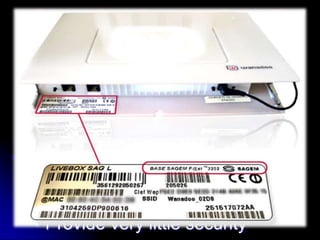
    •   Provide very little security   19
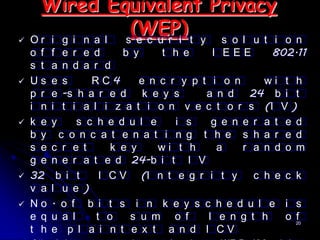
Wired Equivalent Privacy
 Or i g i n a l
                  (WEP) t y s o l u t i
                 s e c u r i                            o n
    o f   f  e r e d     b y     t h e     I EEE      802.11
    s t   a  n d a r d
   Us    e  s     RC4       e n c r y p t i o n     wi t h
    p r   e  -s h a r e d k e y s         a n d 24 b i t
    i n   i  t i a l i z a t i o n v e c t o r s (I V )
   k e   y     s c h e d u l e     i s    g e n e r a t e d
    b y     c o n c a t e n a t i n g t h e s h a r e d
    s e   c r e t      k e y     wi t h     a    r a n d o m
    g e   n e r a t e d 24-b i t I V
   32     b i t     I C V (I n t e g r i t y      c h e c k
    v a   l u e )
   No    . o f b i t s i n k e y s c h e d u l e i s
    e q   u a l     t o    s u m o f      l e n g t h    o 20
                                                           f
    t h   e p l a i n t e x t a n d I CV
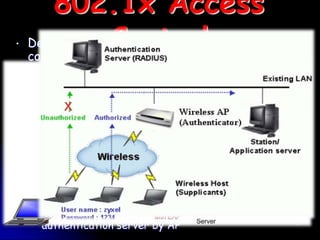
802.1x Access
•   Designed as aControl network access
                  general purpose
    control mechanism
•   Authenticate each client connected to AP (for
    WLAN) or switch port (for Ethernet)
•   Authentication is done with the RADIUS
    server, which ”tells” the access point whether
    access to controlled ports should be allowed
    or not
    •   AP forces the user into an unauthorized state
    •   user send an EAP start message
    •   AP return an EAP message requesting the user’s
        identity
    •   Identity send by user is then forwared to the
        authentication server by AP                   21
Wireless Protected Access
                       (WPA)
# WPA is a specification of standard based, interoperable
security enhancements that strongly increase the level of data
protection and access control for existing and future wireless
LAN system.
•   User Authentication
    •   802.1x
    •   EAP
# TKIP (Temporal Key Integrity Protocol) encryption
    •   RC4, dynamic encryption keys (session based)
         •   48 bit IV
         •   per packet key mixing function
    •   Fixes all issues found from WEP
•   Uses Message Integrity Code (MIC) Michael
    •   Ensures data integrity
• Old hardware should be upgradeable to WPA
# WPA comes in two flavors
        WPA-PSK
                                                                 22
    •
   Wi-Fi technology is the non-
    cable connection between the
                                     # Limitation:
    access point or router and       •   Degradation in
    the PC. The PC remotely
    connects to the internet             performance
    without any wires or cables.     •   High power
    In some cases, Wi-Fi tech.
    requires you to have the WEP     •   consumption
    or WPA key to access.
    WEP/WPA is like the              •   Interference
    password to secure your          •   Limited range
    wireless router/ access
    point.
# Advantages:
•   Mobility, Ease of Installation
•   Flexibility, Cost
•   Reliability,Security                                  23
#
http://in.search.yahoo.com/search;_ylt=A8pWB_u3zVFPxVYAqUv
uPXRG?ei=UTF-8&rd=r1&fr=yfp-t-704-s&p=wi-
fi+technologies&SpellState=&fr2=sp-qrw-corr-top

    http://sviehb.files.wordpress.com/2011/12/viehboeck_wps.pdf
   "Wi-Fi (wireless networking technology)". Encyclopedia
   Britannica.
www.wikipedia.com
www.yahoo.com
www.Google.com
   www.bing.com/image


                                                                  24
BIBLIOGRA
  PHY
“Wi-Fi: What's next", Paul
 S.Henry
Wireless       Networking
 Handbook, Jim Geier.
Wi-Fi             (wireless
 networking technology)".
 Encyclopedia Britannica
Seoul Moves to Provide
 Free    City-Wide     Wi-Fi
 Service". Retrieved 1 April   25
26

Wifi- technology_moni

  • 1.
    PRESENTATION ON WI- FI TECHNOLOGY By MD MONIRUZZAMAN DEPT:-ECE 3RD YEAR WBUT ROLL NO: 09148003059 1
  • 2.
    -:ACKNOWLEDGEMENT :- My respected teacher: Prof. Tarun Kumar Das 2
  • 3.
    # Introduction  # Wi-Fi Technologies  # Wi-Fi Architecture  # Wi-Fi Network Elements  # How a Wi-Fi Network Works  # Wi-Fi Network Topologies  # Wi-Fi Configurations  # Applications of Wi-Fi  # Wi-Fi Security  # Conclusions  # Reference  # Bibliography 3
  • 4.
    Introduction # Wireless Technology is an alternative to Wired Technology, which is commonly used, for connecting devices in wireless mode. # Wi-Fi (Wireless Fidelity) is a generic term that refers to the IEEE 802.11 communications standard for Wireless Local Area Networks 4
  • 5.
    The Wi-Fi Technology Wi-FiNetworks use Radio Technologies to transmit & receive data at high speed: # IEEE 802.11b(1999) # IEEE 802.11a(2001) # IEEE 802.11g(2003) 5
  • 6.
    802.11 Physical Layer #There are three sub layers in physical layer: 1. Direct Sequence Spread Spectrum (DSSS) 2.Frequency Hoping Spread Spectrum (FHSS) 3.Diffused Infrared (DFIR) - Wide angle 6
  • 7.
    DSSS # Direct sequencesignaling technique divides the 2.4 GHz band into 11 22- MHz channels. Adjacent channels overlap one another partially, with three of the 11 being completely non- overlapping. Data is sent across one of these 22 MHz channels without hopping to other channels. 7
  • 8.
    IEEE 802.11 DataLink Layer The data link layer consists of two sub-layers : * Logical Link Control (LLC) * Media Access Control (MAC). 802.11 uses the same 802.2 LLC and 48-bit addressing as other 802 LANs, allowing for very simple 8 bridging from wireless to IEEE
  • 9.
    802.11 Media AccessControl # Carrier Sense Medium Access with collision avoidance protocol (CSMA/CA) ** Listen before talking ** Avoid collision by explicit Acknowledgement (ACK) ** Problem: additional overhead of ACK packets, so slow performance # Request to Send/Clear to Send (RTS/CTS) protocol • Solution for “hidden node” problem • Problem: Adds additional overhead by temporarily reserving the medium, so used for large size packets only retransmission would be expensive # Power Management 9
  • 10.
    Elements of aWI-FI Network # Access Point (AP) - The AP is a wireless LAN transceiver or “base station” that can connect one or many wireless devices simultaneously to the Internet. # Wi-Fi cards - They accept the wireless signal and relay information.They can be internal and external.(e.g PCMCIA Card for Laptop and PCI Card for Desktop PC) 10 # Safeguards - Firewalls and anti-virus
  • 11.
    How a Wi-FiNetwork Works # Basic concept is same as Walkie talkies. # A Wi-Fi hotspot is created by installing an access point to an internet connection. # An access point acts as a base station. # When Wi-Fi enabled device encounters a hotspot the device can then connect to that network wirelessly. # A single access point can support up to 30 users and can function within a range of 100 – 150 feet indoors and up to 300 feet outdoors. # Many access points can be connected to each 11
  • 12.
    Wi-Fi Network Topologies #AP-based topology (Infrastructure Mode) # Peer-to-peer topology (Ad-hoc Mode) # Point-to-multipoint bridge topology 12
  • 13.
    AP-based topology # Theclient communicate through Access Point. # BSA-RF coverage provided by an AP. # ESA-It consists of 2 or more BSA. # ESA cell includes 10-15% overlap to allow roaming. 13
  • 14.
    Peer-to-peer topology # APis not required. # Client devices within a cell can communicate directly with each other. # It is useful for setting up of a wireless network quickly and easily. 14
  • 15.
    Point-to-multipoint bridge topology Thisis used to connect a LAN in one building to a LANs in other buildings even if the buildings are miles apart . These conditions receive a clear line of sight between buildings. The line-of- sight range varies based on the type of wireless bridge and antenna used as well as the environmental conditions. 15
  • 16.
  • 17.
    Wi-Fi Applications # Home #Small Businesses or SOHO # Large Corporations & Campuses # Health Care # Wireless ISP (WISP) #Travellers 17
  • 18.
    Wi-Fi Security Techniques Service Set Identifier (SSID) Wired Equivalent Privacy (WEP) 802.1X Access Control Wireless Protected Access (WPA) IEEE 802.11i 18
  • 19.
    Service Set Identifier(SSID) • SSID is used to identify an 802.11 network • It can be pre-configured or advertised in beacon broadcast • It is transmitted in clear text • Provide very little security 19
  • 20.
    Wired Equivalent Privacy Or i g i n a l (WEP) t y s o l u t i s e c u r i o n o f f e r e d b y t h e I EEE 802.11 s t a n d a r d  Us e s RC4 e n c r y p t i o n wi t h p r e -s h a r e d k e y s a n d 24 b i t i n i t i a l i z a t i o n v e c t o r s (I V )  k e y s c h e d u l e i s g e n e r a t e d b y c o n c a t e n a t i n g t h e s h a r e d s e c r e t k e y wi t h a r a n d o m g e n e r a t e d 24-b i t I V  32 b i t I C V (I n t e g r i t y c h e c k v a l u e )  No . o f b i t s i n k e y s c h e d u l e i s e q u a l t o s u m o f l e n g t h o 20 f t h e p l a i n t e x t a n d I CV
  • 21.
    802.1x Access • Designed as aControl network access general purpose control mechanism • Authenticate each client connected to AP (for WLAN) or switch port (for Ethernet) • Authentication is done with the RADIUS server, which ”tells” the access point whether access to controlled ports should be allowed or not • AP forces the user into an unauthorized state • user send an EAP start message • AP return an EAP message requesting the user’s identity • Identity send by user is then forwared to the authentication server by AP 21
  • 22.
    Wireless Protected Access (WPA) # WPA is a specification of standard based, interoperable security enhancements that strongly increase the level of data protection and access control for existing and future wireless LAN system. • User Authentication • 802.1x • EAP # TKIP (Temporal Key Integrity Protocol) encryption • RC4, dynamic encryption keys (session based) • 48 bit IV • per packet key mixing function • Fixes all issues found from WEP • Uses Message Integrity Code (MIC) Michael • Ensures data integrity • Old hardware should be upgradeable to WPA # WPA comes in two flavors WPA-PSK 22 •
  • 23.
    Wi-Fi technology is the non- cable connection between the # Limitation: access point or router and • Degradation in the PC. The PC remotely connects to the internet performance without any wires or cables. • High power In some cases, Wi-Fi tech. requires you to have the WEP • consumption or WPA key to access. WEP/WPA is like the • Interference password to secure your • Limited range wireless router/ access point. # Advantages: • Mobility, Ease of Installation • Flexibility, Cost • Reliability,Security 23
  • 24.
    # http://in.search.yahoo.com/search;_ylt=A8pWB_u3zVFPxVYAqUv uPXRG?ei=UTF-8&rd=r1&fr=yfp-t-704-s&p=wi- fi+technologies&SpellState=&fr2=sp-qrw-corr-top http://sviehb.files.wordpress.com/2011/12/viehboeck_wps.pdf "Wi-Fi (wireless networking technology)". Encyclopedia Britannica. www.wikipedia.com www.yahoo.com www.Google.com www.bing.com/image 24
  • 25.
    BIBLIOGRA PHY “Wi-Fi:What's next", Paul S.Henry Wireless Networking Handbook, Jim Geier. Wi-Fi (wireless networking technology)". Encyclopedia Britannica Seoul Moves to Provide Free City-Wide Wi-Fi Service". Retrieved 1 April 25
  • 26.