Wireless Local Area
Networks
CS5440 Wireless Access Networks
Dilum Bandara
Dilum.Bandara@uom.lk
Some slides extracted from Dr. Muid Mufti, ID Technologies
Outlines
 Motivation
 IEEE 802.11
 Practical issues
 Security
2
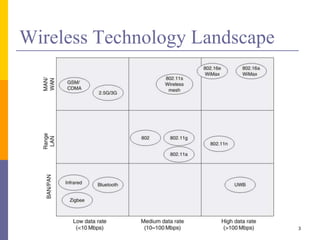
Wireless Technology Landscape
3
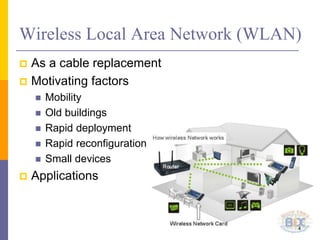
Wireless Local Area Network (WLAN)
 As a cable replacement
 Motivating factors
 Mobility
 Old buildings
 Rapid deployment
 Rapid reconfiguration
 Small devices
 Applications
4
Why Not Wireless Ethernet?
 Ethernet is simple, widely used, & cheap
 But
 Collision detection
 Not possible in wireless
 Would require a full duplex radio
 Receiver sensitivity
 Carrier sense
 Hidden stations
 Mobility
 Power saving
5
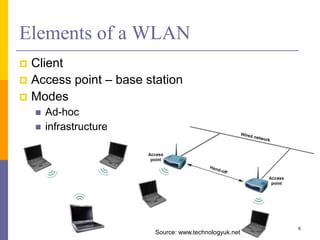
Elements of a WLAN
 Client
 Access point – base station
 Modes
 Ad-hoc
 infrastructure
6
Source: www.technologyuk.net
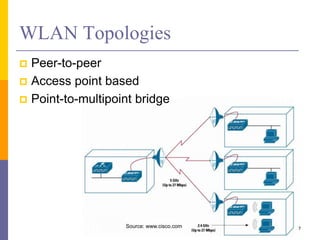
WLAN Topologies
 Peer-to-peer
 Access point based
 Point-to-multipoint bridge
7Source: www.cisco.com
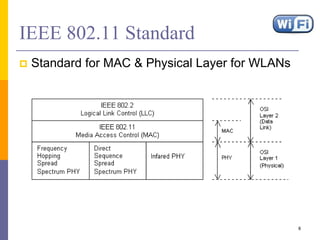
IEEE 802.11 Standard
 Standard for MAC & Physical Layer for WLANs
8
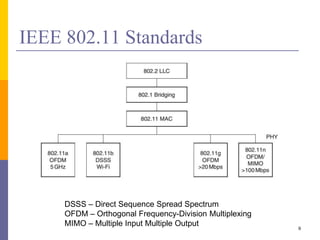
IEEE 802.11 Standards
9
DSSS – Direct Sequence Spread Spectrum
OFDM – Orthogonal Frequency-Division Multiplexing
MIMO – Multiple Input Multiple Output
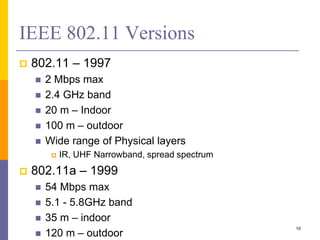
IEEE 802.11 Versions
 802.11 – 1997
 2 Mbps max
 2.4 GHz band
 20 m – Indoor
 100 m – outdoor
 Wide range of Physical layers
 IR, UHF Narrowband, spread spectrum
 802.11a – 1999
 54 Mbps max
 5.1 - 5.8GHz band
 35 m – indoor
 120 m – outdoor
10
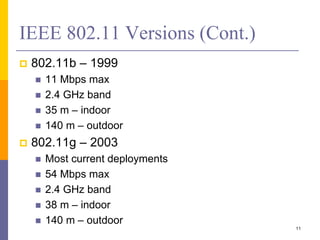
IEEE 802.11 Versions (Cont.)
 802.11b – 1999
 11 Mbps max
 2.4 GHz band
 35 m – indoor
 140 m – outdoor
 802.11g – 2003
 Most current deployments
 54 Mbps max
 2.4 GHz band
 38 m – indoor
 140 m – outdoor
11
IEEE 802.11 Versions (Cont.)
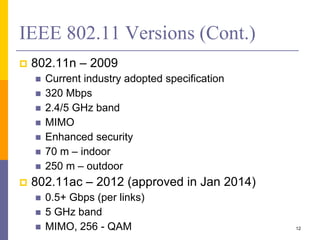
 802.11n – 2009
 Current industry adopted specification
 320 Mbps
 2.4/5 GHz band
 MIMO
 Enhanced security
 70 m – indoor
 250 m – outdoor
 802.11ac – 2012 (approved in Jan 2014)
 0.5+ Gbps (per links)
 5 GHz band
 MIMO, 256 - QAM 12
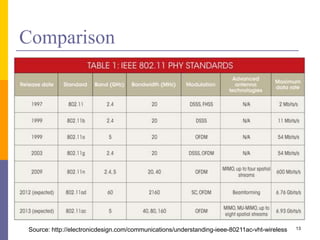
Comparison
13Source: http://electronicdesign.com/communications/understanding-ieee-80211ac-vht-wireless
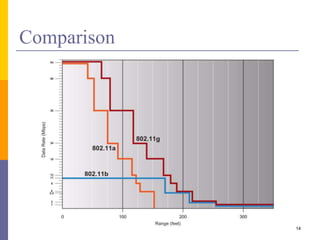
Comparison
14
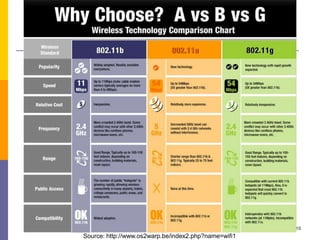
15
Source: http://www.os2warp.be/index2.php?name=wifi1
IEEE 802.11 Topologies
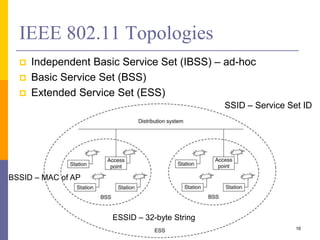
 Independent Basic Service Set (IBSS) – ad-hoc
 Basic Service Set (BSS)
 Extended Service Set (ESS)
16
SSID – Service Set ID
BSSID – MAC of AP
ESSID – 32-byte String
Services
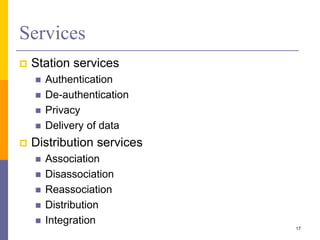
 Station services
 Authentication
 De-authentication
 Privacy
 Delivery of data
 Distribution services
 Association
 Disassociation
 Reassociation
 Distribution
 Integration
17
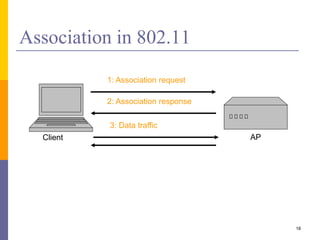
Association in 802.11
AP
1: Association request
2: Association response
3: Data traffic
Client
18
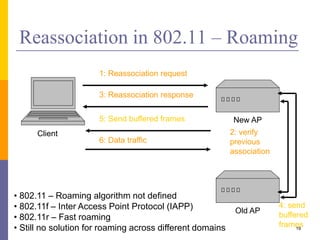
Reassociation in 802.11 – Roaming
New AP
1: Reassociation request
3: Reassociation response
5: Send buffered frames
Old AP
2: verify
previous
association
4: send
buffered
frames
Client
6: Data traffic
19
• 802.11 – Roaming algorithm not defined
• 802.11f – Inter Access Point Protocol (IAPP)
• 802.11r – Fast roaming
• Still no solution for roaming across different domains
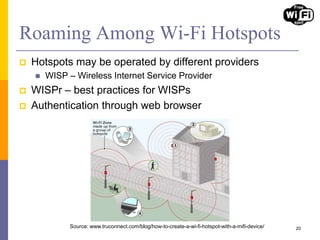
Roaming Among Wi-Fi Hotspots
 Hotspots may be operated by different providers
 WISP – Wireless Internet Service Provider
 WISPr – best practices for WISPs
 Authentication through web browser
20Source: www.truconnect.com/blog/how-to-create-a-wi-fi-hotspot-with-a-mifi-device/
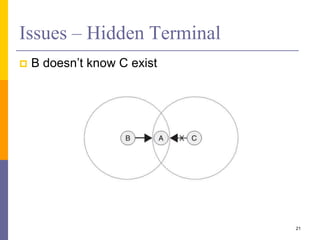
Issues – Hidden Terminal
 B doesn’t know C exist
21
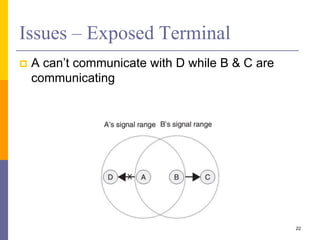
Issues – Exposed Terminal
 A can’t communicate with D while B & C are
communicating
22
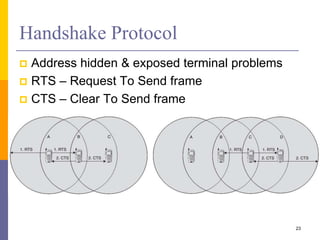
Handshake Protocol
 Address hidden & exposed terminal problems
 RTS – Request To Send frame
 CTS – Clear To Send frame
23
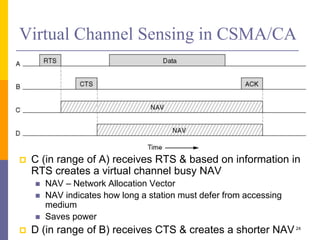
Virtual Channel Sensing in CSMA/CA
 C (in range of A) receives RTS & based on information in
RTS creates a virtual channel busy NAV
 NAV – Network Allocation Vector
 NAV indicates how long a station must defer from accessing
medium
 Saves power
 D (in range of B) receives CTS & creates a shorter NAV24
802.11 Overhead
 Channel contention resolved using backoff
 Nodes choose random backoff interval from [0, CW]
 Count down for this interval before transmission
 Backoff & (optional) RTS/CTS handshake before
transmission of data frame
25
Random
backoff
Data Transmission/ACKRTS/CTS
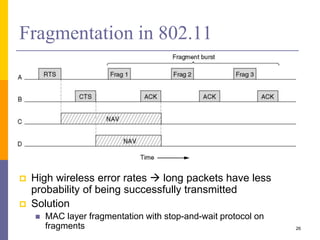
Fragmentation in 802.11
 High wireless error rates  long packets have less
probability of being successfully transmitted
 Solution
 MAC layer fragmentation with stop-and-wait protocol on
fragments 26
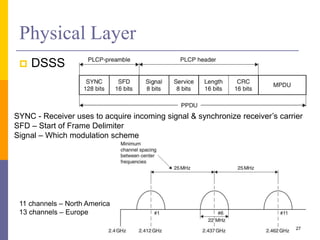
Physical Layer
 DSSS
27
SYNC - Receiver uses to acquire incoming signal & synchronize receiver’s carrier
SFD – Start of Frame Delimiter
Signal – Which modulation scheme
11 channels – North America
13 channels – Europe
28
Source: wikipedia.org
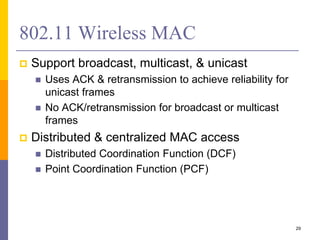
802.11 Wireless MAC
 Support broadcast, multicast, & unicast
 Uses ACK & retransmission to achieve reliability for
unicast frames
 No ACK/retransmission for broadcast or multicast
frames
 Distributed & centralized MAC access
 Distributed Coordination Function (DCF)
 Point Coordination Function (PCF)
29
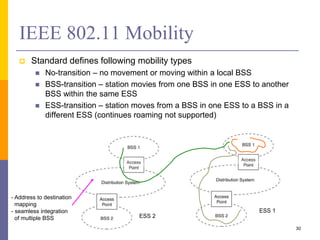
IEEE 802.11 Mobility
 Standard defines following mobility types
 No-transition – no movement or moving within a local BSS
 BSS-transition – station movies from one BSS in one ESS to another
BSS within the same ESS
 ESS-transition – station moves from a BSS in one ESS to a BSS in a
different ESS (continues roaming not supported)
ESS 1
ESS 2
- Address to destination
mapping
- seamless integration
of multiple BSS
30
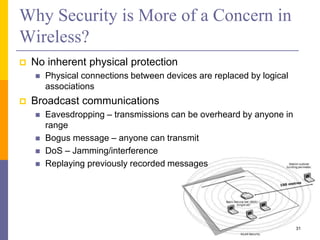
Why Security is More of a Concern in
Wireless?
 No inherent physical protection
 Physical connections between devices are replaced by logical
associations
 Broadcast communications
 Eavesdropping – transmissions can be overheard by anyone in
range
 Bogus message – anyone can transmit
 DoS – Jamming/interference
 Replaying previously recorded messages
31
Further Issues
 Access point configuration
 Default community strings, default passwords
 Evil twin access points
 Stronger signal, capture user authentication
 Renegade access points
 Unauthorised wireless LANs
32
Authentication & Privacy
 To prevent unauthorized access & eavesdropping
 Realized by authentication service prior to access
 Open system authentication
 Station wanting to authenticate sends authentication management
frame
 Receiving station sends back frame for successful authentication
 Supported in WEP
 Shared-key authentication
 Secret, shared key received by all stations by a separate, 802.11
independent channel
 Stations authenticate by a shared knowledge of the key properties
33
MAC ACLs & SSID Hiding
 Access points have Access Control Lists (ACL)
 List of allowed MAC addresses
 E.g., allow access to
 00:01:42:0E:12:1F
 00:01:42:F1:72:AE
 00:01:42:4F:E2:01
 But MAC addresses are sniffable & spoofable
 AP beacons without SSID
 A client knowing a SSID may join AP
 A client send PROBE REQUEST with SSID, AP
MUST send a RESPONSE with its SSID
34
802.11b Security Services
 2 security services
1. Authentication
 Shared Key Authentication
2. Encryption
 Wired Equivalence Privacy (WEP)
35
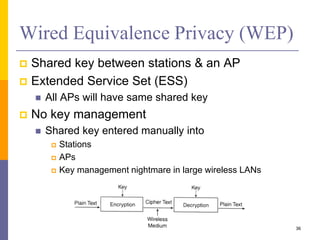
Wired Equivalence Privacy (WEP)
 Shared key between stations & an AP
 Extended Service Set (ESS)
 All APs will have same shared key
 No key management
 Shared key entered manually into
 Stations
 APs
 Key management nightmare in large wireless LANs
36
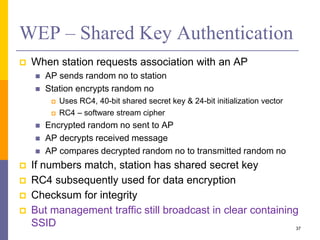
WEP – Shared Key Authentication
 When station requests association with an AP
 AP sends random no to station
 Station encrypts random no
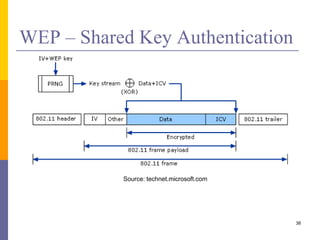
 Uses RC4, 40-bit shared secret key & 24-bit initialization vector
 RC4 – software stream cipher
 Encrypted random no sent to AP
 AP decrypts received message
 AP compares decrypted random no to transmitted random no
 If numbers match, station has shared secret key
 RC4 subsequently used for data encryption
 Checksum for integrity
 But management traffic still broadcast in clear containing
SSID 37
WEP – Shared Key Authentication
38
Source: technet.microsoft.com
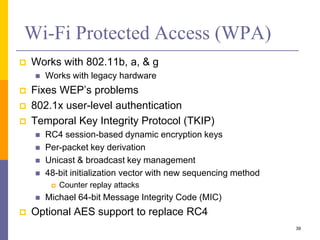
Wi-Fi Protected Access (WPA)
 Works with 802.11b, a, & g
 Works with legacy hardware
 Fixes WEP’s problems
 802.1x user-level authentication
 Temporal Key Integrity Protocol (TKIP)
 RC4 session-based dynamic encryption keys
 Per-packet key derivation
 Unicast & broadcast key management
 48-bit initialization vector with new sequencing method
 Counter replay attacks
 Michael 64-bit Message Integrity Code (MIC)
 Optional AES support to replace RC4
39
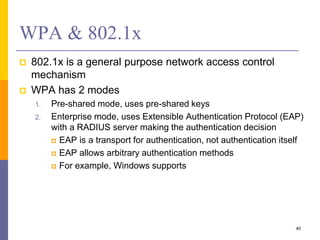
WPA & 802.1x
 802.1x is a general purpose network access control
mechanism
 WPA has 2 modes
1. Pre-shared mode, uses pre-shared keys
2. Enterprise mode, uses Extensible Authentication Protocol (EAP)
with a RADIUS server making the authentication decision
 EAP is a transport for authentication, not authentication itself
 EAP allows arbitrary authentication methods
 For example, Windows supports
40
802.11i – WPA2
 Full implementation
 Adopted in September 2004
 Replaced WPA with WPA2-AES in 2004
 Backwards compatible with WPA
 Uses AES-CCMP
 Advanced Encryption Standard – Counter Mode with
Cipher Block Chaining Message Authentication Code
Protocol (CCMP)
 Very Strong
41
WPA2 (Cont.)
 Robust Security Network (RSN) protocol for
establishing secure communications
 Based on a mode of AES, with 128-bits keys & 48 bit
IV
 Adds dynamic negotiation of authentication &
encryption algorithms
 Allows for future changes
 Requires new hardware
42
RSN Protocol
 Wireless NIC sends a Probe Request
 Access point sends a Probe Response with an
RSN Information Exchange (IE) frame
 Wireless NIC requests authentication via one of
the approved methods
 Access point provides authentication for the
wireless NIC
 Wireless NIC sends an Association Request with
an RSN Information Exchange (IE) frame
 Access point send an Association Response
43
WLAN Network Planning
 Network planning target
 Maximize system performance with limited resources
 Including
 coverage
 throughput
 capacity
 interference
 roaming
 security
 Planning process
 Requirements for project management personnel
 Site investigation
 Computer-aided planning practice
 Testing & verifying planning 44
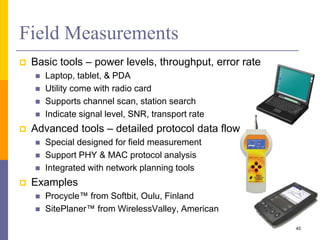
 Basic tools – power levels, throughput, error rate
 Laptop, tablet, & PDA
 Utility come with radio card
 Supports channel scan, station search
 Indicate signal level, SNR, transport rate
 Advanced tools – detailed protocol data flows
 Special designed for field measurement
 Support PHY & MAC protocol analysis
 Integrated with network planning tools
 Examples
 Procycle™ from Softbit, Oulu, Finland
 SitePlaner™ from WirelessValley, American
Field Measurements
45
Capacity Planning – Example
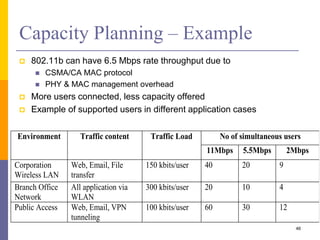
 802.11b can have 6.5 Mbps rate throughput due to
 CSMA/CA MAC protocol
 PHY & MAC management overhead
 More users connected, less capacity offered
 Example of supported users in different application cases
Environment Traffic content Traffic Load No of simultaneous users
11Mbps 5.5Mbps 2Mbps
Corporation
Wireless LAN
Web, Email, File
transfer
150 kbits/user 40 20 9
Branch Office
Network
All application via
WLAN
300 kbits/user 20 10 4
Public Access Web, Email, VPN
tunneling
100 kbits/user 60 30 12
46
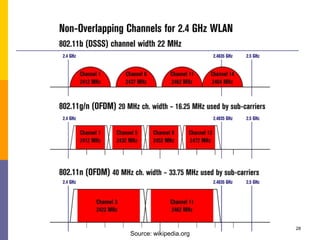
Frequency Planning
 Interference from other WLAN systems or cells
 IEEE 802.11 operates at uncontrolled ISM band
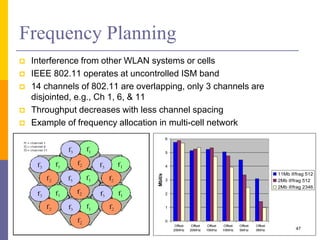
 14 channels of 802.11 are overlapping, only 3 channels are
disjointed, e.g., Ch 1, 6, & 11
 Throughput decreases with less channel spacing
 Example of frequency allocation in multi-cell network
0
1
2
3
4
5
6
Offset
25MHz
Offset
20MHz
Offset
15MHz
Offset
10MHz
Offset
5MHz
Offset
0MHz
Mbit/s
11Mb if/frag 512
2Mb if/frag 512
2Mb if/frag 2346
47
WLAN Technology Problems
 Data Speed
 Effective throughput is still not enough
 Better with IEEE 802.11g/n
 Interference
 Works in ISM band
 Share same frequency with microwave oven, Bluetooth, & others
 Security
 Current WEP algorithm is weak – usually not ON!
 Roaming
 No industry standard is available & propriety solution aren’t
interoperable
 Inter-operability
 Only few basic functionality are interoperable, other vendor’s
features can’t be used in a mixed network 48
WLAN Implementation Problems
 Lack of wireless networking experience for most IT
engineer
 Lack of well-recognized operation process on network
implementation
 Selecting access points with “best guess” method
 Unaware of interference from/to other networks
 Weak security policy
 As a result, a WLAN may have
 Poor performance (coverage, throughput, capacity, & security)
 Unstable service
 Customer dissatisfaction
49
Summary
 Emerged as a replacement for wired LAN
 IEEE 802.11g is popular
 Many IEEE 802.11n devices are being deployed
 Data rate & security continue to improve
 Only a small subset of the available channels
can be effectively used
 No roaming access across different domains
50

Wireless Local Area Networks

  • 1.
    Wireless Local Area Networks CS5440Wireless Access Networks Dilum Bandara Dilum.Bandara@uom.lk Some slides extracted from Dr. Muid Mufti, ID Technologies
  • 2.
    Outlines  Motivation  IEEE802.11  Practical issues  Security 2
  • 3.
  • 4.
    Wireless Local AreaNetwork (WLAN)  As a cable replacement  Motivating factors  Mobility  Old buildings  Rapid deployment  Rapid reconfiguration  Small devices  Applications 4
  • 5.
    Why Not WirelessEthernet?  Ethernet is simple, widely used, & cheap  But  Collision detection  Not possible in wireless  Would require a full duplex radio  Receiver sensitivity  Carrier sense  Hidden stations  Mobility  Power saving 5
  • 6.
    Elements of aWLAN  Client  Access point – base station  Modes  Ad-hoc  infrastructure 6 Source: www.technologyuk.net
  • 7.
    WLAN Topologies  Peer-to-peer Access point based  Point-to-multipoint bridge 7Source: www.cisco.com
  • 8.
    IEEE 802.11 Standard Standard for MAC & Physical Layer for WLANs 8
  • 9.
    IEEE 802.11 Standards 9 DSSS– Direct Sequence Spread Spectrum OFDM – Orthogonal Frequency-Division Multiplexing MIMO – Multiple Input Multiple Output
  • 10.
    IEEE 802.11 Versions 802.11 – 1997  2 Mbps max  2.4 GHz band  20 m – Indoor  100 m – outdoor  Wide range of Physical layers  IR, UHF Narrowband, spread spectrum  802.11a – 1999  54 Mbps max  5.1 - 5.8GHz band  35 m – indoor  120 m – outdoor 10
  • 11.
    IEEE 802.11 Versions(Cont.)  802.11b – 1999  11 Mbps max  2.4 GHz band  35 m – indoor  140 m – outdoor  802.11g – 2003  Most current deployments  54 Mbps max  2.4 GHz band  38 m – indoor  140 m – outdoor 11
  • 12.
    IEEE 802.11 Versions(Cont.)  802.11n – 2009  Current industry adopted specification  320 Mbps  2.4/5 GHz band  MIMO  Enhanced security  70 m – indoor  250 m – outdoor  802.11ac – 2012 (approved in Jan 2014)  0.5+ Gbps (per links)  5 GHz band  MIMO, 256 - QAM 12
  • 13.
  • 14.
  • 15.
  • 16.
    IEEE 802.11 Topologies Independent Basic Service Set (IBSS) – ad-hoc  Basic Service Set (BSS)  Extended Service Set (ESS) 16 SSID – Service Set ID BSSID – MAC of AP ESSID – 32-byte String
  • 17.
    Services  Station services Authentication  De-authentication  Privacy  Delivery of data  Distribution services  Association  Disassociation  Reassociation  Distribution  Integration 17
  • 18.
    Association in 802.11 AP 1:Association request 2: Association response 3: Data traffic Client 18
  • 19.
    Reassociation in 802.11– Roaming New AP 1: Reassociation request 3: Reassociation response 5: Send buffered frames Old AP 2: verify previous association 4: send buffered frames Client 6: Data traffic 19 • 802.11 – Roaming algorithm not defined • 802.11f – Inter Access Point Protocol (IAPP) • 802.11r – Fast roaming • Still no solution for roaming across different domains
  • 20.
    Roaming Among Wi-FiHotspots  Hotspots may be operated by different providers  WISP – Wireless Internet Service Provider  WISPr – best practices for WISPs  Authentication through web browser 20Source: www.truconnect.com/blog/how-to-create-a-wi-fi-hotspot-with-a-mifi-device/
  • 21.
    Issues – HiddenTerminal  B doesn’t know C exist 21
  • 22.
    Issues – ExposedTerminal  A can’t communicate with D while B & C are communicating 22
  • 23.
    Handshake Protocol  Addresshidden & exposed terminal problems  RTS – Request To Send frame  CTS – Clear To Send frame 23
  • 24.
    Virtual Channel Sensingin CSMA/CA  C (in range of A) receives RTS & based on information in RTS creates a virtual channel busy NAV  NAV – Network Allocation Vector  NAV indicates how long a station must defer from accessing medium  Saves power  D (in range of B) receives CTS & creates a shorter NAV24
  • 25.
    802.11 Overhead  Channelcontention resolved using backoff  Nodes choose random backoff interval from [0, CW]  Count down for this interval before transmission  Backoff & (optional) RTS/CTS handshake before transmission of data frame 25 Random backoff Data Transmission/ACKRTS/CTS
  • 26.
    Fragmentation in 802.11 High wireless error rates  long packets have less probability of being successfully transmitted  Solution  MAC layer fragmentation with stop-and-wait protocol on fragments 26
  • 27.
    Physical Layer  DSSS 27 SYNC- Receiver uses to acquire incoming signal & synchronize receiver’s carrier SFD – Start of Frame Delimiter Signal – Which modulation scheme 11 channels – North America 13 channels – Europe
  • 28.
  • 29.
    802.11 Wireless MAC Support broadcast, multicast, & unicast  Uses ACK & retransmission to achieve reliability for unicast frames  No ACK/retransmission for broadcast or multicast frames  Distributed & centralized MAC access  Distributed Coordination Function (DCF)  Point Coordination Function (PCF) 29
  • 30.
    IEEE 802.11 Mobility Standard defines following mobility types  No-transition – no movement or moving within a local BSS  BSS-transition – station movies from one BSS in one ESS to another BSS within the same ESS  ESS-transition – station moves from a BSS in one ESS to a BSS in a different ESS (continues roaming not supported) ESS 1 ESS 2 - Address to destination mapping - seamless integration of multiple BSS 30
  • 31.
    Why Security isMore of a Concern in Wireless?  No inherent physical protection  Physical connections between devices are replaced by logical associations  Broadcast communications  Eavesdropping – transmissions can be overheard by anyone in range  Bogus message – anyone can transmit  DoS – Jamming/interference  Replaying previously recorded messages 31
  • 32.
    Further Issues  Accesspoint configuration  Default community strings, default passwords  Evil twin access points  Stronger signal, capture user authentication  Renegade access points  Unauthorised wireless LANs 32
  • 33.
    Authentication & Privacy To prevent unauthorized access & eavesdropping  Realized by authentication service prior to access  Open system authentication  Station wanting to authenticate sends authentication management frame  Receiving station sends back frame for successful authentication  Supported in WEP  Shared-key authentication  Secret, shared key received by all stations by a separate, 802.11 independent channel  Stations authenticate by a shared knowledge of the key properties 33
  • 34.
    MAC ACLs &SSID Hiding  Access points have Access Control Lists (ACL)  List of allowed MAC addresses  E.g., allow access to  00:01:42:0E:12:1F  00:01:42:F1:72:AE  00:01:42:4F:E2:01  But MAC addresses are sniffable & spoofable  AP beacons without SSID  A client knowing a SSID may join AP  A client send PROBE REQUEST with SSID, AP MUST send a RESPONSE with its SSID 34
  • 35.
    802.11b Security Services 2 security services 1. Authentication  Shared Key Authentication 2. Encryption  Wired Equivalence Privacy (WEP) 35
  • 36.
    Wired Equivalence Privacy(WEP)  Shared key between stations & an AP  Extended Service Set (ESS)  All APs will have same shared key  No key management  Shared key entered manually into  Stations  APs  Key management nightmare in large wireless LANs 36
  • 37.
    WEP – SharedKey Authentication  When station requests association with an AP  AP sends random no to station  Station encrypts random no  Uses RC4, 40-bit shared secret key & 24-bit initialization vector  RC4 – software stream cipher  Encrypted random no sent to AP  AP decrypts received message  AP compares decrypted random no to transmitted random no  If numbers match, station has shared secret key  RC4 subsequently used for data encryption  Checksum for integrity  But management traffic still broadcast in clear containing SSID 37
  • 38.
    WEP – SharedKey Authentication 38 Source: technet.microsoft.com
  • 39.
    Wi-Fi Protected Access(WPA)  Works with 802.11b, a, & g  Works with legacy hardware  Fixes WEP’s problems  802.1x user-level authentication  Temporal Key Integrity Protocol (TKIP)  RC4 session-based dynamic encryption keys  Per-packet key derivation  Unicast & broadcast key management  48-bit initialization vector with new sequencing method  Counter replay attacks  Michael 64-bit Message Integrity Code (MIC)  Optional AES support to replace RC4 39
  • 40.
    WPA & 802.1x 802.1x is a general purpose network access control mechanism  WPA has 2 modes 1. Pre-shared mode, uses pre-shared keys 2. Enterprise mode, uses Extensible Authentication Protocol (EAP) with a RADIUS server making the authentication decision  EAP is a transport for authentication, not authentication itself  EAP allows arbitrary authentication methods  For example, Windows supports 40
  • 41.
    802.11i – WPA2 Full implementation  Adopted in September 2004  Replaced WPA with WPA2-AES in 2004  Backwards compatible with WPA  Uses AES-CCMP  Advanced Encryption Standard – Counter Mode with Cipher Block Chaining Message Authentication Code Protocol (CCMP)  Very Strong 41
  • 42.
    WPA2 (Cont.)  RobustSecurity Network (RSN) protocol for establishing secure communications  Based on a mode of AES, with 128-bits keys & 48 bit IV  Adds dynamic negotiation of authentication & encryption algorithms  Allows for future changes  Requires new hardware 42
  • 43.
    RSN Protocol  WirelessNIC sends a Probe Request  Access point sends a Probe Response with an RSN Information Exchange (IE) frame  Wireless NIC requests authentication via one of the approved methods  Access point provides authentication for the wireless NIC  Wireless NIC sends an Association Request with an RSN Information Exchange (IE) frame  Access point send an Association Response 43
  • 44.
    WLAN Network Planning Network planning target  Maximize system performance with limited resources  Including  coverage  throughput  capacity  interference  roaming  security  Planning process  Requirements for project management personnel  Site investigation  Computer-aided planning practice  Testing & verifying planning 44
  • 45.
     Basic tools– power levels, throughput, error rate  Laptop, tablet, & PDA  Utility come with radio card  Supports channel scan, station search  Indicate signal level, SNR, transport rate  Advanced tools – detailed protocol data flows  Special designed for field measurement  Support PHY & MAC protocol analysis  Integrated with network planning tools  Examples  Procycle™ from Softbit, Oulu, Finland  SitePlaner™ from WirelessValley, American Field Measurements 45
  • 46.
    Capacity Planning –Example  802.11b can have 6.5 Mbps rate throughput due to  CSMA/CA MAC protocol  PHY & MAC management overhead  More users connected, less capacity offered  Example of supported users in different application cases Environment Traffic content Traffic Load No of simultaneous users 11Mbps 5.5Mbps 2Mbps Corporation Wireless LAN Web, Email, File transfer 150 kbits/user 40 20 9 Branch Office Network All application via WLAN 300 kbits/user 20 10 4 Public Access Web, Email, VPN tunneling 100 kbits/user 60 30 12 46
  • 47.
    Frequency Planning  Interferencefrom other WLAN systems or cells  IEEE 802.11 operates at uncontrolled ISM band  14 channels of 802.11 are overlapping, only 3 channels are disjointed, e.g., Ch 1, 6, & 11  Throughput decreases with less channel spacing  Example of frequency allocation in multi-cell network 0 1 2 3 4 5 6 Offset 25MHz Offset 20MHz Offset 15MHz Offset 10MHz Offset 5MHz Offset 0MHz Mbit/s 11Mb if/frag 512 2Mb if/frag 512 2Mb if/frag 2346 47
  • 48.
    WLAN Technology Problems Data Speed  Effective throughput is still not enough  Better with IEEE 802.11g/n  Interference  Works in ISM band  Share same frequency with microwave oven, Bluetooth, & others  Security  Current WEP algorithm is weak – usually not ON!  Roaming  No industry standard is available & propriety solution aren’t interoperable  Inter-operability  Only few basic functionality are interoperable, other vendor’s features can’t be used in a mixed network 48
  • 49.
    WLAN Implementation Problems Lack of wireless networking experience for most IT engineer  Lack of well-recognized operation process on network implementation  Selecting access points with “best guess” method  Unaware of interference from/to other networks  Weak security policy  As a result, a WLAN may have  Poor performance (coverage, throughput, capacity, & security)  Unstable service  Customer dissatisfaction 49
  • 50.
    Summary  Emerged asa replacement for wired LAN  IEEE 802.11g is popular  Many IEEE 802.11n devices are being deployed  Data rate & security continue to improve  Only a small subset of the available channels can be effectively used  No roaming access across different domains 50