Jennifer Christy. S
Contents 
 Wireless networks 
 Bluetooth 
 Wi-Fi 
 Father of Wi-Fi 
 How a Wi-Fi Networks works 
 Wi-Fi Networks types 
 Hardware 
 Wi-Fi Technology 
 IEEE 802.11 b, IEEE 802.11 a, IEEE 802.11 g 
 Latest technology in Wi-Fi - 802.11ac 
 Elements of a Wi-Fi networks 
 Roaming 
 Advantages and Limitations of Wi-Fi 
 Conclusion
Wireless Networks: 
 A wireless network is any type of computer network 
that uses wireless data connections for connecting 
network nodes. 
 Wi-Fi (Wireless Fidelity) 
 Bluetooth
Bluetooth 
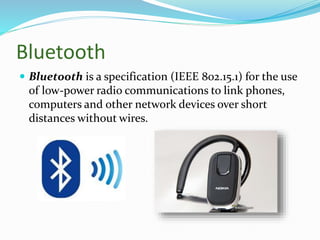
 Bluetooth is a specification (IEEE 802.15.1) for the use 
of low-power radio communications to link phones, 
computers and other network devices over short 
distances without wires.
Wi-Fi (Wireless Fidelity ) 
 Wi-Fi is a wireless 
networking technology that 
allows computers and other 
devices to communicate 
over a wireless signal. 
 Wi-Fi, is a local area 
wireless technology
Father of Wi-Fi 
 The “Father of Wi-Fi,” Vic Hayes 
is senior research fellow at Delft 
University of Technology in 
Delft, Netherlands.
How a Wi-Fi Networks Works 
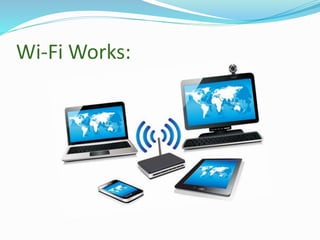
 A Wi-Fi hotspot is created by installing an internet 
connection. 
 A single access point can support up to 30 users. 
 Many acess points can be connected to each other via 
ethernet cables to create a single large networks. 
 An access point acts as a base station.
Wi-Fi Works:
Wireless Networks Types: 
 Wireless PAN – Performance Moderate , 
Cable replacement for peripherals 
 Wireless LAN – Performance High, Mobile extension 
of wired networks 
 Wireless MAN - Performance High, Fixed wireless 
between homes and businesses and the Internet 
 Wireless WAN - Performance Low, Mobile access to 
the Internet from outdoor areas
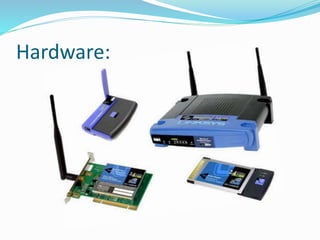
Hardware:
Wi-Fi Technology 
 Wi-Fi networks use radio technologies to transmit and 
receive data at high speed 
 IEEE 802.11 b 
 IEEE 802.11 a 
 IEEE 802.11 g
IEEE 802.11 b 
 Introduced in late 1999 
 4-6 Mbps (actual speed) 
 Most Popular 
 Least Expensive 
 100 – 150 feet range 
 Operates at 2.4GHz radio spectrum 
 Interference from mobile phones and bluetooth 
devices which can reduce the transmission speed.
IEEE 802.11 a 
 Introduced in 2001 
 15 – 20 Mbps (Actual speed) 
 50 – 75 feet range 
 More Expensive 
 Operates at 5 GHz (less popular) 
 Not compatible with 802.11b
IEEE 802.11 g 
 Introduced in 2003 
 54 Mbps speed 
 Compatible with ‘b’ 
 100 – 150 feet range 
 Combine the feature of both standards (a , b) 
 2.4 GHz radio frequencies
Latest technology in Wi-Fi 
 The latest Wi-Fi technology, called "802.11ac," offers 
speeds of up to 1.3 Gigabits per second. 
 That's fast enough to transfer an entire high-definition 
movie to a tablet in under 4 minutes, share photo 
albums with friends in a matter of seconds or stream 
three HD videos at the same time.
802.11ac 
 We 're probably familiar with 802.11a/b/g/n, all of which are 
protocols for the 802.11 wireless networking standard. 
 We can safely bet that any device with Wi-Fi connectivity, 
from your laptop to your Smartphone, supports at least 
wireless B or G, and if it came out within the past few years, 
it should support wireless N. 802.11n (or the latest draft of 
it, 802.11n-2009) is the fastest of the ones that are currently 
widely available. 
 802.11ac is a new Wi-Fi protocol and is intended to be the 
natural successor to 802.11n. We may have heard it called 
"5G Wi-Fi" or "Gigabit Wi-Fi."
Elements of a Wi-Fi networks 
 Access point: The access point is a wireless LAN 
transceiver or “ base station” that can connect one or 
many wireless devices simultaneously to the internet. 
 Wi-Fi cards : They accept the wireless signal and relay 
information. It can be external and internal. 
 Safeguards: Firewalls and anti-virus software protect 
networks from uninvited users and keep information 
secure.
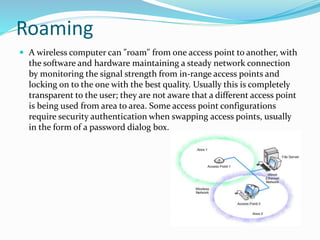
Roaming 
 A wireless computer can "roam" from one access point to another, with 
the software and hardware maintaining a steady network connection 
by monitoring the signal strength from in-range access points and 
locking on to the one with the best quality. Usually this is completely 
transparent to the user; they are not aware that a different access point 
is being used from area to area. Some access point configurations 
require security authentication when swapping access points, usually 
in the form of a password dialog box.
If we have more than one hardware access point then 
how can we share a single Internet connection? 
 If an existing wired LAN already has an Internet 
connection, then the hardware access points simply 
connect to your LAN and allow wireless computers to 
access the existing Internet connection in the same 
way as wired LAN computers.
Advantages of Wi-Fi 
 Convenience 
 Mobility 
 Productivity 
 Deployment 
 Expandability 
 Cost 
 Speed 
 Security 
 Flexibility 
 reliability
Limitations 
 Interference 
 High power consumption 
 Range 
 Degradation in performance
Conclusion 
 Wi-Fi is a universal wireless networking technology 
that utilizes radio frequencies to transfer data. Wi-Fi 
allows for high speed Internet connections without the 
use of cables or wires. 
 Since nearly all new laptops come with internal 
wireless cards
 By 
 Jennifer Christy. S

Wireless networks ppt

  • 1.
  • 2.
    Contents  Wirelessnetworks  Bluetooth  Wi-Fi  Father of Wi-Fi  How a Wi-Fi Networks works  Wi-Fi Networks types  Hardware  Wi-Fi Technology  IEEE 802.11 b, IEEE 802.11 a, IEEE 802.11 g  Latest technology in Wi-Fi - 802.11ac  Elements of a Wi-Fi networks  Roaming  Advantages and Limitations of Wi-Fi  Conclusion
  • 3.
    Wireless Networks: A wireless network is any type of computer network that uses wireless data connections for connecting network nodes.  Wi-Fi (Wireless Fidelity)  Bluetooth
  • 4.
    Bluetooth  Bluetoothis a specification (IEEE 802.15.1) for the use of low-power radio communications to link phones, computers and other network devices over short distances without wires.
  • 5.
    Wi-Fi (Wireless Fidelity)  Wi-Fi is a wireless networking technology that allows computers and other devices to communicate over a wireless signal.  Wi-Fi, is a local area wireless technology
  • 6.
    Father of Wi-Fi  The “Father of Wi-Fi,” Vic Hayes is senior research fellow at Delft University of Technology in Delft, Netherlands.
  • 7.
    How a Wi-FiNetworks Works  A Wi-Fi hotspot is created by installing an internet connection.  A single access point can support up to 30 users.  Many acess points can be connected to each other via ethernet cables to create a single large networks.  An access point acts as a base station.
  • 8.
  • 9.
    Wireless Networks Types:  Wireless PAN – Performance Moderate , Cable replacement for peripherals  Wireless LAN – Performance High, Mobile extension of wired networks  Wireless MAN - Performance High, Fixed wireless between homes and businesses and the Internet  Wireless WAN - Performance Low, Mobile access to the Internet from outdoor areas
  • 10.
  • 11.
    Wi-Fi Technology Wi-Fi networks use radio technologies to transmit and receive data at high speed  IEEE 802.11 b  IEEE 802.11 a  IEEE 802.11 g
  • 12.
    IEEE 802.11 b  Introduced in late 1999  4-6 Mbps (actual speed)  Most Popular  Least Expensive  100 – 150 feet range  Operates at 2.4GHz radio spectrum  Interference from mobile phones and bluetooth devices which can reduce the transmission speed.
  • 13.
    IEEE 802.11 a  Introduced in 2001  15 – 20 Mbps (Actual speed)  50 – 75 feet range  More Expensive  Operates at 5 GHz (less popular)  Not compatible with 802.11b
  • 14.
    IEEE 802.11 g  Introduced in 2003  54 Mbps speed  Compatible with ‘b’  100 – 150 feet range  Combine the feature of both standards (a , b)  2.4 GHz radio frequencies
  • 15.
    Latest technology inWi-Fi  The latest Wi-Fi technology, called "802.11ac," offers speeds of up to 1.3 Gigabits per second.  That's fast enough to transfer an entire high-definition movie to a tablet in under 4 minutes, share photo albums with friends in a matter of seconds or stream three HD videos at the same time.
  • 16.
    802.11ac  We're probably familiar with 802.11a/b/g/n, all of which are protocols for the 802.11 wireless networking standard.  We can safely bet that any device with Wi-Fi connectivity, from your laptop to your Smartphone, supports at least wireless B or G, and if it came out within the past few years, it should support wireless N. 802.11n (or the latest draft of it, 802.11n-2009) is the fastest of the ones that are currently widely available.  802.11ac is a new Wi-Fi protocol and is intended to be the natural successor to 802.11n. We may have heard it called "5G Wi-Fi" or "Gigabit Wi-Fi."
  • 17.
    Elements of aWi-Fi networks  Access point: The access point is a wireless LAN transceiver or “ base station” that can connect one or many wireless devices simultaneously to the internet.  Wi-Fi cards : They accept the wireless signal and relay information. It can be external and internal.  Safeguards: Firewalls and anti-virus software protect networks from uninvited users and keep information secure.
  • 18.
    Roaming  Awireless computer can "roam" from one access point to another, with the software and hardware maintaining a steady network connection by monitoring the signal strength from in-range access points and locking on to the one with the best quality. Usually this is completely transparent to the user; they are not aware that a different access point is being used from area to area. Some access point configurations require security authentication when swapping access points, usually in the form of a password dialog box.
  • 19.
    If we havemore than one hardware access point then how can we share a single Internet connection?  If an existing wired LAN already has an Internet connection, then the hardware access points simply connect to your LAN and allow wireless computers to access the existing Internet connection in the same way as wired LAN computers.
  • 20.
    Advantages of Wi-Fi  Convenience  Mobility  Productivity  Deployment  Expandability  Cost  Speed  Security  Flexibility  reliability
  • 21.
    Limitations  Interference  High power consumption  Range  Degradation in performance
  • 22.
    Conclusion  Wi-Fiis a universal wireless networking technology that utilizes radio frequencies to transfer data. Wi-Fi allows for high speed Internet connections without the use of cables or wires.  Since nearly all new laptops come with internal wireless cards
  • 23.
     By Jennifer Christy. S