
Wi-Fi Technology
Agenda
Introduction
Wi-Fi Technologies
Wi-Fi Architecture
Wi-Fi Network Elements
How a Wi-Fi Network Works
Wi-Fi Network Topologies
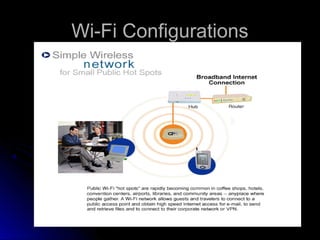
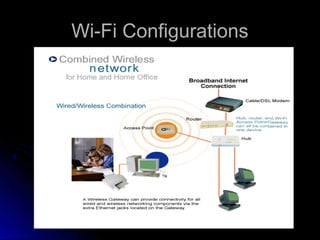
Wi-Fi Configurations
Applications of Wi-Fi
Wi-Fi Security
Advantages/ Disadvantages of Wi-Fi
Introduction
•   Wireless Technology is an alternative to Wired
    Technology, which is commonly used, for
    connecting devices in wireless mode.

•   Wi-Fi (Wireless Fidelity) is a generic term that
    refers to the IEEE 802.11 communications
    standard for Wireless Local Area Networks
    (WLANs).

•   Wi-Fi Network connect computers to each other,
    to the internet and to the wired network.
The Wi-Fi Technology
Wi-Fi Networks use Radio Technologies to
transmit & receive data at high speed:

  IEEE 802.11b
  IEEE 802.11a
  IEEE 802.11g
IEEE 802.11b

•   Appear in late 1999
•   Operates at 2.4GHz radio spectrum
•   11 Mbps (theoretical speed) - within 30 m Range
•   4-6 Mbps (actual speed)
•   100 -150 feet range
•   Most popular, Least Expensive
•   Interference from mobile phones and Bluetooth
    devices which can reduce the transmission
    speed.
IEEE 802.11a
•   Introduced in 2001
•   Operates at 5 GHz (less popular)
•   54 Mbps (theoretical speed)
•   15-20 Mbps (Actual speed)
•   50-75 feet range
•   More expensive
•   Not compatible with 802.11b
Components of Wi-Fi


Access point


                  Adapters
Wi-Fi Antenna


                Wi-Fi Bridge
PCI cards that accept wireless PC cards


                       External USB wireless NICs
How a Wi-Fi Network Works
•   Basic concept is same as Walkie talkies.
•   A Wi-Fi hotspot is created by installing an access point
    to an internet connection.
•   An access point acts as a base station.
•   When Wi-Fi enabled device encounters a hotspot the
    device can then connect to that network wirelessly.
•   A single access point can support up to 30 users and
    can function within a range of 100 – 150 feet indoors and
    up to 300 feet outdoors.
•   Many access points can be connected to each other via
    Ethernet cables to create a single large network.
Wi-Fi Network Topologies
•   AP-based topology (Infrastructure Mode)

•   Peer-to-peer topology (Ad-hoc Mode)

•   Point-to-multipoint bridge topology
AP-based topology
•   The client communicate through Access Point.
•   BSA-RF coverage provided by an AP.
•   ESA-It consists of 2 or more BSA.
•   ESA cell includes 10-15% overlap to allow
    roaming.
Peer-to-peer topology
•   AP is not required.
•   Client devices within
    a        cell       can
    communicate directly
    with each other.
•   It is useful for setting
    up of a wireless
    network quickly and
    easily.
Point-to-multipoint bridge topology
This is used to connect a LAN in one building to a LANs
in other buildings even if the buildings are miles
apart.These conditions receive a clear line of sight
between buildings. The line-of-sight range varies based
on the type of wireless bridge and antenna used as well
as the environmental conditions.
Wi-Fi Configurations
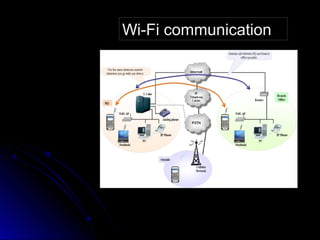
Wi-Fi communication
Wi-Fi Applications
•   Home
•   Small Businesses or SOHO
•   Large Corporations & Campuses
•   Health Care
•   Wireless ISP (WISP)
•   Travellers
Wi-Fi Security Threats
•   Wireless technology doesn’t remove any
    old security issues, but introduces new
    ones
    •   Eavesdropping
    •   Man-in-the-middle attacks
    •   Denial of Service
Eavesdropping
•   Easy to perform, almost impossible to detect
•   By default, everything is transmitted in clear text
    •   Usernames, passwords, content ...
    •   No security offered by the transmission medium
•   Different tools available on the internet
    •   Network sniffers, protocol analysers . . .
    •   Password collectors
•   With the right equipment, it’s possible to
    eavesdrop traffic from few kilometers away
MITM Attack
1.   Attacker spoofes a
     disassociate message
     from the victim
2.   The victim starts to
     look for a new access
     point, and the attacker
     advertises his own AP
     on a different channel,
     using the real AP’s
     MAC address
3.   The attacker connects
     to the real AP using
     victim’s MAC address
Denial of Service
•   Attack on transmission frequecy used
    •   Frequency jamming
    •   Not very technical, but works
•   Attack on MAC layer
    •   Spoofed deauthentication / disassociation messages
    •   can target one specific user
•   Attacks on higher layer protocol (TCP/IP protocol)
    •   SYN Flooding
Wi-Fi Security
      The requirements for Wi-Fi network
    security can be broken down into two
    primary components:
•   Authentication
       User Authentication
       Server Authentication
•   Privacy
Authentication
•   Keeping unauthorized users off the network
•   User Authentication
    •   Authentication Server is used
    •   Username and password
    •   Risk:
         •   Data (username & password) send before secure channel
             established
         •   Prone to passive eavesdropping by attacker
    •   Solution
         •   Establishing a encrypted channel before sending username
             and password
Authentication (cont..)
•   Server Authentication
    •   Digital Certificate is used
    •   Validation of digital certificate occurs
        automatically within client software
Wi-Fi Security Techniques
•   Service Set Identifier (SSID)

•   Wired Equivalent Privacy (WEP)

•   802.1X Access Control

•   Wireless Protected Access (WPA)

•   IEEE 802.11i
Service Set Identifier (SSID)
•   SSID is used to identify an 802.11 network
•   It can be pre-configured or advertised in
    beacon broadcast
•   It is transmitted in clear text
    •   Provide very little security
Wired Equivalent Privacy (WEP)
•   Provide same level of security as by wired network
•   Original security solution offered by the IEEE 802.11
    standard
•   Uses RC4 encryption with pre-shared keys and 24 bit
    initialization vectors (IV)
•   key schedule is generated by concatenating the shared
    secret key with a random generated 24-bit IV
•   32 bit ICV (Integrity check value)
•   No. of bits in keyschedule is equal to sum of length of
    the plaintext and ICV
Wired Equivalent Privacy (WEP)
            (cont.)
•   64 bit preshared key-WEP
•   128 bit preshared key-WEP2
•   Encrypt data only between 802.11 stations.once it enters
    the wired side of the network (between access point)
    WEP is no longer valid
•   Security Issue with WEP
     • Short IV
     • Static key
•   Offers very little security at all
802.1x Access Control
•   Designed as a general purpose network access control mechanism
    •   Not Wi-Fi specific
•   Authenticate each client connected to AP (for WLAN) or switch port
    (for Ethernet)
•   Authentication is done with the RADIUS server, which ”tells” the
    access point whether access to controlled ports should be allowed
    or not
    •   AP forces the user into an unauthorized state
    •   user send an EAP start message
    •   AP return an EAP message requesting the user’s identity
    •   Identity send by user is then forwared to the authentication server by AP
    •   Authentication server authenticate user and return an accept or reject
        message back to the AP
    •   If accept message is return, the AP changes the client’s state to
        authorized and normal traffic flows
802.1x Access Control
Wireless Protected Access (WPA)
•   WPA is a specification of standard based, interoperable security
    enhancements that strongly increase the level of data protection
    and access control for existing and future wireless LAN system.
•   User Authentication
     •   802.1x
     •   EAP
•   TKIP (Temporal Key Integrity Protocol) encryption
     •   RC4, dynamic encryption keys (session based)
          •   48 bit IV
          •   per packet key mixing function
     •   Fixes all issues found from WEP
•   Uses Message Integrity Code (MIC) Michael
     •   Ensures data integrity
•   Old hardware should be upgradeable to WPA
Wireless Protected Access (WPA)(cont.)

•   WPA comes in two flavors
    •   WPA-PSK
        •   use pre-shared key
        •   For SOHO environments
        •   Single master key used for all users
    •   WPA Enterprise
        •   For large organisation
        •   Most secure method
        •   Unique keys for each user
        •   Separate username & password for each user
WPA and Security
•   Data is encrypted
    •   Protection against eavesdropping and man-in-the-
        middle attacks
•   Denial of Service
    •   Attack based on fake massages can not be used.
    •   As a security precaution, if WPA equipment sees
        two packets with invalid MICs within a second, it
        disassociates all its clients, and stops all activity for
        a minute
    •   Only two packets a minute enough to completely
        stop a wireless network
802.11i
•   Provides standard for WLAN security
•   Authentication
    •   802.1x
•   Data encryption
    •   AES protocol is used
•   Secure fast handoff-This allow roaming
    between APs without requiring client to
    fully reauthenticate to every AP.
•   Will require new hardware
Advantages
•   Mobility
•   Ease of Installation
•   Flexibility
•   Cost
•   Reliability
•   Security
•   Use unlicensed part of the radio spectrum
•   Roaming
•   Speed
Limitations
•   Interference
•   Degradation in performance
•   High power consumption
•   Limited range
Wifi

Wifi

  • 1.
  • 3.
    Agenda Introduction Wi-Fi Technologies Wi-Fi Architecture Wi-FiNetwork Elements How a Wi-Fi Network Works Wi-Fi Network Topologies Wi-Fi Configurations Applications of Wi-Fi Wi-Fi Security Advantages/ Disadvantages of Wi-Fi
  • 4.
    Introduction • Wireless Technology is an alternative to Wired Technology, which is commonly used, for connecting devices in wireless mode. • Wi-Fi (Wireless Fidelity) is a generic term that refers to the IEEE 802.11 communications standard for Wireless Local Area Networks (WLANs). • Wi-Fi Network connect computers to each other, to the internet and to the wired network.
  • 5.
    The Wi-Fi Technology Wi-FiNetworks use Radio Technologies to transmit & receive data at high speed: IEEE 802.11b IEEE 802.11a IEEE 802.11g
  • 6.
    IEEE 802.11b • Appear in late 1999 • Operates at 2.4GHz radio spectrum • 11 Mbps (theoretical speed) - within 30 m Range • 4-6 Mbps (actual speed) • 100 -150 feet range • Most popular, Least Expensive • Interference from mobile phones and Bluetooth devices which can reduce the transmission speed.
  • 7.
    IEEE 802.11a • Introduced in 2001 • Operates at 5 GHz (less popular) • 54 Mbps (theoretical speed) • 15-20 Mbps (Actual speed) • 50-75 feet range • More expensive • Not compatible with 802.11b
  • 8.
  • 9.
    Wi-Fi Antenna Wi-Fi Bridge
  • 10.
    PCI cards thataccept wireless PC cards External USB wireless NICs
  • 11.
    How a Wi-FiNetwork Works • Basic concept is same as Walkie talkies. • A Wi-Fi hotspot is created by installing an access point to an internet connection. • An access point acts as a base station. • When Wi-Fi enabled device encounters a hotspot the device can then connect to that network wirelessly. • A single access point can support up to 30 users and can function within a range of 100 – 150 feet indoors and up to 300 feet outdoors. • Many access points can be connected to each other via Ethernet cables to create a single large network.
  • 12.
    Wi-Fi Network Topologies • AP-based topology (Infrastructure Mode) • Peer-to-peer topology (Ad-hoc Mode) • Point-to-multipoint bridge topology
  • 13.
    AP-based topology • The client communicate through Access Point. • BSA-RF coverage provided by an AP. • ESA-It consists of 2 or more BSA. • ESA cell includes 10-15% overlap to allow roaming.
  • 14.
    Peer-to-peer topology • AP is not required. • Client devices within a cell can communicate directly with each other. • It is useful for setting up of a wireless network quickly and easily.
  • 15.
    Point-to-multipoint bridge topology Thisis used to connect a LAN in one building to a LANs in other buildings even if the buildings are miles apart.These conditions receive a clear line of sight between buildings. The line-of-sight range varies based on the type of wireless bridge and antenna used as well as the environmental conditions.
  • 16.
  • 17.
  • 18.
  • 19.
  • 20.
    Wi-Fi Applications • Home • Small Businesses or SOHO • Large Corporations & Campuses • Health Care • Wireless ISP (WISP) • Travellers
  • 21.
    Wi-Fi Security Threats • Wireless technology doesn’t remove any old security issues, but introduces new ones • Eavesdropping • Man-in-the-middle attacks • Denial of Service
  • 22.
    Eavesdropping • Easy to perform, almost impossible to detect • By default, everything is transmitted in clear text • Usernames, passwords, content ... • No security offered by the transmission medium • Different tools available on the internet • Network sniffers, protocol analysers . . . • Password collectors • With the right equipment, it’s possible to eavesdrop traffic from few kilometers away
  • 23.
    MITM Attack 1. Attacker spoofes a disassociate message from the victim 2. The victim starts to look for a new access point, and the attacker advertises his own AP on a different channel, using the real AP’s MAC address 3. The attacker connects to the real AP using victim’s MAC address
  • 24.
    Denial of Service • Attack on transmission frequecy used • Frequency jamming • Not very technical, but works • Attack on MAC layer • Spoofed deauthentication / disassociation messages • can target one specific user • Attacks on higher layer protocol (TCP/IP protocol) • SYN Flooding
  • 25.
    Wi-Fi Security The requirements for Wi-Fi network security can be broken down into two primary components: • Authentication  User Authentication  Server Authentication • Privacy
  • 26.
    Authentication • Keeping unauthorized users off the network • User Authentication • Authentication Server is used • Username and password • Risk: • Data (username & password) send before secure channel established • Prone to passive eavesdropping by attacker • Solution • Establishing a encrypted channel before sending username and password
  • 27.
    Authentication (cont..) • Server Authentication • Digital Certificate is used • Validation of digital certificate occurs automatically within client software
  • 28.
    Wi-Fi Security Techniques • Service Set Identifier (SSID) • Wired Equivalent Privacy (WEP) • 802.1X Access Control • Wireless Protected Access (WPA) • IEEE 802.11i
  • 29.
    Service Set Identifier(SSID) • SSID is used to identify an 802.11 network • It can be pre-configured or advertised in beacon broadcast • It is transmitted in clear text • Provide very little security
  • 30.
    Wired Equivalent Privacy(WEP) • Provide same level of security as by wired network • Original security solution offered by the IEEE 802.11 standard • Uses RC4 encryption with pre-shared keys and 24 bit initialization vectors (IV) • key schedule is generated by concatenating the shared secret key with a random generated 24-bit IV • 32 bit ICV (Integrity check value) • No. of bits in keyschedule is equal to sum of length of the plaintext and ICV
  • 31.
    Wired Equivalent Privacy(WEP) (cont.) • 64 bit preshared key-WEP • 128 bit preshared key-WEP2 • Encrypt data only between 802.11 stations.once it enters the wired side of the network (between access point) WEP is no longer valid • Security Issue with WEP • Short IV • Static key • Offers very little security at all
  • 32.
    802.1x Access Control • Designed as a general purpose network access control mechanism • Not Wi-Fi specific • Authenticate each client connected to AP (for WLAN) or switch port (for Ethernet) • Authentication is done with the RADIUS server, which ”tells” the access point whether access to controlled ports should be allowed or not • AP forces the user into an unauthorized state • user send an EAP start message • AP return an EAP message requesting the user’s identity • Identity send by user is then forwared to the authentication server by AP • Authentication server authenticate user and return an accept or reject message back to the AP • If accept message is return, the AP changes the client’s state to authorized and normal traffic flows
  • 33.
  • 34.
    Wireless Protected Access(WPA) • WPA is a specification of standard based, interoperable security enhancements that strongly increase the level of data protection and access control for existing and future wireless LAN system. • User Authentication • 802.1x • EAP • TKIP (Temporal Key Integrity Protocol) encryption • RC4, dynamic encryption keys (session based) • 48 bit IV • per packet key mixing function • Fixes all issues found from WEP • Uses Message Integrity Code (MIC) Michael • Ensures data integrity • Old hardware should be upgradeable to WPA
  • 35.
    Wireless Protected Access(WPA)(cont.) • WPA comes in two flavors • WPA-PSK • use pre-shared key • For SOHO environments • Single master key used for all users • WPA Enterprise • For large organisation • Most secure method • Unique keys for each user • Separate username & password for each user
  • 36.
    WPA and Security • Data is encrypted • Protection against eavesdropping and man-in-the- middle attacks • Denial of Service • Attack based on fake massages can not be used. • As a security precaution, if WPA equipment sees two packets with invalid MICs within a second, it disassociates all its clients, and stops all activity for a minute • Only two packets a minute enough to completely stop a wireless network
  • 37.
    802.11i • Provides standard for WLAN security • Authentication • 802.1x • Data encryption • AES protocol is used • Secure fast handoff-This allow roaming between APs without requiring client to fully reauthenticate to every AP. • Will require new hardware
  • 38.
    Advantages • Mobility • Ease of Installation • Flexibility • Cost • Reliability • Security • Use unlicensed part of the radio spectrum • Roaming • Speed
  • 39.
    Limitations • Interference • Degradation in performance • High power consumption • Limited range