Wi-Fi Technology
Agenda Introduction Wi-Fi Technologies Wi-Fi Network Elements How a Wi-Fi Network Works Wi-Fi Network Topologies Wi-Fi Configurations Applications of Wi-Fi Wi-Fi Security Threats Wi-Fi Security Advantages/ Disadvantages of Wi-Fi Questions Conclusion
Introduction Wireless Technology is an alternative to Wired Technology, which is commonly used, for connecting devices in wireless mode. Wi-Fi (Wireless Fidelity) is a generic term that refers to the IEEE 802.11 communications standard for Wireless Local Area Networks (WLANs). Wi-Fi Network connect computers to each other, to the internet and to the wired network.
The Wi-Fi Technology Wi-Fi Networks use Radio Technologies to transmit & receive data at high speed: IEEE 802.11b IEEE 802.11a IEEE 802.11g
IEEE 802.11b Appear in late 1999 Operates at 2.4GHz radio spectrum 11 Mbps (theoretical speed) - within 30 m Range 4-6 Mbps (actual speed) 100 -150 feet range Most popular, Least Expensive Interference from mobile phones and Bluetooth devices which can reduce the transmission speed.
IEEE 802.11a Introduced in 2001 Operates at 5 GHz (less popular)  54 Mbps (theoretical speed) 15-20 Mbps (Actual speed) 50-75 feet range More expensive Not compatible with 802.11b
IEEE 802.11g Introduced in 2003 Combine the feature of both standards (a,b) 100-150 feet range 54 Mbps Speed 2.4 GHz radio frequencies Compatible with ‘b’
Elements of a WI-FI Network Access Point (AP) -  The AP is a wireless LAN transceiver or “base station” that can connect one or many wireless devices simultaneously to the Internet.  Wi-Fi cards -  They accept the wireless signal and relay information. They can be internal and external.(e.g. PCMCIA Card for Laptop and PCI Card for Desktop PC) Safeguards -  Firewalls and anti-virus software protect networks from uninvited users and keep information secure.
How a Wi-Fi Network Works Basic concept is same as Walkie talkies. A Wi-Fi hotspot is created by installing an access point to an internet connection. An access point acts as a base station.  When Wi-Fi enabled device encounters a hotspot the device can then connect to that network wirelessly. A single access point can support up to 30 users and can function within a range of 100 – 150 feet indoors and up to 300 feet outdoors. Many access points can be connected to each other via Ethernet cables to create a single large network.
Wi-Fi Network Topologies AP-based topology (Infrastructure Mode) Peer-to-peer topology (Ad-hoc Mode) Point-to-multipoint bridge topology
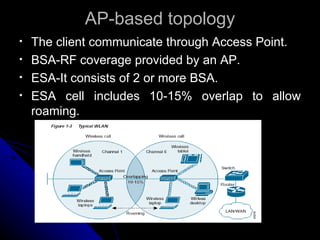
AP-based topology The client communicate through Access Point.  BSA-RF coverage provided by an AP. ESA-It consists of 2 or more BSA. ESA cell includes 10-15% overlap to allow roaming.
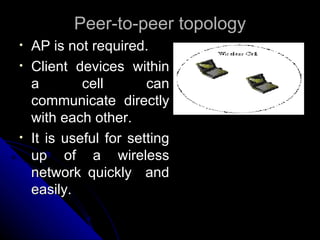
Peer-to-peer topology AP is not required. Client devices within a cell can communicate directly with each other. It is useful for setting up of a wireless network quickly  and easily.
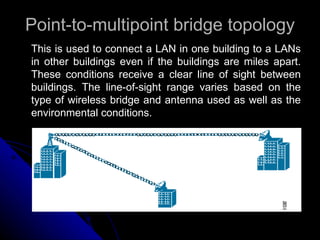
Point-to-multipoint bridge topology This is used to connect a LAN in one building to a LANs in other buildings even if the buildings are miles apart. These conditions receive a clear line of sight between buildings. The line-of-sight range varies based on the type of wireless bridge and antenna used as well as the environmental conditions.
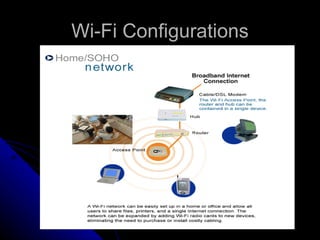
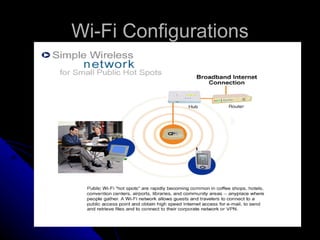
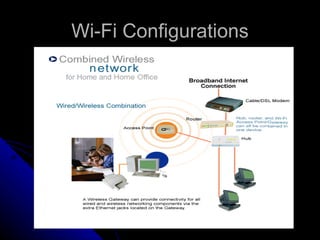
Wi-Fi Configurations
Wi-Fi Applications Home Small Businesses or SOHO Large Corporations & Campuses Health Care Wireless ISP (WISP) Travellers
Wi-Fi Security Threats Wireless technology doesn’t remove any old security issues, but introduces new ones Eavesdropping Man-in-the-middle attacks Denial of Service
Eavesdropping Easy to perform, almost impossible to detect By default, everything is transmitted in clear text Usernames, passwords, content ... No security offered by the transmission medium Different tools available on the internet Network sniffers, protocol analysers . . . Password collectors With the right equipment, it’s possible to eavesdrop traffic from few kilometers away
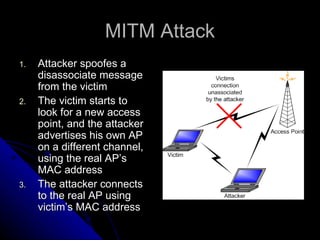
MITM Attack Attacker spoofes a disassociate message from the victim The victim starts to look for a new access point, and the attacker advertises his own AP on a different channel, using the real AP’s MAC address The attacker connects to the real AP using victim’s MAC address
Denial of Service Attack on transmission frequecy used Frequency jamming Not very technical, but works Attack on MAC layer Spoofed deauthentication / disassociation messages can target one specific user Attacks on higher layer protocol (TCP/IP protocol) SYN Flooding
Wi-Fi Security  The requirements for Wi-Fi network security can be broken down into two primary components: Authentication User Authentication Server Authentication Privacy
Advantages Mobility Ease of Installation Flexibility Cost Reliability Security Use unlicensed part of the radio spectrum Roaming Speed
Limitations Interference Degradation in performance High power consumption Limited range
QUESTIONS???
Conclusion Thus, the simple to use Wi-Fi technology is finding a wide range of applications in various fields and is revolutionizing wireless communication. Both technology and skills goes hand-in-hand, those who can design better architecture of networks can lead Wi-Fi networks. Wireless fidelity is common now. We are expecting more on this technology in future. Let’s hope for that…

Wi fi technology

  • 1.
  • 2.
    Agenda Introduction Wi-FiTechnologies Wi-Fi Network Elements How a Wi-Fi Network Works Wi-Fi Network Topologies Wi-Fi Configurations Applications of Wi-Fi Wi-Fi Security Threats Wi-Fi Security Advantages/ Disadvantages of Wi-Fi Questions Conclusion
  • 3.
    Introduction Wireless Technologyis an alternative to Wired Technology, which is commonly used, for connecting devices in wireless mode. Wi-Fi (Wireless Fidelity) is a generic term that refers to the IEEE 802.11 communications standard for Wireless Local Area Networks (WLANs). Wi-Fi Network connect computers to each other, to the internet and to the wired network.
  • 4.
    The Wi-Fi TechnologyWi-Fi Networks use Radio Technologies to transmit & receive data at high speed: IEEE 802.11b IEEE 802.11a IEEE 802.11g
  • 5.
    IEEE 802.11b Appearin late 1999 Operates at 2.4GHz radio spectrum 11 Mbps (theoretical speed) - within 30 m Range 4-6 Mbps (actual speed) 100 -150 feet range Most popular, Least Expensive Interference from mobile phones and Bluetooth devices which can reduce the transmission speed.
  • 6.
    IEEE 802.11a Introducedin 2001 Operates at 5 GHz (less popular) 54 Mbps (theoretical speed) 15-20 Mbps (Actual speed) 50-75 feet range More expensive Not compatible with 802.11b
  • 7.
    IEEE 802.11g Introducedin 2003 Combine the feature of both standards (a,b) 100-150 feet range 54 Mbps Speed 2.4 GHz radio frequencies Compatible with ‘b’
  • 8.
    Elements of aWI-FI Network Access Point (AP) - The AP is a wireless LAN transceiver or “base station” that can connect one or many wireless devices simultaneously to the Internet. Wi-Fi cards - They accept the wireless signal and relay information. They can be internal and external.(e.g. PCMCIA Card for Laptop and PCI Card for Desktop PC) Safeguards - Firewalls and anti-virus software protect networks from uninvited users and keep information secure.
  • 9.
    How a Wi-FiNetwork Works Basic concept is same as Walkie talkies. A Wi-Fi hotspot is created by installing an access point to an internet connection. An access point acts as a base station. When Wi-Fi enabled device encounters a hotspot the device can then connect to that network wirelessly. A single access point can support up to 30 users and can function within a range of 100 – 150 feet indoors and up to 300 feet outdoors. Many access points can be connected to each other via Ethernet cables to create a single large network.
  • 10.
    Wi-Fi Network TopologiesAP-based topology (Infrastructure Mode) Peer-to-peer topology (Ad-hoc Mode) Point-to-multipoint bridge topology
  • 11.
    AP-based topology Theclient communicate through Access Point. BSA-RF coverage provided by an AP. ESA-It consists of 2 or more BSA. ESA cell includes 10-15% overlap to allow roaming.
  • 12.
    Peer-to-peer topology APis not required. Client devices within a cell can communicate directly with each other. It is useful for setting up of a wireless network quickly and easily.
  • 13.
    Point-to-multipoint bridge topologyThis is used to connect a LAN in one building to a LANs in other buildings even if the buildings are miles apart. These conditions receive a clear line of sight between buildings. The line-of-sight range varies based on the type of wireless bridge and antenna used as well as the environmental conditions.
  • 14.
  • 15.
  • 16.
  • 17.
    Wi-Fi Applications HomeSmall Businesses or SOHO Large Corporations & Campuses Health Care Wireless ISP (WISP) Travellers
  • 18.
    Wi-Fi Security ThreatsWireless technology doesn’t remove any old security issues, but introduces new ones Eavesdropping Man-in-the-middle attacks Denial of Service
  • 19.
    Eavesdropping Easy toperform, almost impossible to detect By default, everything is transmitted in clear text Usernames, passwords, content ... No security offered by the transmission medium Different tools available on the internet Network sniffers, protocol analysers . . . Password collectors With the right equipment, it’s possible to eavesdrop traffic from few kilometers away
  • 20.
    MITM Attack Attackerspoofes a disassociate message from the victim The victim starts to look for a new access point, and the attacker advertises his own AP on a different channel, using the real AP’s MAC address The attacker connects to the real AP using victim’s MAC address
  • 21.
    Denial of ServiceAttack on transmission frequecy used Frequency jamming Not very technical, but works Attack on MAC layer Spoofed deauthentication / disassociation messages can target one specific user Attacks on higher layer protocol (TCP/IP protocol) SYN Flooding
  • 22.
    Wi-Fi Security The requirements for Wi-Fi network security can be broken down into two primary components: Authentication User Authentication Server Authentication Privacy
  • 23.
    Advantages Mobility Easeof Installation Flexibility Cost Reliability Security Use unlicensed part of the radio spectrum Roaming Speed
  • 24.
    Limitations Interference Degradationin performance High power consumption Limited range
  • 25.
  • 26.
    Conclusion Thus, thesimple to use Wi-Fi technology is finding a wide range of applications in various fields and is revolutionizing wireless communication. Both technology and skills goes hand-in-hand, those who can design better architecture of networks can lead Wi-Fi networks. Wireless fidelity is common now. We are expecting more on this technology in future. Let’s hope for that…