Introduction to WiFi
         By
   Tarique Akhtar
WiFi Fundamentals
 Wi-Fi, or Wireless Fidelity, is freedom: it allows a person to
connect to the Internet from your couch at home, a bed in a
hotel room or a conference room at work without wires.

 Wi-Fi is a wireless technology. Wi-Fi enabled computers
send and receive data indoors and out; anywhere within the
range of a base station.

 Its just as fast as a cable modem connection.

 Allows you to access the Internet while on the move ; you
can remain online while moving from one area to another,
without a disconnection or loss in coverage.
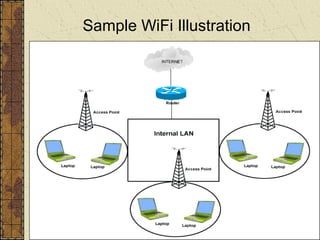
Sample WiFi Illustration
HotSpots
  What is a HotSpot?

 A HotSpot is a geographic area that has a readily
  accessible wireless network.

 HotSpots are equipped with a Broadband Internet
  connection, and one or more Access Points that allow
  users to access the Internet wirelessly.

 HotSpots can be setup in any public location that can
  support an Internet connection. All the locations discussed
  previously are examples of HotSpots.
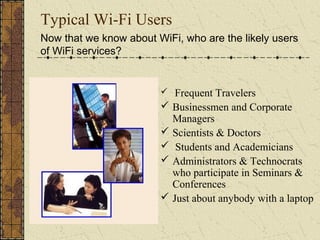
Typical Wi-Fi Users
Now that we know about WiFi, who are the likely users
of WiFi services?


                         Frequent Travelers
                         Businessmen and Corporate
                          Managers
                         Scientists & Doctors
                         Students and Academicians
                         Administrators & Technocrats
                          who participate in Seminars &
                          Conferences
                         Just about anybody with a laptop
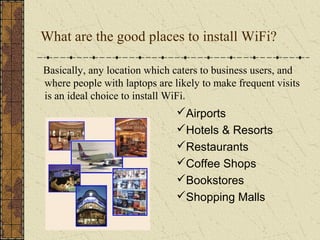
What are the good places to install WiFi?

Basically, any location which caters to business users, and
where people with laptops are likely to make frequent visits
is an ideal choice to install WiFi.
                               Airports
                               Hotels & Resorts
                               Restaurants
                               Coffee Shops
                               Bookstores
                               Shopping Malls
Access Point (AP)
 A wireless access point connects a group of wireless
 devices to an adjacent wired LAN
 An access point is similar to an Ethernet Hub, relaying
 data between connected wireless devices in addition to a
 (usually) single connected wired device, most often an
 Ethernet hub or switch, allowing wireless devices to
 communicate with other wired devices.
 Wireless Adapter
 A wireless adapter allows a device to connect to a wireless
 network. These adapters connect to devices using various
 interconnects such as PCI, USB, PCMCIA
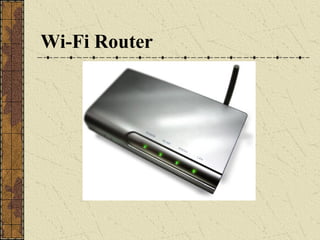
Wireless Router
 A wireless router integrates an AP, Ethernet switch,
 and internal Router firmware application that provides
 IP Routing, NAT & DNS forwarding through an
 integrated WAN interface
 It allows wired and wireless Ethernet LAN devices to
 connect to a (usually) single WAN device such as cable
 modem or DSL modem
 It allows all three devices (mainly the access point and
 router) to be configured through one central utility.
 This utility is most usually an integrated web server or
 may be an application that is run on a desktop
 computer
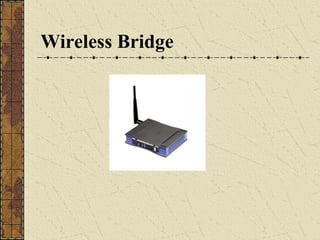
Wireless Ethernet Bridge
A wireless Ethernet bridge connects a wired
network to a wireless network
This is different from an access point in the
sense that an access point connects wireless
devices to a wired network at the data-link
layer
Two wireless bridges may be used to connect
two wired networks over a wireless link, useful
in situations where a wired connection may be
unavailable, such as between two separate
homes.
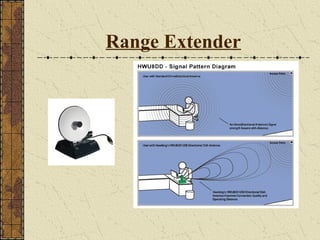
Range Extender
 A wireless range extender or wireless repeater can
 extend the range of an existing wireless network
 It can be strategically placed to elongate a signal area
 or allow for the signal area to reach around barriers
 such as those in L-shaped corridors
 Wireless devices connected through repeaters will
 suffer from an increased latency for each hop.
 Additionally, a wireless device at the end of chain of
 wireless repeaters will have a throughput that is limited
 by the weakest link within the repeater chain.
Components required for WiFi

 A PC, laptop , running Windows 98 or above.
 A wireless PCMCIA card, or a wireless adapter. Now a
  days all the latest LAPTOPS are coming with in built
  CENTRINO
 A Network Interface Card (optional) - Only if a LAN
  connection is required)
 An Access Point - essentially a compact radio transmitter
  with an antenna that connects to a wired connection, such as
  an Ethernet, DSL, or Cable Network.

 A valid internet connection.
Components required – for a larger environment
 Multiple Access Points - To provide overlapping coverage
  throughout a site. Access points can be installed almost
  anywhere.

 Network switch - A device that joins multiple computers
  together. A set of Access Points can be connected to a
  single network switch.

 Wireless LAN bridge (optional) – A wireless LAN
  workgroup bridge enables connection between two
  different hotspot networks.
Components required – for a larger environment
 Authentication and Billing Server – Enables control access
  to the Wi-Fi hotspot network by conducting authentication
  checks similar to credit card or member ID authentication.
  Also tracks wireless usage for billing purposes and
  provides payment transaction services.

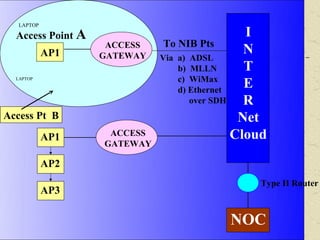
 Wireless Access Gateway – A device which connects
  wireless subscribers to the wired network. It employs one
  Ethernet port to interface with the router and one wireless
  subscriber port that supports IEEE 802.11b/g standard .
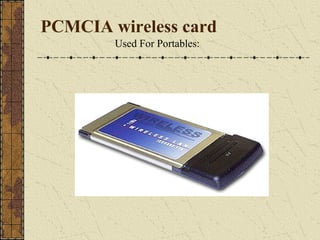
PCMCIA wireless card
        Used For Portables:
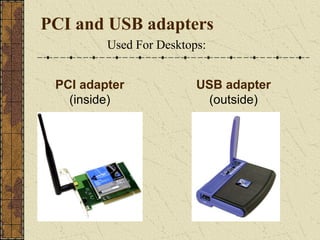
PCI and USB adapters
         Used For Desktops:


 PCI adapter             USB adapter
   (inside)               (outside)
Wi-Fi Router
Wireless Bridge
Range Extender
LAPTOP

  Access Point A                               I
                    ACCESS    To NIB Pts
            AP1    GATEWAY
                                               N
                             Via a) ADSL
                                 b) MLLN       T
                                 c) WiMax
                                               E
  LAPTOP

                                 d) Ethernet
                                    over SDH   R
Access Pt B                                   Net
            AP1     ACCESS                   Cloud
                   GATEWAY

            AP2
                                                Type II Router
            AP3

                                          NOC
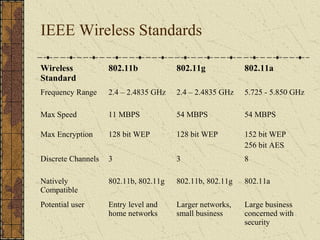
IEEE Wireless Standards

Wireless            802.11b            802.11g            802.11a
Standard
Frequency Range     2.4 – 2.4835 GHz   2.4 – 2.4835 GHz   5.725 - 5.850 GHz

Max Speed           11 MBPS            54 MBPS            54 MBPS

Max Encryption      128 bit WEP        128 bit WEP        152 bit WEP
                                                          256 bit AES
Discrete Channels   3                  3                  8

Natively            802.11b, 802.11g   802.11b, 802.11g   802.11a
Compatible
Potential user      Entry level and    Larger networks,   Large business
                    home networks      small business     concerned with
                                                          security
FEATURES
Advantages-
Unlike packet radio systems, Wi-Fi uses unlicensed radio spectrum and does not require
regulatory approval for individual deployers.
Allows LANs to be deployed without cabling, potentially reducing the costs of network
deployment and expansion. Spaces where cables cannot be run, such as outdoor areas
and historical buildings, can host wireless LANs.
Wi-Fi products are widely available in the market. Different brands of access points and
client network interfaces are interoperable at a basic level of service.
Competition amongst vendors has lowered prices considerably since their inception.
Wi-Fi networks support roaming, in which a mobile client station such as a laptop
computer can move from one access point to another as the user moves around a
building or area.
Many access points and network interfaces support various degrees of encryption to
protect traffic from interception.
Wi-Fi is a global set of standards. Unlike cellular carriers, the same Wi-Fi client works
in different countries around the world
Disadvantages-
Power consumption is fairly high compared to some other low-bandwidth standards,
such as Zigbee and Bluetooth, making battery life a concern.
Many 2.4 GHz 802.11b and 802.11g Access points default to the same channel on initial
startup, contributing to congestion on certain channels. To change the channel of
operation for an access point requires the user to configure the device.
 Wi-Fi networks have limited range. A typical Wi-Fi home router using 802.11b or
802.11g with a stock antenna might have a range of 45 m (150 ft) indoors and 90 m (300
ft) outdoors. Range also varies with frequency band. Wi-Fi in the 2.4 GHz frequency
block has slightly better range than Wi-Fi in the 5 GHz frequency block. Outdoor range
with improved antennas can be several kilometres or more with line-of-sight.
END OF SLIDES

     THANK YOU

Wi te-pp

  • 1.
    Introduction to WiFi By Tarique Akhtar
  • 2.
    WiFi Fundamentals  Wi-Fi,or Wireless Fidelity, is freedom: it allows a person to connect to the Internet from your couch at home, a bed in a hotel room or a conference room at work without wires.  Wi-Fi is a wireless technology. Wi-Fi enabled computers send and receive data indoors and out; anywhere within the range of a base station.  Its just as fast as a cable modem connection.  Allows you to access the Internet while on the move ; you can remain online while moving from one area to another, without a disconnection or loss in coverage.
  • 3.
  • 4.
    HotSpots Whatis a HotSpot?  A HotSpot is a geographic area that has a readily accessible wireless network.  HotSpots are equipped with a Broadband Internet connection, and one or more Access Points that allow users to access the Internet wirelessly.  HotSpots can be setup in any public location that can support an Internet connection. All the locations discussed previously are examples of HotSpots.
  • 5.
    Typical Wi-Fi Users Nowthat we know about WiFi, who are the likely users of WiFi services?  Frequent Travelers  Businessmen and Corporate Managers  Scientists & Doctors  Students and Academicians  Administrators & Technocrats who participate in Seminars & Conferences  Just about anybody with a laptop
  • 6.
    What are thegood places to install WiFi? Basically, any location which caters to business users, and where people with laptops are likely to make frequent visits is an ideal choice to install WiFi. Airports Hotels & Resorts Restaurants Coffee Shops Bookstores Shopping Malls
  • 7.
    Access Point (AP) A wireless access point connects a group of wireless devices to an adjacent wired LAN An access point is similar to an Ethernet Hub, relaying data between connected wireless devices in addition to a (usually) single connected wired device, most often an Ethernet hub or switch, allowing wireless devices to communicate with other wired devices. Wireless Adapter A wireless adapter allows a device to connect to a wireless network. These adapters connect to devices using various interconnects such as PCI, USB, PCMCIA
  • 8.
    Wireless Router Awireless router integrates an AP, Ethernet switch, and internal Router firmware application that provides IP Routing, NAT & DNS forwarding through an integrated WAN interface It allows wired and wireless Ethernet LAN devices to connect to a (usually) single WAN device such as cable modem or DSL modem It allows all three devices (mainly the access point and router) to be configured through one central utility. This utility is most usually an integrated web server or may be an application that is run on a desktop computer
  • 9.
    Wireless Ethernet Bridge Awireless Ethernet bridge connects a wired network to a wireless network This is different from an access point in the sense that an access point connects wireless devices to a wired network at the data-link layer Two wireless bridges may be used to connect two wired networks over a wireless link, useful in situations where a wired connection may be unavailable, such as between two separate homes.
  • 10.
    Range Extender Awireless range extender or wireless repeater can extend the range of an existing wireless network It can be strategically placed to elongate a signal area or allow for the signal area to reach around barriers such as those in L-shaped corridors Wireless devices connected through repeaters will suffer from an increased latency for each hop. Additionally, a wireless device at the end of chain of wireless repeaters will have a throughput that is limited by the weakest link within the repeater chain.
  • 11.
    Components required forWiFi  A PC, laptop , running Windows 98 or above.  A wireless PCMCIA card, or a wireless adapter. Now a days all the latest LAPTOPS are coming with in built CENTRINO  A Network Interface Card (optional) - Only if a LAN connection is required)  An Access Point - essentially a compact radio transmitter with an antenna that connects to a wired connection, such as an Ethernet, DSL, or Cable Network.  A valid internet connection.
  • 12.
    Components required –for a larger environment  Multiple Access Points - To provide overlapping coverage throughout a site. Access points can be installed almost anywhere.  Network switch - A device that joins multiple computers together. A set of Access Points can be connected to a single network switch.  Wireless LAN bridge (optional) – A wireless LAN workgroup bridge enables connection between two different hotspot networks.
  • 13.
    Components required –for a larger environment  Authentication and Billing Server – Enables control access to the Wi-Fi hotspot network by conducting authentication checks similar to credit card or member ID authentication. Also tracks wireless usage for billing purposes and provides payment transaction services.  Wireless Access Gateway – A device which connects wireless subscribers to the wired network. It employs one Ethernet port to interface with the router and one wireless subscriber port that supports IEEE 802.11b/g standard .
  • 14.
    PCMCIA wireless card Used For Portables:
  • 15.
    PCI and USBadapters Used For Desktops: PCI adapter USB adapter (inside) (outside)
  • 16.
  • 17.
  • 18.
  • 19.
    LAPTOP AccessPoint A I ACCESS To NIB Pts AP1 GATEWAY N Via a) ADSL b) MLLN T c) WiMax E LAPTOP d) Ethernet over SDH R Access Pt B Net AP1 ACCESS Cloud GATEWAY AP2 Type II Router AP3 NOC
  • 20.
    IEEE Wireless Standards Wireless 802.11b 802.11g 802.11a Standard Frequency Range 2.4 – 2.4835 GHz 2.4 – 2.4835 GHz 5.725 - 5.850 GHz Max Speed 11 MBPS 54 MBPS 54 MBPS Max Encryption 128 bit WEP 128 bit WEP 152 bit WEP 256 bit AES Discrete Channels 3 3 8 Natively 802.11b, 802.11g 802.11b, 802.11g 802.11a Compatible Potential user Entry level and Larger networks, Large business home networks small business concerned with security
  • 21.
    FEATURES Advantages- Unlike packet radiosystems, Wi-Fi uses unlicensed radio spectrum and does not require regulatory approval for individual deployers. Allows LANs to be deployed without cabling, potentially reducing the costs of network deployment and expansion. Spaces where cables cannot be run, such as outdoor areas and historical buildings, can host wireless LANs. Wi-Fi products are widely available in the market. Different brands of access points and client network interfaces are interoperable at a basic level of service. Competition amongst vendors has lowered prices considerably since their inception. Wi-Fi networks support roaming, in which a mobile client station such as a laptop computer can move from one access point to another as the user moves around a building or area. Many access points and network interfaces support various degrees of encryption to protect traffic from interception. Wi-Fi is a global set of standards. Unlike cellular carriers, the same Wi-Fi client works in different countries around the world
  • 22.
    Disadvantages- Power consumption isfairly high compared to some other low-bandwidth standards, such as Zigbee and Bluetooth, making battery life a concern. Many 2.4 GHz 802.11b and 802.11g Access points default to the same channel on initial startup, contributing to congestion on certain channels. To change the channel of operation for an access point requires the user to configure the device. Wi-Fi networks have limited range. A typical Wi-Fi home router using 802.11b or 802.11g with a stock antenna might have a range of 45 m (150 ft) indoors and 90 m (300 ft) outdoors. Range also varies with frequency band. Wi-Fi in the 2.4 GHz frequency block has slightly better range than Wi-Fi in the 5 GHz frequency block. Outdoor range with improved antennas can be several kilometres or more with line-of-sight.
  • 23.
    END OF SLIDES THANK YOU