
Wireless Fidelity
AGENDA
   Introduction
   What is IEEE 802.11
   Setup required for WiFi
   Working of WiFi
   WiFi Network Topologies
   WiFi Security Threats
   WiFi Security
   Advantages
   Disadvantages
   Comparison B/w Wired & Wireless Network
   Application of WiFi
INTRODUCTION
 Wireless Technology is an alternative to Wired
Technology, which is commonly used, for connecting devices
in wireless mode.
 WiFi is a wireless technology that uses radio frequency to
transmit data through the air.
 WiFi is a generic term that refers to the IEEE 802.11
communications standard for Wireless Local Area Networks
(WLANs).
 WiFi Network connect computers to each other, to the
internet and to the wired network.
 It offers peak data speeds of up to 11 Mbps.
What is IEEE 802.11
IEEE 802.11 is a set of standards carrying out Wireless Local
Area Network (WLAN) computer communication in the 2.4 to
5 GHz frequency bands. They are created and maintained by
the IEEE (Institute of Electrical & Electronics Engineers)
Standards Committee.

    IEEE 802.11b

                        IEEE 802.11a

                                            IEEE 802.11g
IEEE 802.11b

   Appeared in late 1999
   Operates at 2.4GHz radio spectrum
   4-6 Mbps (actual speed) can go up to 11 Mbps within
    the range of 30 m
   100 -150 feet range
   Most popular, Least Expensive
   Interference from mobile phones and Bluetooth
    devices which can reduce the transmission speed.
IEEE 802.11a

   Introduced in 2001
   Operates at 5 GHz radio spectrum (less popular)
   15-20 Mbps (Actual speed) can go up to 54 Mbps as
    the range reduces
   50-75 feet range
   More expensive
   Not compatible with 802.11b
IEEE 802.11g

   Introduced in 2003
   Operates at 2.4 GHz radio spectrum
   54 Mbps (Actual speed)
   100-150 feet range
   Combines the features of both Standards i.e.
    IEEE 802.11b & IEEE 802.11a
   Compatible with 802.11b
Setup Required for WiFi

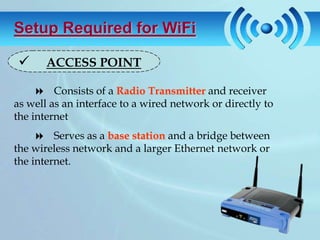
      ACCESS POINT

      Consists of a Radio Transmitter and receiver
as well as an interface to a wired network or directly to
the internet
      Serves as a base station and a bridge between
the wireless network and a larger Ethernet network or
the internet.
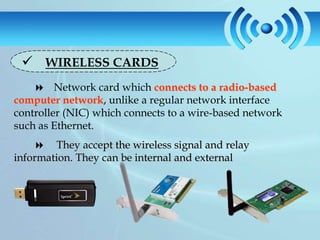
 WIRELESS CARDS
     Network card which connects to a radio-based
computer network, unlike a regular network interface
controller (NIC) which connects to a wire-based network
such as Ethernet.
     They accept the wireless signal and relay
information. They can be internal and external
Working of WiFi
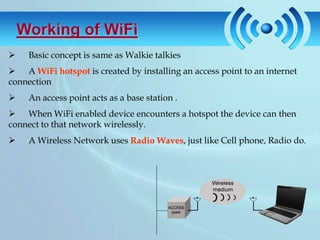
    Basic concept is same as Walkie talkies
 A WiFi hotspot is created by installing an access point to an internet
connection
    An access point acts as a base station .
 When WiFi enabled device encounters a hotspot the device can then
connect to that network wirelessly.
    A Wireless Network uses Radio Waves, just like Cell phone, Radio do.
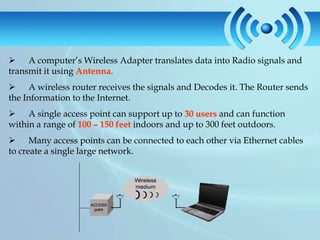
 A computer’s Wireless Adapter translates data into Radio signals and
transmit it using Antenna.
 A wireless router receives the signals and Decodes it. The Router sends
the Information to the Internet.
 A single access point can support up to 30 users and can function
within a range of 100 – 150 feet indoors and up to 300 feet outdoors.
 Many access points can be connected to each other via Ethernet cables
to create a single large network.
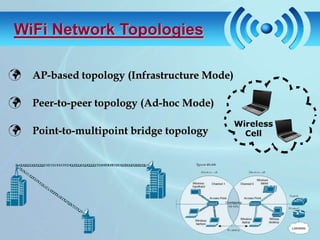
WiFi Network Topologies

 AP-based topology (Infrastructure Mode)

 Peer-to-peer topology (Ad-hoc Mode)

 Point-to-multipoint bridge topology
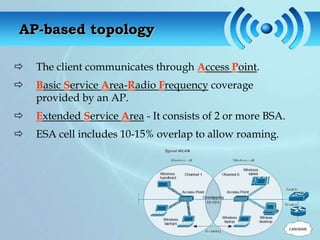
AP-based topology

   The client communicates through Access Point.
   Basic Service Area-Radio Frequency coverage
    provided by an AP.
   Extended Service Area - It consists of 2 or more BSA.
   ESA cell includes 10-15% overlap to allow roaming.
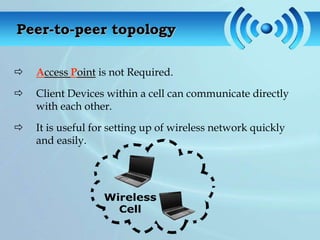
Peer-to-peer topology

   Access Point is not Required.

   Client Devices within a cell can communicate directly
    with each other.

   It is useful for setting up of wireless network quickly
    and easily.
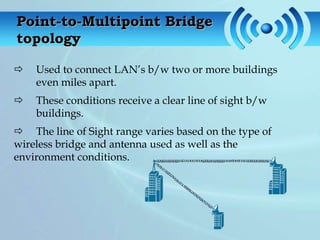
Point-to-Multipoint Bridge
topology

   Used to connect LAN’s b/w two or more buildings
    even miles apart.
   These conditions receive a clear line of sight b/w
    buildings.
 The line of Sight range varies based on the type of
wireless bridge and antenna used as well as the
environment conditions.
WiFi SECURITY Threats

 Wireless technology doesn’t remove any
old security issues, but introduces new ones

                     Eavesdropping


 Man-in-the-middle attacks

                             Denial of Service
Eavesdropping

    Easy to perform, almost impossible to detect
    By default, everything is transmitted in clear text
           Usernames, passwords, content ...
           No security offered by the transmission medium
    Different tools available on the internet
           Network sniffers, protocol analysers . . .
           Password collectors
    With the right equipment, it’s possible to eavesdrop
     traffic from few kilometers away
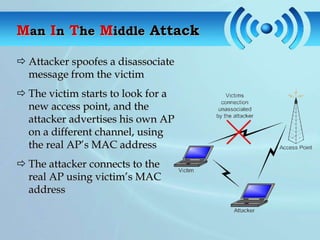
Man In The Middle Attack

 Attacker spoofes a disassociate
  message from the victim
 The victim starts to look for a
  new access point, and the
  attacker advertises his own AP
  on a different channel, using
  the real AP’s MAC address
 The attacker connects to the
  real AP using victim’s MAC
  address
Denial of Service

 Attack on transmission frequecy used
   Frequency jamming
   Not very technical, but works
 Attack on MAC layer
   Spoofed deauthentication / disassociation messages
   can target one specific user
 Attacks on higher layer protocol (TCP/IP protocol)
   SYN Flooding
WiFi SECURITY

The requirements for WiFi network security consists of an
primary component i.e. :

   Authentication

            User Authentication
            Server Authentication
Authentication

Keeping unauthorized users off the network
 User Authentication
                 Authentication Server is used
                 Done using Username and password of the User
      Risk:
                 Data (username & password) send before secure
                          channel established
                 Prone to passive eavesdropping by attacker
      Solution:
                 Establishing a encrypted channel before sending
                          username and password
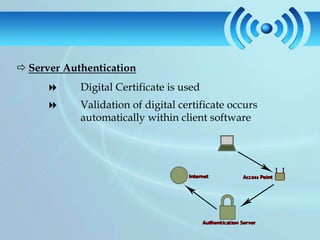
 Server Authentication
           Digital Certificate is used
           Validation of digital certificate occurs
            automatically within client software
Advantages

     Flexible Working:
      Access the Internet, do File Transfers, even Print from anywhere within 100
meters of the WiFi Access Point.
     Reduce Cable Clutter:
      Reduce the clutter of wires and cables behind your Desktop/ Notebook

     Reduce Setup Cost:
      Save the cost of cabling and the cost on Network sockets

     Avoid Deterioration with Time:
      Network Cables and Sockets tend to deteriorate over time, while WiFi does
not have this disadvantage
     Eliminate Re-configuring Computers:
      Can Access WiFi at two different locations under the same company’s
network without having to re-configure their Internet settings each time.
Disadvantages
     Password and Security:
      It is important to secure your WiFi connection at home or the office. Otherwise,
anyone with a WiFi enabled computer can access your data and Internet connection!
Password-protecting your WiFi connection is an easy process and once you set up all
your Computers and devices to access your WiFi network, you do not need to type in
passwords each time thereafter.
     Signal Strength Sensitivity:
     WiFi Networks are sensitive to signal strength. To ensure good connectivity,
you must ensure that all computers and gadgets receive adequate signal strength
     Effect of Climatic Conditions:
      WiFi signals are likely to be adversely affected by climatic conditions such as
thunderstorms.
     Increased number of Network Devices:
      You are increasing the number of devices on your Network, by incorporating a
WiFi Access point. Also, you will need a power socket to plug in and power the WiFi
Access Point.
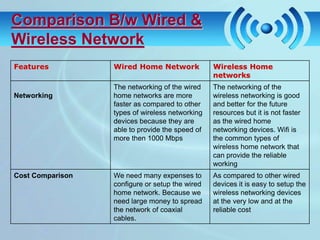
Comparison B/w Wired &
Wireless Network
Features          Wired Home Network             Wireless Home
                                                 networks
                  The networking of the wired    The networking of the
Networking        home networks are more         wireless networking is good
                  faster as compared to other    and better for the future
                  types of wireless networking   resources but it is not faster
                  devices because they are       as the wired home
                  able to provide the speed of   networking devices. Wifi is
                  more then 1000 Mbps            the common types of
                                                 wireless home network that
                                                 can provide the reliable
                                                 working
Cost Comparison   We need many expenses to       As compared to other wired
                  configure or setup the wired   devices it is easy to setup the
                  home network. Because we       wireless networking devices
                  need large money to spread     at the very low and at the
                  the network of coaxial         reliable cost
                  cables.
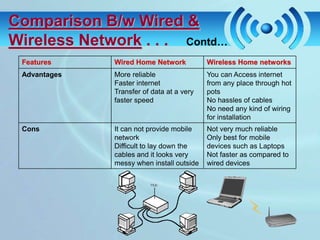
Comparison B/w Wired &
Wireless Network . . . Contd…
 Features     Wired Home Network           Wireless Home networks
 Advantages   More reliable                You can Access internet
              Faster internet              from any place through hot
              Transfer of data at a very   pots
              faster speed                 No hassles of cables
                                           No need any kind of wiring
                                           for installation
 Cons         It can not provide mobile    Not very much reliable
              network                      Only best for mobile
              Difficult to lay down the    devices such as Laptops
              cables and it looks very     Not faster as compared to
              messy when install outside   wired devices
Application of WiFi

     Sharing of Files:
     Sharing and Exchanging of Data can take place with nearby Computers in the
Network.
     Accessing the Internet:
      Using the WiFi, Internet can be made available to the Computers connected to
the Network.
     Stream Audio to Wireless Speakers:
      One of the useful application of WiFi is that using it one can Stream audio to
audio devices present in the Network Area that are compatible to it.
     Device Sharing:
      Similar to Wired Network WiFi provides the feature to access the Devices being
shared within the Network. Like one can command the Printer attached to any
System in the network and get their documents print.
Wi-Fi Wireless Fidelity

Wi-Fi Wireless Fidelity

  • 1.
  • 2.
    AGENDA  Introduction  What is IEEE 802.11  Setup required for WiFi  Working of WiFi  WiFi Network Topologies  WiFi Security Threats  WiFi Security  Advantages  Disadvantages  Comparison B/w Wired & Wireless Network  Application of WiFi
  • 3.
    INTRODUCTION  Wireless Technologyis an alternative to Wired Technology, which is commonly used, for connecting devices in wireless mode.  WiFi is a wireless technology that uses radio frequency to transmit data through the air.  WiFi is a generic term that refers to the IEEE 802.11 communications standard for Wireless Local Area Networks (WLANs).  WiFi Network connect computers to each other, to the internet and to the wired network.  It offers peak data speeds of up to 11 Mbps.
  • 4.
    What is IEEE802.11 IEEE 802.11 is a set of standards carrying out Wireless Local Area Network (WLAN) computer communication in the 2.4 to 5 GHz frequency bands. They are created and maintained by the IEEE (Institute of Electrical & Electronics Engineers) Standards Committee. IEEE 802.11b IEEE 802.11a IEEE 802.11g
  • 5.
    IEEE 802.11b  Appeared in late 1999  Operates at 2.4GHz radio spectrum  4-6 Mbps (actual speed) can go up to 11 Mbps within the range of 30 m  100 -150 feet range  Most popular, Least Expensive  Interference from mobile phones and Bluetooth devices which can reduce the transmission speed.
  • 6.
    IEEE 802.11a  Introduced in 2001  Operates at 5 GHz radio spectrum (less popular)  15-20 Mbps (Actual speed) can go up to 54 Mbps as the range reduces  50-75 feet range  More expensive  Not compatible with 802.11b
  • 7.
    IEEE 802.11g  Introduced in 2003  Operates at 2.4 GHz radio spectrum  54 Mbps (Actual speed)  100-150 feet range  Combines the features of both Standards i.e. IEEE 802.11b & IEEE 802.11a  Compatible with 802.11b
  • 8.
    Setup Required forWiFi  ACCESS POINT  Consists of a Radio Transmitter and receiver as well as an interface to a wired network or directly to the internet  Serves as a base station and a bridge between the wireless network and a larger Ethernet network or the internet.
  • 9.
     WIRELESS CARDS  Network card which connects to a radio-based computer network, unlike a regular network interface controller (NIC) which connects to a wire-based network such as Ethernet.  They accept the wireless signal and relay information. They can be internal and external
  • 10.
    Working of WiFi  Basic concept is same as Walkie talkies  A WiFi hotspot is created by installing an access point to an internet connection  An access point acts as a base station .  When WiFi enabled device encounters a hotspot the device can then connect to that network wirelessly.  A Wireless Network uses Radio Waves, just like Cell phone, Radio do.
  • 11.
     A computer’sWireless Adapter translates data into Radio signals and transmit it using Antenna.  A wireless router receives the signals and Decodes it. The Router sends the Information to the Internet.  A single access point can support up to 30 users and can function within a range of 100 – 150 feet indoors and up to 300 feet outdoors.  Many access points can be connected to each other via Ethernet cables to create a single large network.
  • 12.
    WiFi Network Topologies AP-based topology (Infrastructure Mode)  Peer-to-peer topology (Ad-hoc Mode)  Point-to-multipoint bridge topology
  • 13.
    AP-based topology  The client communicates through Access Point.  Basic Service Area-Radio Frequency coverage provided by an AP.  Extended Service Area - It consists of 2 or more BSA.  ESA cell includes 10-15% overlap to allow roaming.
  • 14.
    Peer-to-peer topology  Access Point is not Required.  Client Devices within a cell can communicate directly with each other.  It is useful for setting up of wireless network quickly and easily.
  • 15.
    Point-to-Multipoint Bridge topology  Used to connect LAN’s b/w two or more buildings even miles apart.  These conditions receive a clear line of sight b/w buildings.  The line of Sight range varies based on the type of wireless bridge and antenna used as well as the environment conditions.
  • 16.
    WiFi SECURITY Threats Wireless technology doesn’t remove any old security issues, but introduces new ones Eavesdropping Man-in-the-middle attacks Denial of Service
  • 17.
    Eavesdropping  Easy to perform, almost impossible to detect  By default, everything is transmitted in clear text  Usernames, passwords, content ...  No security offered by the transmission medium  Different tools available on the internet  Network sniffers, protocol analysers . . .  Password collectors  With the right equipment, it’s possible to eavesdrop traffic from few kilometers away
  • 18.
    Man In TheMiddle Attack  Attacker spoofes a disassociate message from the victim  The victim starts to look for a new access point, and the attacker advertises his own AP on a different channel, using the real AP’s MAC address  The attacker connects to the real AP using victim’s MAC address
  • 19.
    Denial of Service Attack on transmission frequecy used  Frequency jamming  Not very technical, but works  Attack on MAC layer  Spoofed deauthentication / disassociation messages  can target one specific user  Attacks on higher layer protocol (TCP/IP protocol)  SYN Flooding
  • 20.
    WiFi SECURITY The requirementsfor WiFi network security consists of an primary component i.e. :  Authentication  User Authentication  Server Authentication
  • 21.
    Authentication Keeping unauthorized usersoff the network  User Authentication  Authentication Server is used  Done using Username and password of the User Risk:  Data (username & password) send before secure channel established  Prone to passive eavesdropping by attacker Solution:  Establishing a encrypted channel before sending username and password
  • 22.
     Server Authentication  Digital Certificate is used  Validation of digital certificate occurs automatically within client software
  • 23.
    Advantages  Flexible Working: Access the Internet, do File Transfers, even Print from anywhere within 100 meters of the WiFi Access Point.  Reduce Cable Clutter: Reduce the clutter of wires and cables behind your Desktop/ Notebook  Reduce Setup Cost: Save the cost of cabling and the cost on Network sockets  Avoid Deterioration with Time: Network Cables and Sockets tend to deteriorate over time, while WiFi does not have this disadvantage  Eliminate Re-configuring Computers: Can Access WiFi at two different locations under the same company’s network without having to re-configure their Internet settings each time.
  • 24.
    Disadvantages  Password and Security: It is important to secure your WiFi connection at home or the office. Otherwise, anyone with a WiFi enabled computer can access your data and Internet connection! Password-protecting your WiFi connection is an easy process and once you set up all your Computers and devices to access your WiFi network, you do not need to type in passwords each time thereafter.  Signal Strength Sensitivity: WiFi Networks are sensitive to signal strength. To ensure good connectivity, you must ensure that all computers and gadgets receive adequate signal strength  Effect of Climatic Conditions: WiFi signals are likely to be adversely affected by climatic conditions such as thunderstorms.  Increased number of Network Devices: You are increasing the number of devices on your Network, by incorporating a WiFi Access point. Also, you will need a power socket to plug in and power the WiFi Access Point.
  • 25.
    Comparison B/w Wired& Wireless Network Features Wired Home Network Wireless Home networks The networking of the wired The networking of the Networking home networks are more wireless networking is good faster as compared to other and better for the future types of wireless networking resources but it is not faster devices because they are as the wired home able to provide the speed of networking devices. Wifi is more then 1000 Mbps the common types of wireless home network that can provide the reliable working Cost Comparison We need many expenses to As compared to other wired configure or setup the wired devices it is easy to setup the home network. Because we wireless networking devices need large money to spread at the very low and at the the network of coaxial reliable cost cables.
  • 26.
    Comparison B/w Wired& Wireless Network . . . Contd… Features Wired Home Network Wireless Home networks Advantages More reliable You can Access internet Faster internet from any place through hot Transfer of data at a very pots faster speed No hassles of cables No need any kind of wiring for installation Cons It can not provide mobile Not very much reliable network Only best for mobile Difficult to lay down the devices such as Laptops cables and it looks very Not faster as compared to messy when install outside wired devices
  • 27.
    Application of WiFi  Sharing of Files: Sharing and Exchanging of Data can take place with nearby Computers in the Network.  Accessing the Internet: Using the WiFi, Internet can be made available to the Computers connected to the Network.  Stream Audio to Wireless Speakers: One of the useful application of WiFi is that using it one can Stream audio to audio devices present in the Network Area that are compatible to it.  Device Sharing: Similar to Wired Network WiFi provides the feature to access the Devices being shared within the Network. Like one can command the Printer attached to any System in the network and get their documents print.