Wireless Technology
Bhushan Jadhav – BSD India
Prepared By :
Outlines
• Introduction
• Types of Wireless Technology
• What is Wi-Fi?
• Wi-Fi Standards
• Hotspots
• Wi-Fi Network Elements
• How a Wi-Fi Network Works
• Advantages and Limitations of Wi-Fi
• Wi-Fi Security
• Conclusion
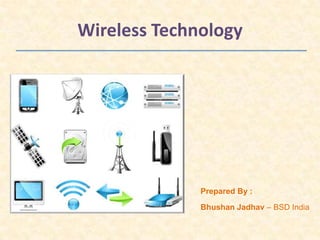
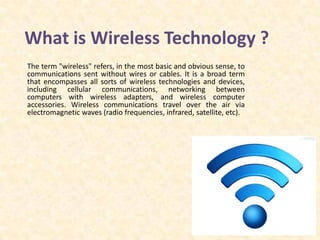
What is Wireless Technology ?
The term "wireless" refers, in the most basic and obvious sense, to
communications sent without wires or cables. It is a broad term
that encompasses all sorts of wireless technologies and devices,
including cellular communications, networking between
computers with wireless adapters, and wireless computer
accessories. Wireless communications travel over the air via
electromagnetic waves (radio frequencies, infrared, satellite, etc).
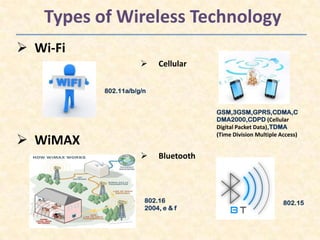
Types of Wireless Technology
 Wi-Fi
 Cellular
 WiMAX
 Bluetooth
GSM,3GSM,GPRS,CDMA,C
DMA2000,CDPD (Cellular
Digital Packet Data),TDMA
(Time Division Multiple Access)
802.11a/b/g/n
802.15802.16
2004, e & f
What is Wi-Fi?
Imagine working on your laptop or checking e-mail
from anywhere in your home.
Imagine being able to connect to your office network
from an airport or coffee shop.
Now, imagine doing all these things easily and
quickly, without worrying about finding a wired
network connection.
That is Wi-Fi !
 Wi-Fi (Wireless Fidelity) is a generic term that refers to the
IEEE (Institute of Electrical and Electronics Engineers) 802.11
communications standard for Wireless Local Area Network
(WLAN).
 Wireless technology is an alternative to Wired
Technology, which is commonly used, for connecting devices
in wireless using radio waves.
 Allows you to access the Internet while on the move; you can
remain online while moving from one area to
another, without a disconnection or loss in coverage.
IEEE 802.11 Standards
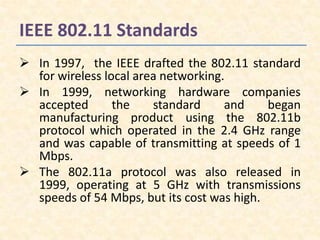
 In 1997, the IEEE drafted the 802.11 standard
for wireless local area networking.
 In 1999, networking hardware companies
accepted the standard and began
manufacturing product using the 802.11b
protocol which operated in the 2.4 GHz range
and was capable of transmitting at speeds of 1
Mbps.
 The 802.11a protocol was also released in
1999, operating at 5 GHz with transmissions
speeds of 54 Mbps, but its cost was high.
IEEE 802.11 Standards (Cont.)
Network
Standard
Maximum
Speed
(Mbps)
Range
(feet)
Frequency
(GHz)
Power
Drain
Cost
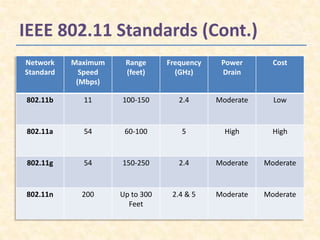
802.11b 11 100-150 2.4 Moderate Low
802.11a 54 60-100 5 High High
802.11g 54 150-250 2.4 Moderate Moderate
802.11n 200 Up to 300
Feet
2.4 & 5 Moderate Moderate
Hotspot
• What is a Hotspot ?
A Hotspot is any location where Wi-Fi network
access is made publicly available.
Hotspots are equipped with a Broadband Internet
connection, and one or more Access points that
allow users to access the Internet wirelessly.
Hotspots can be setup in any public location that
can support an Internet connection. All the
locations discussed below are examples of
Hotspots.
Wi-Fi Hotspot Locations
Airports
Hotels & Resorts
Restaurants
Coffee Shops
Bookstores
Shopping Malls
Elements of a Wi-Fi Network
Access Point (AP) – The AP is a wireless LAN
transceiver or “base station” that can connect
one or many wireless devices in the same time to
the Internet.
Safeguards – Firewalls and anti-virus software
protect networks from uninvited users and keep
information secure.
Wi-Fi cards (Adapters) – They accept the wireless
signal and relay information. They can be internal
and external.
How a Wi-Fi Network Works ?
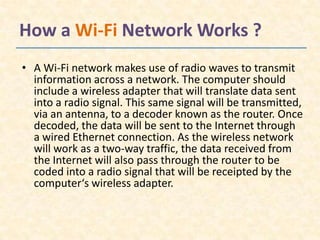
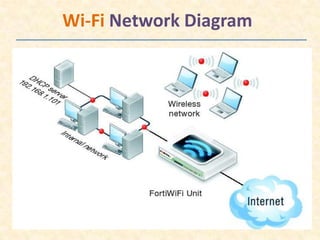
• A Wi-Fi network makes use of radio waves to transmit
information across a network. The computer should
include a wireless adapter that will translate data sent
into a radio signal. This same signal will be transmitted,
via an antenna, to a decoder known as the router. Once
decoded, the data will be sent to the Internet through
a wired Ethernet connection. As the wireless network
will work as a two-way traffic, the data received from
the Internet will also pass through the router to be
coded into a radio signal that will be receipted by the
computer‘s wireless adapter.
Wi-Fi Network Diagram
Advantages of Wi-Fi
No Wires – A truly wireless networking
Solution
No Waiting – Fast, easy deployments.
No Worries – A wireless networking system
that secure, easy to manage, and built to grow
with you
Ease of Installation – Quick, easy setup.
Fast data transfer rates
Limitations of Wi-Fi
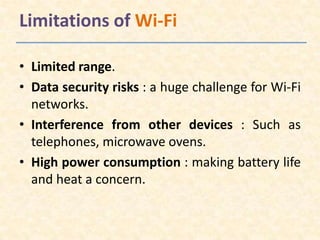
• Limited range.
• Data security risks : a huge challenge for Wi-Fi
networks.
• Interference from other devices : Such as
telephones, microwave ovens.
• High power consumption : making battery life
and heat a concern.
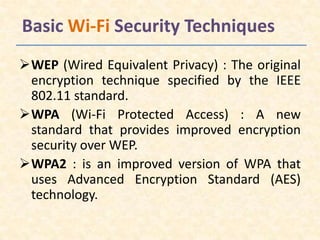
Basic Wi-Fi Security Techniques
WEP (Wired Equivalent Privacy) : The original
encryption technique specified by the IEEE
802.11 standard.
WPA (Wi-Fi Protected Access) : A new
standard that provides improved encryption
security over WEP.
WPA2 : is an improved version of WPA that
uses Advanced Encryption Standard (AES)
technology.
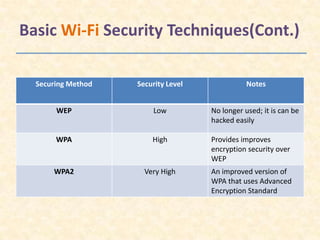
Basic Wi-Fi Security Techniques(Cont.)
Securing Method Security Level Notes
WEP Low No longer used; it is can be
hacked easily
WPA High Provides improves
encryption security over
WEP
WPA2 Very High An improved version of
WPA that uses Advanced
Encryption Standard
Conclusion
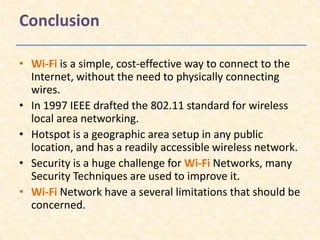
• Wi-Fi is a simple, cost-effective way to connect to the
Internet, without the need to physically connecting
wires.
• In 1997 IEEE drafted the 802.11 standard for wireless
local area networking.
• Hotspot is a geographic area setup in any public
location, and has a readily accessible wireless network.
• Security is a huge challenge for Wi-Fi Networks, many
Security Techniques are used to improve it.
• Wi-Fi Network have a several limitations that should be
concerned.
Wireless technology - Wi-Fi

Wireless technology - Wi-Fi

  • 1.
    Wireless Technology Bhushan Jadhav– BSD India Prepared By :
  • 2.
    Outlines • Introduction • Typesof Wireless Technology • What is Wi-Fi? • Wi-Fi Standards • Hotspots • Wi-Fi Network Elements • How a Wi-Fi Network Works • Advantages and Limitations of Wi-Fi • Wi-Fi Security • Conclusion
  • 3.
    What is WirelessTechnology ? The term "wireless" refers, in the most basic and obvious sense, to communications sent without wires or cables. It is a broad term that encompasses all sorts of wireless technologies and devices, including cellular communications, networking between computers with wireless adapters, and wireless computer accessories. Wireless communications travel over the air via electromagnetic waves (radio frequencies, infrared, satellite, etc).
  • 4.
    Types of WirelessTechnology  Wi-Fi  Cellular  WiMAX  Bluetooth GSM,3GSM,GPRS,CDMA,C DMA2000,CDPD (Cellular Digital Packet Data),TDMA (Time Division Multiple Access) 802.11a/b/g/n 802.15802.16 2004, e & f
  • 5.
    What is Wi-Fi? Imagineworking on your laptop or checking e-mail from anywhere in your home. Imagine being able to connect to your office network from an airport or coffee shop. Now, imagine doing all these things easily and quickly, without worrying about finding a wired network connection. That is Wi-Fi !
  • 6.
     Wi-Fi (WirelessFidelity) is a generic term that refers to the IEEE (Institute of Electrical and Electronics Engineers) 802.11 communications standard for Wireless Local Area Network (WLAN).  Wireless technology is an alternative to Wired Technology, which is commonly used, for connecting devices in wireless using radio waves.  Allows you to access the Internet while on the move; you can remain online while moving from one area to another, without a disconnection or loss in coverage.
  • 7.
    IEEE 802.11 Standards In 1997, the IEEE drafted the 802.11 standard for wireless local area networking.  In 1999, networking hardware companies accepted the standard and began manufacturing product using the 802.11b protocol which operated in the 2.4 GHz range and was capable of transmitting at speeds of 1 Mbps.  The 802.11a protocol was also released in 1999, operating at 5 GHz with transmissions speeds of 54 Mbps, but its cost was high.
  • 8.
    IEEE 802.11 Standards(Cont.) Network Standard Maximum Speed (Mbps) Range (feet) Frequency (GHz) Power Drain Cost 802.11b 11 100-150 2.4 Moderate Low 802.11a 54 60-100 5 High High 802.11g 54 150-250 2.4 Moderate Moderate 802.11n 200 Up to 300 Feet 2.4 & 5 Moderate Moderate
  • 9.
    Hotspot • What isa Hotspot ? A Hotspot is any location where Wi-Fi network access is made publicly available. Hotspots are equipped with a Broadband Internet connection, and one or more Access points that allow users to access the Internet wirelessly. Hotspots can be setup in any public location that can support an Internet connection. All the locations discussed below are examples of Hotspots.
  • 10.
    Wi-Fi Hotspot Locations Airports Hotels& Resorts Restaurants Coffee Shops Bookstores Shopping Malls
  • 11.
    Elements of aWi-Fi Network Access Point (AP) – The AP is a wireless LAN transceiver or “base station” that can connect one or many wireless devices in the same time to the Internet. Safeguards – Firewalls and anti-virus software protect networks from uninvited users and keep information secure. Wi-Fi cards (Adapters) – They accept the wireless signal and relay information. They can be internal and external.
  • 12.
    How a Wi-FiNetwork Works ? • A Wi-Fi network makes use of radio waves to transmit information across a network. The computer should include a wireless adapter that will translate data sent into a radio signal. This same signal will be transmitted, via an antenna, to a decoder known as the router. Once decoded, the data will be sent to the Internet through a wired Ethernet connection. As the wireless network will work as a two-way traffic, the data received from the Internet will also pass through the router to be coded into a radio signal that will be receipted by the computer‘s wireless adapter.
  • 13.
  • 14.
    Advantages of Wi-Fi NoWires – A truly wireless networking Solution No Waiting – Fast, easy deployments. No Worries – A wireless networking system that secure, easy to manage, and built to grow with you Ease of Installation – Quick, easy setup. Fast data transfer rates
  • 15.
    Limitations of Wi-Fi •Limited range. • Data security risks : a huge challenge for Wi-Fi networks. • Interference from other devices : Such as telephones, microwave ovens. • High power consumption : making battery life and heat a concern.
  • 16.
    Basic Wi-Fi SecurityTechniques WEP (Wired Equivalent Privacy) : The original encryption technique specified by the IEEE 802.11 standard. WPA (Wi-Fi Protected Access) : A new standard that provides improved encryption security over WEP. WPA2 : is an improved version of WPA that uses Advanced Encryption Standard (AES) technology.
  • 17.
    Basic Wi-Fi SecurityTechniques(Cont.) Securing Method Security Level Notes WEP Low No longer used; it is can be hacked easily WPA High Provides improves encryption security over WEP WPA2 Very High An improved version of WPA that uses Advanced Encryption Standard
  • 18.
    Conclusion • Wi-Fi isa simple, cost-effective way to connect to the Internet, without the need to physically connecting wires. • In 1997 IEEE drafted the 802.11 standard for wireless local area networking. • Hotspot is a geographic area setup in any public location, and has a readily accessible wireless network. • Security is a huge challenge for Wi-Fi Networks, many Security Techniques are used to improve it. • Wi-Fi Network have a several limitations that should be concerned.