Advanced Spectrum Analyzer
measurements
Introduction


         Applications Engineer
Agenda
 What is a spectrum analyzer?

 Basic spectrum analyzer architecture

 Dynamic Range

 Spectrum analyzer features and usage

 Advanced Spectrum Analyzer Architecture

 Standard Measurements

 Advanced Measurements


            February 2013| Spectrum Analyzer Fundamentals - Advanced | 3
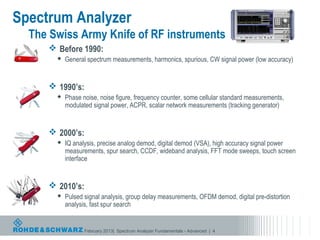
Spectrum Analyzer
  The Swiss Army Knife of RF instruments
      Before 1990:
          General spectrum measurements, harmonics, spurious, CW signal power (low accuracy)


      1990’s:
          Phase noise, noise figure, frequency counter, some cellular standard measurements,
           modulated signal power, ACPR, scalar network measurements (tracking generator)


      2000’s:
          IQ analysis, precise analog demod, digital demod (VSA), high accuracy signal power
           measurements, spur search, CCDF, wideband analysis, FFT mode sweeps, touch screen
           interface


      2010’s:
          Pulsed signal analysis, group delay measurements, OFDM demod, digital pre-distortion
           analysis, fast spur search


                  February 2013| Spectrum Analyzer Fundamentals - Advanced | 4
Notable Milestones in Spectrum Analysis
1940s: First sweep spectral analysis performed by MIT RAD LAB.
1960s: Spectrum Analyzer market dominated by Polarad and Panoramic
1964:     HP makes the 1st LO tunable, revolutionizes the market
1978:     HP introduces the 8566/8568. First microprocessor based SA.
1986:     Rohde & Schwarz enters spectrum analyzer market with FSA and               begins a tradition of
 innovation
           – 1986: First SA with a color display
           – 1996: First RMS detector
           – 1999: FSP is fastest SA available
           – 2001: First SA with >8MHz resolution bandwidth (50MHz)
           – 2003: First SA with USB ports
           – 2003: First SA with power sensor reading function
           – 2006: First combination phase noise analyzer and SA
           – 2007: First SA to 67GHz without external mixer
           – 2008: FSV is again the fastest SA on the market
           – 2010: FSVR is first combination real-time analyzer and SA
           – 2011: FSW is the most advanced SA on the market


                       February 2013| Spectrum Analyzer Fundamentals - Advanced | 5
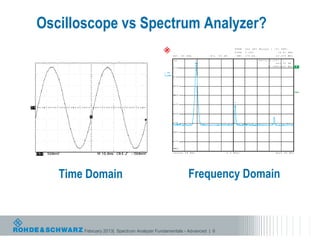
Oscilloscope vs Spectrum Analyzer?


   Time Domain                                        Frequency Domain


       February 2013| Spectrum Analyzer Fundamentals - Advanced | 6
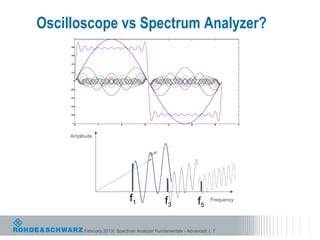
Oscilloscope vs Spectrum Analyzer?
       1


     0.8


     0.6


     0.4


     0.2


       0


     -0.2


     -0.4


     -0.6


     -0.8


      -1
            0         1         2          3          4          5         6          7


     Amplitude


                                    f1              f3               f5   Frequency


                February 2013| Spectrum Analyzer Fundamentals - Advanced | 7
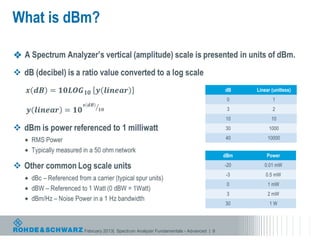
What is dBm?


                                                                        dB    Linear (unitless)
                                                                         0           1
                                                                         3           2
                                                                        10           10
                                                                        30          1000
                                                                        40         10000


                                                                        dBm       Power
                                                                        -20      0.01 mW
                                                                        -3        0.5 mW
                                                                         0         1 mW
                                                                         3         2 mW
                                                                        30          1W


         February 2013| Spectrum Analyzer Fundamentals - Advanced | 8
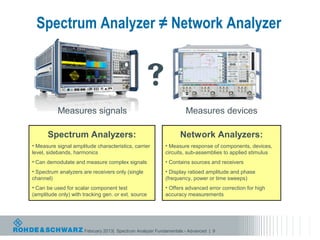
Spectrum Analyzer ≠ Network Analyzer


                                                
           Measures signals                                         Measures devices

      Spectrum Analyzers:                                        Network Analyzers:
• Measure signal amplitude characteristics, carrier        • Measure response of components, devices,
level, sidebands, harmonics                                circuits, sub-assemblies to applied stimulus
• Can demodulate and measure complex signals               • Contains sources and receivers
• Spectrum analyzers are receivers only (single            • Display ratioed amplitude and phase
channel)                                                   (frequency, power or time sweeps)
• Can be used for scalar component test                    • Offers advanced error correction for high
(amplitude only) with tracking gen. or ext. source         accuracy measurements


                      February 2013| Spectrum Analyzer Fundamentals - Advanced | 9
Agenda
 What is a spectrum analyzer?

 Basic spectrum analyzer architecture

 Dynamic Range

 Spectrum analyzer features and usage

 Advanced Spectrum Analyzer Architecture

 Standard Measurements

 Advanced Measurements


            February 2013| Spectrum Analyzer Fundamentals - Advanced | 10
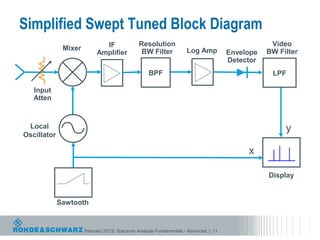
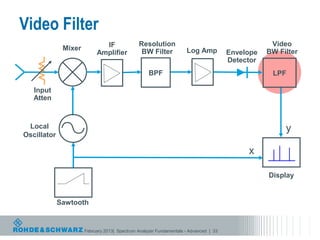
Simplified Swept Tuned Block Diagram
                             IF               Resolution                                          Video
              Mixer                            BW Filter            Log Amp                      BW Filter
                           Amplifier                                                  Envelope
                                                                                      Detector
                                                   BPF                                            LPF

   Input
   Atten


 Local                                                                                                y
Oscillator

                                                                                           x

                                                                                                 Display


             Sawtooth


                      February 2013| Spectrum Analyzer Fundamentals - Advanced | 11
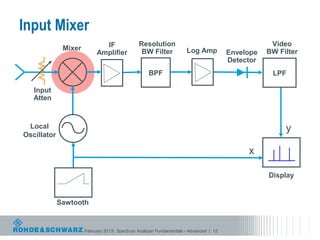
Input Mixer
                             IF               Resolution                                          Video
              Mixer                            BW Filter            Log Amp                      BW Filter
                           Amplifier                                                  Envelope
                                                                                      Detector
                                                   BPF                                            LPF

   Input
   Atten


 Local                                                                                                y
Oscillator

                                                                                           x

                                                                                                 Display


             Sawtooth


                      February 2013| Spectrum Analyzer Fundamentals - Advanced | 12
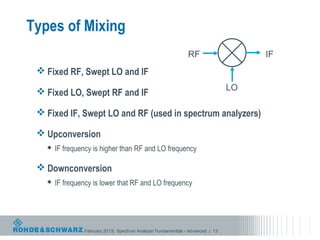
Types of Mixing
                                                               RF                    IF
  Fixed RF, Swept LO and IF

  Fixed LO, Swept RF and IF                                                    LO

  Fixed IF, Swept LO and RF (used in spectrum analyzers)

  Upconversion
      IF frequency is higher than RF and LO frequency

  Downconversion
      IF frequency is lower that RF and LO frequency


                February 2013| Spectrum Analyzer Fundamentals - Advanced | 13
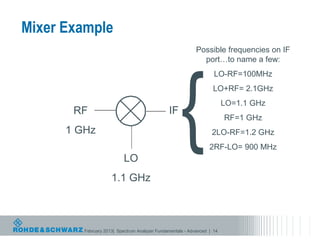
Mixer Example
                                                            Possible frequencies on IF


                                                     {
                                                              port…to name a few:
                                                                    LO-RF=100MHz
                                                                   LO+RF= 2.1GHz
                                                                         LO=1.1 GHz
       RF                                      IF
                                                                         RF=1 GHz
      1 GHz                                                        2LO-RF=1.2 GHz
                                                                  2RF-LO= 900 MHz
                           LO
                     1.1 GHz


         February 2013| Spectrum Analyzer Fundamentals - Advanced | 14
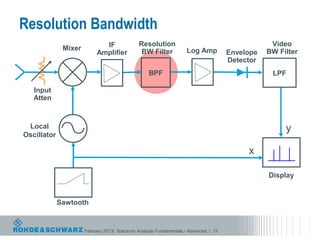
Resolution Bandwidth
                             IF               Resolution                                          Video
              Mixer                            BW Filter            Log Amp                      BW Filter
                           Amplifier                                                  Envelope
                                                                                      Detector
                                                   BPF                                            LPF

   Input
   Atten


 Local                                                                                                y
Oscillator

                                                                                           x

                                                                                                 Display


             Sawtooth


                      February 2013| Spectrum Analyzer Fundamentals - Advanced | 15
Resolution Bandwidth
   Sets IF Bandwidth of Spectrum Analyzer
   Filter types:
      Standard sweep filters: digital Gaussian filters
      Channel filters
      EMI filters (available with Quasipeak detector)
      FFT filters
      RRC

   Determines frequency resolution and noise floor


  Sweep Time is function of Resolution Bandwidth and Span


                 February 2013| Spectrum Analyzer Fundamentals - Advanced | 16
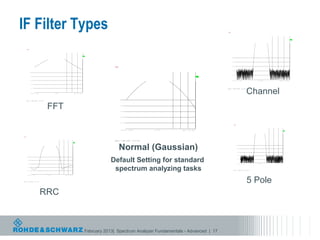
IF Filter Types                                                                                                                                                                                                                                                         Ref     -20     dBm                         Att    5   dB
                                                                                                                                                                                                                                                                                                                                                 * RBW
                                                                                                                                                                                                                                                                                                                                                  VBW
                                                                                                                                                                                                                                                                                                                                                  SWT
                                                                                                                                                                                                                                                                                                                                                         18
                                                                                                                                                                                                                                                                                                                                                         50
                                                                                                                                                                                                                                                                                                                                                         65
                                                                                                                                                                                                                                                                                                                                                               kHz
                                                                                                                                                                                                                                                                                                                                                               kHz
                                                                                                                                                                                                                                                                                                                                                               ms

                                                                                                                                                                                                                                                                         -20


                                                                                                                                                                                                                                                                                                                                                                                                         A
                                                                                                                                                                                                                                                                         -30

                                                                                                                                                                                                                                                                1 AP
                                                                                                                                                                                                                                                                CLRWR
                                                                                                                                                                                                                                                                         -40


                                                                                * RBW     20 kHz                                                                                                                                                                         -50
                                                                                    VBW   50 kHz
                  Ref       -20 dBm                   Att      5 dB                 SWT   2.5 ms

                    -20                                                                                                                                                                                                                                                  -60


                                                                                                                                       A
                    -30
                                                                                                                                                                                                                                                                         -70
         1 AP
         CLRWR
                    -40
                                                                                                                                                                                                                                                                         -80

                    -50
                                                                                                                                                                                                                     * RBW   20    kHz                                   -90
                                                                                                                                                                                                                       VBW   50    kHz
                    -60
                                                                                                                                                                 Ref     -20   dBm              Att   5   dB           SWT   2.5    ms
                                                                                                                                                                                                                                                                         -100
                    -70                                                                                                                                           -20
                                                                                                                                                                                                                                                                         -110
                    -80                                                                                                                                                                                                                                     A
                                                                                                                                                                  -30
                                                                                                                                                                                                                                                                         -120

                    -90                                                                                                                                  1 AP                                                                                                           Center         1     GHz                                     10    kHz/                                   Span       100   kHz
                                                                                                                                                         CLRWR
                                                                                                                                                                  -40
                    -100


                                                                                                                                                                                                                                                                                                             Channel
                    -110                                                                                                                                          -50                                                                                           Date: 7.NOV.2006                   12:16:17

                    -120

                   Center         1 GHz                                 10 kHz/                                       Span   100 kHz
                                                                                                                                                                  -60


                                                                                                                                                                  -70
         Date: 7.NOV.2006             12:15:43


                                                          FFT                                                                                                     -80


                                                                                                                                                                  -90


                                                                                                                                                                  -100


                                                                                                                                                                  -110
                                                                                                                                                                                                                                                                                                                                            * RBW   20   kHz
                                                                                                                                                                                                                                                                                                                                             VBW    50   kHz
                                                                                                                                                                                                                                                                                  Ref        -20   dBm               Att   5   dB            SWT    50   ms
                                                                                                                                                                  -120
                                                                                                                                                                                                                                                                                      -20

                                                                                                                                                                 Center        1   GHz                         10   kHz/                 Span   100   kHz                                                                                                                                A
                                                                                                                                                                                                                                                                                      -30

                                                                                                                                                                                                                                                                          1 AP
                                                                                                                                                                                                                                                                          CLRWR
                                                                                                                                                                                                                                                                                      -40
                                                                * RBW   20    kHz


          Ref     -20   dBm               Att    5   dB           AQT   2.5    ms                                                                                                                                                                                                     -50

           -20
                                                                                                                                                        Date: 7.NOV.2006             12:17:44
                                                                                                                                                                                                                                                                                      -60


                                                                                                                                                             Normal (Gaussian)
                                                                                                                      A
           -30

1   PK
                                                                                                                                                                                                                                                                                      -70
CLRWR
           -40


                                                                                                                                                                                                                                                                                      -80
           -50


                                                                                                                                                                                                                                                                                      -90
           -60


                                                                                                                                                                                                                                                                                      -100


                                                                                                                                                       Default Setting for standard
           -70


                                                                                                                                                                                                                                                                                      -110
           -80

                                                                                                                                                                                                                                                                                      -120

           -90                                                                                                                                                                                                                                                                    Center           1   GHz                          10    kHz/                       Span   100    kHz


           -100


           -110


           -120
                                                                                                                                                        spectrum analyzing tasks                                                                                          Date: 7.NOV.2006               12:16:44


                                                                                                                                                                                                                                                                                                             5 Pole
          Center        1   GHz                           10   kHz/                                Span   100   kHz


Date: 7.NOV.2006              12:17:11


                                          RRC


                                                                                                                                           February 2013| Spectrum Analyzer Fundamentals - Advanced | 17
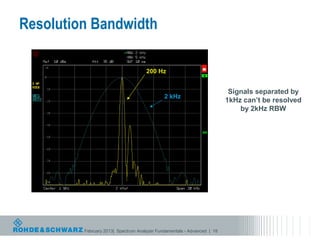
Resolution Bandwidth

                                     200 Hz


                                                                          Signals separated by
                                             2 kHz
                                                                         1kHz can’t be resolved
                                                                             by 2kHz RBW


         February 2013| Spectrum Analyzer Fundamentals - Advanced | 18
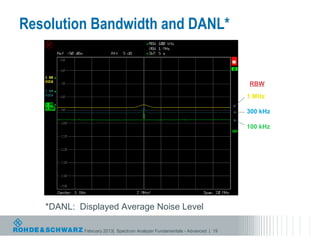
Resolution Bandwidth and DANL*


                                                                           RBW

                                                                           1 MHz

                                                                           300 kHz

                                                                           100 kHz


   *DANL: Displayed Average Noise Level

           February 2013| Spectrum Analyzer Fundamentals - Advanced | 19
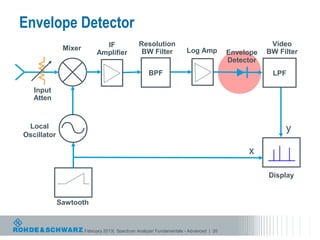
Envelope Detector
                             IF               Resolution                                          Video
              Mixer                            BW Filter            Log Amp                      BW Filter
                           Amplifier                                                  Envelope
                                                                                      Detector
                                                   BPF                                            LPF

   Input
   Atten


 Local                                                                                                y
Oscillator

                                                                                           x

                                                                                                 Display


             Sawtooth


                      February 2013| Spectrum Analyzer Fundamentals - Advanced | 20
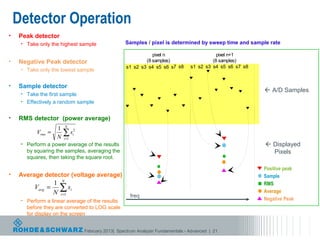
Detector Operation
•   Peak detector
     • Take only the highest sample                       Samples / pixel is determined by sweep time and sample rate

                                                                      pixel n                      pixel n+1
•   Negative Peak detector                                         (8 samples)                   (8 samples)
                                                           s1 s2 s3 s4 s5 s6 s7 s8      s1 s2 s3 s4 s5 s6 s7 s8
     • Take only the lowest sample


•   Sample detector
                                                                                                                   A/D Samples
     • Take the first sample
     • Effectively a random sample


•   RMS detector (power average)
                            N
                    1
           Vrms =
                    N
                        ∑s
                         i =1
                                    2
                                    i

     • Perform a power average of the results                                                                      Displayed
       by squaring the samples, averaging the                                                                       Pixels
       squares, then taking the square root.

                                                                                                                  Positive peak
•   Average detector (voltage average)                                                                            Sample
                        N
                   1                                                                                              RMS
          Vavg   =
                   N
                       ∑s
                       i =1
                                i
                                                                                                                  Average
                                                            freq
     • Perform a linear average of the results                                                                    Negative Peak
       before they are converted to LOG scale
       for display on the screen


                                        February 2013| Spectrum Analyzer Fundamentals - Advanced | 21
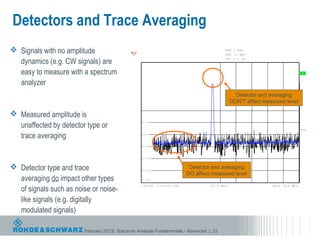
Detectors and Trace Averaging
 Signals with no amplitude                                                                                   RBW
                                                                                                              VBW
                                                                                                                    3
                                                                                                                    10
                                                                                                                         MHz
                                                                                                                          MHz


  dynamics (e.g. CW signals) are
                                                      Ref     -20   dBm               Att   5   dB            SWT   2.5    ms

                                                       -20


  easy to measure with a spectrum                      -30
                                                                                                                                                        A


  analyzer                                   1 SA
                                             AVG
                                                       -40

                                             2 SA *
                                             CLRWR                                                                   Detector and averaging
                                                       -50
                                                                                                                   DON’T affect measured level
                                                       -60
 Measured amplitude is
  unaffected by detector type or
                                                       -70

                                                                                                                                                       3DB

  trace averaging                                      -80


                                                       -90


                                                       -100


 Detector type and trace                              -110
                                                                                      Detector and averaging
                                                                                     DO affect measured level
  averaging do impact other types                      -120


  of signals such as noise or noise-
                                                      Center        1.03025   GHz                    62.5   MHz/                    Span   625   MHz


  like signals (e.g. digitally
  modulated signals)                        Date: 3.MAR.2009              16:33:15


                        February 2013| Spectrum Analyzer Fundamentals - Advanced | 22
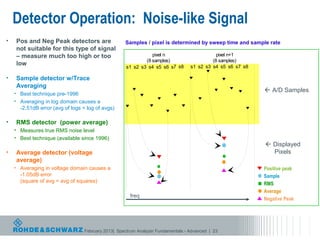
Detector Operation: Noise-like Signal
•   Pos and Neg Peak detectors are                 Samples / pixel is determined by sweep time and sample rate
    not suitable for this type of signal
    – measure much too high or too                             pixel n                      pixel n+1
                                                            (8 samples)                   (8 samples)
    low
                                                    s1 s2 s3 s4 s5 s6 s7 s8      s1 s2 s3 s4 s5 s6 s7 s8

•   Sample detector w/Trace
    Averaging
    • Best technique pre-1996
                                                                                                            A/D Samples
    • Averaging in log domain causes a
      -2.51dB error (avg of logs < log of avgs)

•   RMS detector (power average)
    • Measures true RMS noise level
    • Best technique (available since 1996)
                                                                                                            Displayed
•   Average detector (voltage                                                                                Pixels
    average)
    • Averaging in voltage domain causes a                                                                 Positive peak
      -1.05dB error                                                                                        Sample
      (square of avg < avg of squares)
                                                                                                           RMS
                                                                                                           Average
                                                     freq
                                                                                                           Negative Peak


                                 February 2013| Spectrum Analyzer Fundamentals - Advanced | 23
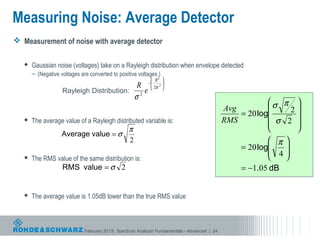
Measuring Noise: Average Detector
 Measurement of noise with average detector

      Gaussian noise (voltages) take on a Rayleigh distribution when envelope detected
       – (Negative voltages are converted to positive voltages.)
                                                               R2 
                                                             − 2 
                                                      R        2σ 
                                                                  
                    Rayleigh Distribution:               e
                                                      σ2
                                                                                                          σ π 
                                                                                              Avg              2
                                                                                                  = 20 log      
      The average value of a Rayleigh distributed variable is:                               RMS          σ 2 
                                                  π                                                             
                    Average value = σ
                                                  2                                                        π 
                                                                                                  = 20 log
                                                                                                           4
                                                                                                              
      The RMS value of the same distribution is:                                                            
                    RMS value = σ 2                                                               = −1.05 dB


      The average value is 1.05dB lower than the true RMS value


                              February 2013| Spectrum Analyzer Fundamentals - Advanced | 24
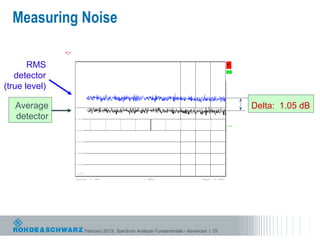
Measuring Noise
                                                                                 RBW   200   kHz
                                                                                 VBW   500   kHz
                        Ref     -90   dBm                  Att   5   dB          SWT   2.5   ms


       RMS               -90
                                                                                                                     *
   detector
                                                                                                                      A
                         -91

               1 RM *


(true level)
               VIEW
                         -92

               2 AV *
               VIEW
                         -93


   Average                                                                                                                 Delta: 1.05 dB
               3 SA
               VIEW
                         -94


   detector              -95

                                                                                                                     3DB
                         -96


                         -97


                         -98


                         -99


                         -100

                        Center        1   GHz                             1   MHz/                 Span   10   MHz


               Date: 13.MAR.2009                15:06:16


                                February 2013| Spectrum Analyzer Fundamentals - Advanced | 25
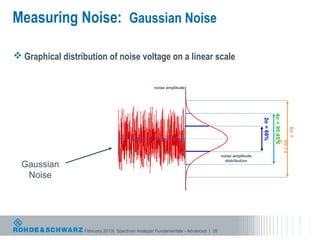
Measuring Noise: Gaussian Noise

 Graphical distribution of noise voltage on a linear scale


                                                 noise amplitude


                                                                                                               4σ = 95.45%
                                                                                                    2σ = 68%


                                                                                                                             6σ =
                                                                                                                         %
                                                                                                                         99.73
                                                                                  noise amplitude
                                                                                    distribution
  Gaussian
   Noise


                  February 2013| Spectrum Analyzer Fundamentals - Advanced | 26
Measuring Noise: Sample Detector w/Log Averaging
 •       Video (log) averaging (dBm) values causes a negative shift in the result.
     •    Positive peaks are compressed            Avg value of a Gaussian variable g(x) with µ = 0, σ = 1
     •    Negative peaks are enhanced               → E [ 20 log( g ( x ) ) ] = −2.51 dB

 •       The log of the average is not the same as the average of the log values
 •       The delta for a Gaussian distribution is -2.51 dB
 •       Linear averaging solves this problem, but was not available until relatively recently
                                                             Amplitude


                        Noise on log (dB) scale                    Rayleigh Distribution


                           February 2013| Spectrum Analyzer Fundamentals - Advanced | 27
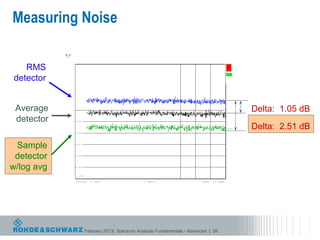
Measuring Noise
                                                                              RBW   200   kHz
                                                                              VBW   500   kHz
                     Ref     -90   dBm                  Att   5   dB          SWT   2.5   ms


   RMS                -90
                                                                                                                  *
detector
                                                                                                                   A
                      -91

            1 RM *
            VIEW
                      -92

            2 AV *
            VIEW
                      -93


 Average                                                                                                                Delta: 1.05 dB
            3 SA
            VIEW      -94


 detector             -95


                      -96
                                                                                                                  3DB   Delta: 2.51 dB

 Sample               -97


 detector             -98


w/log avg             -99


                      -100

                     Center        1   GHz                             1   MHz/                 Span   10   MHz


            Date: 13.MAR.2009                15:06:16


                             February 2013| Spectrum Analyzer Fundamentals - Advanced | 28
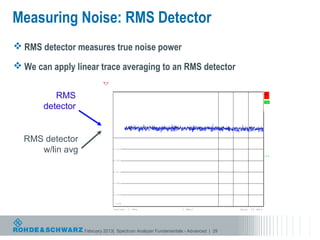
Measuring Noise: RMS Detector
 RMS detector measures true noise power

 We can apply linear trace averaging to an RMS detector
                                                                                 RBW   200   kHz
                                                                                 VBW   2   MHz
                                   Ref     -90   dBm       Att   5   dB          SWT   2.5   ms


          RMS                       -90
                                                                                                                     *
                                                                                                                      A

       detector
                                    -91

                          1 RM *
                          VIEW
                                    -92

                          2 RM *
                          VIEW
                                    -93


  RMS detector                      -94


     w/lin avg                      -95

                                                                                                                     3DB
                                    -96


                                    -97


                                    -98


                                    -99


                                    -100

                                   Center        1   GHz                  1   MHz/                 Span   10   MHz


                  FebruaryDate: 13.MAR.2009 Analyzer Fundamentals - Advanced | 29
                           2013| Spectrum 17:29:46
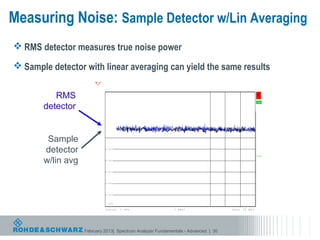
Measuring Noise: Sample Detector w/Lin Averaging
 RMS detector measures true noise power

 Sample detector with linear averaging can yield the same results
                                                                                           RBW   200   kHz
                                                                                           VBW   500   kHz
                                Ref     -90   dBm                    Att   5   dB          SWT   2.5   ms


          RMS                    -90
                                                                                                                               *
                                                                                                                                A

       detector
                                 -91

                       1 RM *
                       VIEW
                                 -92

                       2 SA
                       AVG
                                 -93


        Sample                   -94


       detector                  -95

                                        SWP       1000   of   1000
                                                                                                                               3DB

       w/lin avg                 -96


                                 -97


                                 -98


                                 -99


                                 -100

                                Center        1   GHz                               1   MHz/                 Span   10   MHz


                   February 2013| Spectrum Analyzer Fundamentals - Advanced | 30
                       Date: 13.MAR.2009 15:13:07
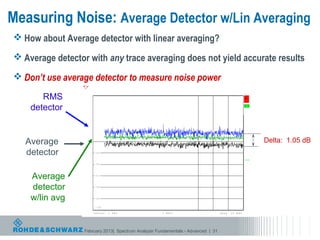
Measuring Noise: Average Detector w/Lin Averaging
 How about Average detector with linear averaging?

 Average detector with any trace averaging does not yield accurate results

 Don’t use average detector to measure noise power
                                                                                   RBW   200   kHz
                                                                                   VBW   2   MHz
                          Ref     -90   dBm                  Att   5   dB          SWT   2.5   ms

       RMS                 -90
                                                                                                                       *
    detector     1 RM *
                           -91
                                                                                                                        A


                 VIEW
                           -92

                 2 AV *
                 VIEW
                           -93

                 3 AV *

   Average       VIEW
                           -94                                                                                               Delta: 1.05 dB
   detector                -95

                                                                                                                       3DB
                           -96


    Average                -97


    detector               -98


    w/lin avg              -99


                           -100

                          Center        1   GHz                             1   MHz/                 Span   10   MHz


                  February 2013| Spectrum Analyzer Fundamentals - Advanced | 31
                 Date: 13.MAR.2009                18:01:57
Detectors, Averaging, and Noise
 Measuring Noise with the RMS Detector
     To get a smoother trace use a slower sweep time – more samples/pixel
      – 500ms sweep, 32MHz A/D sample rate, 625 pixels  over 25,000 samples per pixel
     Or apply linear (power) trace averaging to average multiple traces


 Measuring Noise with the Sample Detector
     Only one sample per pixel is used so no advantage to slow sweep
     To get a smoother trace use Linear or Power average
     Log averaging will result in a -2.51dB measurement error


 Measuring noise with the Pos Peak, Neg Peak, or Average Detector
     Not recommended for measuring level of noise or noise-like signals


                         February 2013| Spectrum Analyzer Fundamentals - Advanced | 32
Video Filter
                             IF               Resolution                                          Video
              Mixer                            BW Filter            Log Amp                      BW Filter
                           Amplifier                                                  Envelope
                                                                                      Detector
                                                   BPF                                            LPF

   Input
   Atten


 Local                                                                                                y
Oscillator

                                                                                           x

                                                                                                 Display


             Sawtooth


                      February 2013| Spectrum Analyzer Fundamentals - Advanced | 33
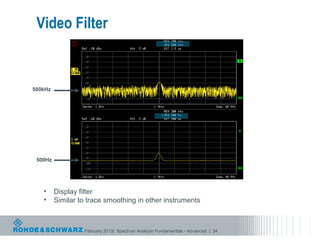
Video Filter


500kHz


 500Hz


   •     Display filter
   •     Similar to trace smoothing in other instruments


                  February 2013| Spectrum Analyzer Fundamentals - Advanced | 34
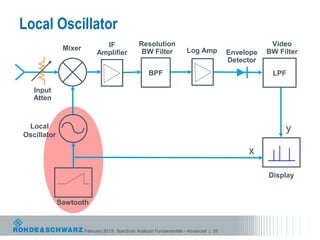
Local Oscillator
                             IF               Resolution                                          Video
              Mixer                            BW Filter            Log Amp                      BW Filter
                           Amplifier                                                  Envelope
                                                                                      Detector
                                                   BPF                                            LPF

   Input
   Atten


 Local                                                                                                y
Oscillator

                                                                                           x

                                                                                                 Display


             Sawtooth


                      February 2013| Spectrum Analyzer Fundamentals - Advanced | 35
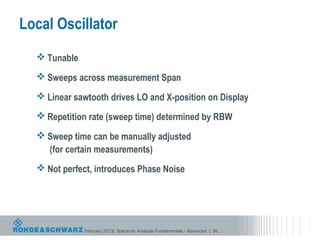
Local Oscillator
   Tunable

   Sweeps across measurement Span

   Linear sawtooth drives LO and X-position on Display

   Repetition rate (sweep time) determined by RBW

   Sweep time can be manually adjusted
    (for certain measurements)
   Not perfect, introduces Phase Noise


              February 2013| Spectrum Analyzer Fundamentals - Advanced | 36
Agenda
 What is a spectrum analyzer?

 Basic spectrum analyzer architecture

 Dynamic Range

 Spectrum analyzer features and usage

 Advanced Spectrum Analyzer Architecture

 Standard Measurements

 Advanced Measurements


            February 2013| Spectrum Analyzer Fundamentals - Advanced | 37
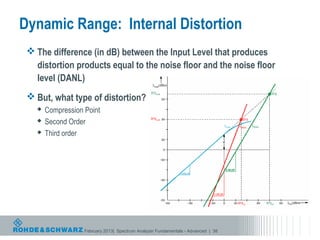
Dynamic Range: Internal Distortion
  The difference (in dB) between the Input Level that produces
   distortion products equal to the noise floor and the noise floor
   level (DANL)
  But, what type of distortion?
    Compression Point
    Second Order
    Third order


                 February 2013| Spectrum Analyzer Fundamentals - Advanced | 38
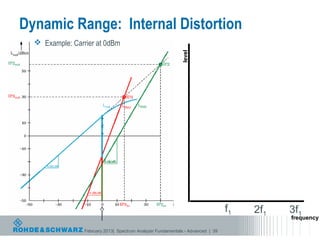
Dynamic Range: Internal Distortion
   Example: Carrier at 0dBm


                                                             level


                                                                                 f1   2f1   3f1
                                                                                            frequency

                 February 2013| Spectrum Analyzer Fundamentals - Advanced | 39
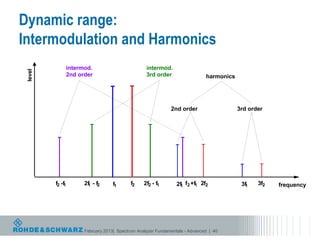
Dynamic range:
Intermodulation and Harmonics
                 intermod.                         intermod.
                                                   Intermod.
 level


                 2nd order                         3rd order                  harmonics


                                                              2nd order                   3rd order


         f2 -f
             1         2f - f2
                        1           f1      f2    2f2 - f1       2f f2 +f1 2f2
                                                                  1                        3f
                                                                                            1    3f2   frequency


                       February 2013| Spectrum Analyzer Fundamentals - Advanced | 40
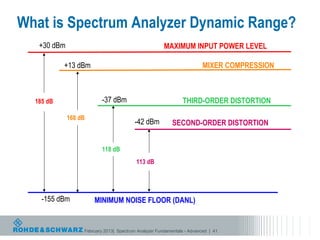
What is Spectrum Analyzer Dynamic Range?
   +30 dBm                                            MAXIMUM INPUT POWER LEVEL

           +13 dBm                                                      MIXER COMPRESSION


  185 dB                  -37 dBm                              THIRD-ORDER DISTORTION

             168 dB
                                         -42 dBm          SECOND-ORDER DISTORTION


                          118 dB
                                         113 dB


    -155 dBm          MINIMUM NOISE FLOOR (DANL)


                  February 2013| Spectrum Analyzer Fundamentals - Advanced | 41
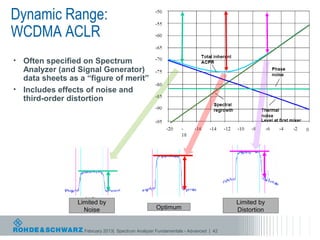
Dynamic Range:
WCDMA ACLR
• Often specified on Spectrum
  Analyzer (and Signal Generator)
  data sheets as a “figure of merit”
• Includes effects of noise and
  third-order distortion


                 Limited by                                                        Limited by
                   Noise                           Optimum                         Distortion


                   February 2013| Spectrum Analyzer Fundamentals - Advanced | 42
Agenda
 What is a spectrum analyzer?

 Basic spectrum analyzer architecture

 Dynamic Range

 Spectrum analyzer features and usage

 Advanced Spectrum Analyzer Architecture

 Standard Measurements

 Advanced Measurements


            February 2013| Spectrum Analyzer Fundamentals - Advanced | 43
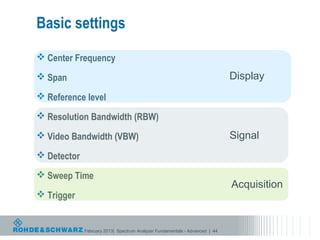
Basic settings
 Center Frequency

 Span                                                                       Display
 Reference level

 Resolution Bandwidth (RBW)

 Video Bandwidth (VBW)                                                      Signal
 Detector

 Sweep Time
                                                                             Acquisition
 Trigger


             February 2013| Spectrum Analyzer Fundamentals - Advanced | 44
Triggering
  Free run
  External trigger
    Demodulation
    Pulsed measurements in zero span


  IF level
      Instrument is triggered when IF level reaches defined level

  Video
      Instrument is triggered when Video output reaches defined level

  Gated trigger
    Defines measurement interval in time
    Typically used for viewing bursted signals in the frequency domain


                  February 2013| Spectrum Analyzer Fundamentals - Advanced | 45
How to get most sensitivity?
  Make frequency span very small

  Set RBW to lowest value

  Set Ref Level to low value

  Set Attenuation to 0dB (must be done manually)

  Turn on Preamp


            February 2013| Spectrum Analyzer Fundamentals - Advanced | 46
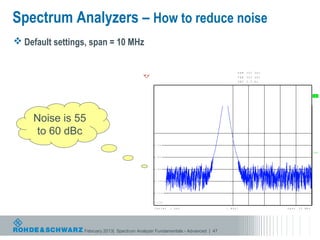
Spectrum Analyzers – How to reduce noise
 Default settings, span = 10 MHz


                                                                                                RBW   200   kHz
                                                                                                VBW   500   kHz
                                                   Ref    -20   dBm       Att   5   dB          SWT   2.5   ms

                                                   -20


                                                                                                                                     A
                                                   -30

                                           1 AP
                                           CLRWR
                                                   -40


     Noise is 55                                   -50


     to 60 dBc                                     -60


                                                   -70

                                                                                                                                    3DB
                                                   -80


                                                   -90


                                                   -100


                                                   -110


                                                   -120

                                                   Center       1   GHz                  1   MHz/                 Span   10   MHz


                 February 2013| Spectrum Analyzer 2.MAR.2009 20:06:32
                                           Date: Fundamentals - Advanced | 47
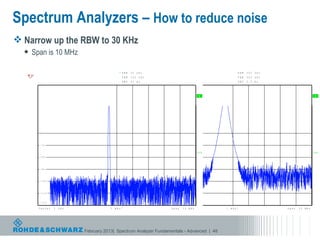
Spectrum Analyzers – How to reduce noise
 Narrow up the RBW to 30 KHz
     Span is 10 MHz

                                                               * RBW   30    kHz                                                                          RBW   200   kHz
                                                                VBW    100    kHz                                                                         VBW   500   kHz
           Ref    -20   dBm               Att   5   dB          SWT    30    ms            Ref    -20   dBm                         Att   5   dB          SWT   2.5   ms

           -20                                                                             -20


                                                                                                                               A                                                               A
           -30                                                                             -30

   1 AP                                                                            1 AP
   CLRWR                                                                           CLRWR
           -40                                                                             -40


           -50                                                                             -50


           -60                                                                             -60


           -70                                                                             -70

                                                                                                                              3DB                                                             3DB
           -80                                                                             -80


           -90                                                                             -90


           -100                                                                            -100


           -110                                                                            -110


           -120                                                                            -120

           Center       1   GHz                          1   MHz/                          Center       1S p a n
                                                                                                           GHz     10   MHz                        1   MHz/                 Span   10   MHz


   Date: 2.MAR.2009           20:07:31   February 2013| Spectrum Analyzer 2.MAR.2009 20:06:32
                                                                   Date: Fundamentals - Advanced | 48
Spectrum Analyzers – How to reduce noise
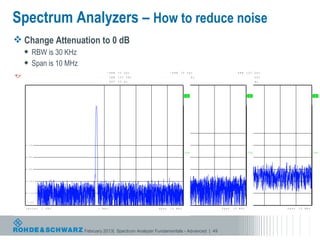
 Change Attenuation to 0 dB
         RBW is 30 KHz
         Span is 10 MHz
                                                                 * RBW     30    kHz                                 * RBW      30    kHz                                    RBW       200   kHz
                                                                   VBW     100    kHz                                   VBW     100       kHz                                VBW       500   kHz
        Ref    -20   dBm              * Att   0 RdeBf    -20    dBSWT
                                                                  m        30    ms     Att      5    dR e f
                                                                                                       B       -20    dSBWmT    30    ms        Att   5   dB                 SWT       2.5   ms

        -20                                       -20                                                   -20


                                                                                                                                      A                                                 A                             A
        -30                                       -30                                                   -30

1 AP                                     1 AP                                                 1 AP
CLRWR                                    CLRWR                                                CLRWR
        -40                                       -40                                                   -40


        -50                                       -50                                                   -50


        -60                                       -60                                                   -60


        -70                                       -70                                                   -70

                                                                                                                                     3DB                                               3DB                           3DB
        -80                                       -80                                                   -80


        -90                                       -90                                                   -90


        -100                                      -100                                                  -100


        -110                                      -110                                                  -110


        -120                                      -120                                                  -120

        Center       1   GHz                     C e n t e1r M H z / H z
                                                               1 G                                     C e n t e r H z1/0 G H z z
                                                                                                             1 M
                                                                                                           Span             MH                                 S p a1n M H z / M H z
                                                                                                                                                                         10                        Span   10   MHz


Date: 2.MAR.2009           20:08:51         February 2013| Spectrum
                                        Date: 2.MAR.2009 20:07:31                       Analyzer 2.MAR.2009 20:06:32
                                                                                          Date: Fundamentals - Advanced | 49
Spectrum Analyzers – How to reduce noise
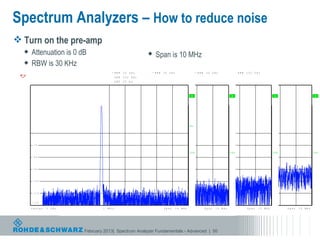
 Turn on the pre-amp
    Attenuation is 0 dB                                                                                        Span is 10 MHz
    RBW is 30 KHz
                                                                        * RBW      30    kHz                  * RBW     30    kHz                        * RBW    30     kHz                       RBW   200    kHz
                                                                          VBW      100        kHz               VBW     100     kHz                       VBW     100     kHz                      VBW   500    kHz
         Ref    -20   dBm               Ref * -20
                                              Att   d B0m d B             R e *T A t3t0 0 m d B m B
                                                                           S Wf - 2         s
                                                                                            0 d                 Ref
                                                                                                                SWT     A20 s
                                                                                                                        - t t m d B5m d B
                                                                                                                        30                                S W T A t3t0   ms
                                                                                                                                                                          5    dB                  SWT   2.5    ms

         -20                             -20                                -20                                  -20


                                                                                                                                                    A                                         A                                  A                       A
         -30                             -30                                -30                                  -30

 1 AP                           1 AP                            1 AP                                  1 AP
 CLRWR                          CLRWR                           CLRWR                                 CLRWR
         -40                             -40                                -40                                  -40


         -50                             -50                                -50                                  -50
                                                                                                                                                   PA

         -60                             -60                                -60                                  -60


         -70                             -70                                -70                                  -70

                                                                                                                                                   3DB                                       3DB                                3DB                     3DB
         -80                             -80                                -80                                  -80


         -90                             -90                                -90                                  -90


         -100                            -100                               -100                                 -100


         -110                            -110                               -110                                 -110


         -120                            -120                               -120                                 -120

         Center       1   GHz           Center      1   GHz     1   M H z /C e n t e r    1    GHz    1   M H z /C e n t e Sr p a 1 G1H0z M H z1
                                                                                                                                  n                MHz/          Span         10    M H z1   MHz/        Span        10   MHz         Span   10   MHz


 Date: 2.MAR.2009           20:09:28 2.MAR.2009 20:08:51 2.MAR.2009 Analyzer 2.MAR.2009 20:06:32
                              Date:        FebruaryDate: Spectrum 20:07:31 Fundamentals - Advanced
                                                    2013|             Date:                                                                                          | 50
Spectrum Analyzers – How to reduce noise
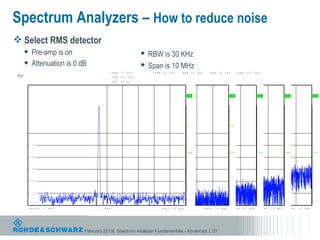
 Select RMS detector
     Pre-amp is on                                                                                         RBW is 30 KHz
     Attenuation is 0 dB                                                                                   Span is 10 MHz
                                                                           * RBW      30    kHz                      * RBW       30    kHz        * RBW        30    kHz       * RBW    30    kHz            RBW    200   kHz
                                                                              VBW     300     kHz                       VBW      100     kHz         VBW       100    kHz        VBW    100     kHz          VBW    500   kHz
         Ref     -20   dBm               R e* A t t 0
                                            f -2        dBm B
                                                        0 d       Ref         S T* A 0 m s 0
                                                                          - 2 0 W d B m3 t t R e f   dB0
                                                                                                     -2      * A  SW0
                                                                                                            dBm ttRefT          d B 0 md B m t t S W 5 d B
                                                                                                                                30
                                                                                                                                -2     s A           T 30            ms    Att SW5
                                                                                                                                                                                 T      dB
                                                                                                                                                                                        30    ms             SWT    2.5   ms

          -20                             -20                      -20                       -20                         -20


                                                                                                                                                           A                                          A                        A                   A                  A
          -30                             -30                      -30                       -30                         -30

1 RM *                           1 AP                   1 AP                     1 AP                       1 AP
CLRWR                            CLRWR                  CLRWR                    CLRWR                      CLRWR
          -40                             -40                      -40                       -40                         -40


          -50                             -50                      -50                       -50                         -50
                                                                                                                                                          PA                                         PA

          -60                             -60                      -60                       -60                         -60


          -70                             -70                      -70                       -70                         -70

                                                                                                                                                          3DB                                        3DB                      3DB                 3DB                3DB
          -80                             -80                      -80                       -80                         -80


          -90                             -90                      -90                       -90                         -90


          -100                            -100                     -100                      -100                        -100


          -110                            -110                     -110                      -110                        -110


          -120                            -120                     -120                      -120                        -120

         Center        1   GHz           Center         1   GHz   C1 nM H z / 1
                                                                   e ter            GHz     Center         1 1 G M H z /C e n tSepra n 1 11 G MH HMzH/z
                                                                                                                  Hz                         0 z                      1    MS p a n
                                                                                                                                                                             Hz/       10   M H z1   M SH p a n
                                                                                                                                                                                                           z/      10   MHz     Span   10   MHz    Span   10   MHz


Date: 2.MAR.2009                            February 2013| Spectrum Analyzer 2.MAR.2009 20:06:32
                                              Date: 2.MAR.2009 20:08:51 Date: Fundamentals - Advanced
                             20:11:02 2.MAR.2009 20:09:28 Date: 2.MAR.2009 20:07:31
                                Date:                                                                                                                                           | 51
Spectrum Analyzers – How to reduce noise
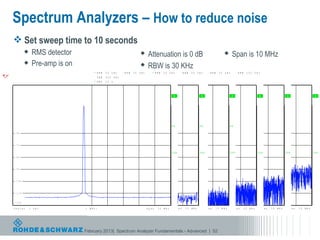
          Set sweep time to 10 seconds
                  RMS detector                                                                                              Attenuation is 0 dB                                                                      Span is 10 MHz
                  Pre-amp is on                                                                                             RBW is 30 KHz
                                                                              * RBW       30    kHz       * RBW       30    kHz       * RBW      30    kHz        * RBW       30    kHz          * RBW    30    kHz            RBW    200   kHz
                                                                                 VBW      300      kHz      VBW       300    kHz         VBW     100      kHz        VBW      100    kHz           VBW    100     kHz          VBW    500   kHz
         Ref    -20   dBm       Ref    -20   dBm tt
                                              * A        R e f d B- 2 0 * B m t S R e f d B- 2 s
                                                           0            dAt * W0 10 0
                                                                                    T                 * A SWT 0 020
                                                                                                     dBm ttRef 3dBmsdBm ttRef
                                                                                                                -    * A  SW0T                   d B 0 md B m t t S W 5 d B
                                                                                                                                                 30
                                                                                                                                                 -2     s A           T 30          ms       Att SW5
                                                                                                                                                                                                   T      dB
                                                                                                                                                                                                          30    ms             SWT    2.5   ms

         -20                    -20                       -20                       -20                         -20                       -20


                                                                                                                                                            A                            A                              A                        A                   A                  A
         -30                    -30                       -30                       -30                         -30                       -30

1 RM *                1 RM *                     1 AP                   1 AP                        1 AP                      1 AP
CLRWR                 CLRWR                      CLRWR                  CLRWR                       CLRWR                     CLRWR
         -40                    -40                       -40                       -40                         -40                       -40


         -50                    -50                       -50                       -50                         -50                       -50
                                                                                                                                                          PA                         PA                                PA

         -60                    -60                       -60                       -60                         -60                       -60


         -70                    -70                       -70                       -70                         -70                       -70

                                                                                                                                                          3DB                        3DB                               3DB                      3DB                 3DB                3DB
         -80                    -80                       -80                       -80                         -80                       -80


         -90                    -90                       -90                       -90                         -90                       -90


         -100                   -100                      -100                      -100                        -100                      -100


         -110                   -110                      -110                      -110                        -110                      -110


         -120                   -120                      -120                      -120                        -120                      -120

         Center       1   GHz   Center       1   GHz     Center       11 MGHHzz/ C e n t e r       11 MGHHzz/ C e n t e r    1 1 G MpHazn/C e1n0t eMrH z 1 1 G MH Hazn/ 1 0
                                                                                                                                 SHz                         Spz              MHz 1          MS p a n
                                                                                                                                                                                               Hz/       10   M H z1   M SH p a n
                                                                                                                                                                                                                             z/      10   MHz     Span   10   MHz    Span   10   MHz


              Date: 2.MAR.2009 20:11:02 February 2013| Date: 2.MAR.2009 20:07:31
Date: 2.MAR.2009 20:11:50    Date: 2.MAR.2009 20:09:28 Spectrum Analyzer 2.MAR.2009 20:06:32
                                           Date: 2.MAR.2009 20:08:51 Date: Fundamentals - Advanced                                                                                                | 52
Spectrum Analyzers – How to reduce noise
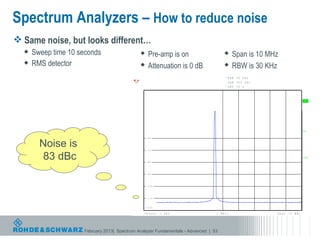
 Same noise, but looks different…
   Sweep time 10 seconds                     Pre-amp is on                                            Span is 10 MHz
   RMS detector                              Attenuation is 0 dB                                      RBW is 30 KHz
                                                                                                       * RBW   30    kHz
                                                                                                        VBW    300       kHz
                                                  Ref    -20   dBm              * Att   0   dB         * SWT   10    s

                                                  -20


                                                                                                                                                  A
                                                  -30

                                         1 RM *
                                         CLRWR
                                                  -40


                                                  -50
                                                                                                                                                 PA

                                                  -60


      Noise is                                    -70


       83 dBc                                     -80
                                                                                                                                                 3DB


                                                  -90


                                                  -100


                                                  -110


                                                  -120

                                                  Center       1   GHz                           1   MHz/                      Span   10   MHz


                   February 2013| Spectrum Analyzer Fundamentals - Advanced | 53
                                        Date: 2.MAR.2009             20:11:50
Agenda
 What is a spectrum analyzer?

 Basic spectrum analyzer architecture

 Dynamic Range

 Spectrum analyzer features and usage

 Advanced Spectrum Analyzer Architecture

 Standard Measurements

 Advanced Measurements


            February 2013| Spectrum Analyzer Fundamentals - Advanced | 54
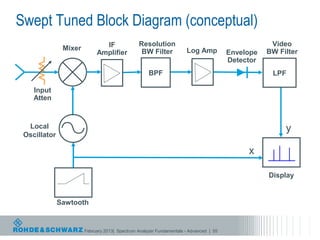
Swept Tuned Block Diagram (conceptual)
                              IF               Resolution                                          Video
               Mixer                            BW Filter            Log Amp                      BW Filter
                            Amplifier                                                  Envelope
                                                                                       Detector
                                                    BPF                                            LPF

    Input
    Atten


  Local                                                                                                y
 Oscillator

                                                                                            x

                                                                                                  Display


              Sawtooth


                       February 2013| Spectrum Analyzer Fundamentals - Advanced | 55
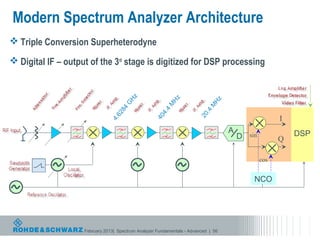
Modern Spectrum Analyzer Architecture
 Triple Conversion Superheterodyne

 Digital IF – output of the 3rd stage is digitized for DSP processing


                                       Hz


                                                          Hz


                                                                             Hz
                                      G


                                                         M


                                                                            M
                                     84


                                                          4


                                                                           .4
                                                       4.
                                  62


                                                                        20
                                                                                                        I


                                                    40
                               4.

                                                                                    A                       DSP
                                                                                        D   sin
                                                                                                        Q

                                                                                                  cos


                                                                                             NCO


                    February 2013| Spectrum Analyzer Fundamentals - Advanced | 56
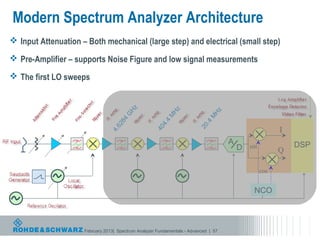
Modern Spectrum Analyzer Architecture
 Input Attenuation – Both mechanical (large step) and electrical (small step)

 Pre-Amplifier – supports Noise Figure and low signal measurements

 The first LO sweeps


                                        Hz


                                                           Hz


                                                                              Hz
                                       G


                                                          M


                                                                             M
                                      4


                                                           4
                                   28


                                                                            .4
                                                        4.


                                                                         20
                                                                                                         I
                                   6


                                                     40
                                4.


                                                                                     A                       DSP
                                                                                         D   sin
                                                                                                         Q

                                                                                                   cos


                                                                                              NCO


                     February 2013| Spectrum Analyzer Fundamentals - Advanced | 57
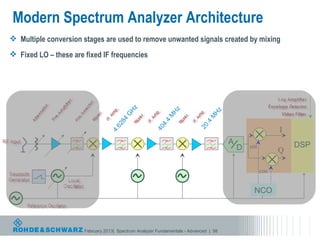
Modern Spectrum Analyzer Architecture
 Multiple conversion stages are used to remove unwanted signals created by mixing
 Fixed LO – these are fixed IF frequencies


                                          Hz


                                                             Hz


                                                                                Hz
                                         G


                                                            M


                                                                               M
                                        4


                                                             4
                                     28


                                                                              .4
                                                          4.


                                                                           20
                                                                                                           I
                                     6


                                                       40
                                  4.


                                                                                       A                       DSP
                                                                                           D   sin
                                                                                                           Q

                                                                                                     cos


                                                                                                NCO


                       February 2013| Spectrum Analyzer Fundamentals - Advanced | 58
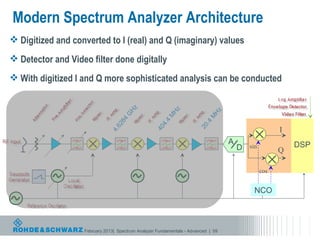
Modern Spectrum Analyzer Architecture
 Digitized and converted to I (real) and Q (imaginary) values
 Detector and Video filter done digitally
 With digitized I and Q more sophisticated analysis can be conducted


                                      Hz


                                                         Hz


                                                                            Hz
                                     G


                                                        M


                                                                           M
                                    4


                                                         4
                                 28


                                                                          .4
                                                      4.


                                                                       20
                                                                                                       I
                                 6


                                                   40
                              4.


                                                                                   A                       DSP
                                                                                       D   sin
                                                                                                       Q

                                                                                                 cos


                                                                                            NCO


                   February 2013| Spectrum Analyzer Fundamentals - Advanced | 59
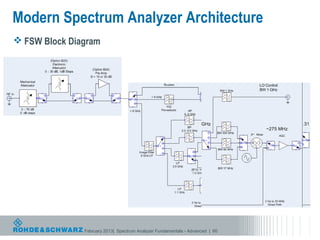
Modern Spectrum Analyzer Architecture
 FSW Block Diagram


               February 2013| Spectrum Analyzer Fundamentals - Advanced | 60
Agenda
 What is a spectrum analyzer?

 Basic spectrum analyzer architecture

 Dynamic Range

 Spectrum analyzer features and usage

 Advanced Spectrum Analyzer Architecture

 Standard Measurements

 Advanced Measurements


            February 2013| Spectrum Analyzer Fundamentals - Advanced | 61
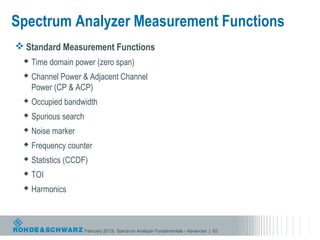
Spectrum Analyzer Measurement Functions
 Standard Measurement Functions
   Time domain power (zero span)

   Channel Power & Adjacent Channel
    Power (CP & ACP)
   Occupied bandwidth

   Spurious search

   Noise marker

   Frequency counter

   Statistics (CCDF)

   TOI

   Harmonics


                      February 2013| Spectrum Analyzer Fundamentals - Advanced | 62
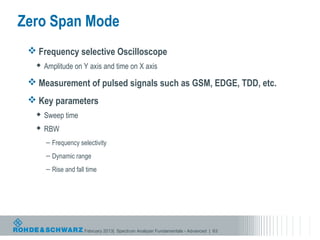
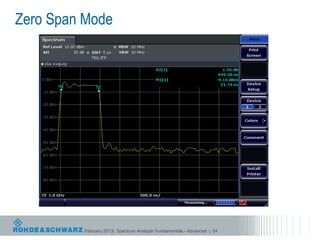
Zero Span Mode
  Frequency selective Oscilloscope
      Amplitude on Y axis and time on X axis

  Measurement of pulsed signals such as GSM, EDGE, TDD, etc.
  Key parameters
      Sweep time
      RBW
       – Frequency selectivity
       – Dynamic range
       – Rise and fall time


                      February 2013| Spectrum Analyzer Fundamentals - Advanced | 63
Zero Span Mode


         February 2013| Spectrum Analyzer Fundamentals - Advanced | 64
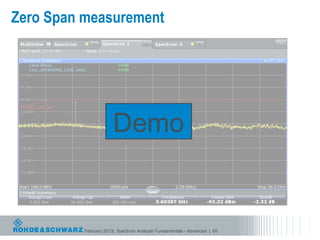
Zero Span measurement


                       Demo


          February 2013| Spectrum Analyzer Fundamentals - Advanced | 65
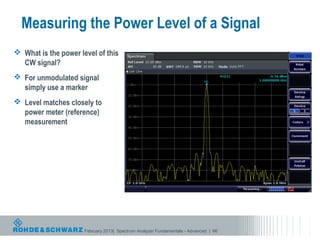
Measuring the Power Level of a Signal
 What is the power level of this
  CW signal?
 For unmodulated signal
  simply use a marker
 Level matches closely to
  power meter (reference)
  measurement


                      February 2013| Spectrum Analyzer Fundamentals - Advanced | 66
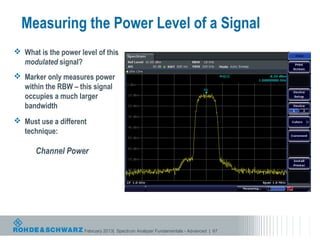
Measuring the Power Level of a Signal
 What is the power level of this
  modulated signal?
 Marker only measures power
  within the RBW – this signal
  occupies a much larger
  bandwidth
 Must use a different
  technique:

      Channel Power


                      February 2013| Spectrum Analyzer Fundamentals - Advanced | 67
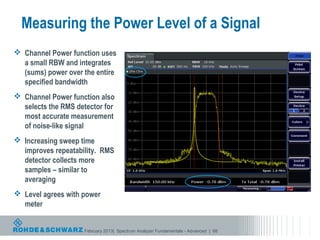
Measuring the Power Level of a Signal
 Channel Power function uses
  a small RBW and integrates
  (sums) power over the entire
  specified bandwidth
 Channel Power function also
  selects the RMS detector for
  most accurate measurement
  of noise-like signal
 Increasing sweep time
  improves repeatability. RMS
  detector collects more
  samples – similar to
  averaging
 Level agrees with power
  meter


                    February 2013| Spectrum Analyzer Fundamentals - Advanced | 68
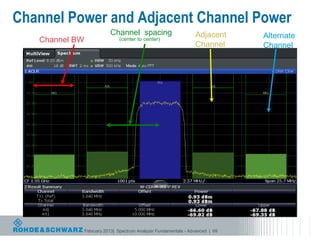
Channel Power and Adjacent Channel Power
                           Channel spacing                        Adjacent      Alternate
   Channel BW                  (center to center)
                                                                  Channel       Channel


                February 2013| Spectrum Analyzer Fundamentals - Advanced | 69
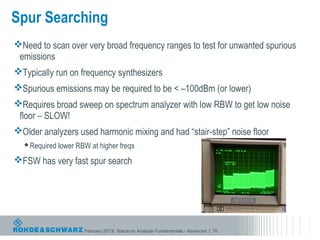
Spur Searching
Need to scan over very broad frequency ranges to test for unwanted spurious
 emissions
Typically run on frequency synthesizers
Spurious emissions may be required to be < –100dBm (or lower)
Requires broad sweep on spectrum analyzer with low RBW to get low noise
 floor – SLOW!
Older analyzers used harmonic mixing and had “stair-step” noise floor
   Required lower RBW at higher freqs

FSW has very fast spur search


                     February 2013| Spectrum Analyzer Fundamentals - Advanced | 70
Spur Search using basic Spectrum Analyzer
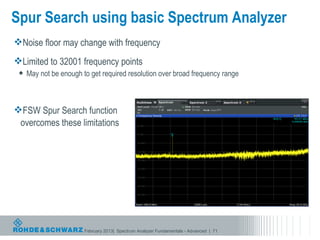
Noise floor may change with frequency
Limited to 32001 frequency points
    May not be enough to get required resolution over broad frequency range


FSW Spur Search function
 overcomes these limitations


                        February 2013| Spectrum Analyzer Fundamentals - Advanced | 71
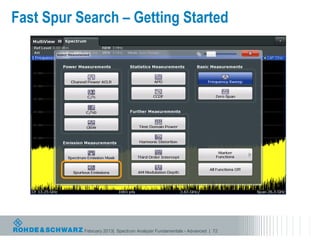
Fast Spur Search – Getting Started


           February 2013| Spectrum Analyzer Fundamentals - Advanced | 72
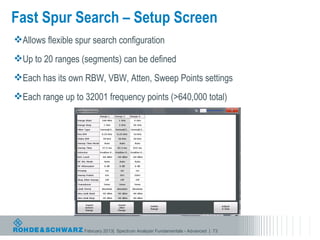
Fast Spur Search – Setup Screen
Allows flexible spur search configuration
Up to 20 ranges (segments) can be defined
Each has its own RBW, VBW, Atten, Sweep Points settings
Each range up to 32001 frequency points (>640,000 total)


                   February 2013| Spectrum Analyzer Fundamentals - Advanced | 73
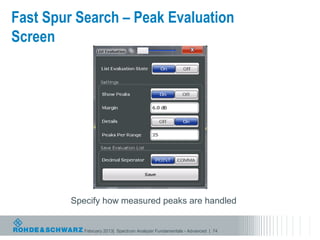
Fast Spur Search – Peak Evaluation
Screen


         Specify how measured peaks are handled


            February 2013| Spectrum Analyzer Fundamentals - Advanced | 74
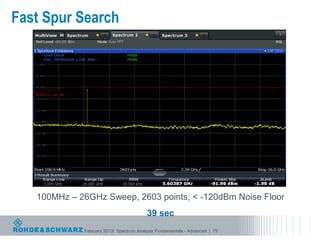
Fast Spur Search


   100MHz – 26GHz Sweep, 2603 points, < -120dBm Noise Floor
                                         39 sec
             February 2013| Spectrum Analyzer Fundamentals - Advanced | 75
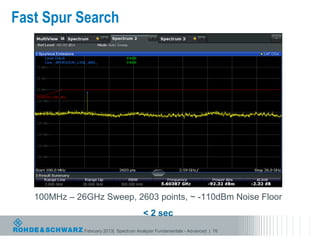
Fast Spur Search


   100MHz – 26GHz Sweep, 2603 points, ~ -110dBm Noise Floor
                                        < 2 sec
              February 2013| Spectrum Analyzer Fundamentals - Advanced | 76
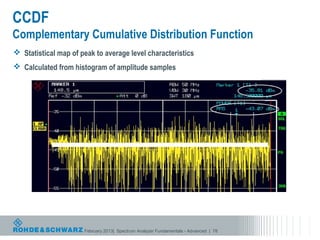
CCDF
Complementary Cumulative Distribution Function
 Statistical map of peak to average level characteristics
 Calculated from histogram of amplitude samples


                      February 2013| Spectrum Analyzer Fundamentals - Advanced | 78
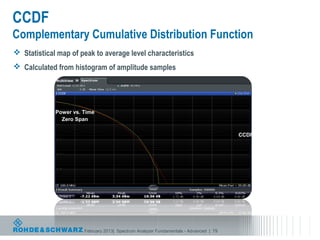
CCDF
Complementary Cumulative Distribution Function
 Statistical map of peak to average level characteristics
 Calculated from histogram of amplitude samples


             Power vs. Time
               Zero Span

                                                                                       CCDF


                       February 2013| Spectrum Analyzer Fundamentals - Advanced | 79
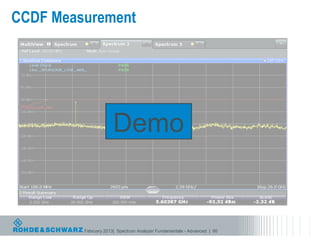
CCDF Measurement


                      Demo


         February 2013| Spectrum Analyzer Fundamentals - Advanced | 80
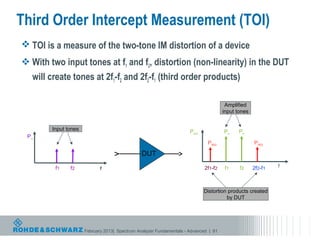
Third Order Intercept Measurement (TOI)
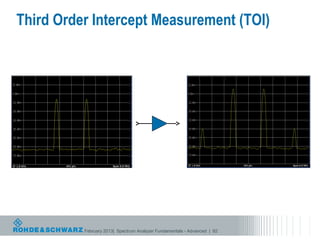
 TOI is a measure of the two-tone IM distortion of a device
 With two input tones at f1 and f2, distortion (non-linearity) in the DUT
   will create tones at 2f1-f2 and 2f2-f1 (third order products)

                                                                                       Amplified
                                                                                      input tones


        Input tones                                                   Pout            Po     Po
 Pin
                                                                              PIM3                  PIM3

                                                DUT
         f1    f2                                                            2f1-f2    f1    f2     2f2-f1   f
                             f


                                                                             Distortion products created
                                                                                       by DUT


                      February 2013| Spectrum Analyzer Fundamentals - Advanced | 81
Third Order Intercept Measurement (TOI)


          February 2013| Spectrum Analyzer Fundamentals - Advanced | 82
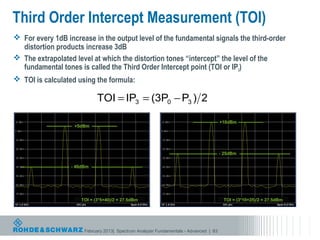
Third Order Intercept Measurement (TOI)
 For every 1dB increase in the output level of the fundamental signals the third-order
  distortion products increase 3dB
 The extrapolated level at which the distortion tones “intercept” the level of the
  fundamental tones is called the Third Order Intercept point (TOI or IP3)
 TOI is calculated using the formula:

                             TOI = IP3 = (3P0 − P3 ) 2

                                                                                       +10dBm
                   +5dBm


                                                                                       - 25dBm

                  - 40dBm


                      TOI = (3*5+40)/2 = 27.5dBm                                        TOI = (3*10+25)/2 = 27.5dBm


                       February 2013| Spectrum Analyzer Fundamentals - Advanced | 83
Third Order Intercept Measurement (TOI)
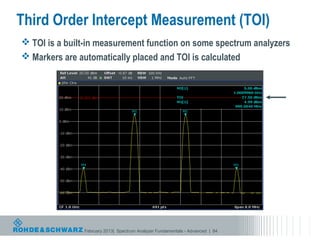
 TOI is a built-in measurement function on some spectrum analyzers
 Markers are automatically placed and TOI is calculated


               February 2013| Spectrum Analyzer Fundamentals - Advanced | 84
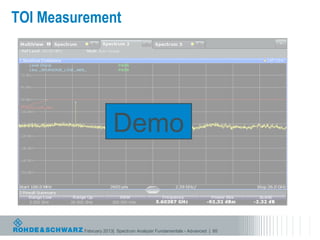
TOI Measurement


                      Demo


         February 2013| Spectrum Analyzer Fundamentals - Advanced | 85
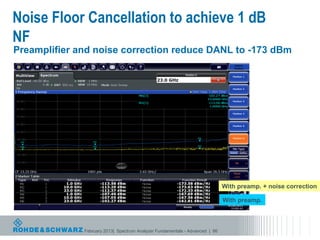
Noise Floor Cancellation to achieve 1 dB
NF
Preamplifier and noise correction reduce DANL to -173 dBm


                                                                              With preamp. + noise correction

                                                                              With preamp.


              February 2013| Spectrum Analyzer Fundamentals - Advanced | 86
Spectrum Analyzer Measurement Functions
l Advanced Measurement Functions
 l Measurement Probes
 l Noise Figure
 l Phase Noise
 l Vector Signal analysis (VSA)
 l Pulsed Signal analysis
 l Multi-carrier Group Delay


l Digital Wireless Comms
 l LTE
 l WCDMA (UMTS)
 l GSM/EDGE
 l CDMA2000/1xEV-DO
 l 802.11(a/b/g/n/ac)
 l WiMAX

                  February 2013| Spectrum Analyzer Fundamentals - Advanced | 87
Probing
•   Provides a means to measure signals within a circuit where no
    connection point is available
•   Usually used for troubleshooting, not accurate measurements
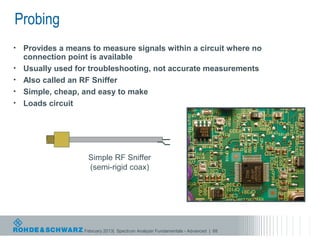
•   Also called an RF Sniffer
•   Simple, cheap, and easy to make
•   Loads circuit


                    Simple RF Sniffer
                    (semi-rigid coax)


                   February 2013| Spectrum Analyzer Fundamentals - Advanced | 88
Probing
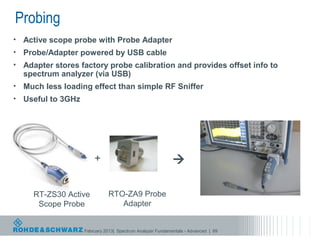
•   Active scope probe with Probe Adapter
•   Probe/Adapter powered by USB cable
•   Adapter stores factory probe calibration and provides offset info to
    spectrum analyzer (via USB)
•   Much less loading effect than simple RF Sniffer
•   Useful to 3GHz


                         +                                   

      RT-ZS30 Active            RTO-ZA9 Probe
       Scope Probe                 Adapter


                     February 2013| Spectrum Analyzer Fundamentals - Advanced | 89
Noise Figure
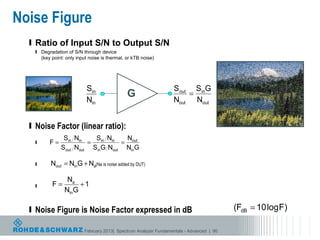
  l Ratio of Input S/N to Output S/N
   l   Degradation of S/N through device
       (key point: only input noise is thermal, or kTB noise)


                            Sin                                    Sout SinG
                                                G                      =
                            Nin                                    Nout Nout


  l Noise Factor (linear ratio):
                 Sin Nin   Sin Nin  N
   l       F=            =         = out
                Sout Nout SinG Nout NinG

   l       Nout = NinG + Na(Na is noise added by DUT)

                   Na
   l        F=         +1
                  NinG

  l Noise Figure is Noise Factor expressed in dB                                           (FdB = 10 log F)

                           February 2013| Spectrum Analyzer Fundamentals - Advanced | 90
Noise Figure
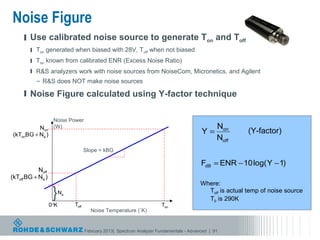
     l Use calibrated noise source to generate Ton and Toff
        l Ton generated when biased with 28V, Toff when not biased
        l Ton known from calibrated ENR (Excess Noise Ratio)
        l R&S analyzers work with noise sources from NoiseCom, Micronetics, and Agilent
           – R&S does NOT make noise sources

     l Noise Figure calculated using Y-factor technique


                    Noise Power
           Non      (W)                                                                          Non
 (kTonBG + Na )                                                                           Y=               (Y-factor)
                                                                                                 Noff
                                     Slope = kBG

                                                                                          FdB = ENR − 10 log( Y − 1)
            Noff
(kToff BG + Na )
                                                                                          Where:
                    }    Na                                                                 Toff is actual temp of noise source
                                                                                            T0 is 290K
                   0°K        Toff                                      Ton
                                       Noise Temperature (˚K)


                                     February 2013| Spectrum Analyzer Fundamentals - Advanced | 91
Noise Figure
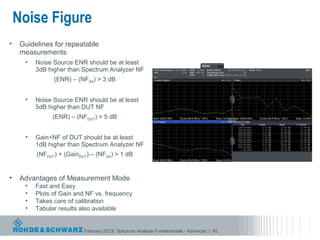
•    Guidelines for repeatable
     measurements
      •   Noise Source ENR should be at least
          3dB higher than Spectrum Analyzer NF
                (ENR) – (NFSA) > 3 dB


      •   Noise Source ENR should be at least
          5dB higher than DUT NF
                (ENR) – (NFDUT) > 5 dB


      •   Gain+NF of DUT should be at least
          1dB higher than Spectrum Analyzer NF
          (NFDUT) + (GainDUT) – (NFSA) > 1 dB


•    Advantages of Measurement Mode
      •   Fast and Easy
      •   Plots of Gain and NF vs. frequency
      •   Takes care of calibration
      •   Tabular results also available


                           February 2013| Spectrum Analyzer Fundamentals - Advanced | 92
Phase Noise
 • Radom (short term) fluctuation in the phase of a waveform
                                                             Level
     • Ideal Signal (noiseless)

        V(t) = A sin(2πνt)
                                                                                       f

          where
             A = nominal amplitude                                                 t
             ν = nominal frequency


     • Real Signal                                           Level


        V(t) = [A + E(t)] sin(2πνt + φ(t))
                                                                                   f
          where
             E(t) = amplitude fluctuations                                         t
             φ(t) = phase fluctuations

           Phase Noise is unintentional phase modulation on a carrier

                   February 2013| Spectrum Analyzer Fundamentals - Advanced | 93
Phase Noise
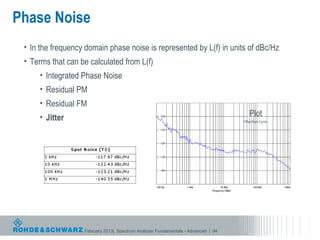
 • In the frequency domain phase noise is represented by L(f) in units of dBc/Hz
 • Terms that can be calculated from L(f)
     • Integrated Phase Noise
     • Residual PM
     • Residual FM
     • Jitter                                                                          Plot
                                                                                   Offset from Carrier


                   February 2013| Spectrum Analyzer Fundamentals - Advanced | 94
Phase Noise

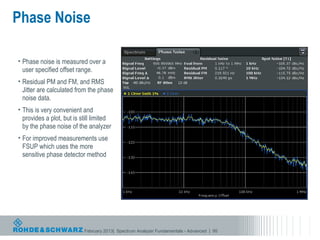
• Phase noise is measured over a
  user specified offset range.
• Residual PM and FM, and RMS
  Jitter are calculated from the phase
  noise data.
• This is very convenient and
  provides a plot, but is still limited
  by the phase noise of the analyzer
• For improved measurements use
  FSUP which uses the more
  sensitive phase detector method


                           February 2013| Spectrum Analyzer Fundamentals - Advanced | 95
Phase Noise Measurement


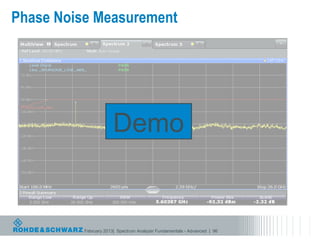
                       Demo


          February 2013| Spectrum Analyzer Fundamentals - Advanced | 96
Vector Signal Analysis (VSA)

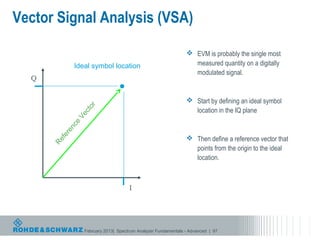
                                                                 EVM is probably the single most
             Ideal symbol location                                measured quantity on a digitally
                                                                  modulated signal.
  Q


                                                                 Start by defining an ideal symbol
                  or

                                                                  location in the IQ plane
                  ct
               Ve
             ce
          en
        er


                                                                 Then define a reference vector that
         f
      Re


                                                                  points from the origin to the ideal
                                                                  location.


                                      I


                  February 2013| Spectrum Analyzer Fundamentals - Advanced | 97
Vector Signal Analysis (VSA)
                                                                                                 Error
                                                                                                 Vector
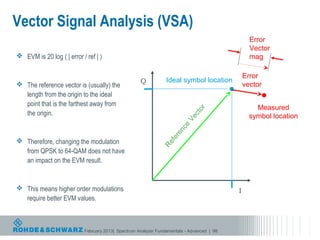
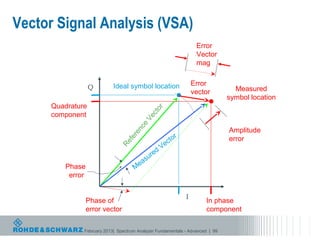
 EVM is 20 log ( | error / ref | )                                                              mag

                                                                                               Error
                                                    Q           Ideal symbol location
 The reference vector is (usually) the                                                        vector
  length from the origin to the ideal
  point that is the farthest away from
                                                                                                   Measured


                                                                              r
                                                                            to
  the origin.                                                                                    symbol location


                                                                            c
                                                                         Ve
                                                                      ce
                                                                   en
                                                                 er
 Therefore, changing the modulation


                                                                 f
                                                              Re
  from QPSK to 64-QAM does not have
  an impact on the EVM result.


 This means higher order modulations                                                      I
  require better EVM values.


                           February 2013| Spectrum Analyzer Fundamentals - Advanced | 98
Vector Signal Analysis (VSA)
                                                                   Error
                                                                   Vector
                                                                   mag


                           Ideal symbol location                  Error
                  Q                                                             Measured
                                                                  vector
                                                                              symbol location
     Quadrature


                                              or
     component


                                            ct
                                           Ve
                                      ce
                                                                              Amplitude
                                       n
                                    re                    r
                                                      ct o                    error
                                 fe

                                                 Ve
                              Re


                                            d
                                         ure
                                     eas
        Phase                       M
         error


                                                              I
                 Phase of                                             In phase
                 error vector                                         component

              February 2013| Spectrum Analyzer Fundamentals - Advanced | 99
Vector Signal Analysis (VSA)

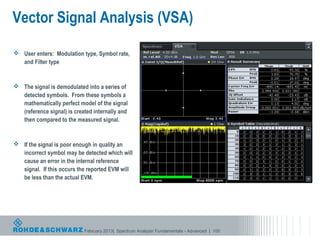
 User enters: Modulation type, Symbol rate,
  and Filter type


 The signal is demodulated into a series of
  detected symbols. From these symbols a
  mathematically perfect model of the signal
  (reference signal) is created internally and
  then compared to the measured signal.


 If the signal is poor enough in quality an
  incorrect symbol may be detected which will
  cause an error in the internal reference
  signal. If this occurs the reported EVM will
  be less than the actual EVM.


                            February 2013| Spectrum Analyzer Fundamentals - Advanced | 100
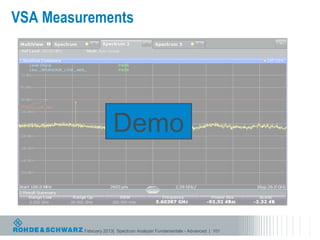
VSA Measurements


                      Demo


         February 2013| Spectrum Analyzer Fundamentals - Advanced | 101
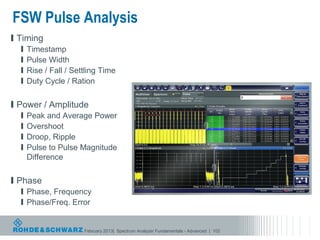
FSW Pulse Analysis
l Timing
  l   Timestamp
  l   Pulse Width
  l   Rise / Fall / Settling Time
  l   Duty Cycle / Ration

l Power / Amplitude
  l   Peak and Average Power
  l   Overshoot
  l   Droop, Ripple
  l   Pulse to Pulse Magnitude
      Difference

l Phase
  l Phase, Frequency
  l Phase/Freq. Error


                       February 2013| Spectrum Analyzer Fundamentals - Advanced | 102
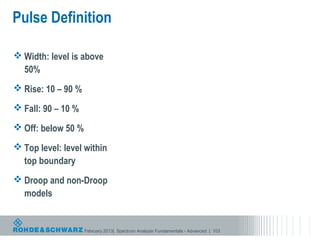
Pulse Definition

 Width: level is above
  50%
 Rise: 10 – 90 %

 Fall: 90 – 10 %

 Off: below 50 %

 Top level: level within
  top boundary
 Droop and non-Droop
  models


                    February 2013| Spectrum Analyzer Fundamentals - Advanced | 103
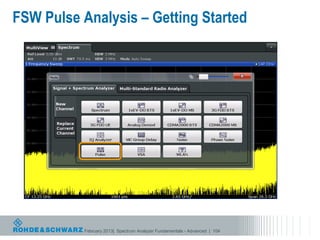
FSW Pulse Analysis – Getting Started


           February 2013| Spectrum Analyzer Fundamentals - Advanced | 104
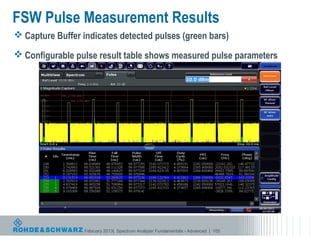
FSW Pulse Measurement Results
 Capture Buffer indicates detected pulses (green bars)

 Configurable pulse result table shows measured pulse parameters


                  February 2013| Spectrum Analyzer Fundamentals - Advanced | 105
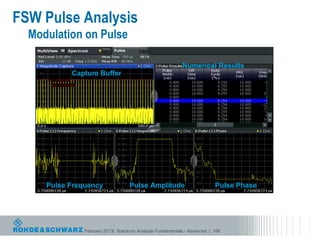
FSW Pulse Analysis
  Modulation on Pulse

                                                           Numerical Results
           Capture Buffer


     Pulse Frequency               Pulse Amplitude                        Pulse Phase


               February 2013| Spectrum Analyzer Fundamentals - Advanced | 106
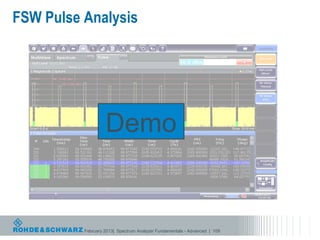
FSW Pulse Analysis


                   Demo


          February 2013| Spectrum Analyzer Fundamentals - Advanced | 109
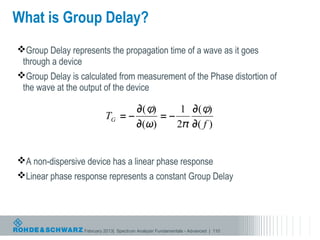
What is Group Delay?
Group Delay represents the propagation time of a wave as it goes
 through a device
Group Delay is calculated from measurement of the Phase distortion of
 the wave at the output of the device


A non-dispersive device has a linear phase response
Linear phase response represents a constant Group Delay


                  February 2013| Spectrum Analyzer Fundamentals - Advanced | 110
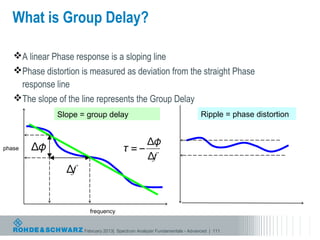
What is Group Delay?

   A linear Phase response is a sloping line
   Phase distortion is measured as deviation from the straight Phase
    response line
   The slope of the line represents the Group Delay
              Slope = group delay                                          Ripple = phase distortion


phase


                        frequency


                      February 2013| Spectrum Analyzer Fundamentals - Advanced | 111
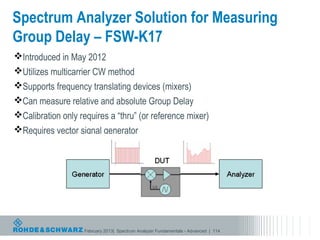
Spectrum Analyzer Solution for Measuring
Group Delay – FSW-K17
Introduced in May 2012
Utilizes multicarrier CW method
Supports frequency translating devices (mixers)
Can measure relative and absolute Group Delay
Calibration only requires a “thru” (or reference mixer)
Requires vector signal generator


                    February 2013| Spectrum Analyzer Fundamentals - Advanced | 114
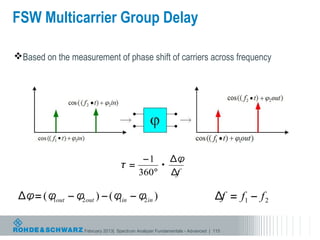
FSW Multicarrier Group Delay

Based on the measurement of phase shift of carriers across frequency


                  February 2013| Spectrum Analyzer Fundamentals - Advanced | 115
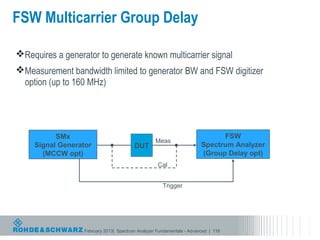
FSW Multicarrier Group Delay

Requires a generator to generate known multicarrier signal
Measurement bandwidth limited to generator BW and FSW digitizer
 option (up to 160 MHz)


           SMx                                                                FSW
                                                   Meas
     Signal Generator                    DUT                            Spectrum Analyzer
       (MCCW opt)                                                       (Group Delay opt)
                                                    Cal


                                                      Trigger


                   February 2013| Spectrum Analyzer Fundamentals - Advanced | 116
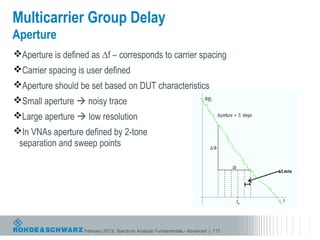
Multicarrier Group Delay
Aperture
Aperture is defined as ∆f – corresponds to carrier spacing
Carrier spacing is user defined
Aperture should be set based on DUT characteristics
Small aperture  noisy trace
Large aperture  low resolution
In VNAs aperture defined by 2-tone
 separation and sweep points


                   February 2013| Spectrum Analyzer Fundamentals - Advanced | 117
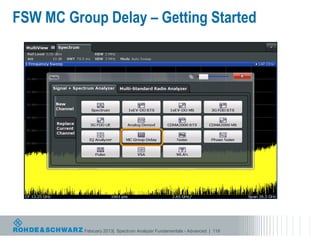
FSW MC Group Delay – Getting Started


          February 2013| Spectrum Analyzer Fundamentals - Advanced | 118
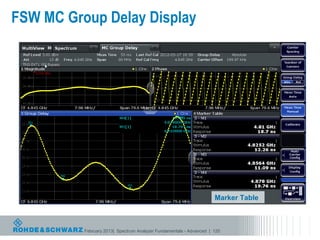
FSW MC Group Delay Display


                                                                     Marker Table


          February 2013| Spectrum Analyzer Fundamentals - Advanced | 120
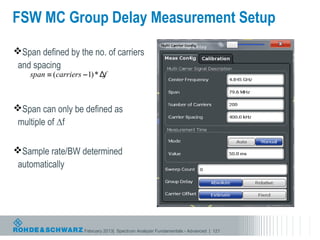
FSW MC Group Delay Measurement Setup
Span defined by the no. of carriers
 and spacing


Span can only be defined as
 multiple of ∆f

Sample rate/BW determined
 automatically


                   February 2013| Spectrum Analyzer Fundamentals - Advanced | 121
FSW MC Group Delay Calibration
Must perform calibration to perform measurement


For non-frequency translating devices (amps, filters)
    Only requires a “thru” connection


For frequency translating devices (mixers)
  Calibrate using raw mixer with known delay (usually <400ps) for absolute delay
   measurements
  Use reference mixer and measure relative delay (normalize)
  Use gold mixer and import calibration data


                         February 2013| Spectrum Analyzer Fundamentals - Advanced | 124
Thank you!

Spectrum Analyzer Fundamentals/Advanced Spectrum Analysis

  • 1.
  • 2.
    Introduction Applications Engineer
  • 3.
    Agenda  What isa spectrum analyzer?  Basic spectrum analyzer architecture  Dynamic Range  Spectrum analyzer features and usage  Advanced Spectrum Analyzer Architecture  Standard Measurements  Advanced Measurements February 2013| Spectrum Analyzer Fundamentals - Advanced | 3
  • 4.
    Spectrum Analyzer The Swiss Army Knife of RF instruments  Before 1990:  General spectrum measurements, harmonics, spurious, CW signal power (low accuracy)  1990’s:  Phase noise, noise figure, frequency counter, some cellular standard measurements, modulated signal power, ACPR, scalar network measurements (tracking generator)  2000’s:  IQ analysis, precise analog demod, digital demod (VSA), high accuracy signal power measurements, spur search, CCDF, wideband analysis, FFT mode sweeps, touch screen interface  2010’s:  Pulsed signal analysis, group delay measurements, OFDM demod, digital pre-distortion analysis, fast spur search February 2013| Spectrum Analyzer Fundamentals - Advanced | 4
  • 5.
    Notable Milestones inSpectrum Analysis 1940s: First sweep spectral analysis performed by MIT RAD LAB. 1960s: Spectrum Analyzer market dominated by Polarad and Panoramic 1964: HP makes the 1st LO tunable, revolutionizes the market 1978: HP introduces the 8566/8568. First microprocessor based SA. 1986: Rohde & Schwarz enters spectrum analyzer market with FSA and begins a tradition of innovation – 1986: First SA with a color display – 1996: First RMS detector – 1999: FSP is fastest SA available – 2001: First SA with >8MHz resolution bandwidth (50MHz) – 2003: First SA with USB ports – 2003: First SA with power sensor reading function – 2006: First combination phase noise analyzer and SA – 2007: First SA to 67GHz without external mixer – 2008: FSV is again the fastest SA on the market – 2010: FSVR is first combination real-time analyzer and SA – 2011: FSW is the most advanced SA on the market February 2013| Spectrum Analyzer Fundamentals - Advanced | 5
  • 6.
    Oscilloscope vs SpectrumAnalyzer? Time Domain Frequency Domain February 2013| Spectrum Analyzer Fundamentals - Advanced | 6
  • 7.
    Oscilloscope vs SpectrumAnalyzer? 1 0.8 0.6 0.4 0.2 0 -0.2 -0.4 -0.6 -0.8 -1 0 1 2 3 4 5 6 7 Amplitude f1 f3 f5 Frequency February 2013| Spectrum Analyzer Fundamentals - Advanced | 7
  • 8.
    What is dBm? dB Linear (unitless) 0 1 3 2 10 10 30 1000 40 10000 dBm Power -20 0.01 mW -3 0.5 mW 0 1 mW 3 2 mW 30 1W February 2013| Spectrum Analyzer Fundamentals - Advanced | 8
  • 9.
    Spectrum Analyzer ≠Network Analyzer  Measures signals Measures devices Spectrum Analyzers: Network Analyzers: • Measure signal amplitude characteristics, carrier • Measure response of components, devices, level, sidebands, harmonics circuits, sub-assemblies to applied stimulus • Can demodulate and measure complex signals • Contains sources and receivers • Spectrum analyzers are receivers only (single • Display ratioed amplitude and phase channel) (frequency, power or time sweeps) • Can be used for scalar component test • Offers advanced error correction for high (amplitude only) with tracking gen. or ext. source accuracy measurements February 2013| Spectrum Analyzer Fundamentals - Advanced | 9
  • 10.
    Agenda  What isa spectrum analyzer?  Basic spectrum analyzer architecture  Dynamic Range  Spectrum analyzer features and usage  Advanced Spectrum Analyzer Architecture  Standard Measurements  Advanced Measurements February 2013| Spectrum Analyzer Fundamentals - Advanced | 10
  • 11.
    Simplified Swept TunedBlock Diagram IF Resolution Video Mixer BW Filter Log Amp BW Filter Amplifier Envelope Detector BPF LPF Input Atten Local y Oscillator x Display Sawtooth February 2013| Spectrum Analyzer Fundamentals - Advanced | 11
  • 12.
    Input Mixer IF Resolution Video Mixer BW Filter Log Amp BW Filter Amplifier Envelope Detector BPF LPF Input Atten Local y Oscillator x Display Sawtooth February 2013| Spectrum Analyzer Fundamentals - Advanced | 12
  • 13.
    Types of Mixing RF IF  Fixed RF, Swept LO and IF  Fixed LO, Swept RF and IF LO  Fixed IF, Swept LO and RF (used in spectrum analyzers)  Upconversion  IF frequency is higher than RF and LO frequency  Downconversion  IF frequency is lower that RF and LO frequency February 2013| Spectrum Analyzer Fundamentals - Advanced | 13
  • 14.
    Mixer Example Possible frequencies on IF { port…to name a few: LO-RF=100MHz LO+RF= 2.1GHz LO=1.1 GHz RF IF RF=1 GHz 1 GHz 2LO-RF=1.2 GHz 2RF-LO= 900 MHz LO 1.1 GHz February 2013| Spectrum Analyzer Fundamentals - Advanced | 14
  • 15.
    Resolution Bandwidth IF Resolution Video Mixer BW Filter Log Amp BW Filter Amplifier Envelope Detector BPF LPF Input Atten Local y Oscillator x Display Sawtooth February 2013| Spectrum Analyzer Fundamentals - Advanced | 15
  • 16.
    Resolution Bandwidth  Sets IF Bandwidth of Spectrum Analyzer  Filter types:  Standard sweep filters: digital Gaussian filters  Channel filters  EMI filters (available with Quasipeak detector)  FFT filters  RRC  Determines frequency resolution and noise floor Sweep Time is function of Resolution Bandwidth and Span February 2013| Spectrum Analyzer Fundamentals - Advanced | 16
  • 17.
    IF Filter Types Ref -20 dBm Att 5 dB * RBW VBW SWT 18 50 65 kHz kHz ms -20 A -30 1 AP CLRWR -40 * RBW 20 kHz -50 VBW 50 kHz Ref -20 dBm Att 5 dB SWT 2.5 ms -20 -60 A -30 -70 1 AP CLRWR -40 -80 -50 * RBW 20 kHz -90 VBW 50 kHz -60 Ref -20 dBm Att 5 dB SWT 2.5 ms -100 -70 -20 -110 -80 A -30 -120 -90 1 AP Center 1 GHz 10 kHz/ Span 100 kHz CLRWR -40 -100 Channel -110 -50 Date: 7.NOV.2006 12:16:17 -120 Center 1 GHz 10 kHz/ Span 100 kHz -60 -70 Date: 7.NOV.2006 12:15:43 FFT -80 -90 -100 -110 * RBW 20 kHz VBW 50 kHz Ref -20 dBm Att 5 dB SWT 50 ms -120 -20 Center 1 GHz 10 kHz/ Span 100 kHz A -30 1 AP CLRWR -40 * RBW 20 kHz Ref -20 dBm Att 5 dB AQT 2.5 ms -50 -20 Date: 7.NOV.2006 12:17:44 -60 Normal (Gaussian) A -30 1 PK -70 CLRWR -40 -80 -50 -90 -60 -100 Default Setting for standard -70 -110 -80 -120 -90 Center 1 GHz 10 kHz/ Span 100 kHz -100 -110 -120 spectrum analyzing tasks Date: 7.NOV.2006 12:16:44 5 Pole Center 1 GHz 10 kHz/ Span 100 kHz Date: 7.NOV.2006 12:17:11 RRC February 2013| Spectrum Analyzer Fundamentals - Advanced | 17
  • 18.
    Resolution Bandwidth 200 Hz Signals separated by 2 kHz 1kHz can’t be resolved by 2kHz RBW February 2013| Spectrum Analyzer Fundamentals - Advanced | 18
  • 19.
    Resolution Bandwidth andDANL* RBW 1 MHz 300 kHz 100 kHz *DANL: Displayed Average Noise Level February 2013| Spectrum Analyzer Fundamentals - Advanced | 19
  • 20.
    Envelope Detector IF Resolution Video Mixer BW Filter Log Amp BW Filter Amplifier Envelope Detector BPF LPF Input Atten Local y Oscillator x Display Sawtooth February 2013| Spectrum Analyzer Fundamentals - Advanced | 20
  • 21.
    Detector Operation • Peak detector • Take only the highest sample Samples / pixel is determined by sweep time and sample rate pixel n pixel n+1 • Negative Peak detector (8 samples) (8 samples) s1 s2 s3 s4 s5 s6 s7 s8 s1 s2 s3 s4 s5 s6 s7 s8 • Take only the lowest sample • Sample detector  A/D Samples • Take the first sample • Effectively a random sample • RMS detector (power average) N 1 Vrms = N ∑s i =1 2 i • Perform a power average of the results  Displayed by squaring the samples, averaging the Pixels squares, then taking the square root. Positive peak • Average detector (voltage average) Sample N 1 RMS Vavg = N ∑s i =1 i Average freq • Perform a linear average of the results Negative Peak before they are converted to LOG scale for display on the screen February 2013| Spectrum Analyzer Fundamentals - Advanced | 21
  • 22.
    Detectors and TraceAveraging  Signals with no amplitude RBW VBW 3 10 MHz MHz dynamics (e.g. CW signals) are Ref -20 dBm Att 5 dB SWT 2.5 ms -20 easy to measure with a spectrum -30 A analyzer 1 SA AVG -40 2 SA * CLRWR Detector and averaging -50 DON’T affect measured level -60  Measured amplitude is unaffected by detector type or -70 3DB trace averaging -80 -90 -100  Detector type and trace -110 Detector and averaging DO affect measured level averaging do impact other types -120 of signals such as noise or noise- Center 1.03025 GHz 62.5 MHz/ Span 625 MHz like signals (e.g. digitally modulated signals) Date: 3.MAR.2009 16:33:15 February 2013| Spectrum Analyzer Fundamentals - Advanced | 22
  • 23.
    Detector Operation: Noise-likeSignal • Pos and Neg Peak detectors are Samples / pixel is determined by sweep time and sample rate not suitable for this type of signal – measure much too high or too pixel n pixel n+1 (8 samples) (8 samples) low s1 s2 s3 s4 s5 s6 s7 s8 s1 s2 s3 s4 s5 s6 s7 s8 • Sample detector w/Trace Averaging • Best technique pre-1996  A/D Samples • Averaging in log domain causes a -2.51dB error (avg of logs < log of avgs) • RMS detector (power average) • Measures true RMS noise level • Best technique (available since 1996)  Displayed • Average detector (voltage Pixels average) • Averaging in voltage domain causes a Positive peak -1.05dB error Sample (square of avg < avg of squares) RMS Average freq Negative Peak February 2013| Spectrum Analyzer Fundamentals - Advanced | 23
  • 24.
    Measuring Noise: AverageDetector  Measurement of noise with average detector  Gaussian noise (voltages) take on a Rayleigh distribution when envelope detected – (Negative voltages are converted to positive voltages.)  R2  − 2  R  2σ    Rayleigh Distribution: e σ2 σ π  Avg  2 = 20 log   The average value of a Rayleigh distributed variable is: RMS  σ 2  π   Average value = σ 2  π  = 20 log  4   The RMS value of the same distribution is:   RMS value = σ 2 = −1.05 dB  The average value is 1.05dB lower than the true RMS value February 2013| Spectrum Analyzer Fundamentals - Advanced | 24
  • 25.
    Measuring Noise RBW 200 kHz VBW 500 kHz Ref -90 dBm Att 5 dB SWT 2.5 ms RMS -90 * detector A -91 1 RM * (true level) VIEW -92 2 AV * VIEW -93 Average Delta: 1.05 dB 3 SA VIEW -94 detector -95 3DB -96 -97 -98 -99 -100 Center 1 GHz 1 MHz/ Span 10 MHz Date: 13.MAR.2009 15:06:16 February 2013| Spectrum Analyzer Fundamentals - Advanced | 25
  • 26.
    Measuring Noise: GaussianNoise  Graphical distribution of noise voltage on a linear scale noise amplitude 4σ = 95.45% 2σ = 68% 6σ = % 99.73 noise amplitude distribution Gaussian Noise February 2013| Spectrum Analyzer Fundamentals - Advanced | 26
  • 27.
    Measuring Noise: SampleDetector w/Log Averaging • Video (log) averaging (dBm) values causes a negative shift in the result. • Positive peaks are compressed Avg value of a Gaussian variable g(x) with µ = 0, σ = 1 • Negative peaks are enhanced → E [ 20 log( g ( x ) ) ] = −2.51 dB • The log of the average is not the same as the average of the log values • The delta for a Gaussian distribution is -2.51 dB • Linear averaging solves this problem, but was not available until relatively recently Amplitude Noise on log (dB) scale Rayleigh Distribution February 2013| Spectrum Analyzer Fundamentals - Advanced | 27
  • 28.
    Measuring Noise RBW 200 kHz VBW 500 kHz Ref -90 dBm Att 5 dB SWT 2.5 ms RMS -90 * detector A -91 1 RM * VIEW -92 2 AV * VIEW -93 Average Delta: 1.05 dB 3 SA VIEW -94 detector -95 -96 3DB Delta: 2.51 dB Sample -97 detector -98 w/log avg -99 -100 Center 1 GHz 1 MHz/ Span 10 MHz Date: 13.MAR.2009 15:06:16 February 2013| Spectrum Analyzer Fundamentals - Advanced | 28
  • 29.
    Measuring Noise: RMSDetector  RMS detector measures true noise power  We can apply linear trace averaging to an RMS detector RBW 200 kHz VBW 2 MHz Ref -90 dBm Att 5 dB SWT 2.5 ms RMS -90 * A detector -91 1 RM * VIEW -92 2 RM * VIEW -93 RMS detector -94 w/lin avg -95 3DB -96 -97 -98 -99 -100 Center 1 GHz 1 MHz/ Span 10 MHz FebruaryDate: 13.MAR.2009 Analyzer Fundamentals - Advanced | 29 2013| Spectrum 17:29:46
  • 30.
    Measuring Noise: SampleDetector w/Lin Averaging  RMS detector measures true noise power  Sample detector with linear averaging can yield the same results RBW 200 kHz VBW 500 kHz Ref -90 dBm Att 5 dB SWT 2.5 ms RMS -90 * A detector -91 1 RM * VIEW -92 2 SA AVG -93 Sample -94 detector -95 SWP 1000 of 1000 3DB w/lin avg -96 -97 -98 -99 -100 Center 1 GHz 1 MHz/ Span 10 MHz February 2013| Spectrum Analyzer Fundamentals - Advanced | 30 Date: 13.MAR.2009 15:13:07
  • 31.
    Measuring Noise: AverageDetector w/Lin Averaging  How about Average detector with linear averaging?  Average detector with any trace averaging does not yield accurate results  Don’t use average detector to measure noise power RBW 200 kHz VBW 2 MHz Ref -90 dBm Att 5 dB SWT 2.5 ms RMS -90 * detector 1 RM * -91 A VIEW -92 2 AV * VIEW -93 3 AV * Average VIEW -94 Delta: 1.05 dB detector -95 3DB -96 Average -97 detector -98 w/lin avg -99 -100 Center 1 GHz 1 MHz/ Span 10 MHz February 2013| Spectrum Analyzer Fundamentals - Advanced | 31 Date: 13.MAR.2009 18:01:57
  • 32.
    Detectors, Averaging, andNoise  Measuring Noise with the RMS Detector  To get a smoother trace use a slower sweep time – more samples/pixel – 500ms sweep, 32MHz A/D sample rate, 625 pixels  over 25,000 samples per pixel  Or apply linear (power) trace averaging to average multiple traces  Measuring Noise with the Sample Detector  Only one sample per pixel is used so no advantage to slow sweep  To get a smoother trace use Linear or Power average  Log averaging will result in a -2.51dB measurement error  Measuring noise with the Pos Peak, Neg Peak, or Average Detector  Not recommended for measuring level of noise or noise-like signals February 2013| Spectrum Analyzer Fundamentals - Advanced | 32
  • 33.
    Video Filter IF Resolution Video Mixer BW Filter Log Amp BW Filter Amplifier Envelope Detector BPF LPF Input Atten Local y Oscillator x Display Sawtooth February 2013| Spectrum Analyzer Fundamentals - Advanced | 33
  • 34.
    Video Filter 500kHz 500Hz • Display filter • Similar to trace smoothing in other instruments February 2013| Spectrum Analyzer Fundamentals - Advanced | 34
  • 35.
    Local Oscillator IF Resolution Video Mixer BW Filter Log Amp BW Filter Amplifier Envelope Detector BPF LPF Input Atten Local y Oscillator x Display Sawtooth February 2013| Spectrum Analyzer Fundamentals - Advanced | 35
  • 36.
    Local Oscillator  Tunable  Sweeps across measurement Span  Linear sawtooth drives LO and X-position on Display  Repetition rate (sweep time) determined by RBW  Sweep time can be manually adjusted (for certain measurements)  Not perfect, introduces Phase Noise February 2013| Spectrum Analyzer Fundamentals - Advanced | 36
  • 37.
    Agenda  What isa spectrum analyzer?  Basic spectrum analyzer architecture  Dynamic Range  Spectrum analyzer features and usage  Advanced Spectrum Analyzer Architecture  Standard Measurements  Advanced Measurements February 2013| Spectrum Analyzer Fundamentals - Advanced | 37
  • 38.
    Dynamic Range: InternalDistortion  The difference (in dB) between the Input Level that produces distortion products equal to the noise floor and the noise floor level (DANL)  But, what type of distortion?  Compression Point  Second Order  Third order February 2013| Spectrum Analyzer Fundamentals - Advanced | 38
  • 39.
    Dynamic Range: InternalDistortion  Example: Carrier at 0dBm level f1 2f1 3f1 frequency February 2013| Spectrum Analyzer Fundamentals - Advanced | 39
  • 40.
    Dynamic range: Intermodulation andHarmonics intermod. intermod. Intermod. level 2nd order 3rd order harmonics 2nd order 3rd order f2 -f 1 2f - f2 1 f1 f2 2f2 - f1 2f f2 +f1 2f2 1 3f 1 3f2 frequency February 2013| Spectrum Analyzer Fundamentals - Advanced | 40
  • 41.
    What is SpectrumAnalyzer Dynamic Range? +30 dBm MAXIMUM INPUT POWER LEVEL +13 dBm MIXER COMPRESSION 185 dB -37 dBm THIRD-ORDER DISTORTION 168 dB -42 dBm SECOND-ORDER DISTORTION 118 dB 113 dB -155 dBm MINIMUM NOISE FLOOR (DANL) February 2013| Spectrum Analyzer Fundamentals - Advanced | 41
  • 42.
    Dynamic Range: WCDMA ACLR •Often specified on Spectrum Analyzer (and Signal Generator) data sheets as a “figure of merit” • Includes effects of noise and third-order distortion Limited by Limited by Noise Optimum Distortion February 2013| Spectrum Analyzer Fundamentals - Advanced | 42
  • 43.
    Agenda  What isa spectrum analyzer?  Basic spectrum analyzer architecture  Dynamic Range  Spectrum analyzer features and usage  Advanced Spectrum Analyzer Architecture  Standard Measurements  Advanced Measurements February 2013| Spectrum Analyzer Fundamentals - Advanced | 43
  • 44.
    Basic settings  CenterFrequency  Span Display  Reference level  Resolution Bandwidth (RBW)  Video Bandwidth (VBW) Signal  Detector  Sweep Time Acquisition  Trigger February 2013| Spectrum Analyzer Fundamentals - Advanced | 44
  • 45.
    Triggering  Freerun  External trigger  Demodulation  Pulsed measurements in zero span  IF level  Instrument is triggered when IF level reaches defined level  Video  Instrument is triggered when Video output reaches defined level  Gated trigger  Defines measurement interval in time  Typically used for viewing bursted signals in the frequency domain February 2013| Spectrum Analyzer Fundamentals - Advanced | 45
  • 46.
    How to getmost sensitivity?  Make frequency span very small  Set RBW to lowest value  Set Ref Level to low value  Set Attenuation to 0dB (must be done manually)  Turn on Preamp February 2013| Spectrum Analyzer Fundamentals - Advanced | 46
  • 47.
    Spectrum Analyzers –How to reduce noise  Default settings, span = 10 MHz RBW 200 kHz VBW 500 kHz Ref -20 dBm Att 5 dB SWT 2.5 ms -20 A -30 1 AP CLRWR -40 Noise is 55 -50 to 60 dBc -60 -70 3DB -80 -90 -100 -110 -120 Center 1 GHz 1 MHz/ Span 10 MHz February 2013| Spectrum Analyzer 2.MAR.2009 20:06:32 Date: Fundamentals - Advanced | 47
  • 48.
    Spectrum Analyzers –How to reduce noise  Narrow up the RBW to 30 KHz  Span is 10 MHz * RBW 30 kHz RBW 200 kHz VBW 100 kHz VBW 500 kHz Ref -20 dBm Att 5 dB SWT 30 ms Ref -20 dBm Att 5 dB SWT 2.5 ms -20 -20 A A -30 -30 1 AP 1 AP CLRWR CLRWR -40 -40 -50 -50 -60 -60 -70 -70 3DB 3DB -80 -80 -90 -90 -100 -100 -110 -110 -120 -120 Center 1 GHz 1 MHz/ Center 1S p a n GHz 10 MHz 1 MHz/ Span 10 MHz Date: 2.MAR.2009 20:07:31 February 2013| Spectrum Analyzer 2.MAR.2009 20:06:32 Date: Fundamentals - Advanced | 48
  • 49.
    Spectrum Analyzers –How to reduce noise  Change Attenuation to 0 dB  RBW is 30 KHz  Span is 10 MHz * RBW 30 kHz * RBW 30 kHz RBW 200 kHz VBW 100 kHz VBW 100 kHz VBW 500 kHz Ref -20 dBm * Att 0 RdeBf -20 dBSWT m 30 ms Att 5 dR e f B -20 dSBWmT 30 ms Att 5 dB SWT 2.5 ms -20 -20 -20 A A A -30 -30 -30 1 AP 1 AP 1 AP CLRWR CLRWR CLRWR -40 -40 -40 -50 -50 -50 -60 -60 -60 -70 -70 -70 3DB 3DB 3DB -80 -80 -80 -90 -90 -90 -100 -100 -100 -110 -110 -110 -120 -120 -120 Center 1 GHz C e n t e1r M H z / H z 1 G C e n t e r H z1/0 G H z z 1 M Span MH S p a1n M H z / M H z 10 Span 10 MHz Date: 2.MAR.2009 20:08:51 February 2013| Spectrum Date: 2.MAR.2009 20:07:31 Analyzer 2.MAR.2009 20:06:32 Date: Fundamentals - Advanced | 49
  • 50.
    Spectrum Analyzers –How to reduce noise  Turn on the pre-amp  Attenuation is 0 dB  Span is 10 MHz  RBW is 30 KHz * RBW 30 kHz * RBW 30 kHz * RBW 30 kHz RBW 200 kHz VBW 100 kHz VBW 100 kHz VBW 100 kHz VBW 500 kHz Ref -20 dBm Ref * -20 Att d B0m d B R e *T A t3t0 0 m d B m B S Wf - 2 s 0 d Ref SWT A20 s - t t m d B5m d B 30 S W T A t3t0 ms 5 dB SWT 2.5 ms -20 -20 -20 -20 A A A A -30 -30 -30 -30 1 AP 1 AP 1 AP 1 AP CLRWR CLRWR CLRWR CLRWR -40 -40 -40 -40 -50 -50 -50 -50 PA -60 -60 -60 -60 -70 -70 -70 -70 3DB 3DB 3DB 3DB -80 -80 -80 -80 -90 -90 -90 -90 -100 -100 -100 -100 -110 -110 -110 -110 -120 -120 -120 -120 Center 1 GHz Center 1 GHz 1 M H z /C e n t e r 1 GHz 1 M H z /C e n t e Sr p a 1 G1H0z M H z1 n MHz/ Span 10 M H z1 MHz/ Span 10 MHz Span 10 MHz Date: 2.MAR.2009 20:09:28 2.MAR.2009 20:08:51 2.MAR.2009 Analyzer 2.MAR.2009 20:06:32 Date: FebruaryDate: Spectrum 20:07:31 Fundamentals - Advanced 2013| Date: | 50
  • 51.
    Spectrum Analyzers –How to reduce noise  Select RMS detector  Pre-amp is on  RBW is 30 KHz  Attenuation is 0 dB  Span is 10 MHz * RBW 30 kHz * RBW 30 kHz * RBW 30 kHz * RBW 30 kHz RBW 200 kHz VBW 300 kHz VBW 100 kHz VBW 100 kHz VBW 100 kHz VBW 500 kHz Ref -20 dBm R e* A t t 0 f -2 dBm B 0 d Ref S T* A 0 m s 0 - 2 0 W d B m3 t t R e f dB0 -2 * A SW0 dBm ttRefT d B 0 md B m t t S W 5 d B 30 -2 s A T 30 ms Att SW5 T dB 30 ms SWT 2.5 ms -20 -20 -20 -20 -20 A A A A A -30 -30 -30 -30 -30 1 RM * 1 AP 1 AP 1 AP 1 AP CLRWR CLRWR CLRWR CLRWR CLRWR -40 -40 -40 -40 -40 -50 -50 -50 -50 -50 PA PA -60 -60 -60 -60 -60 -70 -70 -70 -70 -70 3DB 3DB 3DB 3DB 3DB -80 -80 -80 -80 -80 -90 -90 -90 -90 -90 -100 -100 -100 -100 -100 -110 -110 -110 -110 -110 -120 -120 -120 -120 -120 Center 1 GHz Center 1 GHz C1 nM H z / 1 e ter GHz Center 1 1 G M H z /C e n tSepra n 1 11 G MH HMzH/z Hz 0 z 1 MS p a n Hz/ 10 M H z1 M SH p a n z/ 10 MHz Span 10 MHz Span 10 MHz Date: 2.MAR.2009 February 2013| Spectrum Analyzer 2.MAR.2009 20:06:32 Date: 2.MAR.2009 20:08:51 Date: Fundamentals - Advanced 20:11:02 2.MAR.2009 20:09:28 Date: 2.MAR.2009 20:07:31 Date: | 51
  • 52.
    Spectrum Analyzers –How to reduce noise  Set sweep time to 10 seconds  RMS detector  Attenuation is 0 dB  Span is 10 MHz  Pre-amp is on  RBW is 30 KHz * RBW 30 kHz * RBW 30 kHz * RBW 30 kHz * RBW 30 kHz * RBW 30 kHz RBW 200 kHz VBW 300 kHz VBW 300 kHz VBW 100 kHz VBW 100 kHz VBW 100 kHz VBW 500 kHz Ref -20 dBm Ref -20 dBm tt * A R e f d B- 2 0 * B m t S R e f d B- 2 s 0 dAt * W0 10 0 T * A SWT 0 020 dBm ttRef 3dBmsdBm ttRef - * A SW0T d B 0 md B m t t S W 5 d B 30 -2 s A T 30 ms Att SW5 T dB 30 ms SWT 2.5 ms -20 -20 -20 -20 -20 -20 A A A A A A -30 -30 -30 -30 -30 -30 1 RM * 1 RM * 1 AP 1 AP 1 AP 1 AP CLRWR CLRWR CLRWR CLRWR CLRWR CLRWR -40 -40 -40 -40 -40 -40 -50 -50 -50 -50 -50 -50 PA PA PA -60 -60 -60 -60 -60 -60 -70 -70 -70 -70 -70 -70 3DB 3DB 3DB 3DB 3DB 3DB -80 -80 -80 -80 -80 -80 -90 -90 -90 -90 -90 -90 -100 -100 -100 -100 -100 -100 -110 -110 -110 -110 -110 -110 -120 -120 -120 -120 -120 -120 Center 1 GHz Center 1 GHz Center 11 MGHHzz/ C e n t e r 11 MGHHzz/ C e n t e r 1 1 G MpHazn/C e1n0t eMrH z 1 1 G MH Hazn/ 1 0 SHz Spz MHz 1 MS p a n Hz/ 10 M H z1 M SH p a n z/ 10 MHz Span 10 MHz Span 10 MHz Date: 2.MAR.2009 20:11:02 February 2013| Date: 2.MAR.2009 20:07:31 Date: 2.MAR.2009 20:11:50 Date: 2.MAR.2009 20:09:28 Spectrum Analyzer 2.MAR.2009 20:06:32 Date: 2.MAR.2009 20:08:51 Date: Fundamentals - Advanced | 52
  • 53.
    Spectrum Analyzers –How to reduce noise  Same noise, but looks different…  Sweep time 10 seconds  Pre-amp is on  Span is 10 MHz  RMS detector  Attenuation is 0 dB  RBW is 30 KHz * RBW 30 kHz VBW 300 kHz Ref -20 dBm * Att 0 dB * SWT 10 s -20 A -30 1 RM * CLRWR -40 -50 PA -60 Noise is -70 83 dBc -80 3DB -90 -100 -110 -120 Center 1 GHz 1 MHz/ Span 10 MHz February 2013| Spectrum Analyzer Fundamentals - Advanced | 53 Date: 2.MAR.2009 20:11:50
  • 54.
    Agenda  What isa spectrum analyzer?  Basic spectrum analyzer architecture  Dynamic Range  Spectrum analyzer features and usage  Advanced Spectrum Analyzer Architecture  Standard Measurements  Advanced Measurements February 2013| Spectrum Analyzer Fundamentals - Advanced | 54
  • 55.
    Swept Tuned BlockDiagram (conceptual) IF Resolution Video Mixer BW Filter Log Amp BW Filter Amplifier Envelope Detector BPF LPF Input Atten Local y Oscillator x Display Sawtooth February 2013| Spectrum Analyzer Fundamentals - Advanced | 55
  • 56.
    Modern Spectrum AnalyzerArchitecture  Triple Conversion Superheterodyne  Digital IF – output of the 3rd stage is digitized for DSP processing Hz Hz Hz G M M 84 4 .4 4. 62 20 I 40 4. A DSP D sin Q cos NCO February 2013| Spectrum Analyzer Fundamentals - Advanced | 56
  • 57.
    Modern Spectrum AnalyzerArchitecture  Input Attenuation – Both mechanical (large step) and electrical (small step)  Pre-Amplifier – supports Noise Figure and low signal measurements  The first LO sweeps Hz Hz Hz G M M 4 4 28 .4 4. 20 I 6 40 4. A DSP D sin Q cos NCO February 2013| Spectrum Analyzer Fundamentals - Advanced | 57
  • 58.
    Modern Spectrum AnalyzerArchitecture  Multiple conversion stages are used to remove unwanted signals created by mixing  Fixed LO – these are fixed IF frequencies Hz Hz Hz G M M 4 4 28 .4 4. 20 I 6 40 4. A DSP D sin Q cos NCO February 2013| Spectrum Analyzer Fundamentals - Advanced | 58
  • 59.
    Modern Spectrum AnalyzerArchitecture  Digitized and converted to I (real) and Q (imaginary) values  Detector and Video filter done digitally  With digitized I and Q more sophisticated analysis can be conducted Hz Hz Hz G M M 4 4 28 .4 4. 20 I 6 40 4. A DSP D sin Q cos NCO February 2013| Spectrum Analyzer Fundamentals - Advanced | 59
  • 60.
    Modern Spectrum AnalyzerArchitecture  FSW Block Diagram February 2013| Spectrum Analyzer Fundamentals - Advanced | 60
  • 61.
    Agenda  What isa spectrum analyzer?  Basic spectrum analyzer architecture  Dynamic Range  Spectrum analyzer features and usage  Advanced Spectrum Analyzer Architecture  Standard Measurements  Advanced Measurements February 2013| Spectrum Analyzer Fundamentals - Advanced | 61
  • 62.
    Spectrum Analyzer MeasurementFunctions  Standard Measurement Functions  Time domain power (zero span)  Channel Power & Adjacent Channel Power (CP & ACP)  Occupied bandwidth  Spurious search  Noise marker  Frequency counter  Statistics (CCDF)  TOI  Harmonics February 2013| Spectrum Analyzer Fundamentals - Advanced | 62
  • 63.
    Zero Span Mode  Frequency selective Oscilloscope  Amplitude on Y axis and time on X axis  Measurement of pulsed signals such as GSM, EDGE, TDD, etc.  Key parameters  Sweep time  RBW – Frequency selectivity – Dynamic range – Rise and fall time February 2013| Spectrum Analyzer Fundamentals - Advanced | 63
  • 64.
    Zero Span Mode February 2013| Spectrum Analyzer Fundamentals - Advanced | 64
  • 65.
    Zero Span measurement Demo February 2013| Spectrum Analyzer Fundamentals - Advanced | 65
  • 66.
    Measuring the PowerLevel of a Signal  What is the power level of this CW signal?  For unmodulated signal simply use a marker  Level matches closely to power meter (reference) measurement February 2013| Spectrum Analyzer Fundamentals - Advanced | 66
  • 67.
    Measuring the PowerLevel of a Signal  What is the power level of this modulated signal?  Marker only measures power within the RBW – this signal occupies a much larger bandwidth  Must use a different technique: Channel Power February 2013| Spectrum Analyzer Fundamentals - Advanced | 67
  • 68.
    Measuring the PowerLevel of a Signal  Channel Power function uses a small RBW and integrates (sums) power over the entire specified bandwidth  Channel Power function also selects the RMS detector for most accurate measurement of noise-like signal  Increasing sweep time improves repeatability. RMS detector collects more samples – similar to averaging  Level agrees with power meter February 2013| Spectrum Analyzer Fundamentals - Advanced | 68
  • 69.
    Channel Power andAdjacent Channel Power Channel spacing Adjacent Alternate Channel BW (center to center) Channel Channel February 2013| Spectrum Analyzer Fundamentals - Advanced | 69
  • 70.
    Spur Searching Need toscan over very broad frequency ranges to test for unwanted spurious emissions Typically run on frequency synthesizers Spurious emissions may be required to be < –100dBm (or lower) Requires broad sweep on spectrum analyzer with low RBW to get low noise floor – SLOW! Older analyzers used harmonic mixing and had “stair-step” noise floor  Required lower RBW at higher freqs FSW has very fast spur search February 2013| Spectrum Analyzer Fundamentals - Advanced | 70
  • 71.
    Spur Search usingbasic Spectrum Analyzer Noise floor may change with frequency Limited to 32001 frequency points  May not be enough to get required resolution over broad frequency range FSW Spur Search function overcomes these limitations February 2013| Spectrum Analyzer Fundamentals - Advanced | 71
  • 72.
    Fast Spur Search– Getting Started February 2013| Spectrum Analyzer Fundamentals - Advanced | 72
  • 73.
    Fast Spur Search– Setup Screen Allows flexible spur search configuration Up to 20 ranges (segments) can be defined Each has its own RBW, VBW, Atten, Sweep Points settings Each range up to 32001 frequency points (>640,000 total) February 2013| Spectrum Analyzer Fundamentals - Advanced | 73
  • 74.
    Fast Spur Search– Peak Evaluation Screen Specify how measured peaks are handled February 2013| Spectrum Analyzer Fundamentals - Advanced | 74
  • 75.
    Fast Spur Search 100MHz – 26GHz Sweep, 2603 points, < -120dBm Noise Floor 39 sec February 2013| Spectrum Analyzer Fundamentals - Advanced | 75
  • 76.
    Fast Spur Search 100MHz – 26GHz Sweep, 2603 points, ~ -110dBm Noise Floor < 2 sec February 2013| Spectrum Analyzer Fundamentals - Advanced | 76
  • 77.
    CCDF Complementary Cumulative DistributionFunction  Statistical map of peak to average level characteristics  Calculated from histogram of amplitude samples February 2013| Spectrum Analyzer Fundamentals - Advanced | 78
  • 78.
    CCDF Complementary Cumulative DistributionFunction  Statistical map of peak to average level characteristics  Calculated from histogram of amplitude samples Power vs. Time Zero Span CCDF February 2013| Spectrum Analyzer Fundamentals - Advanced | 79
  • 79.
    CCDF Measurement Demo February 2013| Spectrum Analyzer Fundamentals - Advanced | 80
  • 80.
    Third Order InterceptMeasurement (TOI)  TOI is a measure of the two-tone IM distortion of a device  With two input tones at f1 and f2, distortion (non-linearity) in the DUT will create tones at 2f1-f2 and 2f2-f1 (third order products) Amplified input tones Input tones Pout Po Po Pin PIM3 PIM3 DUT f1 f2 2f1-f2 f1 f2 2f2-f1 f f Distortion products created by DUT February 2013| Spectrum Analyzer Fundamentals - Advanced | 81
  • 81.
    Third Order InterceptMeasurement (TOI) February 2013| Spectrum Analyzer Fundamentals - Advanced | 82
  • 82.
    Third Order InterceptMeasurement (TOI)  For every 1dB increase in the output level of the fundamental signals the third-order distortion products increase 3dB  The extrapolated level at which the distortion tones “intercept” the level of the fundamental tones is called the Third Order Intercept point (TOI or IP3)  TOI is calculated using the formula: TOI = IP3 = (3P0 − P3 ) 2 +10dBm +5dBm - 25dBm - 40dBm TOI = (3*5+40)/2 = 27.5dBm TOI = (3*10+25)/2 = 27.5dBm February 2013| Spectrum Analyzer Fundamentals - Advanced | 83
  • 83.
    Third Order InterceptMeasurement (TOI)  TOI is a built-in measurement function on some spectrum analyzers  Markers are automatically placed and TOI is calculated February 2013| Spectrum Analyzer Fundamentals - Advanced | 84
  • 84.
    TOI Measurement Demo February 2013| Spectrum Analyzer Fundamentals - Advanced | 85
  • 85.
    Noise Floor Cancellationto achieve 1 dB NF Preamplifier and noise correction reduce DANL to -173 dBm With preamp. + noise correction With preamp. February 2013| Spectrum Analyzer Fundamentals - Advanced | 86
  • 86.
    Spectrum Analyzer MeasurementFunctions l Advanced Measurement Functions l Measurement Probes l Noise Figure l Phase Noise l Vector Signal analysis (VSA) l Pulsed Signal analysis l Multi-carrier Group Delay l Digital Wireless Comms l LTE l WCDMA (UMTS) l GSM/EDGE l CDMA2000/1xEV-DO l 802.11(a/b/g/n/ac) l WiMAX February 2013| Spectrum Analyzer Fundamentals - Advanced | 87
  • 87.
    Probing • Provides a means to measure signals within a circuit where no connection point is available • Usually used for troubleshooting, not accurate measurements • Also called an RF Sniffer • Simple, cheap, and easy to make • Loads circuit Simple RF Sniffer (semi-rigid coax) February 2013| Spectrum Analyzer Fundamentals - Advanced | 88
  • 88.
    Probing • Active scope probe with Probe Adapter • Probe/Adapter powered by USB cable • Adapter stores factory probe calibration and provides offset info to spectrum analyzer (via USB) • Much less loading effect than simple RF Sniffer • Useful to 3GHz +  RT-ZS30 Active RTO-ZA9 Probe Scope Probe Adapter February 2013| Spectrum Analyzer Fundamentals - Advanced | 89
  • 89.
    Noise Figure l Ratio of Input S/N to Output S/N l Degradation of S/N through device (key point: only input noise is thermal, or kTB noise) Sin Sout SinG G = Nin Nout Nout l Noise Factor (linear ratio): Sin Nin Sin Nin N l F= = = out Sout Nout SinG Nout NinG l Nout = NinG + Na(Na is noise added by DUT) Na l F= +1 NinG l Noise Figure is Noise Factor expressed in dB (FdB = 10 log F) February 2013| Spectrum Analyzer Fundamentals - Advanced | 90
  • 90.
    Noise Figure l Use calibrated noise source to generate Ton and Toff l Ton generated when biased with 28V, Toff when not biased l Ton known from calibrated ENR (Excess Noise Ratio) l R&S analyzers work with noise sources from NoiseCom, Micronetics, and Agilent – R&S does NOT make noise sources l Noise Figure calculated using Y-factor technique Noise Power Non (W) Non (kTonBG + Na ) Y= (Y-factor) Noff Slope = kBG FdB = ENR − 10 log( Y − 1) Noff (kToff BG + Na ) Where: } Na Toff is actual temp of noise source T0 is 290K 0°K Toff Ton Noise Temperature (˚K) February 2013| Spectrum Analyzer Fundamentals - Advanced | 91
  • 91.
    Noise Figure • Guidelines for repeatable measurements • Noise Source ENR should be at least 3dB higher than Spectrum Analyzer NF (ENR) – (NFSA) > 3 dB • Noise Source ENR should be at least 5dB higher than DUT NF (ENR) – (NFDUT) > 5 dB • Gain+NF of DUT should be at least 1dB higher than Spectrum Analyzer NF (NFDUT) + (GainDUT) – (NFSA) > 1 dB • Advantages of Measurement Mode • Fast and Easy • Plots of Gain and NF vs. frequency • Takes care of calibration • Tabular results also available February 2013| Spectrum Analyzer Fundamentals - Advanced | 92
  • 92.
    Phase Noise •Radom (short term) fluctuation in the phase of a waveform Level • Ideal Signal (noiseless) V(t) = A sin(2πνt) f where A = nominal amplitude t ν = nominal frequency • Real Signal Level V(t) = [A + E(t)] sin(2πνt + φ(t)) f where E(t) = amplitude fluctuations t φ(t) = phase fluctuations Phase Noise is unintentional phase modulation on a carrier February 2013| Spectrum Analyzer Fundamentals - Advanced | 93
  • 93.
    Phase Noise •In the frequency domain phase noise is represented by L(f) in units of dBc/Hz • Terms that can be calculated from L(f) • Integrated Phase Noise • Residual PM • Residual FM • Jitter Plot Offset from Carrier February 2013| Spectrum Analyzer Fundamentals - Advanced | 94
  • 94.
    Phase Noise • Phasenoise is measured over a user specified offset range. • Residual PM and FM, and RMS Jitter are calculated from the phase noise data. • This is very convenient and provides a plot, but is still limited by the phase noise of the analyzer • For improved measurements use FSUP which uses the more sensitive phase detector method February 2013| Spectrum Analyzer Fundamentals - Advanced | 95
  • 95.
    Phase Noise Measurement Demo February 2013| Spectrum Analyzer Fundamentals - Advanced | 96
  • 96.
    Vector Signal Analysis(VSA)  EVM is probably the single most Ideal symbol location measured quantity on a digitally modulated signal. Q  Start by defining an ideal symbol or location in the IQ plane ct Ve ce en er  Then define a reference vector that f Re points from the origin to the ideal location. I February 2013| Spectrum Analyzer Fundamentals - Advanced | 97
  • 97.
    Vector Signal Analysis(VSA) Error Vector  EVM is 20 log ( | error / ref | ) mag Error Q Ideal symbol location  The reference vector is (usually) the vector length from the origin to the ideal point that is the farthest away from Measured r to the origin. symbol location c Ve ce en er  Therefore, changing the modulation f Re from QPSK to 64-QAM does not have an impact on the EVM result.  This means higher order modulations I require better EVM values. February 2013| Spectrum Analyzer Fundamentals - Advanced | 98
  • 98.
    Vector Signal Analysis(VSA) Error Vector mag Ideal symbol location Error Q Measured vector symbol location Quadrature or component ct Ve ce Amplitude n re r ct o error fe Ve Re d ure eas Phase M error I Phase of In phase error vector component February 2013| Spectrum Analyzer Fundamentals - Advanced | 99
  • 99.
    Vector Signal Analysis(VSA)  User enters: Modulation type, Symbol rate, and Filter type  The signal is demodulated into a series of detected symbols. From these symbols a mathematically perfect model of the signal (reference signal) is created internally and then compared to the measured signal.  If the signal is poor enough in quality an incorrect symbol may be detected which will cause an error in the internal reference signal. If this occurs the reported EVM will be less than the actual EVM. February 2013| Spectrum Analyzer Fundamentals - Advanced | 100
  • 100.
    VSA Measurements Demo February 2013| Spectrum Analyzer Fundamentals - Advanced | 101
  • 101.
    FSW Pulse Analysis lTiming l Timestamp l Pulse Width l Rise / Fall / Settling Time l Duty Cycle / Ration l Power / Amplitude l Peak and Average Power l Overshoot l Droop, Ripple l Pulse to Pulse Magnitude Difference l Phase l Phase, Frequency l Phase/Freq. Error February 2013| Spectrum Analyzer Fundamentals - Advanced | 102
  • 102.
    Pulse Definition  Width:level is above 50%  Rise: 10 – 90 %  Fall: 90 – 10 %  Off: below 50 %  Top level: level within top boundary  Droop and non-Droop models February 2013| Spectrum Analyzer Fundamentals - Advanced | 103
  • 103.
    FSW Pulse Analysis– Getting Started February 2013| Spectrum Analyzer Fundamentals - Advanced | 104
  • 104.
    FSW Pulse MeasurementResults  Capture Buffer indicates detected pulses (green bars)  Configurable pulse result table shows measured pulse parameters February 2013| Spectrum Analyzer Fundamentals - Advanced | 105
  • 105.
    FSW Pulse Analysis Modulation on Pulse Numerical Results Capture Buffer Pulse Frequency Pulse Amplitude Pulse Phase February 2013| Spectrum Analyzer Fundamentals - Advanced | 106
  • 106.
    FSW Pulse Analysis Demo February 2013| Spectrum Analyzer Fundamentals - Advanced | 109
  • 107.
    What is GroupDelay? Group Delay represents the propagation time of a wave as it goes through a device Group Delay is calculated from measurement of the Phase distortion of the wave at the output of the device A non-dispersive device has a linear phase response Linear phase response represents a constant Group Delay February 2013| Spectrum Analyzer Fundamentals - Advanced | 110
  • 108.
    What is GroupDelay? A linear Phase response is a sloping line Phase distortion is measured as deviation from the straight Phase response line The slope of the line represents the Group Delay Slope = group delay Ripple = phase distortion phase frequency February 2013| Spectrum Analyzer Fundamentals - Advanced | 111
  • 109.
    Spectrum Analyzer Solutionfor Measuring Group Delay – FSW-K17 Introduced in May 2012 Utilizes multicarrier CW method Supports frequency translating devices (mixers) Can measure relative and absolute Group Delay Calibration only requires a “thru” (or reference mixer) Requires vector signal generator February 2013| Spectrum Analyzer Fundamentals - Advanced | 114
  • 110.
    FSW Multicarrier GroupDelay Based on the measurement of phase shift of carriers across frequency February 2013| Spectrum Analyzer Fundamentals - Advanced | 115
  • 111.
    FSW Multicarrier GroupDelay Requires a generator to generate known multicarrier signal Measurement bandwidth limited to generator BW and FSW digitizer option (up to 160 MHz) SMx FSW Meas Signal Generator DUT Spectrum Analyzer (MCCW opt) (Group Delay opt) Cal Trigger February 2013| Spectrum Analyzer Fundamentals - Advanced | 116
  • 112.
    Multicarrier Group Delay Aperture Apertureis defined as ∆f – corresponds to carrier spacing Carrier spacing is user defined Aperture should be set based on DUT characteristics Small aperture  noisy trace Large aperture  low resolution In VNAs aperture defined by 2-tone separation and sweep points February 2013| Spectrum Analyzer Fundamentals - Advanced | 117
  • 113.
    FSW MC GroupDelay – Getting Started February 2013| Spectrum Analyzer Fundamentals - Advanced | 118
  • 114.
    FSW MC GroupDelay Display Marker Table February 2013| Spectrum Analyzer Fundamentals - Advanced | 120
  • 115.
    FSW MC GroupDelay Measurement Setup Span defined by the no. of carriers and spacing Span can only be defined as multiple of ∆f Sample rate/BW determined automatically February 2013| Spectrum Analyzer Fundamentals - Advanced | 121
  • 116.
    FSW MC GroupDelay Calibration Must perform calibration to perform measurement For non-frequency translating devices (amps, filters)  Only requires a “thru” connection For frequency translating devices (mixers)  Calibrate using raw mixer with known delay (usually <400ps) for absolute delay measurements  Use reference mixer and measure relative delay (normalize)  Use gold mixer and import calibration data February 2013| Spectrum Analyzer Fundamentals - Advanced | 124
  • 117.

Editor's Notes

  • #7 Ocilloscope that everyone is familiar with has amplitude on the y axis and time on the x axis. The spectrum analyzer has amplitude on the y axis and frequency on the x axis. There is one exception to this when you are in the zero span mode, which we will talk about later
  • #8 Ocilloscope that everyone is familiar with has amplitude on the y axis and time on the x axis. The spectrum analyzer has amplitude on the y axis and frequency on the x axis. There is one exception to this when you are in the zero span mode, which we will talk about later
  • #10 Network analyzer is used to characterize devices such as mixers, amplifiers, attenuators etc. Network analyzer can provide vector error corrected measurements on S parameters Commonly used to measure gain, VSWR, etc. The network analyzer has it’s own synthesizer…hense it is used to measure known signals…i.e. the synthesizer supplies the signal used to measure common S parameters. The spectrum analyzer as mentioned previously is used to measure unknown signals…i.e. signals it did not create. The one exception to this is when using a tracking generator. It can only do scalar calibration
  • #12 This is a functional block diagram of the Swept Tuned Heterodyne receiver. Very basically, the difference between this receiver (spectrum analyzer) and an analog radio receiver is that the spectrum analyzer has an automatic tuning dial (swept local oscillator) which continually runs through the spectrum. Also, the output is the display instead of a speaker. We will talk a bit more about each of these parts. With a better understanding of the operation, you can better use and understand the results you get from a spectrum analyzer. You can also understand what is behind the specifications, which help sort out what the differences are between the different spectrum analyzers on the market. Obviously, a real spectrum analyzer is much more complex than this, however this should give sufficient background and understanding to the key principals of operation. ADD SLIDE ABOUT PRE SELECTOR
  • #13 An RF Mixer is a common RF component used in many designs. A mixer is a three port frequency converting device. This is a non-linear device, which means that there are output frequencies from this device that were not present at the input. The signal we are interested in is “down converted” to the IF frequency and is always at the same frequency. A mixer will always output both of the input frequencies, as well a series of harmonic products. This means that the mixer will output the sum and the difference of the output of the swept local oscillator and the input signal. There are also many other signals present at the output of this mixer, so we must select only the frequency of interest. TALK ABOUT IMAGE FREQUENCIES, ETC. The reason the mixer is used is so that we can analyze a stable, known IF frequency. No matter how the input signal’s frequency varies, as long as it is in the range of the instrument, we will have a constant frequency at the output of the mixer and can design the rest of our spectrum analyzer with this in mind.
  • #16 The IF Bandwidth Filter is a Band Pass Filter. This is used to select the “useful” fixed output frequency from the mixer. The first Amplifier before the IF Filter is used the signal strength of the signal of interest. Filters can be somewhat selective, so this is built “reject” the unwanted signals to a certain extent. The IF Filter is also known as the Resolution Band Pass Filter. In the classic spectrum analyzer, this is a Gaussian shaped filter and the user can select the desired bandwidth. Note that the sweep time is a function of the width of the filter used. This is a relatively straight forward concept – assuming the “sweeper” (Local Oscillator) moves at a constant speed, it will take longer to move through a given spectral span if you are using a smaller window (or narrower Resolution Bandwidth filter). For many of today’s modern high data rate communications systems, it is advantageous to have as wide of a IF Filter as possible. This is because for accurate measurement, you want to accurately measure all of the energy in the transmitted spectrum.
  • #17 For instance if you have two signals that are 100 KHz apart and the RBW is set at 100 KHz or greater you will be unable to see each signal. To be able to see both signals the RBW must be less than the difference between the two signals Note that if the sweep time is left in the auto mode, the analyzer will change the sweep time based on the RBW and Span. It is good in some instances to increase the sweep time, but rarely do you want to decrease the sweep time.
  • #19 Notice from the screen shot how selecting a different shape factor for the IF Filter determines how the Spectrum Analyzer can differentiate from two signal close together. The lower the shape factor number the the better the filter and the easier it is to find additional signals DRAW PICTURE AND SHOW POINTS
  • #20 The slide shows the effect of RBW on signals close to the noise floor of the analyzer. Reducing the RBW by a factor of 10 drops the displayed noise by 10 dB. When measuring low level signals adjusting the RBW allows you to bring the wanted signals above the noise floor. We will do a demonstration on this later So when looking for low level signals, RBW is one of the key settings DEMO RBW SHOW DANL AND SHAPE FACTOR ADD NEXT SLIDE SHOWING MEASUREMENT ACCURACY VS S/N
  • #21 The Envelope Detector can be modeled as a diode operating in the linear region. The Log Amplifier sets the signal level so that it hits the diode in the linear region. Recall that classic diodes do have a predictable, linear response over a certain range. This means that if with this range, changes in the input voltage will result in proportional changes to the output current, and with some gain. Note that the Log Amplifier is used so the signal levels are “converted” to a log-scale prior to detection. This is desirable because RF signals have such wide level ranges (signals with high amplitudes compared to signals or noise with low amplitudes) that the most useful way of displaying these is over a log-scale. In this model, the Log Amplifier is the only way that the Envelope Detector (which is diode-based) can properly work properly over the linear gain region.
  • #34 The Video filter is used to average the incoming signal – removing some of the unwanted noise on the signal of interest. The video filter has an adjustable pass-band which controls the level of averaging which will occur. Basically, with a narrower Video Band Width, more averaging will occur than with a wider bandwidth. This averaging can be eliminated all together by choosing a very wide bandwidth. Typically, the Video Bandwidth is set in relation to the Resolution Bandwidth: VBW = 3*RBW. This is just a rule of thumb; there are many times when you would want to set the VBW differently. You can select the ratio you would like between the RBW filter and the VBW filter FIND EXAMPLES OF WHEN YOU WOULD WANT TO USE A LOW VBW FILTER
  • #35 Notice from the screen shot the effect of the VBW. Although the trace in smooth, it did not improve the noise floor of the measurement. The VBW is a visual tool that does not affect the performance of the measurement. Note that with a VBW much less than the RBW errors can occur. DEMONSTRATE ERROR
  • #36 In order for the mixer to output a constant IF frequency, it is important that the Local Oscillator and Sawtooth generator be tunable. This is technically feasible. The basic principal is that the oscillator sweeps across the measurement frequency span, and is driven by the Sawtooth. The Sawtooth also drives the Display. The idea here is that the Sawtooth indicates to the Display where we are in the span, while allowing the value of the Envelope Detector to be known at that particular point along the sweep. So the dual purpose of tuning the Local Oscillator and driving the display allows the Spectrum Analyzer to display the power level at along the measurement span across which the Oscillator sweeps. The Display’s horizontal axis is controlled by the Sawtooth, and the vertical axis is controlled by the output from the Video filter. Since the Sawtooth is sweeping across the user selected measurement frequency span, the particular power can be correlated to the appropriate frequency point along that span. As the Sawtooth sweeps along the frequency span (controlling the sweep of the display’s electron raster), for every frequency value displayed, a power can be assigned. The input signal can be clearly assigned to the displayed spectrum.
  • #37 FOR NEXT SLIDES ADD DISTORTION AND NOISE SLIDES
  • #39 Dynamic range is a common term used when discussing spectrum analyzer specifications, but within this term are several contributing factors. The important thing for dynamic range is to make sure that: You can see the signal of interest on the display The signal of interested is not distorted by the spectrum analyzer The power levels of the signal of interest are accurate Similar specifications are used for spectrum analyzers as are used for amplifiers. This is achieved by having a spectrum analyzer with a low enough noise floor: Noise floor defined as a combination of the phase noise of the local oscillator, the thermal noise of the input resistance, and sensitivity of the detector. And having a spectrum analyzer that can handle the power level of you input signal: This can be measured by either 1 dB compression point or Third Order Intercept. The 1 dB Compression Point refers to the input power above which the amplifier gain is no longer linear. The Third Order Intercept (also called IP3) is a theoretical point, and without getting too deep in the theory, is defined as the input power where the third order harmonic signal level is higher than the primary signal level. The Third Order Intercept is usually a higher value than the 1 dB Compression Point – you want it there because at input powers = to the TOI, lots of non-linear distortions are introduced into the measurement by the spectrum analyzer. With the TOI higher than the 1 dB Compression Point, fewer of these distortions are introduced even as you have the inception of compression occurring in your spectrum analyzer. The upper end power limit is defined as the total power over the entire span seen at the first mixer. This is an often overlooked factor which can cause erroneous readings in the spectrum analyzer. Basically, if you are analyzing a wide band signal (WLAN, cdma, etc), then you have to keep in mind that the power density is what is important. The first mixer not only sees the entire signal, but also sees all of the noise over the entire span. Spectrum analyzers do report when there is an “IF Overload” condition. The point here is that you can’t measure a wide bandwidth signal which has a peak power at the same level as the rated 1 dB Compression point of the analyzer.
  • #40 Dynamic range is a common term used when discussing spectrum analyzer specifications, but within this term are several contributing factors. The important thing for dynamic range is to make sure that: You can see the signal of interest on the display The signal of interested is not distorted by the spectrum analyzer The power levels of the signal of interest are accurate Similar specifications are used for spectrum analyzers as are used for amplifiers. This is achieved by having a spectrum analyzer with a low enough noise floor: Noise floor defined as a combination of the phase noise of the local oscillator, the thermal noise of the input resistance, and sensitivity of the detector. And having a spectrum analyzer that can handle the power level of you input signal: This can be measured by either 1 dB compression point or Third Order Intercept. The 1 dB Compression Point refers to the input power above which the amplifier gain is no longer linear. The Third Order Intercept (also called IP3) is a theoretical point, and without getting too deep in the theory, is defined as the input power where the third order harmonic signal level is higher than the primary signal level. The Third Order Intercept is usually a higher value than the 1 dB Compression Point – you want it there because at input powers = to the TOI, lots of non-linear distortions are introduced into the measurement by the spectrum analyzer. With the TOI higher than the 1 dB Compression Point, fewer of these distortions are introduced even as you have the inception of compression occurring in your spectrum analyzer. The upper end power limit is defined as the total power over the entire span seen at the first mixer. This is an often overlooked factor which can cause erroneous readings in the spectrum analyzer. Basically, if you are analyzing a wide band signal (WLAN, cdma, etc), then you have to keep in mind that the power density is what is important. The first mixer not only sees the entire signal, but also sees all of the noise over the entire span. Spectrum analyzers do report when there is an “IF Overload” condition. The point here is that you can’t measure a wide bandwidth signal which has a peak power at the same level as the rated 1 dB Compression point of the analyzer.
  • #41 Maximum intermodulation free range for maximum harmonic suppression. Here we see the results of applying two sinusoids of f1 and f2 with input levels that exceed the -1dB compression point. We see the intermodulation or mixing products, as well as the 2 nd and 3 rd order harmonics. THESE ARE BAD, BECAUSE THEY ARE SIGNALS THAT ARE GENERATED BY THE MIXER AND NOT THE MEASURED SIGNALS. What is interesting, and will see it in the next slide, is that for a 1dB level increase in the fundamental signal, the intermodulation third order product’s level will increase by 3dB!
  • #42 One illustration of dynamic range is to consider wideband CDMA signal adjacent channel leakage ratio (ACLR). For manufacturers of these 3G base station amplifiers, one of the most limiting factor into how high quality they can make their amplifiers is the dynamic range of the spectrum analyzer. The problem is that the spectrum analyzer (and signal generators) must be operated near the limit of their specifications in order to work properly. Even if you’re not working on WCDMA signals, this exercise is also relevant to describing the factors involved in determining dynamic range. The ACLR refers to the amount of energy that is adjacent to the signal of interest. WCDMA is a unique specification in that it has rather strict controls on how much energy is “allowed” to “leak” past the carrier signal. This is in part due to the fact that we are dealing with a 3.84 MHz wide signal – this is much wider than most communications signals, so there is concern that there is very low amounts of interference outside of the transmitted frequency band. In this case, the dynamic range of the spectrum analyzer can be modeled with 3 components (the straight lines on graph)– IP3 (Third Order Intercept) phase noise (or thermal noise of inherent to the input resistance) Noise level of the instrument The horizontal axis represents the input power seen at the first mixer. The left side vertical axis shows the relative levels of the components used to build up this dynamic (IP3, phase noise, and noise level). The right side vertical axis shows the ACLR dynamic range, as measured along the purple curve (from this curve to the TOP of the graph). Basically, as the input seen at the first mixer, the IP3 level increases at a 2:1 ratio (the third order harmonic grows at twice the rate of the signal of interst as you raise power on an amplifier). The phase noise is at a constant level independent of input power. The noise level of the instrument decreases at a 1:1 ratio as power increases (the affects of the noise level are “masked” as input power increases). When you add these components together on a log scale, you get the purple curve. You use the right hand side vertical axis to determine the ACLR dynamic range for a given input power. At the trough of this curve, you encounter the highest dynamic range. For this example, when the input power seen at the first mixer (a function of input power, reference level, and attenuation of the signal) is –12 dBm, then you will get the best dynamic range (approx. 73 dBc).
  • #43 One illustration of dynamic range is to consider wideband CDMA signal adjacent channel leakage ratio (ACLR). For manufacturers of these 3G base station amplifiers, one of the most limiting factor into how high quality they can make their amplifiers is the dynamic range of the spectrum analyzer. The problem is that the spectrum analyzer (and signal generators) must be operated near the limit of their specifications in order to work properly. Even if you’re not working on WCDMA signals, this exercise is also relevant to describing the factors involved in determining dynamic range. The ACLR refers to the amount of energy that is adjacent to the signal of interest. WCDMA is a unique specification in that it has rather strict controls on how much energy is “allowed” to “leak” past the carrier signal. This is in part due to the fact that we are dealing with a 3.84 MHz wide signal – this is much wider than most communications signals, so there is concern that there is very low amounts of interference outside of the transmitted frequency band. In this case, the dynamic range of the spectrum analyzer can be modeled with 3 components (the straight lines on graph)– IP3 (Third Order Intercept) phase noise (or thermal noise of inherent to the input resistance) Noise level of the instrument The horizontal axis represents the input power seen at the first mixer. The left side vertical axis shows the relative levels of the components used to build up this dynamic (IP3, phase noise, and noise level). The right side vertical axis shows the ACLR dynamic range, as measured along the purple curve (from this curve to the TOP of the graph). Basically, as the input seen at the first mixer, the IP3 level increases at a 2:1 ratio (the third order harmonic grows at twice the rate of the signal of interst as you raise power on an amplifier). The phase noise is at a constant level independent of input power. The noise level of the instrument decreases at a 1:1 ratio as power increases (the affects of the noise level are “masked” as input power increases). When you add these components together on a log scale, you get the purple curve. You use the right hand side vertical axis to determine the ACLR dynamic range for a given input power. At the trough of this curve, you encounter the highest dynamic range. For this example, when the input power seen at the first mixer (a function of input power, reference level, and attenuation of the signal) is –12 dBm, then you will get the best dynamic range (approx. 73 dBc).
  • #46 Insert screen captures in next two slides
  • #47 Used typically to look at pulse width and Pulse repitition frequency DEMO AFTER NEXT SLIDE
  • #56 This is a functional block diagram of the Swept Tuned Heterodyne receiver. Very basically, the difference between this receiver (spectrum analyzer) and an analog radio receiver is that the spectrum analyzer has an automatic tuning dial (swept local oscillator) which continually runs through the spectrum. Also, the output is the display instead of a speaker. We will talk a bit more about each of these parts. With a better understanding of the operation, you can better use and understand the results you get from a spectrum analyzer. You can also understand what is behind the specifications, which help sort out what the differences are between the different spectrum analyzers on the market. Obviously, a real spectrum analyzer is much more complex than this, however this should give sufficient background and understanding to the key principals of operation. ADD SLIDE ABOUT PRE SELECTOR
  • #63 Missing slides: Occupied BW Noise Marker Frequency Counter Harmonics
  • #64 Used typically to look at pulse width and Pulse repitition frequency DEMO AFTER NEXT SLIDE
  • #65 DEMONSTRATE
  • #82 Used typically to look at pulse width and Pulse repitition frequency DEMO AFTER NEXT SLIDE
  • #83 Used typically to look at pulse width and Pulse repitition frequency DEMO AFTER NEXT SLIDE
  • #84 Used typically to look at pulse width and Pulse repitition frequency DEMO AFTER NEXT SLIDE
  • #85 Used typically to look at pulse width and Pulse repitition frequency DEMO AFTER NEXT SLIDE
  • #87 This slide has been hid. I don’t think it fits in this presentation.
  • #89 One illustration of dynamic range is to consider wideband CDMA signal adjacent channel leakage ratio (ACLR). For manufacturers of these 3G base station amplifiers, one of the most limiting factor into how high quality they can make their amplifiers is the dynamic range of the spectrum analyzer. The problem is that the spectrum analyzer (and signal generators) must be operated near the limit of their specifications in order to work properly. Even if you’re not working on WCDMA signals, this exercise is also relevant to describing the factors involved in determining dynamic range. The ACLR refers to the amount of energy that is adjacent to the signal of interest. WCDMA is a unique specification in that it has rather strict controls on how much energy is “allowed” to “leak” past the carrier signal. This is in part due to the fact that we are dealing with a 3.84 MHz wide signal – this is much wider than most communications signals, so there is concern that there is very low amounts of interference outside of the transmitted frequency band. In this case, the dynamic range of the spectrum analyzer can be modeled with 3 components (the straight lines on graph)– IP3 (Third Order Intercept) phase noise (or thermal noise of inherent to the input resistance) Noise level of the instrument The horizontal axis represents the input power seen at the first mixer. The left side vertical axis shows the relative levels of the components used to build up this dynamic (IP3, phase noise, and noise level). The right side vertical axis shows the ACLR dynamic range, as measured along the purple curve (from this curve to the TOP of the graph). Basically, as the input seen at the first mixer, the IP3 level increases at a 2:1 ratio (the third order harmonic grows at twice the rate of the signal of interst as you raise power on an amplifier). The phase noise is at a constant level independent of input power. The noise level of the instrument decreases at a 1:1 ratio as power increases (the affects of the noise level are “masked” as input power increases). When you add these components together on a log scale, you get the purple curve. You use the right hand side vertical axis to determine the ACLR dynamic range for a given input power. At the trough of this curve, you encounter the highest dynamic range. For this example, when the input power seen at the first mixer (a function of input power, reference level, and attenuation of the signal) is –12 dBm, then you will get the best dynamic range (approx. 73 dBc).
  • #90 One illustration of dynamic range is to consider wideband CDMA signal adjacent channel leakage ratio (ACLR). For manufacturers of these 3G base station amplifiers, one of the most limiting factor into how high quality they can make their amplifiers is the dynamic range of the spectrum analyzer. The problem is that the spectrum analyzer (and signal generators) must be operated near the limit of their specifications in order to work properly. Even if you’re not working on WCDMA signals, this exercise is also relevant to describing the factors involved in determining dynamic range. The ACLR refers to the amount of energy that is adjacent to the signal of interest. WCDMA is a unique specification in that it has rather strict controls on how much energy is “allowed” to “leak” past the carrier signal. This is in part due to the fact that we are dealing with a 3.84 MHz wide signal – this is much wider than most communications signals, so there is concern that there is very low amounts of interference outside of the transmitted frequency band. In this case, the dynamic range of the spectrum analyzer can be modeled with 3 components (the straight lines on graph)– IP3 (Third Order Intercept) phase noise (or thermal noise of inherent to the input resistance) Noise level of the instrument The horizontal axis represents the input power seen at the first mixer. The left side vertical axis shows the relative levels of the components used to build up this dynamic (IP3, phase noise, and noise level). The right side vertical axis shows the ACLR dynamic range, as measured along the purple curve (from this curve to the TOP of the graph). Basically, as the input seen at the first mixer, the IP3 level increases at a 2:1 ratio (the third order harmonic grows at twice the rate of the signal of interst as you raise power on an amplifier). The phase noise is at a constant level independent of input power. The noise level of the instrument decreases at a 1:1 ratio as power increases (the affects of the noise level are “masked” as input power increases). When you add these components together on a log scale, you get the purple curve. You use the right hand side vertical axis to determine the ACLR dynamic range for a given input power. At the trough of this curve, you encounter the highest dynamic range. For this example, when the input power seen at the first mixer (a function of input power, reference level, and attenuation of the signal) is –12 dBm, then you will get the best dynamic range (approx. 73 dBc).