Lab 27: S2S VPN with Routing Protocols
Task
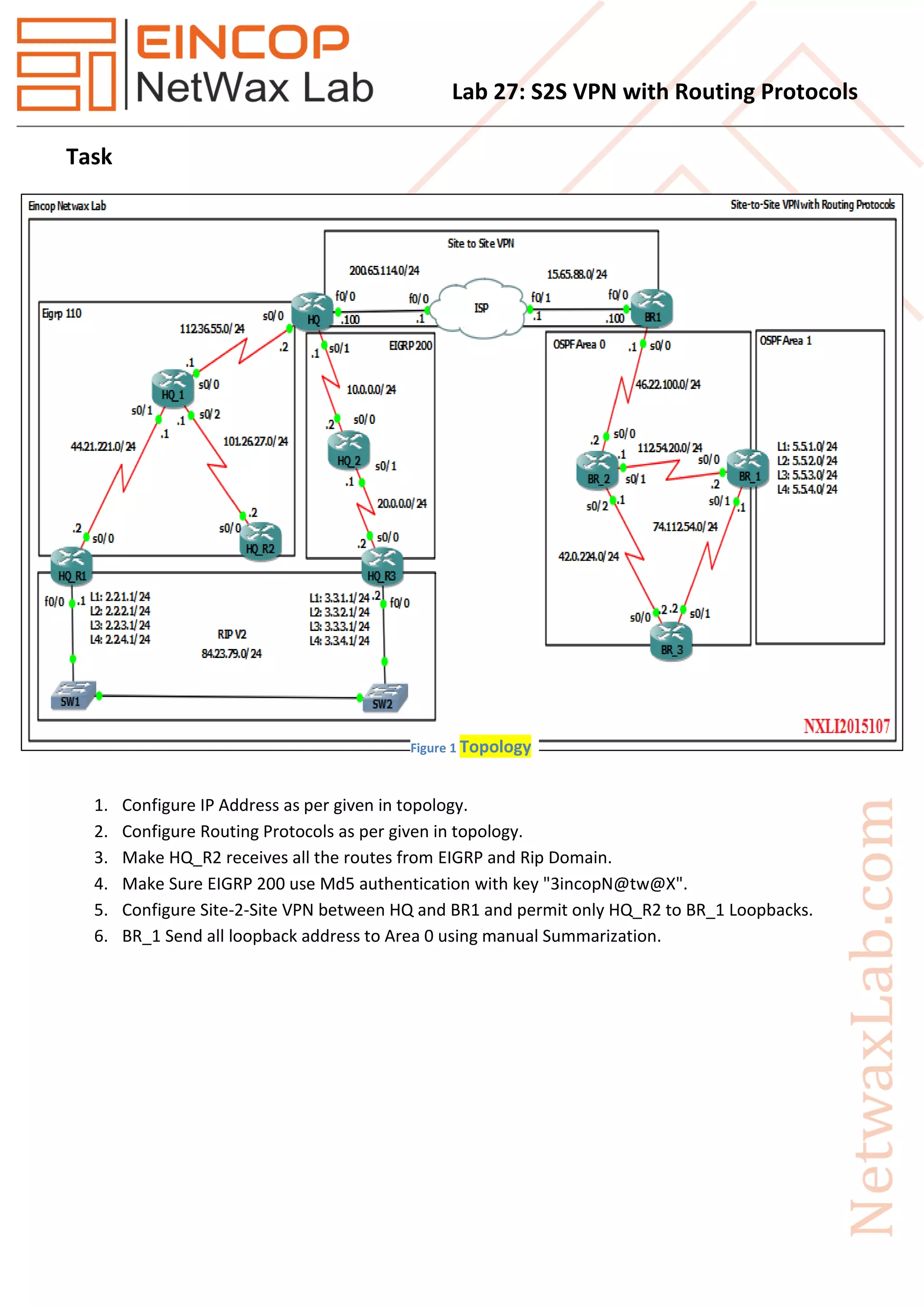
1. Configure IP Address as per given in topology.
2. Configure Routing Protocols as per given in topology.
3. Make HQ_R2 receives all the routes from EIGRP and Rip Domain.
4. Make Sure EIGRP 200 use Md5 authentication with key "3incopN@tw@X".
5. Configure Site-2-Site VPN between HQ and BR1 and permit only HQ_R2 to BR_1 Loopbacks.
6. BR_1 Send all loopback address to Area 0 using manual Summarization.
Figure 1 Topology
Lab 27: S2S VPN with Routing Protocols
Solution
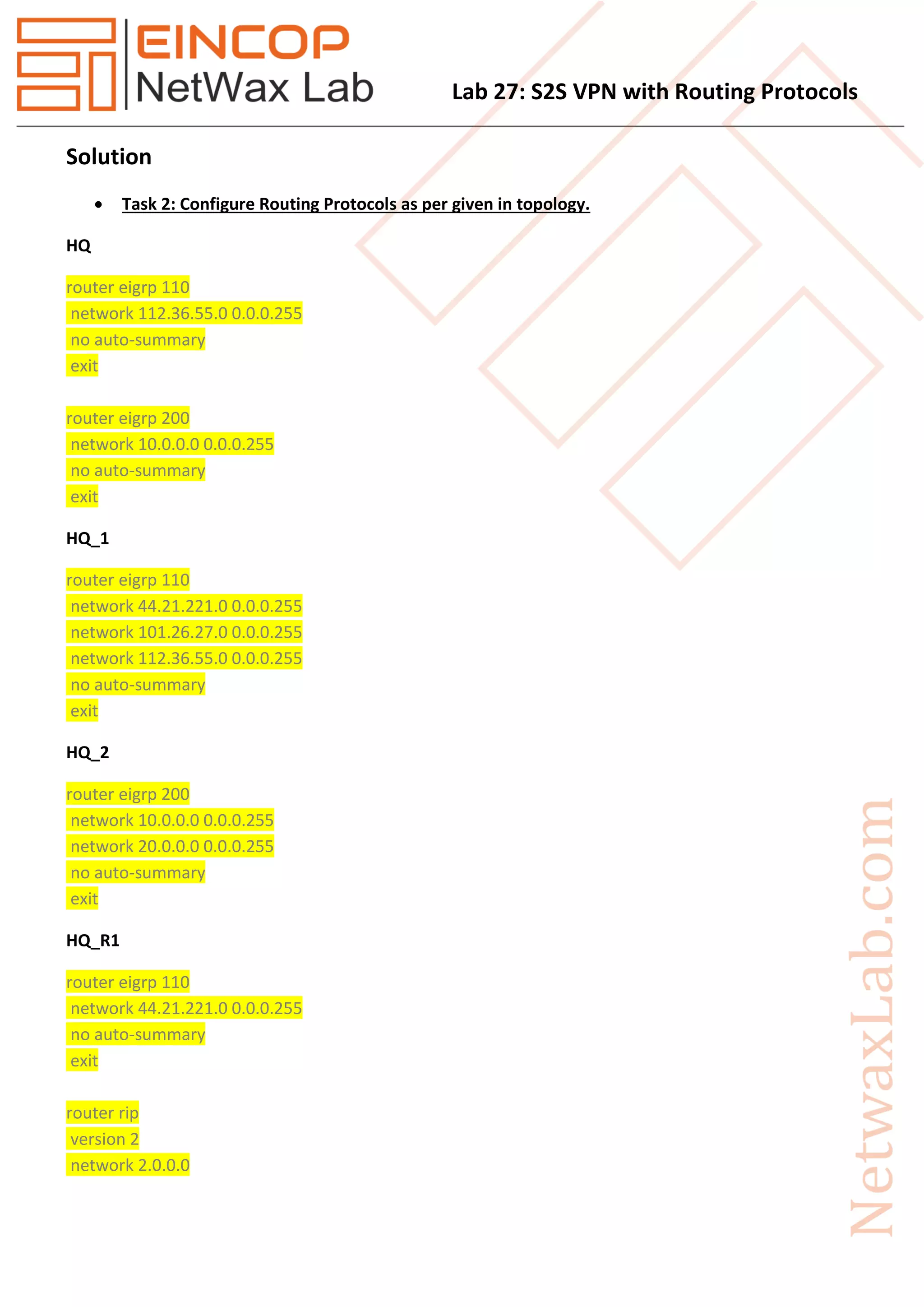
 Task 2: Configure Routing Protocols as per given in topology.
HQ
router eigrp 110
network 112.36.55.0 0.0.0.255
no auto-summary
exit
router eigrp 200
network 10.0.0.0 0.0.0.255
no auto-summary
exit
HQ_1
router eigrp 110
network 44.21.221.0 0.0.0.255
network 101.26.27.0 0.0.0.255
network 112.36.55.0 0.0.0.255
no auto-summary
exit
HQ_2
router eigrp 200
network 10.0.0.0 0.0.0.255
network 20.0.0.0 0.0.0.255
no auto-summary
exit
HQ_R1
router eigrp 110
network 44.21.221.0 0.0.0.255
no auto-summary
exit
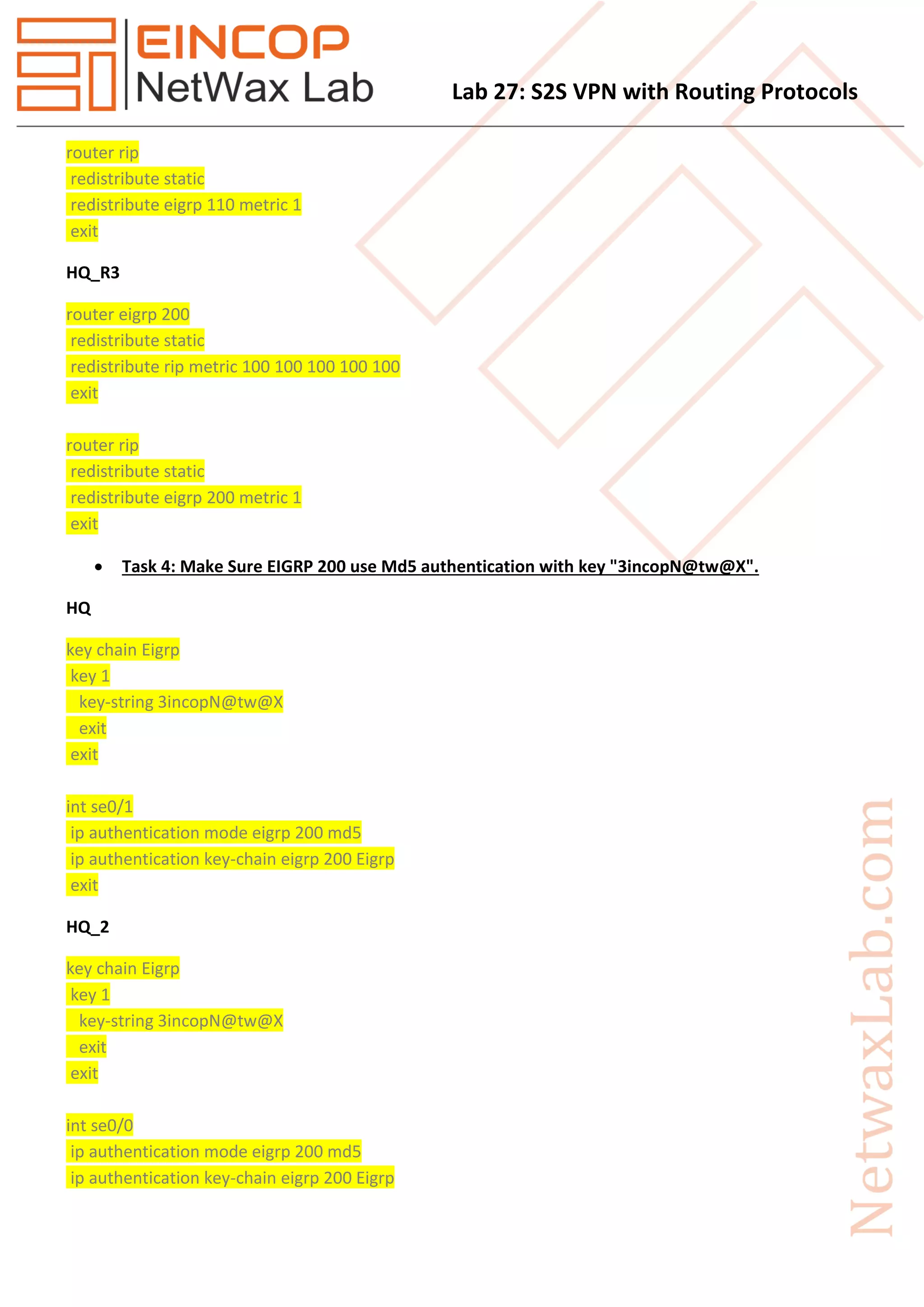
router rip
version 2
network 2.0.0.0
Lab 27: S2S VPN with Routing Protocols
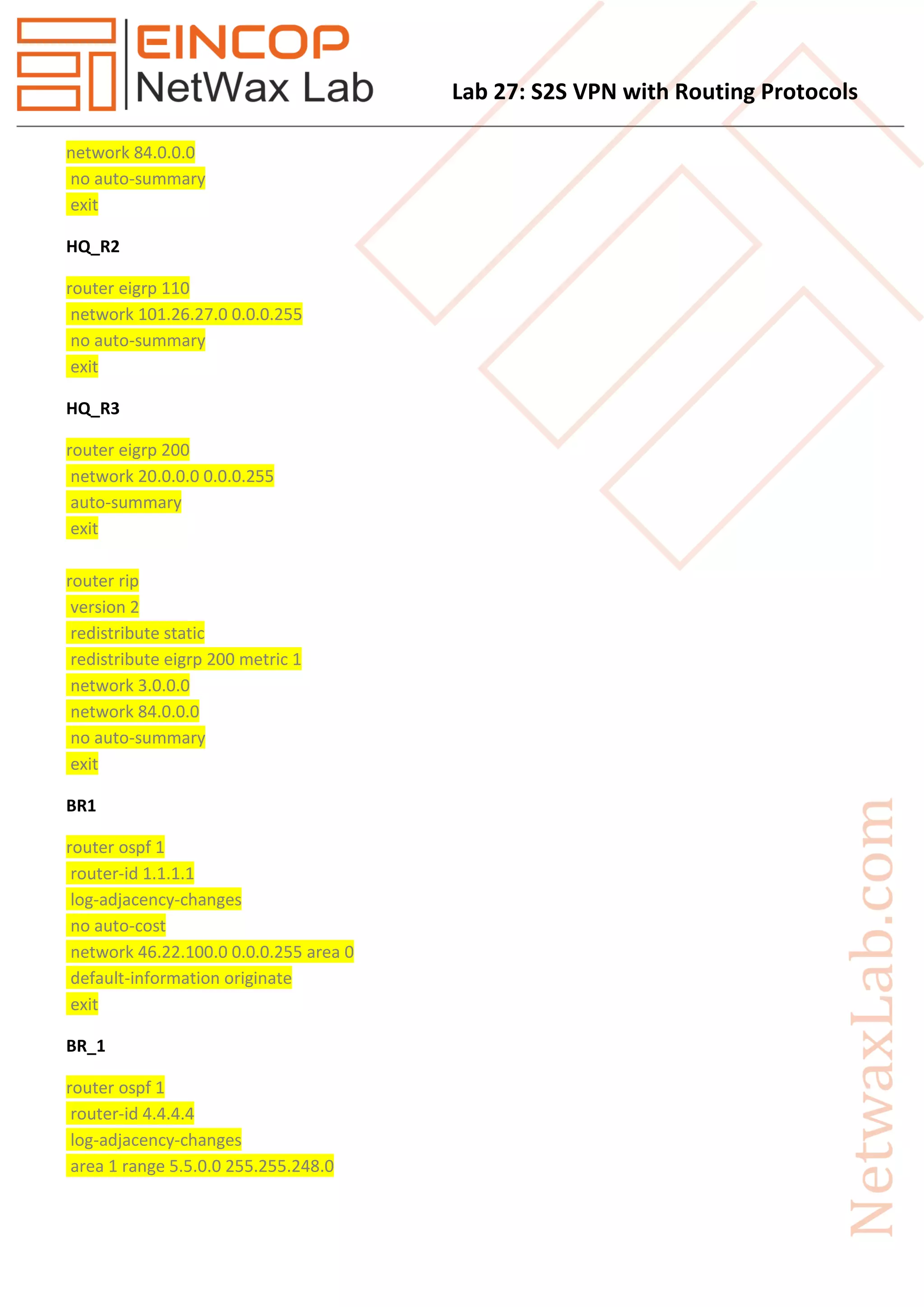
network 84.0.0.0
no auto-summary
exit
HQ_R2
router eigrp 110
network 101.26.27.0 0.0.0.255
no auto-summary
exit
HQ_R3
router eigrp 200
network 20.0.0.0 0.0.0.255
auto-summary
exit
router rip
version 2
redistribute static
redistribute eigrp 200 metric 1
network 3.0.0.0
network 84.0.0.0
no auto-summary
exit
BR1
router ospf 1
router-id 1.1.1.1
log-adjacency-changes
no auto-cost
network 46.22.100.0 0.0.0.255 area 0
default-information originate
exit
BR_1
router ospf 1
router-id 4.4.4.4
log-adjacency-changes
area 1 range 5.5.0.0 255.255.248.0
Lab 27: S2S VPN with Routing Protocols
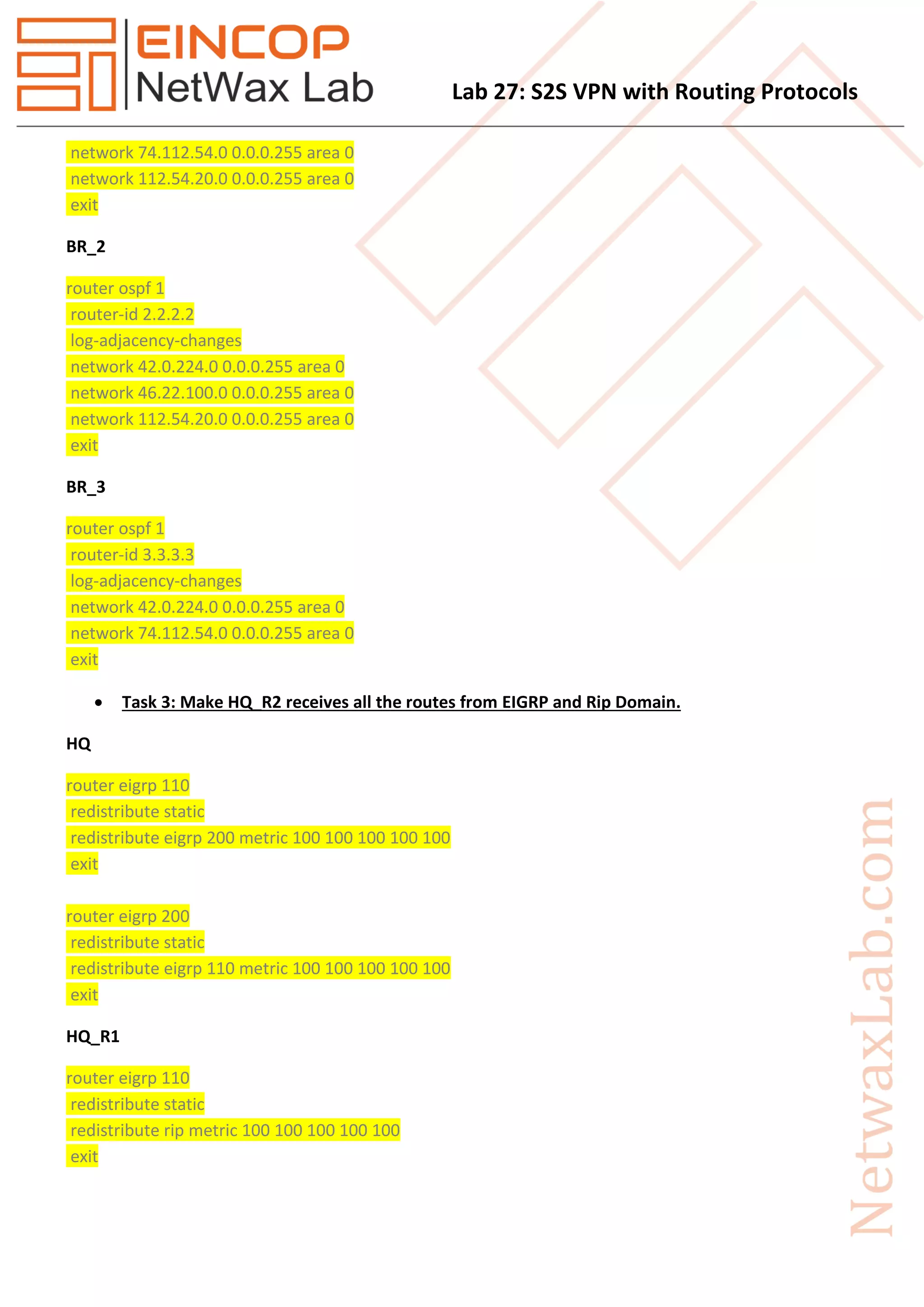
network 74.112.54.0 0.0.0.255 area 0
network 112.54.20.0 0.0.0.255 area 0
exit
BR_2
router ospf 1
router-id 2.2.2.2
log-adjacency-changes
network 42.0.224.0 0.0.0.255 area 0
network 46.22.100.0 0.0.0.255 area 0
network 112.54.20.0 0.0.0.255 area 0
exit
BR_3
router ospf 1
router-id 3.3.3.3
log-adjacency-changes
network 42.0.224.0 0.0.0.255 area 0
network 74.112.54.0 0.0.0.255 area 0
exit
 Task 3: Make HQ_R2 receives all the routes from EIGRP and Rip Domain.
HQ
router eigrp 110
redistribute static
redistribute eigrp 200 metric 100 100 100 100 100
exit
router eigrp 200
redistribute static
redistribute eigrp 110 metric 100 100 100 100 100
exit
HQ_R1
router eigrp 110
redistribute static
redistribute rip metric 100 100 100 100 100
exit
Lab 27: S2S VPN with Routing Protocols
router rip
redistribute static
redistribute eigrp 110 metric 1
exit
HQ_R3
router eigrp 200
redistribute static
redistribute rip metric 100 100 100 100 100
exit
router rip
redistribute static
redistribute eigrp 200 metric 1
exit
 Task 4: Make Sure EIGRP 200 use Md5 authentication with key "3incopN@tw@X".
HQ
key chain Eigrp
key 1
key-string 3incopN@tw@X
exit
exit
int se0/1
ip authentication mode eigrp 200 md5
ip authentication key-chain eigrp 200 Eigrp
exit
HQ_2
key chain Eigrp
key 1
key-string 3incopN@tw@X
exit
exit
int se0/0
ip authentication mode eigrp 200 md5
ip authentication key-chain eigrp 200 Eigrp
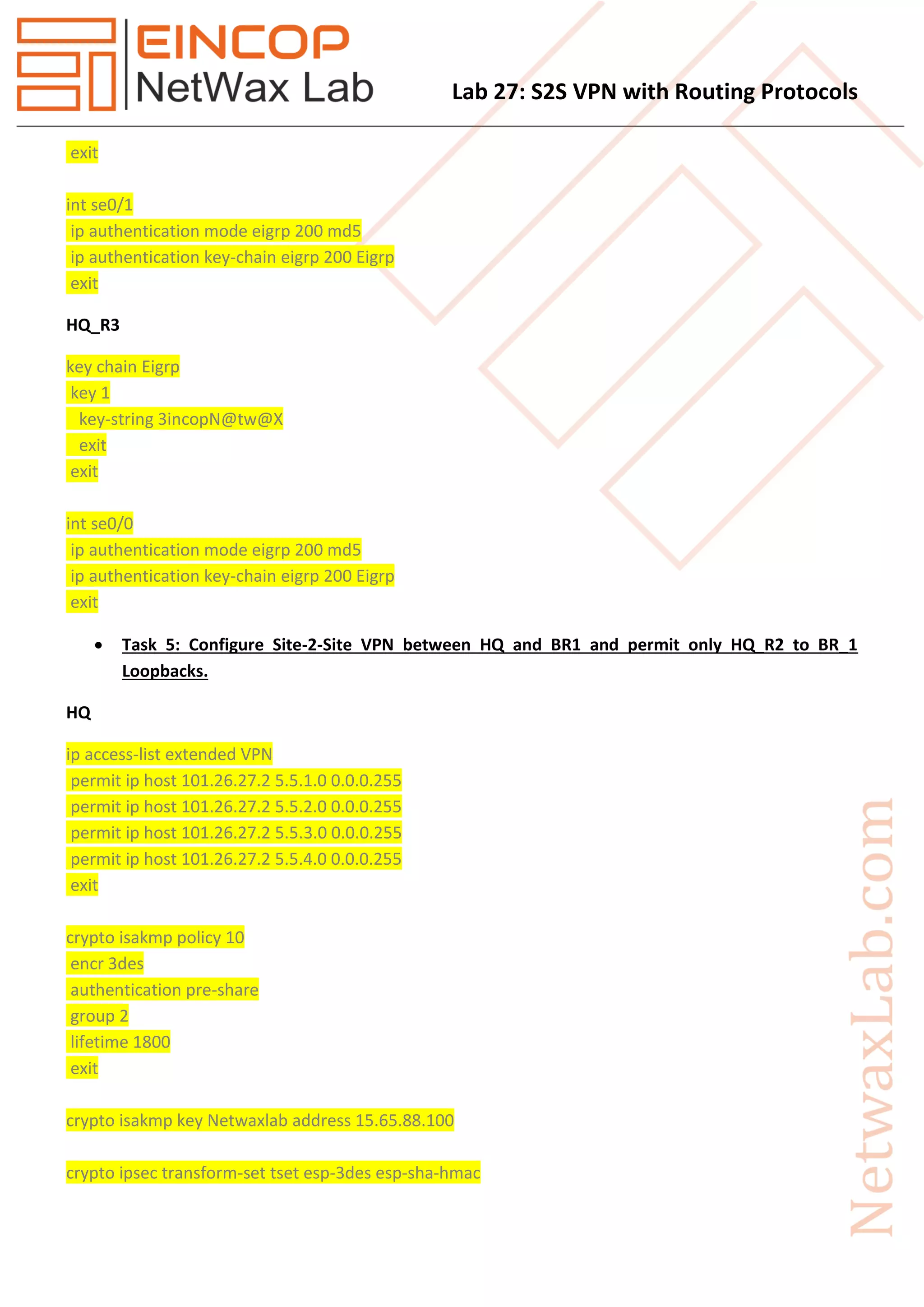
Lab 27: S2S VPN with Routing Protocols
exit
int se0/1
ip authentication mode eigrp 200 md5
ip authentication key-chain eigrp 200 Eigrp
exit
HQ_R3
key chain Eigrp
key 1
key-string 3incopN@tw@X
exit
exit
int se0/0
ip authentication mode eigrp 200 md5
ip authentication key-chain eigrp 200 Eigrp
exit
 Task 5: Configure Site-2-Site VPN between HQ and BR1 and permit only HQ_R2 to BR_1
Loopbacks.
HQ
ip access-list extended VPN
permit ip host 101.26.27.2 5.5.1.0 0.0.0.255
permit ip host 101.26.27.2 5.5.2.0 0.0.0.255
permit ip host 101.26.27.2 5.5.3.0 0.0.0.255
permit ip host 101.26.27.2 5.5.4.0 0.0.0.255
exit
crypto isakmp policy 10
encr 3des
authentication pre-share
group 2
lifetime 1800
exit
crypto isakmp key Netwaxlab address 15.65.88.100
crypto ipsec transform-set tset esp-3des esp-sha-hmac
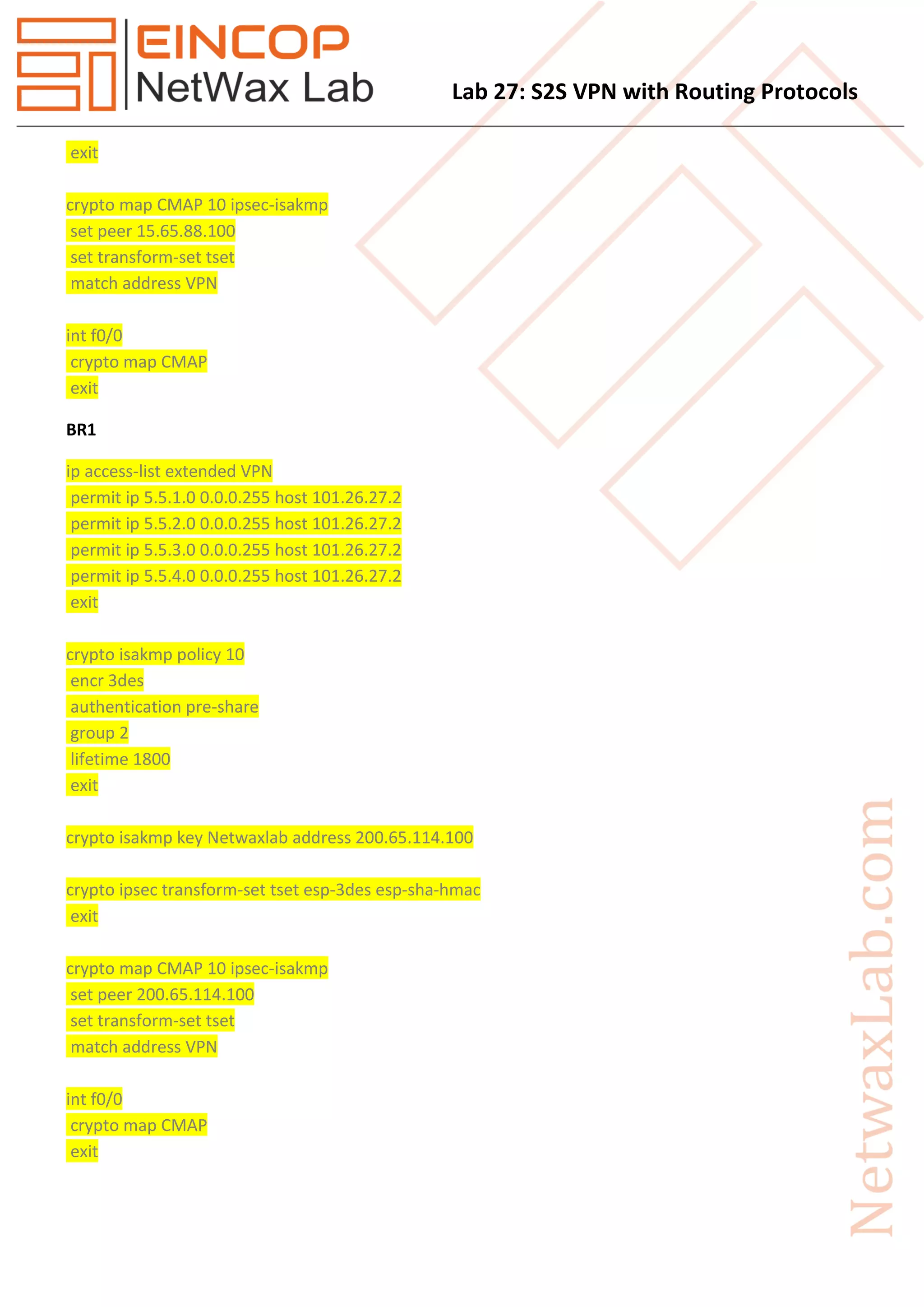
Lab 27: S2S VPN with Routing Protocols
exit
crypto map CMAP 10 ipsec-isakmp
set peer 15.65.88.100
set transform-set tset
match address VPN
int f0/0
crypto map CMAP
exit
BR1
ip access-list extended VPN
permit ip 5.5.1.0 0.0.0.255 host 101.26.27.2
permit ip 5.5.2.0 0.0.0.255 host 101.26.27.2
permit ip 5.5.3.0 0.0.0.255 host 101.26.27.2
permit ip 5.5.4.0 0.0.0.255 host 101.26.27.2
exit
crypto isakmp policy 10
encr 3des
authentication pre-share
group 2
lifetime 1800
exit
crypto isakmp key Netwaxlab address 200.65.114.100
crypto ipsec transform-set tset esp-3des esp-sha-hmac
exit
crypto map CMAP 10 ipsec-isakmp
set peer 200.65.114.100
set transform-set tset
match address VPN
int f0/0
crypto map CMAP
exit
Lab 27: S2S VPN with Routing Protocols
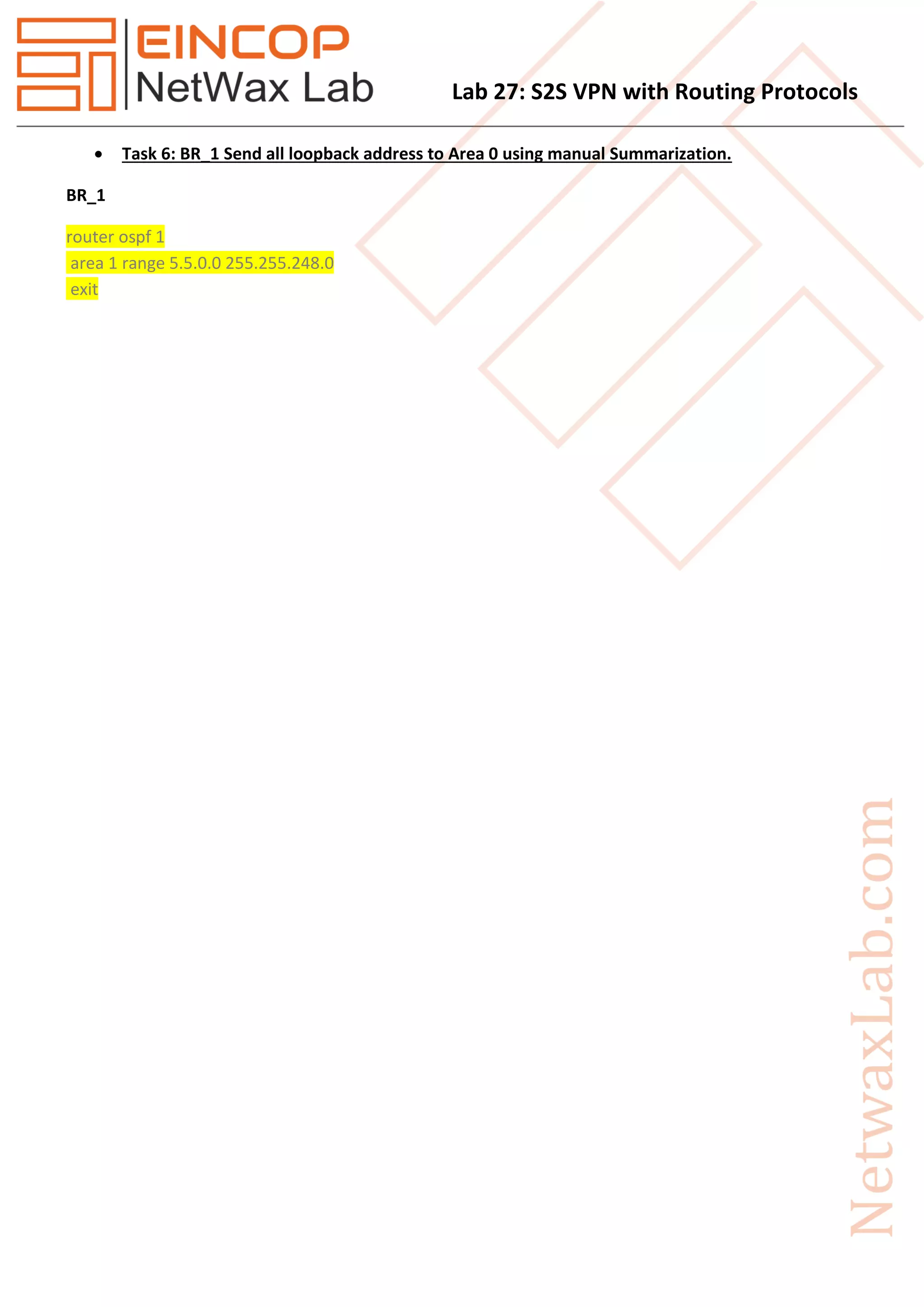
 Task 6: BR_1 Send all loopback address to Area 0 using manual Summarization.
BR_1
router ospf 1
area 1 range 5.5.0.0 255.255.248.0
exit

Eincop Netwax Lab: Site 2 Site VPN with Routing Protocols

  • 1.
    Lab 27: S2SVPN with Routing Protocols Task 1. Configure IP Address as per given in topology. 2. Configure Routing Protocols as per given in topology. 3. Make HQ_R2 receives all the routes from EIGRP and Rip Domain. 4. Make Sure EIGRP 200 use Md5 authentication with key "3incopN@tw@X". 5. Configure Site-2-Site VPN between HQ and BR1 and permit only HQ_R2 to BR_1 Loopbacks. 6. BR_1 Send all loopback address to Area 0 using manual Summarization. Figure 1 Topology
  • 2.
    Lab 27: S2SVPN with Routing Protocols Solution  Task 2: Configure Routing Protocols as per given in topology. HQ router eigrp 110 network 112.36.55.0 0.0.0.255 no auto-summary exit router eigrp 200 network 10.0.0.0 0.0.0.255 no auto-summary exit HQ_1 router eigrp 110 network 44.21.221.0 0.0.0.255 network 101.26.27.0 0.0.0.255 network 112.36.55.0 0.0.0.255 no auto-summary exit HQ_2 router eigrp 200 network 10.0.0.0 0.0.0.255 network 20.0.0.0 0.0.0.255 no auto-summary exit HQ_R1 router eigrp 110 network 44.21.221.0 0.0.0.255 no auto-summary exit router rip version 2 network 2.0.0.0
  • 3.
    Lab 27: S2SVPN with Routing Protocols network 84.0.0.0 no auto-summary exit HQ_R2 router eigrp 110 network 101.26.27.0 0.0.0.255 no auto-summary exit HQ_R3 router eigrp 200 network 20.0.0.0 0.0.0.255 auto-summary exit router rip version 2 redistribute static redistribute eigrp 200 metric 1 network 3.0.0.0 network 84.0.0.0 no auto-summary exit BR1 router ospf 1 router-id 1.1.1.1 log-adjacency-changes no auto-cost network 46.22.100.0 0.0.0.255 area 0 default-information originate exit BR_1 router ospf 1 router-id 4.4.4.4 log-adjacency-changes area 1 range 5.5.0.0 255.255.248.0
  • 4.
    Lab 27: S2SVPN with Routing Protocols network 74.112.54.0 0.0.0.255 area 0 network 112.54.20.0 0.0.0.255 area 0 exit BR_2 router ospf 1 router-id 2.2.2.2 log-adjacency-changes network 42.0.224.0 0.0.0.255 area 0 network 46.22.100.0 0.0.0.255 area 0 network 112.54.20.0 0.0.0.255 area 0 exit BR_3 router ospf 1 router-id 3.3.3.3 log-adjacency-changes network 42.0.224.0 0.0.0.255 area 0 network 74.112.54.0 0.0.0.255 area 0 exit  Task 3: Make HQ_R2 receives all the routes from EIGRP and Rip Domain. HQ router eigrp 110 redistribute static redistribute eigrp 200 metric 100 100 100 100 100 exit router eigrp 200 redistribute static redistribute eigrp 110 metric 100 100 100 100 100 exit HQ_R1 router eigrp 110 redistribute static redistribute rip metric 100 100 100 100 100 exit
  • 5.
    Lab 27: S2SVPN with Routing Protocols router rip redistribute static redistribute eigrp 110 metric 1 exit HQ_R3 router eigrp 200 redistribute static redistribute rip metric 100 100 100 100 100 exit router rip redistribute static redistribute eigrp 200 metric 1 exit  Task 4: Make Sure EIGRP 200 use Md5 authentication with key "3incopN@tw@X". HQ key chain Eigrp key 1 key-string 3incopN@tw@X exit exit int se0/1 ip authentication mode eigrp 200 md5 ip authentication key-chain eigrp 200 Eigrp exit HQ_2 key chain Eigrp key 1 key-string 3incopN@tw@X exit exit int se0/0 ip authentication mode eigrp 200 md5 ip authentication key-chain eigrp 200 Eigrp
  • 6.
    Lab 27: S2SVPN with Routing Protocols exit int se0/1 ip authentication mode eigrp 200 md5 ip authentication key-chain eigrp 200 Eigrp exit HQ_R3 key chain Eigrp key 1 key-string 3incopN@tw@X exit exit int se0/0 ip authentication mode eigrp 200 md5 ip authentication key-chain eigrp 200 Eigrp exit  Task 5: Configure Site-2-Site VPN between HQ and BR1 and permit only HQ_R2 to BR_1 Loopbacks. HQ ip access-list extended VPN permit ip host 101.26.27.2 5.5.1.0 0.0.0.255 permit ip host 101.26.27.2 5.5.2.0 0.0.0.255 permit ip host 101.26.27.2 5.5.3.0 0.0.0.255 permit ip host 101.26.27.2 5.5.4.0 0.0.0.255 exit crypto isakmp policy 10 encr 3des authentication pre-share group 2 lifetime 1800 exit crypto isakmp key Netwaxlab address 15.65.88.100 crypto ipsec transform-set tset esp-3des esp-sha-hmac
  • 7.
    Lab 27: S2SVPN with Routing Protocols exit crypto map CMAP 10 ipsec-isakmp set peer 15.65.88.100 set transform-set tset match address VPN int f0/0 crypto map CMAP exit BR1 ip access-list extended VPN permit ip 5.5.1.0 0.0.0.255 host 101.26.27.2 permit ip 5.5.2.0 0.0.0.255 host 101.26.27.2 permit ip 5.5.3.0 0.0.0.255 host 101.26.27.2 permit ip 5.5.4.0 0.0.0.255 host 101.26.27.2 exit crypto isakmp policy 10 encr 3des authentication pre-share group 2 lifetime 1800 exit crypto isakmp key Netwaxlab address 200.65.114.100 crypto ipsec transform-set tset esp-3des esp-sha-hmac exit crypto map CMAP 10 ipsec-isakmp set peer 200.65.114.100 set transform-set tset match address VPN int f0/0 crypto map CMAP exit
  • 8.
    Lab 27: S2SVPN with Routing Protocols  Task 6: BR_1 Send all loopback address to Area 0 using manual Summarization. BR_1 router ospf 1 area 1 range 5.5.0.0 255.255.248.0 exit