Lab 16: Basic ASA v8.2
Task
*Use ASA Code 8.2 for this Task
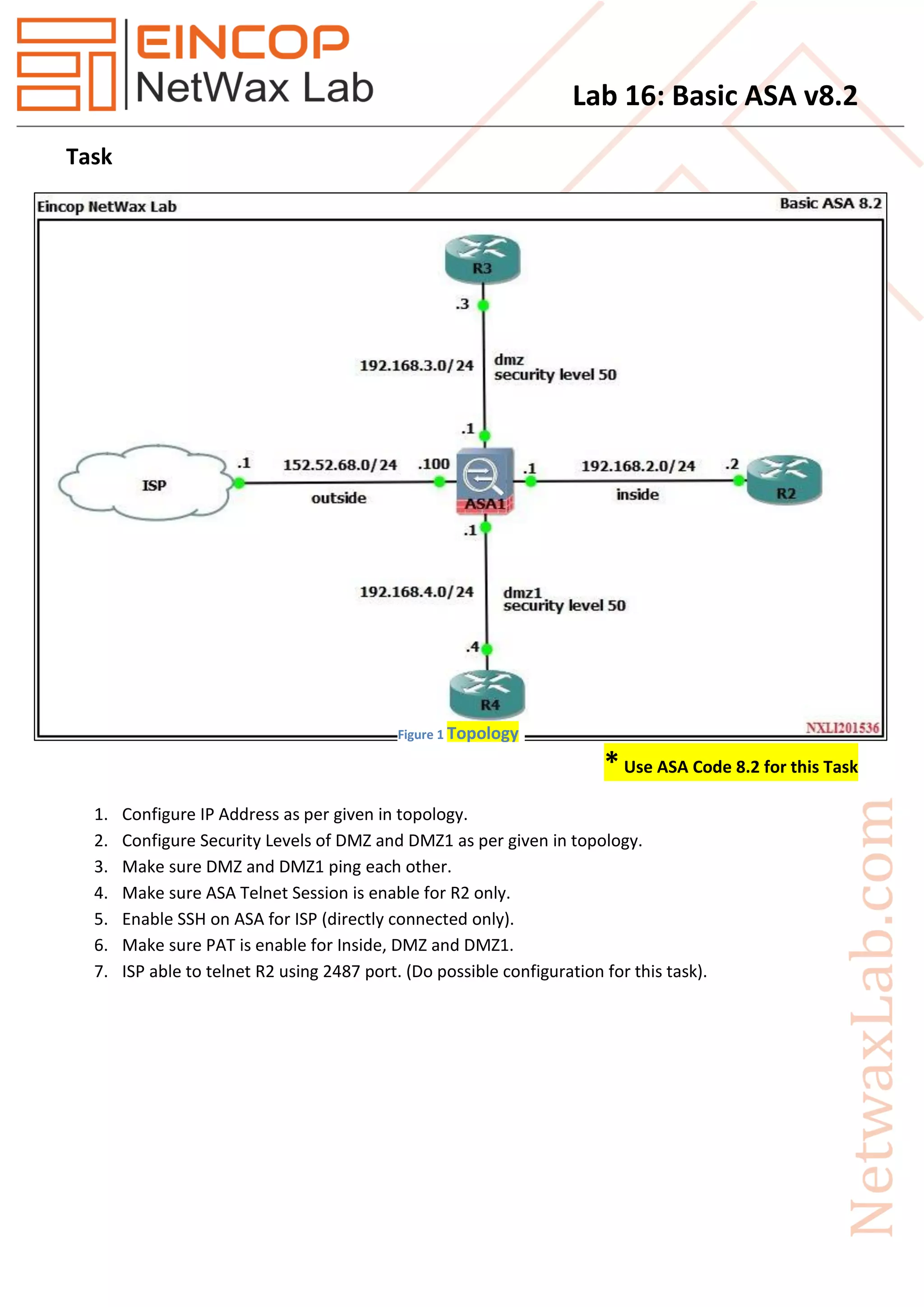
1. Configure IP Address as per given in topology.
2. Configure Security Levels of DMZ and DMZ1 as per given in topology.
3. Make sure DMZ and DMZ1 ping each other.
4. Make sure ASA Telnet Session is enable for R2 only.
5. Enable SSH on ASA for ISP (directly connected only).
6. Make sure PAT is enable for Inside, DMZ and DMZ1.
7. ISP able to telnet R2 using 2487 port. (Do possible configuration for this task).
Figure 1 Topology
Lab 16: Basic ASA v8.2
Solution
* Use ASA Code 8.2 for this Task.
(Note: Make sure R2, R3 and R4 have default route to ASA.)
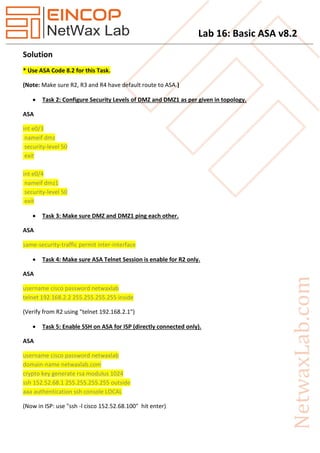
 Task 2: Configure Security Levels of DMZ and DMZ1 as per given in topology.
ASA
int e0/3
nameif dmz
security-level 50
exit
int e0/4
nameif dmz1
security-level 50
exit
 Task 3: Make sure DMZ and DMZ1 ping each other.
ASA
same-security-traffic permit inter-interface
 Task 4: Make sure ASA Telnet Session is enable for R2 only.
ASA
username cisco password netwaxlab
telnet 192.168.2.2 255.255.255.255 inside
(Verify from R2 using "telnet 192.168.2.1")
 Task 5: Enable SSH on ASA for ISP (directly connected only).
ASA
username cisco password netwaxlab
domain-name netwaxlab.com
crypto key generate rsa modulus 1024
ssh 152.52.68.1 255.255.255.255 outside
aaa authentication ssh console LOCAL
(Now in ISP: use "ssh -l cisco 152.52.68.100" hit enter)
Lab 16: Basic ASA v8.2
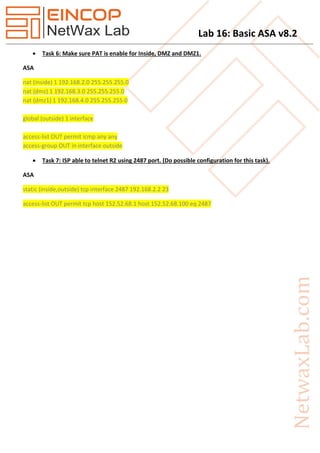
 Task 6: Make sure PAT is enable for Inside, DMZ and DMZ1.
ASA
nat (inside) 1 192.168.2.0 255.255.255.0
nat (dmz) 1 192.168.3.0 255.255.255.0
nat (dmz1) 1 192.168.4.0 255.255.255.0
global (outside) 1 interface
access-list OUT permit icmp any any
access-group OUT in interface outside
 Task 7: ISP able to telnet R2 using 2487 port. (Do possible configuration for this task).
ASA
static (inside,outside) tcp interface 2487 192.168.2.2 23
access-list OUT permit tcp host 152.52.68.1 host 152.52.68.100 eq 2487

Nxll16 basic asa v8.2

  • 1.
    Lab 16: BasicASA v8.2 Task *Use ASA Code 8.2 for this Task 1. Configure IP Address as per given in topology. 2. Configure Security Levels of DMZ and DMZ1 as per given in topology. 3. Make sure DMZ and DMZ1 ping each other. 4. Make sure ASA Telnet Session is enable for R2 only. 5. Enable SSH on ASA for ISP (directly connected only). 6. Make sure PAT is enable for Inside, DMZ and DMZ1. 7. ISP able to telnet R2 using 2487 port. (Do possible configuration for this task). Figure 1 Topology
  • 2.
    Lab 16: BasicASA v8.2 Solution * Use ASA Code 8.2 for this Task. (Note: Make sure R2, R3 and R4 have default route to ASA.)  Task 2: Configure Security Levels of DMZ and DMZ1 as per given in topology. ASA int e0/3 nameif dmz security-level 50 exit int e0/4 nameif dmz1 security-level 50 exit  Task 3: Make sure DMZ and DMZ1 ping each other. ASA same-security-traffic permit inter-interface  Task 4: Make sure ASA Telnet Session is enable for R2 only. ASA username cisco password netwaxlab telnet 192.168.2.2 255.255.255.255 inside (Verify from R2 using "telnet 192.168.2.1")  Task 5: Enable SSH on ASA for ISP (directly connected only). ASA username cisco password netwaxlab domain-name netwaxlab.com crypto key generate rsa modulus 1024 ssh 152.52.68.1 255.255.255.255 outside aaa authentication ssh console LOCAL (Now in ISP: use "ssh -l cisco 152.52.68.100" hit enter)
  • 3.
    Lab 16: BasicASA v8.2  Task 6: Make sure PAT is enable for Inside, DMZ and DMZ1. ASA nat (inside) 1 192.168.2.0 255.255.255.0 nat (dmz) 1 192.168.3.0 255.255.255.0 nat (dmz1) 1 192.168.4.0 255.255.255.0 global (outside) 1 interface access-list OUT permit icmp any any access-group OUT in interface outside  Task 7: ISP able to telnet R2 using 2487 port. (Do possible configuration for this task). ASA static (inside,outside) tcp interface 2487 192.168.2.2 23 access-list OUT permit tcp host 152.52.68.1 host 152.52.68.100 eq 2487