Lab 22: Role Based CLI
Task
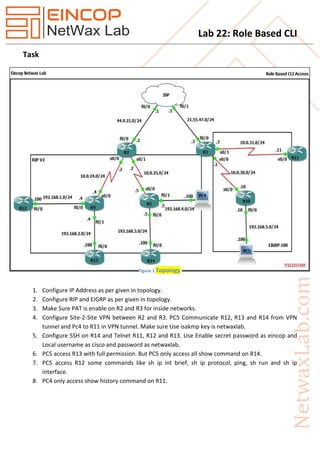
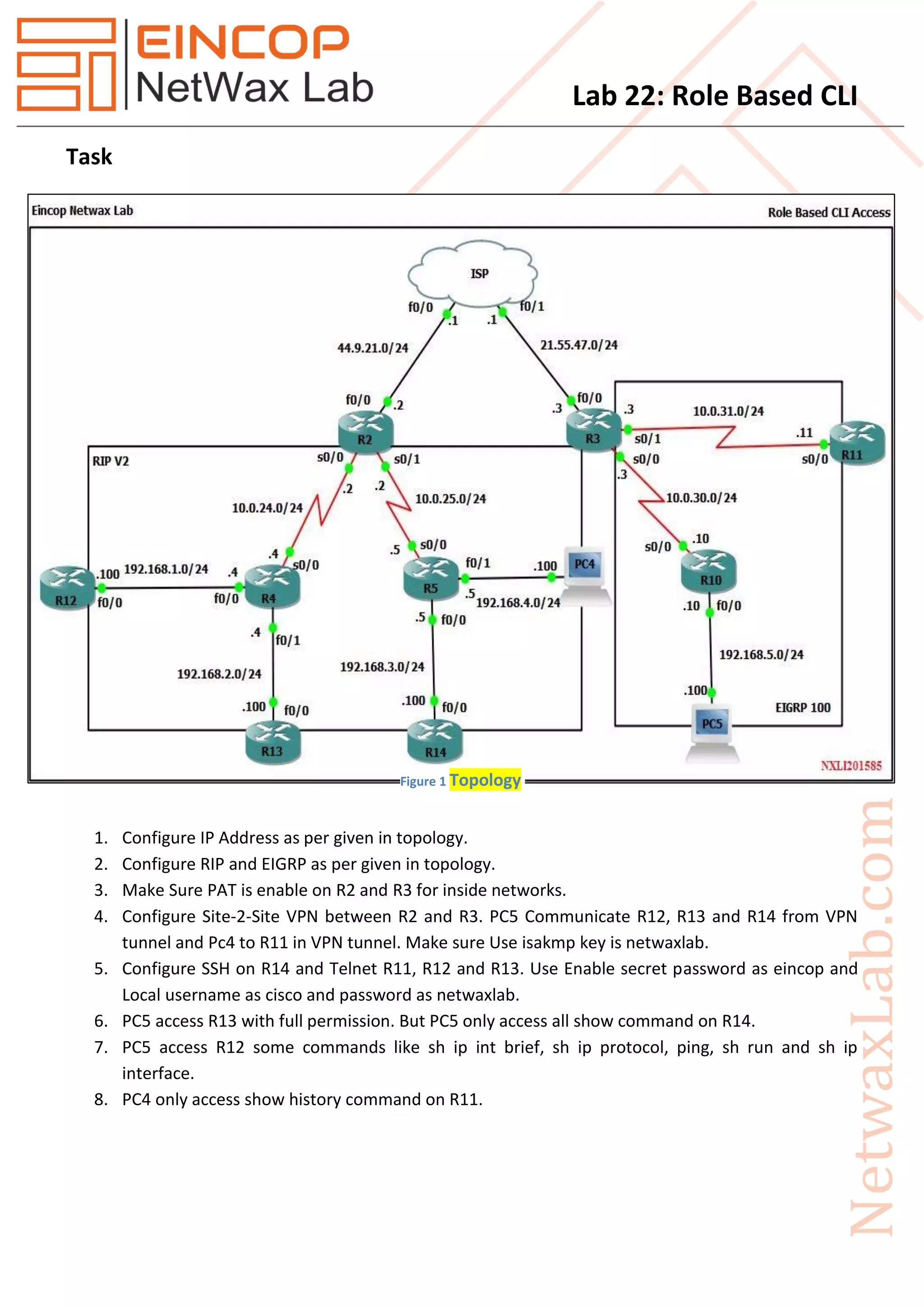
1. Configure IP Address as per given in topology.
2. Configure RIP and EIGRP as per given in topology.
3. Make Sure PAT is enable on R2 and R3 for inside networks.
4. Configure Site-2-Site VPN between R2 and R3. PC5 Communicate R12, R13 and R14 from VPN
tunnel and Pc4 to R11 in VPN tunnel. Make sure Use isakmp key is netwaxlab.
5. Configure SSH on R14 and Telnet R11, R12 and R13. Use Enable secret password as eincop and
Local username as cisco and password as netwaxlab.
6. PC5 access R13 with full permission. But PC5 only access all show command on R14.
7. PC5 access R12 some commands like sh ip int brief, sh ip protocol, ping, sh run and sh ip
interface.
8. PC4 only access show history command on R11.
Figure 1 Topology
Lab 22: Role Based CLI
Solution
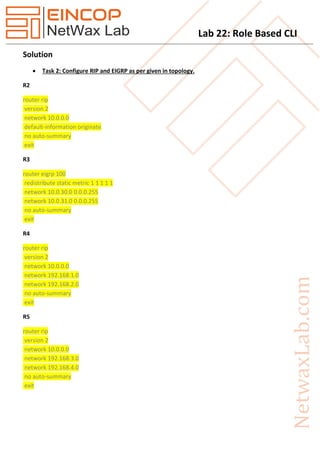
 Task 2: Configure RIP and EIGRP as per given in topology.
R2
router rip
version 2
network 10.0.0.0
default-information originate
no auto-summary
exit
R3
router eigrp 100
redistribute static metric 1 1 1 1 1
network 10.0.30.0 0.0.0.255
network 10.0.31.0 0.0.0.255
no auto-summary
exit
R4
router rip
version 2
network 10.0.0.0
network 192.168.1.0
network 192.168.2.0
no auto-summary
exit
R5
router rip
version 2
network 10.0.0.0
network 192.168.3.0
network 192.168.4.0
no auto-summary
exit
Lab 22: Role Based CLI
R10
router eigrp 100
network 10.0.30.0 0.0.0.255
network 192.168.5.0
no auto-summary
exit
R11
router eigrp 100
network 10.0.31.0 0.0.0.255
no auto-summary
exit
R12
router rip
version 2
network 192.168.1.0
no auto-summary
R13
router rip
version 2
network 192.168.2.0
no auto-summary
R14
router rip
version 2
network 192.168.3.0
no auto-summary
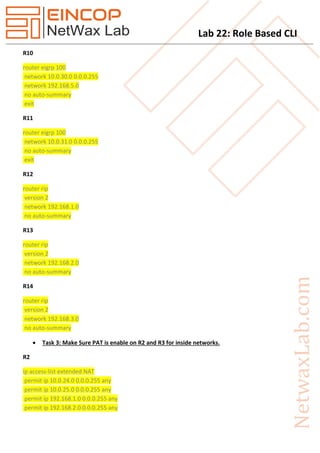
 Task 3: Make Sure PAT is enable on R2 and R3 for inside networks.
R2
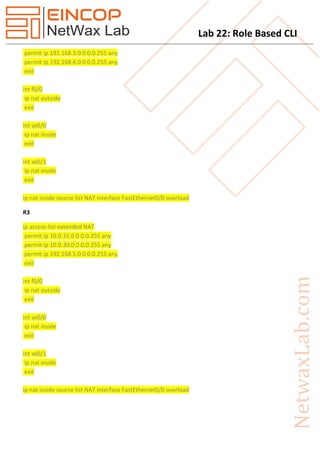
ip access-list extended NAT
permit ip 10.0.24.0 0.0.0.255 any
permit ip 10.0.25.0 0.0.0.255 any
permit ip 192.168.1.0 0.0.0.255 any
permit ip 192.168.2.0 0.0.0.255 any
Lab 22: Role Based CLI
permit ip 192.168.3.0 0.0.0.255 any
permit ip 192.168.4.0 0.0.0.255 any
exit
int f0/0
ip nat outside
exit
int se0/0
ip nat inside
exit
int se0/1
ip nat inside
exit
ip nat inside source list NAT interface FastEthernet0/0 overload
R3
ip access-list extended NAT
permit ip 10.0.31.0 0.0.0.255 any
permit ip 10.0.30.0 0.0.0.255 any
permit ip 192.168.5.0 0.0.0.255 any
exit
int f0/0
ip nat outside
exit
int se0/0
ip nat inside
exit
int se0/1
ip nat inside
exit
ip nat inside source list NAT interface FastEthernet0/0 overload
Lab 22: Role Based CLI
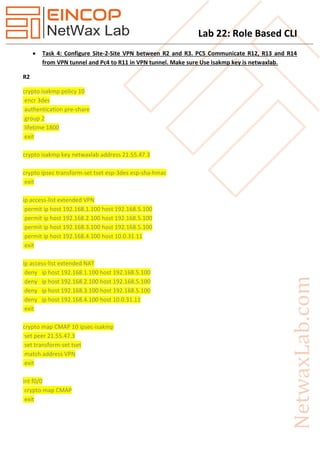
 Task 4: Configure Site-2-Site VPN between R2 and R3. PC5 Communicate R12, R13 and R14
from VPN tunnel and Pc4 to R11 in VPN tunnel. Make sure Use isakmp key is netwaxlab.
R2
crypto isakmp policy 10
encr 3des
authentication pre-share
group 2
lifetime 1800
exit
crypto isakmp key netwaxlab address 21.55.47.3
crypto ipsec transform-set tset esp-3des esp-sha-hmac
exit
ip access-list extended VPN
permit ip host 192.168.1.100 host 192.168.5.100
permit ip host 192.168.2.100 host 192.168.5.100
permit ip host 192.168.3.100 host 192.168.5.100
permit ip host 192.168.4.100 host 10.0.31.11
exit
ip access-list extended NAT
deny ip host 192.168.1.100 host 192.168.5.100
deny ip host 192.168.2.100 host 192.168.5.100
deny ip host 192.168.3.100 host 192.168.5.100
deny ip host 192.168.4.100 host 10.0.31.11
exit
crypto map CMAP 10 ipsec-isakmp
set peer 21.55.47.3
set transform-set tset
match address VPN
exit
int f0/0
crypto map CMAP
exit
Lab 22: Role Based CLI
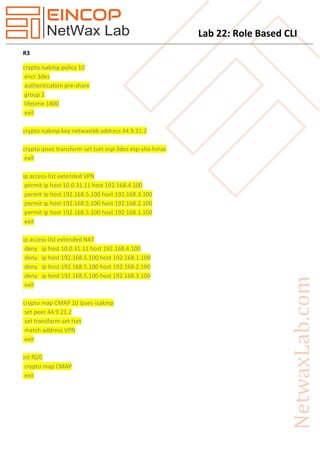
R3
crypto isakmp policy 10
encr 3des
authentication pre-share
group 2
lifetime 1800
exit
crypto isakmp key netwaxlab address 44.9.21.2
crypto ipsec transform-set tset esp-3des esp-sha-hmac
exit
ip access-list extended VPN
permit ip host 10.0.31.11 host 192.168.4.100
permit ip host 192.168.5.100 host 192.168.3.100
permit ip host 192.168.5.100 host 192.168.2.100
permit ip host 192.168.5.100 host 192.168.1.100
exit
ip access-list extended NAT
deny ip host 10.0.31.11 host 192.168.4.100
deny ip host 192.168.5.100 host 192.168.1.100
deny ip host 192.168.5.100 host 192.168.2.100
deny ip host 192.168.5.100 host 192.168.3.100
exit
crypto map CMAP 10 ipsec-isakmp
set peer 44.9.21.2
set transform-set tset
match address VPN
exit
int f0/0
crypto map CMAP
exit
Lab 22: Role Based CLI
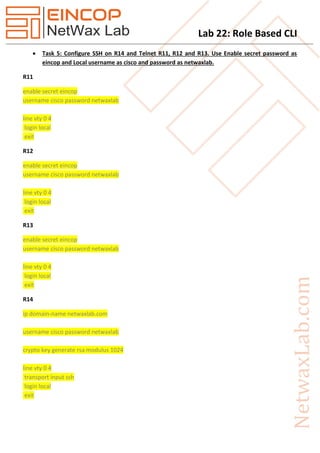
 Task 5: Configure SSH on R14 and Telnet R11, R12 and R13. Use Enable secret password as
eincop and Local username as cisco and password as netwaxlab.
R11
enable secret eincop
username cisco password netwaxlab
line vty 0 4
login local
exit
R12
enable secret eincop
username cisco password netwaxlab
line vty 0 4
login local
exit
R13
enable secret eincop
username cisco password netwaxlab
line vty 0 4
login local
exit
R14
ip domain-name netwaxlab.com
username cisco password netwaxlab
crypto key generate rsa modulus 1024
line vty 0 4
transport input ssh
login local
exit
Lab 22: Role Based CLI
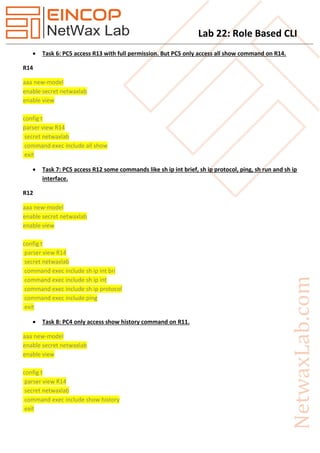
 Task 6: PC5 access R13 with full permission. But PC5 only access all show command on R14.
R14
aaa new-model
enable secret netwaxlab
enable view
config t
parser view R14
secret netwaxlab
command exec include all show
exit
 Task 7: PC5 access R12 some commands like sh ip int brief, sh ip protocol, ping, sh run and sh ip
interface.
R12
aaa new-model
enable secret netwaxlab
enable view
config t
parser view R14
secret netwaxlab
command exec include sh ip int bri
command exec include sh ip int
command exec include sh ip protocol
command exec include ping
exit
 Task 8: PC4 only access show history command on R11.
aaa new-model
enable secret netwaxlab
enable view
config t
parser view R14
secret netwaxlab
command exec include show history
exit

Nxll22 role based cli

  • 1.
    Lab 22: RoleBased CLI Task 1. Configure IP Address as per given in topology. 2. Configure RIP and EIGRP as per given in topology. 3. Make Sure PAT is enable on R2 and R3 for inside networks. 4. Configure Site-2-Site VPN between R2 and R3. PC5 Communicate R12, R13 and R14 from VPN tunnel and Pc4 to R11 in VPN tunnel. Make sure Use isakmp key is netwaxlab. 5. Configure SSH on R14 and Telnet R11, R12 and R13. Use Enable secret password as eincop and Local username as cisco and password as netwaxlab. 6. PC5 access R13 with full permission. But PC5 only access all show command on R14. 7. PC5 access R12 some commands like sh ip int brief, sh ip protocol, ping, sh run and sh ip interface. 8. PC4 only access show history command on R11. Figure 1 Topology
  • 2.
    Lab 22: RoleBased CLI Solution  Task 2: Configure RIP and EIGRP as per given in topology. R2 router rip version 2 network 10.0.0.0 default-information originate no auto-summary exit R3 router eigrp 100 redistribute static metric 1 1 1 1 1 network 10.0.30.0 0.0.0.255 network 10.0.31.0 0.0.0.255 no auto-summary exit R4 router rip version 2 network 10.0.0.0 network 192.168.1.0 network 192.168.2.0 no auto-summary exit R5 router rip version 2 network 10.0.0.0 network 192.168.3.0 network 192.168.4.0 no auto-summary exit
  • 3.
    Lab 22: RoleBased CLI R10 router eigrp 100 network 10.0.30.0 0.0.0.255 network 192.168.5.0 no auto-summary exit R11 router eigrp 100 network 10.0.31.0 0.0.0.255 no auto-summary exit R12 router rip version 2 network 192.168.1.0 no auto-summary R13 router rip version 2 network 192.168.2.0 no auto-summary R14 router rip version 2 network 192.168.3.0 no auto-summary  Task 3: Make Sure PAT is enable on R2 and R3 for inside networks. R2 ip access-list extended NAT permit ip 10.0.24.0 0.0.0.255 any permit ip 10.0.25.0 0.0.0.255 any permit ip 192.168.1.0 0.0.0.255 any permit ip 192.168.2.0 0.0.0.255 any
  • 4.
    Lab 22: RoleBased CLI permit ip 192.168.3.0 0.0.0.255 any permit ip 192.168.4.0 0.0.0.255 any exit int f0/0 ip nat outside exit int se0/0 ip nat inside exit int se0/1 ip nat inside exit ip nat inside source list NAT interface FastEthernet0/0 overload R3 ip access-list extended NAT permit ip 10.0.31.0 0.0.0.255 any permit ip 10.0.30.0 0.0.0.255 any permit ip 192.168.5.0 0.0.0.255 any exit int f0/0 ip nat outside exit int se0/0 ip nat inside exit int se0/1 ip nat inside exit ip nat inside source list NAT interface FastEthernet0/0 overload
  • 5.
    Lab 22: RoleBased CLI  Task 4: Configure Site-2-Site VPN between R2 and R3. PC5 Communicate R12, R13 and R14 from VPN tunnel and Pc4 to R11 in VPN tunnel. Make sure Use isakmp key is netwaxlab. R2 crypto isakmp policy 10 encr 3des authentication pre-share group 2 lifetime 1800 exit crypto isakmp key netwaxlab address 21.55.47.3 crypto ipsec transform-set tset esp-3des esp-sha-hmac exit ip access-list extended VPN permit ip host 192.168.1.100 host 192.168.5.100 permit ip host 192.168.2.100 host 192.168.5.100 permit ip host 192.168.3.100 host 192.168.5.100 permit ip host 192.168.4.100 host 10.0.31.11 exit ip access-list extended NAT deny ip host 192.168.1.100 host 192.168.5.100 deny ip host 192.168.2.100 host 192.168.5.100 deny ip host 192.168.3.100 host 192.168.5.100 deny ip host 192.168.4.100 host 10.0.31.11 exit crypto map CMAP 10 ipsec-isakmp set peer 21.55.47.3 set transform-set tset match address VPN exit int f0/0 crypto map CMAP exit
  • 6.
    Lab 22: RoleBased CLI R3 crypto isakmp policy 10 encr 3des authentication pre-share group 2 lifetime 1800 exit crypto isakmp key netwaxlab address 44.9.21.2 crypto ipsec transform-set tset esp-3des esp-sha-hmac exit ip access-list extended VPN permit ip host 10.0.31.11 host 192.168.4.100 permit ip host 192.168.5.100 host 192.168.3.100 permit ip host 192.168.5.100 host 192.168.2.100 permit ip host 192.168.5.100 host 192.168.1.100 exit ip access-list extended NAT deny ip host 10.0.31.11 host 192.168.4.100 deny ip host 192.168.5.100 host 192.168.1.100 deny ip host 192.168.5.100 host 192.168.2.100 deny ip host 192.168.5.100 host 192.168.3.100 exit crypto map CMAP 10 ipsec-isakmp set peer 44.9.21.2 set transform-set tset match address VPN exit int f0/0 crypto map CMAP exit
  • 7.
    Lab 22: RoleBased CLI  Task 5: Configure SSH on R14 and Telnet R11, R12 and R13. Use Enable secret password as eincop and Local username as cisco and password as netwaxlab. R11 enable secret eincop username cisco password netwaxlab line vty 0 4 login local exit R12 enable secret eincop username cisco password netwaxlab line vty 0 4 login local exit R13 enable secret eincop username cisco password netwaxlab line vty 0 4 login local exit R14 ip domain-name netwaxlab.com username cisco password netwaxlab crypto key generate rsa modulus 1024 line vty 0 4 transport input ssh login local exit
  • 8.
    Lab 22: RoleBased CLI  Task 6: PC5 access R13 with full permission. But PC5 only access all show command on R14. R14 aaa new-model enable secret netwaxlab enable view config t parser view R14 secret netwaxlab command exec include all show exit  Task 7: PC5 access R12 some commands like sh ip int brief, sh ip protocol, ping, sh run and sh ip interface. R12 aaa new-model enable secret netwaxlab enable view config t parser view R14 secret netwaxlab command exec include sh ip int bri command exec include sh ip int command exec include sh ip protocol command exec include ping exit  Task 8: PC4 only access show history command on R11. aaa new-model enable secret netwaxlab enable view config t parser view R14 secret netwaxlab command exec include show history exit