Lab 31: Access List-II
Task
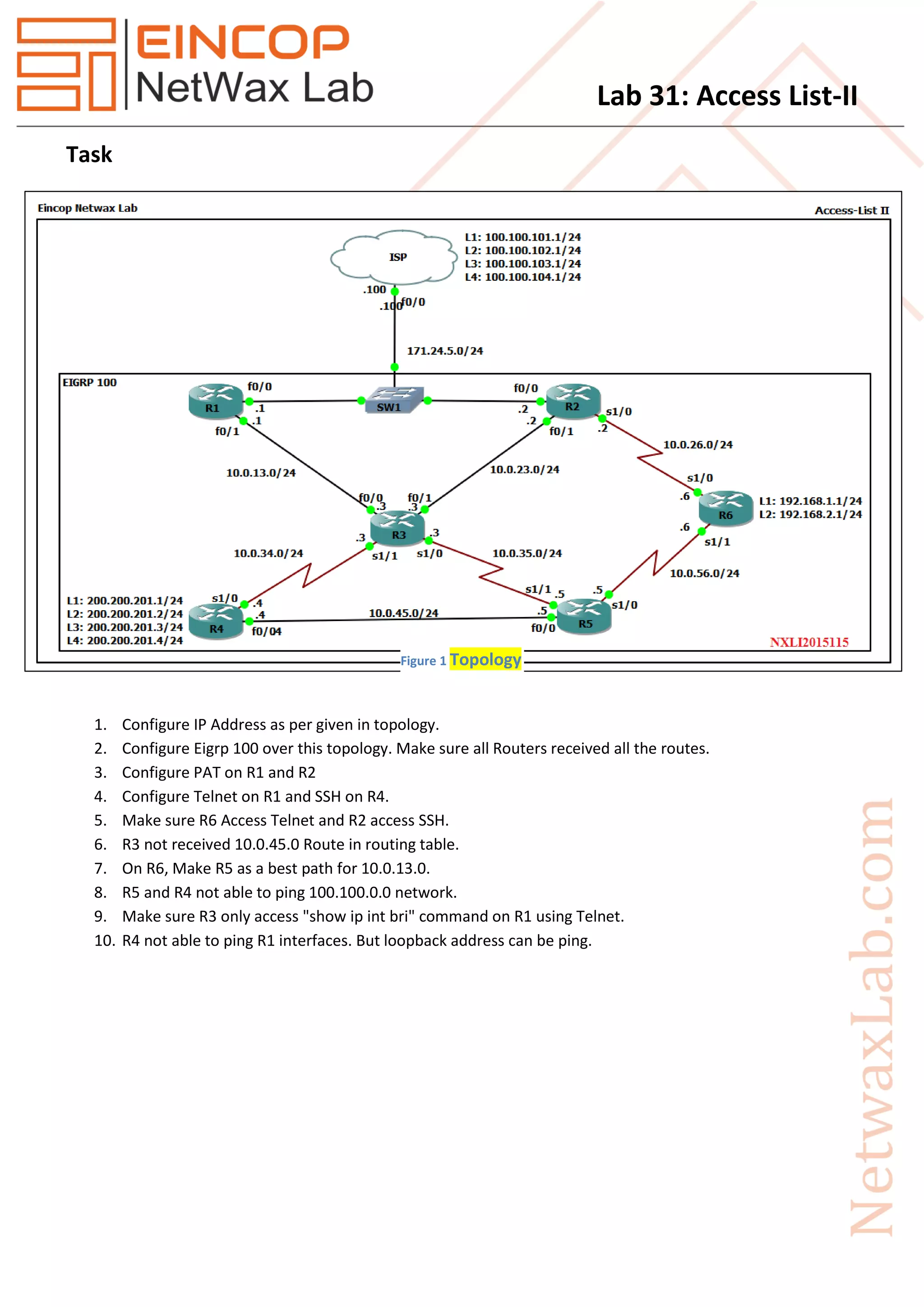
1. Configure IP Address as per given in topology.
2. Configure Eigrp 100 over this topology. Make sure all Routers received all the routes.
3. Configure PAT on R1 and R2
4. Configure Telnet on R1 and SSH on R4.
5. Make sure R6 Access Telnet and R2 access SSH.
6. R3 not received 10.0.45.0 Route in routing table.
7. On R6, Make R5 as a best path for 10.0.13.0.
8. R5 and R4 not able to ping 100.100.0.0 network.
9. Make sure R3 only access "show ip int bri" command on R1 using Telnet.
10. R4 not able to ping R1 interfaces. But loopback address can be ping.
Figure 1 Topology
Lab 31: Access List-II
Solution
Task 2: Configure Eigrp 100 over this topology. Make sure all Routers received all the routes.
R1
router eigrp 100
redistribute static
network 10.0.13.0 0.0.0.255
no auto-summary
exit
R2
router eigrp 100
redistribute static
network 10.0.23.0 0.0.0.255
network 10.0.26.0 0.0.0.255
no auto-summary
exit
R3
router eigrp 100
network 10.0.13.0 0.0.0.255
network 10.0.23.0 0.0.0.255
network 10.0.34.0 0.0.0.255
network 10.0.35.0 0.0.0.255
no auto-summary
exit
R4
router eigrp 100
network 10.0.34.0 0.0.0.255
network 10.0.45.0 0.0.0.255
network 200.200.201.0
network 200.200.202.0
network 200.200.203.0
network 200.200.204.0
no auto-summary
exit
Lab 31: Access List-II
R5
router eigrp 100
network 10.0.35.0 0.0.0.255
network 10.0.45.0 0.0.0.255
network 10.0.56.0 0.0.0.255
no auto-summary
exit
R6
router eigrp 100
network 10.0.26.0 0.0.0.255
network 10.0.56.0 0.0.0.255
network 192.168.1.0
network 192.168.2.0
no auto-summary
exit
Task 3: Configure PAT on R1 and R3.
R1
ip access-list extended NAT
permit ip 10.0.13.0 0.0.0.255 any
permit ip 10.0.23.0 0.0.0.255 any
permit ip 10.0.34.0 0.0.0.255 any
permit ip 10.0.35.0 0.0.0.255 any
permit ip 10.0.45.0 0.0.0.255 any
permit ip 10.0.56.0 0.0.0.255 any
permit ip 10.0.26.0 0.0.0.255 any
permit ip 192.168.1.0 0.0.0.255 any
permit ip 192.168.2.0 0.0.0.255 any
permit ip 200.200.200.0 0.0.0.255 any
permit ip 200.200.201.0 0.0.0.255 any
permit ip 200.200.202.0 0.0.0.255 any
permit ip 200.200.203.0 0.0.0.255 any
permit ip 200.200.204.0 0.0.0.255 any
exit
ip nat inside source list NAT interface FastEthernet0/0 overload
Lab 31: Access List-II
R2
ip access-list extended NAT
permit ip 10.0.13.0 0.0.0.255 any
permit ip 10.0.23.0 0.0.0.255 any
permit ip 10.0.34.0 0.0.0.255 any
permit ip 10.0.35.0 0.0.0.255 any
permit ip 10.0.45.0 0.0.0.255 any
permit ip 10.0.56.0 0.0.0.255 any
permit ip 10.0.26.0 0.0.0.255 any
permit ip 192.168.1.0 0.0.0.255 any
permit ip 192.168.2.0 0.0.0.255 any
permit ip 200.200.200.0 0.0.0.255 any
permit ip 200.200.201.0 0.0.0.255 any
permit ip 200.200.202.0 0.0.0.255 any
permit ip 200.200.203.0 0.0.0.255 any
permit ip 200.200.204.0 0.0.0.255 any
exit
ip nat inside source list NAT interface FastEthernet0/0 overload
Task 4: Configure Telnet on R1 and SSH on R4.
R1
username cisco password 0 netwax
line vty 0 4
login local
exit
enable secret cisco
R4
username cisco password 0 netwax
enable secret cisco
ip domain name www.netwaxlab.com
crypto key generate rsa modulus 1024
line vty 0 4
transport input ssh
login local
Lab 31: Access List-II
Task 5: Make sure R6 Access Telnet and R2 access SSH.
R1
access-list 10 permit 10.0.26.6
access-list 10 permit 10.0.56.6
access-list 10 deny any
line vty 0 4
access-class 10 in
exit
R4
access-list 10 permit 10.0.26.2
access-list 10 permit 10.0.23.2
access-list 10 deny any
line vty 0 4
access-class 10 in
exit
Task 6: R3 not received 10.0.45.0 Route in routing table.
R3
access-list 10 deny 10.0.45.0 0.0.0.255
access-list 10 permit any
router eigrp 100
distribute-list 10 in
exit
router eigrp 100
distribute-list 10 in
exit
Task 7: On R6, Make R5 as a best path for 10.0.13.0.
R6
access-list 10 permit 10.0.13.0 0.0.0.255
router eigrp 100
offset-list 10 in 2195456 Serial1/1
exit
Lab 31: Access List-II
Task 8: R5 and R4 not able to ping 100.100.0.0 network.
R3
ip access-list extended R4
deny ip host 10.0.34.4 100.100.0.0 0.0.255.255
deny ip host 10.0.45.4 100.100.0.0 0.0.255.255
deny ip host 10.0.35.5 100.100.0.0 0.0.255.255
deny ip host 10.0.45.5 100.100.0.0 0.0.255.255
deny ip host 10.0.56.5 100.100.0.0 0.0.255.255
permit ip any any
exit
int se1/1
ip access-group R4 in
exit
int se1/0
ip access-group R4 in
exit
Task 9: Make sure R3 only access "show ip int bri" command on R1 using Telnet.
R1
Username Cisco view R3 password Netwax
aaa new-model
exit
enable view
config t
parser view R3
secret netwax@
commands exec include show ip int bri
exit
access-list 11 permit 10.0.13.3
access-list 11 deny any
int f0/1
ip access-group 11 in
exit
Lab 31: Access List-II
Verify:
R3
telnet 10.0.13.1
Username: Cisco
Password: Netwax
R1>en
Password: netwax@
Task 10: R4 not able to ping R1 interfaces. But loopback address can be ping.
R3
access-list 101 deny icmp host 10.0.34.4 host 10.0.13.1
access-list 101 deny icmp host 10.0.45.4 host 10.0.13.1
access-list 101 permit icmp any any
access-list 101 permit eigrp any any
int se1/1
ip access-group 101 in
exit

Eincop Netwax Lab: Access List ii

  • 1.
    Lab 31: AccessList-II Task 1. Configure IP Address as per given in topology. 2. Configure Eigrp 100 over this topology. Make sure all Routers received all the routes. 3. Configure PAT on R1 and R2 4. Configure Telnet on R1 and SSH on R4. 5. Make sure R6 Access Telnet and R2 access SSH. 6. R3 not received 10.0.45.0 Route in routing table. 7. On R6, Make R5 as a best path for 10.0.13.0. 8. R5 and R4 not able to ping 100.100.0.0 network. 9. Make sure R3 only access "show ip int bri" command on R1 using Telnet. 10. R4 not able to ping R1 interfaces. But loopback address can be ping. Figure 1 Topology
  • 2.
    Lab 31: AccessList-II Solution Task 2: Configure Eigrp 100 over this topology. Make sure all Routers received all the routes. R1 router eigrp 100 redistribute static network 10.0.13.0 0.0.0.255 no auto-summary exit R2 router eigrp 100 redistribute static network 10.0.23.0 0.0.0.255 network 10.0.26.0 0.0.0.255 no auto-summary exit R3 router eigrp 100 network 10.0.13.0 0.0.0.255 network 10.0.23.0 0.0.0.255 network 10.0.34.0 0.0.0.255 network 10.0.35.0 0.0.0.255 no auto-summary exit R4 router eigrp 100 network 10.0.34.0 0.0.0.255 network 10.0.45.0 0.0.0.255 network 200.200.201.0 network 200.200.202.0 network 200.200.203.0 network 200.200.204.0 no auto-summary exit
  • 3.
    Lab 31: AccessList-II R5 router eigrp 100 network 10.0.35.0 0.0.0.255 network 10.0.45.0 0.0.0.255 network 10.0.56.0 0.0.0.255 no auto-summary exit R6 router eigrp 100 network 10.0.26.0 0.0.0.255 network 10.0.56.0 0.0.0.255 network 192.168.1.0 network 192.168.2.0 no auto-summary exit Task 3: Configure PAT on R1 and R3. R1 ip access-list extended NAT permit ip 10.0.13.0 0.0.0.255 any permit ip 10.0.23.0 0.0.0.255 any permit ip 10.0.34.0 0.0.0.255 any permit ip 10.0.35.0 0.0.0.255 any permit ip 10.0.45.0 0.0.0.255 any permit ip 10.0.56.0 0.0.0.255 any permit ip 10.0.26.0 0.0.0.255 any permit ip 192.168.1.0 0.0.0.255 any permit ip 192.168.2.0 0.0.0.255 any permit ip 200.200.200.0 0.0.0.255 any permit ip 200.200.201.0 0.0.0.255 any permit ip 200.200.202.0 0.0.0.255 any permit ip 200.200.203.0 0.0.0.255 any permit ip 200.200.204.0 0.0.0.255 any exit ip nat inside source list NAT interface FastEthernet0/0 overload
  • 4.
    Lab 31: AccessList-II R2 ip access-list extended NAT permit ip 10.0.13.0 0.0.0.255 any permit ip 10.0.23.0 0.0.0.255 any permit ip 10.0.34.0 0.0.0.255 any permit ip 10.0.35.0 0.0.0.255 any permit ip 10.0.45.0 0.0.0.255 any permit ip 10.0.56.0 0.0.0.255 any permit ip 10.0.26.0 0.0.0.255 any permit ip 192.168.1.0 0.0.0.255 any permit ip 192.168.2.0 0.0.0.255 any permit ip 200.200.200.0 0.0.0.255 any permit ip 200.200.201.0 0.0.0.255 any permit ip 200.200.202.0 0.0.0.255 any permit ip 200.200.203.0 0.0.0.255 any permit ip 200.200.204.0 0.0.0.255 any exit ip nat inside source list NAT interface FastEthernet0/0 overload Task 4: Configure Telnet on R1 and SSH on R4. R1 username cisco password 0 netwax line vty 0 4 login local exit enable secret cisco R4 username cisco password 0 netwax enable secret cisco ip domain name www.netwaxlab.com crypto key generate rsa modulus 1024 line vty 0 4 transport input ssh login local
  • 5.
    Lab 31: AccessList-II Task 5: Make sure R6 Access Telnet and R2 access SSH. R1 access-list 10 permit 10.0.26.6 access-list 10 permit 10.0.56.6 access-list 10 deny any line vty 0 4 access-class 10 in exit R4 access-list 10 permit 10.0.26.2 access-list 10 permit 10.0.23.2 access-list 10 deny any line vty 0 4 access-class 10 in exit Task 6: R3 not received 10.0.45.0 Route in routing table. R3 access-list 10 deny 10.0.45.0 0.0.0.255 access-list 10 permit any router eigrp 100 distribute-list 10 in exit router eigrp 100 distribute-list 10 in exit Task 7: On R6, Make R5 as a best path for 10.0.13.0. R6 access-list 10 permit 10.0.13.0 0.0.0.255 router eigrp 100 offset-list 10 in 2195456 Serial1/1 exit
  • 6.
    Lab 31: AccessList-II Task 8: R5 and R4 not able to ping 100.100.0.0 network. R3 ip access-list extended R4 deny ip host 10.0.34.4 100.100.0.0 0.0.255.255 deny ip host 10.0.45.4 100.100.0.0 0.0.255.255 deny ip host 10.0.35.5 100.100.0.0 0.0.255.255 deny ip host 10.0.45.5 100.100.0.0 0.0.255.255 deny ip host 10.0.56.5 100.100.0.0 0.0.255.255 permit ip any any exit int se1/1 ip access-group R4 in exit int se1/0 ip access-group R4 in exit Task 9: Make sure R3 only access "show ip int bri" command on R1 using Telnet. R1 Username Cisco view R3 password Netwax aaa new-model exit enable view config t parser view R3 secret netwax@ commands exec include show ip int bri exit access-list 11 permit 10.0.13.3 access-list 11 deny any int f0/1 ip access-group 11 in exit
  • 7.
    Lab 31: AccessList-II Verify: R3 telnet 10.0.13.1 Username: Cisco Password: Netwax R1>en Password: netwax@ Task 10: R4 not able to ping R1 interfaces. But loopback address can be ping. R3 access-list 101 deny icmp host 10.0.34.4 host 10.0.13.1 access-list 101 deny icmp host 10.0.45.4 host 10.0.13.1 access-list 101 permit icmp any any access-list 101 permit eigrp any any int se1/1 ip access-group 101 in exit