LAB 1: Static Route
Prerequisites
1. 5 Routers 2911 Series
2. 5 Switches 2960 Series
3. 5 PC's
Task
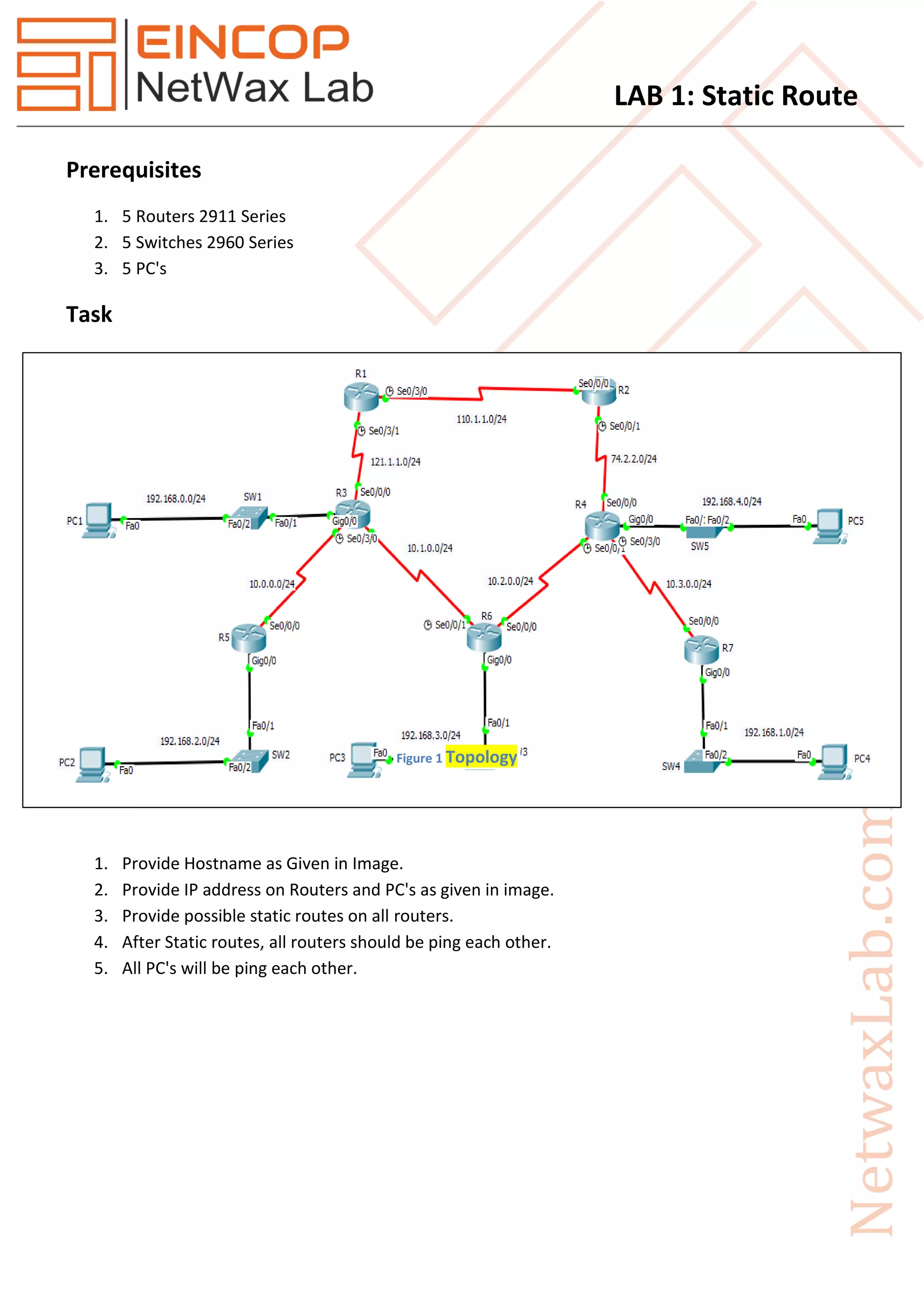
1. Provide Hostname as Given in Image.
2. Provide IP address on Routers and PC's as given in image.
3. Provide possible static routes on all routers.
4. After Static routes, all routers should be ping each other.
5. All PC's will be ping each other.
Figure 1 Topology
LAB 1: Static Route
Solution
R1
en
config t
hostname R1
interface Serial0/3/0
ip address 110.1.1.1 255.255.255.0
clock rate 64000
no shut
exit
interface Serial0/3/1
ip address 121.1.1.1 255.255.255.0
clock rate 64000
no shut
exit
ip route 74.2.2.0 255.255.255.0 110.1.1.2
ip route 10.0.0.0 255.255.255.0 121.1.1.3
ip route 10.1.0.0 255.255.255.0 121.1.1.3
ip route 10.3.0.0 255.255.255.0 110.1.1.2
ip route 10.2.0.0 255.255.255.0 110.1.1.2
ip route 192.168.0.0 255.255.255.0 121.1.1.3
ip route 192.168.2.0 255.255.255.0 121.1.1.3
ip route 192.168.3.0 255.255.255.0 121.1.1.3
ip route 192.168.4.0 255.255.255.0 110.1.1.2
ip route 192.168.1.0 255.255.255.0 110.1.1.2
R2
en
config t
hostname R2
interface Serial0/0/0
ip address 110.1.1.2 255.255.255.0
no shut
exit
LAB 1: Static Route
interface Serial0/0/1
ip address 74.2.2.2 255.255.255.0
clock rate 64000
no shut
exit
ip route 192.168.0.0 255.255.255.0 110.1.1.1
ip route 192.168.2.0 255.255.255.0 110.1.1.1
ip route 192.168.3.0 255.255.255.0 74.2.2.4
ip route 192.168.4.0 255.255.255.0 74.2.2.4
ip route 10.0.0.0 255.255.255.0 110.1.1.1
ip route 192.168.1.0 255.255.255.0 74.2.2.4
ip route 121.1.1.0 255.255.255.0 110.1.1.1
ip route 10.1.0.0 255.255.255.0 110.1.1.1
ip route 10.2.0.0 255.255.255.0 74.2.2.4
ip route 10.3.0.0 255.255.255.0 74.2.2.4
R3
en
config t
hostname R3
interface GigabitEthernet0/0
ip address 192.168.0.1 255.255.255.0
no shut
exit
interface Serial0/0/0
ip address 121.1.1.3 255.255.255.0
no shut
exit
interface Serial0/0/1
ip address 10.1.0.3 255.255.255.0
no shut
exit
interface Serial0/3/0
ip address 10.0.0.3 255.255.255.0
clock rate 64000
LAB 1: Static Route
no shut
exit
ip route 110.1.1.0 255.255.255.0 121.1.1.1
ip route 10.2.0.0 255.255.255.0 10.1.0.6
ip route 10.3.0.0 255.255.255.0 10.1.0.6
ip route 74.2.2.0 255.255.255.0 121.1.1.1
ip route 192.168.2.0 255.255.255.0 10.0.0.5
ip route 192.168.3.0 255.255.255.0 10.1.0.6
ip route 192.168.4.0 255.255.255.0 121.1.1.1
ip route 192.168.1.0 255.255.255.0 10.1.0.6
R4
en
config t
hostname R4
interface GigabitEthernet0/0
ip address 192.168.4.1 255.255.255.0
no shut
exit
interface Serial0/0/0
ip address 74.2.2.4 255.255.255.0
no shut
exit
interface Serial0/0/1
ip address 10.2.0.4 255.255.255.0
clock rate 64000
no shut
exit
interface Serial0/3/0
ip address 10.3.0.4 255.255.255.0
clock rate 64000
no shut
exit
LAB 1: Static Route
ip route 192.168.0.0 255.255.255.0 74.2.2.2
ip route 192.168.2.0 255.255.255.0 10.2.0.6
ip route 192.168.3.0 255.255.255.0 10.2.0.6
ip route 192.168.1.0 255.255.255.0 10.3.0.7
ip route 110.1.1.0 255.255.255.0 74.2.2.2
ip route 121.1.1.0 255.255.255.0 74.2.2.2
ip route 10.0.0.0 255.255.255.0 74.2.2.2
ip route 10.1.0.0 255.255.255.0 74.2.2.2
R5
en
config t
hostname R5
interface GigabitEthernet0/0
ip address 192.168.2.1 255.255.255.0
no shut
exit
interface Serial0/0/0
ip address 10.0.0.5 255.255.255.0
no shut
exit
ip route 192.168.0.0 255.255.255.0 10.0.0.3
ip route 192.168.3.0 255.255.255.0 10.0.0.3
ip route 192.168.1.0 255.255.255.0 10.0.0.3
ip route 192.168.4.0 255.255.255.0 10.0.0.3
ip route 110.1.1.0 255.255.255.0 10.0.0.3
ip route 121.1.1.0 255.255.255.0 10.0.0.3
ip route 10.1.0.0 255.255.255.0 10.0.0.3
ip route 10.2.0.0 255.255.255.0 10.0.0.3
ip route 74.2.2.0 255.255.255.0 10.0.0.3
ip route 10.3.0.0 255.255.255.0 10.0.0.3
On R6
en
config t
hostname R6
LAB 1: Static Route
interface GigabitEthernet0/0
ip address 192.168.3.1 255.255.255.0
no shut
exit
interface Serial0/0/0
ip address 10.2.0.6 255.255.255.0
no shut
exit
interface Serial0/0/1
ip address 10.1.0.6 255.255.255.0
clock rate 64000
no shut
exit
ip route 10.0.0.0 255.255.255.0 10.1.0.3
ip route 10.3.0.0 255.255.255.0 10.2.0.4
ip route 110.1.1.0 255.255.255.0 10.1.0.3
ip route 121.1.1.0 255.255.255.0 10.1.0.3
ip route 74.2.2.0 255.255.255.0 10.2.0.4
ip route 192.168.0.0 255.255.255.0 10.1.0.3
ip route 192.168.2.0 255.255.255.0 10.1.0.3
ip route 192.168.4.0 255.255.255.0 10.2.0.4
ip route 192.168.1.0 255.255.255.0 10.2.0.4
R7
en
config t
hostname R7
interface GigabitEthernet0/0
ip address 192.168.1.1 255.255.255.0
no shut
exit
interface Serial0/0/0
ip address 10.3.0.7 255.255.255.0
no shut
LAB 1: Static Route
exit
ip route 192.168.0.0 255.255.255.0 10.3.0.4
ip route 192.168.2.0 255.255.255.0 10.3.0.4
ip route 192.168.3.0 255.255.255.0 10.3.0.4
ip route 192.168.4.0 255.255.255.0 10.3.0.4
ip route 10.0.0.0 255.255.255.0 10.3.0.4
ip route 10.1.0.0 255.255.255.0 10.3.0.4
ip route 121.1.1.0 255.255.255.0 10.3.0.4
ip route 110.1.1.0 255.255.255.0 10.3.0.4
ip route 74.2.2.0 255.255.255.0 10.3.0.4
ip route 10.2.0.0 255.255.255.0 10.3.0.4

Eincop Netwax Lab: Lab 1 static route

  • 1.
    LAB 1: StaticRoute Prerequisites 1. 5 Routers 2911 Series 2. 5 Switches 2960 Series 3. 5 PC's Task 1. Provide Hostname as Given in Image. 2. Provide IP address on Routers and PC's as given in image. 3. Provide possible static routes on all routers. 4. After Static routes, all routers should be ping each other. 5. All PC's will be ping each other. Figure 1 Topology
  • 2.
    LAB 1: StaticRoute Solution R1 en config t hostname R1 interface Serial0/3/0 ip address 110.1.1.1 255.255.255.0 clock rate 64000 no shut exit interface Serial0/3/1 ip address 121.1.1.1 255.255.255.0 clock rate 64000 no shut exit ip route 74.2.2.0 255.255.255.0 110.1.1.2 ip route 10.0.0.0 255.255.255.0 121.1.1.3 ip route 10.1.0.0 255.255.255.0 121.1.1.3 ip route 10.3.0.0 255.255.255.0 110.1.1.2 ip route 10.2.0.0 255.255.255.0 110.1.1.2 ip route 192.168.0.0 255.255.255.0 121.1.1.3 ip route 192.168.2.0 255.255.255.0 121.1.1.3 ip route 192.168.3.0 255.255.255.0 121.1.1.3 ip route 192.168.4.0 255.255.255.0 110.1.1.2 ip route 192.168.1.0 255.255.255.0 110.1.1.2 R2 en config t hostname R2 interface Serial0/0/0 ip address 110.1.1.2 255.255.255.0 no shut exit
  • 3.
    LAB 1: StaticRoute interface Serial0/0/1 ip address 74.2.2.2 255.255.255.0 clock rate 64000 no shut exit ip route 192.168.0.0 255.255.255.0 110.1.1.1 ip route 192.168.2.0 255.255.255.0 110.1.1.1 ip route 192.168.3.0 255.255.255.0 74.2.2.4 ip route 192.168.4.0 255.255.255.0 74.2.2.4 ip route 10.0.0.0 255.255.255.0 110.1.1.1 ip route 192.168.1.0 255.255.255.0 74.2.2.4 ip route 121.1.1.0 255.255.255.0 110.1.1.1 ip route 10.1.0.0 255.255.255.0 110.1.1.1 ip route 10.2.0.0 255.255.255.0 74.2.2.4 ip route 10.3.0.0 255.255.255.0 74.2.2.4 R3 en config t hostname R3 interface GigabitEthernet0/0 ip address 192.168.0.1 255.255.255.0 no shut exit interface Serial0/0/0 ip address 121.1.1.3 255.255.255.0 no shut exit interface Serial0/0/1 ip address 10.1.0.3 255.255.255.0 no shut exit interface Serial0/3/0 ip address 10.0.0.3 255.255.255.0 clock rate 64000
  • 4.
    LAB 1: StaticRoute no shut exit ip route 110.1.1.0 255.255.255.0 121.1.1.1 ip route 10.2.0.0 255.255.255.0 10.1.0.6 ip route 10.3.0.0 255.255.255.0 10.1.0.6 ip route 74.2.2.0 255.255.255.0 121.1.1.1 ip route 192.168.2.0 255.255.255.0 10.0.0.5 ip route 192.168.3.0 255.255.255.0 10.1.0.6 ip route 192.168.4.0 255.255.255.0 121.1.1.1 ip route 192.168.1.0 255.255.255.0 10.1.0.6 R4 en config t hostname R4 interface GigabitEthernet0/0 ip address 192.168.4.1 255.255.255.0 no shut exit interface Serial0/0/0 ip address 74.2.2.4 255.255.255.0 no shut exit interface Serial0/0/1 ip address 10.2.0.4 255.255.255.0 clock rate 64000 no shut exit interface Serial0/3/0 ip address 10.3.0.4 255.255.255.0 clock rate 64000 no shut exit
  • 5.
    LAB 1: StaticRoute ip route 192.168.0.0 255.255.255.0 74.2.2.2 ip route 192.168.2.0 255.255.255.0 10.2.0.6 ip route 192.168.3.0 255.255.255.0 10.2.0.6 ip route 192.168.1.0 255.255.255.0 10.3.0.7 ip route 110.1.1.0 255.255.255.0 74.2.2.2 ip route 121.1.1.0 255.255.255.0 74.2.2.2 ip route 10.0.0.0 255.255.255.0 74.2.2.2 ip route 10.1.0.0 255.255.255.0 74.2.2.2 R5 en config t hostname R5 interface GigabitEthernet0/0 ip address 192.168.2.1 255.255.255.0 no shut exit interface Serial0/0/0 ip address 10.0.0.5 255.255.255.0 no shut exit ip route 192.168.0.0 255.255.255.0 10.0.0.3 ip route 192.168.3.0 255.255.255.0 10.0.0.3 ip route 192.168.1.0 255.255.255.0 10.0.0.3 ip route 192.168.4.0 255.255.255.0 10.0.0.3 ip route 110.1.1.0 255.255.255.0 10.0.0.3 ip route 121.1.1.0 255.255.255.0 10.0.0.3 ip route 10.1.0.0 255.255.255.0 10.0.0.3 ip route 10.2.0.0 255.255.255.0 10.0.0.3 ip route 74.2.2.0 255.255.255.0 10.0.0.3 ip route 10.3.0.0 255.255.255.0 10.0.0.3 On R6 en config t hostname R6
  • 6.
    LAB 1: StaticRoute interface GigabitEthernet0/0 ip address 192.168.3.1 255.255.255.0 no shut exit interface Serial0/0/0 ip address 10.2.0.6 255.255.255.0 no shut exit interface Serial0/0/1 ip address 10.1.0.6 255.255.255.0 clock rate 64000 no shut exit ip route 10.0.0.0 255.255.255.0 10.1.0.3 ip route 10.3.0.0 255.255.255.0 10.2.0.4 ip route 110.1.1.0 255.255.255.0 10.1.0.3 ip route 121.1.1.0 255.255.255.0 10.1.0.3 ip route 74.2.2.0 255.255.255.0 10.2.0.4 ip route 192.168.0.0 255.255.255.0 10.1.0.3 ip route 192.168.2.0 255.255.255.0 10.1.0.3 ip route 192.168.4.0 255.255.255.0 10.2.0.4 ip route 192.168.1.0 255.255.255.0 10.2.0.4 R7 en config t hostname R7 interface GigabitEthernet0/0 ip address 192.168.1.1 255.255.255.0 no shut exit interface Serial0/0/0 ip address 10.3.0.7 255.255.255.0 no shut
  • 7.
    LAB 1: StaticRoute exit ip route 192.168.0.0 255.255.255.0 10.3.0.4 ip route 192.168.2.0 255.255.255.0 10.3.0.4 ip route 192.168.3.0 255.255.255.0 10.3.0.4 ip route 192.168.4.0 255.255.255.0 10.3.0.4 ip route 10.0.0.0 255.255.255.0 10.3.0.4 ip route 10.1.0.0 255.255.255.0 10.3.0.4 ip route 121.1.1.0 255.255.255.0 10.3.0.4 ip route 110.1.1.0 255.255.255.0 10.3.0.4 ip route 74.2.2.0 255.255.255.0 10.3.0.4 ip route 10.2.0.0 255.255.255.0 10.3.0.4