Lab 30: Vlan and Trunking-II
Task
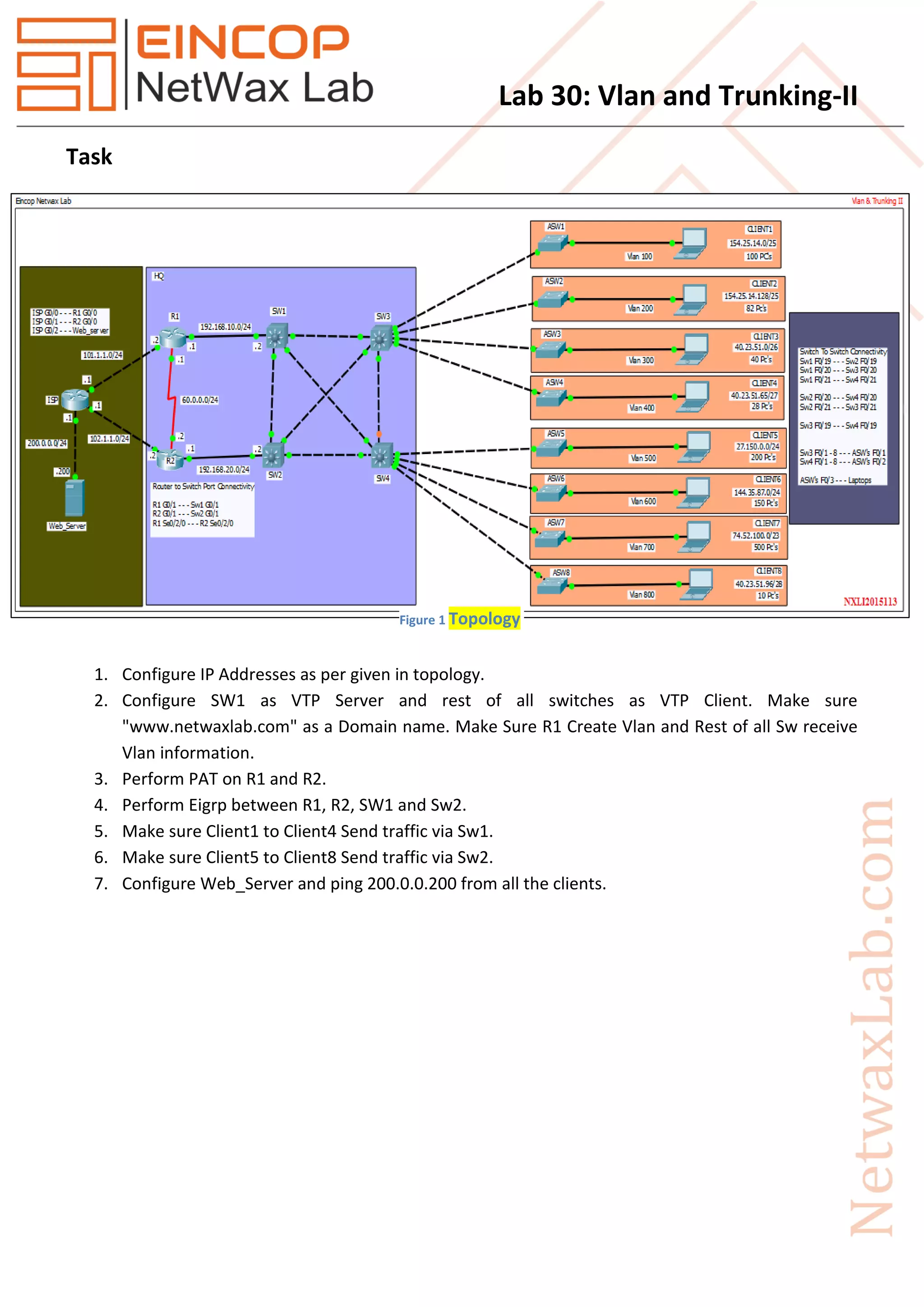
1. Configure IP Addresses as per given in topology.
2. Configure SW1 as VTP Server and rest of all switches as VTP Client. Make sure
"www.netwaxlab.com" as a Domain name. Make Sure R1 Create Vlan and Rest of all Sw receive
Vlan information.
3. Perform PAT on R1 and R2.
4. Perform Eigrp between R1, R2, SW1 and Sw2.
5. Make sure Client1 to Client4 Send traffic via Sw1.
6. Make sure Client5 to Client8 Send traffic via Sw2.
7. Configure Web_Server and ping 200.0.0.200 from all the clients.
Figure 1 Topology
Lab 30: Vlan and Trunking-II
Solution
Task 2: Configure SW1 as VTP Server and rest of all switches as VTP Client. Make sure
"www.netwaxlab.com" as a Domain name. Make Sure R1 Create Vlan and Rest of all Sw receive Vlan
information.
Sw1
vtp domain www.netwaxlab.com
vtp mode server
vtp ver 2
vtp password Netwax
Vlan 100
name Client1
exit
Vlan 200
name Client2
exit
Vlan 300
name Client3
exit
Vlan 400
name Client4
exit
Vlan 500
name Client5
exit
Vlan 600
name Client6
exit
Vlan 700
name Client7
exit
Lab 30: Vlan and Trunking-II
Vlan 800
name Client8
exit
Rest of All Switches
vtp domain www.netwaxlab.com
vtp mode client
vtp ver 2
vtp password Netwax
Task 3: Perform PAT on R1 and R2.
R1
ip route 0.0.0.0 0.0.0.0 101.1.1.1
int g0/0
ip nat outside
exit
int se0/2/0
ip nat inside
exit
int g0/1
ip nat inside
exit
ip access-list extended NAT
permit ip 192.168.10.0 0.0.0.255 any
permit ip 154.25.14.0 0.0.0.127 any
permit ip 154.25.14.128 0.0.0.127 any
permit ip 40.23.51.0 0.0.0.63 any
permit ip 40.23.51.64 0.0.0.31 any
permit ip 27.150.0.0 0.0.0.255 any
permit ip 144.35.87.0 0.0.0.255 any
permit ip 74.52.100.0 0.0.1.255 any
permit ip 40.23.51.96 0.0.0.15 any
permit ip 192.168.20.0 0.0.0.255 any
exit
Lab 30: Vlan and Trunking-II
ip nat inside source list NAT interface GigabitEthernet0/0 overload
R2
ip route 0.0.0.0 0.0.0.0 102.1.1.1
int g0/1
ip nat inside
exit
int se0/2/0
ip nat inside
exit
int g0/0
ip nat outside
exit
ip access-list extended NAT
permit ip 192.168.10.0 0.0.0.255 any
permit ip 154.25.14.0 0.0.0.127 any
permit ip 154.25.14.128 0.0.0.127 any
permit ip 40.23.51.0 0.0.0.63 any
permit ip 40.23.51.64 0.0.0.31 any
permit ip 27.150.0.0 0.0.0.255 any
permit ip 144.35.87.0 0.0.0.255 any
permit ip 74.52.100.0 0.0.1.255 any
permit ip 40.23.51.96 0.0.0.15 any
permit ip 192.168.20.0 0.0.0.255 any
exit
ip nat inside source list NAT interface GigabitEthernet0/0 overload
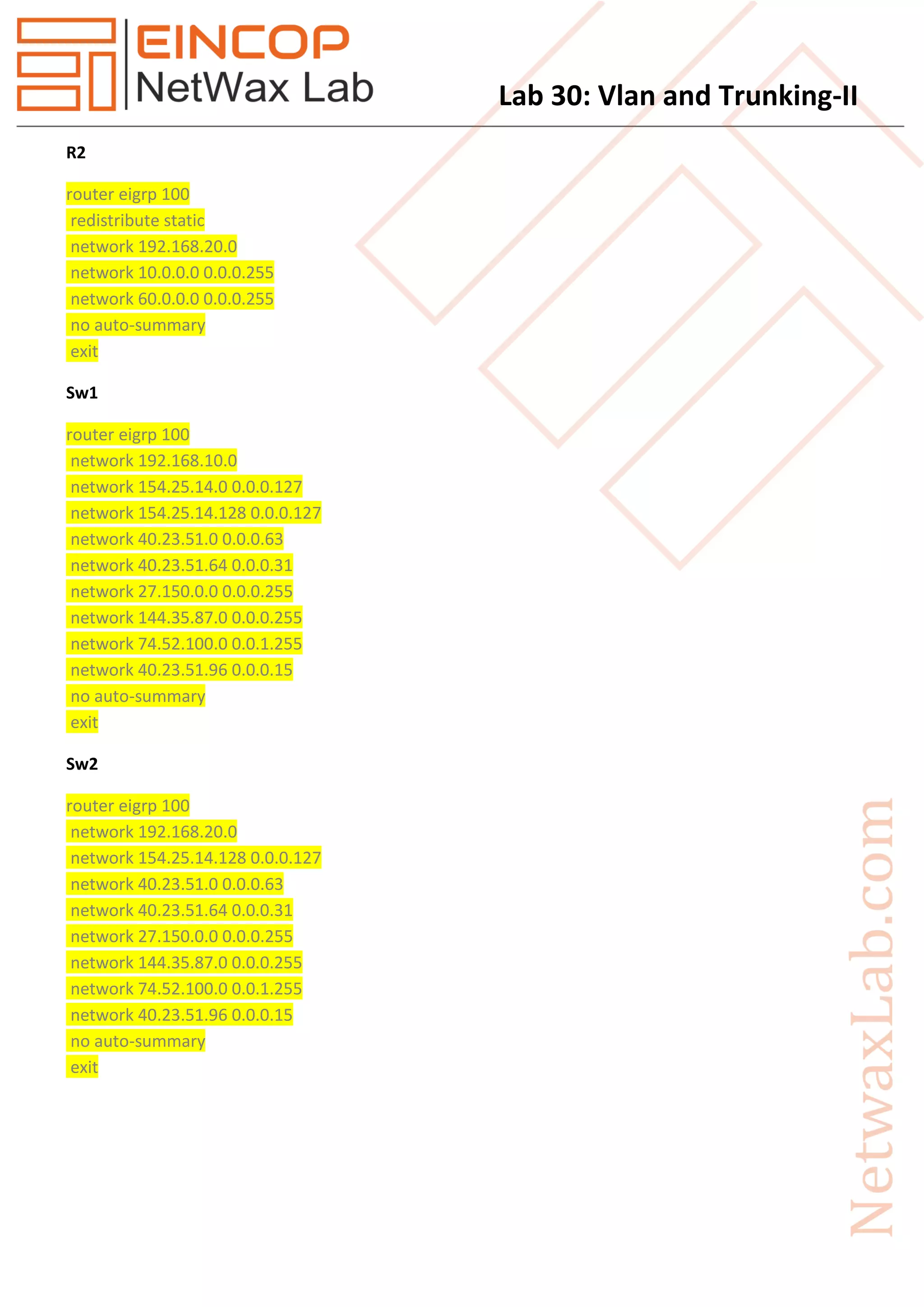
Task 4: Perform Eigrp between R1, R2, SW1 and Sw2.
R1
router eigrp 100
redistribute static
network 192.168.10.0
network 60.0.0.0 0.0.0.255
no auto-summary
Lab 30: Vlan and Trunking-II
R2
router eigrp 100
redistribute static
network 192.168.20.0
network 10.0.0.0 0.0.0.255
network 60.0.0.0 0.0.0.255
no auto-summary
exit
Sw1
router eigrp 100
network 192.168.10.0
network 154.25.14.0 0.0.0.127
network 154.25.14.128 0.0.0.127
network 40.23.51.0 0.0.0.63
network 40.23.51.64 0.0.0.31
network 27.150.0.0 0.0.0.255
network 144.35.87.0 0.0.0.255
network 74.52.100.0 0.0.1.255
network 40.23.51.96 0.0.0.15
no auto-summary
exit
Sw2
router eigrp 100
network 192.168.20.0
network 154.25.14.128 0.0.0.127
network 40.23.51.0 0.0.0.63
network 40.23.51.64 0.0.0.31
network 27.150.0.0 0.0.0.255
network 144.35.87.0 0.0.0.255
network 74.52.100.0 0.0.1.255
network 40.23.51.96 0.0.0.15
no auto-summary
exit
Lab 30: Vlan and Trunking-II
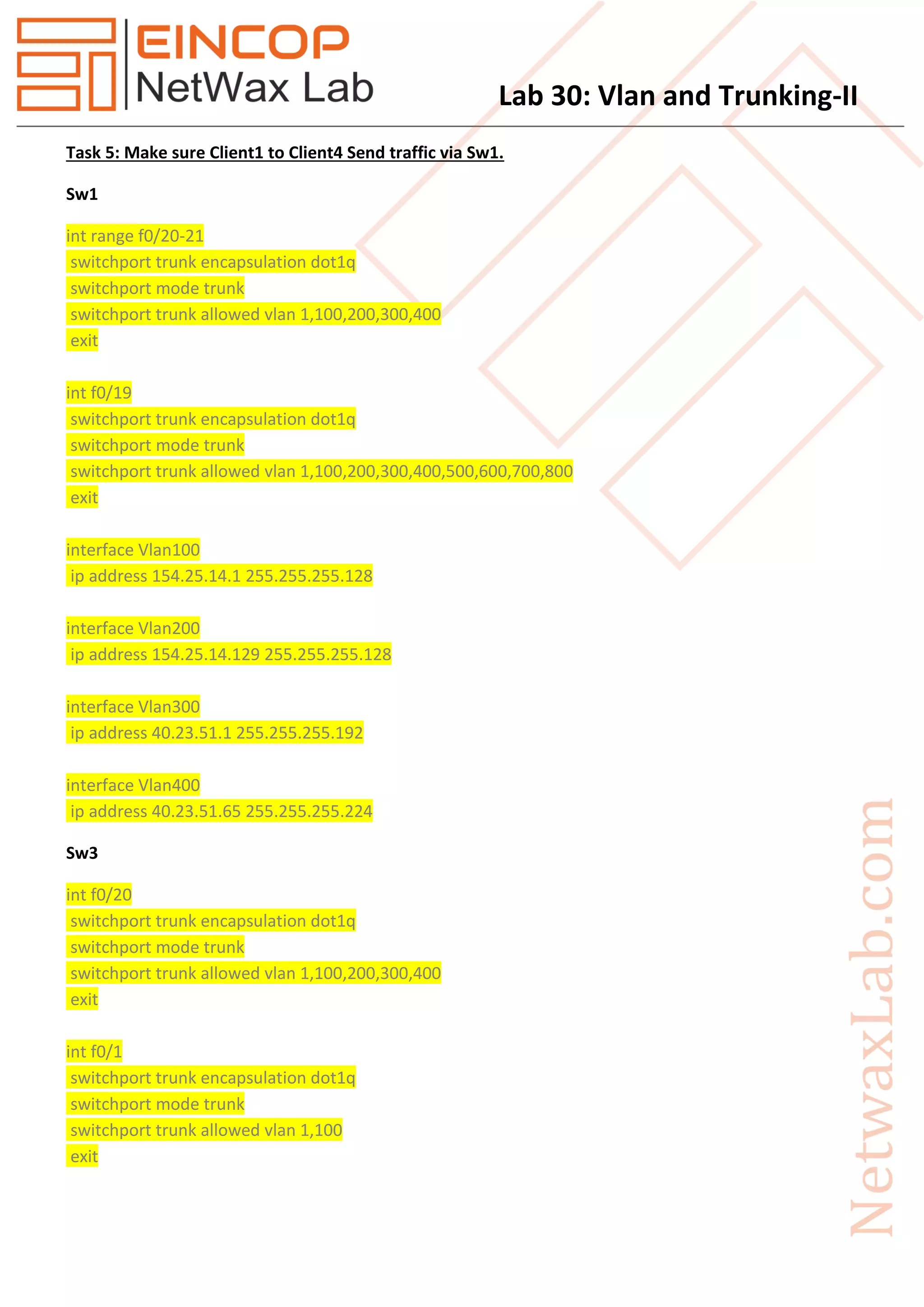
Task 5: Make sure Client1 to Client4 Send traffic via Sw1.
Sw1
int range f0/20-21
switchport trunk encapsulation dot1q
switchport mode trunk
switchport trunk allowed vlan 1,100,200,300,400
exit
int f0/19
switchport trunk encapsulation dot1q
switchport mode trunk
switchport trunk allowed vlan 1,100,200,300,400,500,600,700,800
exit
interface Vlan100
ip address 154.25.14.1 255.255.255.128
interface Vlan200
ip address 154.25.14.129 255.255.255.128
interface Vlan300
ip address 40.23.51.1 255.255.255.192
interface Vlan400
ip address 40.23.51.65 255.255.255.224
Sw3
int f0/20
switchport trunk encapsulation dot1q
switchport mode trunk
switchport trunk allowed vlan 1,100,200,300,400
exit
int f0/1
switchport trunk encapsulation dot1q
switchport mode trunk
switchport trunk allowed vlan 1,100
exit
Lab 30: Vlan and Trunking-II
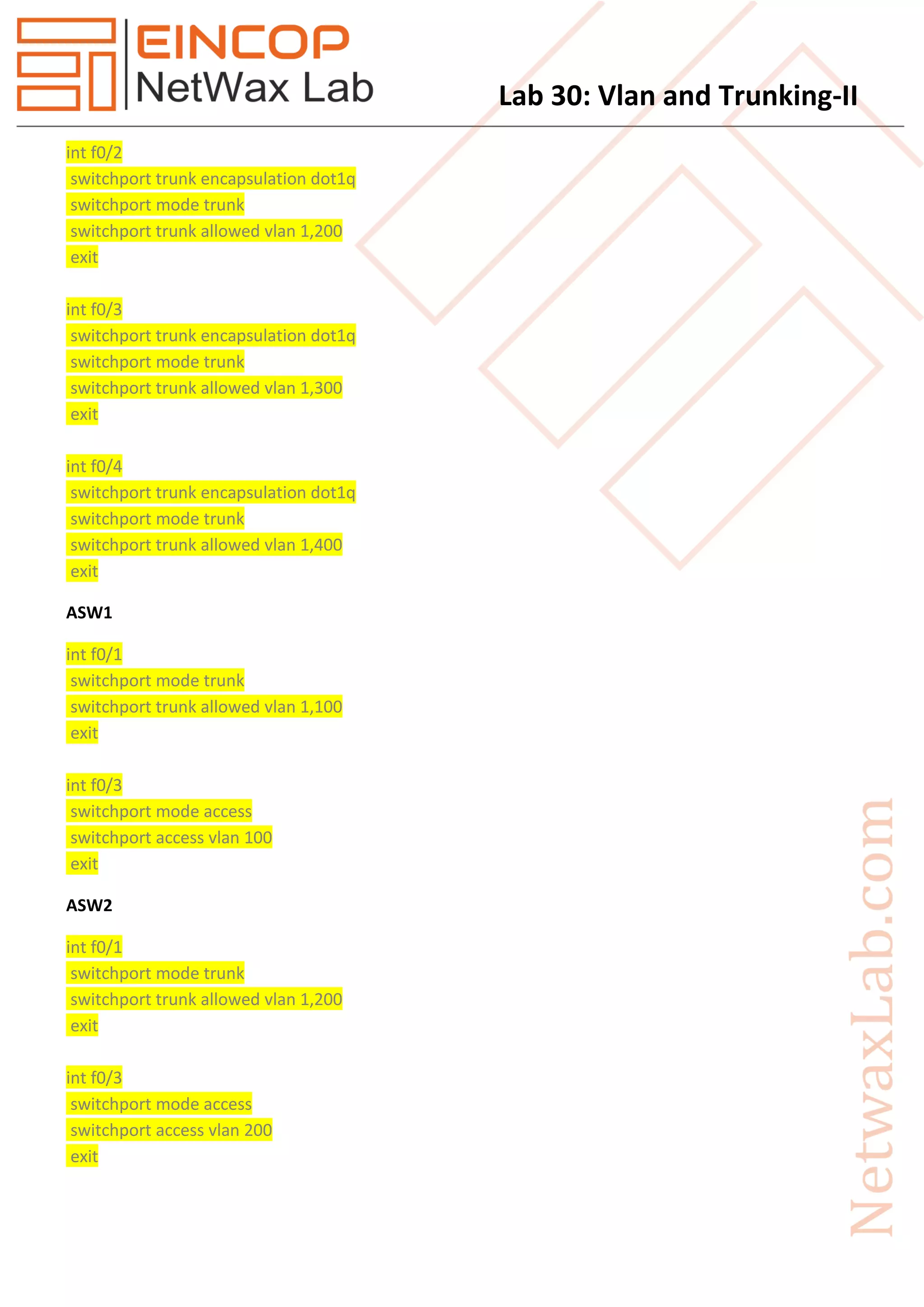
int f0/2
switchport trunk encapsulation dot1q
switchport mode trunk
switchport trunk allowed vlan 1,200
exit
int f0/3
switchport trunk encapsulation dot1q
switchport mode trunk
switchport trunk allowed vlan 1,300
exit
int f0/4
switchport trunk encapsulation dot1q
switchport mode trunk
switchport trunk allowed vlan 1,400
exit
ASW1
int f0/1
switchport mode trunk
switchport trunk allowed vlan 1,100
exit
int f0/3
switchport mode access
switchport access vlan 100
exit
ASW2
int f0/1
switchport mode trunk
switchport trunk allowed vlan 1,200
exit
int f0/3
switchport mode access
switchport access vlan 200
exit
Lab 30: Vlan and Trunking-II
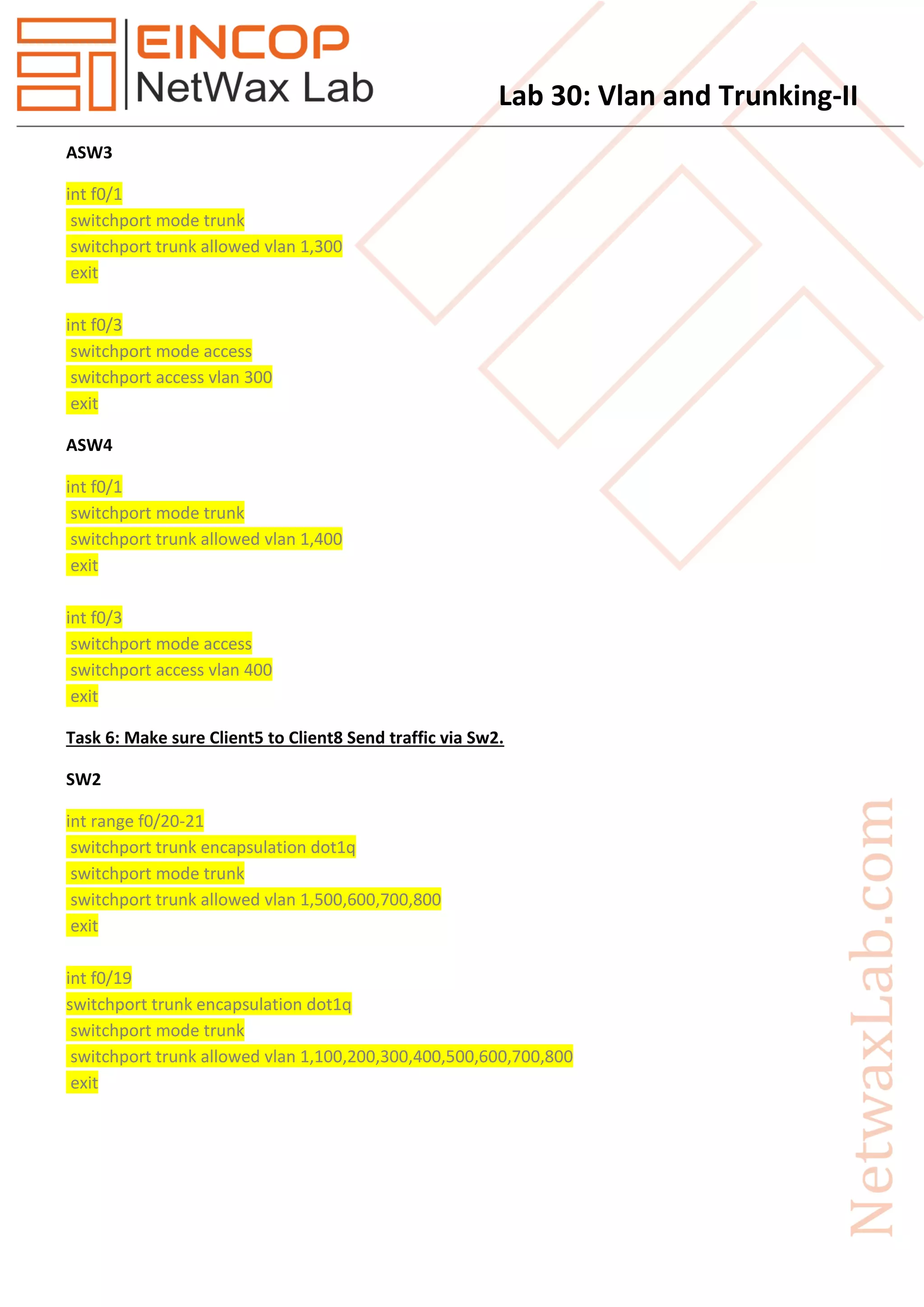
ASW3
int f0/1
switchport mode trunk
switchport trunk allowed vlan 1,300
exit
int f0/3
switchport mode access
switchport access vlan 300
exit
ASW4
int f0/1
switchport mode trunk
switchport trunk allowed vlan 1,400
exit
int f0/3
switchport mode access
switchport access vlan 400
exit
Task 6: Make sure Client5 to Client8 Send traffic via Sw2.
SW2
int range f0/20-21
switchport trunk encapsulation dot1q
switchport mode trunk
switchport trunk allowed vlan 1,500,600,700,800
exit
int f0/19
switchport trunk encapsulation dot1q
switchport mode trunk
switchport trunk allowed vlan 1,100,200,300,400,500,600,700,800
exit
Lab 30: Vlan and Trunking-II
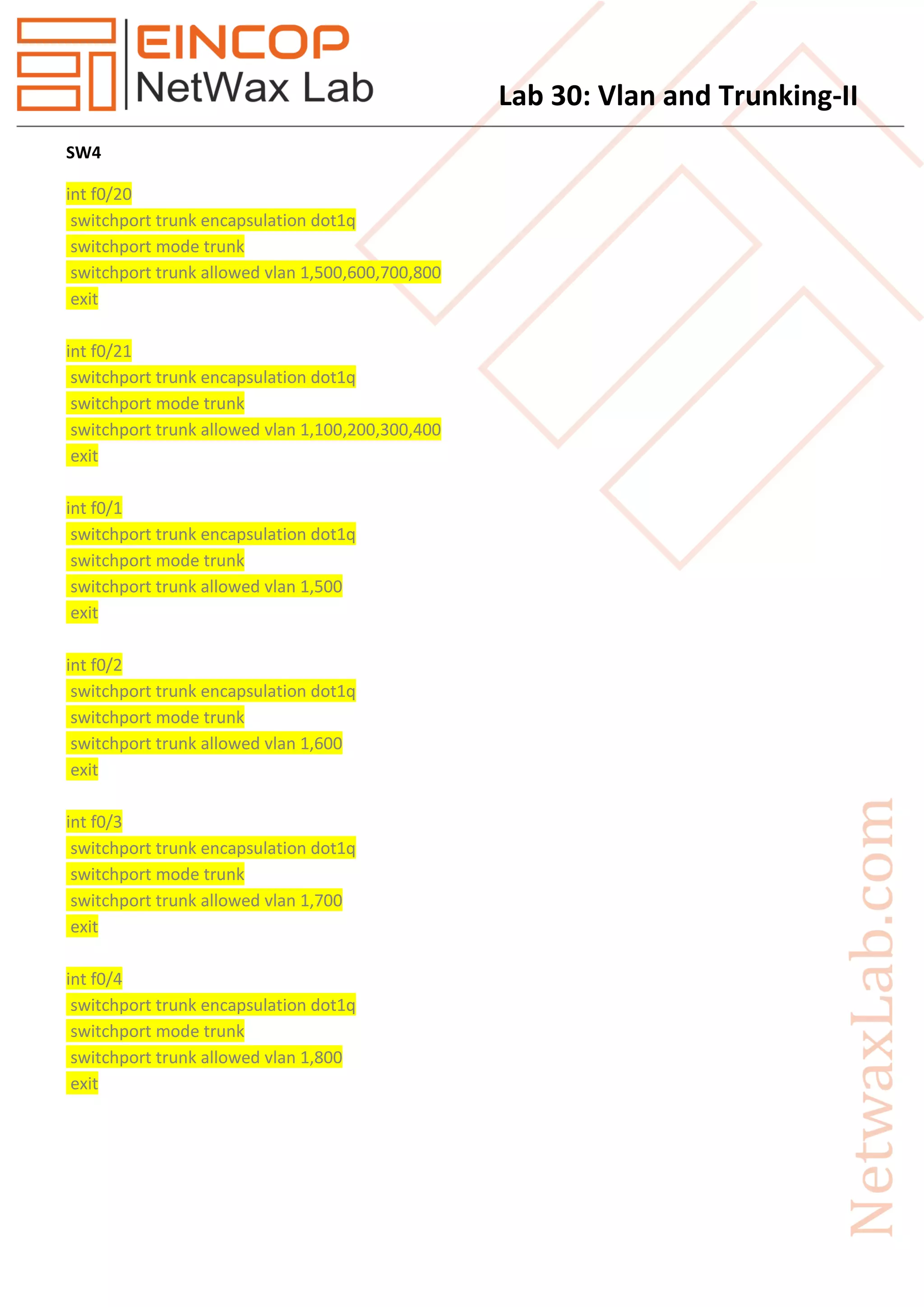
SW4
int f0/20
switchport trunk encapsulation dot1q
switchport mode trunk
switchport trunk allowed vlan 1,500,600,700,800
exit
int f0/21
switchport trunk encapsulation dot1q
switchport mode trunk
switchport trunk allowed vlan 1,100,200,300,400
exit
int f0/1
switchport trunk encapsulation dot1q
switchport mode trunk
switchport trunk allowed vlan 1,500
exit
int f0/2
switchport trunk encapsulation dot1q
switchport mode trunk
switchport trunk allowed vlan 1,600
exit
int f0/3
switchport trunk encapsulation dot1q
switchport mode trunk
switchport trunk allowed vlan 1,700
exit
int f0/4
switchport trunk encapsulation dot1q
switchport mode trunk
switchport trunk allowed vlan 1,800
exit
Lab 30: Vlan and Trunking-II
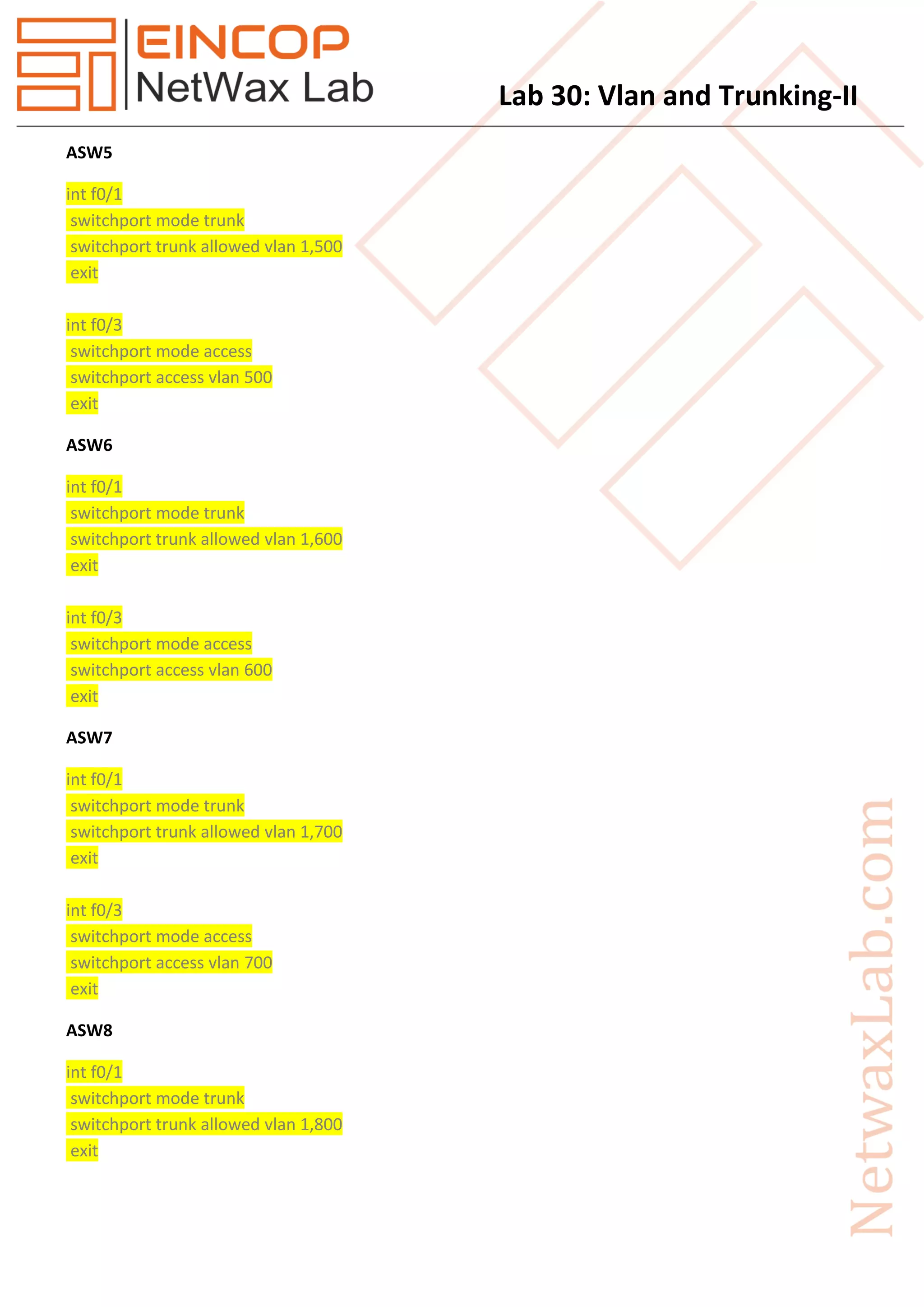
ASW5
int f0/1
switchport mode trunk
switchport trunk allowed vlan 1,500
exit
int f0/3
switchport mode access
switchport access vlan 500
exit
ASW6
int f0/1
switchport mode trunk
switchport trunk allowed vlan 1,600
exit
int f0/3
switchport mode access
switchport access vlan 600
exit
ASW7
int f0/1
switchport mode trunk
switchport trunk allowed vlan 1,700
exit
int f0/3
switchport mode access
switchport access vlan 700
exit
ASW8
int f0/1
switchport mode trunk
switchport trunk allowed vlan 1,800
exit
Lab 30: Vlan and Trunking-II
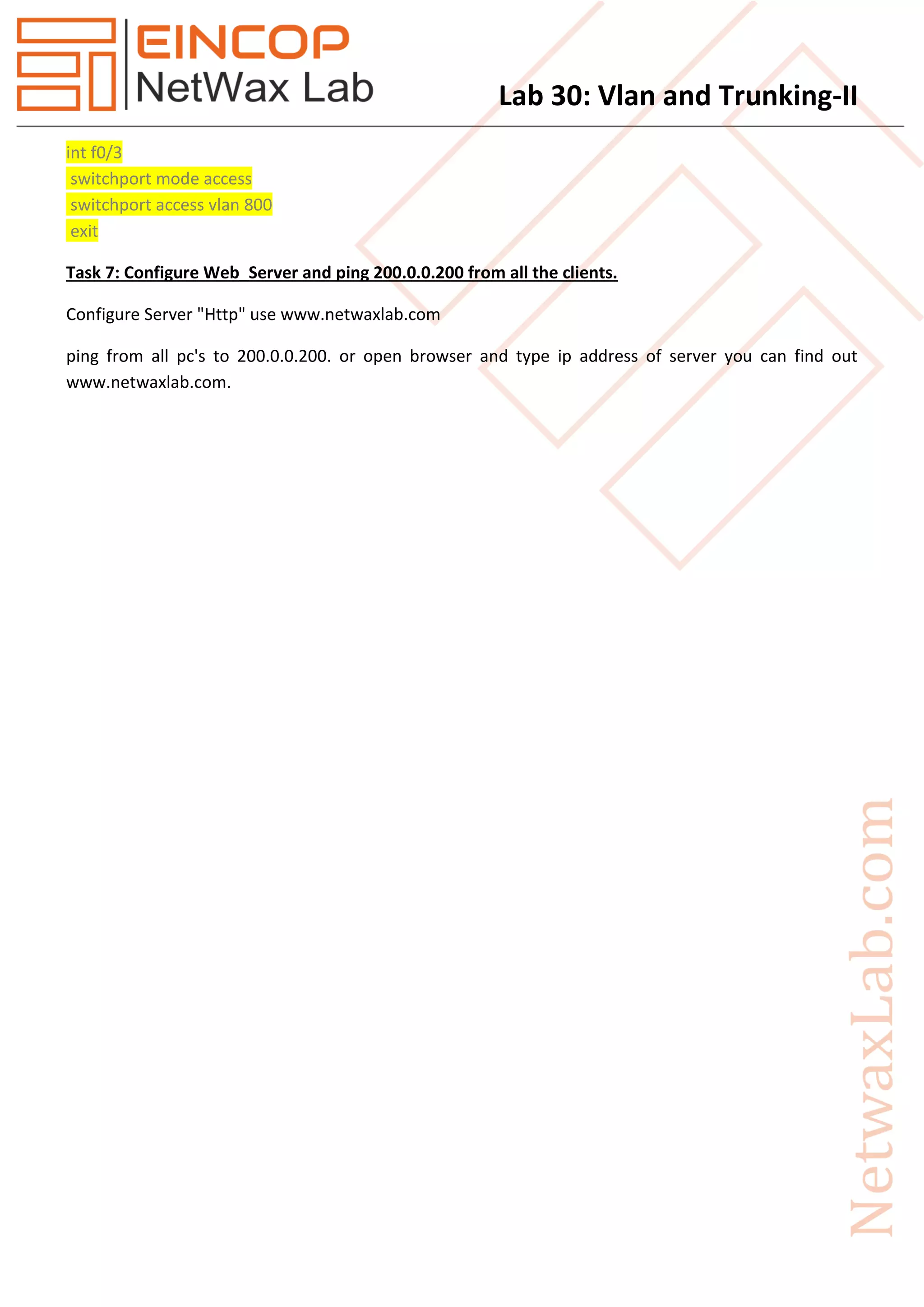
int f0/3
switchport mode access
switchport access vlan 800
exit
Task 7: Configure Web_Server and ping 200.0.0.200 from all the clients.
Configure Server "Http" use www.netwaxlab.com
ping from all pc's to 200.0.0.200. or open browser and type ip address of server you can find out
www.netwaxlab.com.

Eincop Netwax Lab: Vlan and Trunking ii

  • 1.
    Lab 30: Vlanand Trunking-II Task 1. Configure IP Addresses as per given in topology. 2. Configure SW1 as VTP Server and rest of all switches as VTP Client. Make sure "www.netwaxlab.com" as a Domain name. Make Sure R1 Create Vlan and Rest of all Sw receive Vlan information. 3. Perform PAT on R1 and R2. 4. Perform Eigrp between R1, R2, SW1 and Sw2. 5. Make sure Client1 to Client4 Send traffic via Sw1. 6. Make sure Client5 to Client8 Send traffic via Sw2. 7. Configure Web_Server and ping 200.0.0.200 from all the clients. Figure 1 Topology
  • 2.
    Lab 30: Vlanand Trunking-II Solution Task 2: Configure SW1 as VTP Server and rest of all switches as VTP Client. Make sure "www.netwaxlab.com" as a Domain name. Make Sure R1 Create Vlan and Rest of all Sw receive Vlan information. Sw1 vtp domain www.netwaxlab.com vtp mode server vtp ver 2 vtp password Netwax Vlan 100 name Client1 exit Vlan 200 name Client2 exit Vlan 300 name Client3 exit Vlan 400 name Client4 exit Vlan 500 name Client5 exit Vlan 600 name Client6 exit Vlan 700 name Client7 exit
  • 3.
    Lab 30: Vlanand Trunking-II Vlan 800 name Client8 exit Rest of All Switches vtp domain www.netwaxlab.com vtp mode client vtp ver 2 vtp password Netwax Task 3: Perform PAT on R1 and R2. R1 ip route 0.0.0.0 0.0.0.0 101.1.1.1 int g0/0 ip nat outside exit int se0/2/0 ip nat inside exit int g0/1 ip nat inside exit ip access-list extended NAT permit ip 192.168.10.0 0.0.0.255 any permit ip 154.25.14.0 0.0.0.127 any permit ip 154.25.14.128 0.0.0.127 any permit ip 40.23.51.0 0.0.0.63 any permit ip 40.23.51.64 0.0.0.31 any permit ip 27.150.0.0 0.0.0.255 any permit ip 144.35.87.0 0.0.0.255 any permit ip 74.52.100.0 0.0.1.255 any permit ip 40.23.51.96 0.0.0.15 any permit ip 192.168.20.0 0.0.0.255 any exit
  • 4.
    Lab 30: Vlanand Trunking-II ip nat inside source list NAT interface GigabitEthernet0/0 overload R2 ip route 0.0.0.0 0.0.0.0 102.1.1.1 int g0/1 ip nat inside exit int se0/2/0 ip nat inside exit int g0/0 ip nat outside exit ip access-list extended NAT permit ip 192.168.10.0 0.0.0.255 any permit ip 154.25.14.0 0.0.0.127 any permit ip 154.25.14.128 0.0.0.127 any permit ip 40.23.51.0 0.0.0.63 any permit ip 40.23.51.64 0.0.0.31 any permit ip 27.150.0.0 0.0.0.255 any permit ip 144.35.87.0 0.0.0.255 any permit ip 74.52.100.0 0.0.1.255 any permit ip 40.23.51.96 0.0.0.15 any permit ip 192.168.20.0 0.0.0.255 any exit ip nat inside source list NAT interface GigabitEthernet0/0 overload Task 4: Perform Eigrp between R1, R2, SW1 and Sw2. R1 router eigrp 100 redistribute static network 192.168.10.0 network 60.0.0.0 0.0.0.255 no auto-summary
  • 5.
    Lab 30: Vlanand Trunking-II R2 router eigrp 100 redistribute static network 192.168.20.0 network 10.0.0.0 0.0.0.255 network 60.0.0.0 0.0.0.255 no auto-summary exit Sw1 router eigrp 100 network 192.168.10.0 network 154.25.14.0 0.0.0.127 network 154.25.14.128 0.0.0.127 network 40.23.51.0 0.0.0.63 network 40.23.51.64 0.0.0.31 network 27.150.0.0 0.0.0.255 network 144.35.87.0 0.0.0.255 network 74.52.100.0 0.0.1.255 network 40.23.51.96 0.0.0.15 no auto-summary exit Sw2 router eigrp 100 network 192.168.20.0 network 154.25.14.128 0.0.0.127 network 40.23.51.0 0.0.0.63 network 40.23.51.64 0.0.0.31 network 27.150.0.0 0.0.0.255 network 144.35.87.0 0.0.0.255 network 74.52.100.0 0.0.1.255 network 40.23.51.96 0.0.0.15 no auto-summary exit
  • 6.
    Lab 30: Vlanand Trunking-II Task 5: Make sure Client1 to Client4 Send traffic via Sw1. Sw1 int range f0/20-21 switchport trunk encapsulation dot1q switchport mode trunk switchport trunk allowed vlan 1,100,200,300,400 exit int f0/19 switchport trunk encapsulation dot1q switchport mode trunk switchport trunk allowed vlan 1,100,200,300,400,500,600,700,800 exit interface Vlan100 ip address 154.25.14.1 255.255.255.128 interface Vlan200 ip address 154.25.14.129 255.255.255.128 interface Vlan300 ip address 40.23.51.1 255.255.255.192 interface Vlan400 ip address 40.23.51.65 255.255.255.224 Sw3 int f0/20 switchport trunk encapsulation dot1q switchport mode trunk switchport trunk allowed vlan 1,100,200,300,400 exit int f0/1 switchport trunk encapsulation dot1q switchport mode trunk switchport trunk allowed vlan 1,100 exit
  • 7.
    Lab 30: Vlanand Trunking-II int f0/2 switchport trunk encapsulation dot1q switchport mode trunk switchport trunk allowed vlan 1,200 exit int f0/3 switchport trunk encapsulation dot1q switchport mode trunk switchport trunk allowed vlan 1,300 exit int f0/4 switchport trunk encapsulation dot1q switchport mode trunk switchport trunk allowed vlan 1,400 exit ASW1 int f0/1 switchport mode trunk switchport trunk allowed vlan 1,100 exit int f0/3 switchport mode access switchport access vlan 100 exit ASW2 int f0/1 switchport mode trunk switchport trunk allowed vlan 1,200 exit int f0/3 switchport mode access switchport access vlan 200 exit
  • 8.
    Lab 30: Vlanand Trunking-II ASW3 int f0/1 switchport mode trunk switchport trunk allowed vlan 1,300 exit int f0/3 switchport mode access switchport access vlan 300 exit ASW4 int f0/1 switchport mode trunk switchport trunk allowed vlan 1,400 exit int f0/3 switchport mode access switchport access vlan 400 exit Task 6: Make sure Client5 to Client8 Send traffic via Sw2. SW2 int range f0/20-21 switchport trunk encapsulation dot1q switchport mode trunk switchport trunk allowed vlan 1,500,600,700,800 exit int f0/19 switchport trunk encapsulation dot1q switchport mode trunk switchport trunk allowed vlan 1,100,200,300,400,500,600,700,800 exit
  • 9.
    Lab 30: Vlanand Trunking-II SW4 int f0/20 switchport trunk encapsulation dot1q switchport mode trunk switchport trunk allowed vlan 1,500,600,700,800 exit int f0/21 switchport trunk encapsulation dot1q switchport mode trunk switchport trunk allowed vlan 1,100,200,300,400 exit int f0/1 switchport trunk encapsulation dot1q switchport mode trunk switchport trunk allowed vlan 1,500 exit int f0/2 switchport trunk encapsulation dot1q switchport mode trunk switchport trunk allowed vlan 1,600 exit int f0/3 switchport trunk encapsulation dot1q switchport mode trunk switchport trunk allowed vlan 1,700 exit int f0/4 switchport trunk encapsulation dot1q switchport mode trunk switchport trunk allowed vlan 1,800 exit
  • 10.
    Lab 30: Vlanand Trunking-II ASW5 int f0/1 switchport mode trunk switchport trunk allowed vlan 1,500 exit int f0/3 switchport mode access switchport access vlan 500 exit ASW6 int f0/1 switchport mode trunk switchport trunk allowed vlan 1,600 exit int f0/3 switchport mode access switchport access vlan 600 exit ASW7 int f0/1 switchport mode trunk switchport trunk allowed vlan 1,700 exit int f0/3 switchport mode access switchport access vlan 700 exit ASW8 int f0/1 switchport mode trunk switchport trunk allowed vlan 1,800 exit
  • 11.
    Lab 30: Vlanand Trunking-II int f0/3 switchport mode access switchport access vlan 800 exit Task 7: Configure Web_Server and ping 200.0.0.200 from all the clients. Configure Server "Http" use www.netwaxlab.com ping from all pc's to 200.0.0.200. or open browser and type ip address of server you can find out www.netwaxlab.com.