Lab 9: Access-List
Task
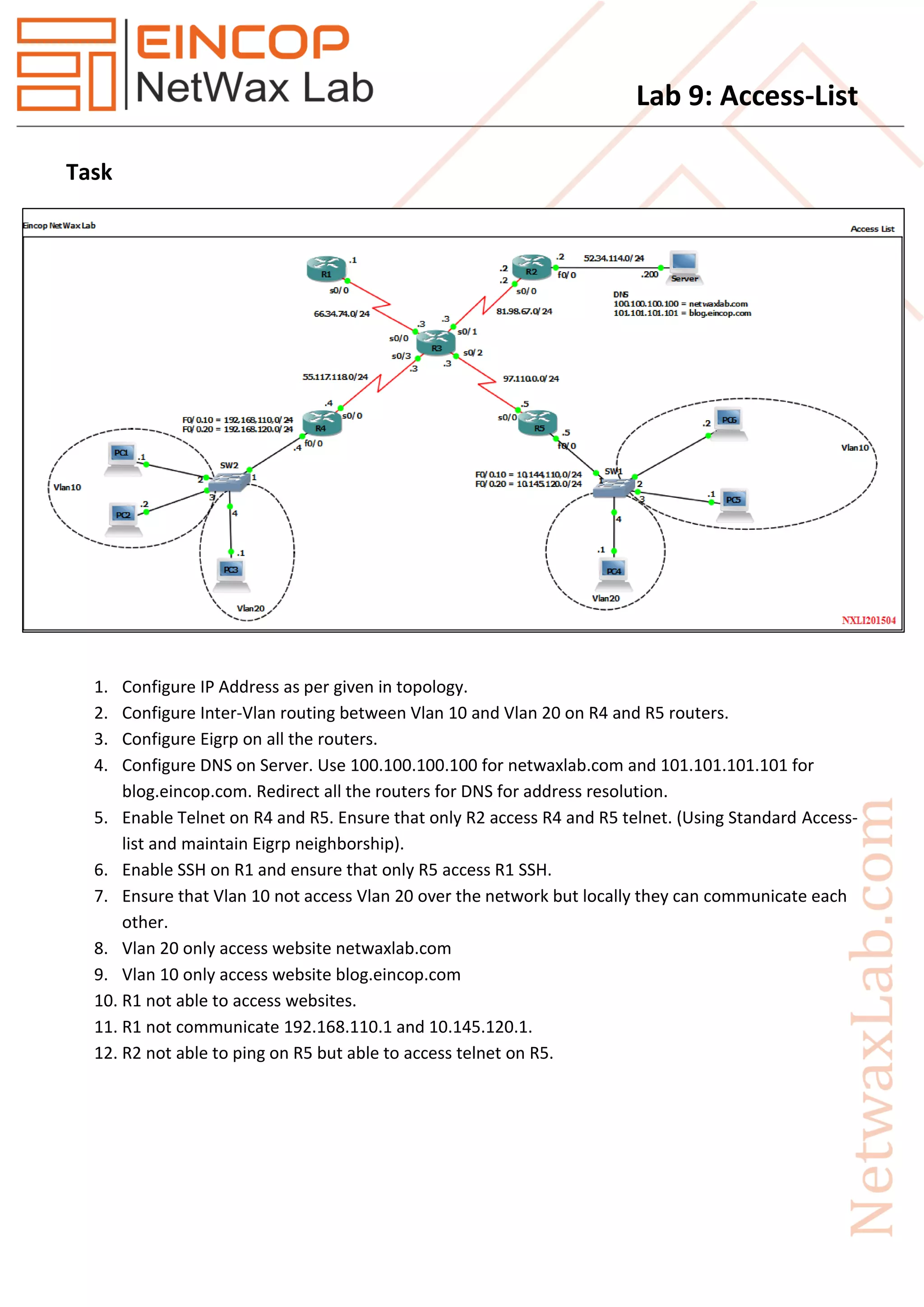
1. Configure IP Address as per given in topology.
2. Configure Inter-Vlan routing between Vlan 10 and Vlan 20 on R4 and R5 routers.
3. Configure Eigrp on all the routers.
4. Configure DNS on Server. Use 100.100.100.100 for netwaxlab.com and 101.101.101.101 for
blog.eincop.com. Redirect all the routers for DNS for address resolution.
5. Enable Telnet on R4 and R5. Ensure that only R2 access R4 and R5 telnet. (Using Standard Access-
list and maintain Eigrp neighborship).
6. Enable SSH on R1 and ensure that only R5 access R1 SSH.
7. Ensure that Vlan 10 not access Vlan 20 over the network but locally they can communicate each
other.
8. Vlan 20 only access website netwaxlab.com
9. Vlan 10 only access website blog.eincop.com
10. R1 not able to access websites.
11. R1 not communicate 192.168.110.1 and 10.145.120.1.
12. R2 not able to ping on R5 but able to access telnet on R5.
Lab 9: Access-List
Solution
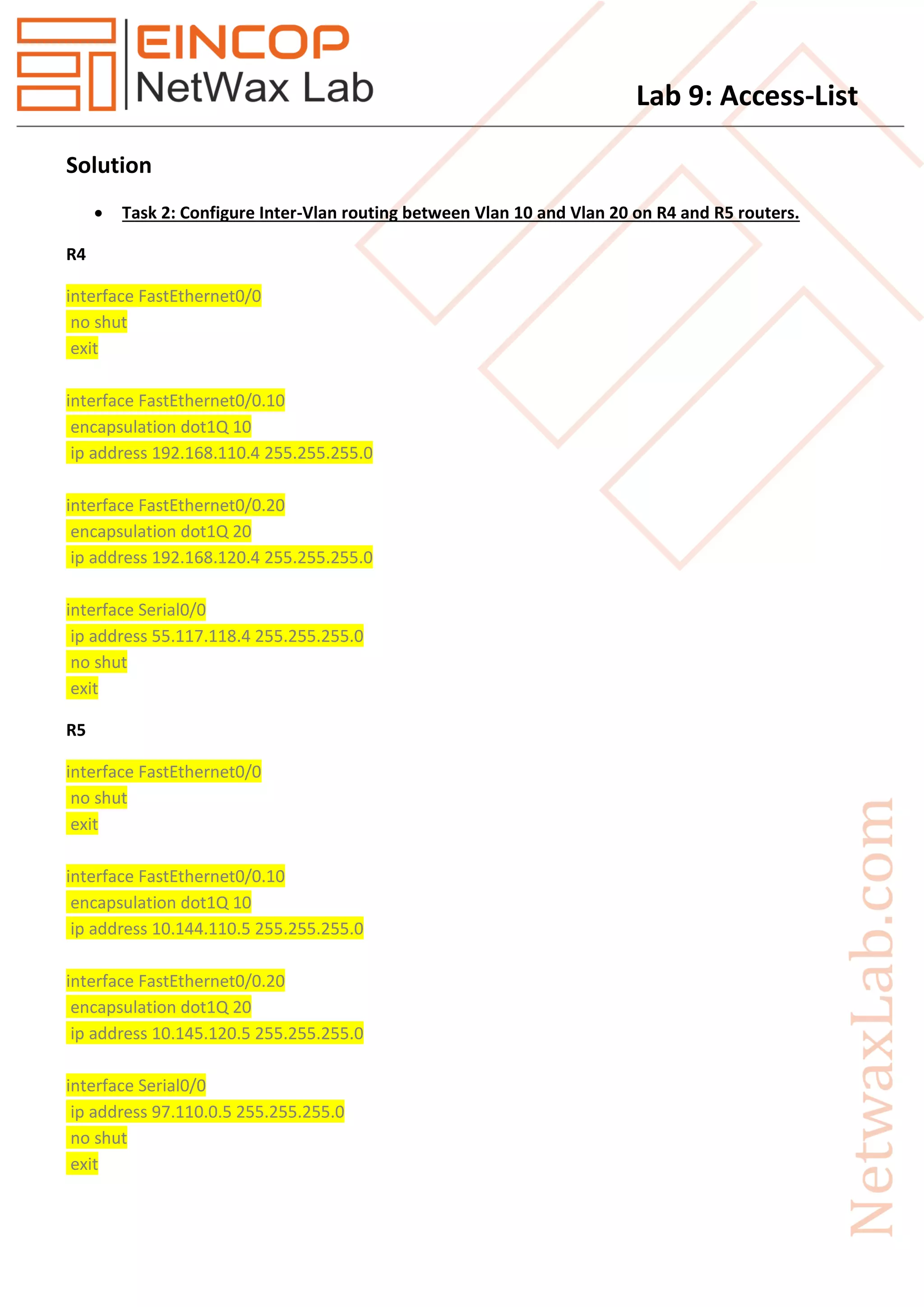
 Task 2: Configure Inter-Vlan routing between Vlan 10 and Vlan 20 on R4 and R5 routers.
R4
interface FastEthernet0/0
no shut
exit
interface FastEthernet0/0.10
encapsulation dot1Q 10
ip address 192.168.110.4 255.255.255.0
interface FastEthernet0/0.20
encapsulation dot1Q 20
ip address 192.168.120.4 255.255.255.0
interface Serial0/0
ip address 55.117.118.4 255.255.255.0
no shut
exit
R5
interface FastEthernet0/0
no shut
exit
interface FastEthernet0/0.10
encapsulation dot1Q 10
ip address 10.144.110.5 255.255.255.0
interface FastEthernet0/0.20
encapsulation dot1Q 20
ip address 10.145.120.5 255.255.255.0
interface Serial0/0
ip address 97.110.0.5 255.255.255.0
no shut
exit
Lab 9: Access-List
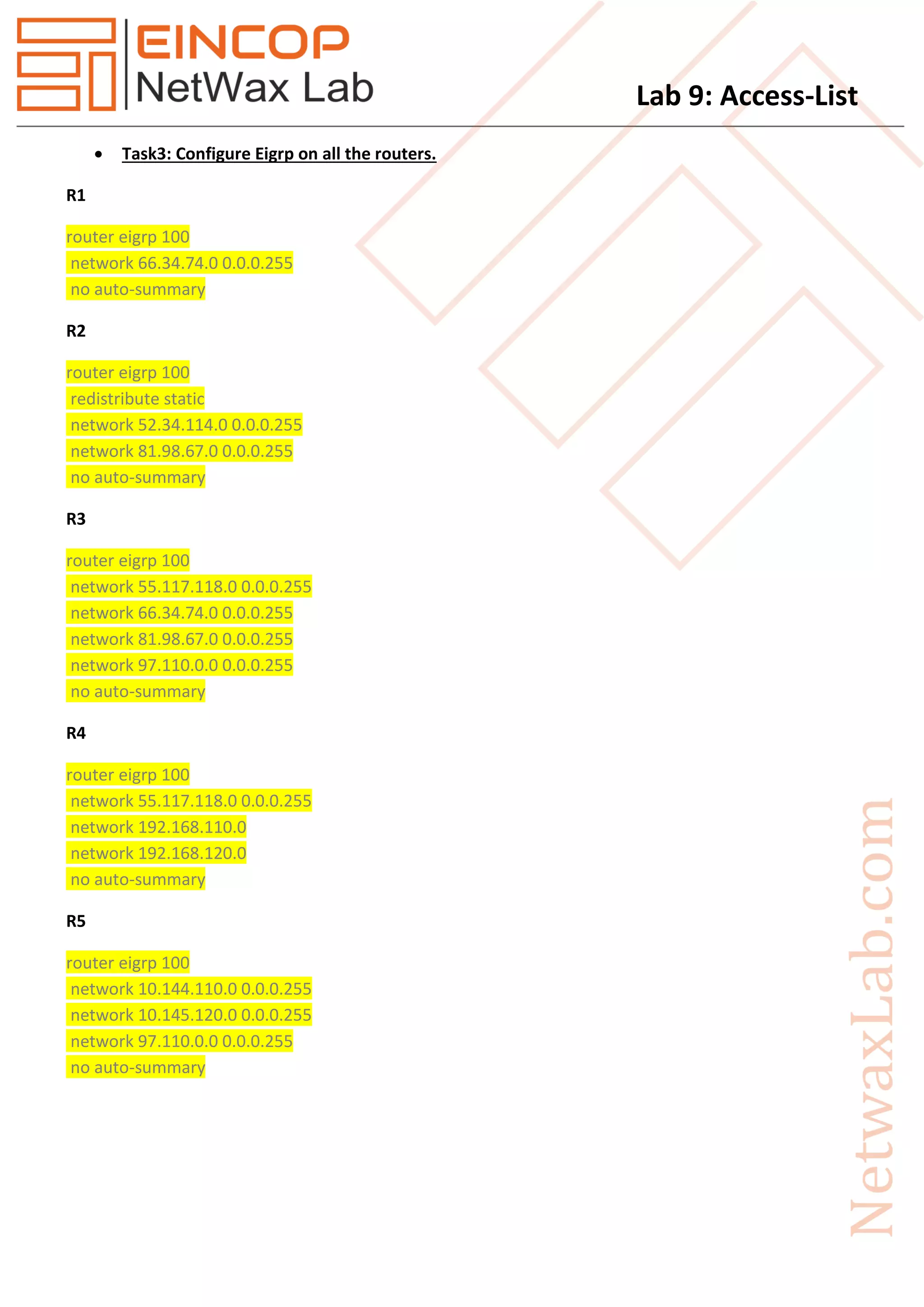
 Task3: Configure Eigrp on all the routers.
R1
router eigrp 100
network 66.34.74.0 0.0.0.255
no auto-summary
R2
router eigrp 100
redistribute static
network 52.34.114.0 0.0.0.255
network 81.98.67.0 0.0.0.255
no auto-summary
R3
router eigrp 100
network 55.117.118.0 0.0.0.255
network 66.34.74.0 0.0.0.255
network 81.98.67.0 0.0.0.255
network 97.110.0.0 0.0.0.255
no auto-summary
R4
router eigrp 100
network 55.117.118.0 0.0.0.255
network 192.168.110.0
network 192.168.120.0
no auto-summary
R5
router eigrp 100
network 10.144.110.0 0.0.0.255
network 10.145.120.0 0.0.0.255
network 97.110.0.0 0.0.0.255
no auto-summary
Lab 9: Access-List
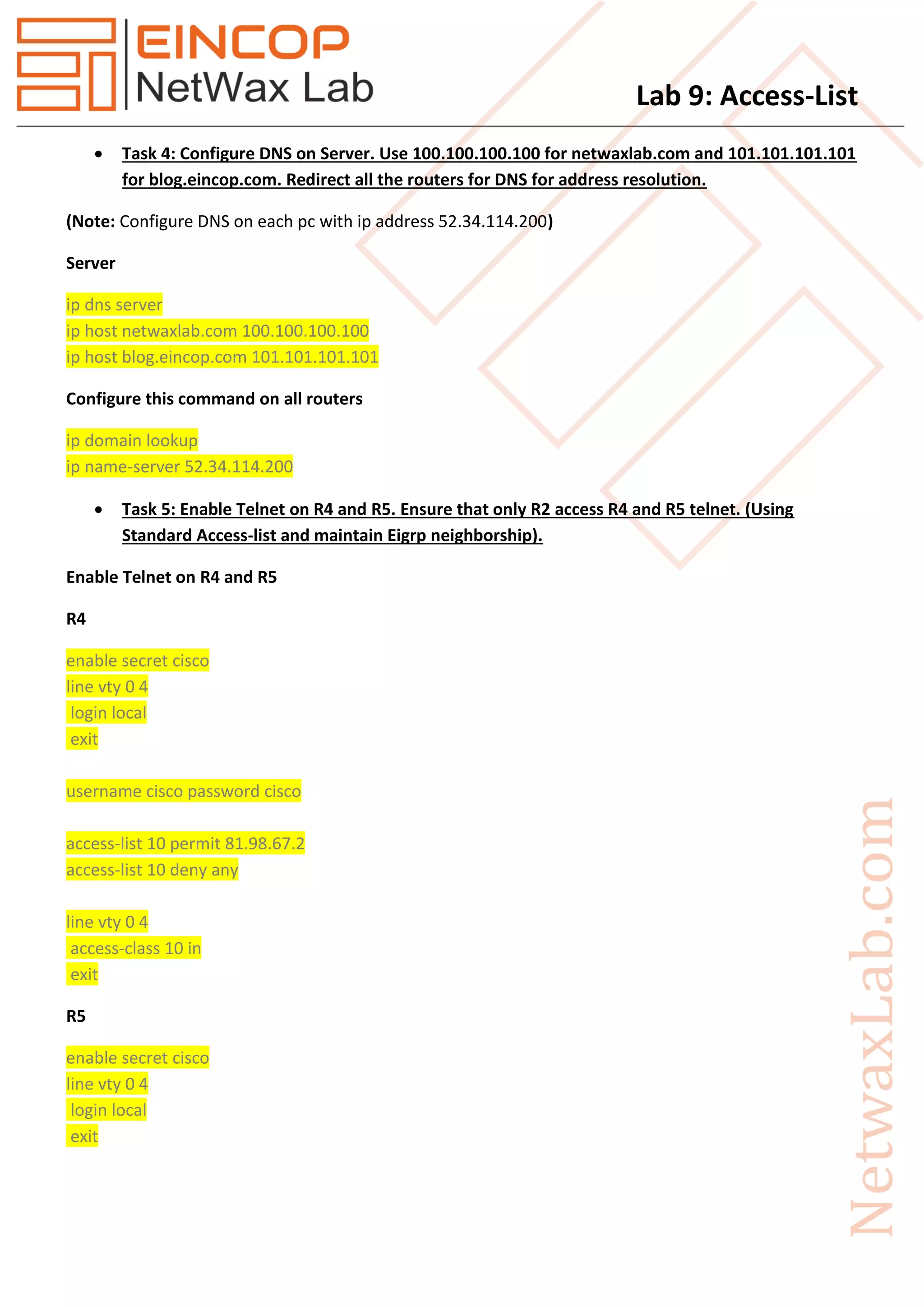
 Task 4: Configure DNS on Server. Use 100.100.100.100 for netwaxlab.com and 101.101.101.101
for blog.eincop.com. Redirect all the routers for DNS for address resolution.
(Note: Configure DNS on each pc with ip address 52.34.114.200)
Server
ip dns server
ip host netwaxlab.com 100.100.100.100
ip host blog.eincop.com 101.101.101.101
Configure this command on all routers
ip domain lookup
ip name-server 52.34.114.200
 Task 5: Enable Telnet on R4 and R5. Ensure that only R2 access R4 and R5 telnet. (Using
Standard Access-list and maintain Eigrp neighborship).
Enable Telnet on R4 and R5
R4
enable secret cisco
line vty 0 4
login local
exit
username cisco password cisco
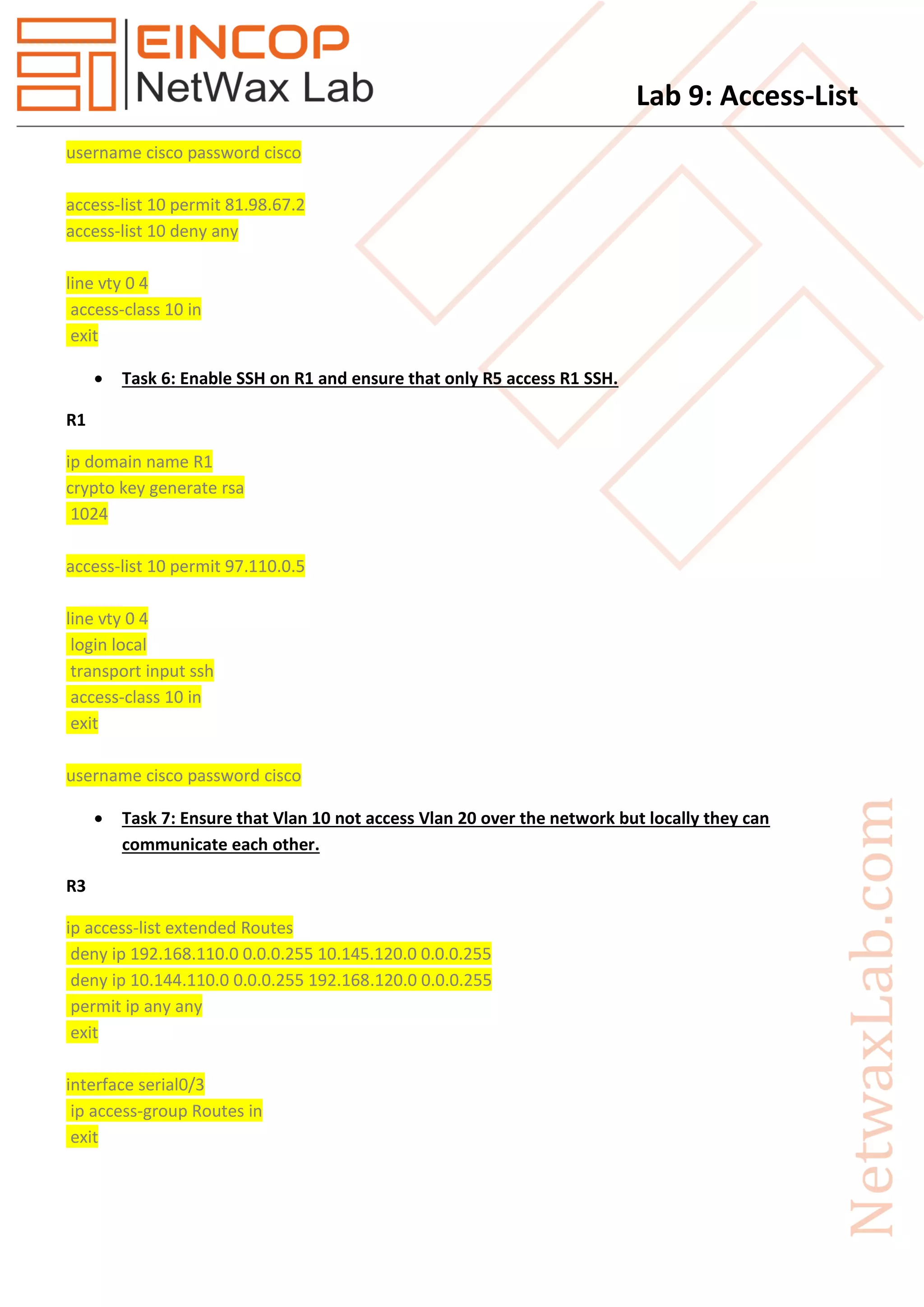
access-list 10 permit 81.98.67.2
access-list 10 deny any
line vty 0 4
access-class 10 in
exit
R5
enable secret cisco
line vty 0 4
login local
exit
Lab 9: Access-List
username cisco password cisco
access-list 10 permit 81.98.67.2
access-list 10 deny any
line vty 0 4
access-class 10 in
exit
 Task 6: Enable SSH on R1 and ensure that only R5 access R1 SSH.
R1
ip domain name R1
crypto key generate rsa
1024
access-list 10 permit 97.110.0.5
line vty 0 4
login local
transport input ssh
access-class 10 in
exit
username cisco password cisco
 Task 7: Ensure that Vlan 10 not access Vlan 20 over the network but locally they can
communicate each other.
R3
ip access-list extended Routes
deny ip 192.168.110.0 0.0.0.255 10.145.120.0 0.0.0.255
deny ip 10.144.110.0 0.0.0.255 192.168.120.0 0.0.0.255
permit ip any any
exit
interface serial0/3
ip access-group Routes in
exit
Lab 9: Access-List
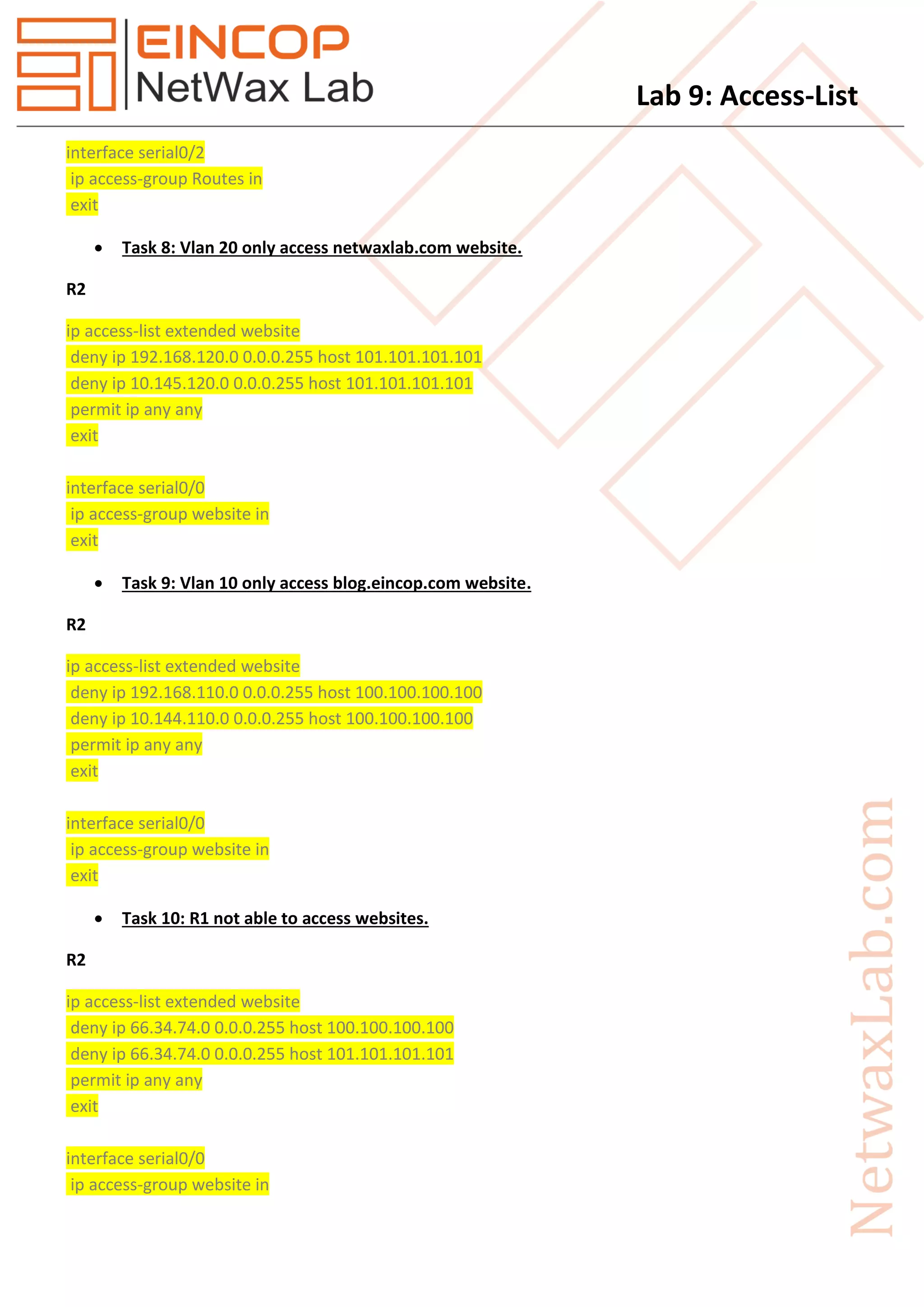
interface serial0/2
ip access-group Routes in
exit
 Task 8: Vlan 20 only access netwaxlab.com website.
R2
ip access-list extended website
deny ip 192.168.120.0 0.0.0.255 host 101.101.101.101
deny ip 10.145.120.0 0.0.0.255 host 101.101.101.101
permit ip any any
exit
interface serial0/0
ip access-group website in
exit
 Task 9: Vlan 10 only access blog.eincop.com website.
R2
ip access-list extended website
deny ip 192.168.110.0 0.0.0.255 host 100.100.100.100
deny ip 10.144.110.0 0.0.0.255 host 100.100.100.100
permit ip any any
exit
interface serial0/0
ip access-group website in
exit
 Task 10: R1 not able to access websites.
R2
ip access-list extended website
deny ip 66.34.74.0 0.0.0.255 host 100.100.100.100
deny ip 66.34.74.0 0.0.0.255 host 101.101.101.101
permit ip any any
exit
interface serial0/0
ip access-group website in
Lab 9: Access-List
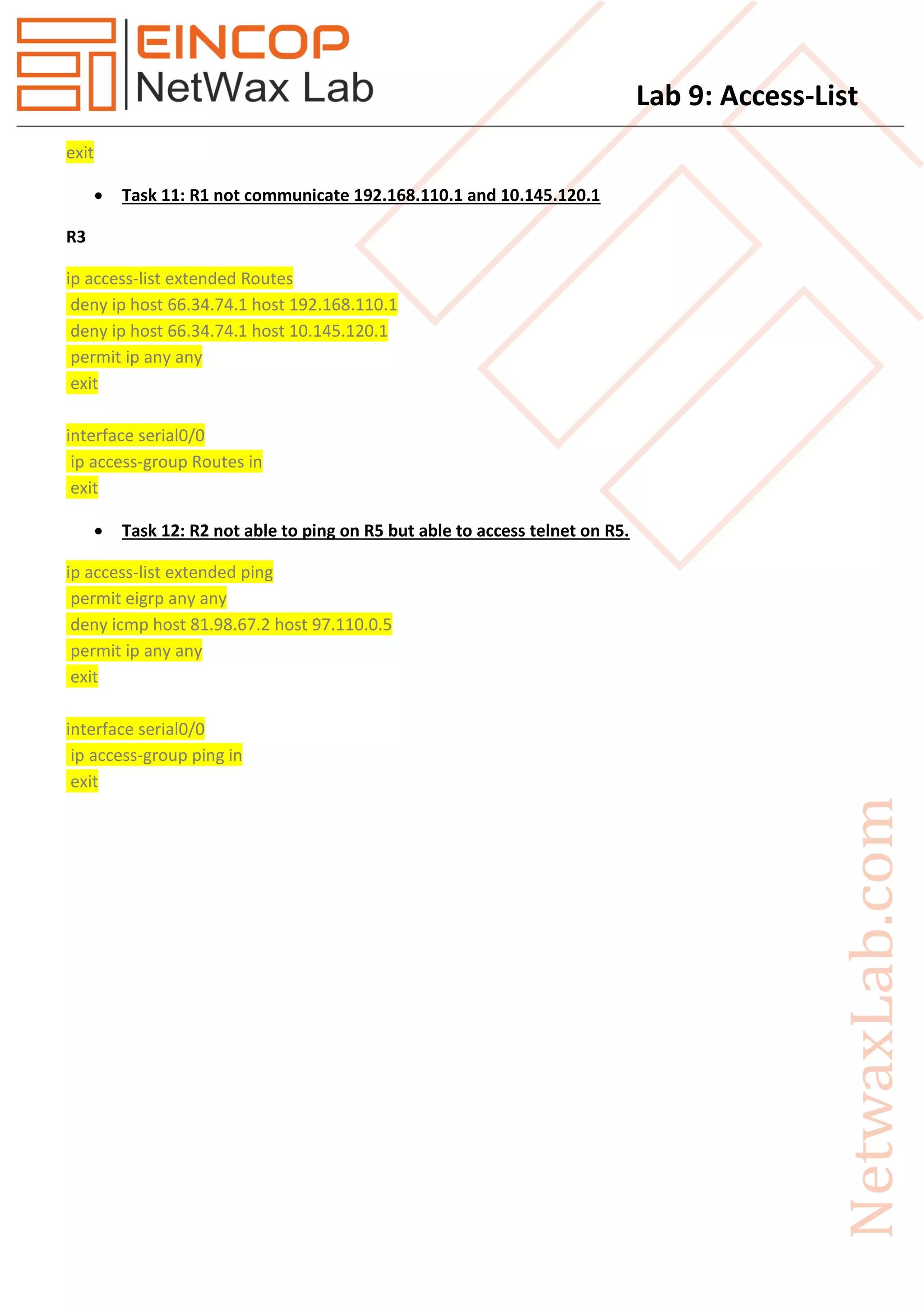
exit
 Task 11: R1 not communicate 192.168.110.1 and 10.145.120.1
R3
ip access-list extended Routes
deny ip host 66.34.74.1 host 192.168.110.1
deny ip host 66.34.74.1 host 10.145.120.1
permit ip any any
exit
interface serial0/0
ip access-group Routes in
exit
 Task 12: R2 not able to ping on R5 but able to access telnet on R5.
ip access-list extended ping
permit eigrp any any
deny icmp host 81.98.67.2 host 97.110.0.5
permit ip any any
exit
interface serial0/0
ip access-group ping in
exit

Nxll09 access list

  • 1.
    Lab 9: Access-List Task 1.Configure IP Address as per given in topology. 2. Configure Inter-Vlan routing between Vlan 10 and Vlan 20 on R4 and R5 routers. 3. Configure Eigrp on all the routers. 4. Configure DNS on Server. Use 100.100.100.100 for netwaxlab.com and 101.101.101.101 for blog.eincop.com. Redirect all the routers for DNS for address resolution. 5. Enable Telnet on R4 and R5. Ensure that only R2 access R4 and R5 telnet. (Using Standard Access- list and maintain Eigrp neighborship). 6. Enable SSH on R1 and ensure that only R5 access R1 SSH. 7. Ensure that Vlan 10 not access Vlan 20 over the network but locally they can communicate each other. 8. Vlan 20 only access website netwaxlab.com 9. Vlan 10 only access website blog.eincop.com 10. R1 not able to access websites. 11. R1 not communicate 192.168.110.1 and 10.145.120.1. 12. R2 not able to ping on R5 but able to access telnet on R5.
  • 2.
    Lab 9: Access-List Solution Task 2: Configure Inter-Vlan routing between Vlan 10 and Vlan 20 on R4 and R5 routers. R4 interface FastEthernet0/0 no shut exit interface FastEthernet0/0.10 encapsulation dot1Q 10 ip address 192.168.110.4 255.255.255.0 interface FastEthernet0/0.20 encapsulation dot1Q 20 ip address 192.168.120.4 255.255.255.0 interface Serial0/0 ip address 55.117.118.4 255.255.255.0 no shut exit R5 interface FastEthernet0/0 no shut exit interface FastEthernet0/0.10 encapsulation dot1Q 10 ip address 10.144.110.5 255.255.255.0 interface FastEthernet0/0.20 encapsulation dot1Q 20 ip address 10.145.120.5 255.255.255.0 interface Serial0/0 ip address 97.110.0.5 255.255.255.0 no shut exit
  • 3.
    Lab 9: Access-List Task3: Configure Eigrp on all the routers. R1 router eigrp 100 network 66.34.74.0 0.0.0.255 no auto-summary R2 router eigrp 100 redistribute static network 52.34.114.0 0.0.0.255 network 81.98.67.0 0.0.0.255 no auto-summary R3 router eigrp 100 network 55.117.118.0 0.0.0.255 network 66.34.74.0 0.0.0.255 network 81.98.67.0 0.0.0.255 network 97.110.0.0 0.0.0.255 no auto-summary R4 router eigrp 100 network 55.117.118.0 0.0.0.255 network 192.168.110.0 network 192.168.120.0 no auto-summary R5 router eigrp 100 network 10.144.110.0 0.0.0.255 network 10.145.120.0 0.0.0.255 network 97.110.0.0 0.0.0.255 no auto-summary
  • 4.
    Lab 9: Access-List Task 4: Configure DNS on Server. Use 100.100.100.100 for netwaxlab.com and 101.101.101.101 for blog.eincop.com. Redirect all the routers for DNS for address resolution. (Note: Configure DNS on each pc with ip address 52.34.114.200) Server ip dns server ip host netwaxlab.com 100.100.100.100 ip host blog.eincop.com 101.101.101.101 Configure this command on all routers ip domain lookup ip name-server 52.34.114.200  Task 5: Enable Telnet on R4 and R5. Ensure that only R2 access R4 and R5 telnet. (Using Standard Access-list and maintain Eigrp neighborship). Enable Telnet on R4 and R5 R4 enable secret cisco line vty 0 4 login local exit username cisco password cisco access-list 10 permit 81.98.67.2 access-list 10 deny any line vty 0 4 access-class 10 in exit R5 enable secret cisco line vty 0 4 login local exit
  • 5.
    Lab 9: Access-List usernamecisco password cisco access-list 10 permit 81.98.67.2 access-list 10 deny any line vty 0 4 access-class 10 in exit  Task 6: Enable SSH on R1 and ensure that only R5 access R1 SSH. R1 ip domain name R1 crypto key generate rsa 1024 access-list 10 permit 97.110.0.5 line vty 0 4 login local transport input ssh access-class 10 in exit username cisco password cisco  Task 7: Ensure that Vlan 10 not access Vlan 20 over the network but locally they can communicate each other. R3 ip access-list extended Routes deny ip 192.168.110.0 0.0.0.255 10.145.120.0 0.0.0.255 deny ip 10.144.110.0 0.0.0.255 192.168.120.0 0.0.0.255 permit ip any any exit interface serial0/3 ip access-group Routes in exit
  • 6.
    Lab 9: Access-List interfaceserial0/2 ip access-group Routes in exit  Task 8: Vlan 20 only access netwaxlab.com website. R2 ip access-list extended website deny ip 192.168.120.0 0.0.0.255 host 101.101.101.101 deny ip 10.145.120.0 0.0.0.255 host 101.101.101.101 permit ip any any exit interface serial0/0 ip access-group website in exit  Task 9: Vlan 10 only access blog.eincop.com website. R2 ip access-list extended website deny ip 192.168.110.0 0.0.0.255 host 100.100.100.100 deny ip 10.144.110.0 0.0.0.255 host 100.100.100.100 permit ip any any exit interface serial0/0 ip access-group website in exit  Task 10: R1 not able to access websites. R2 ip access-list extended website deny ip 66.34.74.0 0.0.0.255 host 100.100.100.100 deny ip 66.34.74.0 0.0.0.255 host 101.101.101.101 permit ip any any exit interface serial0/0 ip access-group website in
  • 7.
    Lab 9: Access-List exit Task 11: R1 not communicate 192.168.110.1 and 10.145.120.1 R3 ip access-list extended Routes deny ip host 66.34.74.1 host 192.168.110.1 deny ip host 66.34.74.1 host 10.145.120.1 permit ip any any exit interface serial0/0 ip access-group Routes in exit  Task 12: R2 not able to ping on R5 but able to access telnet on R5. ip access-list extended ping permit eigrp any any deny icmp host 81.98.67.2 host 97.110.0.5 permit ip any any exit interface serial0/0 ip access-group ping in exit