Routing protocols


                   Prepared By,
               Bhagyashri Dhoke
                    TH036410
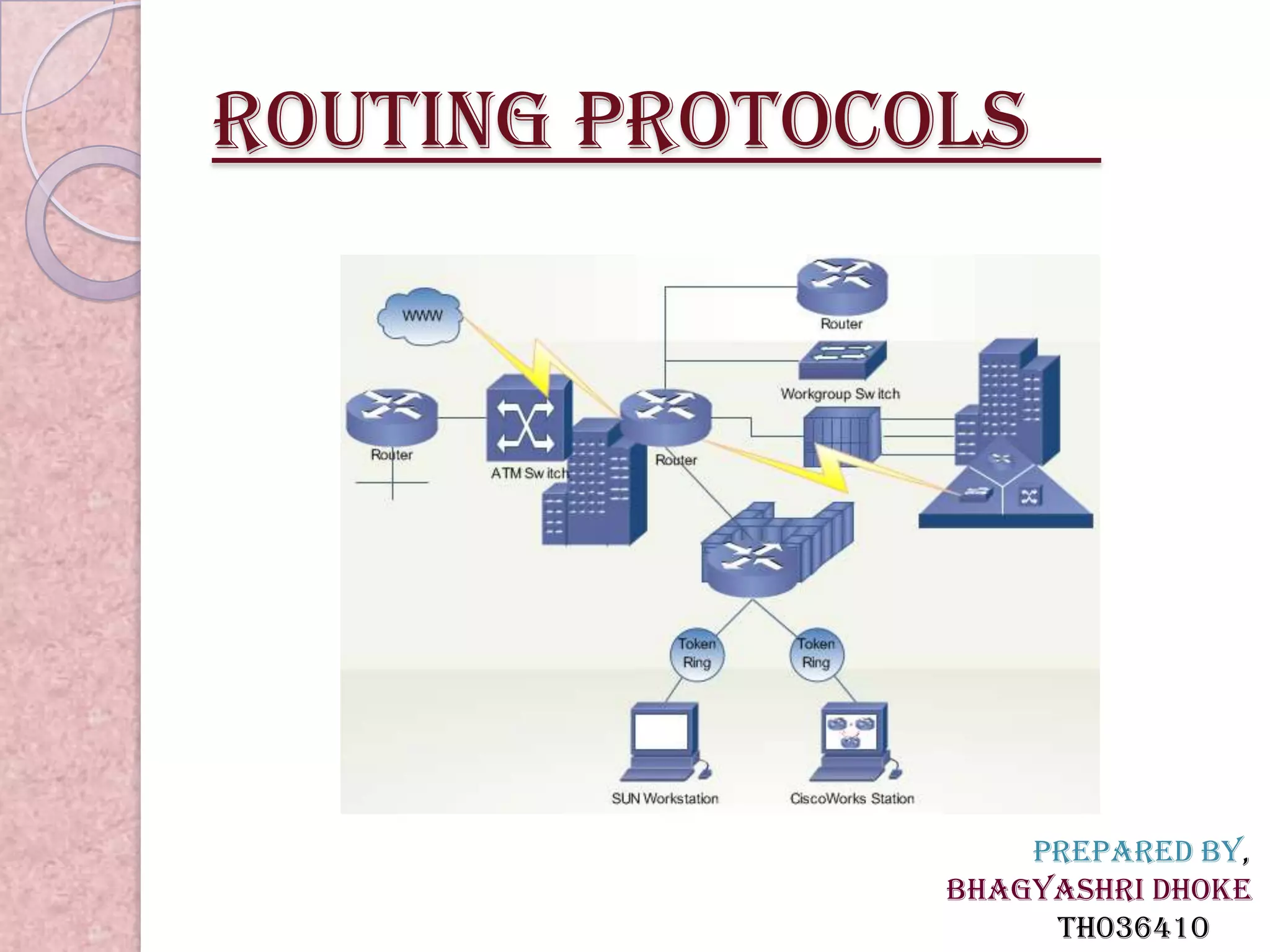
Routing protocols
 Routing protocols are the set of rules used by the routers to
 communicate between source & destination. they do not
 move the information to source to destination only update the
 routing table(contains the information
 Each protocol has its own algorithm to choose the best path.
  The metrics by routing protocols ,
   *Number of network layer devices along with the path (hop
 count)
   *Bandwidth
   *Delay
   *Load
   *MTU
   *Cost
 Routing protocols store the result of these metrics in routing
 table.
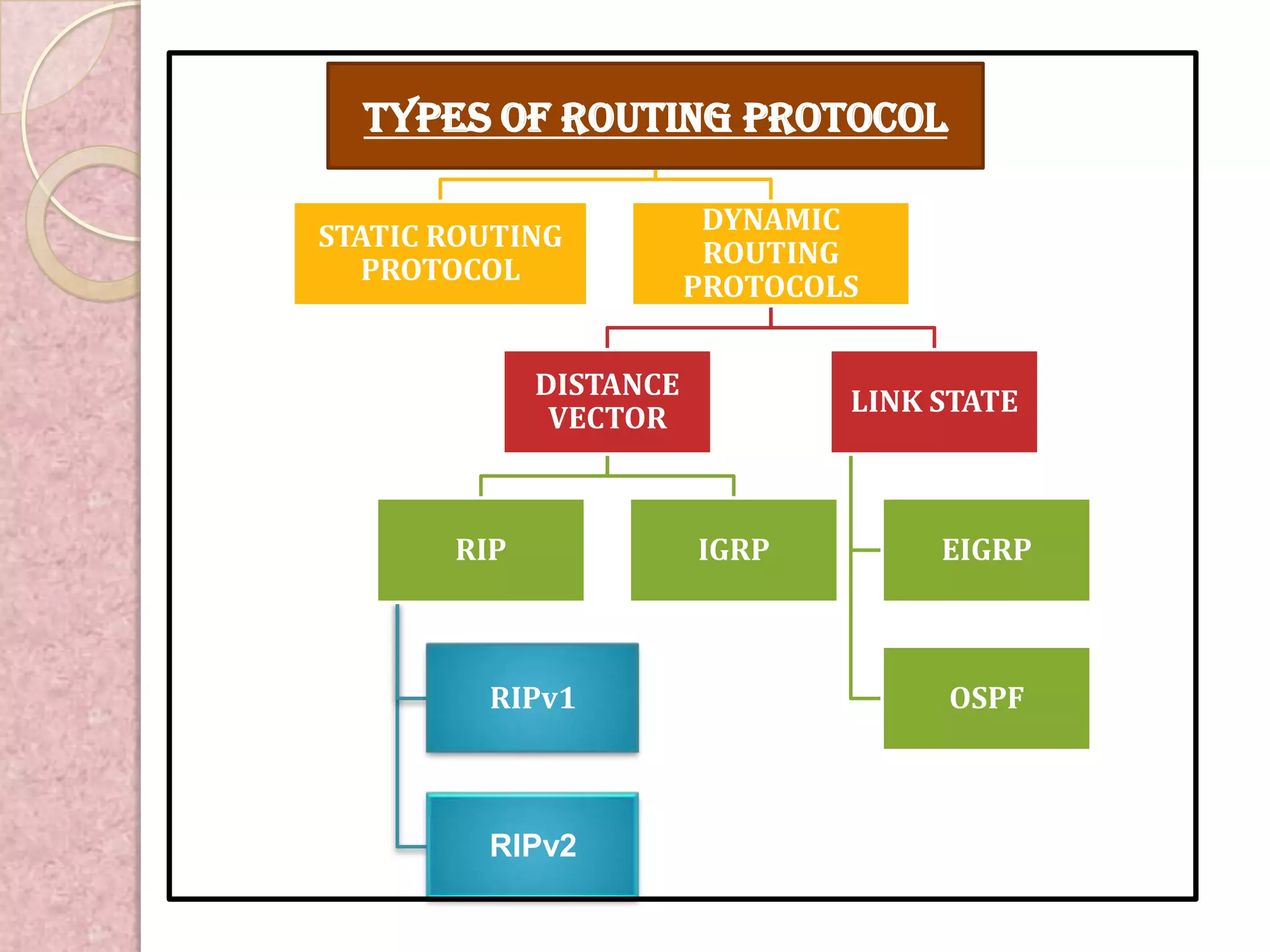
TYPES OF ROUTING PROTOCOL

                         DYNAMIC
STATIC ROUTING
                         ROUTING
   PROTOCOL
                        PROTOCOLS


             DISTANCE
                                LINK STATE
              VECTOR


       RIP              IGRP         EIGRP


         RIPv1                       OSPF


         RIPv2
Static routing protocols
   Static routing ,when an administrator manually assigns the path
   from source to destination network. It provides more security to
   network. The main drawback of static routing is that when a link
   fail in the internetwork all the network goes down. This is feasible
   in small networks, but not in large networks.
Advantages
 No overhead on router CPU.
 No bandwidth usage between links.
 Security (only administrator add routes.)
Disadvantages
 Administrator must really understand internetwork & how each
   router is connected.
 Not practical on large networks as it is time intensive.
 Administrator must update all routers.
Dynamic routing protocols
 Dynamic routing is the process in which routing tables are
 automatically updates by routing table
  *Dynamically discover & maintains routes.
  *Calculate routes
  *Distributing routing updates to other routers in the network
 Advantages
   -less work in maintaining the configuration when adding & deleting
 networks.
   -protocols automatically react to the topology changes.
   -configuration is less-prone.
   -More scalable.
 Disadvantages
   -Routers resource are used.
   -More administrator knowledge is required for configuration
Types of dynamic routing
protocols
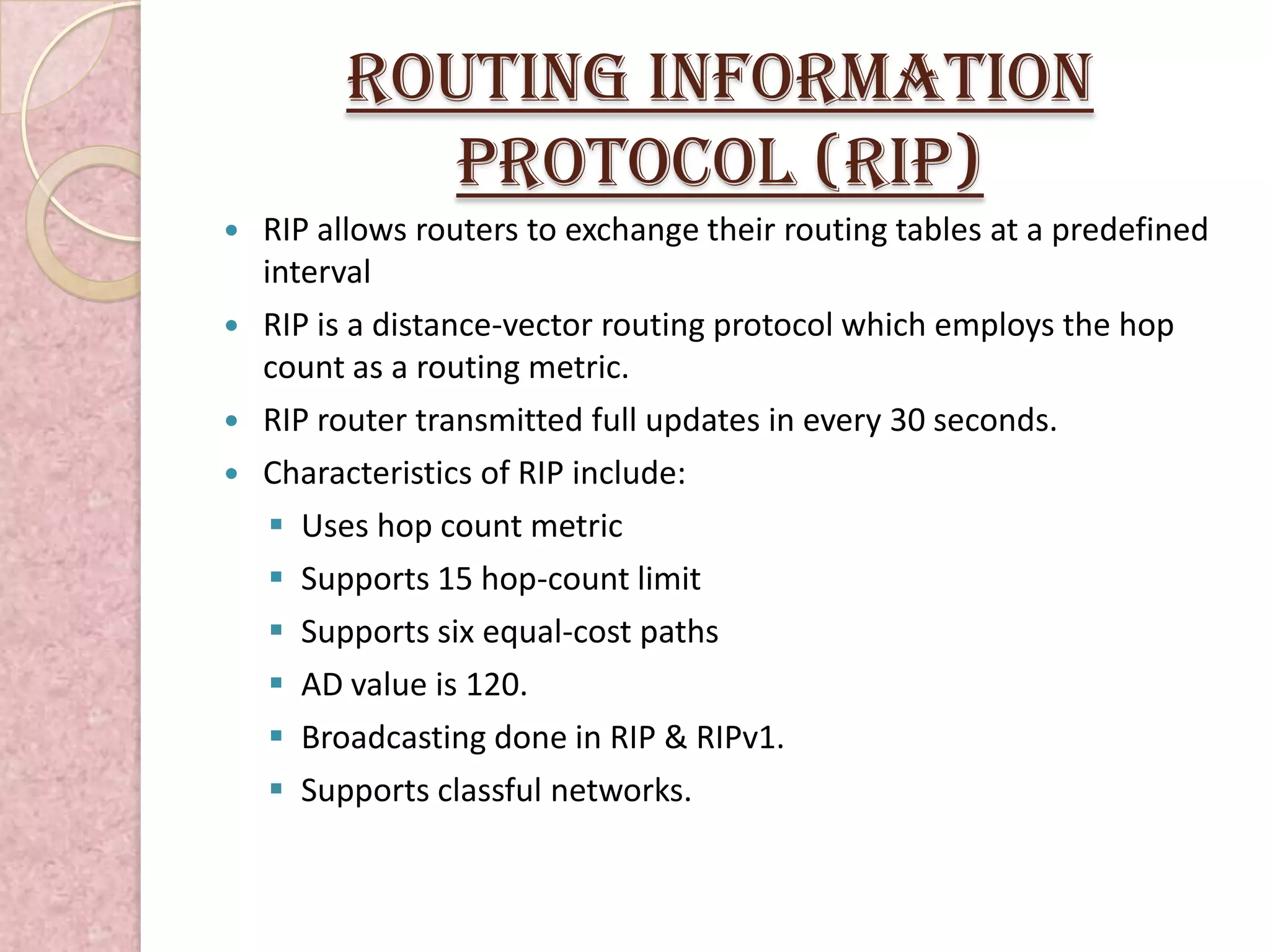
   The dynamic routing protocols can be categorized on the basis of
   various parameters .Dynamic routing protocols are classified into
   two protocols:
 1. Distance Vector Routing Protocols: - It uses simple algorithms
   that calculate cumulative distance value between routers based on
   hop count.
Example:
 Routing Information Protocol(RIP)
 Interior Gateway Routing Protocols (IGRP
 2. Link State Routing Protocols: - It uses sophisticated algorithms
   that maintain a complex database of internetwork topology.
 Example:
 Enhanced Interior Gateway Routing Protocol(EIGRP)
 Open Shortest Path First (OSPF)
Routing Information
           Protocol (RIP)
   RIP allows routers to exchange their routing tables at a predefined
    interval
   RIP is a distance-vector routing protocol which employs the hop
    count as a routing metric.
   RIP router transmitted full updates in every 30 seconds.
   Characteristics of RIP include:
      Uses hop count metric
      Supports 15 hop-count limit
      Supports six equal-cost paths
      AD value is 120.
      Broadcasting done in RIP & RIPv1.
      Supports classful networks.
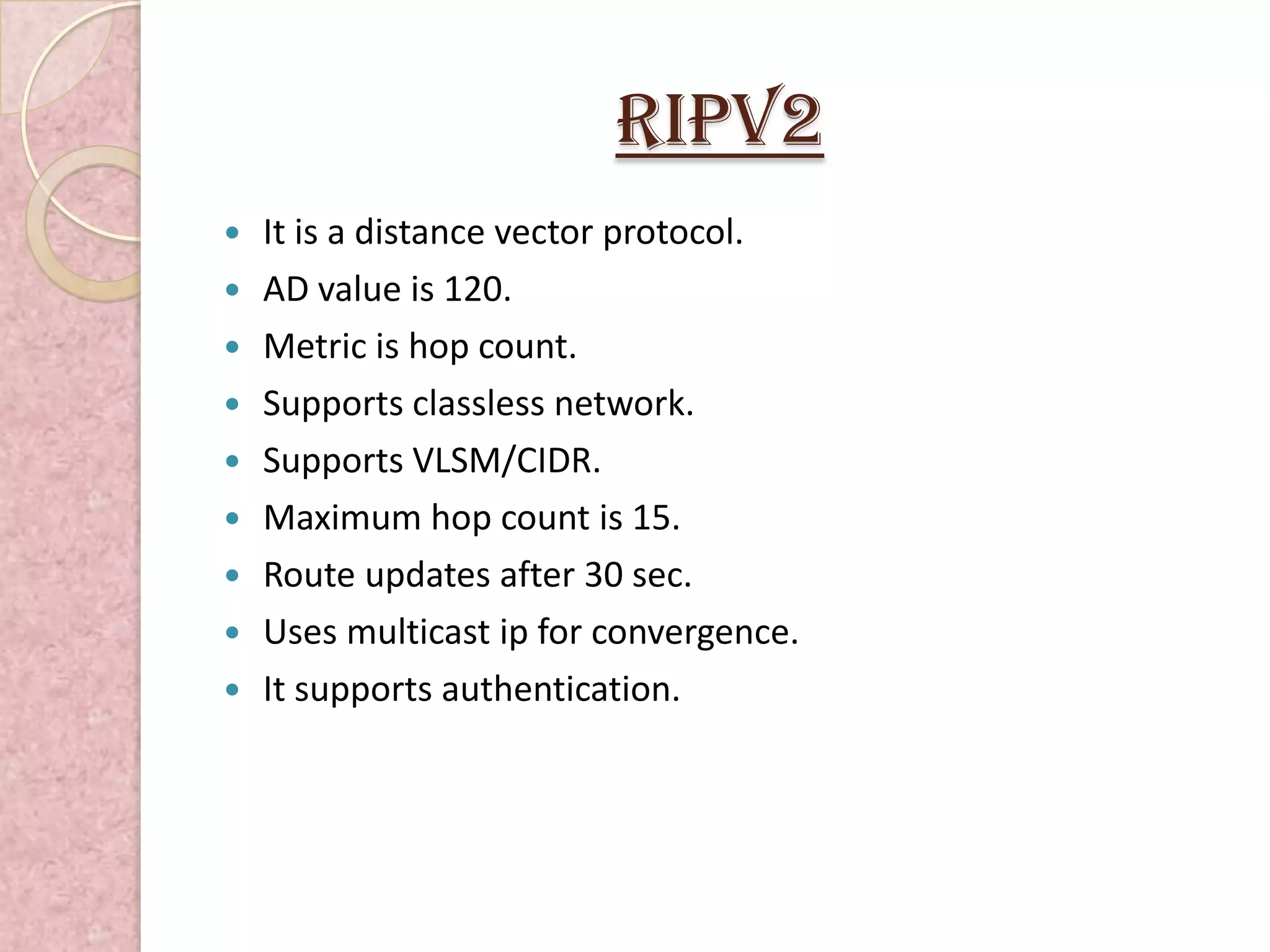
RIPv2
   It is a distance vector protocol.
   AD value is 120.
   Metric is hop count.
   Supports classless network.
   Supports VLSM/CIDR.
   Maximum hop count is 15.
   Route updates after 30 sec.
   Uses multicast ip for convergence.
   It supports authentication.
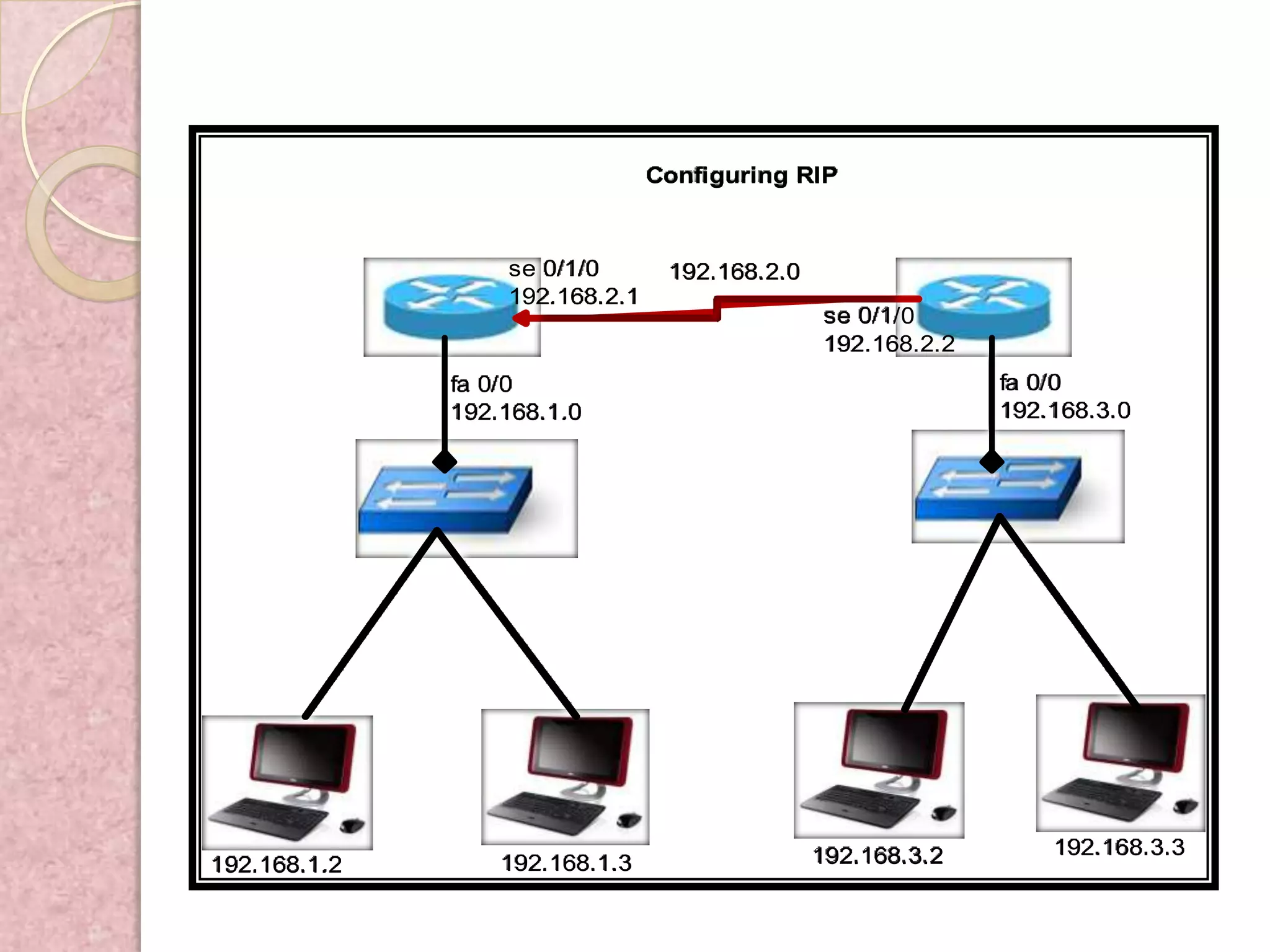
Configuring RIP


                  se 0/1/0       192.168.2.0
                  192.168.2.1
                                               se 0/1/0
                                               192.168.2.2
              fa 0/0                                         fa 0/0
              192.168.1.0                                    192.168.3.0


                                               192.168.3.2       192.168.3.3
192.168.1.2       192.168.1.3
Configure RIP
Configuration for RIPv1
Router>enable
Router# configure terminal
Router(config)#router rip
Router(config)#serial 0/1/0
Router(config-router)#network _network address of own router(e.g.192.168.1.0)
Router(config-router)#version 1
Router(config)save & exit
Configuration for RIPv2
Router>enable
Router# configure terminal
Router(config)#router rip
Router(config)#serial 0/1/0
Router(config-router)#network _network address of own router(e.g.192.168.1.0)
Router(config-router)#version 2
Router(config)save & exit
INTERIOR GATEWAY ROUTING
      PROTOCOL (IGRP)
  IGRP is a distance vector protocol. To overcome RIP limitations
  IGRP introduced. The metrics used are bandwidth, load, delay,
  MTU AND reliability. Routing updates are broadcast every 90
  seconds (by default).It is used by routers to exchange routing data
  within an autonomous system.

The following are the characteristics of IGRP:
  - Uses composite metrics
  - Uses multipath routing
  - Supports unequal-cost load balancing
  - Supports hold-downs
  - Supprts spilt horizons
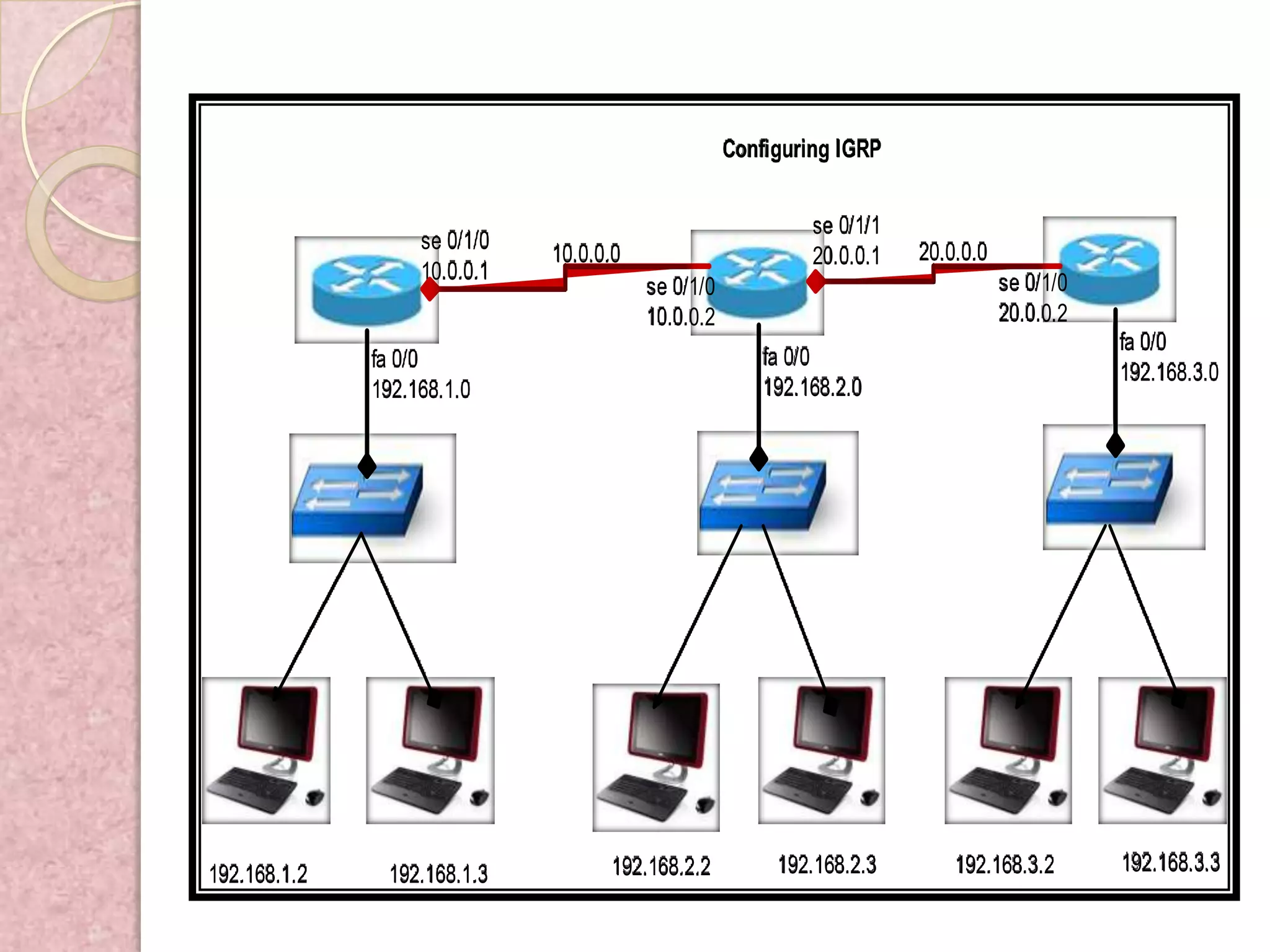
Configuring IGRP


                                                             se 0/1/1
                   se 0/1/0                                             20.0.0.0
                              10.0.0.0                       20.0.0.1
                   10.0.0.1                                                        se 0/1/0
                                         se 0/1/0
                                         10.0.0.2                                  20.0.0.2
                                                                                              fa 0/0
              fa 0/0                                    fa 0/0
                                                                                              192.168.3.0
              192.168.1.0                               192.168.2.0


192.168.1.2    192.168.1.3          192.168.2.2          192.168.2.3        192.168.3.2       192.168.3.3
Configure igRP
The syntax for configuring IGRP is :
   -Router igrp AS_number (1 to 65535)
   -Network IP_networks

Configure IGRP,
Router>enable
Router#configure terminal
Router#(config)#router igrp 100 (AS Number)
Router#(config-router)# network _ network address of own router
Router#(config-router)#exit
Router#(config)#

Verifying IGRP configurations,
 Show ip route (I indicates that IGRP was added as the routing protocol.)
 Show ip protocols
 Show ip igrp events
Enhanced INTERIOR GATEWAY
ROUTING PROTOCOL (eIGRP)
 Works on any condition. It’s supports the features both distance
 vector & link state protocol. It is a cisco proprietary protocol. EIGRP
 is an ideal protocol in the large networks. The AD value of EIGRP is
 90. By default, bandwidth & delay are the activated metrics. EIGRP
 uses the following tables for route discovery i.e. Neighbor Table,
 Topology Table, Route Table.

 The following are the characteristics of EIGRP:
 - communication done via RTP (capable of transmitting both multicast & unicast )
 - uses DUAL algorithm
 - supports classless network
 - supports VLSM/CIDR,
 - supports Discontiguous network.
 - supports all layer 3 protocols (IPv4, IPX, and IPv6)
Configuring EIGRP


              R1     se 0/1/0                                        R2
                     192.168.2.1    192.168.2.0/30
                                                       se 0/1/0
                                                       192.168.2.2
               fa 0/0                                                 fa 0/0
               192.168.1.0/25                                         192.168.1.128/25


192.168.1.2        192.168.1.3                       192.168.1.129        192.168.1.130
Configure EIGRP
R1>enable
R1#configure terminal
R1#(config)#router eigrp 100(AS Number)
R1#(config-router)#network _ network address of own router
R1#(config-router)#exit
R1#(config)#

Verifying EIGRP configurations,
 Show ip route (D indicates that EIGRP was added as the routing
  protocol.)
 Show ip eigerp neighbors
 Show ip eigrp topology
OPEN SHORTEST PATH FIRST
  (OSPF)
  The large network can be broken into the small areas so the router in
  one area know less topology and they don’t have information about
  other areas routers. Creating OSPF areas result in smaller database
  which reduce the memory consumption and processing.
OSPF maintains a two layer hierarchy consisting of:
    -Backbone area (area 0)
    -Off backbone area (areas1-65,535)
The following are the characteristics of OSPF:
   -AD value is 110.
   -supports classless network
   -supports VLSM/CIDR & has unlimited hop counts
   -Supports hierarchical network.
   -Route propagation using multicasting.
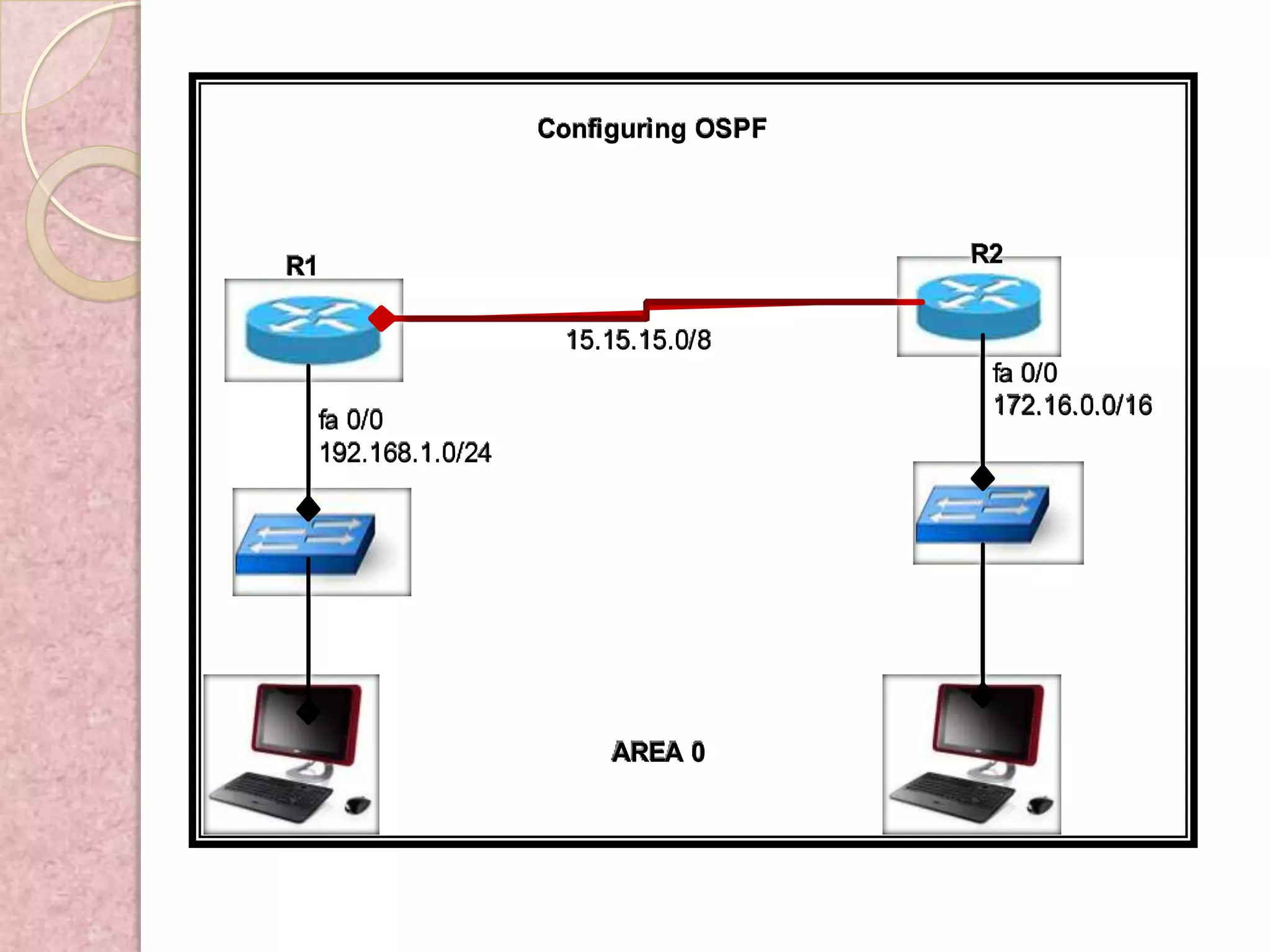
Configuring OSPF


R1                                   R2


                   15.15.15.0/8
                                      fa 0/0
                                      172.16.0.0/16
 fa 0/0
 192.168.1.0/24


                       AREA 0
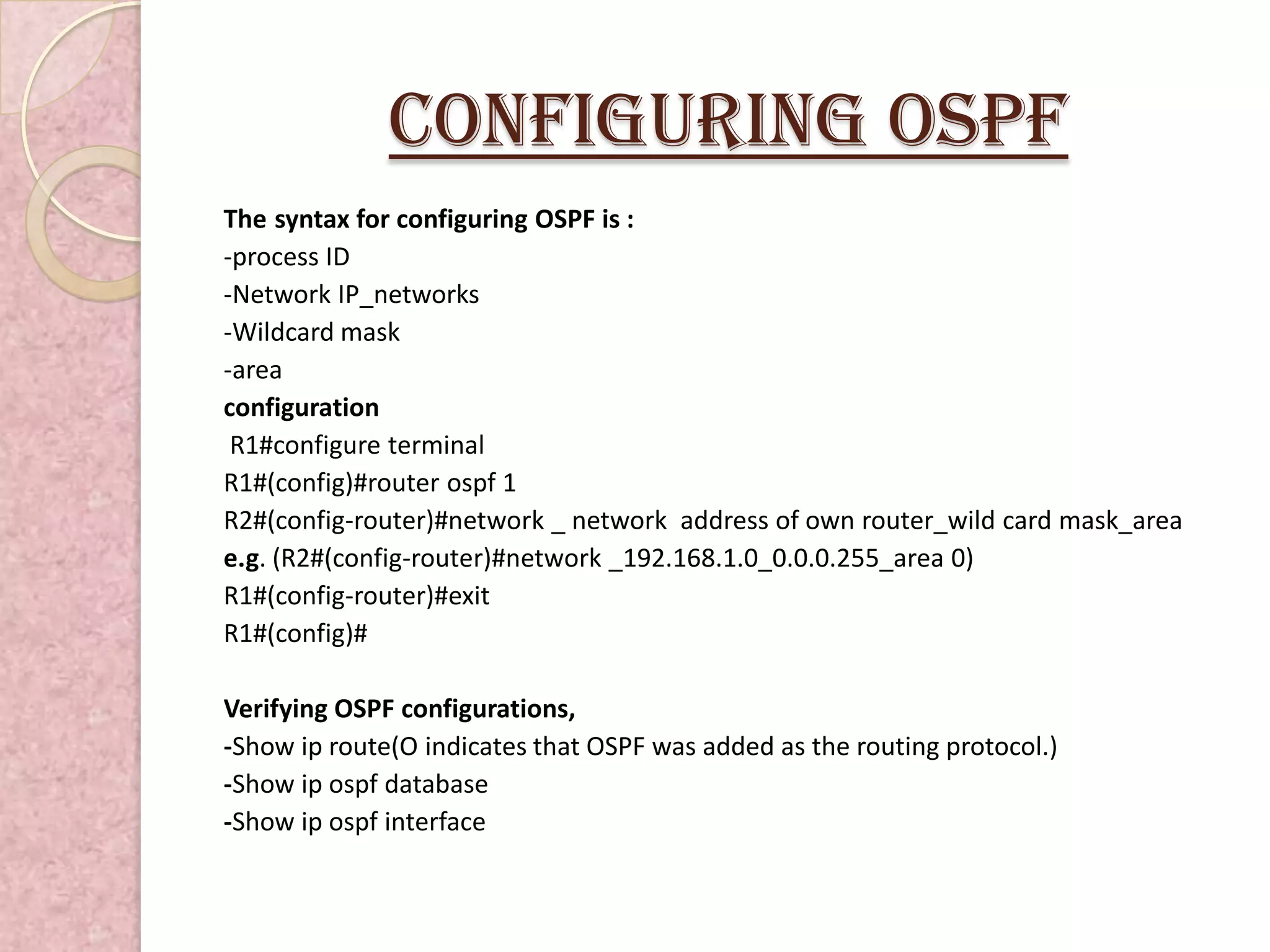
Configuring OSPF
The syntax for configuring OSPF is :
-process ID
-Network IP_networks
-Wildcard mask
-area
configuration
 R1#configure terminal
R1#(config)#router ospf 1
R2#(config-router)#network _ network address of own router_wild card mask_area
e.g. (R2#(config-router)#network _192.168.1.0_0.0.0.255_area 0)
R1#(config-router)#exit
R1#(config)#

Verifying OSPF configurations,
-Show ip route(O indicates that OSPF was added as the routing protocol.)
-Show ip ospf database
-Show ip ospf interface
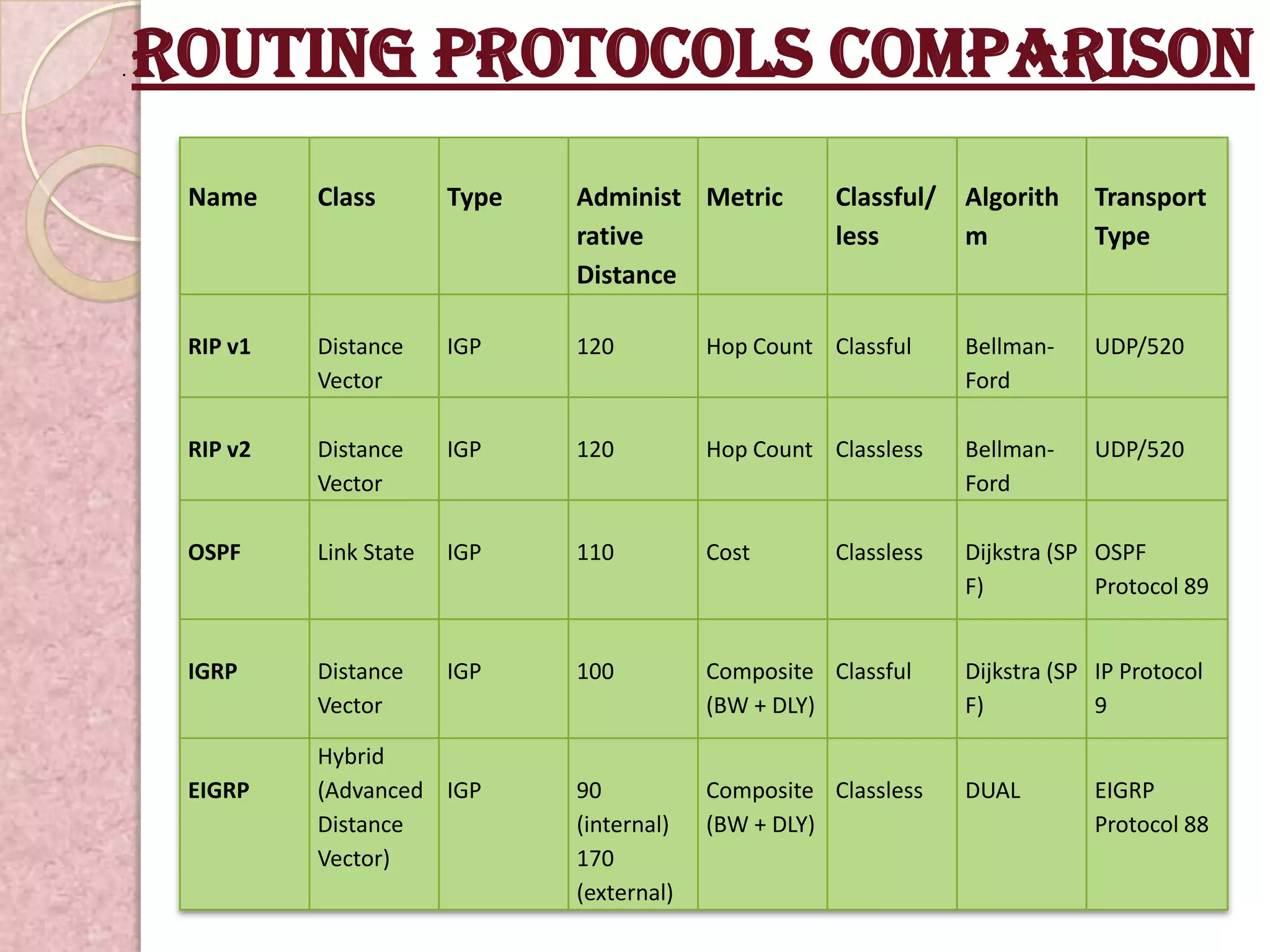
.   Routing Protocols Comparison
     Name     Class        Type   Administ Metric         Classful/   Algorith     Transport
                                  rative                  less        m            Type
                                  Distance

     RIP v1   Distance     IGP    120          Hop Count Classful     Bellman-     UDP/520
              Vector                                                  Ford

     RIP v2   Distance     IGP    120          Hop Count Classless    Bellman-     UDP/520
              Vector                                                  Ford

     OSPF     Link State   IGP    110          Cost       Classless   Dijkstra (SP OSPF
                                                                      F)           Protocol 89


     IGRP     Distance     IGP    100          Composite Classful     Dijkstra (SP IP Protocol
              Vector                           (BW + DLY)             F)           9

              Hybrid
     EIGRP    (Advanced IGP       90           Composite Classless    DUAL         EIGRP
              Distance            (internal)   (BW + DLY)                          Protocol 88
              Vector)             170
                                  (external)
Thank
You !

Ppt of routing protocols

  • 1.
    Routing protocols Prepared By, Bhagyashri Dhoke TH036410
  • 2.
    Routing protocols Routingprotocols are the set of rules used by the routers to communicate between source & destination. they do not move the information to source to destination only update the routing table(contains the information Each protocol has its own algorithm to choose the best path. The metrics by routing protocols , *Number of network layer devices along with the path (hop count) *Bandwidth *Delay *Load *MTU *Cost Routing protocols store the result of these metrics in routing table.
  • 3.
    TYPES OF ROUTINGPROTOCOL DYNAMIC STATIC ROUTING ROUTING PROTOCOL PROTOCOLS DISTANCE LINK STATE VECTOR RIP IGRP EIGRP RIPv1 OSPF RIPv2
  • 4.
    Static routing protocols Static routing ,when an administrator manually assigns the path from source to destination network. It provides more security to network. The main drawback of static routing is that when a link fail in the internetwork all the network goes down. This is feasible in small networks, but not in large networks. Advantages  No overhead on router CPU.  No bandwidth usage between links.  Security (only administrator add routes.) Disadvantages  Administrator must really understand internetwork & how each router is connected.  Not practical on large networks as it is time intensive.  Administrator must update all routers.
  • 5.
    Dynamic routing protocols Dynamic routing is the process in which routing tables are automatically updates by routing table *Dynamically discover & maintains routes. *Calculate routes *Distributing routing updates to other routers in the network Advantages -less work in maintaining the configuration when adding & deleting networks. -protocols automatically react to the topology changes. -configuration is less-prone. -More scalable. Disadvantages -Routers resource are used. -More administrator knowledge is required for configuration
  • 6.
    Types of dynamicrouting protocols The dynamic routing protocols can be categorized on the basis of various parameters .Dynamic routing protocols are classified into two protocols:  1. Distance Vector Routing Protocols: - It uses simple algorithms that calculate cumulative distance value between routers based on hop count. Example:  Routing Information Protocol(RIP)  Interior Gateway Routing Protocols (IGRP  2. Link State Routing Protocols: - It uses sophisticated algorithms that maintain a complex database of internetwork topology. Example:  Enhanced Interior Gateway Routing Protocol(EIGRP)  Open Shortest Path First (OSPF)
  • 7.
    Routing Information Protocol (RIP)  RIP allows routers to exchange their routing tables at a predefined interval  RIP is a distance-vector routing protocol which employs the hop count as a routing metric.  RIP router transmitted full updates in every 30 seconds.  Characteristics of RIP include:  Uses hop count metric  Supports 15 hop-count limit  Supports six equal-cost paths  AD value is 120.  Broadcasting done in RIP & RIPv1.  Supports classful networks.
  • 8.
    RIPv2  It is a distance vector protocol.  AD value is 120.  Metric is hop count.  Supports classless network.  Supports VLSM/CIDR.  Maximum hop count is 15.  Route updates after 30 sec.  Uses multicast ip for convergence.  It supports authentication.
  • 9.
    Configuring RIP se 0/1/0 192.168.2.0 192.168.2.1 se 0/1/0 192.168.2.2 fa 0/0 fa 0/0 192.168.1.0 192.168.3.0 192.168.3.2 192.168.3.3 192.168.1.2 192.168.1.3
  • 10.
    Configure RIP Configuration forRIPv1 Router>enable Router# configure terminal Router(config)#router rip Router(config)#serial 0/1/0 Router(config-router)#network _network address of own router(e.g.192.168.1.0) Router(config-router)#version 1 Router(config)save & exit Configuration for RIPv2 Router>enable Router# configure terminal Router(config)#router rip Router(config)#serial 0/1/0 Router(config-router)#network _network address of own router(e.g.192.168.1.0) Router(config-router)#version 2 Router(config)save & exit
  • 11.
    INTERIOR GATEWAY ROUTING PROTOCOL (IGRP) IGRP is a distance vector protocol. To overcome RIP limitations IGRP introduced. The metrics used are bandwidth, load, delay, MTU AND reliability. Routing updates are broadcast every 90 seconds (by default).It is used by routers to exchange routing data within an autonomous system. The following are the characteristics of IGRP: - Uses composite metrics - Uses multipath routing - Supports unequal-cost load balancing - Supports hold-downs - Supprts spilt horizons
  • 12.
    Configuring IGRP se 0/1/1 se 0/1/0 20.0.0.0 10.0.0.0 20.0.0.1 10.0.0.1 se 0/1/0 se 0/1/0 10.0.0.2 20.0.0.2 fa 0/0 fa 0/0 fa 0/0 192.168.3.0 192.168.1.0 192.168.2.0 192.168.1.2 192.168.1.3 192.168.2.2 192.168.2.3 192.168.3.2 192.168.3.3
  • 13.
    Configure igRP The syntaxfor configuring IGRP is : -Router igrp AS_number (1 to 65535) -Network IP_networks Configure IGRP, Router>enable Router#configure terminal Router#(config)#router igrp 100 (AS Number) Router#(config-router)# network _ network address of own router Router#(config-router)#exit Router#(config)# Verifying IGRP configurations,  Show ip route (I indicates that IGRP was added as the routing protocol.)  Show ip protocols  Show ip igrp events
  • 14.
    Enhanced INTERIOR GATEWAY ROUTINGPROTOCOL (eIGRP) Works on any condition. It’s supports the features both distance vector & link state protocol. It is a cisco proprietary protocol. EIGRP is an ideal protocol in the large networks. The AD value of EIGRP is 90. By default, bandwidth & delay are the activated metrics. EIGRP uses the following tables for route discovery i.e. Neighbor Table, Topology Table, Route Table. The following are the characteristics of EIGRP: - communication done via RTP (capable of transmitting both multicast & unicast ) - uses DUAL algorithm - supports classless network - supports VLSM/CIDR, - supports Discontiguous network. - supports all layer 3 protocols (IPv4, IPX, and IPv6)
  • 15.
    Configuring EIGRP R1 se 0/1/0 R2 192.168.2.1 192.168.2.0/30 se 0/1/0 192.168.2.2 fa 0/0 fa 0/0 192.168.1.0/25 192.168.1.128/25 192.168.1.2 192.168.1.3 192.168.1.129 192.168.1.130
  • 16.
    Configure EIGRP R1>enable R1#configure terminal R1#(config)#routereigrp 100(AS Number) R1#(config-router)#network _ network address of own router R1#(config-router)#exit R1#(config)# Verifying EIGRP configurations,  Show ip route (D indicates that EIGRP was added as the routing protocol.)  Show ip eigerp neighbors  Show ip eigrp topology
  • 17.
    OPEN SHORTEST PATHFIRST (OSPF) The large network can be broken into the small areas so the router in one area know less topology and they don’t have information about other areas routers. Creating OSPF areas result in smaller database which reduce the memory consumption and processing. OSPF maintains a two layer hierarchy consisting of: -Backbone area (area 0) -Off backbone area (areas1-65,535) The following are the characteristics of OSPF: -AD value is 110. -supports classless network -supports VLSM/CIDR & has unlimited hop counts -Supports hierarchical network. -Route propagation using multicasting.
  • 18.
    Configuring OSPF R1 R2 15.15.15.0/8 fa 0/0 172.16.0.0/16 fa 0/0 192.168.1.0/24 AREA 0
  • 19.
    Configuring OSPF The syntaxfor configuring OSPF is : -process ID -Network IP_networks -Wildcard mask -area configuration R1#configure terminal R1#(config)#router ospf 1 R2#(config-router)#network _ network address of own router_wild card mask_area e.g. (R2#(config-router)#network _192.168.1.0_0.0.0.255_area 0) R1#(config-router)#exit R1#(config)# Verifying OSPF configurations, -Show ip route(O indicates that OSPF was added as the routing protocol.) -Show ip ospf database -Show ip ospf interface
  • 20.
    . Routing Protocols Comparison Name Class Type Administ Metric Classful/ Algorith Transport rative less m Type Distance RIP v1 Distance IGP 120 Hop Count Classful Bellman- UDP/520 Vector Ford RIP v2 Distance IGP 120 Hop Count Classless Bellman- UDP/520 Vector Ford OSPF Link State IGP 110 Cost Classless Dijkstra (SP OSPF F) Protocol 89 IGRP Distance IGP 100 Composite Classful Dijkstra (SP IP Protocol Vector (BW + DLY) F) 9 Hybrid EIGRP (Advanced IGP 90 Composite Classless DUAL EIGRP Distance (internal) (BW + DLY) Protocol 88 Vector) 170 (external)
  • 21.