Sub Topic   : E-Mail Transfer (part 2)
.


                                         1
Recap
  In the previous class, you have learnt about


      • E-mail
      • E-mail transfer mechanism


                                                 2
Objectives
On the completion of this topic, you would be
able to understand

   • E-mail Protocols
   • SMTP
   • POP


                                                3
Electronic mail

Protocols
   • Simple Mail Transfer Protocol (SMTP) delivers mail to
     servers
   • From clients to local mail server
   • Inter-mail server delivery


  • Post Office Protocol (POP) for user access to delivered
    email


                                                              4
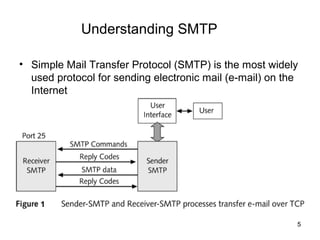
Understanding SMTP

• Simple Mail Transfer Protocol (SMTP) is the most widely
  used protocol for sending electronic mail (e-mail) on the
  Internet


    1

                                                          5
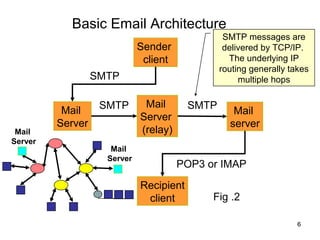
Basic Email Architecture
                                                 SMTP messages are
                             Sender              delivered by TCP/IP.
                              client              The underlying IP
                                                routing generally takes
                  SMTP                               multiple hops

                   SMTP       Mail       SMTP
          Mail                                     Mail
                             Server
         Server                                   server
 Mail                        (relay)
Server
                     Mail
                    Server
                                       POP3 or IMAP
                             Recipient
                              client         Fig .2

                                                                    6
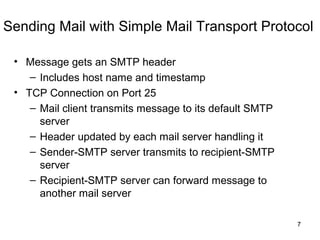
Sending Mail with Simple Mail Transport Protocol

 • Message gets an SMTP header
    – Includes host name and timestamp
 • TCP Connection on Port 25
    – Mail client transmits message to its default SMTP
      server
    – Header updated by each mail server handling it
    – Sender-SMTP server transmits to recipient-SMTP
      server
    – Recipient-SMTP server can forward message to
      another mail server

                                                          7
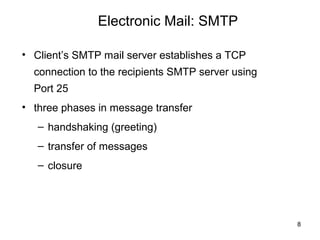
Electronic Mail: SMTP

• Client’s SMTP mail server establishes a TCP
  connection to the recipients SMTP server using
  Port 25
• three phases in message transfer
   – handshaking (greeting)
   – transfer of messages
   – closure


                                                   8
SMTP

   User Agent                      User Agent


Mail Transfer Agent              Mail Transfer Agent
       Client                           Server
                                        Port
        TCP ephemeral                    25
        port
                      Internet

          Fig .3
                                                       9
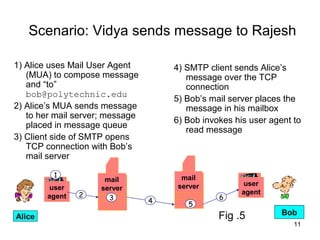
Sequence of Events in SMTP

1.   TCP connection is established to port 25
2.   The sending machine (client) waits for the receiving
     machine (server) to talk first
3.   The server sends its identity and preparedness to
     receive mail
4.   The client announces whom the e-mail is coming from
     and whom it is going to send
5.   The server gives the client the go-ahead to send the
     message
6.   The client sends the message and the server
     acknowledges it
7.   When all the e-mail has been exchanged in both
     directions, the connection is released

                                                        10
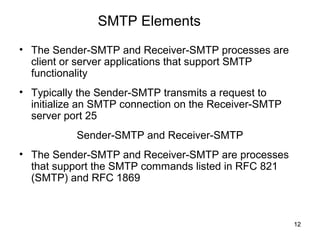
Scenario: Vidya sends message to Rajesh

1) Alice uses Mail User Agent        4) SMTP client sends Alice’s
   (MUA) to compose message             message over the TCP
   and “to”                             connection
   bob@polytechnic.edu
                                     5) Bob’s mail server places the
2) Alice’s MUA sends message            message in his mailbox
   to her mail server; message
                                     6) Bob invokes his user agent to
   placed in message queue
                                        read message
3) Client side of SMTP opens
   TCP connection with Bob’s
   mail server

         1                             mail
                      mail
                                      server           user
        user         server
                2                                     agent
        agent          3         4              6
                                        5
                                                Fig .5          Bob
Alice
                                                                   11
SMTP Elements
• The Sender-SMTP and Receiver-SMTP processes are
  client or server applications that support SMTP
  functionality
• Typically the Sender-SMTP transmits a request to
  initialize an SMTP connection on the Receiver-SMTP
  server port 25
           Sender-SMTP and Receiver-SMTP
• The Sender-SMTP and Receiver-SMTP are processes
  that support the SMTP commands listed in RFC 821
  (SMTP) and RFC 1869


                                                       12
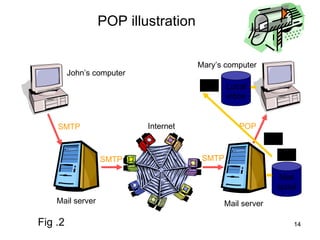
POP (Post Office Protocol)

• POP stands for Post Office Protocol

• The POP server holds the message until the recipient
  retrieves it with his/her email software

• POP protocol is used to transfer the mail from POP
  server to user’s machine


                                                         13
POP illustration

                                      Mary’s computer
         John’s computer
                                              Local
                                              inbox


    SMTP                   Internet               POP


                  SMTP                 SMTP

                                                             Mail
                                                            spool
    Mail server                               Mail server

Fig .2                                                          14
Sequence of Events in POP

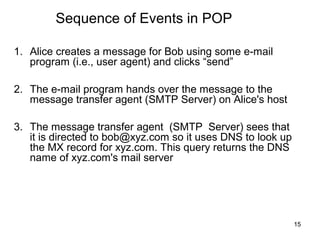
1. Alice creates a message for Bob using some e-mail
   program (i.e., user agent) and clicks “send”

2. The e-mail program hands over the message to the
   message transfer agent (SMTP Server) on Alice's host

3. The message transfer agent (SMTP Server) sees that
   it is directed to bob@xyz.com so it uses DNS to look up
   the MX record for xyz.com. This query returns the DNS
   name of xyz.com's mail server


                                                             15
Sequence of Events in POP contd…

4.   The message transfer agent now looks up for the IP
     address of this machine using DNS again


5.   It then establishes a TCP connection to the SMTP
     server on port 25 of this machine. Using an SMTP
     command sequence analogous, it transfers the
     message to Bob mailbox and breaks the TCP
     connection


                                                          16
Sequence of Events – Contd.

6. Bob boots up his PC, connects to his ISP, and starts his
   e-mail program

7. The e-mail program establishes a TCP connection to
   the POP3 server at port 110 of the ISP's mail server
   machine

8. Bob's e-mail program runs the POP3 protocol to fetch
   the contents of the mailbox to his hard disk

9. Once all the e-mail has been transferred, the TCP
   connection is released
                                                          17
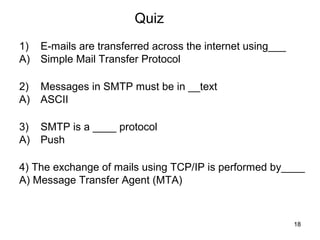
Quiz
1)   E-mails are transferred across the internet using___
A)   Simple Mail Transfer Protocol

2)   Messages in SMTP must be in __text
A)   ASCII

3)   SMTP is a ____ protocol
A)   Push

4) The exchange of mails using TCP/IP is performed by____
A) Message Transfer Agent (MTA)


                                                            18
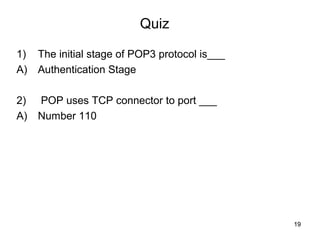
Quiz

1)   The initial stage of POP3 protocol is___
A)   Authentication Stage

2)   POP uses TCP connector to port ___
A)   Number 110


                                                19
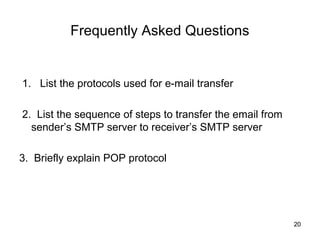
Frequently Asked Questions


1. List the protocols used for e-mail transfer

2. List the sequence of steps to transfer the email from
  sender’s SMTP server to receiver’s SMTP server

3. Briefly explain POP protocol


                                                           20

E mail transfer .74

  • 1.
    Sub Topic : E-Mail Transfer (part 2) . 1
  • 2.
    Recap Inthe previous class, you have learnt about • E-mail • E-mail transfer mechanism 2
  • 3.
    Objectives On the completionof this topic, you would be able to understand • E-mail Protocols • SMTP • POP 3
  • 4.
    Electronic mail Protocols • Simple Mail Transfer Protocol (SMTP) delivers mail to servers • From clients to local mail server • Inter-mail server delivery • Post Office Protocol (POP) for user access to delivered email 4
  • 5.
    Understanding SMTP • SimpleMail Transfer Protocol (SMTP) is the most widely used protocol for sending electronic mail (e-mail) on the Internet 1 5
  • 6.
    Basic Email Architecture SMTP messages are Sender delivered by TCP/IP. client The underlying IP routing generally takes SMTP multiple hops SMTP Mail SMTP Mail Mail Server Server server Mail (relay) Server Mail Server POP3 or IMAP Recipient client Fig .2 6
  • 7.
    Sending Mail withSimple Mail Transport Protocol • Message gets an SMTP header – Includes host name and timestamp • TCP Connection on Port 25 – Mail client transmits message to its default SMTP server – Header updated by each mail server handling it – Sender-SMTP server transmits to recipient-SMTP server – Recipient-SMTP server can forward message to another mail server 7
  • 8.
    Electronic Mail: SMTP •Client’s SMTP mail server establishes a TCP connection to the recipients SMTP server using Port 25 • three phases in message transfer – handshaking (greeting) – transfer of messages – closure 8
  • 9.
    SMTP User Agent User Agent Mail Transfer Agent Mail Transfer Agent Client Server Port TCP ephemeral 25 port Internet Fig .3 9
  • 10.
    Sequence of Eventsin SMTP 1. TCP connection is established to port 25 2. The sending machine (client) waits for the receiving machine (server) to talk first 3. The server sends its identity and preparedness to receive mail 4. The client announces whom the e-mail is coming from and whom it is going to send 5. The server gives the client the go-ahead to send the message 6. The client sends the message and the server acknowledges it 7. When all the e-mail has been exchanged in both directions, the connection is released 10
  • 11.
    Scenario: Vidya sendsmessage to Rajesh 1) Alice uses Mail User Agent 4) SMTP client sends Alice’s (MUA) to compose message message over the TCP and “to” connection bob@polytechnic.edu 5) Bob’s mail server places the 2) Alice’s MUA sends message message in his mailbox to her mail server; message 6) Bob invokes his user agent to placed in message queue read message 3) Client side of SMTP opens TCP connection with Bob’s mail server 1 mail mail server user user server 2 agent agent 3 4 6 5 Fig .5 Bob Alice 11
  • 12.
    SMTP Elements • TheSender-SMTP and Receiver-SMTP processes are client or server applications that support SMTP functionality • Typically the Sender-SMTP transmits a request to initialize an SMTP connection on the Receiver-SMTP server port 25 Sender-SMTP and Receiver-SMTP • The Sender-SMTP and Receiver-SMTP are processes that support the SMTP commands listed in RFC 821 (SMTP) and RFC 1869 12
  • 13.
    POP (Post OfficeProtocol) • POP stands for Post Office Protocol • The POP server holds the message until the recipient retrieves it with his/her email software • POP protocol is used to transfer the mail from POP server to user’s machine 13
  • 14.
    POP illustration Mary’s computer John’s computer Local inbox SMTP Internet POP SMTP SMTP Mail spool Mail server Mail server Fig .2 14
  • 15.
    Sequence of Eventsin POP 1. Alice creates a message for Bob using some e-mail program (i.e., user agent) and clicks “send” 2. The e-mail program hands over the message to the message transfer agent (SMTP Server) on Alice's host 3. The message transfer agent (SMTP Server) sees that it is directed to bob@xyz.com so it uses DNS to look up the MX record for xyz.com. This query returns the DNS name of xyz.com's mail server 15
  • 16.
    Sequence of Eventsin POP contd… 4. The message transfer agent now looks up for the IP address of this machine using DNS again 5. It then establishes a TCP connection to the SMTP server on port 25 of this machine. Using an SMTP command sequence analogous, it transfers the message to Bob mailbox and breaks the TCP connection 16
  • 17.
    Sequence of Events– Contd. 6. Bob boots up his PC, connects to his ISP, and starts his e-mail program 7. The e-mail program establishes a TCP connection to the POP3 server at port 110 of the ISP's mail server machine 8. Bob's e-mail program runs the POP3 protocol to fetch the contents of the mailbox to his hard disk 9. Once all the e-mail has been transferred, the TCP connection is released 17
  • 18.
    Quiz 1) E-mails are transferred across the internet using___ A) Simple Mail Transfer Protocol 2) Messages in SMTP must be in __text A) ASCII 3) SMTP is a ____ protocol A) Push 4) The exchange of mails using TCP/IP is performed by____ A) Message Transfer Agent (MTA) 18
  • 19.
    Quiz 1) The initial stage of POP3 protocol is___ A) Authentication Stage 2) POP uses TCP connector to port ___ A) Number 110 19
  • 20.
    Frequently Asked Questions 1.List the protocols used for e-mail transfer 2. List the sequence of steps to transfer the email from sender’s SMTP server to receiver’s SMTP server 3. Briefly explain POP protocol 20

Editor's Notes

  • #5 User agent ( a.k.a . a “mail reader”) is the interface to the mail system. — This is the entity used for composing, editing, sending, and reading email messages. — The examples are Eudora, Outlook, elm, pine, Netscape Messenger, etc . The mail server is the entity that delivers your outgoing mail and stores your incoming mail. Did you know that different protocols were used for sending and retrieving email? — Your mail client uses different protocols and communicates with different servers (running different applications and different protocols).