Computer Networks – CSE331
Lecture 9
2 Hr
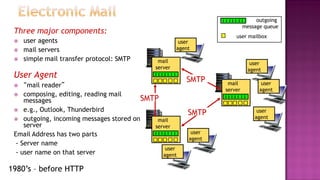
Three major components:
 user agents
 mail servers
 simple mail transfer protocol: SMTP
User Agent
 “mail reader”
 composing, editing, reading mail
messages
 e.g., Outlook, Thunderbird
 outgoing, incoming messages stored on
server
Email Address has two parts
- Server name
- user name on that server
user mailbox
outgoing
message queue
mail
server
mail
server
mail
server
SMTP
SMTP
SMTP
user
agent
user
agent
user
agent
user
agent
user
agent
user
agent
1980’s – before HTTP
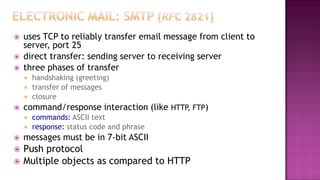
 uses TCP to reliably transfer email message from client to
server, port 25
 direct transfer: sending server to receiving server
 three phases of transfer
 handshaking (greeting)
 transfer of messages
 closure
 command/response interaction (like HTTP, FTP)
 commands: ASCII text
 response: status code and phrase
 messages must be in 7-bit ASCII
 Push protocol
 Multiple objects as compared to HTTP
user
agent
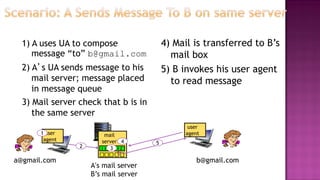
1) A uses UA to compose
message “to” b@gmail.com
2) A’s UA sends message to his
mail server; message placed
in message queue
3) Mail server check that b is in
the same server
4) Mail is transferred to B’s
mail box
5) B invokes his user agent
to read message
mail
server
1
2 3
5
A’s mail server
B’s mail server
user
agent
a@gmail.com b@gmail.com
4
user
agent
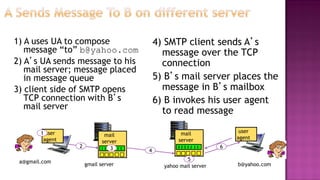
1) A uses UA to compose
message “to” b@yahoo.com
2) A’s UA sends message to his
mail server; message placed
in message queue
3) client side of SMTP opens
TCP connection with B’s
mail server
4) SMTP client sends A’s
message over the TCP
connection
5) B’s mail server places the
message in B’s mailbox
6) B invokes his user agent
to read message
mail
server
mail
server
1
2 3 4
5
6
gmail server yahoo mail server
user
agent
a@gmail.com
b@yahoo.com
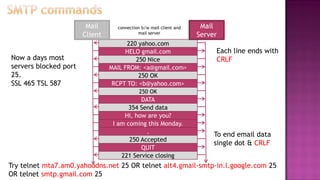
connection b/w mail client and
mail server
220 yahoo.com
HELO gmail.com
250 Nice
MAIL FROM: <a@gmail.com>
250 OK
RCPT TO: <b@yahoo.com>
250 OK
DATA
354 Send data
Hi, how are you?
221 Service closing
Mail
Server
Mail
Client
I am coming this Monday.
.
250 Accepted
QUIT
Each line ends with
CRLF
To end email data
single dot & CRLF
Now a days most
servers blocked port
25.
SSL 465 TSL 587
Try telnet mta7.am0.yahoodns.net 25 OR telnet alt4.gmail-smtp-in.l.google.com 25
OR telnet smtp.gmail.com 25
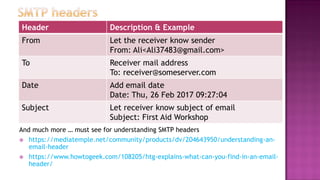
And much more … must see for understanding SMTP headers
 https://mediatemple.net/community/products/dv/204643950/understanding-an-
email-header
 https://www.howtogeek.com/108205/htg-explains-what-can-you-find-in-an-email-
header/
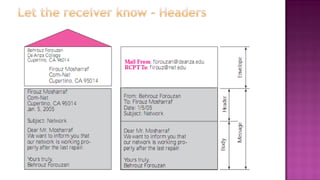
Header Description & Example
From Let the receiver know sender
From: Ali<Ali37483@gmail.com>
To Receiver mail address
To: receiver@someserver.com
Date Add email date
Date: Thu, 26 Feb 2017 09:27:04
Subject Let receiver know subject of email
Subject: First Aid Workshop
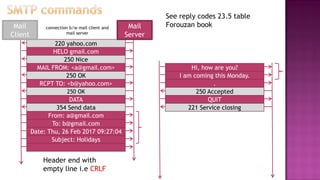
connection b/w mail client and
mail server
220 yahoo.com
HELO gmail.com
250 Nice
MAIL FROM: <a@gmail.com>
250 OK
RCPT TO: <b@yahoo.com>
250 OK
DATA
354 Send data
From: a@gmail.com
Mail
Server
Mail
Client
To: b@gmail.com
Date: Thu, 26 Feb 2017 09:27:04
Subject: Holidays
Header end with
empty line i.e CRLF
Hi, how are you?
221 Service closing
I am coming this Monday.
.
250 Accepted
QUIT
See reply codes 23.5 table
Forouzan book
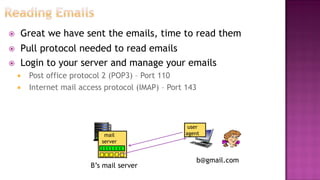
 Great we have sent the emails, time to read them
 Pull protocol needed to read emails
 Login to your server and manage your emails
 Post office protocol 2 (POP3) – Port 110
 Internet mail access protocol (IMAP) – Port 143
mail
server
B’s mail server
user
agent
b@gmail.com
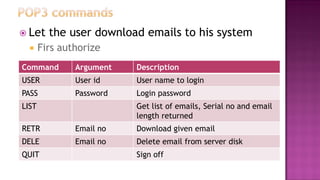
 Let the user download emails to his system
 Firs authorize
Command Argument Description
USER User id User name to login
PASS Password Login password
LIST Get list of emails, Serial no and email
length returned
RETR Email no Download given email
DELE Email no Delete email from server disk
QUIT Sign off
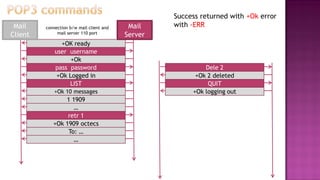
connection b/w mail client and
mail server 110 port
+OK ready
user username
+Ok
pass password
+Ok Logged in
LIST
+Ok 10 messages
1 1909
Mail
Server
Mail
Client
Dele 2
+Ok logging out
+Ok 2 deleted
QUIT
retr 1
…
+Ok 1909 octecs
To: …
…
Success returned with +Ok error
with -ERR
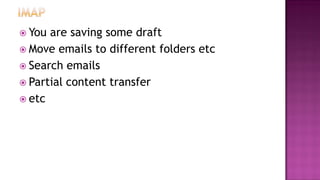
 You are saving some draft
 Move emails to different folders etc
 Search emails
 Partial content transfer
 etc
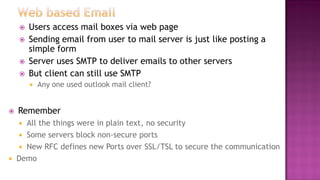
 Users access mail boxes via web page
 Sending email from user to mail server is just like posting a
simple form
 Server uses SMTP to deliver emails to other servers
 But client can still use SMTP
 Any one used outlook mail client?
 Remember
 All the things were in plain text, no security
 Some servers block non-secure ports
 New RFC defines new Ports over SSL/TSL to secure the communication
 Demo
 Ross book 2.4
 Forouzan book Chapter 23 (Leave details of MIME)
 SMTP header analysis – Tracing email origin
 https://mediatemple.net/community/products/dv/204643950/understanding-an-
email-header
 https://www.howtogeek.com/108205/htg-explains-what-can-you-find-in-an-email-
header/

Lec 9(Emails)

  • 1.
    Computer Networks –CSE331 Lecture 9 2 Hr
  • 2.
    Three major components: user agents  mail servers  simple mail transfer protocol: SMTP User Agent  “mail reader”  composing, editing, reading mail messages  e.g., Outlook, Thunderbird  outgoing, incoming messages stored on server Email Address has two parts - Server name - user name on that server user mailbox outgoing message queue mail server mail server mail server SMTP SMTP SMTP user agent user agent user agent user agent user agent user agent 1980’s – before HTTP
  • 3.
     uses TCPto reliably transfer email message from client to server, port 25  direct transfer: sending server to receiving server  three phases of transfer  handshaking (greeting)  transfer of messages  closure  command/response interaction (like HTTP, FTP)  commands: ASCII text  response: status code and phrase  messages must be in 7-bit ASCII  Push protocol  Multiple objects as compared to HTTP
  • 4.
    user agent 1) A usesUA to compose message “to” b@gmail.com 2) A’s UA sends message to his mail server; message placed in message queue 3) Mail server check that b is in the same server 4) Mail is transferred to B’s mail box 5) B invokes his user agent to read message mail server 1 2 3 5 A’s mail server B’s mail server user agent a@gmail.com b@gmail.com 4
  • 5.
    user agent 1) A usesUA to compose message “to” b@yahoo.com 2) A’s UA sends message to his mail server; message placed in message queue 3) client side of SMTP opens TCP connection with B’s mail server 4) SMTP client sends A’s message over the TCP connection 5) B’s mail server places the message in B’s mailbox 6) B invokes his user agent to read message mail server mail server 1 2 3 4 5 6 gmail server yahoo mail server user agent a@gmail.com b@yahoo.com
  • 6.
    connection b/w mailclient and mail server 220 yahoo.com HELO gmail.com 250 Nice MAIL FROM: <a@gmail.com> 250 OK RCPT TO: <b@yahoo.com> 250 OK DATA 354 Send data Hi, how are you? 221 Service closing Mail Server Mail Client I am coming this Monday. . 250 Accepted QUIT Each line ends with CRLF To end email data single dot & CRLF Now a days most servers blocked port 25. SSL 465 TSL 587 Try telnet mta7.am0.yahoodns.net 25 OR telnet alt4.gmail-smtp-in.l.google.com 25 OR telnet smtp.gmail.com 25
  • 8.
    And much more… must see for understanding SMTP headers  https://mediatemple.net/community/products/dv/204643950/understanding-an- email-header  https://www.howtogeek.com/108205/htg-explains-what-can-you-find-in-an-email- header/ Header Description & Example From Let the receiver know sender From: Ali<Ali37483@gmail.com> To Receiver mail address To: receiver@someserver.com Date Add email date Date: Thu, 26 Feb 2017 09:27:04 Subject Let receiver know subject of email Subject: First Aid Workshop
  • 9.
    connection b/w mailclient and mail server 220 yahoo.com HELO gmail.com 250 Nice MAIL FROM: <a@gmail.com> 250 OK RCPT TO: <b@yahoo.com> 250 OK DATA 354 Send data From: a@gmail.com Mail Server Mail Client To: b@gmail.com Date: Thu, 26 Feb 2017 09:27:04 Subject: Holidays Header end with empty line i.e CRLF Hi, how are you? 221 Service closing I am coming this Monday. . 250 Accepted QUIT See reply codes 23.5 table Forouzan book
  • 10.
     Great wehave sent the emails, time to read them  Pull protocol needed to read emails  Login to your server and manage your emails  Post office protocol 2 (POP3) – Port 110  Internet mail access protocol (IMAP) – Port 143 mail server B’s mail server user agent b@gmail.com
  • 11.
     Let theuser download emails to his system  Firs authorize Command Argument Description USER User id User name to login PASS Password Login password LIST Get list of emails, Serial no and email length returned RETR Email no Download given email DELE Email no Delete email from server disk QUIT Sign off
  • 12.
    connection b/w mailclient and mail server 110 port +OK ready user username +Ok pass password +Ok Logged in LIST +Ok 10 messages 1 1909 Mail Server Mail Client Dele 2 +Ok logging out +Ok 2 deleted QUIT retr 1 … +Ok 1909 octecs To: … … Success returned with +Ok error with -ERR
  • 13.
     You aresaving some draft  Move emails to different folders etc  Search emails  Partial content transfer  etc
  • 14.
     Users accessmail boxes via web page  Sending email from user to mail server is just like posting a simple form  Server uses SMTP to deliver emails to other servers  But client can still use SMTP  Any one used outlook mail client?  Remember  All the things were in plain text, no security  Some servers block non-secure ports  New RFC defines new Ports over SSL/TSL to secure the communication  Demo
  • 15.
     Ross book2.4  Forouzan book Chapter 23 (Leave details of MIME)  SMTP header analysis – Tracing email origin  https://mediatemple.net/community/products/dv/204643950/understanding-an- email-header  https://www.howtogeek.com/108205/htg-explains-what-can-you-find-in-an-email- header/