Mail Services
Mail Services
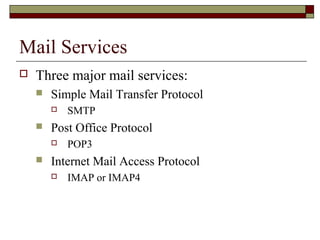
 Three major mail services:
 Simple Mail Transfer Protocol
 SMTP
 Post Office Protocol
 POP3
 Internet Mail Access Protocol
 IMAP or IMAP4
Which one to use?
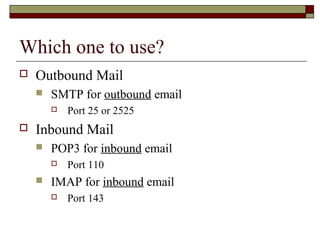
 Outbound Mail
 SMTP for outbound email
 Port 25 or 2525
 Inbound Mail
 POP3 for inbound email
 Port 110
 IMAP for inbound email
 Port 143
What is SMTP?
 Simple Mail Transfer Protocol (SMTP) is the
standard protocol for sending emails across the
Internet.
 SMTP uses TCP port 25 or 2525
 Sometimes you may have problems sending messages
 ISP may have closed port 25
 To determine the SMTP server for a given domain name
 MX (Mail eXchange) DNS record is used
IMAP or POP3?
 Both receive email
 Main differences between IMAP and POP3:
 POP3 protocol assumes there is only one client
connected to the mailbox
 IMAP protocol allows simultaneous access by
multiple clients
 IMAP is suitable if the mailbox is used by multiple
users
SMTP
Material from:
http://en.wikipedia.org/wiki/Smtp
SMTP
 Simple Mail Transfer Protocol
 The de facto standard for e-mail transmissions across the
Internet.
 Defined in RFC 821 (STD 10)
 amended by RFC 1123 (STD 3) chapter 5.
 The protocol used today is also known as ESMTP
 Defined in RFC 2821.
SMTP
 Relatively simple text-based protocol
 One or more recipients of a message are specified
 In most cases verified to exist
 The message text is transferred
 Client-server protocol
 The client transmits an email message to the server
 Either
 an end-user's email client, a.k.a. MUA (Mail User Agent),
- or -
 a relaying server's MTA (Mail Transfer Agents)
 can act as an SMTP client.
SMTP
 An email client knows the outgoing mail SMTP server from
its configuration
 A relaying server typically determines which SMTP server
to connect to by looking up the MX (Mail eXchange) DNS
record for each recipient's domain name
 The part of the email address to the right of the at (@) sign
 Conformant MTAs (not all) fall back to a simple A record
in the case of no MX
 A Record: address record
 Some current mail transfer agents will also use
SRV records
 SRV Records: SeRVice records
 More general form of MX,
 These are not widely adopted.
 Relaying servers can also be configured to use a smart host
SMTP
 The SMTP client initiates a TCP connection
to the server's port 25
 unless overridden by configuration
 It is quite easy to test an SMTP server using
the telnet program
 see following example
SMTP
 SMTP is a "push" protocol that does not
allow one to "pull" messages from a remote
server on demand
 That is it sends only
 To do a pull (i.e. receive) a mail client must
use POP3 or IMAP
 Another SMTP server can trigger a delivery
in SMTP using ETRN
Outgoing mail SMTP server
 An email client requires the name or the IP address of an
SMTP server as part of its configuration
 Server will deliver messages on behalf of the user
 Setting allows for various policies and network designs
 End users connected to the Internet can use the services of an
e-mail provider that is not necessarily the same as their
connection provider
 Network topology, or the location of a client within a
network or outside of a network, is no longer a limiting factor
for email submission or delivery
 Modern SMTP servers typically use a client's credentials (
authentication) rather than a client's location (IP address), to
determine whether it is eligible to relay email.
Outgoing mail SMTP server
 Another choice is whether to use TCP port 25 (SMTP) or
port 587 (Submission), as established by RFC 2476, for
relaying outbound mail to a mail server.
 Many servers support both.
 Some servers still support port 465 for legacy secure SMTP
 It is preferable to use encryption on standard ports according to
RFC 2487.
 Some servers are setup to reject all relaying on port 25
 Valid users authenticating on port 587 are allowed to relay mail to
any valid address.
 A server that relays all email for all destinations for all clients
connecting to port 25 is known as an open relay
 Generally considered a bad practice worthy of blacklisting.
Sample communications
 After establishing a connection between the sender
(the client) and the receiver (the server), the
following page shows a legal SMTP session.
 In the following conversation, everything sent by the
client is prefaced with C: and everything sent by the
server is prefaced with S:.
 On most computer systems, a connection can be
established using the telnet command on the client
machine, for example:
 telnet www.example.com 25
 Opens a TCP connection from the sending machine to the MTA
listening on port 25 on host www.example.com.
Sample communications
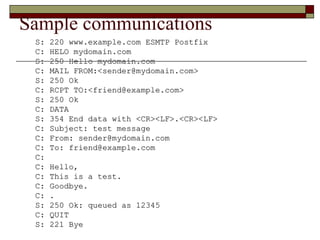
S: 220 www.example.com ESMTP PostfixS: 220 www.example.com ESMTP Postfix
C: HELO mydomain.comC: HELO mydomain.com
S: 250 Hello mydomain.comS: 250 Hello mydomain.com
C: MAIL FROM:<sender@mydomain.com>C: MAIL FROM:<sender@mydomain.com>
S: 250 OkS: 250 Ok
C: RCPT TO:<friend@example.com>C: RCPT TO:<friend@example.com>
S: 250 OkS: 250 Ok
C: DATAC: DATA
S: 354 End data with <CR><LF>.<CR><LF>S: 354 End data with <CR><LF>.<CR><LF>
C: Subject: test messageC: Subject: test message
C: From: sender@mydomain.comC: From: sender@mydomain.com
C: To: friend@example.comC: To: friend@example.com
C:C:
C: Hello,C: Hello,
C: This is a test.C: This is a test.
C: Goodbye.C: Goodbye.
C: .C: .
S: 250 Ok: queued as 12345S: 250 Ok: queued as 12345
C: QUITC: QUIT
S: 221 ByeS: 221 Bye
Sample communications
 Note: the data the client sends in the HELO and
MAIL FROM commands can be retrieved in
additional headers that the server adds to the
message:
 Received and Return-Path respectively.
 Optional: (and not shown above) nearly all clients
ask the server which SMTP extensions the server
supports
 Uses the EHLO greeting to invoke Extended SMTP
(ESMTP).
 These clients use HELO only if the server does not
respond to EHLO.
Sample communications
 Contemporary clients will use the ESMTP
extension keyword SIZE to inquire of the
server the maximum message size that will be
accepted.
 Older clients and servers
 Try to transfer huge messages that will be
rejected
 After wasting the network resources
 Including a lot of connect time to dialup ISPs
 paid by the minute.
Sample communications
 For the edit planning of giant files or sending with older clients, users can
manually determine in advance the maximum size accepted by ESMTP
servers.
 The user telnets as above, but substitutes "EHLO mydomain.com" for the
HELO command line:
 S: 220-serverdomain.com ESMTP {postfix version and
date}
 S: 220 NO UCE. {etc., terms of service}
 C: EHLO mydomain.com
 S: 250-serverdomain.com Hello mydomain.com [127.0.0.1]
 S: 250-SIZE 14680064
 S: 250-PIPELINING
 S: 250 HELP
 This serverdomain.com declares that it will accept a fixed maximum
message size no larger than 14,680,064 octets (8-bit bytes).
 Depending on the server's actual resource usage, it may be currently
unable to accept a message this large.
Sample communications
 In the simplest case, an ESMTP server will declare a
maximum SIZE with only the EHLO user
interaction.
 If no number appears after the SIZE keyword, or if
the current message limit must be exactly
determined:
 User can further interact by simulating the ESMTP header
of a message with an estimated size.
 See External Link RFC 1870
POP
From:
http://en.wikipedia.org/wiki/Post_Office_Protocol
POP
 Local e-mail clients use the Post Office Protocol
version 3 (POP3)
 An application-layer Internet standard protocol
 Retrieves e-mail from a remote server over a TCP/IP
connection
 Many subscribers to individual
Internet service provider e-mail accounts access their
e-mail with client software that uses POP3.
POP Overview
 POP3 has made earlier versions of the
protocol obsolete
 POP (informally called POP1 and POP2)
 Now, the term POP almost always means POP3
in the context of e-mail protocols
POP Overview
 The design of POP3 and its procedures supports end-
users with intermittent connections (such as
dial-up connections)
 Allows users to retrieve e-mail when connected
 View and manipulate the retrieved messages without
needing to stay connected
 Although most clients have an option to leave mail
on server, e-mail clients using POP3 generally:
 Connect
 Retrieve all messages
 Store them on the user's PC as new messages
 Delete them from the server
 Disconnect.
POP Overview
 In contrast, the newer, more capable
Internet Message Access Protocol (IMAP) supports
both connected and disconnected modes of
operation.
 E-mail clients using IMAP generally leave messages on
the server until the user explicitly deletes them.
 This and other facets of IMAP operation allow
multiple clients to access the same mailbox
POP Overview
 Most e-mail clients support either POP3 or IMAP to retrieve
messages
 Few Internet Service Providers (ISPs) support IMAP
 The fundamental difference between POP3 and IMAP4:
 POP3 offers access to a mail drop
 Mail exists on the server until it is collected by the client
 If the client leaves some or all messages on the server
 The client's message store is considered authoritative
 In contrast, IMAP4 offers access to the mail store
 The client may store local copies of the messages
 These are considered to be a temporary cache
 The server's store is authoritative
POP Overview
 Clients with a leave mail on server option generally use the POP3 UIDL (Unique
IDentification Listing) command.
 Most POP3 commands identify specific messages by their ordinal number on the mail server.
 Creates a problem for a client intending to leave messages on the server
 Message numbers may change from one connection to the server to another
 For example if a mailbox contains five messages at last connect, and a different client then
deletes message #3, the next connecting user will find the last two messages' numbers
decremented by one
 UIDL provides a mechanism to avoid these numbering issues.
 Server assigns a string of characters as a permanent and unique ID for the message
 When a POP3-compatible e-mail client connects to the server, it can use the UIDL command to
get the current mapping from these message IDs to the ordinal message numbers
 The client can then use this mapping to determine which messages it has yet to download
 Saves time when downloading
 Note: IMAP has a similar mechanism, using a 32-bit UID (Unique IDentifier) that is required to be strictly ascending.
 The advantage of the numeric UID is with large mailboxes
 A client can request just the UIDs greater than its previously stored "highest UID"
 In POP, the client must fetch the entire UIDL map
POP Overview
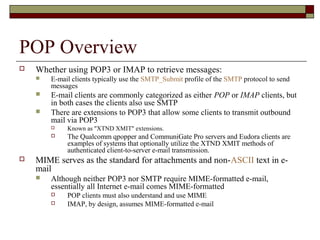
 Whether using POP3 or IMAP to retrieve messages:
 E-mail clients typically use the SMTP_Submit profile of the SMTP protocol to send
messages
 E-mail clients are commonly categorized as either POP or IMAP clients, but
in both cases the clients also use SMTP
 There are extensions to POP3 that allow some clients to transmit outbound
mail via POP3
 Known as "XTND XMIT" extensions.
 The Qualcomm qpopper and CommuniGate Pro servers and Eudora clients are
examples of systems that optionally utilize the XTND XMIT methods of
authenticated client-to-server e-mail transmission.
 MIME serves as the standard for attachments and non-ASCII text in e-
mail
 Although neither POP3 nor SMTP require MIME-formatted e-mail,
essentially all Internet e-mail comes MIME-formatted
 POP clients must also understand and use MIME
 IMAP, by design, assumes MIME-formatted e-mail
POP Overview
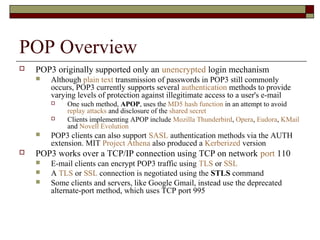
 POP3 originally supported only an unencrypted login mechanism
 Although plain text transmission of passwords in POP3 still commonly
occurs, POP3 currently supports several authentication methods to provide
varying levels of protection against illegitimate access to a user's e-mail
 One such method, APOP, uses the MD5 hash function in an attempt to avoid
replay attacks and disclosure of the shared secret
 Clients implementing APOP include Mozilla Thunderbird, Opera, Eudora, KMail
and Novell Evolution
 POP3 clients can also support SASL authentication methods via the AUTH
extension. MIT Project Athena also produced a Kerberized version
 POP3 works over a TCP/IP connection using TCP on network port 110
 E-mail clients can encrypt POP3 traffic using TLS or SSL
 A TLS or SSL connection is negotiated using the STLS command
 Some clients and servers, like Google Gmail, instead use the deprecated
alternate-port method, which uses TCP port 995
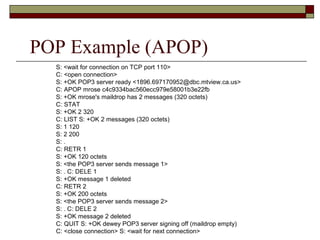
POP Example (APOP)
S: <wait for connection on TCP port 110>
C: <open connection>
S: +OK POP3 server ready <1896.697170952@dbc.mtview.ca.us>
C: APOP mrose c4c9334bac560ecc979e58001b3e22fb
S: +OK mrose's maildrop has 2 messages (320 octets)
C: STAT
S: +OK 2 320
C: LIST S: +OK 2 messages (320 octets)
S: 1 120
S: 2 200
S: .
C: RETR 1
S: +OK 120 octets
S: <the POP3 server sends message 1>
S: . C: DELE 1
S: +OK message 1 deleted
C: RETR 2
S: +OK 200 octets
S: <the POP3 server sends message 2>
S: . C: DELE 2
S: +OK message 2 deleted
C: QUIT S: +OK dewey POP3 server signing off (maildrop empty)
C: <close connection> S: <wait for next connection>
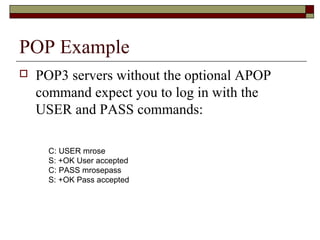
POP Example
 POP3 servers without the optional APOP
command expect you to log in with the
USER and PASS commands:
C: USER mrose
S: +OK User accepted
C: PASS mrosepass
S: +OK Pass accepted
IMAP
IMAP
 Internet Message Access Protocol
 Commonly known as IMAP or IMAP4
 An application layer Internet protocol
 Operates on port 143
 Allows a local client to access e-mail on a remote server
 Previously called Internet Mail Access Protocol, Interactive Mail
Access Protocol (RFC 1064), and Interim Mail Access Protocol)
 Current version is IMAP version 4 revision 1
 IMAP4rev1: defined by RFC 3501
 IMAP4 and POP3 are the two most prevalent Internet
standard protocols for e-mail retrieval
 Virtually all modern e-mail clients and servers support both
IMAP
 IMAP supports both connected and disconnected modes of
operation.
 E-mail clients using IMAP generally leave messages on the
server until the user explicitly deletes them.
 This and other facets of IMAP operation allow multiple clients to
access the same mailbox.
 Most e-mail clients support either POP3 or IMAP
 Fewer Internet Service Providers (ISPs) support IMAP.
 IMAP4 offers access to the mail store
 the client may store local copies of the messages
 considered to be a temporary cache
 the server's store is authoritative.
IMAP
 E-mail messages are generally sent to an e-mail server
 Stores received messages in the recipient's e-mail mailbox
 User later retrieves these messages with either a web browser or an e-mail
client that uses one of a number of e-mail retrieval protocols.
 Some clients and servers preferentially use vendor specific, typically
proprietary protocols, most support the Internet standard protocols
 SMTP for sending e-mail
 POP3 and IMAP4 for retrieving e-mail
 Allows interoperability with other servers and clients
 Proprietary protocols:
 Microsoft Outlook client when communicating with an Exchange server
 IBM Notes client when communicating with a Domino server
 Both products also support SMTP, POP3, and IMAP4.
 Support for the Internet standard protocols
 Allows other e-mail clients to access these servers
 Allows the clients to be used with other servers
 E.g. Qualcomm's Eudora or Mozilla Thunderbird
IMAP
 E-mail clients can generally be configured to use either POP3 or IMAP4
to retrieve e-mail and in both cases use SMTP for sending.
 Most e-mail programs can also use Lightweight Directory Access Protocol
(LDAP) for directory services
 Many (if not most) subscribers to individual ISP e-mail accounts access
their e-mail with client software that uses POP3
 IMAP is often used in large networks
 For example, a college campus mail system.
 IMAP allows users to access new messages instantly on their computers
 The mail is stored on the network
 With POP3, users either
 download the e-mail to their computer
 access it via the web.
 Both methods take longer than IMAP
 User must either download any new mail or "refresh" the page to see the new
messages.
Advantages over POP3
 Connected and disconnected modes of operation
 When using POP3, clients typically connect to the e-mail server
briefly, only as long as it takes to download new messages.
 When using IMAP4, clients often stay connected as long as the user
interface is active and download message content on demand.
 For users with many or large messages, this IMAP4 usage pattern can
result in faster response times.
 Multiple clients simultaneously connected to the same
mailbox
 The POP3 protocol requires the currently connected client to be the
only client connected to the mailbox.
 The IMAP protocol specifically allows simultaneous access by
multiple clients
 Provides mechanisms for clients to detect changes made to the mailbox
by other, concurrently connected, clients
Advantages over POP3
 Access to MIME message parts and partial fetch
 Nearly all internet e-mail is transmitted in MIME format,
allowing messages to have a tree structure where the leaf
nodes are any of a variety of single part content types and
the non-leaf nodes are any of a variety of multipart types.
 The IMAP4 protocol allows clients to separately retrieve
any of the individual MIME parts and also to retrieve
portions of either individual parts or the entire message.
 These mechanisms allow clients to retrieve the text
portion of a message without retrieving attached files or
to stream content as it is being fetched.
Advantages over POP3
 Message state information
 flags (defined in the IMAP4 protocol clients) can keep track of message state
 for example whether or not the message has been read, replied to, or deleted
 Flags are stored on the server
 Different clients accessing the same mailbox at different times can detect state changes made
by other clients
 POP3 provides no mechanism for clients to store such state information on the server
 If a single user accesses a mailbox with two different POP3 clients
 State information, such as whether a message has been accessed, cannot be synchronized
between the clients
 The IMAP4 protocol supports both pre-defined system flags and client defined
keywords
 System flags indicate state information such as whether a message has been read.
 Keywords, (not supported by all IMAP servers), allow messages to be given one or
more tags whose meaning is up to the client
 Adding user created tags to messages is an operation supported by some Webmail
services, such as Gmail
 Generally not using IMAP.
Advantages over POP3
 Multiple mailboxes on the server
 IMAP4 clients can create, rename, and/or delete mailboxes (usually
presented to the user as folders) on the server, and move messages between
mailboxes.
 Multiple mailbox support also allows servers to provide access to shared
and public folders.
 Server-side searches
 IMAP4 provides a mechanism for a client to ask the server to search for
messages meeting a variety of criteria
 Avoids requiring clients to download every message in the mailbox in
order to perform searches
 Built-in extension mechanism
 IMAP4 defines an explicit mechanism by which it may be extended.
 Many extensions to the base protocol have been proposed and are in
common use.
 IMAP2bis did not have an extension mechanism
 POP3 now has one defined by RFC 2449.
Disadvantages of IMAP
 IMAP remedies many of the shortcomings of
POP
 Inherently introduces additional complexity
 Much of this complexity (e.g., multiple clients
accessing the same mailbox at the same time)
is compensated for by server-side
workarounds
 Maildir
 Database backends
Disadvantages of IMAP
 Unless the mail store and searching
algorithms on the server are carefully
implemented, a client can potentially
consume large amounts of server resources
when searching massive mailboxes.
Disadvantages of IMAP
 IMAP4 clients need to explicitly request new email
message content
 Potentially causing additional delays on slow connections
such as those commonly used by mobile devices.
 A private proposal, push IMAP, would extend IMAP
to implement push e-mail by sending the entire
message instead of just a notification.
 However, push IMAP has not been generally
accepted
 Current IETF work has addressed the problem in other
ways
Disadvantages of IMAP
 Unlike some proprietary protocols which combine sending
and retrieval operations, sending a message and saving a
copy in a server-side folder with a base-level IMAP client
requires transmitting the message content twice, once to
SMTP for delivery and a second time to IMAP to store in a
sent mail folder.
 Remedied by a set of extensions defined by the IETF LEMONADE
Working Group for mobile devices
 POP3 servers don't support server-side folders so clients have no
choice but to store sent items on the client.
 Many IMAP clients can be configured to store sent mail in a client-
side folder.
 Courier Mail Server offers a non-standard method of sending using
IMAP by copying an outgoing message to a dedicated outbox folder.
SMTP-AUTH
SMTP Authentication
SMTP Authentication
 SMTP-AUTH
 Extension of the Simple Mail Transfer Protocol (SMTP)
 Includes an authentication step
 Client effectively logs in to the mail server during the
process of sending mail
 Servers which support SMTP-AUTH can usually be
configured to require clients to use this extension,
ensuring the true identity of the sender is known.
 SMTP-AUTH is defined in RFC 2554.
SMTP Authentication
 SMTP-AUTH provides an access control
mechanism
 Can be used to allow legitimate users to relay
mail while denying relay service to unauthorized
users, such as spammers
 Does not guarantee the authenticity of either the
SMTP envelope sender or the "From:" header.
 Spoofing, in which one sender masquerades as
someone else, is possible even with SMTP-AUTH.
SMTP Authentication
 SMTP-AUTH extension also allows one mail
server to indicate to another that the sender has
been authenticated when relaying mail
 This requires the recipient server to trust the
sending server
 This aspect of SMTP-AUTH is rarely used on the
Internet.
 The recipient of an e-mail message cannot tell
whether the sender was authenticated
 Use of SMTP-AUTH is only a partial solution to spam.
SMTP Authentication
 While SMTP-AUTH is generally a security
improvement over unauthenticated SMTP, it can
also introduce a weakness
 If authenticated users are allowed to submit messages
from IP addresses where unauthenticated users are not —
that is, if authenticated users are allowed to relay mail —
then an attacker who subverts one user's account is then
able to use the authenticated server as an open mail relay.
 In such a configuration every user's password becomes a key to
the mail system's security.
 Spammers have attacked SMTP-AUTH mail servers by
bruteforcing common usernames and passwords
 A good password policy can effectively prevent such an
attack
Acronyms
Acronym summary
 ESMTP- Extended SMTP
 ETRN - Extended Turn
 IMAP - Internet Mail Access Protocol
 MTA - Mail Transfer Agents
 MUA - Mail User Agent
 MX - Mail eXchange
 POP - Post Office Protocol
 SMTP - Simple Mail Transfer Protocol
 UIDL - Unique IDentification Listing

Mail services

  • 1.
  • 2.
    Mail Services  Threemajor mail services:  Simple Mail Transfer Protocol  SMTP  Post Office Protocol  POP3  Internet Mail Access Protocol  IMAP or IMAP4
  • 3.
    Which one touse?  Outbound Mail  SMTP for outbound email  Port 25 or 2525  Inbound Mail  POP3 for inbound email  Port 110  IMAP for inbound email  Port 143
  • 4.
    What is SMTP? Simple Mail Transfer Protocol (SMTP) is the standard protocol for sending emails across the Internet.  SMTP uses TCP port 25 or 2525  Sometimes you may have problems sending messages  ISP may have closed port 25  To determine the SMTP server for a given domain name  MX (Mail eXchange) DNS record is used
  • 5.
    IMAP or POP3? Both receive email  Main differences between IMAP and POP3:  POP3 protocol assumes there is only one client connected to the mailbox  IMAP protocol allows simultaneous access by multiple clients  IMAP is suitable if the mailbox is used by multiple users
  • 6.
  • 7.
    SMTP  Simple MailTransfer Protocol  The de facto standard for e-mail transmissions across the Internet.  Defined in RFC 821 (STD 10)  amended by RFC 1123 (STD 3) chapter 5.  The protocol used today is also known as ESMTP  Defined in RFC 2821.
  • 8.
    SMTP  Relatively simpletext-based protocol  One or more recipients of a message are specified  In most cases verified to exist  The message text is transferred  Client-server protocol  The client transmits an email message to the server  Either  an end-user's email client, a.k.a. MUA (Mail User Agent), - or -  a relaying server's MTA (Mail Transfer Agents)  can act as an SMTP client.
  • 9.
    SMTP  An emailclient knows the outgoing mail SMTP server from its configuration  A relaying server typically determines which SMTP server to connect to by looking up the MX (Mail eXchange) DNS record for each recipient's domain name  The part of the email address to the right of the at (@) sign  Conformant MTAs (not all) fall back to a simple A record in the case of no MX  A Record: address record  Some current mail transfer agents will also use SRV records  SRV Records: SeRVice records  More general form of MX,  These are not widely adopted.  Relaying servers can also be configured to use a smart host
  • 10.
    SMTP  The SMTPclient initiates a TCP connection to the server's port 25  unless overridden by configuration  It is quite easy to test an SMTP server using the telnet program  see following example
  • 11.
    SMTP  SMTP isa "push" protocol that does not allow one to "pull" messages from a remote server on demand  That is it sends only  To do a pull (i.e. receive) a mail client must use POP3 or IMAP  Another SMTP server can trigger a delivery in SMTP using ETRN
  • 12.
    Outgoing mail SMTPserver  An email client requires the name or the IP address of an SMTP server as part of its configuration  Server will deliver messages on behalf of the user  Setting allows for various policies and network designs  End users connected to the Internet can use the services of an e-mail provider that is not necessarily the same as their connection provider  Network topology, or the location of a client within a network or outside of a network, is no longer a limiting factor for email submission or delivery  Modern SMTP servers typically use a client's credentials ( authentication) rather than a client's location (IP address), to determine whether it is eligible to relay email.
  • 13.
    Outgoing mail SMTPserver  Another choice is whether to use TCP port 25 (SMTP) or port 587 (Submission), as established by RFC 2476, for relaying outbound mail to a mail server.  Many servers support both.  Some servers still support port 465 for legacy secure SMTP  It is preferable to use encryption on standard ports according to RFC 2487.  Some servers are setup to reject all relaying on port 25  Valid users authenticating on port 587 are allowed to relay mail to any valid address.  A server that relays all email for all destinations for all clients connecting to port 25 is known as an open relay  Generally considered a bad practice worthy of blacklisting.
  • 14.
    Sample communications  Afterestablishing a connection between the sender (the client) and the receiver (the server), the following page shows a legal SMTP session.  In the following conversation, everything sent by the client is prefaced with C: and everything sent by the server is prefaced with S:.  On most computer systems, a connection can be established using the telnet command on the client machine, for example:  telnet www.example.com 25  Opens a TCP connection from the sending machine to the MTA listening on port 25 on host www.example.com.
  • 15.
    Sample communications S: 220www.example.com ESMTP PostfixS: 220 www.example.com ESMTP Postfix C: HELO mydomain.comC: HELO mydomain.com S: 250 Hello mydomain.comS: 250 Hello mydomain.com C: MAIL FROM:<sender@mydomain.com>C: MAIL FROM:<sender@mydomain.com> S: 250 OkS: 250 Ok C: RCPT TO:<friend@example.com>C: RCPT TO:<friend@example.com> S: 250 OkS: 250 Ok C: DATAC: DATA S: 354 End data with <CR><LF>.<CR><LF>S: 354 End data with <CR><LF>.<CR><LF> C: Subject: test messageC: Subject: test message C: From: sender@mydomain.comC: From: sender@mydomain.com C: To: friend@example.comC: To: friend@example.com C:C: C: Hello,C: Hello, C: This is a test.C: This is a test. C: Goodbye.C: Goodbye. C: .C: . S: 250 Ok: queued as 12345S: 250 Ok: queued as 12345 C: QUITC: QUIT S: 221 ByeS: 221 Bye
  • 16.
    Sample communications  Note:the data the client sends in the HELO and MAIL FROM commands can be retrieved in additional headers that the server adds to the message:  Received and Return-Path respectively.  Optional: (and not shown above) nearly all clients ask the server which SMTP extensions the server supports  Uses the EHLO greeting to invoke Extended SMTP (ESMTP).  These clients use HELO only if the server does not respond to EHLO.
  • 17.
    Sample communications  Contemporaryclients will use the ESMTP extension keyword SIZE to inquire of the server the maximum message size that will be accepted.  Older clients and servers  Try to transfer huge messages that will be rejected  After wasting the network resources  Including a lot of connect time to dialup ISPs  paid by the minute.
  • 18.
    Sample communications  Forthe edit planning of giant files or sending with older clients, users can manually determine in advance the maximum size accepted by ESMTP servers.  The user telnets as above, but substitutes "EHLO mydomain.com" for the HELO command line:  S: 220-serverdomain.com ESMTP {postfix version and date}  S: 220 NO UCE. {etc., terms of service}  C: EHLO mydomain.com  S: 250-serverdomain.com Hello mydomain.com [127.0.0.1]  S: 250-SIZE 14680064  S: 250-PIPELINING  S: 250 HELP  This serverdomain.com declares that it will accept a fixed maximum message size no larger than 14,680,064 octets (8-bit bytes).  Depending on the server's actual resource usage, it may be currently unable to accept a message this large.
  • 19.
    Sample communications  Inthe simplest case, an ESMTP server will declare a maximum SIZE with only the EHLO user interaction.  If no number appears after the SIZE keyword, or if the current message limit must be exactly determined:  User can further interact by simulating the ESMTP header of a message with an estimated size.  See External Link RFC 1870
  • 20.
  • 21.
    POP  Local e-mailclients use the Post Office Protocol version 3 (POP3)  An application-layer Internet standard protocol  Retrieves e-mail from a remote server over a TCP/IP connection  Many subscribers to individual Internet service provider e-mail accounts access their e-mail with client software that uses POP3.
  • 22.
    POP Overview  POP3has made earlier versions of the protocol obsolete  POP (informally called POP1 and POP2)  Now, the term POP almost always means POP3 in the context of e-mail protocols
  • 23.
    POP Overview  Thedesign of POP3 and its procedures supports end- users with intermittent connections (such as dial-up connections)  Allows users to retrieve e-mail when connected  View and manipulate the retrieved messages without needing to stay connected  Although most clients have an option to leave mail on server, e-mail clients using POP3 generally:  Connect  Retrieve all messages  Store them on the user's PC as new messages  Delete them from the server  Disconnect.
  • 24.
    POP Overview  Incontrast, the newer, more capable Internet Message Access Protocol (IMAP) supports both connected and disconnected modes of operation.  E-mail clients using IMAP generally leave messages on the server until the user explicitly deletes them.  This and other facets of IMAP operation allow multiple clients to access the same mailbox
  • 25.
    POP Overview  Moste-mail clients support either POP3 or IMAP to retrieve messages  Few Internet Service Providers (ISPs) support IMAP  The fundamental difference between POP3 and IMAP4:  POP3 offers access to a mail drop  Mail exists on the server until it is collected by the client  If the client leaves some or all messages on the server  The client's message store is considered authoritative  In contrast, IMAP4 offers access to the mail store  The client may store local copies of the messages  These are considered to be a temporary cache  The server's store is authoritative
  • 26.
    POP Overview  Clientswith a leave mail on server option generally use the POP3 UIDL (Unique IDentification Listing) command.  Most POP3 commands identify specific messages by their ordinal number on the mail server.  Creates a problem for a client intending to leave messages on the server  Message numbers may change from one connection to the server to another  For example if a mailbox contains five messages at last connect, and a different client then deletes message #3, the next connecting user will find the last two messages' numbers decremented by one  UIDL provides a mechanism to avoid these numbering issues.  Server assigns a string of characters as a permanent and unique ID for the message  When a POP3-compatible e-mail client connects to the server, it can use the UIDL command to get the current mapping from these message IDs to the ordinal message numbers  The client can then use this mapping to determine which messages it has yet to download  Saves time when downloading  Note: IMAP has a similar mechanism, using a 32-bit UID (Unique IDentifier) that is required to be strictly ascending.  The advantage of the numeric UID is with large mailboxes  A client can request just the UIDs greater than its previously stored "highest UID"  In POP, the client must fetch the entire UIDL map
  • 27.
    POP Overview  Whetherusing POP3 or IMAP to retrieve messages:  E-mail clients typically use the SMTP_Submit profile of the SMTP protocol to send messages  E-mail clients are commonly categorized as either POP or IMAP clients, but in both cases the clients also use SMTP  There are extensions to POP3 that allow some clients to transmit outbound mail via POP3  Known as "XTND XMIT" extensions.  The Qualcomm qpopper and CommuniGate Pro servers and Eudora clients are examples of systems that optionally utilize the XTND XMIT methods of authenticated client-to-server e-mail transmission.  MIME serves as the standard for attachments and non-ASCII text in e- mail  Although neither POP3 nor SMTP require MIME-formatted e-mail, essentially all Internet e-mail comes MIME-formatted  POP clients must also understand and use MIME  IMAP, by design, assumes MIME-formatted e-mail
  • 28.
    POP Overview  POP3originally supported only an unencrypted login mechanism  Although plain text transmission of passwords in POP3 still commonly occurs, POP3 currently supports several authentication methods to provide varying levels of protection against illegitimate access to a user's e-mail  One such method, APOP, uses the MD5 hash function in an attempt to avoid replay attacks and disclosure of the shared secret  Clients implementing APOP include Mozilla Thunderbird, Opera, Eudora, KMail and Novell Evolution  POP3 clients can also support SASL authentication methods via the AUTH extension. MIT Project Athena also produced a Kerberized version  POP3 works over a TCP/IP connection using TCP on network port 110  E-mail clients can encrypt POP3 traffic using TLS or SSL  A TLS or SSL connection is negotiated using the STLS command  Some clients and servers, like Google Gmail, instead use the deprecated alternate-port method, which uses TCP port 995
  • 29.
    POP Example (APOP) S:<wait for connection on TCP port 110> C: <open connection> S: +OK POP3 server ready <1896.697170952@dbc.mtview.ca.us> C: APOP mrose c4c9334bac560ecc979e58001b3e22fb S: +OK mrose's maildrop has 2 messages (320 octets) C: STAT S: +OK 2 320 C: LIST S: +OK 2 messages (320 octets) S: 1 120 S: 2 200 S: . C: RETR 1 S: +OK 120 octets S: <the POP3 server sends message 1> S: . C: DELE 1 S: +OK message 1 deleted C: RETR 2 S: +OK 200 octets S: <the POP3 server sends message 2> S: . C: DELE 2 S: +OK message 2 deleted C: QUIT S: +OK dewey POP3 server signing off (maildrop empty) C: <close connection> S: <wait for next connection>
  • 30.
    POP Example  POP3servers without the optional APOP command expect you to log in with the USER and PASS commands: C: USER mrose S: +OK User accepted C: PASS mrosepass S: +OK Pass accepted
  • 31.
  • 32.
    IMAP  Internet MessageAccess Protocol  Commonly known as IMAP or IMAP4  An application layer Internet protocol  Operates on port 143  Allows a local client to access e-mail on a remote server  Previously called Internet Mail Access Protocol, Interactive Mail Access Protocol (RFC 1064), and Interim Mail Access Protocol)  Current version is IMAP version 4 revision 1  IMAP4rev1: defined by RFC 3501  IMAP4 and POP3 are the two most prevalent Internet standard protocols for e-mail retrieval  Virtually all modern e-mail clients and servers support both
  • 33.
    IMAP  IMAP supportsboth connected and disconnected modes of operation.  E-mail clients using IMAP generally leave messages on the server until the user explicitly deletes them.  This and other facets of IMAP operation allow multiple clients to access the same mailbox.  Most e-mail clients support either POP3 or IMAP  Fewer Internet Service Providers (ISPs) support IMAP.  IMAP4 offers access to the mail store  the client may store local copies of the messages  considered to be a temporary cache  the server's store is authoritative.
  • 34.
    IMAP  E-mail messagesare generally sent to an e-mail server  Stores received messages in the recipient's e-mail mailbox  User later retrieves these messages with either a web browser or an e-mail client that uses one of a number of e-mail retrieval protocols.  Some clients and servers preferentially use vendor specific, typically proprietary protocols, most support the Internet standard protocols  SMTP for sending e-mail  POP3 and IMAP4 for retrieving e-mail  Allows interoperability with other servers and clients  Proprietary protocols:  Microsoft Outlook client when communicating with an Exchange server  IBM Notes client when communicating with a Domino server  Both products also support SMTP, POP3, and IMAP4.  Support for the Internet standard protocols  Allows other e-mail clients to access these servers  Allows the clients to be used with other servers  E.g. Qualcomm's Eudora or Mozilla Thunderbird
  • 35.
    IMAP  E-mail clientscan generally be configured to use either POP3 or IMAP4 to retrieve e-mail and in both cases use SMTP for sending.  Most e-mail programs can also use Lightweight Directory Access Protocol (LDAP) for directory services  Many (if not most) subscribers to individual ISP e-mail accounts access their e-mail with client software that uses POP3  IMAP is often used in large networks  For example, a college campus mail system.  IMAP allows users to access new messages instantly on their computers  The mail is stored on the network  With POP3, users either  download the e-mail to their computer  access it via the web.  Both methods take longer than IMAP  User must either download any new mail or "refresh" the page to see the new messages.
  • 36.
    Advantages over POP3 Connected and disconnected modes of operation  When using POP3, clients typically connect to the e-mail server briefly, only as long as it takes to download new messages.  When using IMAP4, clients often stay connected as long as the user interface is active and download message content on demand.  For users with many or large messages, this IMAP4 usage pattern can result in faster response times.  Multiple clients simultaneously connected to the same mailbox  The POP3 protocol requires the currently connected client to be the only client connected to the mailbox.  The IMAP protocol specifically allows simultaneous access by multiple clients  Provides mechanisms for clients to detect changes made to the mailbox by other, concurrently connected, clients
  • 37.
    Advantages over POP3 Access to MIME message parts and partial fetch  Nearly all internet e-mail is transmitted in MIME format, allowing messages to have a tree structure where the leaf nodes are any of a variety of single part content types and the non-leaf nodes are any of a variety of multipart types.  The IMAP4 protocol allows clients to separately retrieve any of the individual MIME parts and also to retrieve portions of either individual parts or the entire message.  These mechanisms allow clients to retrieve the text portion of a message without retrieving attached files or to stream content as it is being fetched.
  • 38.
    Advantages over POP3 Message state information  flags (defined in the IMAP4 protocol clients) can keep track of message state  for example whether or not the message has been read, replied to, or deleted  Flags are stored on the server  Different clients accessing the same mailbox at different times can detect state changes made by other clients  POP3 provides no mechanism for clients to store such state information on the server  If a single user accesses a mailbox with two different POP3 clients  State information, such as whether a message has been accessed, cannot be synchronized between the clients  The IMAP4 protocol supports both pre-defined system flags and client defined keywords  System flags indicate state information such as whether a message has been read.  Keywords, (not supported by all IMAP servers), allow messages to be given one or more tags whose meaning is up to the client  Adding user created tags to messages is an operation supported by some Webmail services, such as Gmail  Generally not using IMAP.
  • 39.
    Advantages over POP3 Multiple mailboxes on the server  IMAP4 clients can create, rename, and/or delete mailboxes (usually presented to the user as folders) on the server, and move messages between mailboxes.  Multiple mailbox support also allows servers to provide access to shared and public folders.  Server-side searches  IMAP4 provides a mechanism for a client to ask the server to search for messages meeting a variety of criteria  Avoids requiring clients to download every message in the mailbox in order to perform searches  Built-in extension mechanism  IMAP4 defines an explicit mechanism by which it may be extended.  Many extensions to the base protocol have been proposed and are in common use.  IMAP2bis did not have an extension mechanism  POP3 now has one defined by RFC 2449.
  • 40.
    Disadvantages of IMAP IMAP remedies many of the shortcomings of POP  Inherently introduces additional complexity  Much of this complexity (e.g., multiple clients accessing the same mailbox at the same time) is compensated for by server-side workarounds  Maildir  Database backends
  • 41.
    Disadvantages of IMAP Unless the mail store and searching algorithms on the server are carefully implemented, a client can potentially consume large amounts of server resources when searching massive mailboxes.
  • 42.
    Disadvantages of IMAP IMAP4 clients need to explicitly request new email message content  Potentially causing additional delays on slow connections such as those commonly used by mobile devices.  A private proposal, push IMAP, would extend IMAP to implement push e-mail by sending the entire message instead of just a notification.  However, push IMAP has not been generally accepted  Current IETF work has addressed the problem in other ways
  • 43.
    Disadvantages of IMAP Unlike some proprietary protocols which combine sending and retrieval operations, sending a message and saving a copy in a server-side folder with a base-level IMAP client requires transmitting the message content twice, once to SMTP for delivery and a second time to IMAP to store in a sent mail folder.  Remedied by a set of extensions defined by the IETF LEMONADE Working Group for mobile devices  POP3 servers don't support server-side folders so clients have no choice but to store sent items on the client.  Many IMAP clients can be configured to store sent mail in a client- side folder.  Courier Mail Server offers a non-standard method of sending using IMAP by copying an outgoing message to a dedicated outbox folder.
  • 44.
  • 45.
    SMTP Authentication  SMTP-AUTH Extension of the Simple Mail Transfer Protocol (SMTP)  Includes an authentication step  Client effectively logs in to the mail server during the process of sending mail  Servers which support SMTP-AUTH can usually be configured to require clients to use this extension, ensuring the true identity of the sender is known.  SMTP-AUTH is defined in RFC 2554.
  • 46.
    SMTP Authentication  SMTP-AUTHprovides an access control mechanism  Can be used to allow legitimate users to relay mail while denying relay service to unauthorized users, such as spammers  Does not guarantee the authenticity of either the SMTP envelope sender or the "From:" header.  Spoofing, in which one sender masquerades as someone else, is possible even with SMTP-AUTH.
  • 47.
    SMTP Authentication  SMTP-AUTHextension also allows one mail server to indicate to another that the sender has been authenticated when relaying mail  This requires the recipient server to trust the sending server  This aspect of SMTP-AUTH is rarely used on the Internet.  The recipient of an e-mail message cannot tell whether the sender was authenticated  Use of SMTP-AUTH is only a partial solution to spam.
  • 48.
    SMTP Authentication  WhileSMTP-AUTH is generally a security improvement over unauthenticated SMTP, it can also introduce a weakness  If authenticated users are allowed to submit messages from IP addresses where unauthenticated users are not — that is, if authenticated users are allowed to relay mail — then an attacker who subverts one user's account is then able to use the authenticated server as an open mail relay.  In such a configuration every user's password becomes a key to the mail system's security.  Spammers have attacked SMTP-AUTH mail servers by bruteforcing common usernames and passwords  A good password policy can effectively prevent such an attack
  • 49.
  • 50.
    Acronym summary  ESMTP-Extended SMTP  ETRN - Extended Turn  IMAP - Internet Mail Access Protocol  MTA - Mail Transfer Agents  MUA - Mail User Agent  MX - Mail eXchange  POP - Post Office Protocol  SMTP - Simple Mail Transfer Protocol  UIDL - Unique IDentification Listing