Web Technologies
(1) html
(2) Xml
(3) Java Script

http://improvejava.blogspot.in
What is html?
 Html stands for Hypertext Mark up language
 It is most widely used language to write web pages
 Hypertext refers to the way in which web pages are linked






together, when you click a link in a web page, you are using
hypertext
Markup language describes how html works. With a
markup language, you simply “mark up” a text document
with tags that tell a web browser how to structure it to
display.
Html is used to create or design web pages
A html document is nothing but a web page
To execute a html document we require a browser
http://improvejava.blogspot.in
What is browser?
 A browser is a program that can interpret(translates)

the html document
 We can use any browser to execute the html document
 Example:
 Internet Explorer, Google Chrome, Mozilla fire Fox,
Opera etc.,

http://improvejava.blogspot.in
How to execute HTML Document?
 To execute html document we need to specify the

URL(Uniform Resource Locator) in the address bar of
the Browser.
 url (uniform Resource Locator) is the primary naming
scheme using which we identify a web resource.
 A web resource can be html document (or) any other
resource

http://improvejava.blogspot.in
 Internet is the biggest network that follows client

server architecture.
 A client is a machine that sends a request to the server
 A server is a machine that responds to the client
request by sending same resource or information.
 A client machine always sends a request or receives a
response, to do this client requires a browser also
called as client-side software

http://improvejava.blogspot.in
Html tags
 Html tags are used to mark up html elements
 The html tag is a command the web browser interprets(translates)
 The html tags are surrounded by less than and greater than characters. These

characters are called as angular brackets(<,>)
 The html tags always come in pairs that is a starting tag and closing tags i.e
<html>…..</html>
 The text in between the starting tag and ending tag is called as element content.
Example:
<html>
Hello
</html>
 All the html tags are predefined tags
 The html tags are not case sensitive that is the uppercase letters and lower case
letters are same.
 The entire html document must be written in between html starting tag (<html>)
and html closing tag </html>
 The <html> tag in a document represents that the document is a html document
http://improvejava.blogspot.in
What does html document
contain?
 Html document can contain text and/or html tags

http://improvejava.blogspot.in
Html document sections
 The entire html document is divided into two parts:
 (1) head section
 (2) body section

http://improvejava.blogspot.in
Html document sections: (1) head section
 Head section is for description the html document.

Providing general information about the html
document.
 Example: title, meta

http://improvejava.blogspot.in
Html document sections: (2) Body Section
 By using Body section we can display text, images in

the browser.
Note:
The head section will not considered as part of the data
in the browser.

http://improvejava.blogspot.in
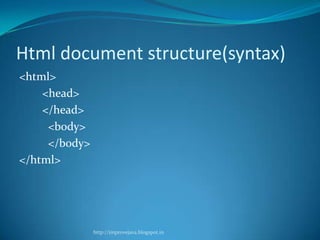
Html document structure(syntax)
<html>
<head>
</head>
<body>
</body>
</html>

http://improvejava.blogspot.in
HTML editor like:
 Writing HTML Using Notepad or Text Edit
 HTML can be edited by using a professional HTML editor

like:
1. Adobe Dreamweaver
2. Microsoft Expression Web
3. Coffee Cup HTML Editor
 However, for learning HTML we recommend a text editor
like Notepad (PC) or Text Edit (Mac). We believe using a
simple text editor is a good way to learn HTML.
 Follow the 4 steps below to create your first web page with
Notepad.
http://improvejava.blogspot.in
Step 1: Start Notepad
 To start Notepad go to:
 Start

All Programs
Accessories
Notepad

http://improvejava.blogspot.in
A procedure to write and execute the html
document
<html>
<head>
<title> First html </title>
</head>
<body> Welcome to html
</body>
</html>

http://improvejava.blogspot.in
Step 2: Edit Your HTML with
Notepad
 Type your HTML code into your Notepad:

<!DOCTYPE html>
<html>
<body>
<h1>My First Heading</h1>
<p>My first paragraph.</p>
</body>
</html>

http://improvejava.blogspot.in
Step 3: Save Your HTML
 Select Save as.. in Notepad's file menu.
 When you save an HTML file, you can use either the

.htm or the .html file extension. There is no difference,
it is entirely up to you.
 Save the file in a folder that is easy to remember

http://improvejava.blogspot.in
Step 4: Run the HTML in Your
Browser
 Start your web browser and open your html file from

the File, Open menu, or just browse the folder and
double-click your HTML file.

http://improvejava.blogspot.in
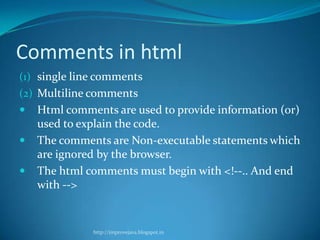
Comments in html
(1) single line comments
(2) Multiline comments





Html comments are used to provide information (or)
used to explain the code.
The comments are Non-executable statements which
are ignored by the browser.
The html comments must begin with <!--.. And end
with -->

http://improvejava.blogspot.in
(1) Single line comments
 <!—comments-->

http://improvejava.blogspot.in
(2) Multiline comments
<! This is my
First html program
-->

http://improvejava.blogspot.in
Error free language
 Html language is an error free language that is when

the browser encounters an error in the html document
it will not display any error message

http://improvejava.blogspot.in
Note:
 Every html tag given the information to the browser
 Browser contains interpreter that executes the html

document
 Each tag which gives the information to the browser
 If you want to provide additional information we
should use attributes
 Attributes should be declared in starting tag
 Ex:
<body bgcolor=“blue”>
</body>
http://improvejava.blogspot.in

1 introduction to html

  • 1.
    Web Technologies (1) html (2)Xml (3) Java Script http://improvejava.blogspot.in
  • 2.
  • 3.
    What is html? Html stands for Hypertext Mark up language  It is most widely used language to write web pages  Hypertext refers to the way in which web pages are linked     together, when you click a link in a web page, you are using hypertext Markup language describes how html works. With a markup language, you simply “mark up” a text document with tags that tell a web browser how to structure it to display. Html is used to create or design web pages A html document is nothing but a web page To execute a html document we require a browser http://improvejava.blogspot.in
  • 4.
    What is browser? A browser is a program that can interpret(translates) the html document  We can use any browser to execute the html document  Example:  Internet Explorer, Google Chrome, Mozilla fire Fox, Opera etc., http://improvejava.blogspot.in
  • 5.
    How to executeHTML Document?  To execute html document we need to specify the URL(Uniform Resource Locator) in the address bar of the Browser.  url (uniform Resource Locator) is the primary naming scheme using which we identify a web resource.  A web resource can be html document (or) any other resource http://improvejava.blogspot.in
  • 6.
  • 7.
  • 8.
  • 9.
  • 10.
     Internet isthe biggest network that follows client server architecture.  A client is a machine that sends a request to the server  A server is a machine that responds to the client request by sending same resource or information.  A client machine always sends a request or receives a response, to do this client requires a browser also called as client-side software http://improvejava.blogspot.in
  • 11.
    Html tags  Htmltags are used to mark up html elements  The html tag is a command the web browser interprets(translates)  The html tags are surrounded by less than and greater than characters. These characters are called as angular brackets(<,>)  The html tags always come in pairs that is a starting tag and closing tags i.e <html>…..</html>  The text in between the starting tag and ending tag is called as element content. Example: <html> Hello </html>  All the html tags are predefined tags  The html tags are not case sensitive that is the uppercase letters and lower case letters are same.  The entire html document must be written in between html starting tag (<html>) and html closing tag </html>  The <html> tag in a document represents that the document is a html document http://improvejava.blogspot.in
  • 12.
    What does htmldocument contain?  Html document can contain text and/or html tags http://improvejava.blogspot.in
  • 13.
    Html document sections The entire html document is divided into two parts:  (1) head section  (2) body section http://improvejava.blogspot.in
  • 14.
    Html document sections:(1) head section  Head section is for description the html document. Providing general information about the html document.  Example: title, meta http://improvejava.blogspot.in
  • 15.
    Html document sections:(2) Body Section  By using Body section we can display text, images in the browser. Note: The head section will not considered as part of the data in the browser. http://improvejava.blogspot.in
  • 16.
  • 17.
    HTML editor like: Writing HTML Using Notepad or Text Edit  HTML can be edited by using a professional HTML editor like: 1. Adobe Dreamweaver 2. Microsoft Expression Web 3. Coffee Cup HTML Editor  However, for learning HTML we recommend a text editor like Notepad (PC) or Text Edit (Mac). We believe using a simple text editor is a good way to learn HTML.  Follow the 4 steps below to create your first web page with Notepad. http://improvejava.blogspot.in
  • 18.
    Step 1: StartNotepad  To start Notepad go to:  Start All Programs Accessories Notepad http://improvejava.blogspot.in
  • 19.
    A procedure towrite and execute the html document <html> <head> <title> First html </title> </head> <body> Welcome to html </body> </html> http://improvejava.blogspot.in
  • 20.
    Step 2: EditYour HTML with Notepad  Type your HTML code into your Notepad: <!DOCTYPE html> <html> <body> <h1>My First Heading</h1> <p>My first paragraph.</p> </body> </html> http://improvejava.blogspot.in
  • 21.
    Step 3: SaveYour HTML  Select Save as.. in Notepad's file menu.  When you save an HTML file, you can use either the .htm or the .html file extension. There is no difference, it is entirely up to you.  Save the file in a folder that is easy to remember http://improvejava.blogspot.in
  • 22.
    Step 4: Runthe HTML in Your Browser  Start your web browser and open your html file from the File, Open menu, or just browse the folder and double-click your HTML file. http://improvejava.blogspot.in
  • 23.
    Comments in html (1)single line comments (2) Multiline comments    Html comments are used to provide information (or) used to explain the code. The comments are Non-executable statements which are ignored by the browser. The html comments must begin with <!--.. And end with --> http://improvejava.blogspot.in
  • 24.
    (1) Single linecomments  <!—comments--> http://improvejava.blogspot.in
  • 25.
    (2) Multiline comments <!This is my First html program --> http://improvejava.blogspot.in
  • 26.
    Error free language Html language is an error free language that is when the browser encounters an error in the html document it will not display any error message http://improvejava.blogspot.in
  • 27.
    Note:  Every htmltag given the information to the browser  Browser contains interpreter that executes the html document  Each tag which gives the information to the browser  If you want to provide additional information we should use attributes  Attributes should be declared in starting tag  Ex: <body bgcolor=“blue”> </body> http://improvejava.blogspot.in