ELECTRONIC MAIL M Owais Asghar Jara
ELECTRONIC MAIL (E-MAIL)
Allows users to exchange messages.
Idea: The user run only client programs when they want and the
intermediate servers apply the client/server paradigm or distinct
patterns.
ARCHITECTURE
The users are connected to servers via LAN or a WAN.
A simple mail from Alice to Bob (Two users) take 9 different steps.
Three different agents are used.
1. User Agent (UA)
2. Message Transfer Agent (MTA)
3. Message Access Agent (MAA)
“ The Electronic Mail system needs two UAs, two pairs
of MTAs(client and server), a pair of MAAs(client and
server)”
1. USER AGENT (UA)
The first component : provides service to the user to make the
process of sending and receiving a message easier.
Software package that composes, reads, replies to and forwards
messages.
Two Types:
1. Command Driven: normally accepts commands to perform its
tasks. Ex R to reply a message etc.
2. GUI Bases: contains GUI components to allow user to interact with
the software by using both keyboard and mouse. Contains buttons,
menu bars and windows etc. Ex Outlook.
ADDRESSES
Local Part: Defines user mailbox.
Domain Name: mail servers or exchangers.
2. MESSAGE TRANSFER AGENT:
SMTP
The formal protocol that defines the MTA client and server in the
internet is called Simple Mail Transfer Protocol (SMTP).
SMTP simply defines how commands and responses must be sent
back and forth.
SMTP uses commands and responses to transfer messages between
an MTA client and an MTA server.
Command is from MTA client to MTA server and Response is vice
versa.
Each command or reply is separated by a two character (Carriage
return and line feed) end of line token.
Commands and responses tables are given below.
MAIL TRANSFER PHASES:
The process of mail message occurs in three phases:
1. Connection Establishment
2. Mail Transfer
3. Connection Termination
1. CONNECTION ESTABLISHMENT
 TCP Connection to the well known port 25 then SMTP starts
connection phase.
1. The server sends code 220(Service Ready) to tell the client that it is
ready to receive mail. (code 421 if server not available)
2. The client sends HELO message to identify itself using its domain
name address. This step is necessary to inform the server of the
domain name of the client.
3. The server responds with code 250 ( request command completed)
or some other code depending upon situation.
2. MESSAGE TRANSFER
Phase involves eight steps.
1. The client sends the MAIL FROM message to introduce the sender.
Includes mail address of the sender. Step is compulsory for return
mail in case of the error.
2. The server responds with code 250 or some other appropriate
code.
3. The client sends the RCPT TO (recipient) message, which includes
the mail address of the recipient.
4. The server responds with code 250 or some other appropriate
code.
5. The client sends the DATA message to initialize the message
transfer.
CONTINUED…
6. The server responds with code 354 (start mail input) or some other
appropriate message.
7. The client sends the contents of message in consecutive lines. Each
line is terminated by two-character end-of-line token (carriage return
and line feed). The message is terminated by a line containing just one
period.
8. The server responds with code 250 (OK) or some other appropriate
code.
3. CONNECTION TERMINATION:
Phase involves only two steps:
1. The client sends the quit command.
2. The server responds with code 221 or some other appropriate
code.
We can see the use of these three phases of mail transfer
simultaneously in an example below.
3. MESSAGE ACCESS AGENT
The first and second stage of the mail delivery involve SMTP because
it pushed the message from the client to the server i.e. the direction
of the bulk data is from the client to the server.
The third stage needs PULL control the client must pull messages
from the server because the direction of the bulk data is from the
server to client. Therefore MAA is used.
Two protocols available currently :
1. Post Office Protocol (POP3), version 3
2. Internet Mail Access Protocol (IMAP4), version 4
1. POST OFFICE CONTROL (POP3)
Simple but limited functionality.
The client POP3 software is installed on the recipient computer.
The server POP3 software is installed on the mail server.
First client opens a connection to the server on TCP port 110.
Has two modes:
1. Delete mode: The mail is deleted from the mailbox after each
retrieval.
2. Keep Mode: The mail remains in the mail box after retrieval.
Algorithm follows certain steps to pull a message shown in figure
below.
CONTINUED…
Disadvantages:
1. Does not allow user to organize her mail on the server/
2. The user can not have different folders on the server.
3. Pop3 does not allow the user to partially check the contents of
the mail before downloading which is very risky.
2. INTERNET MAIL ACCESS
PROTOCOL (IMAP4)
IMAP provides following extra functions :
1. A user can check the e-mail header prior to downloading.
2. A user can search the contents of the e-mail for a specific string of
characters prior to downloading.
3. A user can partially download e-mail. This is especially useful if
bandwidth is limited and the e-mail contains multimedia with high
bandwidth requirements.
4. A user can create, delete, or rename the mailboxes on the mail
server.
5. A user can create a hierarchy of the mailboxes in a folder for e-
mail storage.
LIMITATIONS OF ELECTRONIC MAIL:
No doubt electronic mail is simple but its simplicity however comes
with a price.
It can send messages only in NVT 7-bit ASCII format.
It can not be used for languages other then ENGLISH.
It can not be used to send binary files or video or audio data.
So A new supplementary protocol is designed.
MULTIPURPOSE INTERNET
PROTOCOL (MIME)
MIME is a supplementary protocol that allows non-ASCII data to be
sent through e-mail.
Idea : Transforms non-ASCII data at the sender site to NVT ASCII
(Network Virtual Terminal) data and delivers it to the client MTA to be
sent through Internet. And the message at the receiving site is
transformed back to the original data.
So MIME is a set of software functions that holds the responsibility
of transforming non-ASCII to ASCII data and vice versa.
MIME HEADER:
Contains:
1. MIME-Version
2. CONTENT TYPE
3. CONTENT-Transfer-Encoding
4. CONTENT-ID
5. CONTENT-Description
1. MIME VERSION
2. CONTENT-TYPE
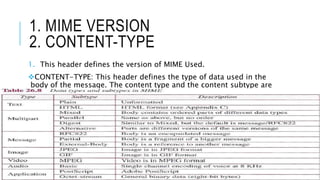
1. This header defines the version of MIME Used.
CONTENT-TYPE: This header defines the type of data used in the
body of the message. The content type and the content subtype are
separated by slash.
3. CONTENT-TRANSFER-ENCODING
BASE64 CONVERSION
CONTINUED…
CONTINUED…
Bas64 is Redundant encoding scheme that is every six bit junk
become one ASCII character and are sent as eight bits. Overhead of
25%.
If data consist of mostly ASCII characters with small non-ASCII
portion then we use Quoted-Printable encoding.
If a character is ASCII it is sent as is.
If a character is non-ASCII it is sent as three characters, the first
character is equal sign (=), the next two characters are the
hexadecimal representation of the byte.
Lets c an example.
4.CONTENT-ID AND
5.CONTENT-DESCRIPTION:
Content-ID uniquely identifies the whole message in a multiple
message environment.
CONTENT-Description defines whether the body is image, audio or
video.
WEB-BASED MAIL
E-mail is a common application that some websites today provide
this service to any one who access the site. Three common sites are
Hotmail, Yahoo and Google mail.
Two cases.
Case1: The sender uses SMTP and the receiver uses HTTP.
Case2: Both uses HTTP.
Described in figure below.
THE END

Electronic Mail

  • 1.
    ELECTRONIC MAIL MOwais Asghar Jara
  • 2.
    ELECTRONIC MAIL (E-MAIL) Allowsusers to exchange messages. Idea: The user run only client programs when they want and the intermediate servers apply the client/server paradigm or distinct patterns.
  • 3.
    ARCHITECTURE The users areconnected to servers via LAN or a WAN. A simple mail from Alice to Bob (Two users) take 9 different steps. Three different agents are used. 1. User Agent (UA) 2. Message Transfer Agent (MTA) 3. Message Access Agent (MAA) “ The Electronic Mail system needs two UAs, two pairs of MTAs(client and server), a pair of MAAs(client and server)”
  • 4.
    1. USER AGENT(UA) The first component : provides service to the user to make the process of sending and receiving a message easier. Software package that composes, reads, replies to and forwards messages. Two Types: 1. Command Driven: normally accepts commands to perform its tasks. Ex R to reply a message etc. 2. GUI Bases: contains GUI components to allow user to interact with the software by using both keyboard and mouse. Contains buttons, menu bars and windows etc. Ex Outlook.
  • 6.
    ADDRESSES Local Part: Definesuser mailbox. Domain Name: mail servers or exchangers.
  • 7.
    2. MESSAGE TRANSFERAGENT: SMTP The formal protocol that defines the MTA client and server in the internet is called Simple Mail Transfer Protocol (SMTP). SMTP simply defines how commands and responses must be sent back and forth. SMTP uses commands and responses to transfer messages between an MTA client and an MTA server. Command is from MTA client to MTA server and Response is vice versa. Each command or reply is separated by a two character (Carriage return and line feed) end of line token. Commands and responses tables are given below.
  • 9.
    MAIL TRANSFER PHASES: Theprocess of mail message occurs in three phases: 1. Connection Establishment 2. Mail Transfer 3. Connection Termination
  • 10.
    1. CONNECTION ESTABLISHMENT TCP Connection to the well known port 25 then SMTP starts connection phase. 1. The server sends code 220(Service Ready) to tell the client that it is ready to receive mail. (code 421 if server not available) 2. The client sends HELO message to identify itself using its domain name address. This step is necessary to inform the server of the domain name of the client. 3. The server responds with code 250 ( request command completed) or some other code depending upon situation.
  • 11.
    2. MESSAGE TRANSFER Phaseinvolves eight steps. 1. The client sends the MAIL FROM message to introduce the sender. Includes mail address of the sender. Step is compulsory for return mail in case of the error. 2. The server responds with code 250 or some other appropriate code. 3. The client sends the RCPT TO (recipient) message, which includes the mail address of the recipient. 4. The server responds with code 250 or some other appropriate code. 5. The client sends the DATA message to initialize the message transfer.
  • 12.
    CONTINUED… 6. The serverresponds with code 354 (start mail input) or some other appropriate message. 7. The client sends the contents of message in consecutive lines. Each line is terminated by two-character end-of-line token (carriage return and line feed). The message is terminated by a line containing just one period. 8. The server responds with code 250 (OK) or some other appropriate code.
  • 13.
    3. CONNECTION TERMINATION: Phaseinvolves only two steps: 1. The client sends the quit command. 2. The server responds with code 221 or some other appropriate code. We can see the use of these three phases of mail transfer simultaneously in an example below.
  • 15.
    3. MESSAGE ACCESSAGENT The first and second stage of the mail delivery involve SMTP because it pushed the message from the client to the server i.e. the direction of the bulk data is from the client to the server. The third stage needs PULL control the client must pull messages from the server because the direction of the bulk data is from the server to client. Therefore MAA is used. Two protocols available currently : 1. Post Office Protocol (POP3), version 3 2. Internet Mail Access Protocol (IMAP4), version 4
  • 16.
    1. POST OFFICECONTROL (POP3) Simple but limited functionality. The client POP3 software is installed on the recipient computer. The server POP3 software is installed on the mail server. First client opens a connection to the server on TCP port 110. Has two modes: 1. Delete mode: The mail is deleted from the mailbox after each retrieval. 2. Keep Mode: The mail remains in the mail box after retrieval. Algorithm follows certain steps to pull a message shown in figure below.
  • 18.
    CONTINUED… Disadvantages: 1. Does notallow user to organize her mail on the server/ 2. The user can not have different folders on the server. 3. Pop3 does not allow the user to partially check the contents of the mail before downloading which is very risky.
  • 19.
    2. INTERNET MAILACCESS PROTOCOL (IMAP4) IMAP provides following extra functions : 1. A user can check the e-mail header prior to downloading. 2. A user can search the contents of the e-mail for a specific string of characters prior to downloading. 3. A user can partially download e-mail. This is especially useful if bandwidth is limited and the e-mail contains multimedia with high bandwidth requirements. 4. A user can create, delete, or rename the mailboxes on the mail server. 5. A user can create a hierarchy of the mailboxes in a folder for e- mail storage.
  • 21.
    LIMITATIONS OF ELECTRONICMAIL: No doubt electronic mail is simple but its simplicity however comes with a price. It can send messages only in NVT 7-bit ASCII format. It can not be used for languages other then ENGLISH. It can not be used to send binary files or video or audio data. So A new supplementary protocol is designed.
  • 22.
    MULTIPURPOSE INTERNET PROTOCOL (MIME) MIMEis a supplementary protocol that allows non-ASCII data to be sent through e-mail. Idea : Transforms non-ASCII data at the sender site to NVT ASCII (Network Virtual Terminal) data and delivers it to the client MTA to be sent through Internet. And the message at the receiving site is transformed back to the original data. So MIME is a set of software functions that holds the responsibility of transforming non-ASCII to ASCII data and vice versa.
  • 24.
    MIME HEADER: Contains: 1. MIME-Version 2.CONTENT TYPE 3. CONTENT-Transfer-Encoding 4. CONTENT-ID 5. CONTENT-Description
  • 25.
    1. MIME VERSION 2.CONTENT-TYPE 1. This header defines the version of MIME Used. CONTENT-TYPE: This header defines the type of data used in the body of the message. The content type and the content subtype are separated by slash.
  • 26.
  • 27.
  • 28.
  • 29.
    CONTINUED… Bas64 is Redundantencoding scheme that is every six bit junk become one ASCII character and are sent as eight bits. Overhead of 25%. If data consist of mostly ASCII characters with small non-ASCII portion then we use Quoted-Printable encoding. If a character is ASCII it is sent as is. If a character is non-ASCII it is sent as three characters, the first character is equal sign (=), the next two characters are the hexadecimal representation of the byte. Lets c an example.
  • 31.
    4.CONTENT-ID AND 5.CONTENT-DESCRIPTION: Content-ID uniquelyidentifies the whole message in a multiple message environment. CONTENT-Description defines whether the body is image, audio or video.
  • 33.
    WEB-BASED MAIL E-mail isa common application that some websites today provide this service to any one who access the site. Three common sites are Hotmail, Yahoo and Google mail. Two cases. Case1: The sender uses SMTP and the receiver uses HTTP. Case2: Both uses HTTP. Described in figure below.
  • 35.