Lecture 9: Electronic Mail Representation and Transfer
Electronic Mail Paradigm, SMTP, POP/ IMAP
Outline
 Introduction
 Architecture
 User Agent
 Message Transfer Agent: SMTP
 Message Access Agent: POP and IMAP
 Web-Based Mail
Electronic Mail
 At beginning email were short and text
  only, today email much more complex.
 It allows a message to include text, audio,
  and video.
 It also allows one message to be sent to
  one or more recipients
Architecture
   To explain the architecture of e-mail we will
    use four scenarios
First scenario in electronic mail


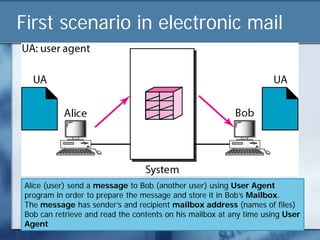
Alice (user) send a message to Bob (another user) using User Agent
program in order to prepare the message and store it in Bob’s Mailbox.
The message has sender’s and recipient mailbox address (names of files)
Bob can retrieve and read the contents on his mailbox at any time using User
Agent
First scenario
   Sender and receiver of email are users on the
    same system (mail server).
   They directly connected to a shared system
   Administrator created one mailbox for each user
    where the received messages are stored
   A Mailbox is part of local hard drive – a special
    file with permission restriction. Only owner of
    mailbox has access to the mailbox
Second scenario in electronic mail


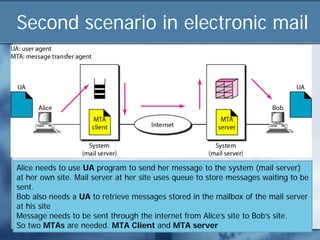
Alice needs to use UA program to send her message to the system (mail server)
at her own site. Mail server at her site uses queue to store messages waiting to be
sent.
Bob also needs a UA to retrieve messages stored in the mailbox of the mail server
at his site
Message needs to be sent through the internet from Alice’s site to Bob’s site.
So two MTAs are needed. MTA Client and MTA server
Second scenario
 Sender and receiver of the email are users
  on two different system
 Message needs to be sent over the Internet
 Here we need to have User Agents (UA)
  and Message Transfer Agents (MTA)
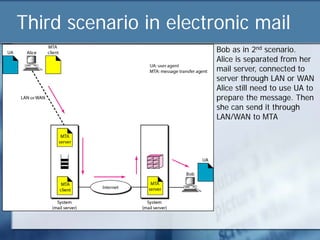
Third scenario in electronic mail
                        Bob as in 2nd scenario.
                        Alice is separated from her
                        mail server, connected to
                        server through LAN or WAN
                        Alice still need to use UA to
                        prepare the message. Then
                        she can send it through
                        LAN/WAN to MTA
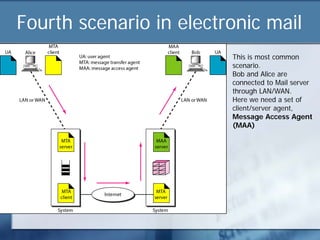
Fourth scenario in electronic mail
                         This is most common
                         scenario.
                         Bob and Alice are
                         connected to Mail server
                         through LAN/WAN.
                         Here we need a set of
                         client/server agent,
                         Message Access Agent
                         (MAA)
User Agent
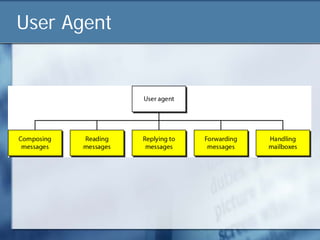
User Agent
   Compose Message
       To write message in proper format
       Provide template, built-in editor that can spell checking,
        grammar checking etc.
   Read Message
       Read incoming message
       Each received message contain;
            Number field
            Flag – status of email. E.g. new, read
            Size of message
            Sender
            Optional subject field
User Agent
   Reply Message
       Reply to the sender
   Forward Message
       Send the message to third party
   Handle Mailbox
     UA usually has Inbox and Outbox
     Inbox – keeps all received emails
     Outbox – keeps all sent email
User Agent
   Command Driven
     Accepts one character command from keyboard
      to perform its task. E.g. r to reply
     Examples: mail, pine, and elm

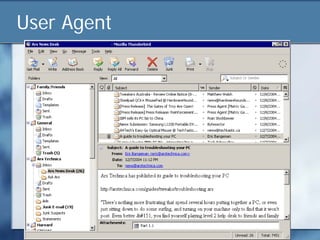
   GUI- based
       Microsoft Outlook, Netscape, Eudora,
        Thunderbird
User Agent
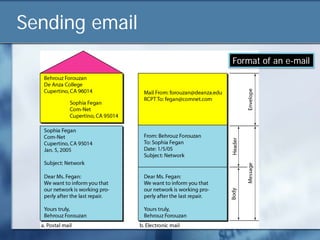
Sending email
                Format of an e-mail
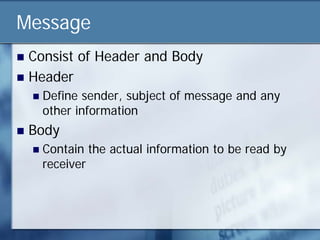
Message
 Consist of Header and Body
 Header
       Define sender, subject of message and any
        other information
   Body
       Contain the actual information to be read by
        receiver
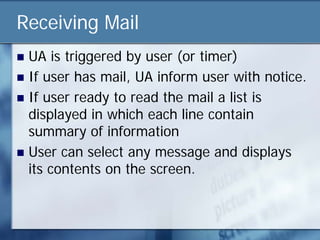
Receiving Mail
 UA is triggered by user (or timer)
 If user has mail, UA inform user with notice.
 If user ready to read the mail a list is
  displayed in which each line contain
  summary of information
 User can select any message and displays
  its contents on the screen.
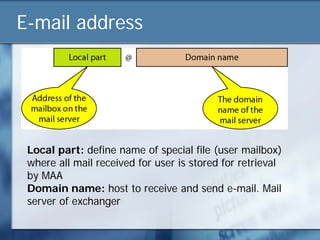
E-mail address


 Local part: define name of special file (user mailbox)
 where all mail received for user is stored for retrieval
 by MAA
 Domain name: host to receive and send e-mail. Mail
 server of exchanger
Mailing List
 Allow one name (alias) to represent
  different e-mail addresses.
 Every time message to be sent system
  checks the recipient name against alias
  database
MIME – Multipurpose Internet Mail
Extensions
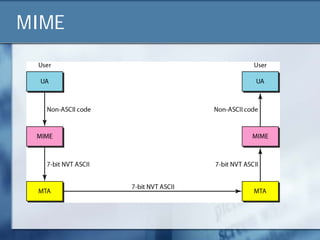
 E-mail can only send message in NVT 7-bit
  ASCII.
 MIME – supplementary protocol to allow
  non ASCII data sent through e-mail.
 Allows transmission of
     Binary data
     Multimedia files (video/audio clips)
     Multiple types in single message
     Mixed formats
MIME
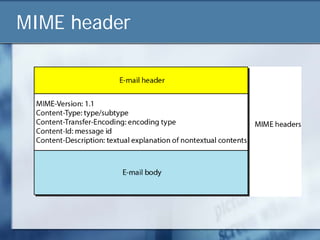
MIME header
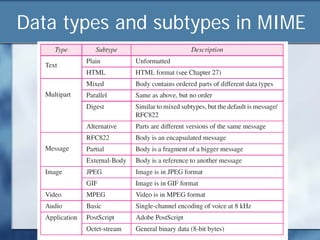
Data types and subtypes in MIME
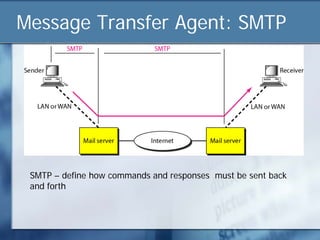
Message Transfer Agent: SMTP


 SMTP – define how commands and responses must be sent back
 and forth
SMTP - Simple Mail Transfer Protocol
 Runs over TCP
 Used between
     Mail transfer program on sender’s computer
     Mail server on recipient’s computer

   Specifies how
     Client interacts with server
     Recipients specified
     Message is transferred
SMTP
   SMTP is simple ASCII protocol where
     sender makes TCP connection to port 25 and
      waits
     receiver identifies itself and says if it will receive
      e-mail
     if rejected, sender tries again later
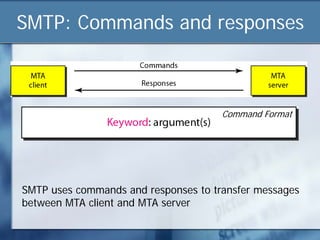
SMTP: Commands and responses


                                      Command Format


SMTP uses commands and responses to transfer messages
between MTA client and MTA server
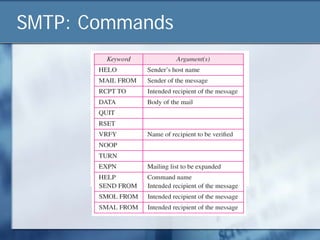
SMTP: Commands
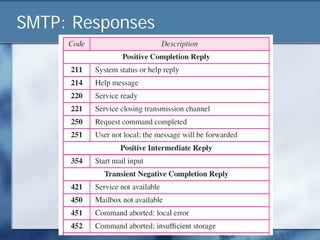
SMTP: Responses
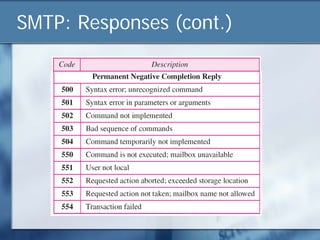
SMTP: Responses (cont.)
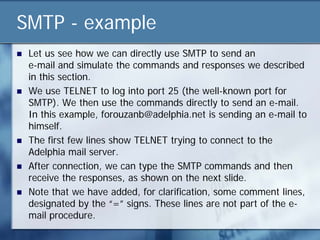
SMTP - example
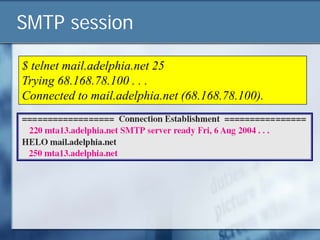
   Let us see how we can directly use SMTP to send an
    e-mail and simulate the commands and responses we described
    in this section.
   We use TELNET to log into port 25 (the well-known port for
    SMTP). We then use the commands directly to send an e-mail.
    In this example, forouzanb@adelphia.net is sending an e-mail to
    himself.
   The first few lines show TELNET trying to connect to the
    Adelphia mail server.
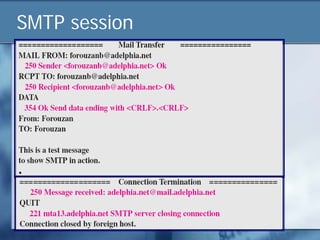
   After connection, we can type the SMTP commands and then
    receive the responses, as shown on the next slide.
   Note that we have added, for clarification, some comment lines,
    designated by the “=” signs. These lines are not part of the e-
    mail procedure.
SMTP session

$ telnet mail.adelphia.net 25
Trying 68.168.78.100 . . .
Connected to mail.adelphia.net (68.168.78.100).
SMTP session
Message Access Agent: POP3 and IMAP4
POP3 and IMAP4
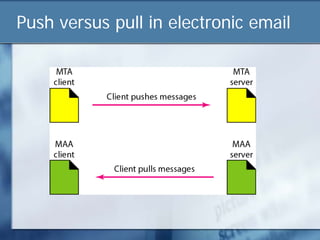
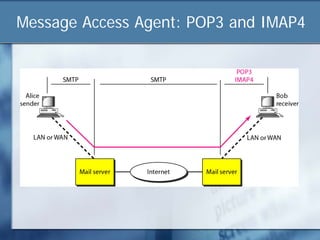
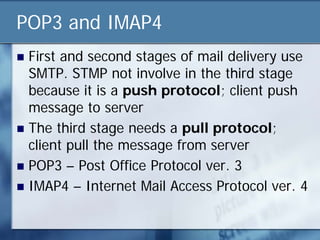
 First and second stages of mail delivery use
  SMTP. STMP not involve in the third stage
  because it is a push protocol; client push
  message to server
 The third stage needs a pull protocol;
  client pull the message from server
 POP3 – Post Office Protocol ver. 3
 IMAP4 – Internet Mail Access Protocol ver. 4
Push versus pull in electronic email
POP3
   POP3 client is installed in recipient computer.
   POP3 server is installed in mail server
   Mail access start when a client downloads its e-
    mail messages from a server.
   Two modes
       Delete: mail is deleted from mailbox after retrieval
       Keep: mail remains in mailbox after retrieval
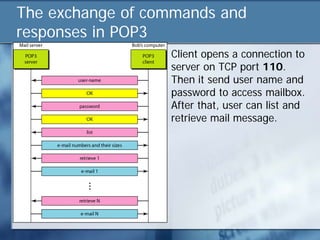
The exchange of commands and
responses in POP3
                  Client opens a connection to
                  server on TCP port 110.
                  Then it send user name and
                  password to access mailbox.
                  After that, user can list and
                  retrieve mail message.
IMAP4
   IMAP4 is more sophisticated protocol that
    offers
     Check email header prior to downloading
     Search the content of email for specific string
     Partially download the email
     Create, delete or rename mailbox on mail server
     Create hierarchy of mailboxes in a folder for
      email storage
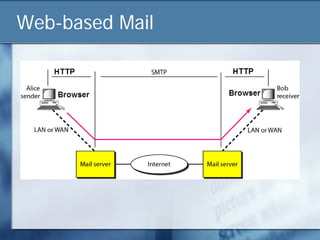
Web-based Mail
 Yahoo Mail, Gmail, Hotmail and etc..
 Mail transfer from sender’s browser to mail
  server through HTTP.
 Transfer of message from sending mail
  server to receiving server still through SMTP
 Message from receiving server (web server)
  to receiver’ browser is done through HTTP
 Instead of POP3 and IMAP4, HTTP is used
  as MAA
Web-based Mail
Summary
   Several program (protocol) including SMTP, POP3 and IMAP4, are used
    in the Internet to provide e-mail service
   The UA prepares the message, creates the envelope, and puts the
    message in the envelope.
   The email address consists of two parts: a local address (user mailbox)
    and a domain name. The form is localname@domainname.
   The MTA transfers the email across the Internet, LAN or WAN.
   SMTP uses commands and responses to transfer messages between an
    MTA client and an MTA server.
   The steps in transferring a mail message are connection establishment,
    message transfer, and connection termination.
   POP3 and IMAP4 used for pulling messages from mail server
   Multipurpose Internet Mail Extension (MIME) is an extension of SMTP
    that allows the transfer of multimedia and other non-ASCII messages.
Review Questions
 Describe the addressing system used by
  SMTP
 In e-mail, what are the tasks of User agent?
 What is MIME?
 Why do we need POP3 or IMAP4 for e-mail?

Lecture 9 electronic_mail_representation_and_transfer

  • 1.
    Lecture 9: ElectronicMail Representation and Transfer Electronic Mail Paradigm, SMTP, POP/ IMAP
  • 2.
    Outline  Introduction  Architecture User Agent  Message Transfer Agent: SMTP  Message Access Agent: POP and IMAP  Web-Based Mail
  • 3.
    Electronic Mail  Atbeginning email were short and text only, today email much more complex.  It allows a message to include text, audio, and video.  It also allows one message to be sent to one or more recipients
  • 4.
    Architecture  To explain the architecture of e-mail we will use four scenarios
  • 5.
    First scenario inelectronic mail Alice (user) send a message to Bob (another user) using User Agent program in order to prepare the message and store it in Bob’s Mailbox. The message has sender’s and recipient mailbox address (names of files) Bob can retrieve and read the contents on his mailbox at any time using User Agent
  • 6.
    First scenario  Sender and receiver of email are users on the same system (mail server).  They directly connected to a shared system  Administrator created one mailbox for each user where the received messages are stored  A Mailbox is part of local hard drive – a special file with permission restriction. Only owner of mailbox has access to the mailbox
  • 7.
    Second scenario inelectronic mail Alice needs to use UA program to send her message to the system (mail server) at her own site. Mail server at her site uses queue to store messages waiting to be sent. Bob also needs a UA to retrieve messages stored in the mailbox of the mail server at his site Message needs to be sent through the internet from Alice’s site to Bob’s site. So two MTAs are needed. MTA Client and MTA server
  • 8.
    Second scenario  Senderand receiver of the email are users on two different system  Message needs to be sent over the Internet  Here we need to have User Agents (UA) and Message Transfer Agents (MTA)
  • 9.
    Third scenario inelectronic mail Bob as in 2nd scenario. Alice is separated from her mail server, connected to server through LAN or WAN Alice still need to use UA to prepare the message. Then she can send it through LAN/WAN to MTA
  • 10.
    Fourth scenario inelectronic mail This is most common scenario. Bob and Alice are connected to Mail server through LAN/WAN. Here we need a set of client/server agent, Message Access Agent (MAA)
  • 11.
  • 12.
    User Agent  Compose Message  To write message in proper format  Provide template, built-in editor that can spell checking, grammar checking etc.  Read Message  Read incoming message  Each received message contain;  Number field  Flag – status of email. E.g. new, read  Size of message  Sender  Optional subject field
  • 13.
    User Agent  Reply Message  Reply to the sender  Forward Message  Send the message to third party  Handle Mailbox  UA usually has Inbox and Outbox  Inbox – keeps all received emails  Outbox – keeps all sent email
  • 14.
    User Agent  Command Driven  Accepts one character command from keyboard to perform its task. E.g. r to reply  Examples: mail, pine, and elm  GUI- based  Microsoft Outlook, Netscape, Eudora, Thunderbird
  • 15.
  • 16.
    Sending email Format of an e-mail
  • 17.
    Message  Consist ofHeader and Body  Header  Define sender, subject of message and any other information  Body  Contain the actual information to be read by receiver
  • 18.
    Receiving Mail  UAis triggered by user (or timer)  If user has mail, UA inform user with notice.  If user ready to read the mail a list is displayed in which each line contain summary of information  User can select any message and displays its contents on the screen.
  • 19.
    E-mail address Localpart: define name of special file (user mailbox) where all mail received for user is stored for retrieval by MAA Domain name: host to receive and send e-mail. Mail server of exchanger
  • 20.
    Mailing List  Allowone name (alias) to represent different e-mail addresses.  Every time message to be sent system checks the recipient name against alias database
  • 21.
    MIME – MultipurposeInternet Mail Extensions  E-mail can only send message in NVT 7-bit ASCII.  MIME – supplementary protocol to allow non ASCII data sent through e-mail.  Allows transmission of  Binary data  Multimedia files (video/audio clips)  Multiple types in single message  Mixed formats
  • 22.
  • 23.
  • 24.
    Data types andsubtypes in MIME
  • 25.
    Message Transfer Agent:SMTP SMTP – define how commands and responses must be sent back and forth
  • 26.
    SMTP - SimpleMail Transfer Protocol  Runs over TCP  Used between  Mail transfer program on sender’s computer  Mail server on recipient’s computer  Specifies how  Client interacts with server  Recipients specified  Message is transferred
  • 27.
    SMTP  SMTP is simple ASCII protocol where  sender makes TCP connection to port 25 and waits  receiver identifies itself and says if it will receive e-mail  if rejected, sender tries again later
  • 28.
    SMTP: Commands andresponses Command Format SMTP uses commands and responses to transfer messages between MTA client and MTA server
  • 29.
  • 30.
  • 31.
  • 32.
    SMTP - example  Let us see how we can directly use SMTP to send an e-mail and simulate the commands and responses we described in this section.  We use TELNET to log into port 25 (the well-known port for SMTP). We then use the commands directly to send an e-mail. In this example, forouzanb@adelphia.net is sending an e-mail to himself.  The first few lines show TELNET trying to connect to the Adelphia mail server.  After connection, we can type the SMTP commands and then receive the responses, as shown on the next slide.  Note that we have added, for clarification, some comment lines, designated by the “=” signs. These lines are not part of the e- mail procedure.
  • 33.
    SMTP session $ telnetmail.adelphia.net 25 Trying 68.168.78.100 . . . Connected to mail.adelphia.net (68.168.78.100).
  • 34.
  • 35.
    Message Access Agent:POP3 and IMAP4
  • 36.
    POP3 and IMAP4 First and second stages of mail delivery use SMTP. STMP not involve in the third stage because it is a push protocol; client push message to server  The third stage needs a pull protocol; client pull the message from server  POP3 – Post Office Protocol ver. 3  IMAP4 – Internet Mail Access Protocol ver. 4
  • 37.
    Push versus pullin electronic email
  • 38.
    POP3  POP3 client is installed in recipient computer.  POP3 server is installed in mail server  Mail access start when a client downloads its e- mail messages from a server.  Two modes  Delete: mail is deleted from mailbox after retrieval  Keep: mail remains in mailbox after retrieval
  • 39.
    The exchange ofcommands and responses in POP3 Client opens a connection to server on TCP port 110. Then it send user name and password to access mailbox. After that, user can list and retrieve mail message.
  • 40.
    IMAP4  IMAP4 is more sophisticated protocol that offers  Check email header prior to downloading  Search the content of email for specific string  Partially download the email  Create, delete or rename mailbox on mail server  Create hierarchy of mailboxes in a folder for email storage
  • 41.
    Web-based Mail  YahooMail, Gmail, Hotmail and etc..  Mail transfer from sender’s browser to mail server through HTTP.  Transfer of message from sending mail server to receiving server still through SMTP  Message from receiving server (web server) to receiver’ browser is done through HTTP  Instead of POP3 and IMAP4, HTTP is used as MAA
  • 42.
  • 43.
    Summary  Several program (protocol) including SMTP, POP3 and IMAP4, are used in the Internet to provide e-mail service  The UA prepares the message, creates the envelope, and puts the message in the envelope.  The email address consists of two parts: a local address (user mailbox) and a domain name. The form is localname@domainname.  The MTA transfers the email across the Internet, LAN or WAN.  SMTP uses commands and responses to transfer messages between an MTA client and an MTA server.  The steps in transferring a mail message are connection establishment, message transfer, and connection termination.  POP3 and IMAP4 used for pulling messages from mail server  Multipurpose Internet Mail Extension (MIME) is an extension of SMTP that allows the transfer of multimedia and other non-ASCII messages.
  • 44.
    Review Questions  Describethe addressing system used by SMTP  In e-mail, what are the tasks of User agent?  What is MIME?  Why do we need POP3 or IMAP4 for e-mail?