Spam Filter Guided by Laya Simpson Submitted by Anand Shekhar Ashish Ranjan Bhuneshwar Prasad Md Nasim Alam
Content Introduction Protocols Software Requirement General Block Diagram Context Diagram Screenshot Work Done Work Remaining
Introduction Spam is an unsolicited (or junk) email. Spam is flooding the Internet with many copies of the same message, in an attempt to force the message on people who would not otherwise choose to receive it In this project the spam messages are identified and move to a specified location  If a sender sends same messages on same day it will be considered as spam. If a message exceeds a certain size, it will also be considered as a spam  Some pre-specified keywords are checked. If these words are present in the mail the mail is considered as spam In this project we are using JavaMail and SMTP, POP, IMAP protocols for mail forwarding
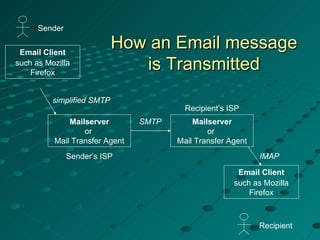
Protocol SMTP   The  S imple  M ail  T ransfer  P rotocol (SMTP) is the mechanism for delivery of email. In the context of the JavaMail API, the  JavaMail-based  program  will communicate with the company or Internet Service Provider's (ISP's) SMTP server. That SMTP server will relay the message on to the SMTP server of the recipient(s) to eventually be acquired by the user(s) through POP or IMAP. This does not require the SMTP server to be an open relay, as authentication is supported, but it should be ensured that the SMTP server is configured properly.
POP POP stands for  P ost  O ffice  P rotocol. POP is the mechanism most people on the Internet use to get their mail. It defines support for a single mailbox for each user The Post Office Protocol defines how the email client should talk to the POP server. POP can perform the following functions:  Retrieve mail from an ISP and delete it on the server.  Retrieve mail from an ISP but not delete it on the server.  Ask whether new mail has arrived but not retrieve it.  Peek at a few lines of a message to see whether it is worth retrieving .
IMAP IMAP is a more advanced protocol for receiving messages. IMAP stands for  I nternet  M essage  A ccess  P rotocol. It permits a "client" email program to access remote message stores as if they were local. Key features of IMAP include: It is fully compatible with Internet messaging standards, e.g. MIME. It allows message access and management from more than one computer. It allows access without reliance on less efficient file access protocols. It provides support for "online", "offline", and "disconnected" access modes. It supports concurrent access to shared mailboxes Client software needs no knowledge about the server's file store format .
Software   requirements Platform : Linux Language Used : J2EE Back End : MySql Technologies Used : JSP, JavaMailDesigner Tool : HTML Server : J2EE Application Server, SMTP
Email Client such as Mozilla Firefox simplified SMTP How an Email message is Transmitted Sender SMTP Mailserver or  Mail Transfer Agent Sender’s ISP Recipient’s ISP Recipient IMAP Mailserver or  Mail Transfer Agent Email Client such as Mozilla Firefox
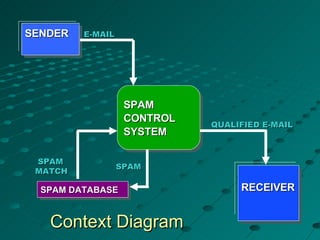
SPAM CONTROL SYSTEM RECEIVER SPAM DATABASE E-MAIL SPAM  MATCH SPAM Context Diagram QUALIFIED E-MAIL SENDER
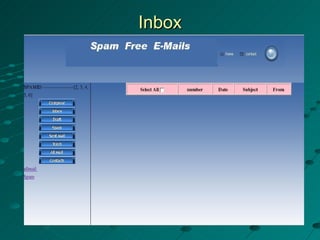
Screenshots
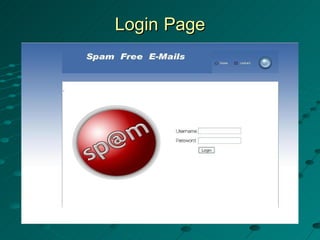
Login   Page
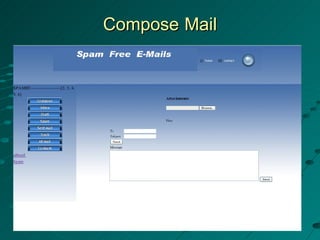
Compose   Mail
Inbox
Completed work Design of static pages is almost completed. We have designed : Login page Inbox page  Compose page Spam page Allmail page  Contact page Validation of username and password
Remaining work  We have to provide feature to add a new contact in the contact list Connection of Apache JavaMail server  Coding for Send mail Spam checking Mail Delete Read mail Compose mail with attachment of files Contact Address
Thank You

Spam Filter

  • 1.
    Spam Filter Guidedby Laya Simpson Submitted by Anand Shekhar Ashish Ranjan Bhuneshwar Prasad Md Nasim Alam
  • 2.
    Content Introduction ProtocolsSoftware Requirement General Block Diagram Context Diagram Screenshot Work Done Work Remaining
  • 3.
    Introduction Spam isan unsolicited (or junk) email. Spam is flooding the Internet with many copies of the same message, in an attempt to force the message on people who would not otherwise choose to receive it In this project the spam messages are identified and move to a specified location If a sender sends same messages on same day it will be considered as spam. If a message exceeds a certain size, it will also be considered as a spam Some pre-specified keywords are checked. If these words are present in the mail the mail is considered as spam In this project we are using JavaMail and SMTP, POP, IMAP protocols for mail forwarding
  • 4.
    Protocol SMTP The S imple M ail T ransfer P rotocol (SMTP) is the mechanism for delivery of email. In the context of the JavaMail API, the JavaMail-based program will communicate with the company or Internet Service Provider's (ISP's) SMTP server. That SMTP server will relay the message on to the SMTP server of the recipient(s) to eventually be acquired by the user(s) through POP or IMAP. This does not require the SMTP server to be an open relay, as authentication is supported, but it should be ensured that the SMTP server is configured properly.
  • 5.
    POP POP standsfor P ost O ffice P rotocol. POP is the mechanism most people on the Internet use to get their mail. It defines support for a single mailbox for each user The Post Office Protocol defines how the email client should talk to the POP server. POP can perform the following functions: Retrieve mail from an ISP and delete it on the server. Retrieve mail from an ISP but not delete it on the server. Ask whether new mail has arrived but not retrieve it. Peek at a few lines of a message to see whether it is worth retrieving .
  • 6.
    IMAP IMAP isa more advanced protocol for receiving messages. IMAP stands for I nternet M essage A ccess P rotocol. It permits a "client" email program to access remote message stores as if they were local. Key features of IMAP include: It is fully compatible with Internet messaging standards, e.g. MIME. It allows message access and management from more than one computer. It allows access without reliance on less efficient file access protocols. It provides support for "online", "offline", and "disconnected" access modes. It supports concurrent access to shared mailboxes Client software needs no knowledge about the server's file store format .
  • 7.
    Software requirements Platform : Linux Language Used : J2EE Back End : MySql Technologies Used : JSP, JavaMailDesigner Tool : HTML Server : J2EE Application Server, SMTP
  • 8.
    Email Client suchas Mozilla Firefox simplified SMTP How an Email message is Transmitted Sender SMTP Mailserver or Mail Transfer Agent Sender’s ISP Recipient’s ISP Recipient IMAP Mailserver or Mail Transfer Agent Email Client such as Mozilla Firefox
  • 9.
    SPAM CONTROL SYSTEMRECEIVER SPAM DATABASE E-MAIL SPAM MATCH SPAM Context Diagram QUALIFIED E-MAIL SENDER
  • 10.
  • 11.
    Login Page
  • 12.
  • 13.
  • 14.
    Completed work Designof static pages is almost completed. We have designed : Login page Inbox page Compose page Spam page Allmail page Contact page Validation of username and password
  • 15.
    Remaining work We have to provide feature to add a new contact in the contact list Connection of Apache JavaMail server Coding for Send mail Spam checking Mail Delete Read mail Compose mail with attachment of files Contact Address
  • 16.