Name: Shwetanshu Gupta
MBA- 1st Sem- 49
E- mail ?
One of the most important services of internet
is electronic- mail.
Electronic mail, commonly referred to as e-
mail since 1993, is a method of exchanging
digital messages from a user to one or more
recipients.
Some early email systems required both the
users to be online at the same time.
Cont’d
Today's email systems are based on a store-
and-forward model.
Requires an account on a mail server and
supporting software on your PC
The username and password will allow you
to access your account
All e-mail programs allow you to Send,
Compose, Reply, and Forward mail
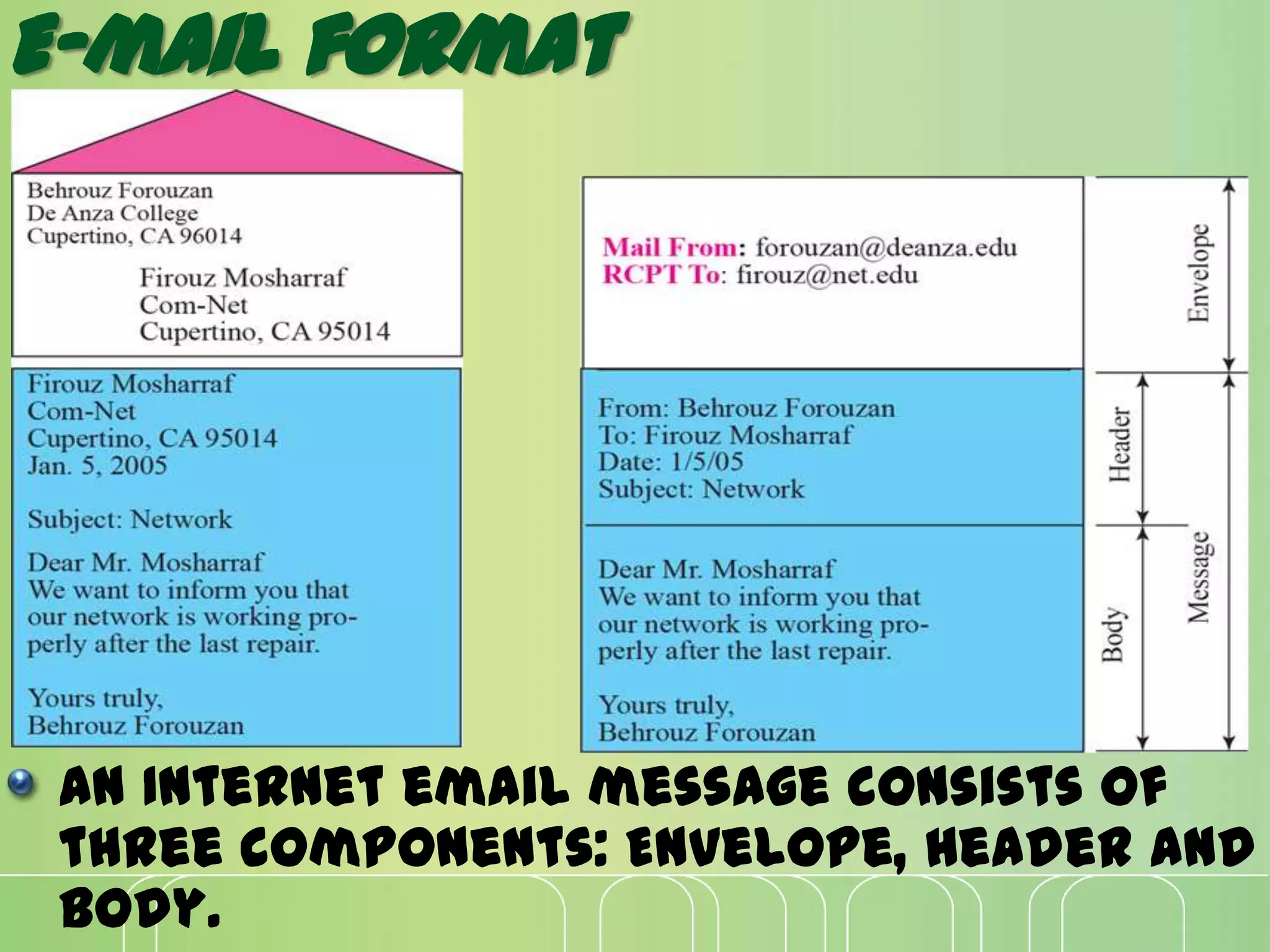
E-mail format
An Internet email message consists of
three components: Envelope, Header and
Body.
Architecture
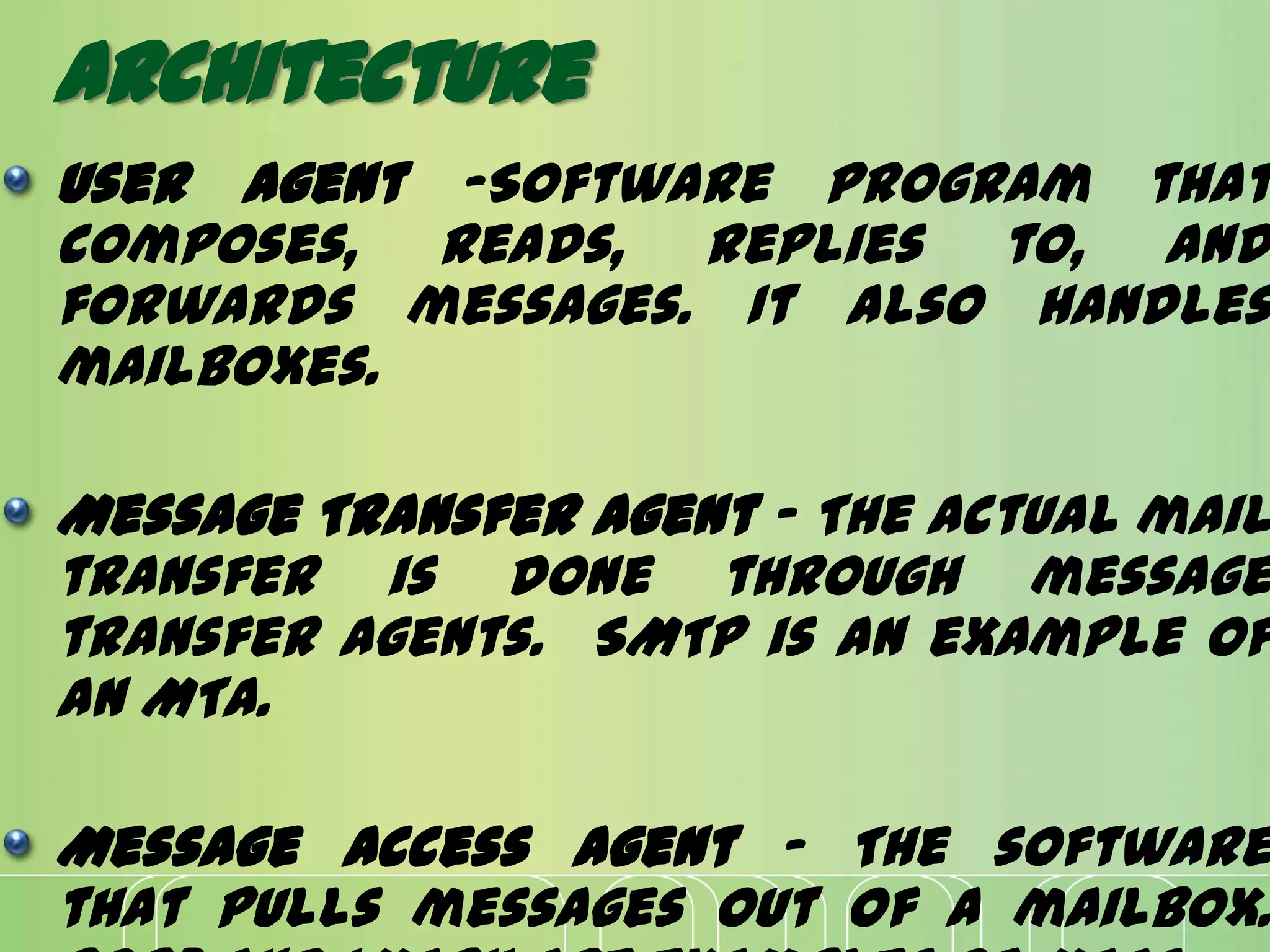
User Agent -Software program that
composes, reads, replies to, and
forwards messages. It also handles
mailboxes.
Message Transfer Agent - The actual mail
transfer is done through message
transfer agents. SMTP is an example of
an MTA.
Message Access Agent - The software
that pulls messages out of a mailbox.
SCENARIORS IN E-MAIL
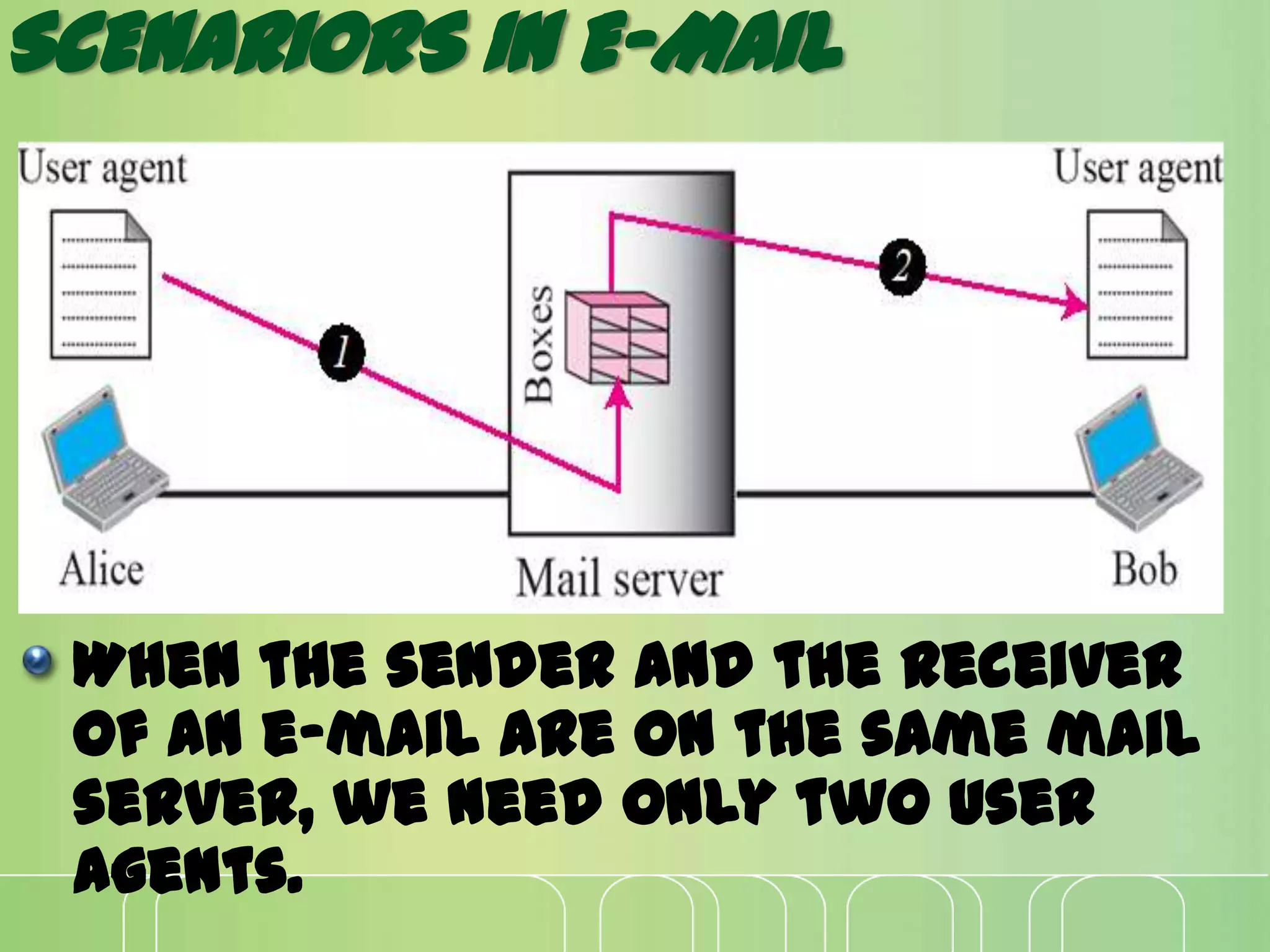
When the sender and the receiver
of an e-mail are on the same mail
server, we need only two user
agents.
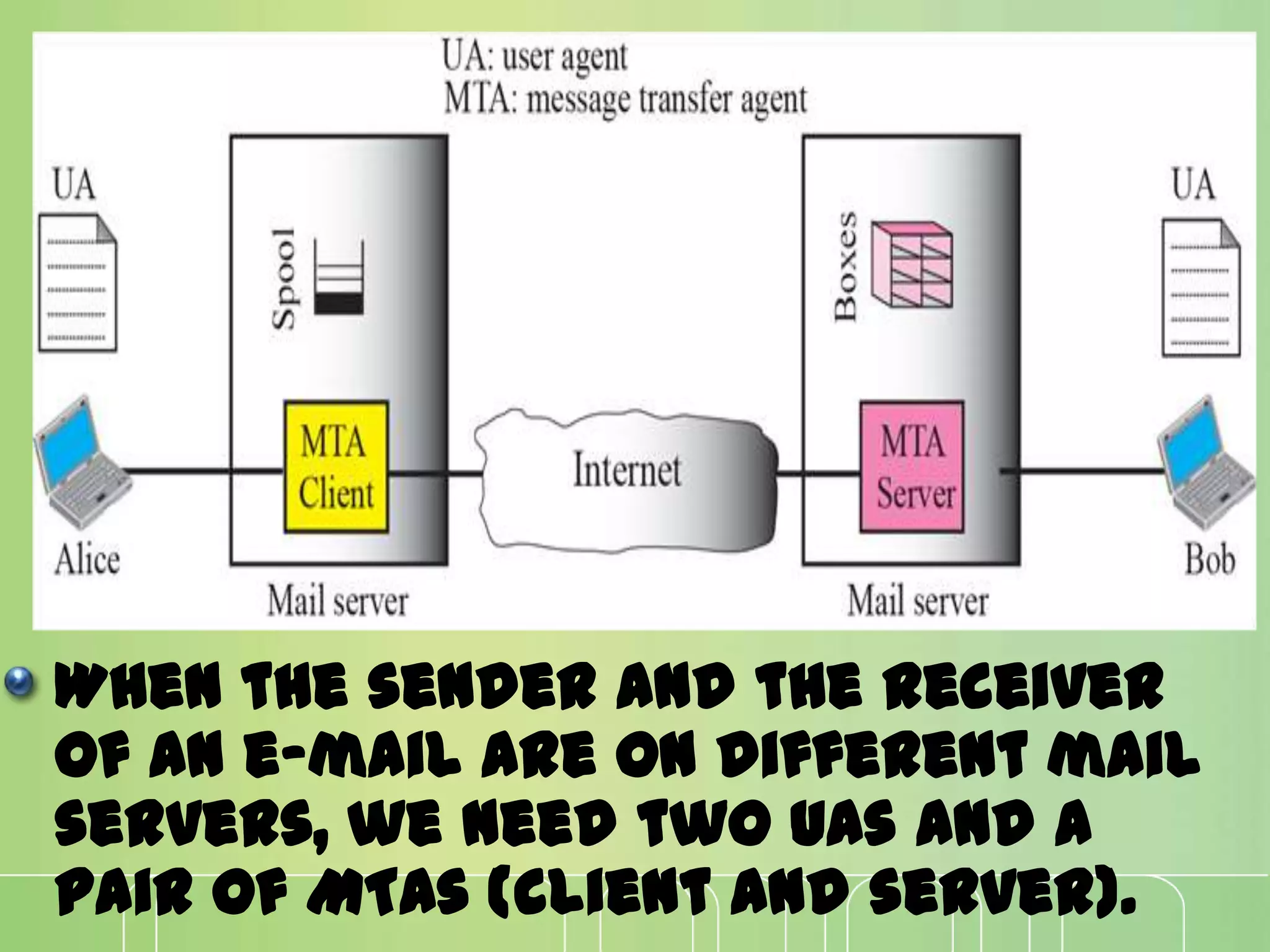
When the sender and the receiver
of an e-mail are on different mail
servers, we need two UAs and a
pair of MTAs (client and server).
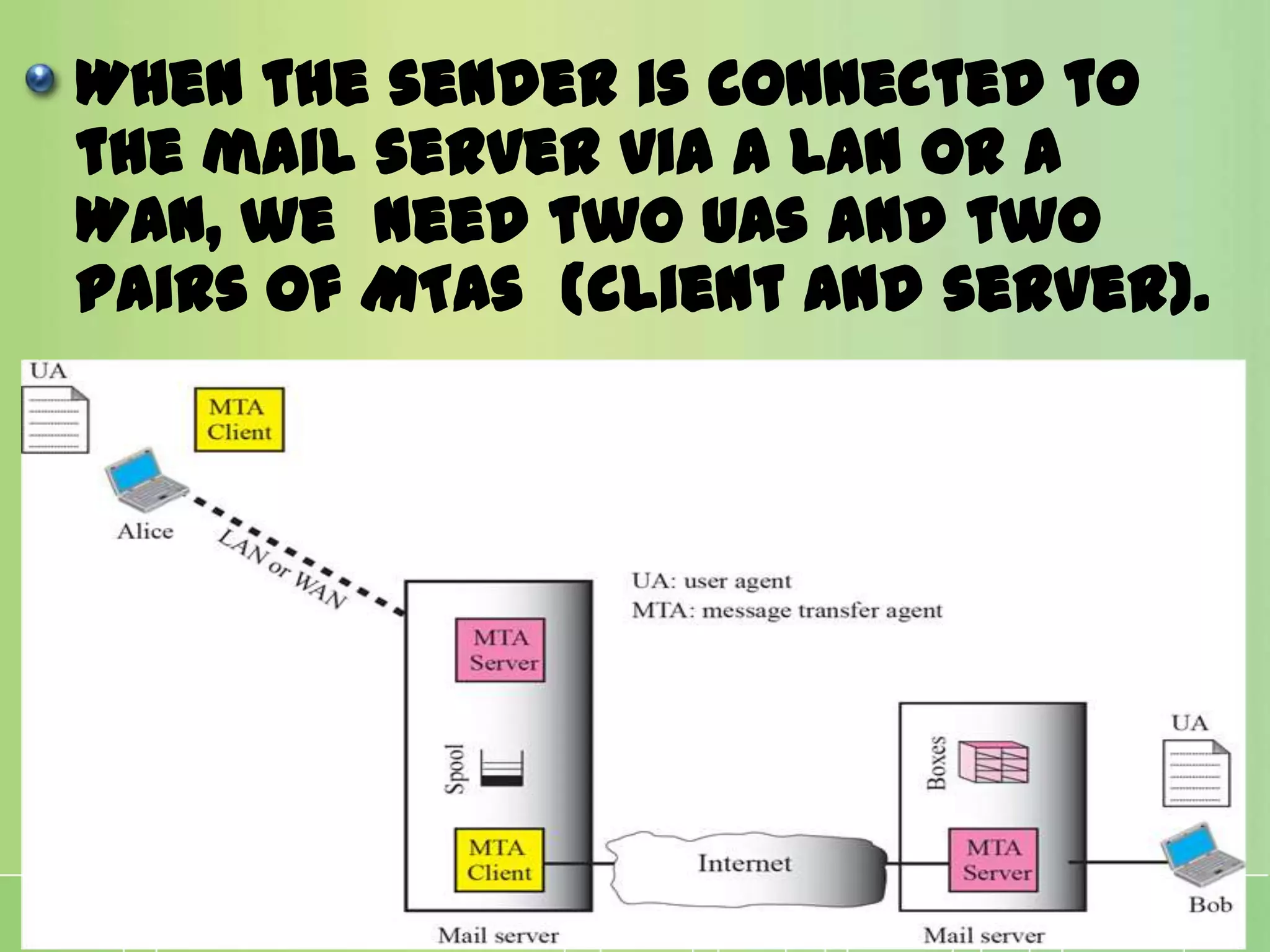
When the sender is connected to
the mail server via a LAN or a
WAN, we need two UAs and two
pairs of MTAs (client and server).
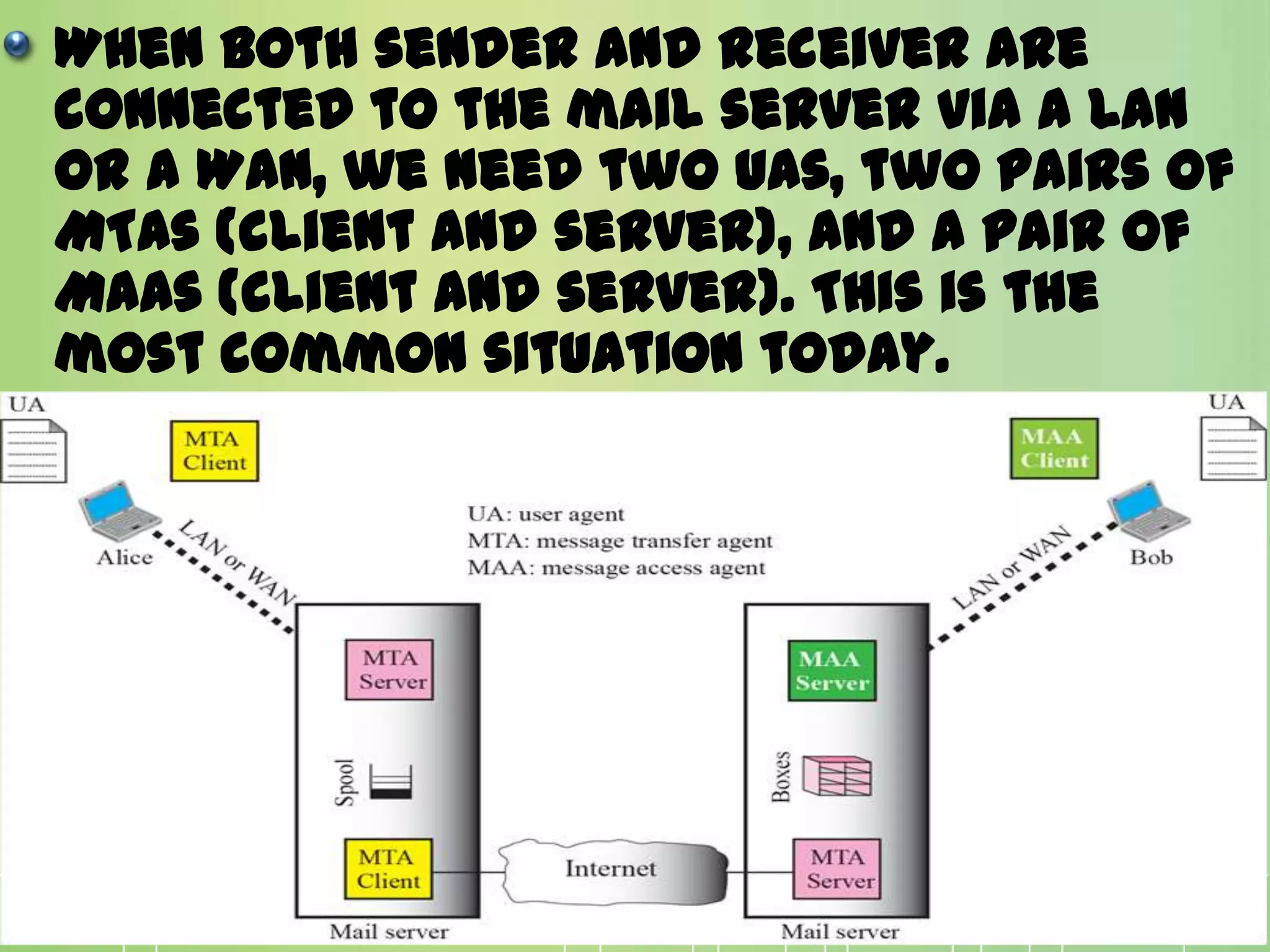
When both sender and receiver are
connected to the mail server via a LAN
or a WAN, we need two UAs, two pairs of
MTAs (client and server), and a pair of
MAAs (client and server). This is the
most common situation today.
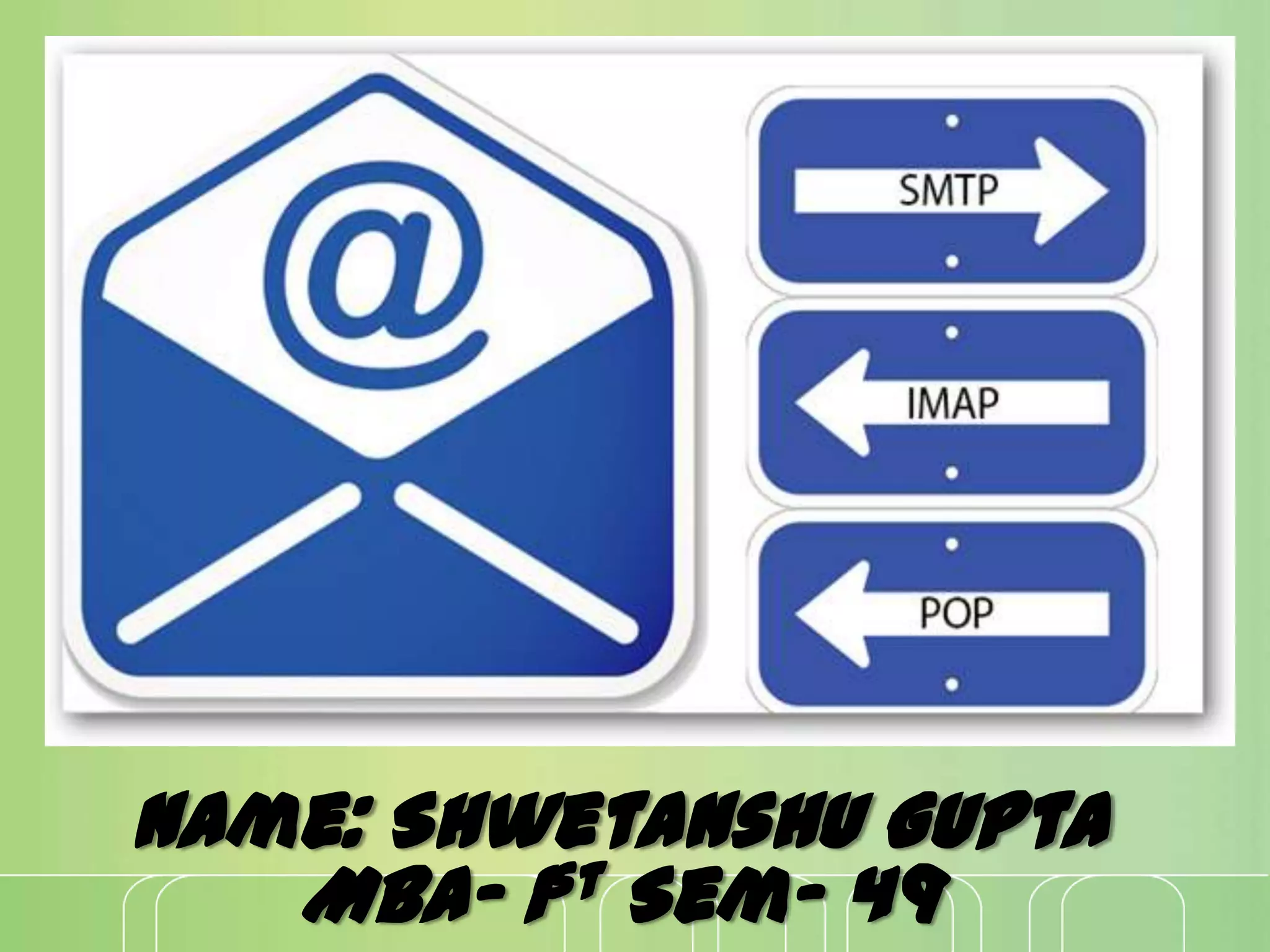
SMTP, POP 3, IMAPV4
For exchanging of e-
mail, protocols are
required. These are:
SMTP
SMTP is short for Simple Mail Transfer Protocol. It is
a standard for sending electronic mail over internet
and part of the TCP/IP protocol suite.
SMTP defines the message format and the message
transfer agent (MTA), which stores and forwards the
mail.
SMTP is a relatively simple, text-based
protocol, where one or more recipients of a message
are specified and then the message text is
transferred.
The direction of the bulk data (messages) is from the
client to the server.
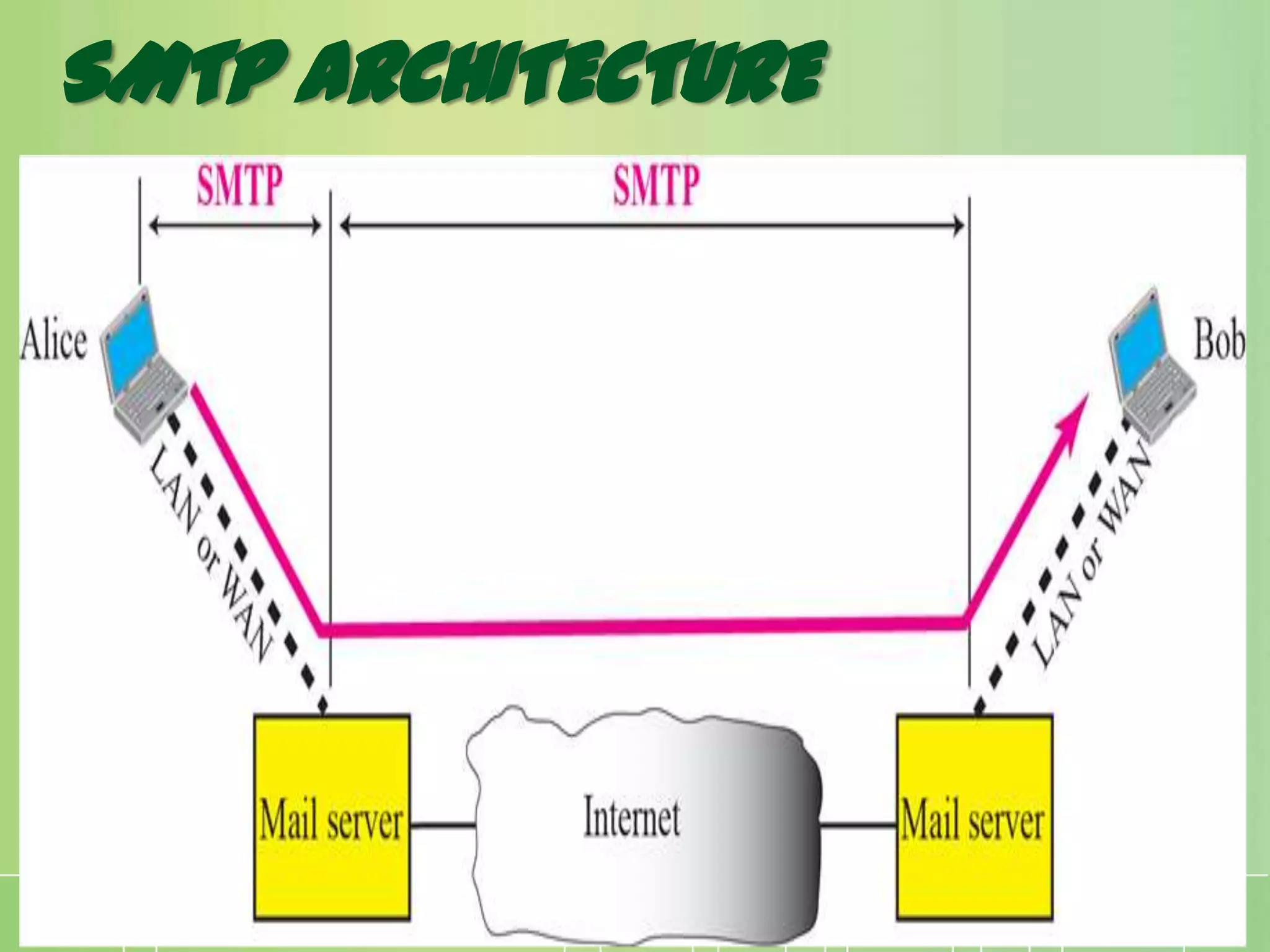
SMTP ARCHITECTURE
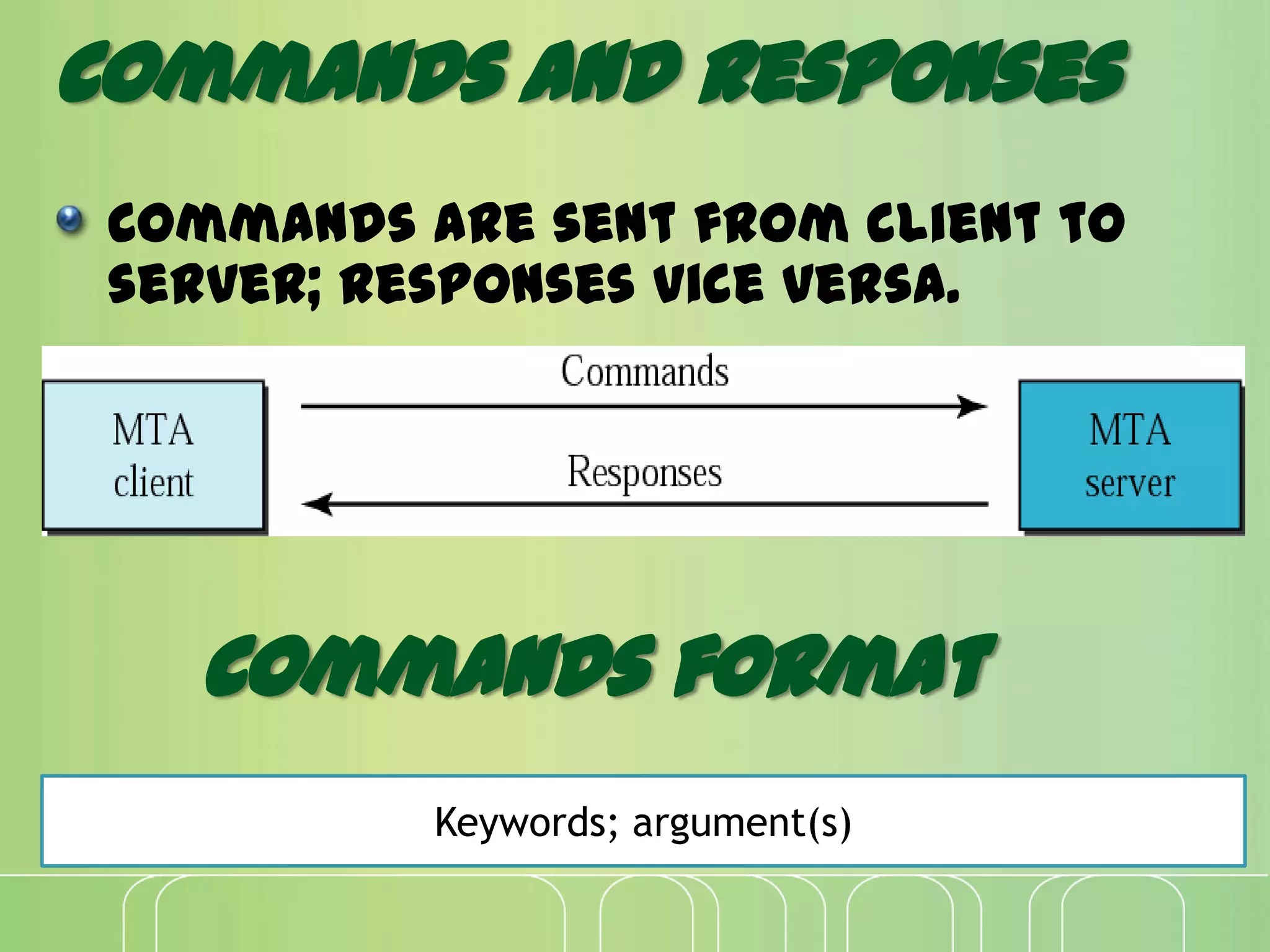
Commands and Responses
Commands are sent from client to
server; responses vice versa.
Keywords; argument(s)
Commands format
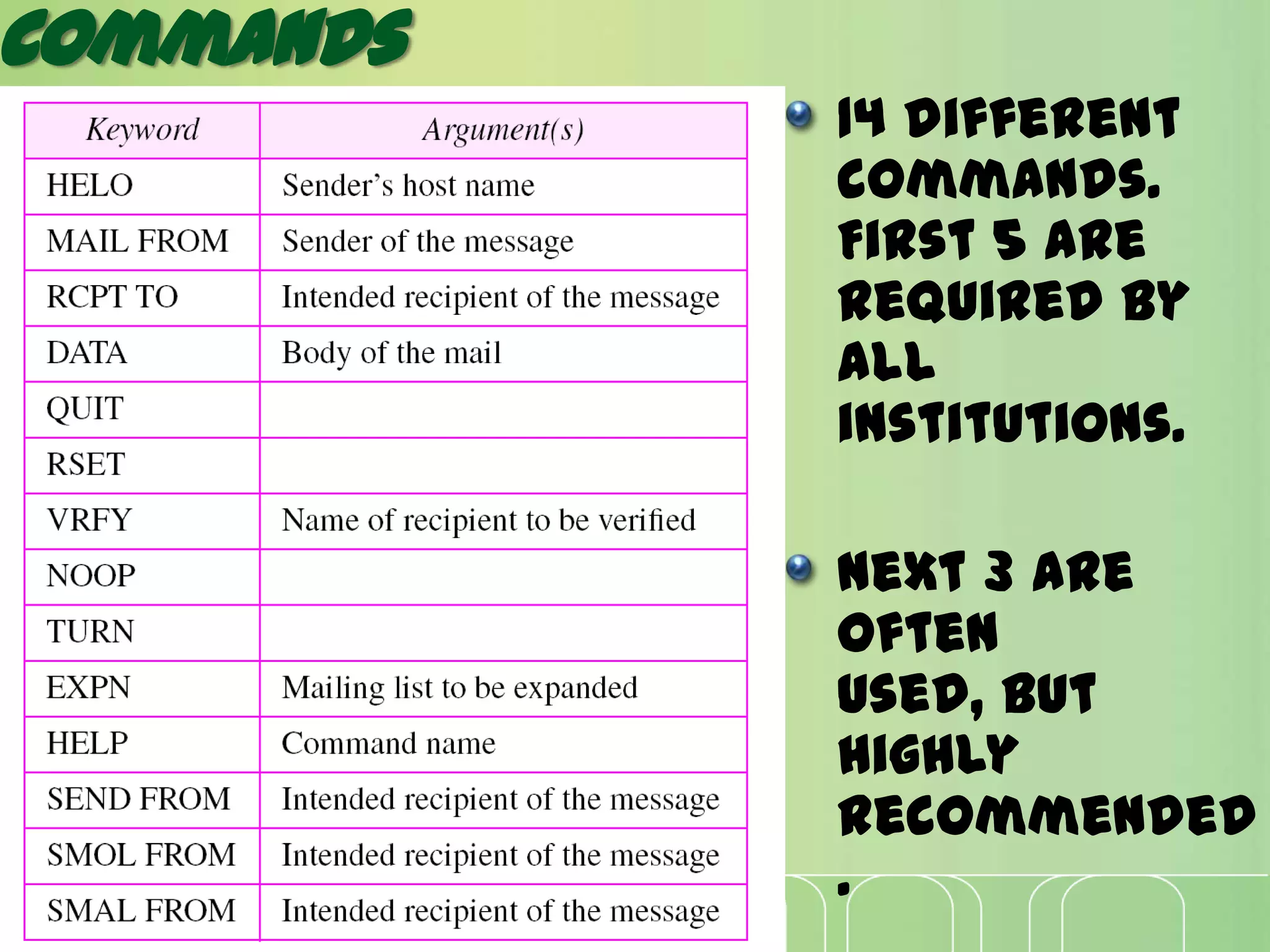
Commands
14 different
commands.
First 5 are
required by
all
institutions.
Next 3 are
often
used, but
highly
recommended
.
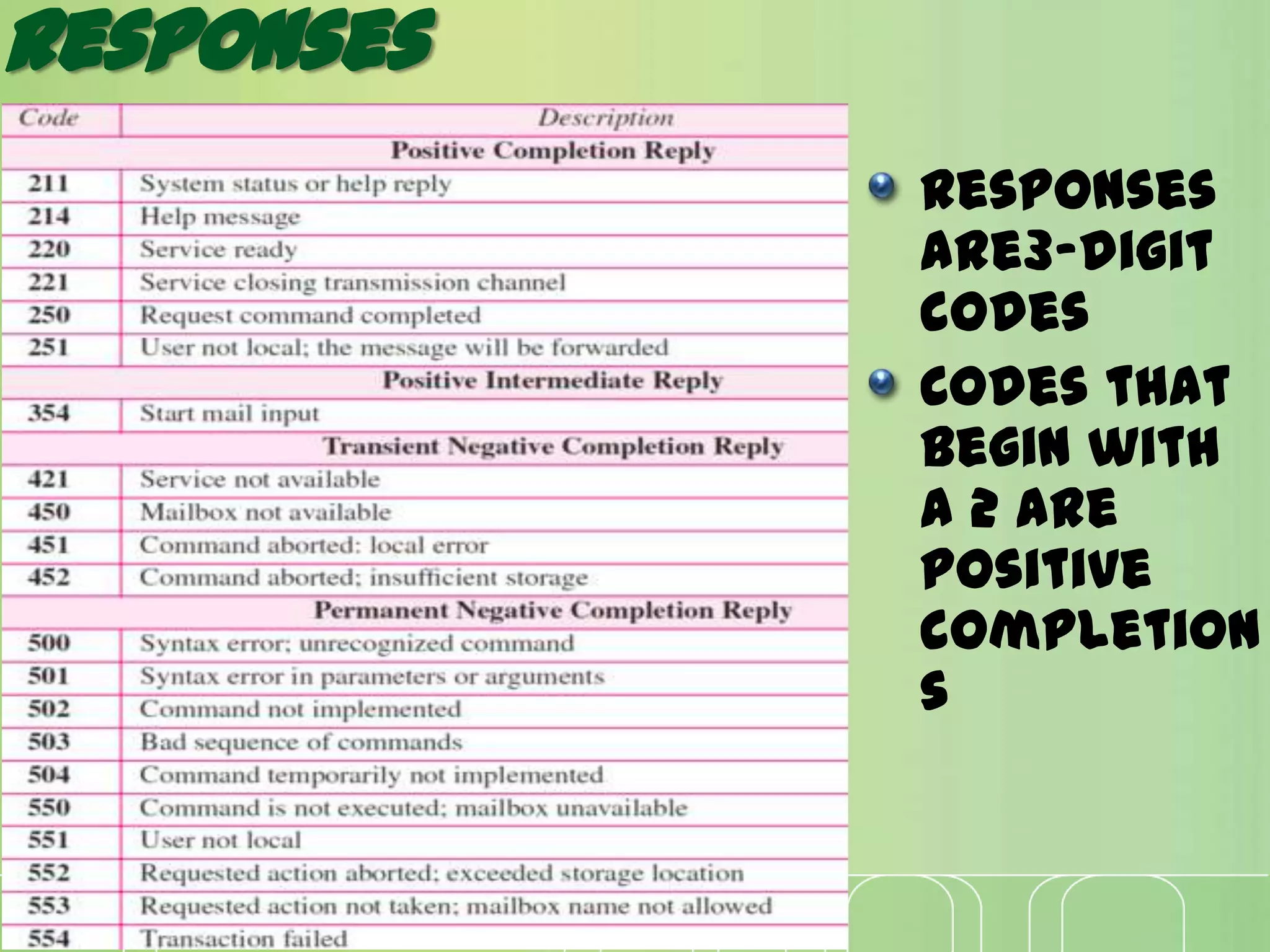
Responses
Responses
are3-digit
codes
Codes that
begin with
a 2 are
positive
completion
s
LIMITATIONS OF SMTP:
Security matters for SMTP are worse.
Its usefulness is limited by its
simplicity.
Transmission of binary files using SMTP
is not possible without converting into
text files. Use MIME to send mail in
other format.
It is limited to 7-bit ASCII characters
only.
SMTP servers may reject mail messages
beyond some specific length.
POP3 AND IMAPV4
The first and the second stages of mail
delivery use SMTP. However, SMTP is not
involved in the third stage because SMTP is a
push protocol; it pushes the message from the
client to the server.
In other words, the direction of the bulk data
(messages) is from the client to the server.
On the other hand, the third stage needs a pull
protocol; the client must pull messages from
the server. The direction of the bulk data are
from the server to the client. The third stage
uses a message access agent.
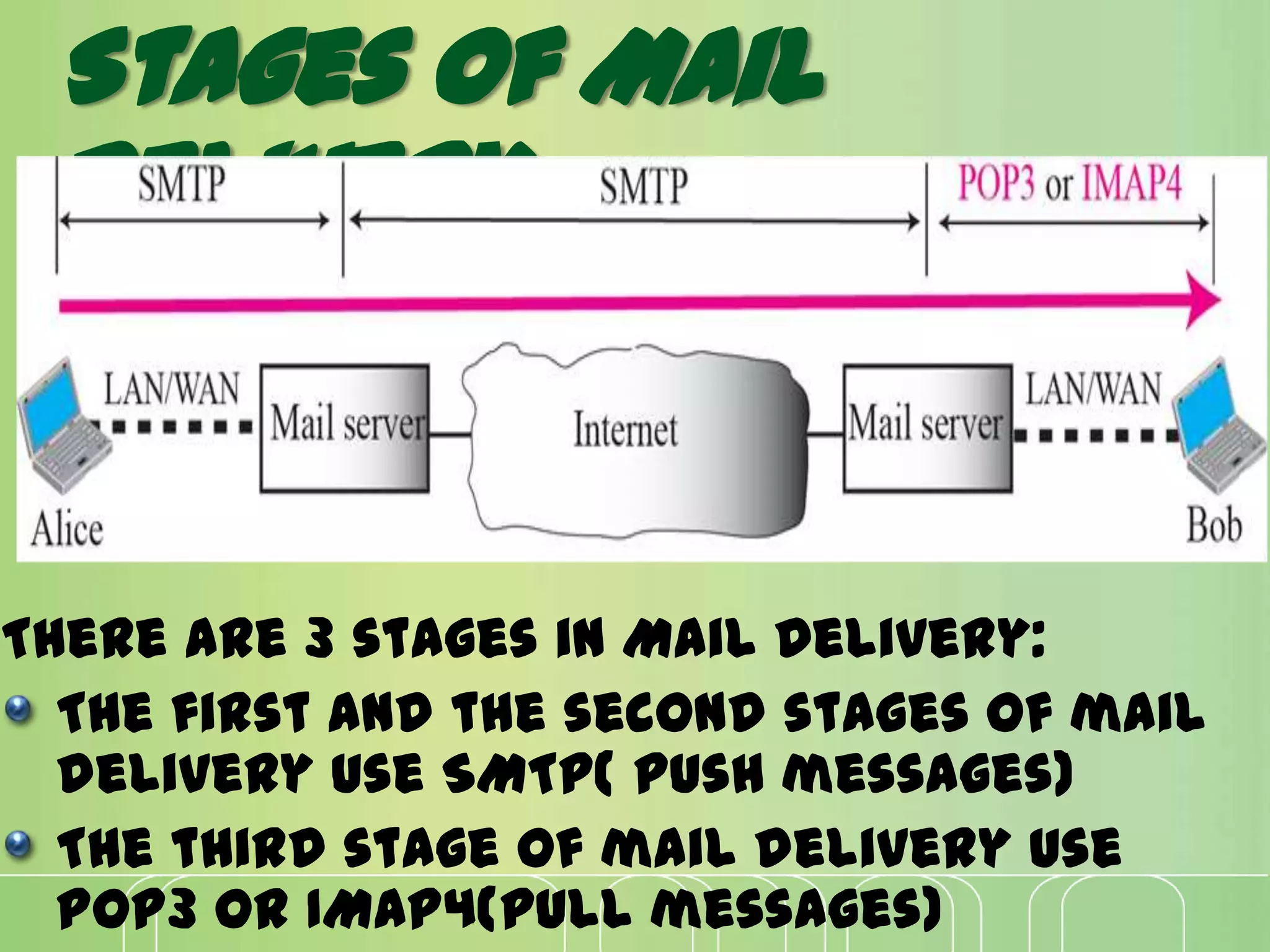
There are 3 stages in Mail Delivery:
The first and the second stages of mail
delivery use SMTP( push messages)
The third stage of mail delivery use
POP3 or IMAP4(pull messages)
Stages of Mail
Delivery
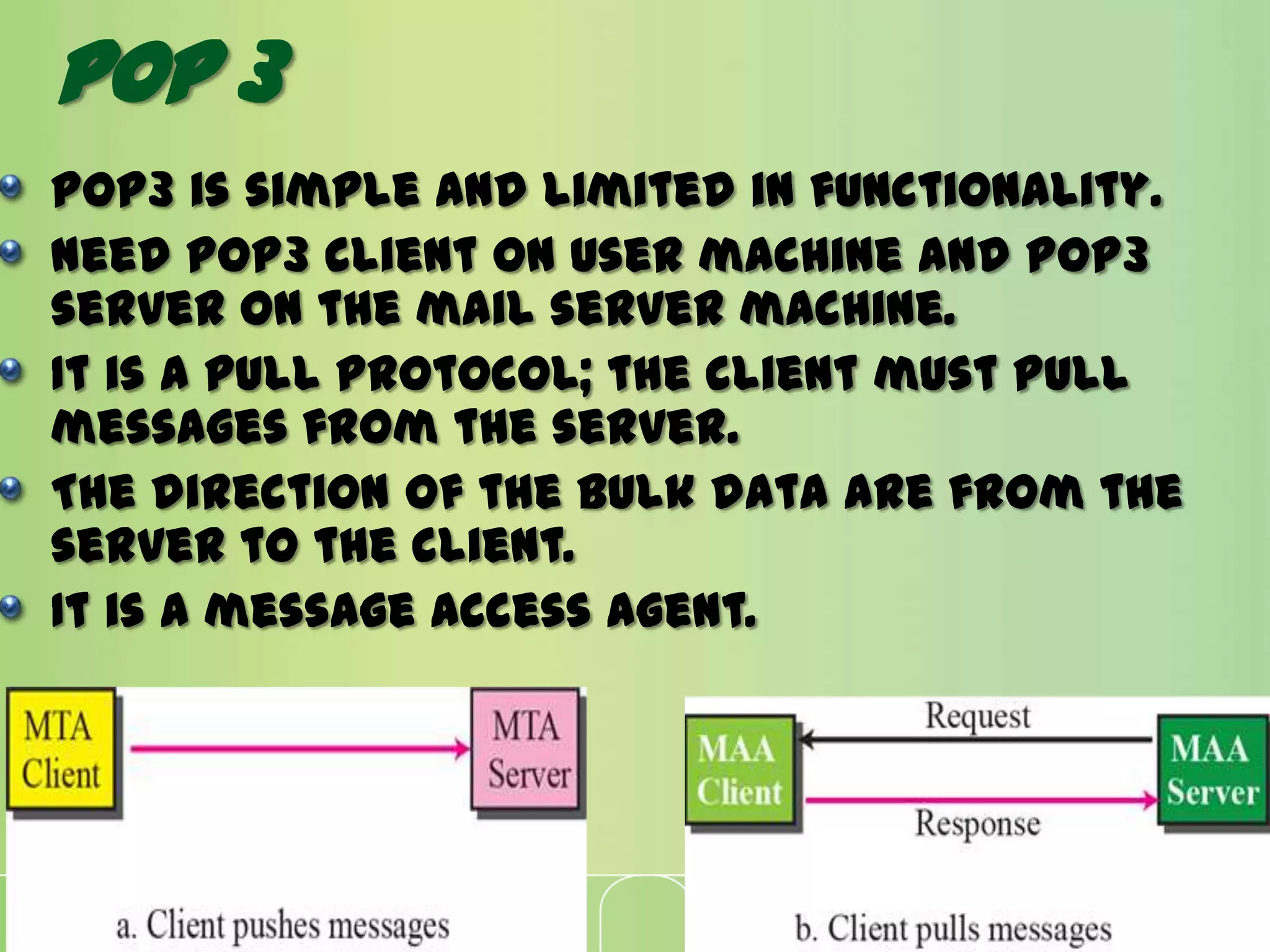
POP3 is simple and limited in functionality.
Need POP3 client on user machine and POP3
server on the mail server machine.
It is a pull protocol; the client must pull
messages from the server.
The direction of the bulk data are from the
server to the client.
It is a message access agent.
Pop 3
POP 3
Pop3 has two modes: keep mode and
delete mode
In delete mode mail is deleted from
mailbox after each retrieval.
In keep mode, mail remains in mailbox
after each retrieval.
Advantages:
Simple protocol
Easier to
implement
Copies all
messages when
connection is
made.
Disadvantages:
Don’t allow user
to organize mails
on server.
Don’t allow user
to partially
check the
contents of mail
before
downloading.
IMAPV4
As its name implies, IMAP allows us to access
email messages wherever we are .
Basically, email messages are stored on
servers. Whenever we heck inbox, our email
client contacts the server to connect with
messages.
When we read an email message using IMAP, we
aren't actually downloading or storing it on
computer; instead, we are reading it off of
the server.
As a result, it's possible to email from
several different devices without missing a
thing.
It as an intermediary between email
client and email server.
When you sign into an email client like
Microsoft Outlook, it contacts the
email server using IMAP.
The headers of all of your email
messages are then displayed.
If you choose to read a message, it is
quickly downloaded so that you can
see it - emails are not downloaded
unless you need to open them.
POP works by contacting email server and
downloading all new messages from it. Once
they are downloaded, they disappear from
the server.
If we decide to check email from a different
device, the messages that have been
downloaded previously will not be
available.
POP works fine for those who generally
only check their email messages from a
single device; those who travel or need to
access their email from various devices are
much better off with IMAP-based email
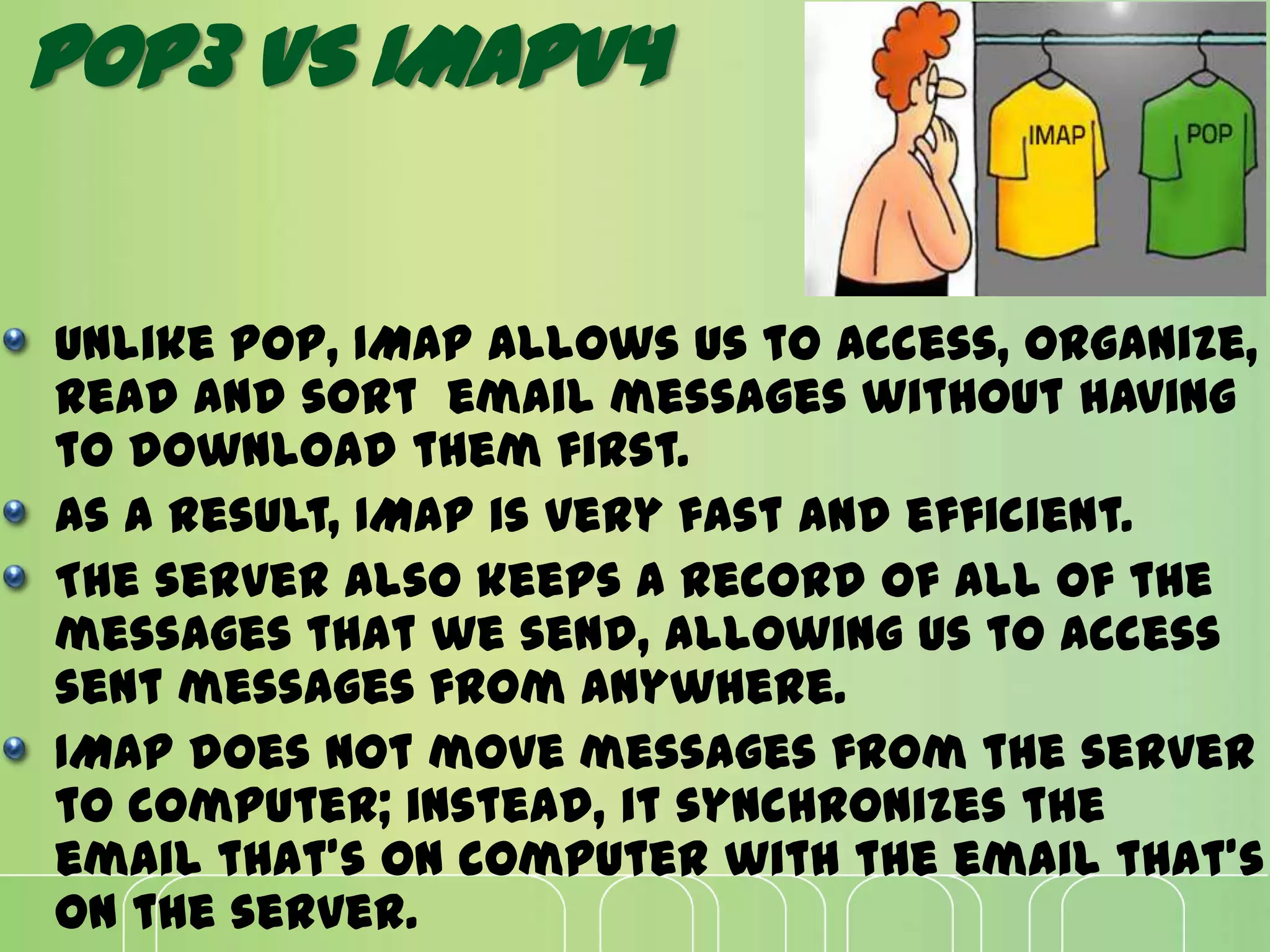
Unlike POP, IMAP allows us to access, organize,
read and sort email messages without having
to download them first.
As a result, IMAP is very fast and efficient.
The server also keeps a record of all of the
messages that we send, allowing us to access
sent messages from anywhere.
IMAP does not move messages from the server
to computer; instead, it synchronizes the
email that's on computer with the email that's
on the server.
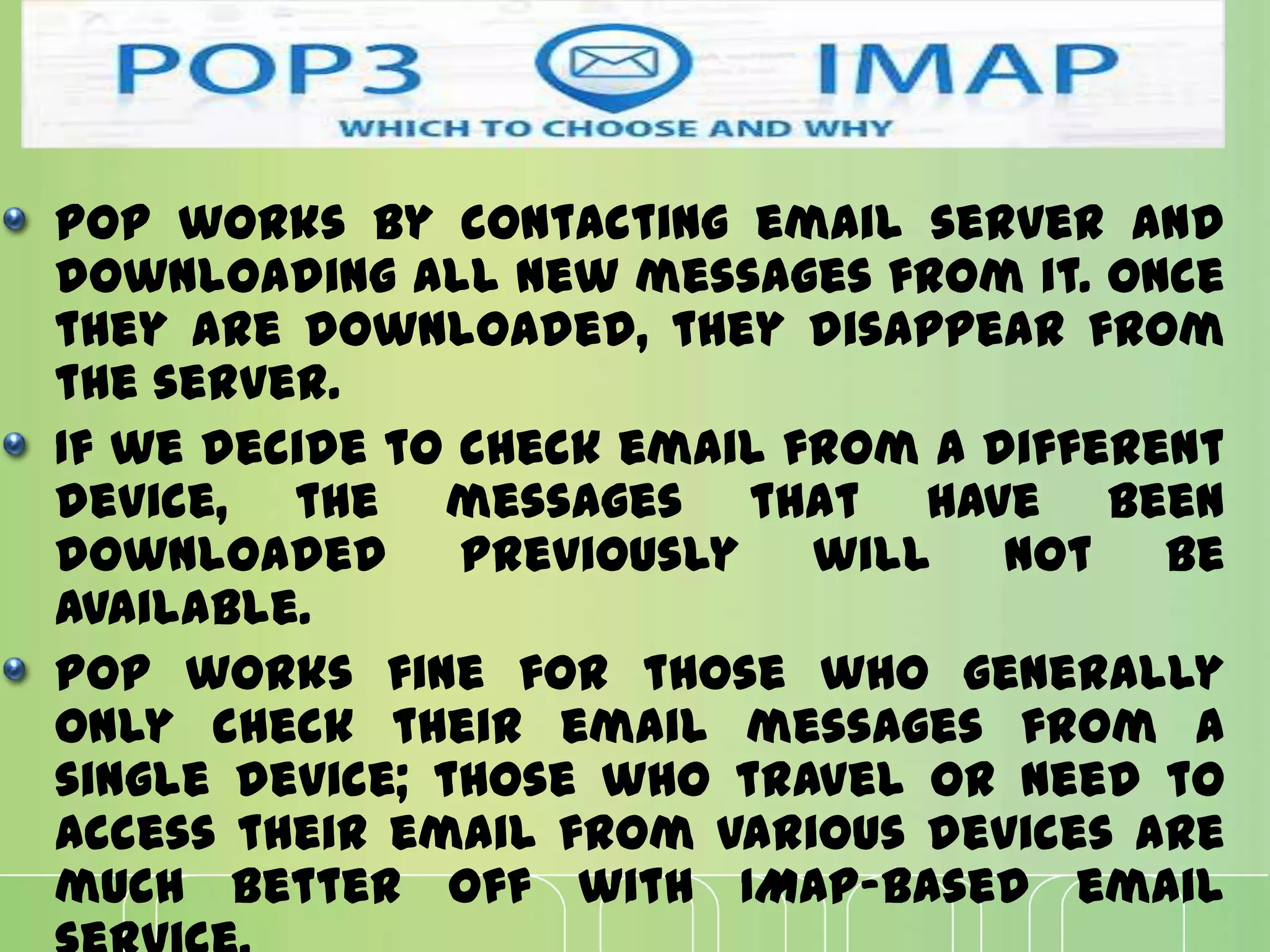
POP3 VS IMAPV4
Advantages of imapv4
A user can check the email header prior to
downloading
A user can search the contents of the email
for a specific string of characters prior to
downloading
A user can partially download email
(helpful if email contains huge attachments
and connection is slow)
A user can create, delete, or rename
mailboxes on the mail server
A user can create a hierarchy of mailboxes in
a folder for email storage
It allows us to access email messages from
anywhere, and from many different devices as we
want.
It only downloads a message when we click on it. As a
result, you do not have to wait for all of your new
messages to download from the server before you
can read them.
Attachments are not automatically downloaded with
IMAP. As a result, you're able to check your messages a
lot more quickly and have greater control over
which attachments are opened.
Finally, IMAP can be used offline just like POP - you
can basically enjoy the benefits of both protocols in
one.
CONCLUSION
As the world becomes more mobile
than ever, IMAP is becoming more and
more popular. The proliferation of
smartphones, laptops, tablets and
other devices is making the demand
for IMAP stronger than ever.
While POP will remain popular with
people who only access their email via
one or two devices - and those who
have slow connections to the Internet -
IMAP is sure to remain the protocol of
choice for most of today's busy
people.
Smtp, pop3, imapv 4

Smtp, pop3, imapv 4

  • 1.
  • 2.
    E- mail ? Oneof the most important services of internet is electronic- mail. Electronic mail, commonly referred to as e- mail since 1993, is a method of exchanging digital messages from a user to one or more recipients. Some early email systems required both the users to be online at the same time.
  • 3.
    Cont’d Today's email systemsare based on a store- and-forward model. Requires an account on a mail server and supporting software on your PC The username and password will allow you to access your account All e-mail programs allow you to Send, Compose, Reply, and Forward mail
  • 4.
    E-mail format An Internetemail message consists of three components: Envelope, Header and Body.
  • 5.
    Architecture User Agent -Softwareprogram that composes, reads, replies to, and forwards messages. It also handles mailboxes. Message Transfer Agent - The actual mail transfer is done through message transfer agents. SMTP is an example of an MTA. Message Access Agent - The software that pulls messages out of a mailbox.
  • 6.
    SCENARIORS IN E-MAIL Whenthe sender and the receiver of an e-mail are on the same mail server, we need only two user agents.
  • 7.
    When the senderand the receiver of an e-mail are on different mail servers, we need two UAs and a pair of MTAs (client and server).
  • 8.
    When the senderis connected to the mail server via a LAN or a WAN, we need two UAs and two pairs of MTAs (client and server).
  • 9.
    When both senderand receiver are connected to the mail server via a LAN or a WAN, we need two UAs, two pairs of MTAs (client and server), and a pair of MAAs (client and server). This is the most common situation today.
  • 10.
    SMTP, POP 3,IMAPV4 For exchanging of e- mail, protocols are required. These are:
  • 11.
    SMTP SMTP is shortfor Simple Mail Transfer Protocol. It is a standard for sending electronic mail over internet and part of the TCP/IP protocol suite. SMTP defines the message format and the message transfer agent (MTA), which stores and forwards the mail. SMTP is a relatively simple, text-based protocol, where one or more recipients of a message are specified and then the message text is transferred. The direction of the bulk data (messages) is from the client to the server.
  • 12.
  • 13.
    Commands and Responses Commandsare sent from client to server; responses vice versa. Keywords; argument(s) Commands format
  • 14.
    Commands 14 different commands. First 5are required by all institutions. Next 3 are often used, but highly recommended .
  • 15.
  • 16.
    LIMITATIONS OF SMTP: Securitymatters for SMTP are worse. Its usefulness is limited by its simplicity. Transmission of binary files using SMTP is not possible without converting into text files. Use MIME to send mail in other format. It is limited to 7-bit ASCII characters only. SMTP servers may reject mail messages beyond some specific length.
  • 17.
    POP3 AND IMAPV4 Thefirst and the second stages of mail delivery use SMTP. However, SMTP is not involved in the third stage because SMTP is a push protocol; it pushes the message from the client to the server. In other words, the direction of the bulk data (messages) is from the client to the server. On the other hand, the third stage needs a pull protocol; the client must pull messages from the server. The direction of the bulk data are from the server to the client. The third stage uses a message access agent.
  • 18.
    There are 3stages in Mail Delivery: The first and the second stages of mail delivery use SMTP( push messages) The third stage of mail delivery use POP3 or IMAP4(pull messages) Stages of Mail Delivery
  • 19.
    POP3 is simpleand limited in functionality. Need POP3 client on user machine and POP3 server on the mail server machine. It is a pull protocol; the client must pull messages from the server. The direction of the bulk data are from the server to the client. It is a message access agent. Pop 3
  • 20.
    POP 3 Pop3 hastwo modes: keep mode and delete mode In delete mode mail is deleted from mailbox after each retrieval. In keep mode, mail remains in mailbox after each retrieval.
  • 21.
    Advantages: Simple protocol Easier to implement Copiesall messages when connection is made. Disadvantages: Don’t allow user to organize mails on server. Don’t allow user to partially check the contents of mail before downloading.
  • 22.
    IMAPV4 As its nameimplies, IMAP allows us to access email messages wherever we are . Basically, email messages are stored on servers. Whenever we heck inbox, our email client contacts the server to connect with messages. When we read an email message using IMAP, we aren't actually downloading or storing it on computer; instead, we are reading it off of the server. As a result, it's possible to email from several different devices without missing a thing.
  • 23.
    It as anintermediary between email client and email server. When you sign into an email client like Microsoft Outlook, it contacts the email server using IMAP. The headers of all of your email messages are then displayed. If you choose to read a message, it is quickly downloaded so that you can see it - emails are not downloaded unless you need to open them.
  • 24.
    POP works bycontacting email server and downloading all new messages from it. Once they are downloaded, they disappear from the server. If we decide to check email from a different device, the messages that have been downloaded previously will not be available. POP works fine for those who generally only check their email messages from a single device; those who travel or need to access their email from various devices are much better off with IMAP-based email
  • 25.
    Unlike POP, IMAPallows us to access, organize, read and sort email messages without having to download them first. As a result, IMAP is very fast and efficient. The server also keeps a record of all of the messages that we send, allowing us to access sent messages from anywhere. IMAP does not move messages from the server to computer; instead, it synchronizes the email that's on computer with the email that's on the server. POP3 VS IMAPV4
  • 26.
    Advantages of imapv4 Auser can check the email header prior to downloading A user can search the contents of the email for a specific string of characters prior to downloading A user can partially download email (helpful if email contains huge attachments and connection is slow) A user can create, delete, or rename mailboxes on the mail server A user can create a hierarchy of mailboxes in a folder for email storage
  • 27.
    It allows usto access email messages from anywhere, and from many different devices as we want. It only downloads a message when we click on it. As a result, you do not have to wait for all of your new messages to download from the server before you can read them. Attachments are not automatically downloaded with IMAP. As a result, you're able to check your messages a lot more quickly and have greater control over which attachments are opened. Finally, IMAP can be used offline just like POP - you can basically enjoy the benefits of both protocols in one.
  • 28.
    CONCLUSION As the worldbecomes more mobile than ever, IMAP is becoming more and more popular. The proliferation of smartphones, laptops, tablets and other devices is making the demand for IMAP stronger than ever. While POP will remain popular with people who only access their email via one or two devices - and those who have slow connections to the Internet - IMAP is sure to remain the protocol of choice for most of today's busy people.