LOGO
MAIL SERVER
LOGO
Presented To : Mam Sara Zainab
Presented by :
Jazib Amjad
LOGO
Page  3
MAIL SERVER
 A message transfer agent or Mail transfer agent(MTA) or mail relay is
software that transfers electronic mail messages from one computer to
another using a client-server application architecture.
 An MTA implements both the client (sending) and server (receiving)
portions of the SIMPLE MAIL TRANSFER PROTOCOL.
 A mail server is a computer that serves as an electronic post office for
email. Mail exchanged across networks is passed between mail servers that
run specially designed software. .
 This software is built around agreed-upon, standardized protocols for
handling mail messages and the graphics they might contain
LOGO
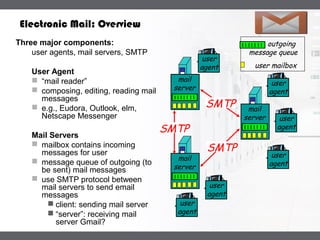
user mailbox
outgoing
message queue
mail
server
user
agent
user
agent
user
agent
mail
server
user
agent
user
agent
mail
server
user
agent
SMTP
SMTP
SMTP
Electronic Mail: Overview
Three major components:
user agents, mail servers, SMTP
User Agent
 “mail reader”
 composing, editing, reading mail
messages
 e.g., Eudora, Outlook, elm,
Netscape Messenger
Mail Servers
 mailbox contains incoming
messages for user
 message queue of outgoing (to
be sent) mail messages
 use SMTP protocol between
mail servers to send email
messages
 client: sending mail server
 “server”: receiving mail
server Gmail?
LOGO
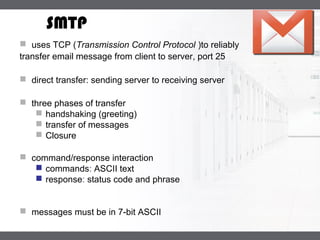
SMTP
 uses TCP (Transmission Control Protocol )to reliably
transfer email message from client to server, port 25
 direct transfer: sending server to receiving server
 three phases of transfer
 handshaking (greeting)
 transfer of messages
 Closure
 command/response interaction
 commands: ASCII text
 response: status code and phrase
 messages must be in 7-bit ASCII
LOGO
Mail Services
 Three major mail services:
Simple Mail Transfer Protocol
 SMTP
Post Office Protocol
 POP3
Internet Mail Access Protocol
 IMAP or IMAP4
LOGO
What is SMTP?
 Simple Mail Transfer Protocol (SMTP) is the standard protocol for
sending emails across the Internet.
 SMTP uses TCP port 25 or 2525
 Sometimes you may have problems sending messages
 ISP(Internet service provider) may have closed port 25
 To determine the SMTP server for a given domain name
 MX (Mail eXchange) DNS record is use
 Simple Mail Transfer Protocol
 e-mail transmissions across the Internet
 The protocol used today is also known as ESMTP
 Relatively simple text-based protocol
LOGO
What is SMTP?
 Client-Server protocol
 The client transmits an email message to the server
 Either
 . MUA (Mail User Agent),
- or -
 a relaying server's MTA (Mail Transfer Agents)
 can act as an SMTP client.
 Command/response interaction
 commands: ASCII text
 Messages must be in 7-bit ASCII
LOGO
What is SMTP?
 SMTP requires message (header & body) to be in 7-bit ASCII
 SMTP server uses CRLF.CRLF to determine end of message
 SMTP is a "push" protocol that does not allow one to "pull" messages from
a remote server on demand
 To do a pull (i.e. receive) a mail client must use POP3 or IMAP
LOGO
What is SMTP?
 After establishing a connection between the sender (the client) and
the receiver (the server), the following page shows a legal SMTP
session.
 In the following conversation, everything sent by the client is prefaced
with
 C: and everything sent by the server
 S:On most computer systems, a connection can be established using
the telnet command on the client machine, for example:
 telnet www.example.com 25
LOGOSample communications
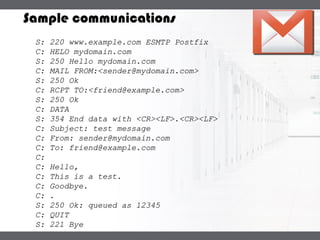
S: 220 www.example.com ESMTP PostfixS: 220 www.example.com ESMTP Postfix
C: HELO mydomain.comC: HELO mydomain.com
S: 250 Hello mydomain.comS: 250 Hello mydomain.com
C: MAIL FROM:<sender@mydomain.com>C: MAIL FROM:<sender@mydomain.com>
S: 250 OkS: 250 Ok
C: RCPT TO:<friend@example.com>C: RCPT TO:<friend@example.com>
S: 250 OkS: 250 Ok
C: DATAC: DATA
S: 354 End data with <CR><LF>.<CR><LF>S: 354 End data with <CR><LF>.<CR><LF>
C: Subject: test messageC: Subject: test message
C: From: sender@mydomain.comC: From: sender@mydomain.com
C: To: friend@example.comC: To: friend@example.com
C:C:
C: Hello,C: Hello,
C: This is a test.C: This is a test.
C: Goodbye.C: Goodbye.
C: .C: .
S: 250 Ok: queued as 12345S: 250 Ok: queued as 12345
C: QUITC: QUIT
S: 221 ByeS: 221 Bye
LOGO
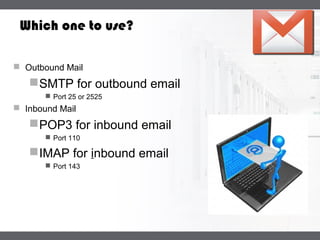
Which one to use?
 Outbound Mail
SMTP for outbound email
 Port 25 or 2525
 Inbound Mail
POP3 for inbound email
 Port 110
IMAP for inbound email
 Port 143
LOGO
1
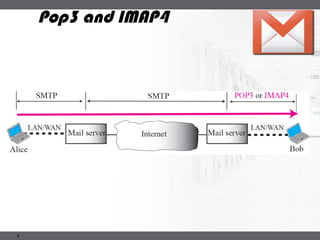
Pop3 and IMAP4
LOGO
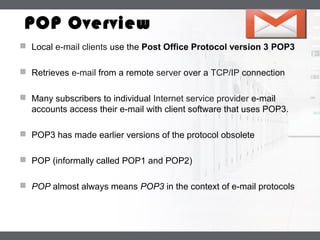
POP Overview
 Local e-mail clients use the Post Office Protocol version 3 POP3
 Retrieves e-mail from a remote server over a TCP/IP connection
 Many subscribers to individual Internet service provider e-mail
accounts access their e-mail with client software that uses POP3.
 POP3 has made earlier versions of the protocol obsolete
 POP (informally called POP1 and POP2)
 POP almost always means POP3 in the context of e-mail protocols
LOGO
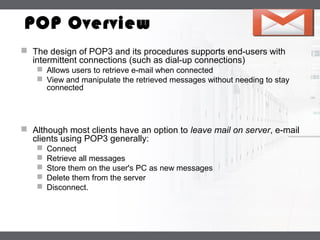
POP Overview
 The design of POP3 and its procedures supports end-users with
intermittent connections (such as dial-up connections)
 Allows users to retrieve e-mail when connected
 View and manipulate the retrieved messages without needing to stay
connected
 Although most clients have an option to leave mail on server, e-mail
clients using POP3 generally:
 Connect
 Retrieve all messages
 Store them on the user's PC as new messages
 Delete them from the server
 Disconnect.
LOGO
POP Overview
 The fundamental difference between POP3 and IMAP4:
 POP3 offers access to a mail drop
 Mail exists on the server until it is collected by the client
 If the client leaves some or all messages on the server
 In contrast, IMAP4 offers access to the mail store
 The client may store local copies of the messages
 These are considered to be a temporary cache
 Whether using POP3 or IMAP to retrieve messages:
 E-mail clients are commonly categorized as either POP or IMAP clients,
but in both cases the clients also use SMTP
 POP3 that allow some clients to transmit outbound mail via POP3
LOGO
POP Overview
 In contrast, the newer, more capable Internet Message Access
Protocol (IMAP) supports both connected and disconnected modes
of operation.
 E-mail clients using IMAP generally leave messages on the server until
the user explicitly deletes them.
 This and other fact of IMAP operation allow multiple clients to
access the same mailbox
 Most e-mail clients support either POP3 or IMAP to
retrieve messages
 Few Internet Service Providers (ISPs) support IMAP
LOGO
IMAP
 Internet Message Access Protocol
 Commonly known as IMAP or IMAP4
 An application layer Internet protocol
 Operates on port 143
 Allows a local client to access e-mail on a remote server
 Previously called Internet Mail Access Protocol, Interactive Mail Access
Protocol (RFC 1064), and Interim Mail Access Protocol)
 Current version is IMAP version 4 revision 1
 IMAP4 and POP3 are the two most prevalent Internet standard protocols for
e-mail retrieval
 Allows interoperability with other servers and clients
LOGO
IMAP
 Support for the Internet standard protocols
 Allows other e-mail clients to access these servers
 Allows the clients to be used with other servers
 E.g. Qualcomm's Eudora or Mozilla Thunderbird
 IMAP is often used in large networks
 For example, a college campus mail system.
 IMAP allows users to access new messages
 The mail is stored on the network
 With POP3, users either
 download the e-mail to their computer
 access it via the web.
 take longer than IMAP
 must either download any new mail or "refresh" the page to see the new
messages.
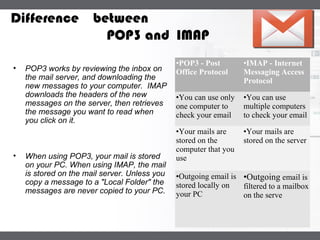
LOGODifference between
POP3 and IMAP
•POP3 - Post
Office Protocol
•IMAP - Internet
Messaging Access
Protocol
•You can use only
one computer to
check your email
•You can use
multiple computers
to check your email
•Your mails are
stored on the
computer that you
use
•Your mails are
stored on the server
•Outgoing email is
stored locally on
your PC
•Outgoing email is
filtered to a mailbox
on the serve
• POP3 works by reviewing the inbox on
the mail server, and downloading the
new messages to your computer. IMAP
downloads the headers of the new
messages on the server, then retrieves
the message you want to read when
you click on it.
• When using POP3, your mail is stored
on your PC. When using IMAP, the mail
is stored on the mail server. Unless you
copy a message to a "Local Folder" the
messages are never copied to your PC.
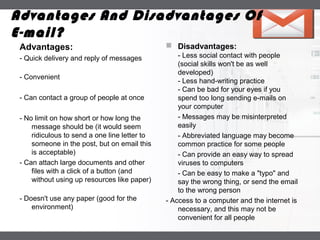
LOGO
Advantages:
- Quick delivery and reply of messages
- Convenient
- Can contact a group of people at once
- No limit on how short or how long the
message should be (it would seem
ridiculous to send a one line letter to
someone in the post, but on email this
is acceptable)
- Can attach large documents and other
files with a click of a button (and
without using up resources like paper)
- Doesn't use any paper (good for the
environment)
 Disadvantages:
- Less social contact with people
(social skills won't be as well
developed)
- Less hand-writing practice
- Can be bad for your eyes if you
spend too long sending e-mails on
your computer
- Messages may be misinterpreted
easily
- Abbreviated language may become
common practice for some people
- Can provide an easy way to spread
viruses to computers
- Can be easy to make a "typo" and
say the wrong thing, or send the email
to the wrong person
- Access to a computer and the internet is
necessary, and this may not be
convenient for all people
Advantages And Disadvantages Of
E-mail?
Thank You

Mail server

  • 1.
  • 2.
    LOGO Presented To :Mam Sara Zainab Presented by : Jazib Amjad
  • 3.
    LOGO Page  3 MAILSERVER  A message transfer agent or Mail transfer agent(MTA) or mail relay is software that transfers electronic mail messages from one computer to another using a client-server application architecture.  An MTA implements both the client (sending) and server (receiving) portions of the SIMPLE MAIL TRANSFER PROTOCOL.  A mail server is a computer that serves as an electronic post office for email. Mail exchanged across networks is passed between mail servers that run specially designed software. .  This software is built around agreed-upon, standardized protocols for handling mail messages and the graphics they might contain
  • 4.
    LOGO user mailbox outgoing message queue mail server user agent user agent user agent mail server user agent user agent mail server user agent SMTP SMTP SMTP ElectronicMail: Overview Three major components: user agents, mail servers, SMTP User Agent  “mail reader”  composing, editing, reading mail messages  e.g., Eudora, Outlook, elm, Netscape Messenger Mail Servers  mailbox contains incoming messages for user  message queue of outgoing (to be sent) mail messages  use SMTP protocol between mail servers to send email messages  client: sending mail server  “server”: receiving mail server Gmail?
  • 5.
    LOGO SMTP  uses TCP(Transmission Control Protocol )to reliably transfer email message from client to server, port 25  direct transfer: sending server to receiving server  three phases of transfer  handshaking (greeting)  transfer of messages  Closure  command/response interaction  commands: ASCII text  response: status code and phrase  messages must be in 7-bit ASCII
  • 6.
    LOGO Mail Services  Threemajor mail services: Simple Mail Transfer Protocol  SMTP Post Office Protocol  POP3 Internet Mail Access Protocol  IMAP or IMAP4
  • 7.
    LOGO What is SMTP? Simple Mail Transfer Protocol (SMTP) is the standard protocol for sending emails across the Internet.  SMTP uses TCP port 25 or 2525  Sometimes you may have problems sending messages  ISP(Internet service provider) may have closed port 25  To determine the SMTP server for a given domain name  MX (Mail eXchange) DNS record is use  Simple Mail Transfer Protocol  e-mail transmissions across the Internet  The protocol used today is also known as ESMTP  Relatively simple text-based protocol
  • 8.
    LOGO What is SMTP? Client-Server protocol  The client transmits an email message to the server  Either  . MUA (Mail User Agent), - or -  a relaying server's MTA (Mail Transfer Agents)  can act as an SMTP client.  Command/response interaction  commands: ASCII text  Messages must be in 7-bit ASCII
  • 9.
    LOGO What is SMTP? SMTP requires message (header & body) to be in 7-bit ASCII  SMTP server uses CRLF.CRLF to determine end of message  SMTP is a "push" protocol that does not allow one to "pull" messages from a remote server on demand  To do a pull (i.e. receive) a mail client must use POP3 or IMAP
  • 10.
    LOGO What is SMTP? After establishing a connection between the sender (the client) and the receiver (the server), the following page shows a legal SMTP session.  In the following conversation, everything sent by the client is prefaced with  C: and everything sent by the server  S:On most computer systems, a connection can be established using the telnet command on the client machine, for example:  telnet www.example.com 25
  • 11.
    LOGOSample communications S: 220www.example.com ESMTP PostfixS: 220 www.example.com ESMTP Postfix C: HELO mydomain.comC: HELO mydomain.com S: 250 Hello mydomain.comS: 250 Hello mydomain.com C: MAIL FROM:<sender@mydomain.com>C: MAIL FROM:<sender@mydomain.com> S: 250 OkS: 250 Ok C: RCPT TO:<friend@example.com>C: RCPT TO:<friend@example.com> S: 250 OkS: 250 Ok C: DATAC: DATA S: 354 End data with <CR><LF>.<CR><LF>S: 354 End data with <CR><LF>.<CR><LF> C: Subject: test messageC: Subject: test message C: From: sender@mydomain.comC: From: sender@mydomain.com C: To: friend@example.comC: To: friend@example.com C:C: C: Hello,C: Hello, C: This is a test.C: This is a test. C: Goodbye.C: Goodbye. C: .C: . S: 250 Ok: queued as 12345S: 250 Ok: queued as 12345 C: QUITC: QUIT S: 221 ByeS: 221 Bye
  • 12.
    LOGO Which one touse?  Outbound Mail SMTP for outbound email  Port 25 or 2525  Inbound Mail POP3 for inbound email  Port 110 IMAP for inbound email  Port 143
  • 13.
  • 14.
    LOGO POP Overview  Locale-mail clients use the Post Office Protocol version 3 POP3  Retrieves e-mail from a remote server over a TCP/IP connection  Many subscribers to individual Internet service provider e-mail accounts access their e-mail with client software that uses POP3.  POP3 has made earlier versions of the protocol obsolete  POP (informally called POP1 and POP2)  POP almost always means POP3 in the context of e-mail protocols
  • 15.
    LOGO POP Overview  Thedesign of POP3 and its procedures supports end-users with intermittent connections (such as dial-up connections)  Allows users to retrieve e-mail when connected  View and manipulate the retrieved messages without needing to stay connected  Although most clients have an option to leave mail on server, e-mail clients using POP3 generally:  Connect  Retrieve all messages  Store them on the user's PC as new messages  Delete them from the server  Disconnect.
  • 16.
    LOGO POP Overview  Thefundamental difference between POP3 and IMAP4:  POP3 offers access to a mail drop  Mail exists on the server until it is collected by the client  If the client leaves some or all messages on the server  In contrast, IMAP4 offers access to the mail store  The client may store local copies of the messages  These are considered to be a temporary cache  Whether using POP3 or IMAP to retrieve messages:  E-mail clients are commonly categorized as either POP or IMAP clients, but in both cases the clients also use SMTP  POP3 that allow some clients to transmit outbound mail via POP3
  • 17.
    LOGO POP Overview  Incontrast, the newer, more capable Internet Message Access Protocol (IMAP) supports both connected and disconnected modes of operation.  E-mail clients using IMAP generally leave messages on the server until the user explicitly deletes them.  This and other fact of IMAP operation allow multiple clients to access the same mailbox  Most e-mail clients support either POP3 or IMAP to retrieve messages  Few Internet Service Providers (ISPs) support IMAP
  • 18.
    LOGO IMAP  Internet MessageAccess Protocol  Commonly known as IMAP or IMAP4  An application layer Internet protocol  Operates on port 143  Allows a local client to access e-mail on a remote server  Previously called Internet Mail Access Protocol, Interactive Mail Access Protocol (RFC 1064), and Interim Mail Access Protocol)  Current version is IMAP version 4 revision 1  IMAP4 and POP3 are the two most prevalent Internet standard protocols for e-mail retrieval  Allows interoperability with other servers and clients
  • 19.
    LOGO IMAP  Support forthe Internet standard protocols  Allows other e-mail clients to access these servers  Allows the clients to be used with other servers  E.g. Qualcomm's Eudora or Mozilla Thunderbird  IMAP is often used in large networks  For example, a college campus mail system.  IMAP allows users to access new messages  The mail is stored on the network  With POP3, users either  download the e-mail to their computer  access it via the web.  take longer than IMAP  must either download any new mail or "refresh" the page to see the new messages.
  • 20.
    LOGODifference between POP3 andIMAP •POP3 - Post Office Protocol •IMAP - Internet Messaging Access Protocol •You can use only one computer to check your email •You can use multiple computers to check your email •Your mails are stored on the computer that you use •Your mails are stored on the server •Outgoing email is stored locally on your PC •Outgoing email is filtered to a mailbox on the serve • POP3 works by reviewing the inbox on the mail server, and downloading the new messages to your computer. IMAP downloads the headers of the new messages on the server, then retrieves the message you want to read when you click on it. • When using POP3, your mail is stored on your PC. When using IMAP, the mail is stored on the mail server. Unless you copy a message to a "Local Folder" the messages are never copied to your PC.
  • 21.
    LOGO Advantages: - Quick deliveryand reply of messages - Convenient - Can contact a group of people at once - No limit on how short or how long the message should be (it would seem ridiculous to send a one line letter to someone in the post, but on email this is acceptable) - Can attach large documents and other files with a click of a button (and without using up resources like paper) - Doesn't use any paper (good for the environment)  Disadvantages: - Less social contact with people (social skills won't be as well developed) - Less hand-writing practice - Can be bad for your eyes if you spend too long sending e-mails on your computer - Messages may be misinterpreted easily - Abbreviated language may become common practice for some people - Can provide an easy way to spread viruses to computers - Can be easy to make a "typo" and say the wrong thing, or send the email to the wrong person - Access to a computer and the internet is necessary, and this may not be convenient for all people Advantages And Disadvantages Of E-mail?
  • 22.