Electronic mail
Dr R Jegadeesan Prof-CSE
Jyothishmathi Institute of Technology and Science,
Karimnagar
• One of the most popular Internet services is
electronic mail (e-mail).
• At the beginning of the Internet era, the
messages sent by electronic mail were short and
consisted of text only.
• Today, electronic mail is much more complex. It
allows a message to include text, audio, and
video.
• It also allows one message to be sent to one or
more recipients.
Architecture
• To explain the architecture of e-mail, we give
four scenarios.
• We begin with the simplest situation and add
complexity as we proceed.
• The fourth scenario is the most common in
the exchange of email.
First Scenario
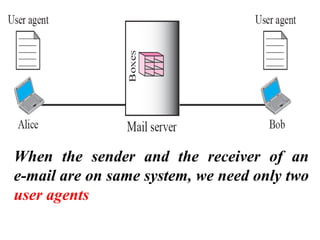
• In the first scenario, the sender(Alice) and the
receiver(Bob) of the e-mail are users (or application
programs) on the same shared system (mail server);
they are directly connected to a shared system (mail
server).
• The administrator has created one mailbox for each
user where the received messages are stored.
• A mailbox is part of a local hard drive, a special file
box with permission restrictions.
• Only the owner of the mailbox has access to it.
• When Alice, a user, needs to send a message
to Bob, another user, Alice runs a user agent
(UA) program to prepare the message and
store it in Bob's mailbox.
• The message has the sender and recipient
mailbox addresses (names of files).
• Bob can retrieve and read the contents of his
mailbox at his convenience, using a user
agent.
When the sender and the receiver of an
e-mail are on same system, we need only two
user agents
Second Scenario
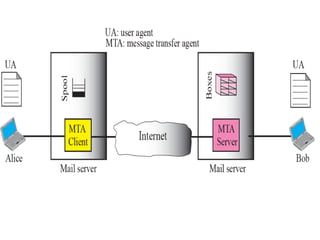
• In the second scenario, the sender and the
receiver of the e-mail are users (or application
programs) on two different systems.
• The message needs to be sent over the Internet.
• Here we need User Agents (UAs) and Message
Transfer Agents (MTAs),
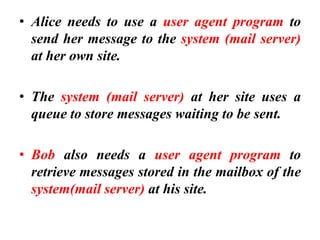
• Alice needs to use a user agent program to
send her message to the system (mail server)
at her own site.
• The system (mail server) at her site uses a
queue to store messages waiting to be sent.
• Bob also needs a user agent program to
retrieve messages stored in the mailbox of the
system(mail server) at his site.
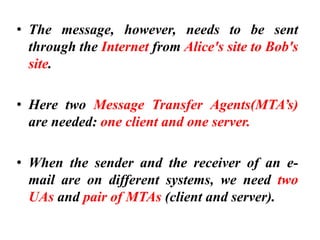
• The message, however, needs to be sent
through the Internet from Alice's site to Bob's
site.
• Here two Message Transfer Agents(MTA’s)
are needed: one client and one server.
• When the sender and the receiver of an e-
mail are on different systems, we need two
UAs and pair of MTAs (client and server).
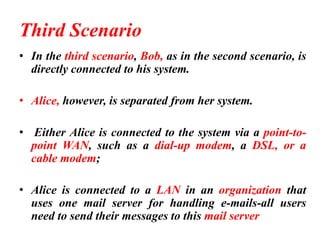
Third Scenario
• In the third scenario, Bob, as in the second scenario, is
directly connected to his system.
• Alice, however, is separated from her system.
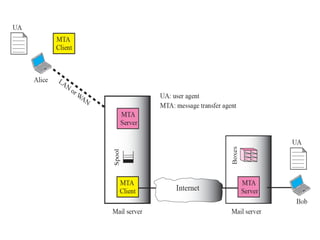
• Either Alice is connected to the system via a point-to-
point WAN, such as a dial-up modem, a DSL, or a
cable modem;
• Alice is connected to a LAN in an organization that
uses one mail server for handling e-mails-all users
need to send their messages to this mail server
• Alice still needs a user agent to prepare her
message. She then needs to send the message
through the LAN or WAN.
• This can be done through a pair of message
transfer agents (client and server).
• Whenever Alice has a message to send, she calls
the user agent which, in turm, calls the MTA
client.
• The MTA client establishes a connection with
the MTA server on the system, which is running
all the time.
• The system at Alice's site queues all messages
received.
• It then uses an MTA client to send the
messages to the system at Bob's site; the
system receives the message and stores it in
Bob's mailbox.
• At his convenience, Bob uses his user agent
to retrieve the message and reads it.
• When the sender is connected to the mail
server via a LAN or a WAN, we need two UAs
and two pairs of MTAs (client and server).
Fourth Scenario
1
2
3
4
5
6
8
9
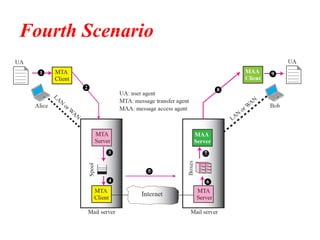
• In the fourth scenario and most common scenario,
Bob is also connected to his mail server by a WAN or
a LAN.
• After the message has arrived at Bob's mail server,
Bob needs to retrieve it.
• Here, we need another set of client/server agents,
which we call Message Access Agents (MAAs).
• Bob uses an MAA client to retrieve his messages. The
client sends a request to the MAA server, which is
running all the time, and requests the transfer of the
messages.
• There are two important points here.
• First, Bob cannot bypass the MAA mail server and use
the MTA server directly.
• To use MTA server directly, Bob would need to run the
MTA server all the time because he does not know
when a message will arrive.
• This implies that Bob must keep his computer on all
the time if he is connected to his system through a
LAN.
• If he is connected through a-WAN, he must keep the
connection up all the time. Neither of these situations
is feasible today.
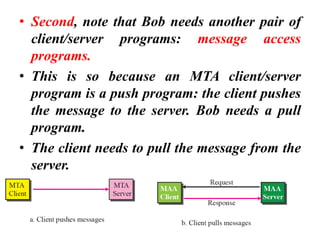
• Second, note that Bob needs another pair of
client/server programs: message access
programs.
• This is so because an MTA client/server
program is a push program: the client pushes
the message to the server. Bob needs a pull
program.
• The client needs to pull the message from the
server.
USER AGENT
• The first component of an electronic mail
system is the user agent (UA).
• It provides service to the user to make the
process of sending and receiving a message
easier.
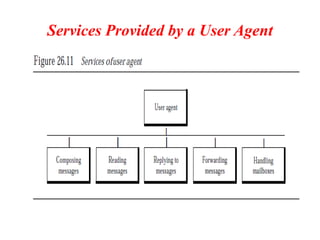
Services Provided by a User Agent
Composing Messages
• A user agent helps the user compose the e-
mail message to be sent out.
• Most user agents provide a template on the
screen to be filled in by the user.
• Some even have a built-in editor that can do
spell checking, grammar checking.
• A user, of course, could alternatively use his
or her favourite text editor or word processor
to create the message and import it, or cut
and paste it, into the user agent template.
Reading Messages
• The second duty of the user agent is to read the
incoming messages.
• When a user invokes a user agent, it first checks
the mail in the incoming mailbox.
• Most user agents show a one-line summary of
each received mail.
• Each e-mail contains the following fields.
• A flag field that shows the status of the mail
such as new, already read but not replied to, or
read and replied to.
• size of the message field
• sender field.
Replying to Messages
• After reading a message, a user can use the user agent to
reply to a message.
• A user agent usually allows the user to reply to the
original sender.
Forwarding Messages
▪ Replying is defined as sending a message to the sender or
recipients of the copy.
▪ Forwarding is defined as sending the message to a third
party.
▪ A user agent allows the receiver to forward the message,
with or without extra comments, to a third party.
Handling Mailboxes
• A user agent normally creates two mailboxes:
an inbox and an outbox.
• Each box is a file with a special format that
can be handled by the user agent.
• The inbox keeps all the received e-mails until
they are deleted by the user.
• The outbox keeps all the sent e-mails until the
user deletes them.
MIME
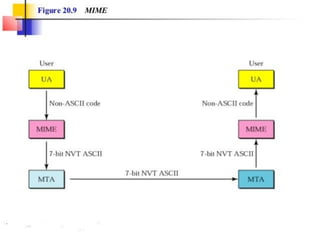
MIME (Multipurpose Internet Mail Extensions)
• Multipurpose Internet Mail Extensions
(MIME) is a supplementary protocol that
allows non-ASCII data to be sent through e-
mail.
• MIME transforms non-ASCII data at the
sender site to ASCII data and delivers them to
the client MTA to be sent through the Internet.
• The message at the receiving side is
transformed back to the original data.
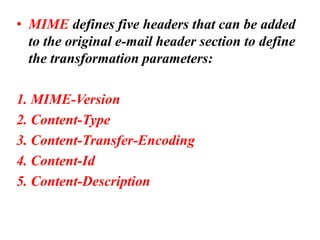
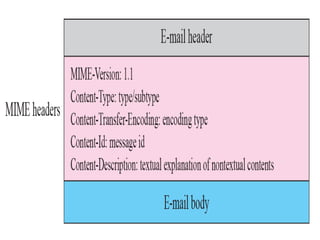
• MIME defines five headers that can be added
to the original e-mail header section to define
the transformation parameters:
1. MIME-Version
2. Content-Type
3. Content-Transfer-Encoding
4. Content-Id
5. Content-Description
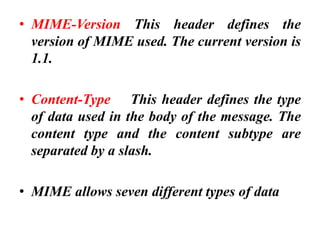
• MIME-Version This header defines the
version of MIME used. The current version is
1.1.
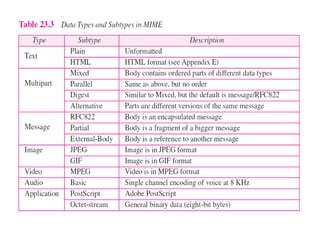
• Content-Type This header defines the type
of data used in the body of the message. The
content type and the content subtype are
separated by a slash.
• MIME allows seven different types of data
• Content-Transfer-Encoding This header
defines the method used to encode the
messages into binary , 7 bit ASCII
• Content-Id It defines a unique identifier. i.e.
This header uniquely identifies the whole
message in a multiple-message environment.
• Content-Description This header defines
whether the body is image, audio, or video
Message Transfer Agent: SMTP
• The actual mail transfer is done through
message transfer agents(MTA)
• To send mail, a system must have the client
MTA, and to receive mail, a system must have
a server MTA.
• The formal protocol that used by the MTA
client and server in the Internet is called the
Simple Mail Transfer Protocol (SMTP)
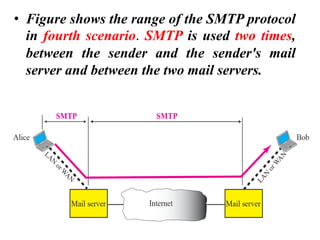
• Figure shows the range of the SMTP protocol
in fourth scenario. SMTP is used two times,
between the sender and the sender's mail
server and between the two mail servers.
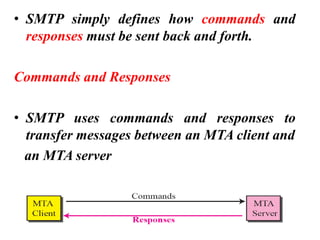
• SMTP simply defines how commands and
responses must be sent back and forth.
Commands and Responses
• SMTP uses commands and responses to
transfer messages between an MTA client and
an MTA server
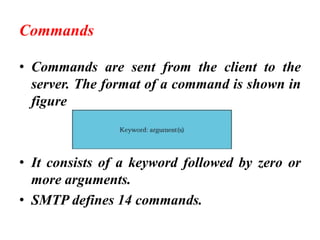
Commands
• Commands are sent from the client to the
server. The format of a command is shown in
figure
• It consists of a keyword followed by zero or
more arguments.
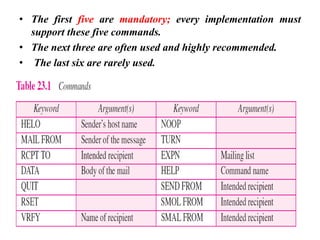
• SMTP defines 14 commands.
• The first five are mandatory; every implementation must
support these five commands.
• The next three are often used and highly recommended.
• The last six are rarely used.
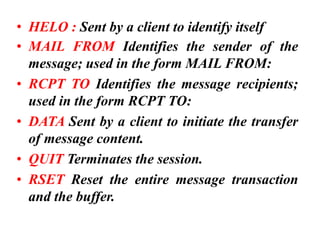
• HELO : Sent by a client to identify itself
• MAIL FROM Identifies the sender of the
message; used in the form MAIL FROM:
• RCPT TO Identifies the message recipients;
used in the form RCPT TO:
• DATA Sent by a client to initiate the transfer
of message content.
• QUIT Terminates the session.
• RSET Reset the entire message transaction
and the buffer.
• NOOP : Ask the receiver to send a valid reply
• VRFY Verifies the recipients that a mailbox is
available for message delivery
• TURN : Allows the client and server to switch
roles and send mail in the reverse direction
without having to establish a new connection.
• EXPN (Expand) Ask the receiver to confirm
that a mailing list has been identified.
• HELP Returns a list of commands that are
supported by the SMTP service.
• SEND From (Send ) Deliver e-mail to one or
more workstations
• SOML (Send or mail) Deliver e-mail to one
or more workstations or recipients if the user
is not active.
• SAML (Send and mail) Deliver e-mail to one
or more work stations and recipients if the
user is not active.
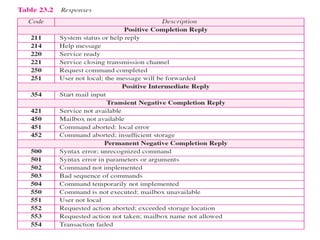
Responses
• Responses are sent from the server to the
client.
• A response is a three digit code that may
be followed by additional textual
information.
Message Access Agent(MAA):
POP3 and IMAP4
Message Access Agent(MAA): POP and IMAP
• The first and the second stages of mail delivery use
SMTP.
• However, SMTP is not involved in the third stage
because SMTP is a push protocol; it pushes the
message from the client to the server.
• In other words, the direction of the bulk: data
(messages) is from the client to the server.
• On the other hand, the third stage needs a pull
protocol; the client must pull messages from the
server.
• The direction of the bulk data is from the server to the
client. The third stage uses a message access agent.
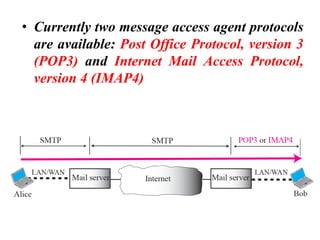
• Currently two message access agent protocols
are available: Post Office Protocol, version 3
(POP3) and Internet Mail Access Protocol,
version 4 (IMAP4)
POP3
• Post Office Protocol, version 3 (POP3) is
simple and limited in functionality.
• The client POP3 software is installed on the
recipient computer.
• The server POP3 software is installed on the
mail server.
• Mail access starts when the user client needs
to download e-mail from the mailbox on the
mail server.
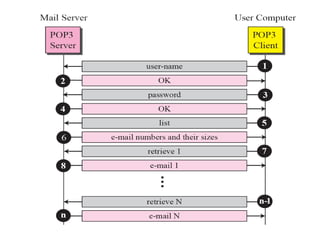
• The client opens a connection to the server on
TCP port 110.
• It then sends its user name and password to
access the mailbox. The user can then list
and retrieve the mail messages, one by one.
as shown in figure.
• POP3 has two modes: the delete mode and
the keep mode.
• In the delete mode, the mail is deleted from
the mailbox after each retrieval.
• In the keep mode, the mail remains in the
mailbox after retrieval.
Internet Mail Access Protocol, version 4
• IMAP4 is similar to POP3, but it has more
features; IMAP4 is more powerful and more
complex.
• IMAP4 provides the following extra functions
➢ A user can check the e-mail header before
downloading .
➢ A user can search the contents of the e-mail
for a specific string of characters before
downloading.
➢ A user can create, delete, or rename mailboxes
on the mail server
• A user can partially download e-mail. This is
especially useful if bandwidth is limited and
the e-mail contains multimedia with high
bandwidth requirements.
• A user can create a hierarchy of mailboxes in
a folder for e-mail storage.
Thank you

Electronic mail

  • 1.
    Electronic mail Dr RJegadeesan Prof-CSE Jyothishmathi Institute of Technology and Science, Karimnagar
  • 2.
    • One ofthe most popular Internet services is electronic mail (e-mail). • At the beginning of the Internet era, the messages sent by electronic mail were short and consisted of text only. • Today, electronic mail is much more complex. It allows a message to include text, audio, and video. • It also allows one message to be sent to one or more recipients.
  • 3.
    Architecture • To explainthe architecture of e-mail, we give four scenarios. • We begin with the simplest situation and add complexity as we proceed. • The fourth scenario is the most common in the exchange of email.
  • 5.
    First Scenario • Inthe first scenario, the sender(Alice) and the receiver(Bob) of the e-mail are users (or application programs) on the same shared system (mail server); they are directly connected to a shared system (mail server). • The administrator has created one mailbox for each user where the received messages are stored. • A mailbox is part of a local hard drive, a special file box with permission restrictions. • Only the owner of the mailbox has access to it.
  • 6.
    • When Alice,a user, needs to send a message to Bob, another user, Alice runs a user agent (UA) program to prepare the message and store it in Bob's mailbox. • The message has the sender and recipient mailbox addresses (names of files). • Bob can retrieve and read the contents of his mailbox at his convenience, using a user agent.
  • 7.
    When the senderand the receiver of an e-mail are on same system, we need only two user agents
  • 8.
    Second Scenario • Inthe second scenario, the sender and the receiver of the e-mail are users (or application programs) on two different systems. • The message needs to be sent over the Internet. • Here we need User Agents (UAs) and Message Transfer Agents (MTAs),
  • 10.
    • Alice needsto use a user agent program to send her message to the system (mail server) at her own site. • The system (mail server) at her site uses a queue to store messages waiting to be sent. • Bob also needs a user agent program to retrieve messages stored in the mailbox of the system(mail server) at his site.
  • 11.
    • The message,however, needs to be sent through the Internet from Alice's site to Bob's site. • Here two Message Transfer Agents(MTA’s) are needed: one client and one server. • When the sender and the receiver of an e- mail are on different systems, we need two UAs and pair of MTAs (client and server).
  • 12.
    Third Scenario • Inthe third scenario, Bob, as in the second scenario, is directly connected to his system. • Alice, however, is separated from her system. • Either Alice is connected to the system via a point-to- point WAN, such as a dial-up modem, a DSL, or a cable modem; • Alice is connected to a LAN in an organization that uses one mail server for handling e-mails-all users need to send their messages to this mail server
  • 14.
    • Alice stillneeds a user agent to prepare her message. She then needs to send the message through the LAN or WAN. • This can be done through a pair of message transfer agents (client and server). • Whenever Alice has a message to send, she calls the user agent which, in turm, calls the MTA client. • The MTA client establishes a connection with the MTA server on the system, which is running all the time. • The system at Alice's site queues all messages received.
  • 15.
    • It thenuses an MTA client to send the messages to the system at Bob's site; the system receives the message and stores it in Bob's mailbox. • At his convenience, Bob uses his user agent to retrieve the message and reads it. • When the sender is connected to the mail server via a LAN or a WAN, we need two UAs and two pairs of MTAs (client and server).
  • 16.
  • 17.
    • In thefourth scenario and most common scenario, Bob is also connected to his mail server by a WAN or a LAN. • After the message has arrived at Bob's mail server, Bob needs to retrieve it. • Here, we need another set of client/server agents, which we call Message Access Agents (MAAs). • Bob uses an MAA client to retrieve his messages. The client sends a request to the MAA server, which is running all the time, and requests the transfer of the messages.
  • 18.
    • There aretwo important points here. • First, Bob cannot bypass the MAA mail server and use the MTA server directly. • To use MTA server directly, Bob would need to run the MTA server all the time because he does not know when a message will arrive. • This implies that Bob must keep his computer on all the time if he is connected to his system through a LAN. • If he is connected through a-WAN, he must keep the connection up all the time. Neither of these situations is feasible today.
  • 19.
    • Second, notethat Bob needs another pair of client/server programs: message access programs. • This is so because an MTA client/server program is a push program: the client pushes the message to the server. Bob needs a pull program. • The client needs to pull the message from the server.
  • 20.
    USER AGENT • Thefirst component of an electronic mail system is the user agent (UA). • It provides service to the user to make the process of sending and receiving a message easier.
  • 21.
  • 22.
    Composing Messages • Auser agent helps the user compose the e- mail message to be sent out. • Most user agents provide a template on the screen to be filled in by the user. • Some even have a built-in editor that can do spell checking, grammar checking. • A user, of course, could alternatively use his or her favourite text editor or word processor to create the message and import it, or cut and paste it, into the user agent template.
  • 23.
    Reading Messages • Thesecond duty of the user agent is to read the incoming messages. • When a user invokes a user agent, it first checks the mail in the incoming mailbox. • Most user agents show a one-line summary of each received mail. • Each e-mail contains the following fields. • A flag field that shows the status of the mail such as new, already read but not replied to, or read and replied to. • size of the message field • sender field.
  • 24.
    Replying to Messages •After reading a message, a user can use the user agent to reply to a message. • A user agent usually allows the user to reply to the original sender. Forwarding Messages ▪ Replying is defined as sending a message to the sender or recipients of the copy. ▪ Forwarding is defined as sending the message to a third party. ▪ A user agent allows the receiver to forward the message, with or without extra comments, to a third party.
  • 25.
    Handling Mailboxes • Auser agent normally creates two mailboxes: an inbox and an outbox. • Each box is a file with a special format that can be handled by the user agent. • The inbox keeps all the received e-mails until they are deleted by the user. • The outbox keeps all the sent e-mails until the user deletes them.
  • 26.
  • 27.
    MIME (Multipurpose InternetMail Extensions) • Multipurpose Internet Mail Extensions (MIME) is a supplementary protocol that allows non-ASCII data to be sent through e- mail. • MIME transforms non-ASCII data at the sender site to ASCII data and delivers them to the client MTA to be sent through the Internet. • The message at the receiving side is transformed back to the original data.
  • 29.
    • MIME definesfive headers that can be added to the original e-mail header section to define the transformation parameters: 1. MIME-Version 2. Content-Type 3. Content-Transfer-Encoding 4. Content-Id 5. Content-Description
  • 31.
    • MIME-Version Thisheader defines the version of MIME used. The current version is 1.1. • Content-Type This header defines the type of data used in the body of the message. The content type and the content subtype are separated by a slash. • MIME allows seven different types of data
  • 33.
    • Content-Transfer-Encoding Thisheader defines the method used to encode the messages into binary , 7 bit ASCII • Content-Id It defines a unique identifier. i.e. This header uniquely identifies the whole message in a multiple-message environment. • Content-Description This header defines whether the body is image, audio, or video
  • 34.
  • 35.
    Message Transfer Agent:SMTP • The actual mail transfer is done through message transfer agents(MTA) • To send mail, a system must have the client MTA, and to receive mail, a system must have a server MTA. • The formal protocol that used by the MTA client and server in the Internet is called the Simple Mail Transfer Protocol (SMTP)
  • 36.
    • Figure showsthe range of the SMTP protocol in fourth scenario. SMTP is used two times, between the sender and the sender's mail server and between the two mail servers.
  • 37.
    • SMTP simplydefines how commands and responses must be sent back and forth. Commands and Responses • SMTP uses commands and responses to transfer messages between an MTA client and an MTA server
  • 38.
    Commands • Commands aresent from the client to the server. The format of a command is shown in figure • It consists of a keyword followed by zero or more arguments. • SMTP defines 14 commands.
  • 39.
    • The firstfive are mandatory; every implementation must support these five commands. • The next three are often used and highly recommended. • The last six are rarely used.
  • 40.
    • HELO :Sent by a client to identify itself • MAIL FROM Identifies the sender of the message; used in the form MAIL FROM: • RCPT TO Identifies the message recipients; used in the form RCPT TO: • DATA Sent by a client to initiate the transfer of message content. • QUIT Terminates the session. • RSET Reset the entire message transaction and the buffer.
  • 41.
    • NOOP :Ask the receiver to send a valid reply • VRFY Verifies the recipients that a mailbox is available for message delivery • TURN : Allows the client and server to switch roles and send mail in the reverse direction without having to establish a new connection. • EXPN (Expand) Ask the receiver to confirm that a mailing list has been identified. • HELP Returns a list of commands that are supported by the SMTP service. • SEND From (Send ) Deliver e-mail to one or more workstations
  • 42.
    • SOML (Sendor mail) Deliver e-mail to one or more workstations or recipients if the user is not active. • SAML (Send and mail) Deliver e-mail to one or more work stations and recipients if the user is not active.
  • 43.
    Responses • Responses aresent from the server to the client. • A response is a three digit code that may be followed by additional textual information.
  • 45.
  • 46.
    Message Access Agent(MAA):POP and IMAP • The first and the second stages of mail delivery use SMTP. • However, SMTP is not involved in the third stage because SMTP is a push protocol; it pushes the message from the client to the server. • In other words, the direction of the bulk: data (messages) is from the client to the server. • On the other hand, the third stage needs a pull protocol; the client must pull messages from the server. • The direction of the bulk data is from the server to the client. The third stage uses a message access agent.
  • 47.
    • Currently twomessage access agent protocols are available: Post Office Protocol, version 3 (POP3) and Internet Mail Access Protocol, version 4 (IMAP4)
  • 48.
    POP3 • Post OfficeProtocol, version 3 (POP3) is simple and limited in functionality. • The client POP3 software is installed on the recipient computer. • The server POP3 software is installed on the mail server. • Mail access starts when the user client needs to download e-mail from the mailbox on the mail server.
  • 49.
    • The clientopens a connection to the server on TCP port 110. • It then sends its user name and password to access the mailbox. The user can then list and retrieve the mail messages, one by one. as shown in figure. • POP3 has two modes: the delete mode and the keep mode. • In the delete mode, the mail is deleted from the mailbox after each retrieval. • In the keep mode, the mail remains in the mailbox after retrieval.
  • 51.
    Internet Mail AccessProtocol, version 4 • IMAP4 is similar to POP3, but it has more features; IMAP4 is more powerful and more complex. • IMAP4 provides the following extra functions ➢ A user can check the e-mail header before downloading . ➢ A user can search the contents of the e-mail for a specific string of characters before downloading. ➢ A user can create, delete, or rename mailboxes on the mail server
  • 52.
    • A usercan partially download e-mail. This is especially useful if bandwidth is limited and the e-mail contains multimedia with high bandwidth requirements. • A user can create a hierarchy of mailboxes in a folder for e-mail storage.
  • 53.