UNIT-2
Electronic Mail
By
Mr. R. Gnanavel
AP/CSE
Electronic Mail
2
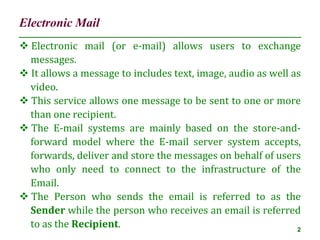
 Electronic mail (or e-mail) allows users to exchange
messages.
 It allows a message to includes text, image, audio as well as
video.
 This service allows one message to be sent to one or more
than one recipient.
 The E-mail systems are mainly based on the store-and-
forward model where the E-mail server system accepts,
forwards, deliver and store the messages on behalf of users
who only need to connect to the infrastructure of the
Email.
 The Person who sends the email is referred to as the
Sender while the person who receives an email is referred
to as the Recipient.
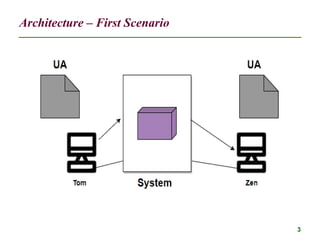
Architecture – First Scenario
3
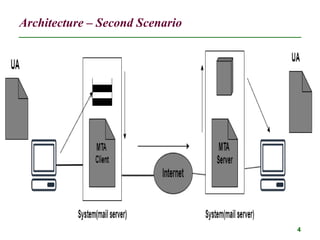
Architecture – Second Scenario
4
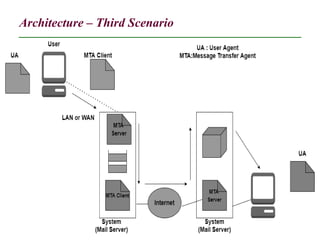
Architecture – Third Scenario
5
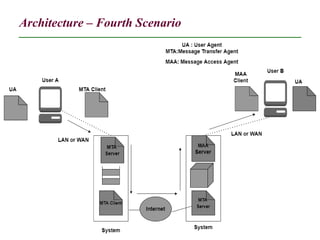
Architecture – Fourth Scenario
6
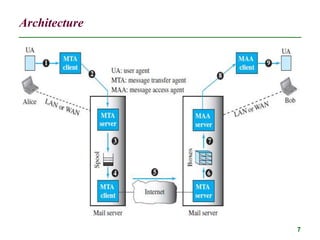
Architecture
7
Architecture
8
 The sender and the receiver of the e-mail, Alice and Bob
respectively, are connected via a LAN or a WAN to two mail
servers.
 The administrator has created one mailbox for each user
where the received messages are stored.
 A mailbox is part of a server hard drive, a special file with
permission restrictions.
 Only the owner of the mailbox has access to it.
 The administrator has also created a queue (spool) to store
messages waiting to be sent.
User Agent (UA)
9
 The first component of an electronic mail system is the
user agent (UA).
 It provides service to the user to make the process of
sending and receiving a message easier.
 A user agent is a software package (program) that
composes, reads, replies to, and forwards messages.
 It also handles local mailboxes on the user computers.
 There are two types of user agents:
1. command-driven and
2. GUI-based
User Agent (UA)
10
 Command-driven user agents belong to the early days of
electronic mail. They are still present as the underlying
user agents. A command-driven user agent normally
accepts a one character command from the keyboard to
perform its task.
 For example, a user can type the character r, at the
command prompt, to reply to the sender of the message, or
type the character R to reply to the sender and all
recipients.
 Some examples of command-driven user agents are mail,
pine, and elm.
User Agent (UA)
11
 Modern user agents are GUI-based.
 They contain graphical user interface (GUI) components
that allow the user to interact with the software by using
both the keyboard and the mouse.
 They have graphical components such as icons, menu bars,
and windows that make the services easy to access.
 Some examples of GUI-based user agents are Eudora and
Outlook.
User Agent (UA)
12
 Modern user agents are GUI-based.
 They contain graphical user interface (GUI) components
that allow the user to interact with the software by using
both the keyboard and the mouse.
 They have graphical components such as icons, menu bars,
and windows that make the services easy to access.
 Some examples of GUI-based user agents are Eudora and
Outlook.
Addresses
13
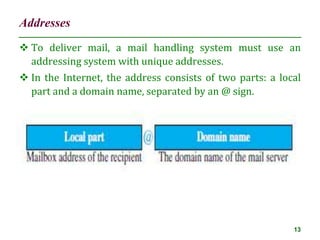
 To deliver mail, a mail handling system must use an
addressing system with unique addresses.
 In the Internet, the address consists of two parts: a local
part and a domain name, separated by an @ sign.
Message Transfer Agent: SMTP
14
 The formal protocol that defines the MTA client and server
in the Internet is called Simple Mail Transfer Protocol
(SMTP).
 SMTP is used two times, between the sender and the
sender’s mail server and between the two mail servers.
 SMTP simply defines how commands and responses must
be sent back and forth.
Commands and Responses
15
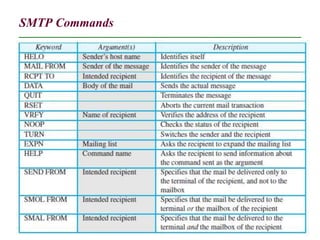
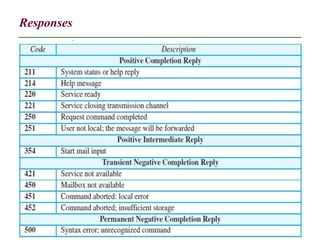
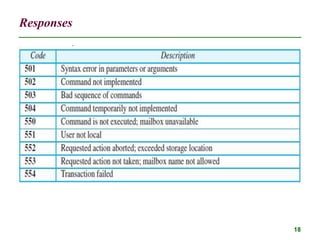
 SMTP uses commands and responses to transfer messages
between an MTA client and an MTA server.
 The command is from an MTA client to an MTA server; the
response is from an MTA server to the MTA client.
 Each command or reply is terminated by a twocharacter
(carriage return and line feed) end-of-line token.
SMTP Commands
16
Responses
17
Responses
18
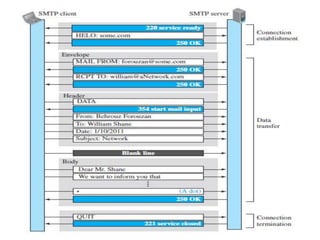
Mail Transfer Phases
19
 The process of transferring a mail message occurs in three
phases:
1. connection establishment,
2. mail transfer, and
3. connection termination.
20
Message Access Agent: POP and IMAP
21
 The first and second stages of mail delivery use SMTP.
 However, SMTP is not involved in the third stage because
SMTP is a push protocol; it pushes the message from the
client to the server.
 In other words, the direction of the bulk data (messages) is
from the client to the server.
 On the other hand, the third stage needs a pull protocol;
the client must pull messages from the server.
 The direction of the bulk data is from the server to the
client. The third stage uses a message access agent.
 Currently two message access protocols are available: Post
Office Protocol, version 3 (POP3) and Internet Mail Access
Protocol, version 4 (IMAP4).
POP3
22
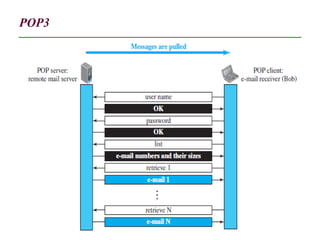
 Post Office Protocol, version 3 (POP3) is simple but limited
in functionality.
 The client POP3 software is installed on the recipient
computer; the server POP3 software is installed on the
mail server.
 Mail access starts with the client when the user needs to
download its e-mail from the mailbox on the mail server.
 The client opens a connection to the server on TCP port
110.
 It then sends its user name and password to access the
mailbox.
 The user can then list and retrieve the mail messages, one
by one.
POP3
23
POP3
24
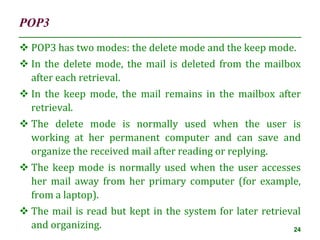
 POP3 has two modes: the delete mode and the keep mode.
 In the delete mode, the mail is deleted from the mailbox
after each retrieval.
 In the keep mode, the mail remains in the mailbox after
retrieval.
 The delete mode is normally used when the user is
working at her permanent computer and can save and
organize the received mail after reading or replying.
 The keep mode is normally used when the user accesses
her mail away from her primary computer (for example,
from a laptop).
 The mail is read but kept in the system for later retrieval
and organizing.
IMAP4
25
 Another mail access protocol is Internet Mail Access
Protocol, version 4 (IMAP4).
 IMAP4 is similar to POP3, but it has more features; IMAP4
is more powerful and more complex.
 POP3 is deficient in several ways. It does not allow the user
to organize her mail on the server; the user cannot have
different folders on the server.
 In addition, POP3 does not allow the user to partially check
the contents of the mail before downloading.
IMAP4
26
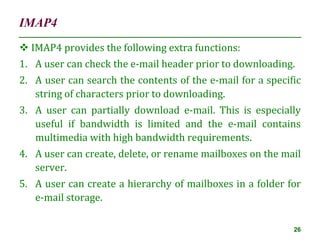
 IMAP4 provides the following extra functions:
1. A user can check the e-mail header prior to downloading.
2. A user can search the contents of the e-mail for a specific
string of characters prior to downloading.
3. A user can partially download e-mail. This is especially
useful if bandwidth is limited and the e-mail contains
multimedia with high bandwidth requirements.
4. A user can create, delete, or rename mailboxes on the mail
server.
5. A user can create a hierarchy of mailboxes in a folder for
e-mail storage.
Web-Based Mail
27
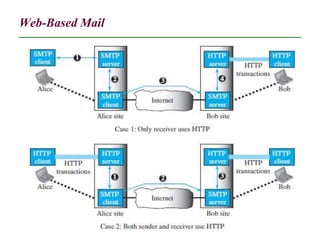
 E-mail is such a common application that some websites
today provide this service to anyone who accesses the site.
 Three common sites are Hotmail, Yahoo, and Google mail.
 The idea is very simple.
Web-Based Mail
28
29
Thank You

Electronic Mail.ppt

  • 1.
  • 2.
    Electronic Mail 2  Electronicmail (or e-mail) allows users to exchange messages.  It allows a message to includes text, image, audio as well as video.  This service allows one message to be sent to one or more than one recipient.  The E-mail systems are mainly based on the store-and- forward model where the E-mail server system accepts, forwards, deliver and store the messages on behalf of users who only need to connect to the infrastructure of the Email.  The Person who sends the email is referred to as the Sender while the person who receives an email is referred to as the Recipient.
  • 3.
  • 4.
  • 5.
  • 6.
  • 7.
  • 8.
    Architecture 8  The senderand the receiver of the e-mail, Alice and Bob respectively, are connected via a LAN or a WAN to two mail servers.  The administrator has created one mailbox for each user where the received messages are stored.  A mailbox is part of a server hard drive, a special file with permission restrictions.  Only the owner of the mailbox has access to it.  The administrator has also created a queue (spool) to store messages waiting to be sent.
  • 9.
    User Agent (UA) 9 The first component of an electronic mail system is the user agent (UA).  It provides service to the user to make the process of sending and receiving a message easier.  A user agent is a software package (program) that composes, reads, replies to, and forwards messages.  It also handles local mailboxes on the user computers.  There are two types of user agents: 1. command-driven and 2. GUI-based
  • 10.
    User Agent (UA) 10 Command-driven user agents belong to the early days of electronic mail. They are still present as the underlying user agents. A command-driven user agent normally accepts a one character command from the keyboard to perform its task.  For example, a user can type the character r, at the command prompt, to reply to the sender of the message, or type the character R to reply to the sender and all recipients.  Some examples of command-driven user agents are mail, pine, and elm.
  • 11.
    User Agent (UA) 11 Modern user agents are GUI-based.  They contain graphical user interface (GUI) components that allow the user to interact with the software by using both the keyboard and the mouse.  They have graphical components such as icons, menu bars, and windows that make the services easy to access.  Some examples of GUI-based user agents are Eudora and Outlook.
  • 12.
    User Agent (UA) 12 Modern user agents are GUI-based.  They contain graphical user interface (GUI) components that allow the user to interact with the software by using both the keyboard and the mouse.  They have graphical components such as icons, menu bars, and windows that make the services easy to access.  Some examples of GUI-based user agents are Eudora and Outlook.
  • 13.
    Addresses 13  To delivermail, a mail handling system must use an addressing system with unique addresses.  In the Internet, the address consists of two parts: a local part and a domain name, separated by an @ sign.
  • 14.
    Message Transfer Agent:SMTP 14  The formal protocol that defines the MTA client and server in the Internet is called Simple Mail Transfer Protocol (SMTP).  SMTP is used two times, between the sender and the sender’s mail server and between the two mail servers.  SMTP simply defines how commands and responses must be sent back and forth.
  • 15.
    Commands and Responses 15 SMTP uses commands and responses to transfer messages between an MTA client and an MTA server.  The command is from an MTA client to an MTA server; the response is from an MTA server to the MTA client.  Each command or reply is terminated by a twocharacter (carriage return and line feed) end-of-line token.
  • 16.
  • 17.
  • 18.
  • 19.
    Mail Transfer Phases 19 The process of transferring a mail message occurs in three phases: 1. connection establishment, 2. mail transfer, and 3. connection termination.
  • 20.
  • 21.
    Message Access Agent:POP and IMAP 21  The first and second stages of mail delivery use SMTP.  However, SMTP is not involved in the third stage because SMTP is a push protocol; it pushes the message from the client to the server.  In other words, the direction of the bulk data (messages) is from the client to the server.  On the other hand, the third stage needs a pull protocol; the client must pull messages from the server.  The direction of the bulk data is from the server to the client. The third stage uses a message access agent.  Currently two message access protocols are available: Post Office Protocol, version 3 (POP3) and Internet Mail Access Protocol, version 4 (IMAP4).
  • 22.
    POP3 22  Post OfficeProtocol, version 3 (POP3) is simple but limited in functionality.  The client POP3 software is installed on the recipient computer; the server POP3 software is installed on the mail server.  Mail access starts with the client when the user needs to download its e-mail from the mailbox on the mail server.  The client opens a connection to the server on TCP port 110.  It then sends its user name and password to access the mailbox.  The user can then list and retrieve the mail messages, one by one.
  • 23.
  • 24.
    POP3 24  POP3 hastwo modes: the delete mode and the keep mode.  In the delete mode, the mail is deleted from the mailbox after each retrieval.  In the keep mode, the mail remains in the mailbox after retrieval.  The delete mode is normally used when the user is working at her permanent computer and can save and organize the received mail after reading or replying.  The keep mode is normally used when the user accesses her mail away from her primary computer (for example, from a laptop).  The mail is read but kept in the system for later retrieval and organizing.
  • 25.
    IMAP4 25  Another mailaccess protocol is Internet Mail Access Protocol, version 4 (IMAP4).  IMAP4 is similar to POP3, but it has more features; IMAP4 is more powerful and more complex.  POP3 is deficient in several ways. It does not allow the user to organize her mail on the server; the user cannot have different folders on the server.  In addition, POP3 does not allow the user to partially check the contents of the mail before downloading.
  • 26.
    IMAP4 26  IMAP4 providesthe following extra functions: 1. A user can check the e-mail header prior to downloading. 2. A user can search the contents of the e-mail for a specific string of characters prior to downloading. 3. A user can partially download e-mail. This is especially useful if bandwidth is limited and the e-mail contains multimedia with high bandwidth requirements. 4. A user can create, delete, or rename mailboxes on the mail server. 5. A user can create a hierarchy of mailboxes in a folder for e-mail storage.
  • 27.
    Web-Based Mail 27  E-mailis such a common application that some websites today provide this service to anyone who accesses the site.  Three common sites are Hotmail, Yahoo, and Google mail.  The idea is very simple.
  • 28.
  • 29.