Computer Network
Application Layer
1. DNS
2. E-Mail Architecture And
Service
3. Message Format
Domain
Name
System
1. DNS
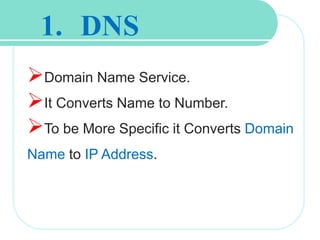
Domain Name Service.
It Converts Name to Number.
To be More Specific it Converts Domain
Name to IP Address.
What Computer Knows?
It Knows only about the Numbers.
Human are comfortable with names as compared to
number.
There are millions of website in the internet, its impossible
to remember all website IP Address.
So, that DNS was Introduced to convert Domain Name to
IP Address that might help us to reach and website from
domain name itself.
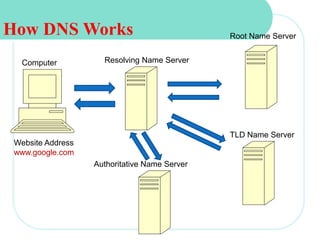
How DNS Works
Computer Resolving Name Server
Root Name Server
TLD Name Server
Authoritative Name Server
Website Address
www.google.com
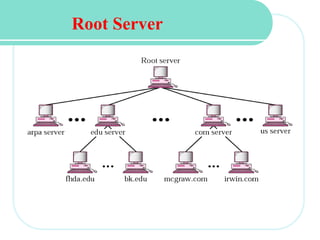
Root Server
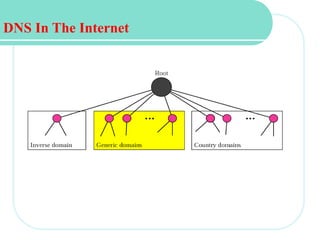
DNS In The Internet
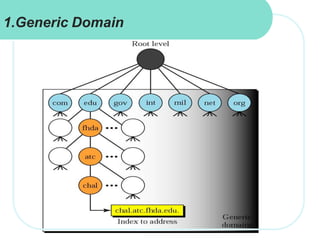
Generic Domain
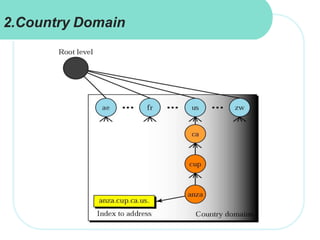
Country Domain
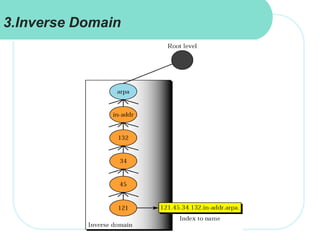
Inverse Domain
DNS In The Internet
1.Generic Domain
2.Country Domain
3.Inverse Domain
E-Mail Architecture
And
Service
26.14
One of the most popular Internet services is electronic
mail (e-mail).
E- mail is an electronic message sent from one device
to another, with e-mail we can send and receive
message with attachments .
Such as, photos and documents. We can also send
music,video clips and software programs.
E-mail Providers
Google-G-mail
Yahoo-Yahoo Mail
Windows Live-Hotmail
2.E-Mail
 First Scenario
 Second Scenario
 Third Scenario
 Fourth Scenario
Topics Discussed in the Section
1
2
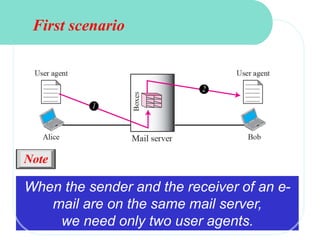
When the sender and the receiver of an e-
mail are on the same mail server,
we need only two user agents.
Note
First scenario
1
2
3
4
5
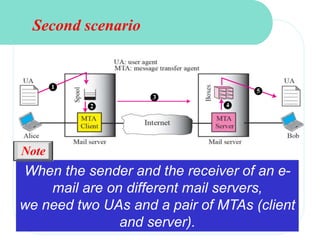
Second scenario
When the sender and the receiver of an e-
mail are on different mail servers,
we need two UAs and a pair of MTAs (client
and server).
Note
1
2
3
4
5
6
7
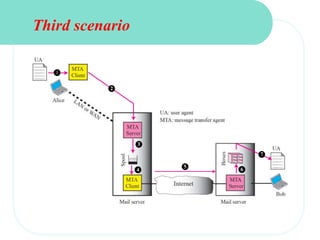
Third scenario
TCP/IP Protocol Suite 19
When the sender is connected to the mail
server via a LAN or a WAN, we
need two UAs and two pairs of MTAs
(client and server).
Note
1
2
3
4
5
6
8
9
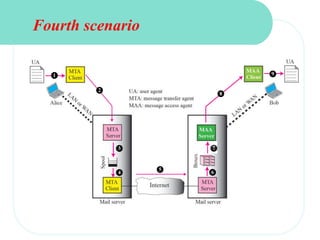
Fourth scenario
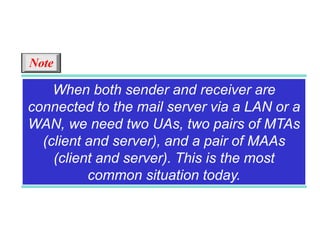
When both sender and receiver are
connected to the mail server via a LAN or a
WAN, we need two UAs, two pairs of MTAs
(client and server), and a pair of MAAs
(client and server). This is the most
common situation today.
Note
Protocol Used
1.SMTP(Simple Mail Transfer Protocol)
2.POP (Post Office Protocol)
3.IMAP (Internet Message Access Protocol)
1.SMTP
SMTP is one of the most common and popular protocols for email
communication over the Internet and it provides intermediary network
services between the remote email provider or organizational email server
and the local user accessing it.
SMTP is generally integrated within an email client application and is
composed of four key components:
Local user or client-end utility known as the mail user agent (MUA)
Server known as mail submission agent (MSA)
Mail transfer agent (MTA)
Mail delivery agent (MDA)
SMTP works by initiating a session between the user and server, whereas
MTA and MDA provide domain searching and local delivery services.
2.POP
 POP uses the TCP/IP protocol stack for network
connection and works with Simple Mail Transfer Protocol
(SMTP) for end-to-end email communication, where POP
pulls messages and SMTP pushes them to the server.
 As of 2012, Post Office Protocol is in its third version
known as POP 3 and is commonly used in most email
client/server communication architecture.
3.IMAP
Internet Message Access Protocol (IMAP) is a standard
protocol for accessing email on a remote server from a
local client.
 IMAP is an application layer Internet Protocol using the
underlying transport layer protocols to establish host-to-
host communication services for applications.
This allows the use of a remote mail server. The well-
known port address for IMAP is 143.
E-mail Service
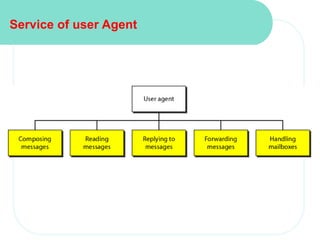
Service of user Agent
Message Format
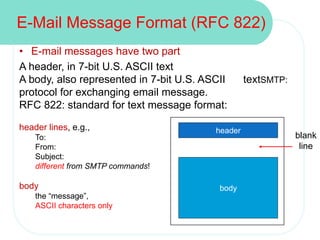
• E-mail messages have two part
A header, in 7-bit U.S. ASCII text
A body, also represented in 7-bit U.S. ASCII textSMTP:
protocol for exchanging email message.
RFC 822: standard for text message format:
header lines, e.g.,
To:
From:
Subject:
different from SMTP commands!
body
the “message”,
ASCII characters only
E-Mail Message Format (RFC 822)
header
body
blank
line
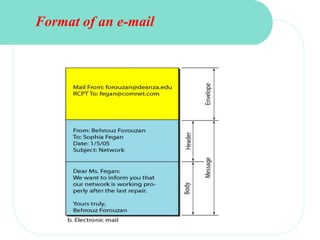
Format of an e-mail
Application layer

Application layer

  • 1.
  • 2.
    Application Layer 1. DNS 2.E-Mail Architecture And Service 3. Message Format
  • 3.
  • 4.
    1. DNS Domain NameService. It Converts Name to Number. To be More Specific it Converts Domain Name to IP Address.
  • 5.
    What Computer Knows? ItKnows only about the Numbers. Human are comfortable with names as compared to number. There are millions of website in the internet, its impossible to remember all website IP Address. So, that DNS was Introduced to convert Domain Name to IP Address that might help us to reach and website from domain name itself.
  • 6.
    How DNS Works ComputerResolving Name Server Root Name Server TLD Name Server Authoritative Name Server Website Address www.google.com
  • 7.
  • 8.
    DNS In TheInternet Generic Domain Country Domain Inverse Domain
  • 9.
    DNS In TheInternet
  • 10.
  • 11.
  • 12.
  • 13.
  • 14.
    26.14 One of themost popular Internet services is electronic mail (e-mail). E- mail is an electronic message sent from one device to another, with e-mail we can send and receive message with attachments . Such as, photos and documents. We can also send music,video clips and software programs. E-mail Providers Google-G-mail Yahoo-Yahoo Mail Windows Live-Hotmail 2.E-Mail
  • 15.
     First Scenario Second Scenario  Third Scenario  Fourth Scenario Topics Discussed in the Section
  • 16.
    1 2 When the senderand the receiver of an e- mail are on the same mail server, we need only two user agents. Note First scenario
  • 17.
    1 2 3 4 5 Second scenario When thesender and the receiver of an e- mail are on different mail servers, we need two UAs and a pair of MTAs (client and server). Note
  • 18.
  • 19.
    TCP/IP Protocol Suite19 When the sender is connected to the mail server via a LAN or a WAN, we need two UAs and two pairs of MTAs (client and server). Note
  • 20.
  • 21.
    When both senderand receiver are connected to the mail server via a LAN or a WAN, we need two UAs, two pairs of MTAs (client and server), and a pair of MAAs (client and server). This is the most common situation today. Note
  • 22.
    Protocol Used 1.SMTP(Simple MailTransfer Protocol) 2.POP (Post Office Protocol) 3.IMAP (Internet Message Access Protocol)
  • 23.
    1.SMTP SMTP is oneof the most common and popular protocols for email communication over the Internet and it provides intermediary network services between the remote email provider or organizational email server and the local user accessing it. SMTP is generally integrated within an email client application and is composed of four key components: Local user or client-end utility known as the mail user agent (MUA) Server known as mail submission agent (MSA) Mail transfer agent (MTA) Mail delivery agent (MDA) SMTP works by initiating a session between the user and server, whereas MTA and MDA provide domain searching and local delivery services.
  • 24.
    2.POP  POP usesthe TCP/IP protocol stack for network connection and works with Simple Mail Transfer Protocol (SMTP) for end-to-end email communication, where POP pulls messages and SMTP pushes them to the server.  As of 2012, Post Office Protocol is in its third version known as POP 3 and is commonly used in most email client/server communication architecture.
  • 25.
    3.IMAP Internet Message AccessProtocol (IMAP) is a standard protocol for accessing email on a remote server from a local client.  IMAP is an application layer Internet Protocol using the underlying transport layer protocols to establish host-to- host communication services for applications. This allows the use of a remote mail server. The well- known port address for IMAP is 143.
  • 26.
  • 27.
  • 28.
  • 29.
    • E-mail messageshave two part A header, in 7-bit U.S. ASCII text A body, also represented in 7-bit U.S. ASCII textSMTP: protocol for exchanging email message. RFC 822: standard for text message format: header lines, e.g., To: From: Subject: different from SMTP commands! body the “message”, ASCII characters only E-Mail Message Format (RFC 822) header body blank line
  • 30.